
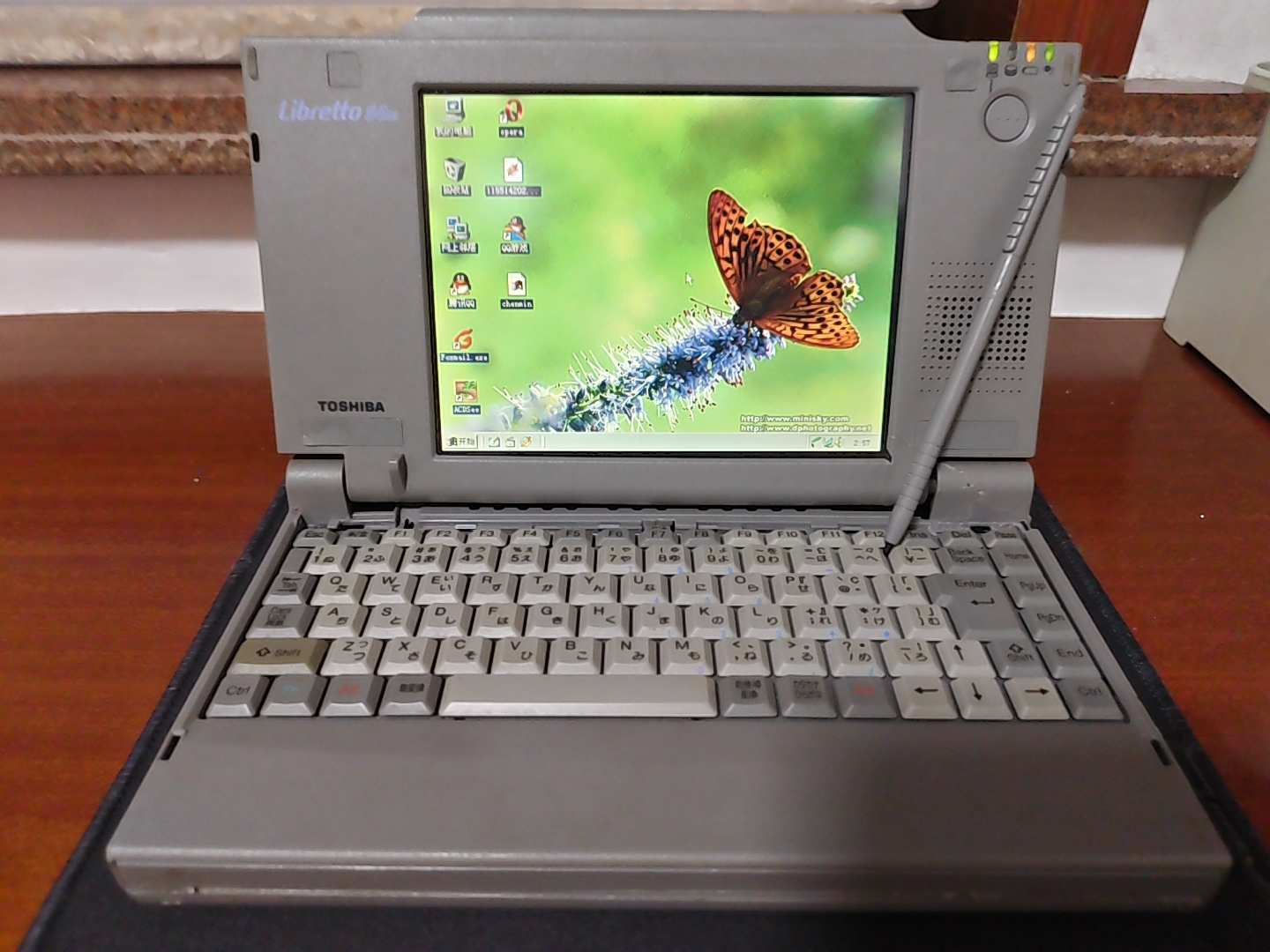
A hands-on look at Toshiba’s rare Libretto 50M, a touchscreen subnotebook custom-built for Meiji Life in 1997. Nearly three decades later, its tiny Pentium-powered design offers a glimpse of an early vision for truly portable computing.
***
Editor’s note: A version of this article by 随便好啦 appears on August 10, 2026 on SSPAI with the title “来自 1997 年的迷你笔记本电脑,东芝 Libretto 50M 怀旧手记”. Translated and published by agreement.
The Launch of Windows 95
Microsoft officially released Windows 95 on August 24, 1995.

It was a “landmark” operating system, introducing the Start menu and taskbar for the first time. Its “ease of use” and “modest hardware requirements” helped make Windows 95 a huge success.

By 1996, the number of PCs installed worldwide was approaching 200 million. According to IDC and Dataquest, annual PC shipments totaled roughly 68–70.9 million units, including around 12 million notebook computers, or 16.9 percent of the total.
Computers were nowhere near as widespread as they are today, and notebooks in particular were synonymous with high prices. Nor were they as thin and portable as modern laptops. Take the IBM ThinkPad 560 series, considered portable at the time: it weighed around 1.9 kilograms and launched in the United States at prices ranging from $2,699 to $4,500.

Yet one Japanese manufacturer was already asking how it might retain the essential functions of a notebook while making the machine easier to carry than its contemporaries.
The Arrival of the Toshiba Libretto 20
The answer was the Toshiba Libretto 20. Released in April 1996, it was the first model in Toshiba’s Libretto line of subnotebooks.

The Libretto 20 weighed only around 840 grams, yet it had a 6.1-inch true-color display and an AMD 486DX4 processor running at 75 MHz. It could run the full Windows 95 operating system described above.
Only nine months after the Libretto 20 arrived, Toshiba released the third generation of the series, the Libretto 50, in January 1997. The second generation was the Libretto 30, released and sold only in Japan in 1996.
The Libretto 50 was the first model in the Libretto subnotebook line to use an Intel Pentium processor. It was also one of the smallest Pentium-powered computers of its time.

But did you know that the Libretto 50 family included a model that was never officially offered for sale—and that it was the first Libretto notebook with a touchscreen? That is the subject of this installment of Retro Tech Journal:
The Toshiba Libretto 50M

Before we get nostalgic and spend some time with it, let’s look at what made this machine so unusual. Its story is documented in a feature published in the official Toshiba technical journal Toshiba Review, Vol. 53, No. 4 (1998).
The Libretto 50M’s Background

The Libretto 50M was a custom-built business-to-business model developed by Toshiba for Meiji Mutual Life Insurance Company, which later became Meiji Yasuda Life Insurance Company. It was never sold to the public. According to the report, Toshiba produced around 40,000 of these specially commissioned machines for approximately 40,000 Meiji Life sales representatives across Japan.
How did it differ from the standard Libretto 50 sold at retail? According to Toshiba’s report, the most significant change was the addition of touchscreen support, a first for the series.

The regular Libretto 50 used a 6.1-inch TFT true-color display without touch support. To the right of the screen was a pointing stick similar to the one found on a ThinkPad.

The custom Libretto 50M added touch input to that same 6.1-inch TFT true-color display.

It used a resistive touchscreen. Toshiba removed the pointing stick from the right side of the display and supplied a stylus in its place.

What is a resistive touchscreen? Put simply, there are two conductive layers on the surface of the display, separated by a tiny gap. When you press down with a hard object, the upper layer bends until it touches the lower one, allowing the system to calculate the coordinates of the contact point. It responds to physical pressure rather than the electrical properties of the human body, so a fingernail or stylus is needed for precise operation.
Toshiba also stated that the Libretto 50M introduced support for PowerON charging, meaning that the notebook could charge while it was in use.

That covers the history of the Libretto 50M. Now, nearly 29 years later, let’s take a hands-on look at this antique subnotebook through my photos and observations.
Libretto 50M Specifications
The 50M is almost identical to the standard Libretto 50:
- Intel Pentium processor at 75 MHz
- 32 MB of memory: 16 MB onboard and a 16 MB expansion module
Note: The standard Libretto 50 shipped with only 16 MB, and the series supports no more than 32 MB.

- Approximately 810 MB 2.5-inch mechanical hard drive with an IDE interface
- 6.1-inch Sharp-made TFT true-color touchscreen with a resolution of 640 × 480
- Chips & Technologies CT65550 (B65550) graphics controller with 1 MB of video memory

- Yamaha OPL3-SA2 audio controller

- Windows 95 OSR2
Exterior
The Libretto 50M and 50 are almost identical in size and weight. The biggest difference is the 50M’s resistive touchscreen. Toshiba therefore removed both the pointing stick on the right side of the display and its two corresponding buttons on the outside of the notebook’s lid.

Look closely and you will also notice a long raised section along the display’s upper bezel. This is where the touchscreen stylus is stored.
Ports
The Libretto 50M itself has only one PCMCIA card slot, a 2.5 mm headphone jack, an infrared port, and a 15 V power connector.

Toshiba’s original dock for the Libretto 50 series adds several more connections: a PS/2 port for a mouse or keyboard, a DB-25 port for printers and other hardware, a DB-9 serial port, and an HD-15 video port.

Neither the computer nor its dock has the USB port now found on virtually every notebook. USB 1.0 was released in 1996, and it was not until Windows 98 arrived in 1998 that Windows gained more complete support for USB devices.
In 1997, USB was still in the early stages of entering the PC ecosystem, and the Libretto 50M’s design left no space for a USB port. The machine instead relied on PCMCIA, infrared, and its dock for peripheral expansion. My own guess is that the pursuit of extreme portability may have made adding a USB port technically difficult as well.
Operating System
The Libretto 50M originally came with the Japanese edition of Windows 95 OSR2, but someone has installed Windows 98 on my unit.

Compared with Windows 95, Windows 98 included a more fully integrated Internet Explorer 4 for browsing the web. It also introduced the FAT32 file system, which managed high-capacity drives more efficiently, and offered better compatibility with the USB devices mentioned above.
Software
My 50M did not come with its matching dock, so I have not yet found a particularly efficient way to transfer files. I therefore tested only the operating system and software already installed when the machine reached me.

For entertainment, the previous owner had installed QQ 2006 and QQ Games. Both are now too old to work or even sign in.

Windows 98 came with Internet Explorer 4, but Opera was also a good browser for its time.

The operating system had its own software for viewing images, of course, and one of the most common—and fashionable—ways to open them at the time was with Internet Explorer. The previous owner of my machine had also installed ACDSee, another capable image viewer.

Windows 98 could handle multimedia entertainment too, including MP3 playback in Winamp.

Paired with the machine’s Yamaha OPL3-SA2 audio hardware, it should have sounded quite good.

After 29 years of natural aging, however, the small mono speaker in this machine can no longer reproduce the sound as it originally did.
Having covered the exterior and software, let’s open up the Libretto 50M.
Inside the Machine
Before disassembly, a warning is in order: after more than 20 years of aging, the ABS plastic used for the shells of Toshiba’s Libretto notebooks becomes extremely brittle.
While taking apart this Libretto 50M, I applied only a little uneven pressure and still left the chassis with cracks of various sizes. Handle these machines as gently as possible. Unless you have a good reason, it is best not to open one at all.
For the Libretto 50M, you can refer to disassembly instructions for the regular 50. After removing the battery, gently lift away the decorative plastic strip above the keyboard. Beneath it is a Phillips screw securing the keyboard. Remove that screw and the keyboard can be carefully lifted.
Set the keyboard aside, and the construction inside this subnotebook becomes clearly visible:

The first thing you will notice is a circuit board in the upper-left corner. Remove it carefully and turn it over to reveal the identifying information on the back.

Information available online identifies it as a Toshiba PA2051UJ 16 MB memory expansion module for the Libretto series.
Directly below the keyboard ribbon-cable connector is the Libretto 50M’s CMOS battery.

If you plan to collect a Libretto yourself, I strongly recommend removing this CMOS battery. After so many years, it could corrode the motherboard and potentially destroy the entire machine.
During disassembly, I noticed a thick yellow ribbon cable on the right beneath the keyboard, extending toward the display hinge. To investigate it, I consulted publicly available Libretto 50CT teardown material, including records published overseas. Retail 50CT units do not have a cable in the corresponding location. Given the 50M’s unique resistive touchscreen, this cable may be connected to the touch layer. This is only my own inference from its position and the differences between the models. Because I did not take the machine apart any further, I have not verified the cable’s exact function, and this should not be treated as a definitive technical finding.

Another objectively observable difference is the material used for the internal frame. On the 50M, much of the structure beneath the right side of the keyboard is metal that, based on tapping and visual inspection, appears to be a magnesium-aluminum alloy. This differs clearly from the plastic or metal shielding structure commonly seen in the corresponding area of the 50CT in publicly available material. The change may be related to the 50M’s role as a custom business machine, but its exact design purpose requires further research.

After seeing so much internal hardware, you may wonder why there is no obvious cooling module. The Libretto 50M uses passive cooling and has no internal fan. Most of the noise you hear while it is running therefore probably comes from its 2.5-inch mechanical hard drive.
Once you have made sure to remove the motherboard’s CMOS battery, you can lightly clean the dust from the interior, then reinstall the memory module and keyboard.
As the article draws to a close, I would like to share a few more details about the Libretto 50M.
More Historical Curiosities
An official Toshiba PDF published in 1998 reveals that the Libretto 50M also had another name: Hohoemi-kun (ほほえみくん, roughly “Smiley”).
Not all of the roughly 40,000 Libretto 50M units produced at the time were destroyed by Meiji Life. Historical accounts online indicate that some eventually appeared in China as yang laji—literally “foreign trash,” a colloquial term for imported used electronics or e-waste. Chinese enthusiasts called the Toshiba Libretto the “Toshiba Luobotou,” or simply “Little Luobotou”; luobotou literally means “little radish.”
When using this Libretto 50M before writing the article, I performed most operations with the notebook’s built-in stylus.

In my experience, this ultraportable little Toshiba Luobotou 50M—which can be held in one hand and operated with a stylus—feels somewhat like the Tablet PCs Microsoft defined after the turn of the millennium, as well as the UMPCs that followed.
That brings the story of this unusual Toshiba Luobotou 50M to an end, although the Libretto story itself continued after 1997. Seeing such an extremely portable subnotebook again 29 years later also lets us glimpse what people in 1997 thought a portable notebook could be.

Disclosure: DeepSeek and Kimi AI assisted in checking some of the historical information in this article. Some images were enhanced with the help of Seedream 4.5, the image-generation model built into Doubao AI.
References:
- Toshiba Review, Vol. 53, No. 4 (1998)—the Libretto 50M’s PowerON charging, Sound Blaster Pro audio, and custom development for Meiji Life
- Toshiba press release, January 7, 1997—the launch of the Libretto 50, its 75 MHz Intel Pentium processor, 6.1-inch TFT display, CT65550 graphics controller, 16 MB of memory, and 810 MB hard drive
- Toshiba press release, June 3, 1997—the Libretto 50’s dimensions of 210 × 115 × 34 mm and weight of approximately 850 grams
- Wikipedia, “Toshiba Libretto”—the custom development of the 50M for Meiji Life, its 6.1-inch touchscreen, and production run of approximately 40,000 units
- CNET, “Toshiba Unwraps Subnotebook” (1997)—contemporary reporting on its sub-two-pound weight, 75 MHz Pentium processor, and 810 MB hard drive
Share: