
Editor’s note: A version of this article by 随便好啦 (Suibian Haola) appears on September 3, 2026 on SSPAI with the title “这台iBook,定义了苹果十年的白色,iBook G3 “Snow” 怀旧手记”. Translated and published by agreement.
The Debut of the iBook
On July 21, 1999, Apple officially unveiled the iBook G3. It was not merely the inaugural entry in the iBook family; it represented Apple’s strategic push into the education and consumer markets.
The iBook G3 was not a single model. The original 1999 iBook G3 (Clamshell) was distinguished by its rounded silhouette and translucent, colorful shell (such as the iconic Blueberry and Tangerine colorways).

More importantly, when opened, the laptop resembled a folding seashell, complete with a built-in carrying handle integrated into the display hinge.

During the Macworld Conference & Expo in New York, Steve Jobs famously declared that there was one missing piece in Apple’s product matrix.

At the time, Apple had already introduced the all-in-one iMac for consumers, the Power Mac tower for power users, and the PowerBook for mobile professionals.

In the consumer laptop space, however, Apple still lacked a dedicated offering. Thus the iBook G3 was born at a starting price of $1,599, accompanied by the AirPort wireless networking card for $99.


According to Apple’s press release (Apple lance le réseautage sans fil AirPort), AirPort was Apple’s first Wi-Fi wireless networking system. Based on the 802.11b standard and supporting data transfer rates up to 11 Mbps, it was offered as an optional internal add-on for the iBook G3.

Alongside the iBook, Apple launched the AirPort Base Station for $299—a sleek, grey disc resembling a flying saucer.

Apple even produced a playful television commercial with a 1950s sci-fi soundtrack, featuring the UFO-shaped base station spinning into view—a charming self-deprecating nod to its futuristic industrial design.

Bringing wireless networking to Apple’s most accessible notebook underscored just how much Jobs was betting on the iBook lineup.
Enter the iBook G3 “Snow”
In May 2001, the iBook G3 received a comprehensive redesign: the iBook G3 (Dual USB), widely known as the “Snow” model (and affectionately dubbed Xiaobai, or “Little White”, in the Chinese-speaking community due to its clean, snow-white aesthetic).

Beyond internal hardware improvements, the most striking change was its visual identity.
Compared to the curvaceous Clamshell, the Snow sported a significantly more squared-off profile while retaining softly rounded corners. Its color palette shifted from translucent, multicolored plastic to an opaque, pristine white encased beneath an outer layer of clear polycarbonate.

This design language endured for nearly a decade, carrying forward through the iBook G4, the original 2006 white MacBook, and up to the 2010 unibody MacBook. For many, this pure white chassis remains the quintessential image of an early Apple notebook.

Over its lifespan, the 2001 iBook G3 Snow saw several incremental hardware revisions.
The 2001 model line was introduced in May with a PowerPC G3 processor clocked at 500 MHz, followed by a 600 MHz refresh in October. Beyond CPU clocks, configurations varied in RAM, hard drive capacity, and optical drive capabilities. The unit featured here is that October 2001 600 MHz model.
Specifications
- Processor: PowerPC G3 at 600 MHz
- Memory: 128 MB (factory baseline)
- Storage: 20 GB IDE hard drive
- Display: 12.1-inch TFT display (1024×768 resolution)
- Original OS: Mac OS 9.2.1 / Mac OS X 10.1

From 2001 through 2003, the iBook G3 Snow underwent numerous revisions, with processor speeds progressing from 500 MHz up to 600, 700, 800, and eventually 900 MHz.
Exterior and Hardware Details
Alongside higher performance, the redesigned iBook G3 added dual USB ports. Screen options expanded from the sole 12-inch panel of the Clamshell generation to two sizes: 12.1-inch and 14.1-inch.
Examining this 12.1-inch unit, the chassis presents a clean, rectangular footprint balanced by gentle corner radii.

The front edge features a spring-loaded magnetic latch. When you close the lid, the latch engages automatically; pressing the front release button pops it open smoothly.

All primary ports are grouped along the left flank:
- 2× USB 1.1 ports
- 1× FireWire 400 (IEEE 1394) port
- Mini-VGA video output
- 3.5 mm stereo headphone jack
- 10/100 RJ-45 Ethernet port
- Kensington security slot

The right edge houses the optical drive. Unlike the slot-loading drives found on later iBook G4s, this G3 uses a traditional tray-loading mechanism. Over time, the drive faceplate has developed a subtle patina compared to the adjacent bezel.

The display lid features a centered, translucent Apple logo that glows when the machine is powered on, with its brightness tied directly to the display backlight level.
On the bottom plate, the four original rubber feet have deteriorated with age and were removed. In the lower-left corner sits the removable battery pack (model A1008), secured by a coin-operated rotary lock that can be unlatched using a small coin.

On the face of the battery pack is a fuel-gauge button: pressing it lights up green LED indicators to display remaining charge, much like a modern power bank.

The keyboard carries over the translucent keycaps of the Clamshell era (which can yellow over time), whereas the later iBook G4 switched to solid opaque white keys.

The trackpad below has a tactile, slightly textured finish rather than a slick glass feel, flanked by responsive left and right physical click buttons.

Above the keyboard sit the power button and stereo speaker grilles, crowned by the classic serif “iBook” wordmark.

Plugging in the original 45W power adapter illuminates an indicator ring right at the barrel connector head.

Operating System Experience
Connecting the power adapter and pressing the power button yields the iconic Mac startup chime after a short delay.
The display illuminates, showing the Apple logo and spinning indicator before giving way to the Mac OS X boot progress bar.

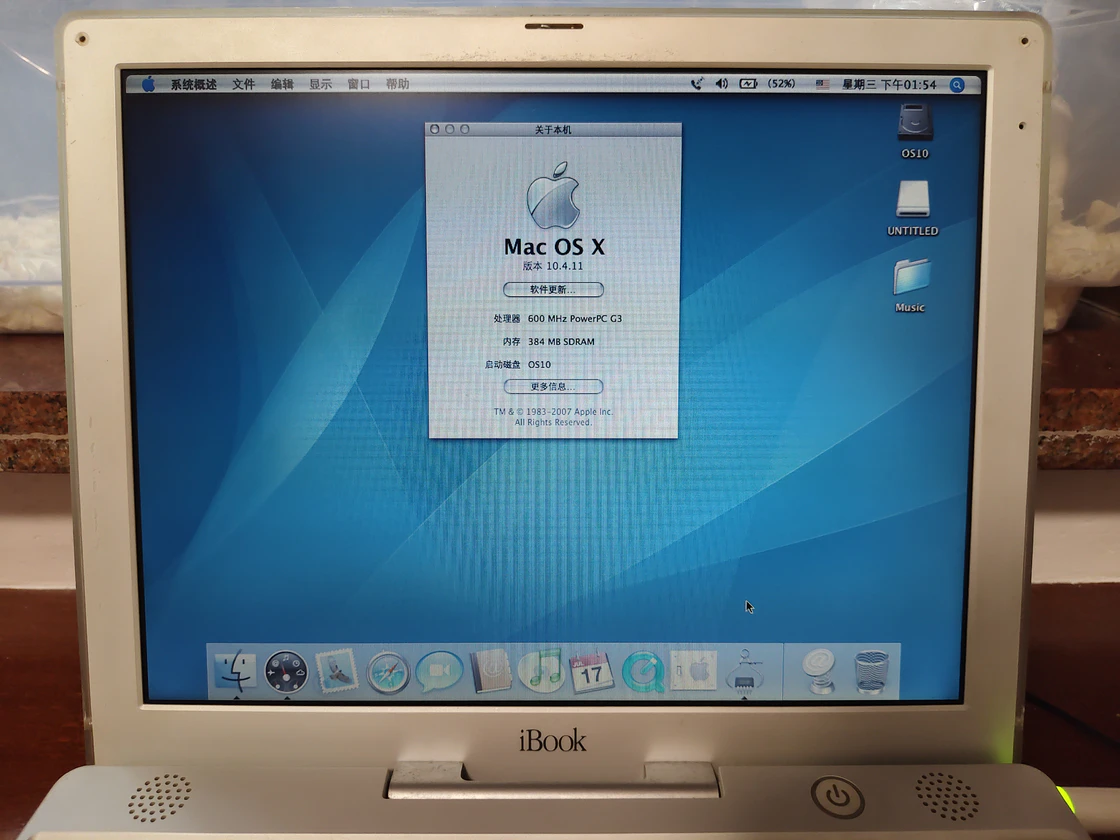
This particular unit runs Mac OS X 10.4 Tiger rather than its factory Mac OS 9.2 or the lightweight 10.3 Panther.

Online forum lore often warns that running Tiger on a G3 causes sluggish 2-minute boot times and window stutters. In practice, this machine handles the OS surprisingly well.

The primary reason is a memory upgrade: the baseline 128 MB was expanded with a 256 MB SO-DIMM module to reach 384 MB. Cold boot from the chime to a fully responsive desktop takes roughly 50 seconds—on its original 20 GB mechanical hard drive.
The 20 GB Hitachi drive remains remarkably quiet after more than two decades, operating without noticeable sector errors or lag.

The optical drive is a Sony CD-RW unit. Sitting between a basic CD-ROM and later DVD drives, it reads and burns CD-R/RW media but does not read or write DVDs—a practical, versatile choice in 2001.

Software and Everyday Workflow
For someone exploring vintage Mac OS X for the first time, its navigation paradigm feels surprisingly close to modern macOS.

To evaluate everyday productivity, I installed AppleWorks 6.2.9, Apple’s integrated office suite somewhat similar to Office on Windows. The disk image was sourced from the Internet Archive and transferred via USB flash drive.

AppleWorks 6.2.9 was released in January 2004 as the suite’s final major update. Apple launched iWork in 2005 as its successor, while AppleWorks remained on sale until August 15, 2007.

On this 600 MHz G3 with 384 MB RAM, AppleWorks launches and runs smoothly.

Testing word processing, spreadsheets, and vector drawing modules reveals a workflow distinctly different from Microsoft Office, yet wonderfully capable for its era.

For media playback, the built-in iTunes and QuickTime Player easily handle local MP3 music libraries.

Gaming on Mac OS X opens another chapter: while native titles like SimCity exist, running classic 1990s Mac games on Tiger requires the Classic environment.
The Classic environment was Apple’s bridge for PowerPC Mac OS X users to run Mac OS 9 applications seamlessly. It was supported up through Mac OS X 10.4 Tiger, omitted entirely from 10.5 Leopard, and never offered on Intel Macs.
Setting it up today is straightforward: copying the system folder from a standard “Mac OS 9.2.2 Universal Drag and Install” package directly onto the root volume allows Tiger to initialize the Classic subsystem.

Reflections on a Design Milestone
This retrospective sets aside the deep technical lineage between Mac OS 9 and OS X to focus on appreciating a piece of industrial design history from 2001.
Compared to the boisterous, playful Clamshell, the Snow presented a more mature, understated elegance.

The glossy white polycarbonate aesthetic introduced by the Snow lived on across multiple generations: the iBook G4, the 2006 Core Duo MacBook, and the 2010 unibody MacBook.

Even with its consumer-friendly price point, Apple refused to treat the iBook as a compromise. Instead, the design choices pioneered here helped define the aesthetic of Apple laptops for an entire decade.

References:
- Apple Newsroom (July 21, 1999) — Apple introduces original iBook G3 at Macworld New York.
- Apple Newsroom (May 1, 2001) — Apple announces the all-new iBook G3 “Snow”.
- Apple Newsroom (October 16, 2001) — Apple upgrades iBook G3 line with 600 MHz processors.
- MacRumors — Retrospective on iBook G3 as the worl’s first mainstream consumer notebook with 802.11b AirPort Wi-Fi.
- Macworld (January 2004) — AppleWorks 6.2.9 released as final maintenance build.
Share: