Author: kiwi

  • Japan Autumn Foliage Guide: Best Places to See Fall Colors in Kanto

    Japan Autumn Foliage Guide: Best Places to See Fall Colors in Kanto

    After finishing the Kansai section in the previous post, I kept procrastinating on this one—only to see news breaking not long after I finally started writing, advising against travel. I had planned to give up on it, but eventually decided to treat this as a personal travel recap instead.

    This article is not intended as travel advice for visiting Japan, but rather as a personal travel memory for reference.

    Overview of the Kanto Itinerary:

    Day 5: Kobe Airport – Tokyo Haneda – Omotesando – Harajuku – Shibuya – Jazz Spot
    Day 6: Tokyo Disneyland
    Day 7: Senso-ji – Akihabara – Nakameguro – Daikanyama – Minami-Aoyama – Yurakucho – Tokyo Tower Shiba Park
    Day 8: Kamakura Station – Shichirigahama – Enoshima – Shonan Coast – Tokyo Dome LaQua

    Day 5: Arriving in Kanto, Wandering Through the City

    After four brief days in Kansai, we departed from Kobe Airport early in the morning on Day 5 and headed to Tokyo.

    Aside from Itami Airport being closer to Osaka’s city center, Kobe Airport and Kansai International Airport are located at similar distances. However, Haneda and Narita airports differ significantly in their proximity to central Tokyo, so we chose Skymark Airlines for its Haneda arrival. The ticket cost 419 RMB and included a 20kg baggage allowance. A Shinkansen ticket from Osaka to Tokyo costs nearly 800 RMB, so we passed after comparing prices.

    There’s also another budget-friendly option—overnight buses—which usually cost around 200–300 RMB and can save you a night’s accommodation.

    Worth mentioning is that when we arrived in Kansai, the weather was gloomy and rainy—but on the day we left for Kobe Airport, it was a cloudless, brilliantly sunny day. During the final above-ground train ride along Kobe’s coastline, the blue of the sky blending with the sea left me mesmerized—I completely forgot to take out my camera or phone.

    Only managed to snap a photo as we were nearing the station.

    Following our usual domestic travel habits, we arrived at the airport three hours early. Check-in and security at Japanese airports are quite simple, leaving us with plenty of spare time. Kobe Airport is small, with not much to browse, so we bought some Osaka-exclusive Calbee fries from a convenience store—they were delicious. Although Skymark is considered a low-cost airline, the actual flight experience didn’t feel cheap at all. Seat spacing and comfort were comparable to standard carriers, and complimentary drinks were provided—giving us a great first impression of domestic flights in Japan.

    After arriving in Tokyo, the subway system felt even more confusing. Sometimes Google Maps indicated no need to transfer, but after passing a station, the announcements didn’t match what was shown in the app, making the entire journey a bit nerve-wracking. Fortunately, we didn’t get on the wrong train.

    For a first-time visit to Tokyo, it’s important to stay somewhere with convenient transportation, reasonable proximity to major attractions, and solid amenities. The Akasaka Select Hotel, located near two subway lines, turned out to be a good choice. Aside from the typical Tokyo hotel drawback of limited space, there were hardly any other downsides.

    You can refer to my travel accommodation review for a more detailed stay experience.

    Unfortunately, our first day in Tokyo was also rainy. We had purchased 5 PM tickets for Shibuya Sky in advance via KKday. In addition to this observation deck, there’s also one in Roppongi. Since they offer different perspectives, it’s best to choose based on your daily itinerary. Our afternoon plan was to stroll from Omotesando all the way through Harajuku before heading from Shinjuku to Shibuya around 4:30 PM.

    We passed many famous shopping malls and stores along the way, but mostly just browsed without buying anything. If you plan to shop seriously, this amount of time definitely won’t be enough. Luxury stores along Omotesando had already put up their Christmas decorations, and even just walking by the architecture, storefronts, and window displays felt like a visual feast of festive aesthetics.

    Another goal in Harajuku was visiting the world’s first Fender flagship store. It spans four floors and is hard to miss thanks to its massive signage. The store wasn’t crowded—just a few people testing guitars in the seating area. You can browse freely without staff hovering nearby, which is very introvert-friendly, though I still didn’t dare try one myself. The interior is minimalistic, and walking through it felt almost like a pilgrimage. I ended up taking a photo of my dream electric guitar before leaving. The presence of English- and Chinese-speaking staff also means there’s no need to worry about language barriers if you plan to buy.

    On the way to Harajuku, we passed by a Mexican restaurant and decided to walk in, figuring we wouldn’t have much time to eat later. Both the staff and chefs appeared to be from Mexico, and the décor had a strong Mexican vibe. I honestly don’t remember how the food tasted, but it couldn’t have been bad.

    Harajuku’s streets are quite narrow, and navigating the crowd with umbrellas left us with little desire to shop—we just wanted to get out as quickly as possible. We hurried to Shibuya Station afterward to avoid missing our observation deck time. After exiting, there’s an observation elevator outside the mall—taking it up leads directly to Shibuya Sky. Due to the weather, the open-air deck was closed, so we could only view from indoors. Given Tokyo’s windy conditions that day, we might have been blown away if it had been open.

    Rain streaked across the floor-to-ceiling windows, and standing above the famous Shibuya Crossing didn’t feel as overwhelming as expected. But being up high somehow gives you a god-like perspective—tempting you to observe the people below and wonder what they’re thinking. Even though the night view looked similar from all sides, we lingered for quite a while.

    The lighting, atmosphere, and facilities inside the observation deck were excellent—there was even a bar. It’s not just a sightseeing stop, but a place where you can stay and relax.

    After leaving the deck, we crossed the very intersection we had just observed from above. In reality, the streets aren’t that wide—it’s the simultaneous crossing from all four directions that creates such a spectacular scene. Yet when you’re part of it, it doesn’t feel especially grand. Shibuya has plenty of shopping options nearby. My favorite was Loft—I kept thinking how much I would’ve bought if I had visited back in my student days. Unfortunately, now that I’m working, I rarely need stationery, and had to stop myself from spending impulsively.

    Beyond stationery, other floors offered digital gadgets, beauty products, and more—so many things to browse that it became overwhelming. During the Christmas season, the first floor was filled with decorations and greeting cards. An entire pillar was dedicated to various Christmas cards, and my friend and I struggled to choose until the mall was about to close. One of the main reasons I love Christmas is the decorations—regardless of how you feel about the holiday, it’s hard not to get caught up in the festive spirit.

    By 8 PM, Tokyo’s nightlife had officially begun. One of my travel habits is to have a drink at a local bar. Tokyo has no shortage of renowned establishments—several even rank among Asia’s Top 50—but we didn’t follow those lists.

    As the world’s second-largest music market, Japan has a deep jazz culture, which has even given rise to the unique concept of Jazz Kissa (jazz cafés). Jazz may feel a bit niche for everyday listening, but in a bar setting, it becomes instantly relaxing.

    So for our first night in Tokyo, we chose to visit Jazz Spot, located near Takadanobaba Station by Waseda University. Many local students come here to perform. The performances are informal—musicians rotate in and out freely, sometimes even emerging from the audience. Tokyo was cold and rainy that evening, and without a reservation, we were worried about getting in. Fortunately, there was no queue, and we were able to walk in. The cramped space quickly warmed us up, and we were seated in the front row, right next to the performers. No exaggeration—the guitarist’s instrument was practically in my face.

    We were so immersed that we forgot to take photos—this one was captured from a video.

    Drinks at the bar were also inexpensive: 1500 yen per person, with refills at 1000 yen. Even for someone like me who doesn’t know much about alcohol, the quality seemed average—but the atmosphere made up for it. With people from all over the world gathered in a small space, drinking and listening to jazz together, the experience itself felt very “jazz.”

    Tokyo also has other famous jazz bars, such as Blue Note Tokyo, Cotton Club Tokyo, and Pit Inn. We opted for Jazz Spot due to its affordability, but if your budget allows, the other three heavyweight venues are well worth considering for a warm and relaxing night.

    Day 6: Tokyo DisneySea

    Tokyo Disney Resort consists of two parks: Disneyland (Land) and DisneySea (Sea). After consulting several friends and comparing attractions, we chose DisneySea—the only ocean-themed Disney park in the world. If it’s your first visit and you only have one day, I would also recommend DisneySea. If you’re traveling with children, Disneyland may be the better option.

    After arriving at Maihama Station, you can purchase commemorative day passes inside the station, which allow unlimited rides for the day. They cost about 100+ yen more than using a Suica card. Each ticket machine offers different designs, so you can choose whichever you like.

    We deliberately picked Thursday, expecting the lowest ticket prices and the smallest crowds. But when we arrived at the station at 8:30 AM and boarded the Disney train, the massive queue at the entrance immediately made me realize we were in trouble. Disney had officially entered the Christmas season by then—an absolute peak period—so there’s really no such thing as a quiet day.

    Unlike Universal Studios, Disney does not allow early entry unless you’re staying at an on-site hotel or have purchased Early Entry access. Everyone else can only enter after the official 9:00 AM opening. We started lining up around 8:40 and didn’t get in until 10:15. It rained throughout the day, and Tokyo’s cold temperature made it even worse. Not having brought thermal leggings, I ended up wearing hotel yukata pants under my clothes just to avoid freezing in the wind. Without a doubt, this became the worst day of our Japan trip—bad weather, massive crowds, and the added stress of constantly refreshing the app to secure entry to the new area.

    Thankfully, for those visiting this year, the new area has officially opened in full, so there’s no longer a need to anxiously refresh the Tokyo Disney app.

    As soon as we entered the park, we rushed to the Tower of Terror while simultaneously trying to secure other passes. In the end, we used our “financial power” to purchase a DPA for Peter Pan’s Never Land Adventure, which granted us entry. We thought we could finally relax—even if we couldn’t secure any free FastPasses—but as we waited, it felt like the queue had entered a black hole. The posted wait time was 100 minutes, but we ended up waiting around 180 minutes. The only consolation was that Journey to the Center of the Earth had a 300-minute wait.

    By the time we finished our first attraction, it was already noon. In the end, we only had time to queue for the two DisneySea attractions that offer single rider lines—Indiana Jones Adventure and Raging Spirits.

    After returning, we asked friends who had visited during off-peak seasons, and apparently the crowds aren’t usually this overwhelming. Even food carts and shops required waiting in line that day. Fortunately, DisneySea’s paid fast passes aren’t too expensive—around 2000 yen per person. At Disney, dreams really can be bought with money.

    In total, we experienced four attractions and watched one show. Here’s our take on five highlights:

    1. Peter Pan’s Never Land Adventure: My favorite attraction across Shanghai, Hong Kong, and Tokyo Disney parks. You wear 3D glasses and join Peter Pan on an adventure, culminating in a breathtaking flight through the sky that makes everyone go “wow.” The terrible weather, long waits, and earlier disappointment all faded away after this ride. It’s also quite long—about five to six minutes—giving you plenty of time to immerse yourself in the dream.
    2. Tower of Terror: Despite having the longest queue, the experience didn’t disappoint. Before boarding the drop ride, you explore the entire castle, with Disney’s signature attention to detail on full display. In terms of thrill level, it ranks among Disney’s top attractions. The seatbelt almost feels unnecessary—as you plummet downward, you literally lift off your seat. Highly recommended at sunset, when you can enjoy a panoramic view of the entire park from the top.
    3. Indiana Jones Adventure: One of the single rider attractions. It’s not very thrilling but beautifully designed—like a cave expedition. The set design is a true showcase of Disney’s craftsmanship, offering a highly immersive experience.
    4. Raging Spirits: Also a single rider attraction. It’s surprising to find a full 360-degree looping roller coaster at Disney. Despite its advanced configuration, it’s not particularly scary and doesn’t induce strong weightlessness. You can keep your eyes open throughout, and the track is surrounded by atmospheric smoke effects.
    5. Big Band Beat: A Broadway-style performance featuring Disney characters, which unfortunately ended in late September this year. The music, choreography, and staging were all worth watching, and we even had front-row seats—it felt like attending a real Broadway show.

    Although the crowds and weather dampened our enjoyment earlier in the day, the sky cleared up by evening. As we entered the theater for Big Band Beat, we caught sight of a post-rain sunset. After the show, with some time left before our Peter Pan reservation, we wandered around the park—taking photos by the Christmas tree, listening to staff sing Christmas carols, snapping pictures at attractions we couldn’t get on, and strolling all the way to Fantasy Springs before finally enjoying the happiest amusement park experience of our lives on Peter Pan’s ride.

    By the time we left, our mood had improved. Setting aside the crowds, Disney during the Christmas season is truly beautiful. In my opinion, Tokyo DisneySea feels even more magical than Shanghai or Hong Kong Disneyland. During the rainy daytime, with umbrellas up, it’s easy to miss the details—but when the park lights up at night, it’s nothing short of stepping into a fairytale. After watching the Christmas special fireworks by the bay, our day at DisneySea officially came to an end.

    For someone like me who will most likely visit Tokyo DisneySea only once, this trip may not stand out as the most wonderful memory—but I certainly don’t regret going.

    Day 7: A Bit of Everything in Tokyo

    The rain stopped after our day at DisneySea, and from this point on we were greeted with bright, sunny Tokyo skies.

    This was the most tightly packed day of our itinerary. Early in the morning, we took the subway to one of Tokyo’s most famous landmarks—the city’s oldest temple, Sensō-ji. From Kaminarimon Gate to the main hall runs Nakamise Street, lined with all kinds of small shops. My friend and I couldn’t help but remark on just how commercialized famous temples can be. At first, the novelty made us want to check out every store, but after realizing that most of them sold similar things, we skipped the shops and headed straight toward the temple.

    Passing through the Hōzōmon Gate of the main hall, you can hear the constant rattling of omikuji fortune sticks. Apparently, Sensō-ji is known for giving out a high number of bad fortunes. I had firmly decided not to draw one before coming—better to not know than to worry about the result. But with so many people lining up on both sides and shaking the boxes, the atmosphere (and a bit of stubborn curiosity) got the better of me, and I dropped in 100 yen. Luckily, both my friend and I drew good fortunes. All the mental preparation I had done turned out to be unnecessary. I even carefully brought mine back home with me, planning to frame it later.

    After drawing our fortunes, we went to pray at the main hall, which enshrines the compassionate Bodhisattva Avalokiteśvara, said to bless all who come with sincere wishes.

    We hadn’t done any research beforehand and simply followed what others were doing on-site. Since Sensō-ji is a Buddhist temple rather than a Shinto shrine, there’s no need to ring bells or clap hands—just press your palms together in prayer and bow. Only after praying did we notice the purification fountain—another moment of hindsight realization.

    Besides the main hall, there’s also Asakusa Shrine next door. Compared to the main hall, it feels much more delicate and compact. Since we were already there, we decided to take a look.

    Asakusa is very close to Akihabara. After leaving Sensō-ji, my friend and I split up again. As a former anime fan, I headed to Akihabara to revisit my childhood, while my friend went to see a Monet exhibition in Tokyo.

    Stepping out of Akihabara Station into the bright blue sky, surrounded by billboards and greeted by maids promoting their cafés, it’s easy to feel overwhelmed on your first visit. I hadn’t made any detailed plans for which shops to visit—just wandered along the main street and went into whatever caught my interest. Still, I made sure not to miss major spots like Animate, MANDARAKE COMPLEX, and Yodobashi Camera. My personal favorite was Animate, filled with anime and game specialty stores. The first floor alone had countless gachapon machines featuring almost every popular IP imaginable—it was enough to make my head spin.

    Yodobashi Camera mainly focuses on electronics, and it’s probably a great place to buy game cartridges, consoles, or controllers.

    If you’re not coming with a specific shopping goal, there’s really no need for a detailed plan in Akihabara—any random shop can feel like heaven. The only regret was discovering after I returned that there’s a commercial complex called 2k540 AKI-OKA ARTISAN between Okachimachi Station and Akihabara Station, built beneath the elevated tracks and filled with original handmade craft shops. For someone like me who loves handmade goods, it would’ve been paradise.

    After wrapping up in Akihabara—without even taking a break—I rushed to Nakameguro. Our afternoon city walk started from Nakameguro Station. Across the street from the exit is the famous Tsutaya Bookstore. Walking along the main road, you can really feel how comfortable and livable this area is. There are plenty of independent boutiques with thoughtful designs. We stepped into a few we liked, but after checking the price tags, everything was beyond my budget—so we left empty-handed.

    By sunset, we had walked all the way from Nakameguro to Daikanyama. As we arrived, the sky gradually darkened, and golden sunlight slowly blanketed the streets. Many of the roadside trees were just beginning to show hints of red. I stopped on the sidewalk to take several photos—not because there was any special landmark, but because the scenery at that moment felt like a gift from the heavens.

    The Tsutaya Bookstore in Daikanyama consists of three buildings connected by skybridges, and we spent most of our afternoon there. Besides books, it’s also a great place to buy souvenirs, with lots of stationery and areas where you can listen to CDs and vinyl records for free. By the time we left, it was already blue hour. We hurried toward Forestgate while the last light of the day faded. Along the way, small shops lit up with warm yellow lights, standing out beautifully against the blue sky and drawing us in.

    We strolled around the ground floor of Forestgate and, despite the late hour, grabbed a coffee at Blue Bottle. Sitting by the glass window watching the sunset, the long walk we had taken all afternoon felt effortless thanks to the weather and the view. We didn’t head to the subway until it was completely dark.

    Near Daikanyama Station, a Miffy-themed café glowed warmly in the night.

    Originally, I hadn’t planned to visit any exhibitions. But after arriving in Japan, I happened to see a post about the 25th anniversary exhibition of Paradise Kiss. During our stay, it was open without reservations, so I decided to drop by whenever I had time. It was already past five when we left Daikanyama, and the exhibition closed at seven, so we rushed over just in time—and ended up buying some “random stuff.” Since it was near the end of the exhibition period, many of the better-looking merchandise items were already sold out, which indirectly saved me some money.

    The exhibition venue was close to our hotel, so I went back afterward to lie down for a bit. Only then did I realize just how exhausting the day had been. Later that evening, after my friend returned, we thought—why not go see Tokyo Tower now? (Originally it was scheduled for the last morning.) So off we went. Shiba Park isn’t far from the hotel, and at around 9 PM we spotted the glowing Tokyo Tower from the street corner. Below it stood a coldly lit gas station, while above rose the warm, radiant tower. Even from a distance, it was easy to understand why people make the effort to visit.

    We didn’t go all the way to the base, just wandered around Shiba Park chatting. Even at 9 PM, many people were sitting on picnic blankets on the lawn, gathering and talking. With nothing of our own, we simply walked around until we got tired, then found a bench and sat down to share our separate experiences from the day.

    The night air was cold, with occasional gusts of wind. We sat there with our arms crossed for warmth, laughing together on the bench. From where we sat, Tokyo Tower was no longer visible—only when we stood up could we catch a glimpse of it. But parks have a certain magic. Even knowing it was late and freezing, we didn’t want to leave. That night at Shiba Park became the happiest evening we had in Japan.

    Day 8: A Stroll Through Kamakura

    With only one day left, it came down to a choice between Mount Fuji and Kamakura. In the end, we chose the sea—and it left me with one of the most beautiful memories of my life.

    Compared to visiting Mount Fuji, the round trip to Kamakura is much more relaxed. It takes about an hour to get from central Tokyo to Kamakura Station. The night before departure, I kept praying for clear skies.

    On the last day of a trip, I prefer not to schedule anything too tightly. It’s more important to savor the local scenery and make the most of the final moments. So instead of getting up early like the previous days, we woke up after eight, quickly got ready, had breakfast, and took the subway toward the seaside.

    There’s a restroom on the train to Kamakura Station, so there’s no need to worry if nature calls midway. After arriving, we followed the crowd out of the station and browsed a nearby shopping street. When we saw a matcha ice cream shop, we couldn’t resist buying one—even in the cold. It became a bit too rich toward the end, but with no trash cans in sight, we had no choice but to finish it.

    The street wasn’t much different from most commercial areas, and with the heavy crowds, we turned back before reaching the end and headed toward Shichirigahama instead. Walking down to the beach, we could see Mount Fuji in the distance. Though the peak was partially hidden by clouds, the clear weather already made us feel relaxed and happy.

    We didn’t have much of a plan for the day—just walking along the coastline without heading to Enoshima.

    At noon, we wandered into a random okonomiyaki restaurant for lunch. The place was small but packed with people from all over the world. Familiar Showa-era J-pop played in the background, and from time to time someone would stand up and sing along. The cheerful atmosphere felt like something straight out of a Japanese drama. The staff were incredibly friendly, and best of all—we could communicate in English without any issues. Anyone who’s been to Japan knows how rare that is. Although we got a bit tired of okonomiyaki by the end, this restaurant remains one of the most unforgettable parts of the trip.

    The only hiccup was that by the last day, we had almost run out of cash—and the restaurant only accepted cash or PayPay. Thankfully, the staff directed us to a nearby 7-Eleven, where we withdrew money and returned to pay.

    As we stepped out of the restaurant, the sun was beginning to set. The brilliant blue sky and warm sunlight were so beautiful that we couldn’t bring ourselves to move on, slowly following the shadow of the setting sun and wishing time would slow down so the view wouldn’t fade away.

    By the time we reached the beach, the sky had turned pink. Couples strolling hand in hand, people walking their dogs, surfers catching the last waves of the sunset—all scattered along the coastline, forming my most cherished memory of Kamakura. The waves were gentle, making it safe to walk along the shore as they rolled in slowly under the fading light. Everything moved at just the right pace.

    When we emerged from an underpass, the sky had transformed into the perfect tangerine sea. I quickly pulled out my phone to capture this fleeting moment.

    Video still captured on my phone

    Sitting on the steps by the beach, we watched high school girls in short skirts laughing together, teenage couples holding hands as they walked along the shore, people strolling with their pets… It became clear why this place continues to draw visitors despite having no major landmarks—because the longing for a beautiful life is universal.

    We stayed by the sea until it was completely dark, then wandered through the nearby shopping street to pick out some souvenirs before heading back to the city.

    The final day in Kamakura was the happiest of the entire trip—and remains one of the best travel memories I’ve ever had. I ran out of storage on my phone and transferred most of my photos and videos to a hard drive before deleting them, but the ones from Kamakura are still saved on my phone. Whenever I’m feeling down, I open them to take myself back to that day.

    On our last night, instead of staying at a hotel, we went to a well-known hot spring facility—LaQua, near Tokyo Dome. It’s open 24 hours, and with the overnight fee included, it’s actually cheaper than staying at a hotel, with the added bonus of a soak in the baths. It’s a great option if you have a red-eye flight. However, on weekends it can get crowded, and finding a sleeping spot may be difficult.

    Early the next morning, we took the subway for two stops to Ginza and boarded a bus directly to Narita Airport. It cost only 1,500 yen, and you can sleep all the way to the end without worrying about missing your stop.

    In Closing

    Even more than a year later, thinking back on this trip to Japan still makes me feel happy today. Following our planned routes, squeezing onto subways with Tokyo’s morning commuters, getting lost in the underground passages of Umeda, sitting beneath red maple leaves in silence, watching everyday life unfold by the seaside, communicating in mutually unintelligible English…

    The moments that seemed good or bad during the trip all feel meaningful in hindsight.

    Experience the best of digital living and begin your next destination: Japan | Iceland 🍃

  • What Editors Are Buying: New Stuff Vol. 236

    What Editors Are Buying: New Stuff Vol. 236

    @Lotta:

    OPPO Find X9

    • Reference price: ¥3884.41 (16+256)

    It’s been more than two years since I last changed my phone, and my Xiaomi had definitely started to feel like it was due for an upgrade if I wanted to enjoy a smoother experience again. So, with strong encouragement from friends and family, I ended up receiving this OPPO Find X9. I won’t go into the specific specs or system experience—that would be both boring and feel a bit like an ad. Instead, I’d like to share my decision-making process when choosing this phone and some pleasant surprises I encountered after switching to ColorOS.

    Because I have a basic need to run two instances of WeChat, I ruled out iOS from the start when choosing an operating system. The iPhone 11 I bought previously still serves as my backup device to this day. On top of that, I wanted a phone with solid imaging performance for everyday outings—whether for documenting life or photographing food. After some consideration, the final contenders came down to OPPO and vivo.

    Initially, we were actually drawn to the vivo X300. Its relatively smaller screen and Fuji-style NC and CC filters were quite appealing. But after trying it out in an offline store, I found that I preferred the feel of ColorOS. The color performance brought by the Hasselblad collaboration also looked great, and I had always been curious about how well ColorOS’s “forced compatibility” with Apple’s ecosystem would work. So during the recent Taobao New Year shopping festival, with stacked discounts and government subsidies, I managed to get this Find X9 for under ¥4000.

    Perhaps because it’s a cross-brand upgrade, using the OPPO Find X9 has given me a constant sense of novelty. Sometimes I’m impressed by how smooth the animations are; other times, it’s the fun little system features that catch my attention. Meanwhile, a friend who upgraded from an iPhone 15 to an iPhone 17 last year said after transferring their data that it “felt like nothing had changed.” In comparison, brand-hopping actually makes each phone upgrade feel more interesting.

    After using it for a while, there are three main aspects of this phone that have pleasantly surprised me: Fluid Cloud, the photo editing features in the system gallery, and compatibility with the Apple ecosystem.

    Although it has a different name, Fluid Cloud is essentially what everyone knows as the “Dynamic Island.” Unlike the iPhone’s Dynamic Island, which requires third-party apps to adapt before they can appear on it, Fluid Cloud can be made compatible through AI recognition. This is especially useful when dealing with pickup or delivery codes—just press the shortcut button on the left side to pin them to the Fluid Cloud for easy viewing.

    Regardless of the implementation, as long as it can present the information I need when I need it, it’s a good feature.

    Then there’s the gallery. As we all know, traditional gallery apps simply add editing features on top of photo viewing—boring and uninspiring. But in today’s highly competitive imaging environment, manufacturers are equipping their gallery apps with various capabilities. In addition to common features like AI object removal and AI color adjustment, what surprised me most about the OPPO Find X9 was its collage function.

    Simply select a few photos in the gallery and choose the collage option to generate a composition based on specific ratios and templates. Tap on one of the photos at the top and select “Out of Frame,” and the system will automatically cut out the subject and overlay it onto the other images. Compared to ordinary collages, this allows you to display multiple photos at once while preserving the integrity of the main subject—and even adds a bit of dynamism. Most importantly, it’s extremely convenient: no need to download third-party apps or manually outline selections. You can create an interesting collage in just a short amount of time.

    Although my main phone has always been an Android device, most of my other gadgets are part of the Apple ecosystem. For a long time, my main phone couldn’t integrate well into my workflow. The biggest issue for me was that my Apple Watch couldn’t receive notifications from it. So after switching to the OPPO Find X9, I immediately installed the relevant interoperability apps on my Apple devices to bridge the gap.

    Starting with the iPhone: while promotional materials often highlight AirDrop compatibility, in actual use it’s not very different from third-party file transfer apps like LANDrop or LocalSend—you still need to operate within the “OPPO Connect” software. If there’s anything unique, it’s the ability to simulate an NFC tag to trigger the iPhone’s App Clips pop-up, somewhat similar to Alipay’s tap-to-interact feature. It’s clever, but not quite the same as native iPhone tap-to-transfer. As for message syncing, since my iPhone doesn’t have a SIM card and rarely receives notifications, I haven’t really tested this feature yet.

    Compared to the iPhone, the Apple Watch integration experience is actually better. After downloading the corresponding app on the Apple Watch and pairing it through the OPPO Health app on the phone, health data can be synced to the main device. Not only that, the Apple Watch can also receive notifications from the phone—which, for me, is one of the fundamental aspects of true ecosystem integration.

    As for the Mac, I rarely need to operate my phone through my computer. Even when file transfers are required, I usually rely on LANDrop. So for now, I don’t feel a strong need to integrate my Mac with the phone. Perhaps I’ll try it in the future and see if it brings any surprises.

    As for AI features, I haven’t explored them in depth yet, so I won’t go into detail here. Overall, I’m very satisfied with the OPPO Find X9 and hope it will serve me well as my main device in the days to come.

    Cherry Maruko Dessert Gift Box

    • Reference price: ¥130

    This festive and adorable Cherry Maruko–themed gift box was recommended to me by the algorithm—and how could I possibly not buy it? On top of that, I’ve always liked the Cherry Maruko IP, so I placed the order without hesitation. The full set includes the gift box, a gift bag, 16 desserts, one Maruko greeting card, and four red envelopes. The print quality is excellent, and I’m very satisfied with it.

    Each compartment inside the box features different animated characters and blessing messages when opened, creating a ritual-like experience reminiscent of an Advent calendar. If you’re sitting around with friends, playing games while drawing dessert blind boxes, it sounds like it could be a lot of fun.

    Among the 16 types of desserts, there’s a mix of both Chinese and Western styles. Aside from the chocolate varieties—which may lose their shape due to melting—the rest are all quite delicate in appearance. I tried the Magical Pastry – Cherry Maruko Rose Soy Milk Treat, and it pleasantly surprised me. Unlike most pastries on the market, it’s not overly sweet. As someone whose sweetness tolerance maxes out at a single bite of a KFC egg tart, this was just right. The Love Core Pastry – Strawberry-Filled Matcha Chocolate has a sweeter outer chocolate layer and a slightly tangy freeze-dried strawberry filling inside, which balances out nicely in one bite.

    Store product images

    Attentive readers may have already noticed one minor drawback—the pattern on the box features a snake rather than a horse. So if you’re planning to give it as a gift, you may want to consider other designs. The brand also offers more than 20 New Year–themed gift boxes, such as “Fortune-Filled New Year,” “Prosperity Every Day,” and “Endless Blessings,” all of which are suitable for festive occasions. If you’re looking for attractive holiday gifts, these are worth considering.

    @什么陈: UNIQLO Puffy Crossbody Bag

    • Reference price: ¥99

    Last weekend, I happened to notice that UNIQLO’s backpacks were on sale while shopping. Since I usually need to carry a laptop for commuting, and this bag was just the right size, I decided to try it on.

    The design is simple and fairly casual, with three color options available: black, light beige, and chestnut. I ultimately chose black, as I think it’s easier to match with everyday outfits. The strap length is adjustable, so it can be worn either over one shoulder or crossbody. I used to prefer shoulder bags, which eventually led to uneven shoulders, so now I tend to go for crossbody styles that help distribute the weight more evenly.

    The capacity is quite decent—it can fit a 14-inch laptop, and there’s still room for a light jacket when heading out. The internal compartments are practical: two open storage sections can hold tissues, keys, or a power bank, while a zippered inner pocket is perfect for storing important items like a wallet or ID. Most convenient of all are the two independent side pockets, which are deep enough for a water bottle or a folding umbrella. They’re easy to access and help prevent spills from affecting other items inside the bag.

    That said, there is a minor downside. Since the bag itself is lightweight and the material isn’t particularly thick, it can lose its shape when overfilled—but it’s still within an acceptable range.

    Image source: official

    The surface material has been treated to resist moisture. While it’s not fully waterproof, light rain or accidental splashes will bead up and roll off instead of soaking in immediately. For those who frequently carry a laptop outdoors, this definitely adds some peace of mind.

    Overall, if you’re looking for an affordable daily commuter bag that can fit a laptop and offers well-organized compartments, this one is worth considering. It may not have any standout design features, but it performs well across the board. Another model currently on sale offers even more storage compartments and is often used as a camera bag—photographers might want to take a look.

    Image source: official

    @一只索狗: Adapro Touch Finger Robot

    • Reference price: ¥92.8

    The inconvenience of upgrading a home with smart features is definitely one of the biggest pain points of renting. Since many household appliances don’t actually belong to you, replacing them outright can feel wasteful—but continuing to use them without connectivity can also be inconvenient. Take the landlord-provided electric heater in my room, for example.

    I had known for a long time about products like finger robots (such as SwitchBot), which can physically press switches to control home appliances without needing to replace existing hardware. So after forgetting to turn off my heater for the Nth time before leaving home, I started thinking about how to give it some kind of network connectivity.

    But the problem was that the heater’s control panel uses touch-sensitive input rather than physical buttons, meaning a traditional finger robot with a mechanical actuator wouldn’t be able to solve the issue. One of the amazing things about domestic manufacturing is that you can always find surprisingly niche solutions—so I came across this touch-based finger robot.

    The principle itself is quite simple: two contact points simulate a finger tap, while the small box contains a communication module and a battery. The model I bought integrates with the Mi Home ecosystem, and if you already have a device that supports a Bluetooth Mesh gateway, you can enable remote control.

    There are two ways to simulate touch input. One is a single tap with adjustable touch duration, which can also replicate a long press. The other is a toggle mode, which separates the “on” and “off” touch actions for easier status identification.

    Since it only has two contact points, I’ve currently assigned them solely to the heater’s power switch. Setting the other one for temperature adjustment didn’t feel ideal—only increasing or only decreasing would both be a bit awkward. Using the included adhesive, it can be mounted directly onto the appliance. After integrating it with Mi Home, it more or less meets my needs for remote control and automation.

  • 10 Multiplayer Games to Play During Chinese New Year Gatherings

    10 Multiplayer Games to Play During Chinese New Year Gatherings

    The much-anticipated Chinese New Year holiday is just around the corner. After a year of hard work, it’s the perfect time to finally relax—so why not invite a few friends over and liven things up with some games during your downtime?

    In fact, 2025 saw the release of quite a few new multiplayer titles, and we’ve also rediscovered some classic games that are still well worth playing. As in previous years, SSPAI has rounded up a selection of multiplayer games perfect for group gatherings—whether you’re competing locally or teaming up online, these picks are sure to heat things up and put your friendships to the test.


    PICO PARK Classic Edition: Kick Things Off with Some Instant Fun

    • 🎮 Platforms: PC

    Last year, we recommended both titles in the PICO PARK series in this column. Although the game’s visuals may even seem a bit rudimentary, its short, simple, and fast-paced gameplay makes it easy to jump in and out at any time—making it one of the best choices for parties and breaking the ice.

    Later this year, the classic version of the series suddenly “announced” that it would become permanently free on Steam. Originally, the development team planned to add online multiplayer and a series of optimizations to this version before restoring its pre-2021 paid status. However, Steam’s policies do not allow a game that has gone free to become paid again, so the developers simply gave up on the plan and decided to let everyone enjoy PICO PARK for free.

    The Classic Edition is the original version of PICO PARK. While it offers fewer levels than Parts 1 and 2 and features relatively rough visuals, its core gameplay still revolves around cooperative puzzle-solving with cat-like characters, supporting up to 10 players on the same screen. Watching a screen full of colorful cats bouncing around while everyone shouts and laughs—does it really matter if the graphics are rough? What matters most is having fun together.


    Split Fiction: A Phenomenal Must-Play

    • 🎮 Platforms: PS5, Xbox Series X|S, Switch 2, PC

    This year’s breakout hit has to be Split Fiction, whose popularity rivals that of the same studio’s It Takes Two. In fact, many people have even taken to social media to look for co-op partners for this game.

    Similar to It Takes Two, Split Fiction is primarily played in a split-screen format. Players take on the roles of two novelists with distinct styles, traveling through fantasy and sci-fi worlds. Compared to the shared-environment setup in It Takes Two, this new approach feels especially fresh.

    In terms of gameplay, Split Fiction also incorporates puzzle-solving, combat, and platforming elements, with a generally faster overall pace. Some levels successfully create an intense atmosphere, but the quicker tempo also demands better coordination and more refined controls from both players. If your keyboard-and-mouse–loving friends come over and try using a controller for the first time, it’s best to “take the blame” yourself when you get stuck—just to keep the controller safe.

    The story is packed with humorous moments (such as a satirical CAPTCHA segment) and hidden Easter eggs that pay tribute to classic games. Even though it’s a two-player title, friends watching at a party can still join in the fun from the sidelines, as the game does a great job of creating an engaging atmosphere for everyone. If you haven’t tried it yet this year, make sure to give it a go at your next gathering.


    Little Nightmares III: A Controversial Multiplayer Sequel

    • 🎮 Platforms: PS4/5, Xbox One/Series X|S, Switch 1/2, PC

    The horror-themed puzzle series Little Nightmares released its sequel, Little Nightmares III, in 2025. This installment transitions into a two-player co-op experience, with two children navigating a nightmare world together as they overcome obstacles and attempt to escape. The storyline is also largely independent, with minimal connection to the first two entries.

    The game continues the visual style and perspective of its predecessors, using muted colors and grotesque figures to create a twisted, unsettling dreamscape. In terms of gameplay, the sequel introduces exclusive tools for the two protagonists—a bow and a wrench—which serve not only as weapons but also play important roles in solving puzzles, making the gameplay feel somewhat reminiscent of It Takes Two.

    However, the reception of this installment has been notably divided compared to the first two games. Many core fans of the Little Nightmares series have given it poor reviews. One reason is that development was handed over to Supermassive Games. Although the studio has experience with horror titles, some players feel that they failed to capture the psychological horror essence of the series, resulting in a loss of narrative depth.

    Another criticism is that the core gameplay relies too heavily on past formulas. Level design and puzzle mechanics show little innovation compared to earlier entries. Although new tools were introduced, their usage frequency is limited. Additionally, the shift to co-op gameplay removes the sense of loneliness that came from facing a bizarre world alone, while also introducing unnecessary technical issues.

    That said, some players have responded positively, suggesting that the criticism stems from the high bar set by previous entries. Newcomers to Little Nightmares III may still find it to be a solid experience, though it may not offer great value at full price and is best picked up during a sale. If you’ve already completed Little Nightmares III, feel free to share your thoughts in the comments—and during the holiday, let friends who haven’t played the series give it a try.


    Lethal Company: More Terrifying Than the Monsters Is Missing Your Quota

    • 🎮 Platforms: PC

    Also a co-op horror game, Lethal Company has received consistently positive reviews since its release in 2023. Although it is still in early access, it has already earned a “Very Positive” rating on Steam. The game does not currently support Chinese, so it’s recommended to familiarize yourself with the interface and controls in advance.

    In the game, up to four players take on the role of “company employees” sent to abandoned space planets to scavenge scrap in order to meet corporate quotas. Players can divide responsibilities—some venture outside to collect items and survive, while others stay inside to monitor and coordinate. Along the way, you must avoid various monsters and fight to stay alive. But if you focus too much on strategy and survival and fail to recover enough valuable items to meet the quota, you’ll be “terminated”—which makes it feel less like a horror game and more like a reflection of reality.

    One of the game’s most interesting features is its “spatial audio.” Of course, this isn’t the spatial audio we’re used to—it refers to how sound effects and voice communication change dynamically in detail. For example, if you’re too far away from a teammate, their voice becomes faint, and if they enter a distant, enclosed space, you may not hear them at all (or perhaps their character is already lying motionless). This blend of virtual and real-world uncertainty is what gives horror games their soul.

    Although the atmosphere, monster designs, and visual style are built around horror elements, the multiplayer nature of Lethal Company guarantees plenty of humorous moments. The many comedic ways to die, panicked screams over voice chat, and inexplicable piles of junk on the floor all become conversation starters during your gathering. And more absurdly, if a teammate doesn’t make it back, players may even need to find ways to retrieve their “cyber corpse”—after all, it still counts as company property.


    R.E.P.O: The More Lighthearted Version of Lethal Company

    • 🎮 Platforms: PC

    I actually came across R.E.P.O before learning about Lethal Company. Both games revolve around scavenging in a horror setting to meet performance targets. Interestingly, both are currently priced at ¥42—so if you’re indecisive, the choice may already be giving you a headache.

    From the game’s cover art and character design alone, it’s clear that R.E.P.O is the more playful experience. There are also significant differences in detail. To borrow an analogy from Steam reviews, the relationship between the two is like Call of Duty and Battlefield.

    In terms of setting, players in R.E.P.O work for an AI employer and can form teams of up to five to scavenge eerie ruins and retrieve items. The game also features a form of “spatial audio,” offering a similar sense of uncertainty when communicating with teammates. However, in this game, items follow clear physical rules: fragile objects like vases must be handled carefully, while large items like pianos require teamwork to transport—and you might accidentally crush a teammate in the process. Conversely, some items can be used as tools to fend off ghosts (some of which are genuinely hilarious).

    Additionally, R.E.P.O includes a shop and upgrade system that allows players to purchase weapons and tools or upgrade attack power and health. This makes it more suitable for longer play sessions where you can fully enjoy progression, unlike Lethal Company, where a failed mission resets everything. This RPG-like aspect might eventually make you feel unstoppable—but don’t forget, this isn’t a hack-and-slash game. You still have KPIs to meet.


    MIMESIS: AI Plants the Seed of Doubt Among Humans

    • 🎮 Platforms: PC

    This game shares a similar background with Lethal Company. Up to four players must gather materials across various locations and repair the train they’re traveling on within a limited time to avoid monsters and move on to the next area. To truly experience the game’s essence, however, using a microphone and in-game voice chat is essential—and here’s why.

    Although monsters constantly attack you, the real threat is the “cursed rain.” If you’re exposed to it while exploring or scavenging outdoors, your character becomes contaminated. Once the contamination level reaches 100%, the character mutates—and that’s when the real horror begins.

    After mutation, the character is no longer a teammate but becomes a “monster” that hunts the other players. In the early stages, however, the character still looks the same, but the player is forcibly muted, with their voice replaced by the game’s AI. The AI automatically plays back previous voice recordings, making others believe “it” is still a trustworthy teammate. Only as time passes does the mutated character begin to visibly distort—by which point it may already be too late.

    Even more chilling is that the game’s native monsters can also imitate player characters. This imitation goes beyond voice playback—the creature can replicate a player’s appearance one-to-one and gradually mimic their behavior, such as collecting resources, performing repairs, checking corners, or even suddenly stopping to “zone out.”

    Overall, the game’s Steam reviews are fairly positive, although feedback from Simplified Chinese users is less favorable. Negative comments often point to a lack of map variety and repetitive gameplay, especially when the AI repeats Chinese voice lines, which can break immersion. Nonetheless, the game is undeniably creative. If you can gather four players, it’s definitely worth a few rounds.


    Ultimate Chicken Horse / Super Raccoon Sheep: Side-Scrolling Races Where You Strategically Sabotage Each Other

    • 🎮 Ultimate Chicken Horse: PS4, Xbox One, Switch, PC, Android, iOS
    • 🎮 Super Raccoon Sheep: PS4/5, Xbox One/Series X|S, Switch 1/2, PC

    These two games can essentially be considered part of the same series. Ultimate Chicken Horse was released in 2016, while Super Raccoon Sheep launched at the end of 2025—nearly a decade apart—yet their core gameplay remains highly consistent. The former supports up to 4 players, while the latter allows up to 8 players to compete together.

    Before each round begins, players can select an item from the pool and place it along the race path—either to buff themselves or set traps for others in hopes of taking first place. However, the presentation differs significantly. In Ultimate Chicken Horse, the animal characters race by running and jumping, while in Super Raccoon Sheep, players ride bicycles.

    Because the latter is a bike-based racing game, players must not only control acceleration and deceleration but also manage the bike’s balance during the race, making it more difficult than its predecessor. Many players familiar with Ultimate Chicken Horse find the controls in Super Raccoon Sheep unintuitive, with less responsive character feedback and occasional racing hiccups—one of the reasons the two games have received polarized reviews on Steam (the latter’s reception is almost catching up with Little Nightmares III). Of course, part of this is also due to Super Raccoon Sheep being newly released and still prone to some bugs.

    That said, both games are excellent in their own right. The cartoon-style animal characters are cute—even a bit absurd—and whether you’re playfully sabotaging longtime friends or breaking the ice with new ones, these games offer plenty of emotional payoff. For now, however, Ultimate Chicken Horse offers better value for money, and 4-player matches are more than enough. You may want to wait for a discount before picking up Super Raccoon Sheep.


    Dunk Dunk: The Basketball Version of the Two Games Above

    • 🎮 Platforms: Switch, PC

    If you’re a basketball fan who also enjoys the lively chaos of Ultimate Chicken Horse and Super Raccoon Sheep, then Dunk Dunk might be right up your alley.

    Like the previous two titles, Dunk Dunk is also a side-scrolling platformer where players place obstacles on the field to hinder others’ progress. This time, however, the competitive setting is a magical basketball game, where the goal is to seize the ball and score points. The player with the highest score at the end wins.

    Notably, although the game only supports local multiplayer, it allows up to 16 players to join a match and supports Xbox and PS4/5 controllers. If you have enough friends, why not have everyone bring their own controller? (You’ll at least need a USB hub with plenty of ports.)


    LEGO® Voyagers: Solve Mysteries with LEGO Creativity

    • 🎮 Platforms: PS4/5, Xbox Series X|S, Switch, PC

    When it comes to LEGO games, the most well-known are typically licensed series like Star Wars or Marvel. In the second half of 2025, however, LEGO released a deeply cooperative two-player game, LEGO® Voyagers. Players take on the role of two LEGO bricks, using the properties of LEGO pieces to overcome obstacles and rescue a rocket.

    Many people see this as the LEGO version of It Takes Two, but I find it somewhat reminiscent of Biped. The game features a shared-screen, top-down perspective, requiring close coordination between the two players—such as building staircases together to ascend, standing together to trigger pressure switches, or jointly controlling the speed and direction of a vehicle.

    Even more interestingly, the two brick characters embody the essence of LEGO itself. In some puzzle scenarios, the players must literally “snap” together to proceed, just like real LEGO pieces. Translating real-world rules into the game world to enable more creative gameplay is, in my opinion, the key differentiator between LEGO titles and other games in the same genre.

    This game was developed by the team behind LEGO® Builder’s Journey, the LEGO title that closely resembled Monument Valley. From another perspective, could these two games be considered a kind of “crossover” as well?


    The Alters: “Self-Cooperation” for Solo Players

    • 🎮 Platforms: PS5, Xbox Series X|S, PC

    All the games recommended above are meant to help you bond with friends and have fun—whether through teamwork or playful sabotage, the screams and laughter along the way will become lasting memories. But in the end, the person who understands you best is always yourself. So at the conclusion of this article, I’ve made a rather “unorthodox” decision to recommend a single-player game: The Alters.

    Although it’s a single-player game, that doesn’t mean it’s “lonely.” In the game, you embark on a high-risk space mission to escape real-world problems, only to become the sole survivor after your spaceship crashes. In your struggle to stay alive, you discover that a substance on the planet called “Rapidium” can create duplicates of yourself.

    As the game progresses, you will continue to collect fragments of past memories, unlocking many “moments of regret” from your life. By choosing different paths on a quantum computer, you can create different versions of yourself. For instance, when faced with the choice of staying in the countryside or moving to the city, choosing to remain and farm will create a farmer version of yourself, while heading to the city results in a technical worker version.

    As a balancing mechanism, duplicates cannot be created freely and require careful consideration. They consume base resources, and creating too many may lead to the base collapsing. The Rapidium needed for duplication is limited and must be obtained by exploring dangerous areas. Different duplicates possess different professional skills, requiring you to make choices that best suit your current needs. Moreover, duplicates from different life paths will develop distinct personalities, so you must choose wisely to ensure harmony among all versions of yourself in the base.

    Base-building is somewhat similar to Fallout Shelter, where you construct various functional rooms connected by vertical elevators. The gameplay also features a large number of dialogues, cinematic sequences (both static and dynamic), and social feedback systems, blending narrative elements reminiscent of Quantum Break and Mass Effect, creating a strong sense of immersion. The branching structure for selecting duplicates also resembles the narrative tree in Detroit: Become Human, where each decision leads to different routes and outcomes.

    The game is developed by the same team behind Frostpunk. Although it hasn’t achieved the same phenomenal success, its overall production quality and player reception are highly praised, standing shoulder to shoulder with many AAA titles. Its innovative concept of “choosing yourself” is truly one of a kind. Perhaps after finishing the game, you’ll reflect on decisions you regret—but also come to understand that every choice in life carries a cost, and every path leaves room for regret.

    If you’d like to learn more about the game, you can read SSPAI’s in-depth article: The Alters: A Sci-Fi Survival Experiment of Multiple Lives.


    2026 Preview

    In addition to the games mentioned above, several promising multiplayer titles have already released teaser information. Let’s take a look at what’s on the horizon.

    • Subnautica 2: Finally Supporting Multiplayer

    As a platinum-level player and longtime fan of Subnautica, I’ve always loved its blend of collection, creation, and survival elements. Back then, I often thought, “If this game supported multiplayer, it would be even more fun than Minecraft.” The community eventually created multiplayer mods, but the experience was far from perfect.

    Now, Subnautica 2 finally introduces co-op gameplay for up to four players. The game will soon enter Early Access on Steam and is definitely worth adding to your wishlist.

    • Stage Fright: A Two-Player Adventure from the Overcooked Team

    Developed by the team behind Overcooked, the two-player adventure game Stage Fright was announced at TGA 2024, although its release date has yet to be confirmed. Judging from the trailer, the game focuses on a cute and quirky style, with gameplay that may resemble It Takes Two or Split Fiction. However, it may not rely entirely on split-screen, potentially switching to full-screen perspectives depending on the level.

    Since the success of It Takes Two, similar co-op titles have become a popular focus for developers—but standing out in this crowded genre remains a challenge.

    • Haunted Paws: Paw Patrol to the Rescue

    Another co-op game, this time starring two adorable dogs. Playing as dogs comes with unique advantages—you can use tools completely different from those of human characters, such as tracking scent trails with your sense of smell or quickly digging up buried items.

    One especially heartwarming feature is that when the dogs are frightened by ghosts and lose health, players can control them to “hug” each other to recover HP. What pet owner could possibly resist that?


    That brings this year’s annual roundup to a close. If you have other multiplayer game recommendations, feel free to share them in the comments. And if you happen to try any of the games mentioned here during the holiday, you’re more than welcome to leave your thoughts after the break.

    Wishing everyone prosperity in the Year of the Horse and success in all your endeavors! 🐎

  • Khadas Mind 2 Hands-On: A Modular Mini PC Built for Cross-Device Workflows After CES 2026

    Khadas Mind 2 Hands-On: A Modular Mini PC Built for Cross-Device Workflows After CES 2026

    From October 2025 to January 2026, SSPAI partnered with modular mini PC pioneer Khadas to launch a hands-on trial program for Khadas’ latest product, the Mind 2. The program was conducted in two phases, with each phase selecting 10 SSPAI users to receive a complete Mind Family package—including the main unit and all expansion modules—for free trial.

    We previously announced the winners of the first phase. Recently, the second phase has also concluded successfully. After evaluation, we are pleased to announce that the following two outstanding articles have received awards in the second phase of the trial program:

    First Prize: “Khadas Mind 2: What Can This Palm-Sized Mini PC Actually Do?”, by so1ar, awarded with a full Mind Family set;
    Excellence Award: “Perhaps This Is the Ideal Form of a ‘Cross-Scenario’ Personal Terminal: Hands-On with the Khadas Mind 2 After CES 2026,” by Sunflower No. 8, awarded with an Akko MOD007B tri-mode magnetic switch mechanical keyboard.

    All other authors who submitted qualifying articles on time will receive participation awards, including a set of SSPAI merchandise and Khadas product discount coupons. We would like to thank all contributors for their active participation, and invite everyone to stay tuned for more hands-on programs featuring exciting new products from SSPAI.

    Readers can browse all hands-on articles via the #Mind 2 Trial tag. The following is the Excellence Award–winning article from the second phase of the program.


    Preface

    Over the past few years, I’ve been trying to build a “cross-scenario” personal terminal of my own. While the term “cross-scenario” comes from Khadas, the underlying idea has been with me for a long time. What I’ve been looking for is not a hyper-productive machine that can put me into a working state anytime, anywhere, but a personal terminal that can stay on standby 24/7 and handle all of my needs across different scenarios. After years of work and life experience, I’ve come to realize that while work and life may be separated as much as possible, the person I am in life and the person I am at work are still the same. A device that integrates all of my memories, experiences, tools, and—most importantly—usage habits can truly blend into my daily life, become a part of it, and enhance both convenience and overall well-being.

    To achieve this goal, I’ve experimented with solutions such as Windows To Go, cloud servers, ultrabooks paired with Thunderbolt eGPU docks, Windows handhelds with docking stations, and more. However, all of them eventually proved impractical due to various real-world pain points, making long-term use unsustainable. This lingering frustration stayed with me until I got to experience the Khadas Mind 2—a product that reignited my enthusiasm for the idea of a “cross-scenario” personal terminal.

    Design and Build Quality

    The Mind 2 measures 146mm × 105mm × 19mm and weighs 435g—roughly equivalent to two iPhone 15 Pro Max units (221g each), or an iPhone 15 Pro Max combined with a protective case and a 10,000mAh power bank. The device has a well-balanced weight distribution and doesn’t feel heavy in hand when used on its own. At the same time, the dense metal body provides just the right amount of heft, striking a good balance between premium feel and portability. Thanks to its thinner profile compared to other Mini PC products, it can easily fit into a waist bag or a small pocket in a laptop backpack. The combination of tactile feel, weight, and size makes you genuinely willing to carry it around at all times.

    In terms of appearance, the chassis is made from CNC-machined matte dark gray anodized aluminum, with matte black cooling fins on the sides and a rear I/O panel that complement the overall understated, deep-toned color scheme. The rounded edges are comfortable to hold and don’t dig into your hand. The power button area features a chamfered design paired with an elongated button, resulting in an intuitive tactile response. Compared to other Mini PCs I’ve used over the past couple of years, the issue of sharp edges has been significantly improved, and the power button design feels more natural to use than the commonly seen flat circular buttons.

    As for build quality, the metal components feel solid and robust, with no noticeable flex under pressure—unlike some metal-bodied laptops on the market that exhibit slight deformation when pressed. The plastic parts feature a finely textured matte finish that resists fingerprints and avoids the cheap plastic feel, while the edges of ventilation cutouts are smooth and free of burrs. The assembly quality is excellent, with tight material junctions, symmetrical port gaps, crisp button feedback, and well-balanced port insertion resistance. Overall, the fit and finish deliver a Mac-level experience—something that would genuinely soothe even the most detail-oriented perfectionists.

    Mind 2 Detail Diagram

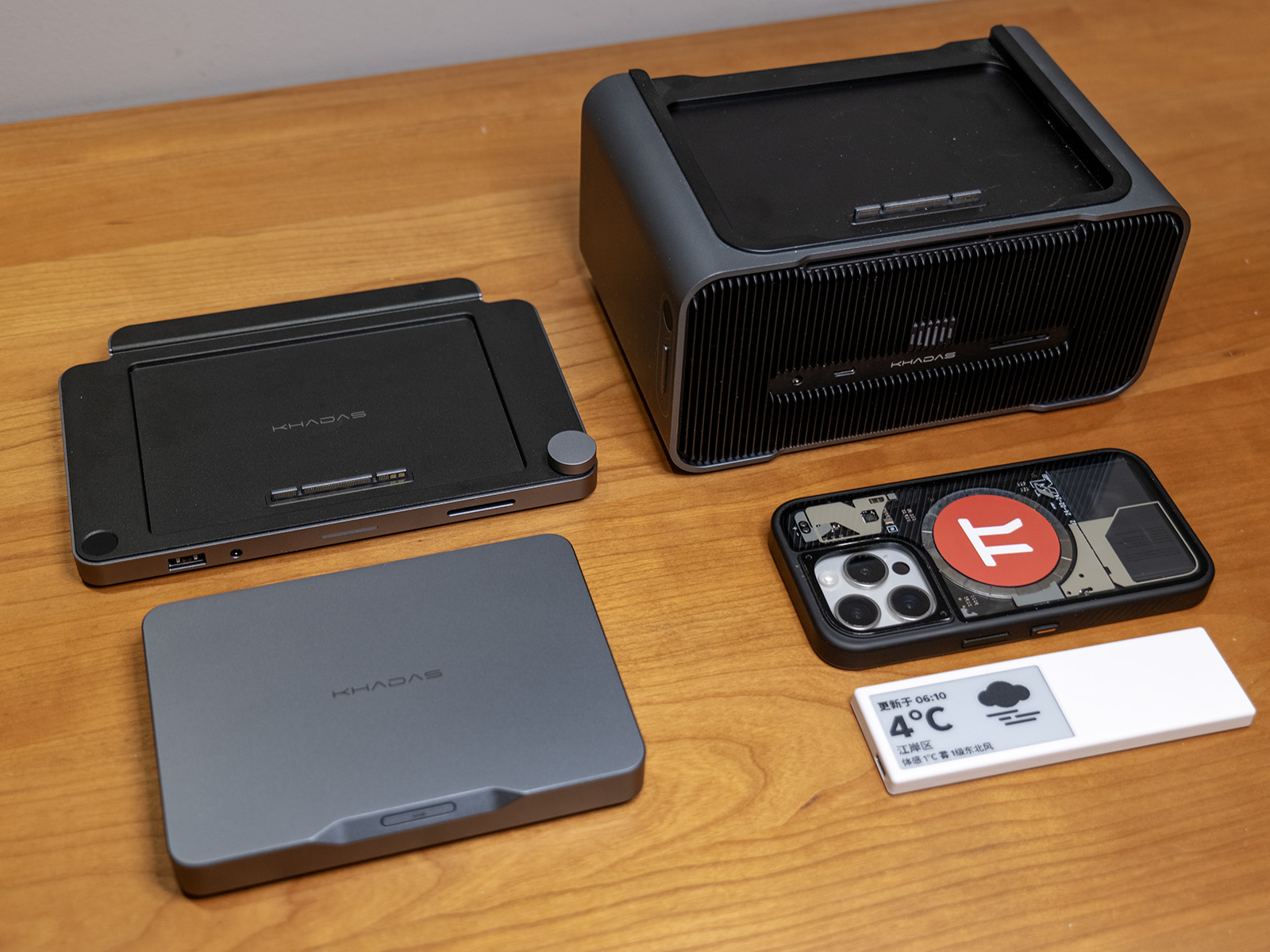
    Additionally, the Mind Dock measures 187mm × 126mm × 17mm and weighs 490g, while the Mind Graphics module measures 197mm × 133mm × 100mm and weighs 2650g. Both share the same design language, materials, and build quality as the Mind 2, and are among the most satisfying electronic products I’ve used in recent years in terms of appearance and craftsmanship. Here’s an image comparing the full Mind Family setup with the more familiar BANGCASE for reference.

    Mind Family Size Comparison (both phone cases shown are 15 Pro BANGCASE)

    Performance Experience

    Performance Specifications

    The Khadas Mind 2 is available with two CPU configurations: Intel Ultra 5-125H and Intel Ultra 7-155H. There is also a Mind 2s variant featuring the Intel Ultra 7-255H. In terms of memory and storage, it offers options of 16GB / 32GB / 64GB LPDDR5X RAM and 512GB / 1TB / 2TB PCIe 4.0 SSDs.

    There is already plenty of quantitative data on these core hardware specifications available online. What I would like to share instead is my own experience using it as a primary device: its performance is on par with a mainstream desktop PC equipped with an RTX 4060 Ti, and slightly below that of a gaming laptop powered by an RTX 5060.

    When paired with the Mind Graphics module, Black Myth: Wukong (2K resolution / cinematic settings / ray tracing off / frame generation off) achieved an average frame rate of 31 FPS, while Cyberpunk 2077 (2K resolution / maximum settings / ray tracing off / frame generation off) reached an average of 65.4 FPS.

    With 64GB of system memory and 16GB of VRAM, the Mind 2 also performs better than both my RTX 4060 Ti desktop and RTX 5060 gaming laptop in running local large language models. In my own tests, I observed the following inference speeds: gpt-oss:120b — 9.29 tokens/s; deepseek-r1:32b — 2.37 tokens/s; deepseek-r1:14b — 4.73 tokens/s; deepseek-r1:8b — 12.94 tokens/s, for reference.

    Considering that this is a device released over a year ago, its performance aligns with my expectations. When factoring in the level of performance delivered within such a compact and quiet form factor, the overall experience actually exceeds expectations.

    Game Performance Benchmark Results

    Local LLM Performance Benchmark Results

    Additionally, there is a 2230 M.2 SSD slot on the bottom of the device for future storage expansion. It is protected by a magnetic cover that can be removed by hand, making SSD installation quick and convenient. In the future, replacing the mounting screws with a quick-release latch would further improve the experience.

    Port Configuration

    In terms of standard I/O configuration, when paired with the Mind Graphics dock, the Mind 2 offers a number and specification of ports that far exceed Mini PCs of similar size and even rival larger ITX desktop systems—approaching the interface configurations of high-end desktop PCs on the market. It is fully capable of handling a wide range of application scenarios. I have compiled a table below to help compare the number and specifications of ports available across different components and combinations.

    Product / CombinationMulti-DisplayThunderbolt 4USB4USB-AHDMIDPEthernetAudioCard ReaderFingerprint ReaderPower Interface
    Mind 221×40Gbps1×40Gbps2×10Gbps1× HDMI 2.1 TMDS1× PD
    Mind Dock3×5Gbps2× HDMI 2.01×2.5Gbps1×3.5mm1×200MB/s11× PD
    Mind Graphics1×40Gbps3×10Gbps2× HDMI 2.1a1×DP1.4a1×2.5Gbps1×3.5mm1×200MB/s11× AC
    Mind 2 + Mind Dock41×40Gbps1×40Gbps2×10Gbps3×5Gbps1× HDMI 2.1 TMDS2× HDMI 2.01×2.5Gbps1×3.5mm1×200MB/s11× PD
    Mind 2 + Mind Graphics61×40Gbps1×40Gbps5×10Gbps1× HDMI 2.1 TMDS2× HDMI 2.1a1×DP1.4a1×2.5Gbps1×3.5mm1×200MB/s11× AC

    Beyond the standard interfaces, the Mind 2 series is equipped with the future-ready Mind Link interface. This connector is designed with a PCIe 5.0 ×8 bandwidth, offering a theoretical maximum throughput of 256GT/s. In the current Mind 2 + Mind Graphics setup, it can achieve a transfer rate of up to 128GT/s—far exceeding the capabilities of the commonly used Thunderbolt 4 interface, and even surpassing the not-yet-widespread Thunderbolt 5 standard. This interface is, in my view, one of the most promising aspects of the Mind ecosystem. With an upper limit of 256GT/s, it provides ample headroom not only for expanding to current RTX 50-series or future 60-series GPUs, but also for connecting additional device types down the line—or even deploying multiple Mind units in parallel for local large language model workloads.

    Cross-Scenario Practical Experience

    As of late January 2026—at a time when Intel’s third-generation Ultra CPUs have just been released and new machines are widely beginning to adopt RTX 50-series GPUs—the Mind 2 may not deliver top-tier performance. However, the “cross-scenario” experience it provides is no less impressive than many of this year’s newly launched products. This experience fully aligns with my expectations of what a true “cross-scenario” personal terminal should be. Below, I’ll share my impressions based on my own real-world usage scenarios.

    Due to the nature of my industry and role, my workplace is not fixed. My typical computing needs include handling large datasets in Excel, performing basic image editing in Photoshop, and editing videos in CapCut. Outside of work, my primary forms of entertainment include competitive online games, AAA single-player titles, high-definition media consumption, and 3D modeling. To achieve a seamless cross-scenario experience across all these use cases, I’ve experimented with numerous solutions over time—but all of them were eventually abandoned due to unresolved pain points. Before diving into my experience with the Mind 2, I’d like to share some of these pitfalls.

    SolutionPain Points
    Running WTG on a portable SSDSevere heat issues, unstable performance, risk of drive disconnection during long sessions;Poor hardware compatibility, frequent issues with both newer and older systems;Official support discontinued, making Windows 11 unusable through conventional means
    Cloud PCHigh long-term subscription costs;Insufficient real-world performance, heavy compression and frame drops;Extreme network dependence, complex operations nearly unusable on 4G/5G;Data and information security concerns;Low-performance hardware endpoints leading to poor user experience
    Remote Desktop (RDP / Moonlight & Sunshine)Extreme network dependence, complex operations nearly unusable on 4G/5G;Unstable home broadband upload speeds
    Ultrabook + eGPU DockCompatibility issues, some laptops unable to recognize Thunderbolt 4 eGPU docks;Unstable operation of the dock itself;Poor product design—external power supply, bulky size, messy cabling, loud noise, and high heat output;Performance overhead from Thunderbolt 4 interface and eGPU controller
    NAS User Folder SynchronizationSync speeds limited by home/office bandwidth and NAS read/write performance;Highly network-dependent, with sync failures often leading to file inconsistencies

    In the past, mitigating these issues required investing a significant amount of time and effort. But once I started using the Mind 2—a device compact enough to fit into a pocket, yet powerful and spacious enough to meet most scenario requirements while allowing flexible expansion on demand—all of these pain points were effectively resolved.

    Use Case 1 – Fixed Office Setup

    In this scenario, my setup consists of the Mind 2 standalone unit paired with a PD-powered docking station. Peripherals needed for daily work—such as the mouse, keyboard, and printer—are all connected to the dock. With just a single cable plugged into the Mind 2, I can immediately enter my working state. Thanks to the strong performance of the Ultra 7 155H processor combined with 64GB of RAM, it easily handles everything from the Office suite to everyday image editing and video cutting tasks.

    If the monitor used in this setup supports single-cable connectivity with reverse power delivery, the configuration can be simplified even further by eliminating the dock altogether. The Mind 2 can then be powered directly by the monitor, making it easy to adapt to peripherals regardless of whether they are older or newer devices.

    Mind 2 Host with Expansion Dock

    Additionally, for users who require multi-display support in their workflow, the Mind 2 standalone unit supports dual USB-C video output. When paired with the Mind Dock, it can support up to four video outputs—sufficient for most multi-monitor setups even without using the Mind Graphics module.

    Use Case 2 – Mobile Office

    After the release of the Mind 2, Khadas announced plans for the Mind xPlay portable display. Although the product was only officially unveiled recently at CES 2026, I had already created a DIY setup using 3D printing to try out a similar experience in advance. I built a custom base that allows the Mind 2 to mount onto the Smartisan TNT GO portable display. Once installed, and combined with the display’s built-in camera, keyboard, and touchpad, it effectively transforms into a high-performance laptop.

    The entire setup, including the keyboard, weighs around 1.6 kg. Compared to representative high-performance ultrabooks on the market that weigh around 1.48 kg, it is only about 100g heavier—and nearly identical to the ROG Flow Z13 2025 with keyboard at 1.59 kg—making it well within a practical range for portable work scenarios.

    The TNT GO’s stylus supports the Microsoft MPP 2.0 protocol, allowing full compatibility with handwriting input in OneNote, the Office suite, and various design software. Personally, I often use it for simple 3D modeling, where the stylus and touchscreen interaction feel intuitive—very similar to the workflow of modeling on an iPad.

    Mind 2 paired with a portable display for use as a laptop

    With the detachable magnetic keyboard removed and using only the touchscreen, the combined weight of the Mind 2 and portable display drops to 1.2 kg—roughly the same as the standalone Flow Z13—allowing it to be handheld for short periods or supported against other surfaces. When held vertically, the Mind 2 sits near the palm, effectively serving as a grip for the tablet, making it even more comfortable to hold. In portrait mode, this setup significantly improves the experience of reading and annotating documents.

    Mind 2 paired with a portable display for use as a tablet computer

    There is currently one minor drawback to this usage method: the TNT GO itself is relatively thick, and when combined with the Mind 2, the overall thickness is noticeably greater than that of typical 2-in-1 tablets. Hopefully, the upcoming official Mind xPlay will better address this issue.

    Use Case 3 – Home Entertainment

    At home, I use a 4K@120Hz television, and my local network runs at 2.5Gbps. I’ve placed the Mind Dock on the TV cabinet and connected it to the network via Ethernet, paired with a wireless keyboard that includes a touchpad. Once I return home, I simply place the Mind 2 onto the Mind Dock and operate it from the sofa using the keyboard—instantly switching into relaxation mode without needing to repeatedly get up to interact with the computer.

    Whether streaming online videos or playing high-quality media from a NAS, the Mind Dock’s 2.5Gbps Ethernet port ensures that buffering is virtually nonexistent. The only minor drawback during this process is that the Mind Dock’s built-in HDMI port does not support HDMI 2.1 output for 4K@120Hz HDR video. While it is sufficient for most content to fully showcase visual quality, manually switching to USB-C video output is still required for extremely high-quality playback scenarios. Hopefully, future versions of the dock will offer improved display output specifications.

    Additionally, this setup includes a very convenient feature: the Mind Dock provides a 5Gbps USB-A port and a 200MB/s SD 4.0 card reader on the front panel. After returning from a shoot, I can directly insert the SD card into the dock for browsing. The USB-A port can be used to connect a card reader for accessing the Pocket 3’s TF card. Whether it’s 6K25p footage from a camera or 4K60p video from the Pocket 3, both interfaces offer sufficient bandwidth for smooth playback—saving me from having to fumble around with ports at the back each time.

    Mind 2 pairs with Mind Dock to connect to your TV.

    Use Case 4 – Gaming and Entertainment

    As the most critical component of the Mind ecosystem—Mind Graphics—I chose to connect it to the monitor in my study. The output interfaces of Mind Graphics fully meet the display requirements of my monitor at 2K@240Hz. While the desktop RTX 4060 Ti GPU may now be considered an N-1 generation product, in actual use, the online games I regularly play (such as Teamfight Tactics and Hextech ARAM) can run at maximum settings with full frame rates. For the single-player AAA titles I frequently enjoy (such as Black Myth: Wukong and Elden Ring), slightly lowering the graphical settings and enabling DLSS still allows for smooth gameplay with good visual quality. Considering that, as of December 2025, the top-ranked GPU in the Steam Hardware Survey remains the RTX 3060 released four years ago, the RTX 4060 Ti integrated into Mind Graphics—released two and a half years ago—should continue to meet mainstream gaming performance requirements for the next few years.

    In addition, Mind Graphics features a dual-speaker system composed of a full-range driver and a high-frequency unit. Its audio performance is significantly better than that of built-in monitor speakers, and subjectively, I find the sound quality superior to desktop speakers in the RMB 500 price range. This allows for a satisfying audio experience while keeping desktop cable management simple.

    Mind 2 pairs with Mind Graphics to connect to a monitor for use.

    Special Scenario 1 – Portable Entertainment

    Beyond the more common usage scenarios mentioned above, I’ve also discovered a niche yet highly practical use case—pairing it with AR viewing glasses, which have gained considerable popularity over the past two years. Thanks to the compact size of the Mind 2 main unit, it can be placed steadily on a coffee table beside the sofa or on a bedside table. Powered by the Iris Xe integrated graphics, connecting AR glasses to the Mind 2 while lying on the sofa or in bed for large-screen viewing or playing strategy games offers a uniquely immersive experience. It effectively addresses both the limited onboard performance of AR glasses and the inconvenience of placing a full-sized PC in various casual environments.

    Mind 2 Host Connects to AR Viewing Glasses for Use

    Special Scenario 2 – Thunderbolt 4 eGPU Dock

    Aside from being paired with the Mind 2, Mind Graphics has a hidden secondary use—as a Thunderbolt 4 eGPU dock and desktop speaker for laptops from other brands. When I first learned about this feature, I struggled to understand such a niche use case. However, after experiencing a situation during this year’s New Year holiday where the Mind 2 and Mind Graphics were split into two high-performance computers for emergency multiplayer gaming, I began to take this functionality more seriously.

    While the price-performance ratio of Mind Graphics may not compare favorably to third-party Thunderbolt 4 eGPU enclosures paired with separately purchased GPUs, for users who already need the Mind 2, it effectively comes as an added-value bonus: a compact, quiet, and aesthetically pleasing desktop RTX 4060 Ti solution with a built-in 300W GaN power supply and integrated desktop speakers. Moreover, even as of 2026, products on the market that match Mind Graphics in terms of build quality, design, size, and functionality remain exceptionally rare. As such, this seemingly niche use case is worth highlighting separately for those who share similar needs.

    Mind Graphics as a graphics card dock

    The Future Is Approaching

    After sharing so many of my personal experiences, as of the time of writing, CES 2026 has come to a close, and more detailed information about the products unveiled by various exhibitors is gradually becoming available. Among the many announcements from CES 2026, I was pleased to see long-awaited updates from Khadas.

    At this year’s exhibition, Khadas introduced three new products: the Mind Pro, the world’s first modular mini PC powered by the Intel Panther Lake processor, with a volume of just 0.43L; the Mind Graphics 2, equipped with a desktop-grade RTX 5060 Ti and capable of delivering up to 180W of performance; and the Mind xPlay, which integrates a display, keyboard, touchpad, and a 48Wh battery. Building upon the existing Mind ecosystem, these new products upgrade the Mind host to Intel’s third-generation Ultra processors, further improving performance and energy efficiency; bring Mind Graphics up to the latest RTX 5060 Ti; and complete the final piece of the Mind ecosystem for mobile productivity. All three products are now available for overseas pre-order, and according to official information, will be launching in the domestic market soon.

    Unlike cloud or streaming solutions—where data and computing units are separated from the user—or WTG-based approaches that separate the user and data from the computing unit, the Mind ecosystem presents what currently appears to be the most logical direction forward: integrating the user, data, and core computing unit into a seamlessly portable personal terminal, then leveraging a unified, high-bandwidth interface standard to adapt to different specialized scenarios. From Mind 1 to Mind 2, and now to the newly released Mind Pro, we can see that as the Mind ecosystem continues to expand, the Mind host itself—the core of the ecosystem—is evolving toward the ideal personal terminal. The Mind 2, born from this trajectory, is far more than just a Mini PC that is “a bit more powerful, a bit smaller, and a bit more refined in design.” It represents a significant step toward a truly “cross-scenario”—and even “all-scenario”—personal terminal.

    Perhaps this is the ideal form of a “cross-scenario” personal terminal.

  • SSPAI Morning Brief: ByteDance Unveils Seedance 2.0 Video Creation Model, Xiaomi Launches Tag Tracker in Europe

    SSPAI Morning Brief: ByteDance Unveils Seedance 2.0 Video Creation Model, Xiaomi Launches Tag Tracker in Europe

    Morning Brief

    1. Zhipu releases and open-sources GLM-5 model
    2. CAC launches Spring Festival “Qinglang” campaign
    3. ByteDance unveils Seedance 2.0 video creation model
    4. Xiaomi Tag tracker launches in the European market
    5. eero introduces Signal 4G LTE network failover device
    6. Rumors You Can Just Glance At

    Zhipu releases and open-sources GLM-5 model

    On February 11, Zhipu released and open-sourced the GLM-5 model. According to reports, GLM-5 ranks 4th globally and 1st among open-source models on the Artificial Analysis leaderboard. It is positioned to move beyond traditional code generation into the “Agentic Engineering” stage, with a focus on systematic engineering comprehension and the ability to handle complex development scenarios.

    In programming and agent capability benchmarks, the model achieved state-of-the-art (SOTA) scores of 77.8 and 56.2 on SWE-bench-Verified and Terminal Bench 2.0, respectively. It also delivered the best performance among open-source models in evaluations such as BrowseComp, MCP-Atlas, τ²-Bench, and Vending Bench 2.

    The model has completed deep adaptation for multiple domestic computing platforms, including Huawei Ascend, Cambricon, Moore Threads, Kunlunxin, Enflame, MetaX, and Hygon, enabling efficient inference and deployment across diverse computing environments. Source

    In addition, Zhipu has adjusted the pricing of the GLM Coding Plan. Specifically, the first-purchase discount has been removed, while quarterly and annual subscription discounts remain available; the package pricing structure has been revised, with overall increases starting from 30%; existing subscribers will retain their current pricing. Source


    CAC launches Spring Festival “Qinglang” campaign

    On February 12, the Cyberspace Administration of China (CAC) announced the launch of a one-month special campaign titled “Qinglang · Creating a Festive and Harmonious Online Environment for the 2026 Spring Festival,” effective immediately. The initiative will further focus on commonly used online platforms and service types during the holiday period, with an emphasis on addressing prominent issues in the online ecosystem reported by the public, in order to create a positive online environment for internet users during the Spring Festival.

    The campaign will target four main categories of issues, including maliciously inciting negative emotions, generating and spreading “digital sludge” or low-quality spam content, fabricating and disseminating false information, and directing traffic to illegal activities. In terms of maliciously inciting negative emotions, key efforts will focus on online displays of wealth under the guise of “holiday shopping” or “Spring Festival customs comparisons” that provoke social rivalry and conflict; as well as organizing or participating in online fan-circle activities tied to events such as the Spring Festival Gala, holiday film releases, or major sporting events to incite online harassment or conflict. Regarding the generation and spread of “digital sludge,” the campaign will also address the mass production of low-quality, repetitive, and logically incoherent content using new technologies such as AI. Source


    ByteDance unveils Seedance 2.0 video creation model

    On February 12, ByteDance released its next-generation video creation model, Seedance 2.0.

    According to reports, Seedance 2.0 adopts a unified multimodal audio-visual joint generation architecture that supports four types of inputs: text, images, audio, and video. It can incorporate up to nine reference images, three video clips, and three audio segments simultaneously. Compared to its predecessor, Seedance 2.0 demonstrates notable improvements in stability within complex motion scenes, physical realism, instruction adherence, and generation controllability. It also supports up to 15 seconds of multi-shot audio-visual output and features such as dual-channel immersive audio generation.

    The company stated that the model is designed for professional content production scenarios, including film and television, advertising, e-commerce, and gaming. However, issues such as insufficient detail stability, multi-subject consistency challenges, and occasional audio anomalies remain, and further alignment improvements are planned. Seedance 2.0 is now available on platforms such as Jimeng AI and Doubao, with both web and app-based access provided. Source


    Xiaomi Tag tracker launches in the European market

    On February 12, the Xiaomi Tag tracker went on sale through multiple European distributor channels and was also listed on Xiaomi’s official UK and France websites. The tracker is powered by a CR2032 coin cell battery, with an official battery life of approximately one year. It measures about 7.2 mm in thickness and features a plastic enclosure. The device supports Bluetooth 5.4 and NFC, and is compatible with Apple’s Find My and Google’s Find Hub services, enabling cross-platform item tracking across both iOS and Android devices.

    The tracker does not currently support UWB (Ultra-Wideband) technology, though reports suggest that Xiaomi may release a UWB-enabled version in the future. In the French market, pricing is set at €17.99 for a single unit and €59.99 for a four-pack, with only a white version currently available. Source


    eero introduces Signal 4G LTE network failover device

    On February 12, eero introduced the eero Signal 4G LTE network backup device. Priced at $99.99, the device automatically switches to a cellular network when a home broadband connection is interrupted, temporarily maintaining internet access. Users need to connect the device via USB-C to an eero router that supports Wi-Fi 6 or higher; when the network goes down, the system will activate the cellular connection automatically, and revert to standby mode once connectivity is restored. The device features a built-in multi-carrier eSIM that can automatically select the best available signal from networks such as AT&T and Verizon.

    In addition to purchasing the hardware, users must subscribe to the eero Plus service to enable the cellular backup function. Two plans are currently available: $99.99 per year with 10 GB of data, or $199.99 per year with 100 GB of data. The company also stated that a 5G version priced at $199.99 will be released later this year, with plans to extend support to eero Business subscribers. Source


    Rumors You Can Just Glance At

    • A set of renders published by tech media outlet YtechB suggests that Samsung has adjusted the rear camera design of the Galaxy S26+ and S26 Ultra, moving from the previous independent ring-style lens layout to a camera bump similar to that of the Galaxy Z Fold7. In terms of specifications, the S26+ is said to feature a 6.7-inch display, body dimensions of 158.4 × 75.8 × 7.3 mm, a 4900mAh battery, and support for 45W fast charging. The European market version is expected to be powered by the Exynos 2600 chipset. The higher-end S26 Ultra is rumored to include a 6.9-inch Dynamic AMOLED 2X display with a resolution of 1440 × 3120 and a 120Hz refresh rate, and is expected to be equipped with the Snapdragon 8 Elite Gen 5 processor. It may offer 12GB and 16GB memory options, with body dimensions of 163.6 × 78.1 × 7.9 mm. Source
    • Tom’s Hardware reports that the Steam Deck OLED has sold out on the US Steam Store as well as through Komodo distribution channels in Japan, South Korea, Hong Kong, and Taiwan. The shortage reportedly began recently in the evening hours. The device remains available in some parts of Europe, while the Japanese channel indicates that stock is expected to be replenished in February. No restock timeline has been announced for the US store, and Valve has not responded to requests for comment as of publication. Source
    • Bloomberg journalist Mark Gurman, citing Apple retail channel employees, reports that iPhone 16e inventory is largely sold out, and the current iPad Air is also experiencing supply shortages. He expects Apple to release the iPhone 17e and a new iPad Air powered by the M4 chip in the coming weeks. The iPhone 17e may be announced via press release, and is expected to feature the Dynamic Island, an upgraded A19 chip, the in-house C1 5G modem, and MagSafe charging, with a starting price likely to remain at $599. Source
    • Mark Gurman also noted that next-generation Siri features originally planned for iOS 26.4 have been delayed due to newly discovered software issues during testing. These features include the ability to understand personal contextual information and proactively execute actions based on on-screen content. They are now expected to continue testing in iOS 26.5, scheduled for release in May. Apple is also reportedly testing a Perplexity-like web search tool and custom image generation features, and plans to introduce an AI chatbot version of Siri across iOS 27, iPadOS, and macOS 27. The new Siri is expected to debut at WWDC in June and launch officially in September. In a statement to CNBC, Source. Apple confirmed that the updated Siri remains on track for release within 2026. Source
  • OpenClaw: After Two Weeks of Heavy Use, This AI Tool Has Completely Reshaped My Workflow

    OpenClaw: After Two Weeks of Heavy Use, This AI Tool Has Completely Reshaped My Workflow

    I believe many people have been repeatedly exposed over the past month to an AI tool called OpenClaw. According to social media posts and early community discussions, the tool went through several name changes before finally settling on OpenClaw. During the renaming period, there was even an incident where its social media accounts were maliciously squatted and used to launch a meme coin called $CLAWD to “harvest” users—adding a dramatic twist to the birth of OpenClaw.

    For a typical mobile-internet-era user like me, my instinctive reaction when encountering a problem has always been to look for yet another app to solve it. After more than two weeks of using OpenClaw, however, I noticed that my habits had quietly changed. Step by step, as I rebuilt my workflow around OpenClaw, it gradually became my first choice for handling digital-life needs.

    In this article, I’ll start by explaining what OpenClaw is and how to install it, then share some of my own usage scenarios and tips, hoping to offer some practical help to anyone interested in trying it out.

    What Is OpenClaw?

    OpenClaw is neither a simple large language model nor just a coding CLI. Instead, it is a locally running “digital life hub.” It can act as a personal AI assistant, and it can also take on parts of certain roles within a company. Its capabilities can be extended through Skills and tool integrations (including MCP scenarios), and by running a Gateway on a Mac mini or server, it enables cross-platform access and asynchronous scheduling. No matter where you are, you can interact with it in real time via various instant messaging tools.

    At the same time, all memories, file indexes, and personal habits generated within OpenClaw are stored in your own local workspace (such as Memory.md files, index databases, and Skills scripts). In a local deployment scenario, this gives you much greater control over your data and makes permission management and backups easier.

    How Do You Install OpenClaw?

    There are many options for hosting OpenClaw. At the moment, the most popular choice is the Mac mini, mainly for three reasons. First, it supports 24/7 continuous operation with low power consumption. Second, within the Apple ecosystem it can easily integrate Skills tied to Apple Reminders, Apple Notes, Apple Calendar, and more. Third, the hardware itself offers strong value for money. The 16GB + 256GB configuration often fluctuates in price on e-commerce platforms, but at the time of writing, many channels are approaching the 3,000 RMB range. Combined with the M4 chip and a minimum of 16GB unified memory, performance is more than sufficient.

    Beyond the Mac mini, OpenClaw can also be installed on devices running Windows, Linux, and other operating systems. If you don’t want to deploy OpenClaw locally, major cloud providers—such as Tencent Cloud, Alibaba Cloud, Cloudflare, and DigitalOcean—offer dedicated server images that support quick OpenClaw deployment as well.

    Overall, OpenClaw provides four installation methods: One-liner, npm, Hackable, and a macOS client. The One-liner supports macOS, Linux, and Windows; npm can be used via either npm or pnpm; Hackable comes in installer and pnpm variants. Each distribution method corresponds to different terminal commands, and you can choose whichever best suits your needs.

    After installation, OpenClaw automatically runs the openclaw onboard --install-daemon command for initial setup. In most cases, the default options are sufficient. The main configuration steps you’ll need to pay attention to are four key areas:

    The first is selecting an AI service provider and the specific model you want to use. Most providers offer both OAuth authorization and direct API key input, corresponding to different billing methods.

    Taking Google Gemini as an example: if you choose OAuth authentication, you can use services like Google Gemini 3 Pro, Google Gemini 3 Flash, Claude Opus 4.5, and Claude Sonnet 4.5 via Antigravity, with quotas refreshed every five hours. If you choose the Google API instead, you’ll need to create an API key in Google AI Studio or Vertex, and billing will be based on token and prompt usage. Once provider verification is complete, you can select your preferred model from the available list.

    The second step is configuring the communication Channels used to interact with OpenClaw. If you choose certain overseas messaging tools, issues may arise during setup, potentially causing the Gateway to fail to start. In that case, you have three options: let it fail and complete the setup first, then ask the AI to help fix it later; skip Channel configuration and move on; or choose a domestic messaging tool such as Feishu.

    The third step is selecting and installing Skills. Use the arrow keys to navigate, the spacebar to select or deselect, and press Enter to install. If you don’t want to spend too much time here, you can skip this step and install Skills later.

    The final step is launching the Gateway and choosing a control interface, such as TUI or Web UI. At this point, the initial OpenClaw configuration is complete. If you’re a macOS user, you can also install the official Companion App. This menu-bar utility makes it easy to adjust OpenClaw settings, monitor Gateway status, and even chat directly with OpenClaw.

    How Should You Choose an OpenClaw Model?

    As of the time of writing, OpenAI has just released ChatGPT 5.3-Codex, while Anthropic has launched Claude Opus 4.6—widely regarded as the two models at the very top tier right now.

    If budget isn’t a concern and you have reliable access to official subscriptions, then ChatGPT Pro and Claude Max are naturally the best choices. If you lack a suitable payment method or worry about account bans, you can also use aggregation services such as OpenRouter to access these top models on a token-based pricing scheme—though the value for money is significantly lower.

    I believe many people have recently taken advantage of Google’s promotions to subscribe to Google AI Pro or Ultra family plans. In that case, you have two options. One is to use Google Antigravity for OAuth authorization; once authenticated, you can access Gemini and Claude models with quotas refreshed periodically. From my own experience, however, this approach is prone to rate limits—especially with Claude—resulting in a subpar experience. The second option is to apply for an API key directly through Google AI Studio and pay per token via the API. Recently, Google has also given Pro and Ultra subscribers a one-time USD 300 credit plus USD 10 in monthly credits, which should last you quite a while.

    If you don’t want to spend heavily on ChatGPT or Claude models and can’t manage Google’s paid subscriptions either, it’s worth trying domestic models. To test OpenClaw, I specifically subscribed to MiniMax and Kimi’s Coding Plans. After using them for a while, I was pleasantly surprised. Their latest models—MiniMax 2.1 and Kimi K2.5—have both been recommended by OpenClaw’s developer Peter himself.

    Based on my personal experience and feedback from users on X, Kimi K2.5 has slightly stronger engineering capabilities than MiniMax M2.1, with most projects running smoothly. MiniMax M2.1, however, has its own advantages: it’s cheaper, with a top-tier plan priced at just RMB 119, compared to RMB 199 for Kimi. In terms of responsiveness, I find MiniMax M2.1 a bit faster than Kimi K2.5, making it more suitable for lighter tasks. In my own usage, Kimi Code’s RMB 99 Moderato plan was exhausted in under five days, so if you plan to use it as a main driver, you’ll likely need the Allegretto plan.

    Overall, I think the best value paid option right now is the ChatGPT Plus subscription. For USD 20 per month, you get access to GPT-5.3 Codex, a true T0-level model. OpenAI is also currently running a promotion that doubles your Codex App quota for two months.

    After comparing multiple primary models, I find GPT-5.3 Codex delivers the best overall experience, with a more balanced combination of speed and quality. It’s particularly well-suited for code audits and refactoring of legacy projects. Many other models can technically complete projects and run them successfully, but they often hide subtle issues that only surface later on.

    If you want to use another T0-level model—Claude Opus 4.6—but can’t manage a Claude subscription or are worried about account bans, you can access it via Google Antigravity (currently requires the AI Ultra plan; the Pro plan does not yet include Claude Opus 4.6). While Claude quotas are relatively limited, it’s still viable for light exploration or as one of several sub-agents handling critical but low-token tasks. If you can’t sort out subscriptions or credit purchases for overseas model services at all, then using domestic models like Kimi, MiniMax, or Qwen is also a solid option—at the very least, they’re more than sufficient for getting OpenClaw up and running and trying it out.

    If you place a high priority on personal privacy or have powerful hardware, running local models is another good choice. Through services like Ollama, you can install local large language models such as DeepSeek V3.2, qwen3-coder-next, or gemma3, then configure OpenClaw to call these local models—saving a substantial amount of money.

    Finally, if you simply want to try OpenClaw without spending extra money on AI subscriptions or credits, there are plenty of free models available. For example, NVIDIA has launched a trial program for Kimi K2.5, allowing you to apply for an API key and use it directly in OpenClaw. OpenRouter has also recently introduced a model called Pony Alpha, which can be used for free in OpenClaw—but as a trade-off, all requests and outputs are uploaded for model training purposes.

    What Can OpenClaw Do?

    With enough groundwork laid, it’s time to show some real-world use cases of OpenClaw to answer the question most people have in mind: what is OpenClaw actually good for? I’ll divide these scenarios into basic and advanced categories, so you can quickly scan according to your needs.

    Note: Most of the capabilities below are based on my own configuration and custom scripts. Results may vary depending on models, Skills, permissions, and network conditions. In addition, due to personal usage scenarios and privacy considerations, the final two advanced use cases are drawn from online sharing—please refer to them at your discretion.

    Basic

    Chatbot

    Yes—interacting with OpenClaw looks no different from chatting with a familiar chatbot. Just like what you do in the Gemini or ChatGPT web or desktop apps, you can ask questions or issue commands in OpenClaw and have a large language model respond or generate results.

    After connecting Feishu, you can chat with OpenClaw across platforms including iPhone, iPad, Android phones, Mac, and Windows. All chat records are synchronized and stored in real time. Based on your configuration, OpenClaw can also distill conversations into memories and recall them in future interactions.

    I’ve now grown accustomed to using OpenClaw as my primary way to gather information or conduct research. On one hand, it can aggregate multiple AI model services and switch between them at will; on the other, IM tools like Feishu offer a more comfortable conversational interface than most AI apps. For example, I discuss investment thoughts with the bot, look up ZIP codes, summarize documents, scrape posts from X, and more—there never seems to be a shortage of things to talk about.

    A Coding Sidekick

    The evolution of large language models by 2025 has fully proven that even people with zero programming background can easily accomplish tasks that once seemed out of reach—this is the once-viral concept of Vibe Coding. With tools like Claude Code, Codex, and Antigravity, and with Xcode now supporting ChatGPT and Claude for AI-assisted coding, ordinary users like me have gained the ability to build products firsthand.

    Imagine yourself as the product manager, with these top-tier AI models acting as full-stack engineers. All you need to do is continuously describe your ideas, and they’ll handle the coding and deliver the results.

    However, tools like Claude Code, Codex, and Antigravity still require working on a computer. Unless you remote into your machine via tools like Tailscale or Sunlogin to operate terminal-based workflows, the experience isn’t great. OpenClaw changes this completely. Wherever I am in the world, I can issue instructions in natural language through Feishu. The Feishu channel connects to the Gateway on my computer, passes the command to OpenClaw, executes various programming tasks in the terminal, and then sends the results back to Feishu.

    For example, I recently switched my primary input method on iPhone to “Cang Input Method,” but wasn’t satisfied with the default skin. I simply dropped an existing .hskin skin file to the bot and asked it to precisely adjust the skin code according to my aesthetic preferences. Once done, I imported the generated skin file directly on my phone—never touching my computer keyboard throughout the entire process.

    A Personalized News Editor

    Today, our information intake is largely controlled by big platforms and algorithms, stripping us of source control. That’s why the revival of RSS has become a hot topic. With OpenClaw, you can bypass expensive RSS subscription services and build a reading system that truly fits you.

    Step one: customize your own RSS list. You can send your frequently used RSS feeds directly to OpenClaw, ask it to discover feeds based on keywords, or—like me—simply drop an existing OPML file.

    Step two: build an RSS fetching mechanism. I had OpenClaw create a script that fetches RSS content, keeps only the text, stores it in Markdown format, retains articles from the past two days, and automatically clears older files.

    Step three: create an article filtering mechanism. If you have too many feeds or articles coming in too frequently, OpenClaw can automatically filter them based on criteria like topic, author, or online popularity—forming a screening system tailored just for you.

    Step four: set up article delivery. After filtering, I had OpenClaw create a cron task that pushes the day’s selected articles to me at a fixed time every evening, following a consistent template. OpenClaw can even summarize each article in the push, letting me quickly scan and decide which ones to read in depth.

    If you don’t like reading text, you can go a step further and have OpenClaw automatically turn the day’s content into a podcast episode or video and send it to you. It’s like running your own TV channel or media company—where you decide exactly what gets broadcast.

    A Writing Assistant

    The arrival of OpenClaw has effectively reassembled my entire writing workflow. While I’d already been using AI since last year for research, fact-checking, proofreading, and polishing, constant platform switching, model changes, and feature updates made the process fragmented.

    In OpenClaw, I created a dedicated writing group to handle all AI collaboration in my writing workflow. When writing, I place the Feishu “Writing Master” group on the left side of the screen and the iA Writer editor on the right.

    During the preparation phase, I ask Claw to gather information related to my topic, repeatedly verify its reliability, then organize it into an outline with sources attached to each point for manual verification.

    While writing, if I need to look something up, I simply ask Claw and get an immediate response—without switching tools or windows, and without breaking my writing flow.

    After finishing a draft, I let Claw handle proofreading and polishing. I created a Skill that allows me to say something like “Help me proofread/polish the article: XXX,” prompting it to read my local iA Writer library, locate the matching article, and begin reviewing it. OpenClaw checks for typos and grammatical issues, flags imprecise expressions, and provides concrete revision suggestions.

    Advanced

    Notion as an External Brain

    I originally subscribed to Notion’s Business Plan, which allowed me to operate content across my entire Notion workspace using the built-in Notion AI. The biggest advantage of Notion AI is that, at least in theory, it offers unlimited access to top-tier models such as Gemini 3 Pro, Claude Opus 4.6, Claude Sonnet 4.5, and GPT-5.2. Users who upgraded before January this year could even keep the subscription at USD 10 per month. The downside, however, is that these AI capabilities are confined strictly within Notion, which significantly limits usage scenarios.

    Later on, I discovered that OpenClaw natively supports Notion Skills. Even the free version of Notion can be controlled by an external AI agent via Connections. As a result, I canceled my Notion subscription and switched to using OpenClaw to operate my Notion content. I created a cron task in OpenClaw that, every day, selects five words from my Notion vocabulary database based on a memory algorithm and pushes them to me using a fixed template. After reviewing them, I rate my familiarity with each word, and OpenClaw records both the score and review count back into the Notion database before moving on to the next round. If I come across new words in daily life, I can simply send them to OpenClaw, which will add them to the Notion vocabulary database and automatically fill in fields such as phonetics, part of speech, definitions, mnemonic roots, and memory aids—ensuring a continuous supply of words to study.

    Controlling the Browser

    OpenClaw can act as an AI agent to control the browser on your computer, helping automate UI-level interactions.

    Before getting started, you need to install the Chrome browser extension using the terminal command openclaw browser extension install. Once installed, click the extension icon in the top-right corner of the browser and make sure it’s enabled on the current page (the icon will display “ON”). From there, you can start directing OpenClaw to work inside the browser.

    For example, I once discovered a great content creator on Xiaohongshu and wanted to scrape all of their posts for study. As a domestic social platform, Xiaohongshu obviously doesn’t provide APIs for this kind of access, nor can it be queried, posted to, or searched via Skills like X. So I had OpenClaw directly control the browser to “manually” scrape those posts. It’s slower, but at least I don’t have to constantly click the mouse myself. That said, Xiaohongshu’s anti-scraping mechanisms can be quite annoying—once you scrape too many posts, it forcibly redirects you back to the homepage.

    Of course, if you’re comfortable with it, you could also let OpenClaw help you clean up your inbox, reply to emails, or even book a flight to Paris. If you’re not comfortable with that level of access, then simply don’t install the browser extension.

    AI Phone

    Some time ago, the Doubao phone sparked a lot of discussion. Users could control the Doubao model via voice to directly operate apps on their phones—ordering a milk tea, scrolling short videos, claiming red packets, and so on. Since OpenClaw also has agent capabilities, it naturally caught the attention of curious users.

    I saw a post on X where a foreign user hacked together a USD 25 Android phone. They installed OpenClaw via Termux and were then able to use it to control the flashlight, recognize objects through the camera, read sensor data, and more.

    How the Developer Uses It

    OpenClaw’s creator, Peter Steinberger, also shared some of his personal use cases in an interview. These include adjusting mattress temperature, playing music, controlling lights, viewing camera feeds, and checking package delivery status. For specific examples, you can refer to the interview video shared in Fu Sheng’s post on X.

    OpenClaw Usage Tips

    OpenClaw is a relatively young open-source project and still maintains a high update cadence. Beyond adding new features, updates frequently focus on bug fixes—which is my roundabout way of saying that OpenClaw is not yet a mature product. You’ll inevitably run into various issues during use. Whether or not you’re an experienced developer with strong programming skills, I recommend handing all debugging tasks over to AI agents. If you don’t have to do it yourself, why would you?

    To make OpenClaw more usable and stable, I’ll share some general usage strategies here. For the actual implementation, just let an AI agent handle it. You can even copy and paste this entire section directly to an AI agent and ask it to propose solutions following these ideas, then execute them after your approval.

    Creating Groups

    Once OpenClaw is set up, you’ll initially be chatting with your bot in a private conversation. All interactions happen in this private chat, and everything is stored in memory. Over time, the bot will continuously pull related information from its memory files to respond. Eventually, those memory files become long and messy.

    To avoid this—and to keep cleaner, more focused timelines for different scenarios—I recommend creating multiple groups, channels, or topics. Add your Claw bot to each one, give it a different name and avatar, and use each group for a dedicated purpose when interacting with OpenClaw.

    By default, when chatting with Claw in a group, you need to prefix messages with @Claw (for example, if my bot is named adawinterbot, I must include @adawinterbot for OpenClaw to receive the message). Once OpenClaw receives it, it adds a 👀 emoji reaction to your message.

    If you’re tired of typing @Claw every time, have your local AI agent—or OpenClaw itself—modify the group configuration to support both @Claw mentions and direct messages.

    Also, remember to propagate configurations you’ve completed in private chats—such as model selection or Skill usage—into your group chats with the help of an AI agent.

    Reducing Token Costs and Improving Efficiency

    If you’re using paid AI subscriptions or API-based billing, you’ll inevitably feel the pain of rate limits or rapidly growing bills. This is where optimizing OpenClaw’s token usage becomes important—both to slow down token consumption and to improve output efficiency by trimming context length.

    The first method is to frequently use the /new and /compact commands. /new starts a completely fresh session with a cleared context—essentially “starting over”—which is useful when switching topics or avoiding interference from old context. /compact compresses the current session’s context, preserving key information while reducing token usage, allowing the conversation to continue more efficiently. If you want a fresh session but still retain some continuity, you can send /new followed by something like “Continue the previous task: XXX.” I’ve had OpenClaw set up a script that automatically runs /new every day at 4 a.m., which significantly reduces context buildup.

    The second method is enabling OpenClaw’s built-in QMD. This acts as a memory-retrieval middleware layer. Before each conversation turn, it selects the most relevant fragments from historical memory and injects them into the model, allowing OpenClaw to retain long-term context while controlling token costs. You can ask OpenClaw to enable QMD and tune parameters such as the maximum number of memory entries per turn, truncation length, and retrieval timeout—choosing between balanced, cost-saving, or performance-oriented presets.

    Subagents

    You may have noticed a new feature released alongside Claude Opus 4.6 called Agents Team. It enables a “main agent + multiple parallel sub-agents” architecture, where the main agent decomposes, assigns, and aggregates tasks, while sub-agents operate with relatively independent contexts to handle frontend, backend, testing, auditing, and more in parallel.

    OpenClaw also natively supports sub-agent collaboration through session orchestration, though its implementation differs from Claude’s official feature. You can ask Claw to build an advanced Subagents system based on the models you’ve configured, similar in spirit to Agents Team.

    Unlike Claude’s kernel-level sub-agent coordination, OpenClaw’s Subagents rely on custom scripts orchestrated by an overarching controller. As for how to design this orchestration, simply explain your idea to OpenClaw and let it build the system. If you have no clear plan, just ask OpenClaw to implement its own recommended approach.

    Voice Input and Output

    On mobile devices, voice has become an indispensable input and output method for interacting with AI.

    On the input side, you can have OpenClaw install the “Whisper without API” Skill and create a script that automatically transcribes incoming voice messages using this Skill. This allows you to send voice messages directly in Feishu, with OpenClaw handling transcription and executing tasks accordingly. While many IM tools already offer voice transcription, OpenAI’s Whisper supports more languages and mixed-language input, generally delivering better results.

    On the output side, you can install the edge-tts Skill, which automatically converts text responses into audio and sends them to you. Currently, edge-tts offers both male and female voices. You can configure OpenClaw to generate audio for all text responses, or only in specific scenarios.

    Backup and Recovery

    It’s easy to run into issues when modifying OpenClaw’s configuration. Once something breaks, OpenClaw may freeze or the Gateway may disconnect. If this happens while you’re traveling or away from home, recovering via IM command menus alone can be extremely difficult and stressful.

    There are currently two main approaches to address this.

    The first is self-healing via automated scripts. Start by having OpenClaw create a daily automatic backup script. Then create a heartbeat monitoring script that pings the Gateway every five minutes; if three consecutive checks fail, it automatically restarts the Gateway. Finally, add a configuration rollback script so that if repeated restarts still result in errors, OpenClaw automatically restores the last known good backup.

    The second approach is repairing via remote SSH access to your local machine. OpenClaw officially supports connecting to the Gateway via Tailscale, but I personally don’t like this option. First, Tailscale can conflict with other networking tools; second, my own programming skills are limited, so even with remote access I’d still struggle to fix bugs.

    Instead, I prefer the “AI fixes AI” approach. There are many ways to remotely control a computer—the most brute-force being desktop control software like Sunlogin or ToDesk—but that feels like overkill. Remote SSH is lighter and easier to manage.

    Beyond Tailscale, you can use Cloudflare Tunnel or VPS reverse proxies to connect to your home machine. My setup uses a VPS reverse proxy: I create a VM on GCP, connect my Mac mini to it, and then use Termius on my iPhone to SSH into the Mac mini. For a smoother experience, I recommend installing tmux on the Mac mini, so SSH sessions remain persistent instead of restarting every time.

    So when OpenClaw crashes while I’m away, I open Termius, SSH into the Mac mini, and use the Codex CLI to diagnose the issue, propose a solution, and execute the fix in one continuous flow. For specific configurations and steps, consult your own AI agent.

    Conclusion

    As mentioned at the beginning, OpenClaw’s core innovation lies more in engineering integration and usability than in breakthroughs of individual model capabilities. Still, it successfully extends the concept of AI agents—once confined to desktops—across platforms, allowing us to access AI agent capabilities on virtually any device. As an open-source project, OpenClaw has also encouraged collective creativity, giving rise to a wide range of playful experiments and productivity tools, creating strong word-of-mouth momentum.

    That said, from a cautious perspective, OpenClaw does pose certain privacy and security risks. Avoid exposing API keys online, never upload sensitive information such as financial data or home addresses, and closely monitor browser automation features—complacency is not an option.

    Of course, every technological shift and real-world deployment comes with a period of growing pains. There’s no denying that personal AI assistants are entering our lives at an accelerating pace. If you’re uneasy about a personal developer’s project like OpenClaw, waiting for companies like Apple or Google to enter the field may offer stronger privacy guarantees—providing reassurance through trust in established giants.

  • Sony LinkBuds Clip Open-Ear Clip-On True Wireless Earbuds Review – TDS REVIEW

    Sony LinkBuds Clip Open-Ear Clip-On True Wireless Earbuds Review – TDS REVIEW

    This article is TDS Studio’s eighteenth piece on SSPAI, and, as always, it is a full-platform first release.

    In our earlier review of the LinkBuds Open, we mentioned that in some regions it was marketed as “Sony’s ideal form of open wireless earbuds.” From my personal experience at the time, I didn’t really feel any particular inconvenience. However, it is ultimately a device that sits inside the concha. Even though its horizontal length was reduced compared to the first generation, users with smaller outer ears could still struggle to achieve a completely stable fit. Perhaps the LinkBuds Clip was created to address this need? With that in mind, we went ahead and picked up the purple version at launch. The initial out-of-the-box impression was surprisingly striking, but it was only after a period of rigorous comparison that we are now ready to share a detailed hands-on experience.

    Packaging & Accessories | Package & Accessories

    The LinkBuds Clip uses the same eco-friendly packaging as the second-generation LinkBuds products, sealed with a one-time adhesive strip. The design language is extremely restrained and minimal. There is no charging cable included; the only accessory is a pair of “Flex Cushions.” This is the main form-factor difference between the LinkBuds Clip and other mainstream clip-on earbuds. Essentially, they are soft silicone pads that slip over the C-bridge, designed to accommodate different thicknesses of the ear’s outer edge. We’ll focus on this more when discussing fit and wearing comfort.

    Design, Fit & Acoustic Structure | Design, Fit & Acoustic Structure

    The LinkBuds Clip comes in four default color options: Midnight Black, Bellflower Purple, Oxygen Green, and Oat White. Since we’ve already seen plenty of the black, white, and green combinations across previous LinkBuds models, we naturally chose the purple version—previously sold internationally as a co-branded colorway and now introduced as a standard option. Compared with the purple we’ve seen on the LinkBuds S and Fit, this one appears noticeably lighter.

    The charging case shares the same overall form as the second-generation LinkBuds products, resembling a square macaron fresh out of the oven. Its overall volume is slightly larger than those two models, which also means silicone protective cases are not interchangeable.

    The lid features a glossy finish and, this time, comes in a solid color without any marble-like decorative patterns. One-handed opening is fairly easy, with a comfortable hinge feel, though the magnetic hold securing the earbuds inside the case isn’t particularly strong.

    The earbuds themselves adopt the familiar clip-on form factor. The C-bridge is flattened, with flexibility that sits between the AeroClip and the Bose Ultra Open. It feels more pre-shaped than the OpenDots One, and the clamping force is lighter than ambie’s product line. In terms of vertical resistance to twisting, performance is quite good. We compared several clip-on earbuds in the same price range, and the closest match in C-bridge elasticity would be the FreeClip series. The rear module is capsule-shaped, while the front acoustic chamber is relatively compact. Compared with the OpenDots One, the front chamber is similar in size, and smaller than the flatter chamber design of the AeroClip, though the sound port opening itself is relatively large.

    In actual use, even without installing the “Flex Cushions,” the fit felt quite stable for me. The sense of enclosure from the C-bridge isn’t as strong as on the Bose Ultra Open or OpenDots One, but there was no noticeable up-and-down movement during running or jumping, and normal walking didn’t require frequent readjustment. We also asked a friend with thinner ear cartilage to try them; his feedback was that the pre-shaped C-bridge created more psychological instability compared to the stronger wrap provided by more flexible C-bridges.

    That’s where the “Flex Cushions” come into play. They essentially add a buffer layer between the C-bridge and the edge of the ear. For me personally, they increased the sense of the earbuds’ presence, but for users with thinner ear cartilage, stability improved noticeably. While this accessory can technically be fitted to other clip-on earbuds, Sony does not currently sell it separately. Much like the ear supports on the LinkBuds Open, it would be better if more sets were included in the box.

    Each earbud weighs 6.4 grams, with most of the weight concentrated in the rear module. The earbuds are rated IPX4 for splash resistance, which is adequate for an OWS product—fine for light rain or mild exercise.

    Control & App | Control & APP

    Without wide-area touch controls, the LinkBuds Clip uses a more “traditional” interaction method. As shown in the diagram, the tap zones are fairly specific. During initial use, it can take some getting used to—hence the need for a visual guide. That said, recognition response is quite fast, and you can adjust sensitivity in the app. The default control logic is as follows: double-tap on the left to switch modes; double-tap on the right for playback control; triple-tap on the right to skip tracks; four taps or more on either side are mapped to volume adjustment. All of these can be customized.

    There is no automatic left/right ear detection or wear detection, which really should be included at this price point. Controls are accompanied by voice prompts. The default prompt volume is acceptable, though it can feel a bit quiet in very noisy environments. Fortunately, you can adjust prompt volume in the app and choose from eight different prompt languages.

    Through the Sound Connect app, you can still access familiar features such as the equalizer, 360 Reality Audio measurement, control customization, and firmware updates.

    There is no head-motion recognition, but Auto Play is retained. This feature automatically starts music playback based on different activity scenarios. Enabling it prompts you to pair an additional LE Bluetooth device. When you start running, it will automatically play a preset playlist. The first time you wear the earbuds each day, they announce the date, and you can also enable hourly time announcements. On the China mainland version, Quick Access continues to support services such as NetEase Cloud Music, Kugou, QQ Music, and Tencent Xiaowei. Available integrations vary by market.

    Call | Call

    Call performance is, in my personal experience over this period of use, where the LinkBuds Clip’s advantages are most clearly felt. Each side is equipped with two microphones and a bone-conduction pickup unit—making it one of the few clip-on earbuds that genuinely invests in call audio hardware.

    We conducted call tests over carrier networks, and real-world stability proved to be very solid, placing it in the top tier among clip-on earbuds. Voice pickup is only slightly muffled, volume is sufficient, and voice isolation in high-noise environments is quite accurate (bone conduction is clearly doing its job). During calls, wind noise from the front and sides has relatively little impact, while wind coming from behind can reduce clarity. Overall, the LinkBuds Clip shows a clear advantage in default call loudness, clarity, and call noise reduction within the clip-on category.

    Connection & Battery | Connection & Battery

    It does not support high-bitrate codecs, so as usual we tested performance under AAC. In our familiar signal test environment, with AAC connected to the standard test device Xperia 5 III, near-field stuttering and packet loss were minimal, regardless of whether WLAN was turned on or off. At a distance of 7 meters with a load-bearing wall in between, there was no noticeable increase in stutter. Beyond 7 meters, occasional packet loss began to appear, and at around 9 meters the connection interruptions became clearly disruptive to the experience.

    In terms of latency, there is no dedicated low-latency mode. Under default conditions, using AAC as the preferred codec when connected to the Xperia 5 III for streaming and local video playback, latency is roughly equivalent to slightly more than half a syllable at normal speaking speed, which is not particularly impressive.

    It does support dual-device connections as well as features such as Windows Swift Pair.

    For battery life, the official rating is 9 hours of continuous playback on the earbuds alone, and up to 37 hours in total with the charging case, which is relatively good among clip-on earbuds. Based on our standard testing procedure, using AAC with the Xperia 5 III, Auto Play disabled, default sound mode, DSEE set to Auto, and continuous playback at 50% volume (Apple Music Lossless streams and podcast content from Xiaoyuzhou), we recorded an earbud-only runtime of 7 hours and 49 minutes, measured from a full charge.

    Charging performance was also tested. The earbuds charge fairly steadily at around 0.9W, which is on the lower end for TWS earbuds, though PD compatibility is not an issue. They also support quick charging, providing approximately 1 hour of playback from a 3-minute charge.

    Driver, Sound Modes, Leak Control & Codec | Driver, Sound Modes, Leak Control & Codec

    The LinkBuds Clip is equipped with a 10mm dynamic driver, with no further detailed specifications disclosed by Sony. Supported codecs are SBC and AAC, and it continues to support DSEE as well as Sony’s standard 360 Reality Audio spatial audio.

    Here we’ll spend a bit more time on sound-related settings. The LinkBuds Clip is described as supporting the previously seen background sound effect modes, but these appear to require a future OTA update, as they are not present in the early firmware we tested. For clip-on earbuds, default loudness and sound leakage control are especially important, and Sony’s tuning this time clearly focuses on these aspects.

    The two additional listening modes are “Voice Enhancement” and “Leakage Suppression.” The former can be understood as adding extra gain to the mid- and high-frequency range, making vocal information more prominent in noisy environments. The latter attenuates mid- and high-frequencies, resulting in lower overall perceived sound pressure, making it more suitable for environments like elevators or tightly packed study rooms. In our view, both modes are better suited for specific scenarios rather than everyday music listening—fine for podcasts or short videos, but not ideal for regular music. It’s worth noting that these two modes cannot be used simultaneously with the equalizer or DSEE.

    For comparison, we fixed system volume at 50% and wore the earbuds normally. Personally, in Standard mode at this volume, most tracks mastered to current remastering standards are clear in a quiet indoor environment, though some listeners with hearing similar to mine may find the fullness slightly lacking. At around 60%, volume becomes more than sufficient. Since different systems, devices, and hearing conditions can affect judgment, we consistently used the Xperia 5 III—an often-featured device in our reviews—for comparison.

    In Standard mode at 50% volume, leakage is only faintly perceptible beyond 15 cm, and almost imperceptible beyond 25 cm. In Voice Enhancement mode, mid- and high-frequency leakage is more noticeable, with slight perception still present around 25 cm, and only becoming reasonably controlled at around 30 cm. In Leakage Suppression mode, leakage is almost imperceptible beyond 10 cm, and even at very close distances it’s difficult to clearly make out content.

    In a horizontal comparison with similarly positioned products, based on a not-particularly-rigorous unified measurement approach and subjective volume perception, leakage control from best to worst roughly ranks as follows:
    LinkBuds Clip (Leakage Suppression mode) >> OpenDots One ≈ FreeClip > LinkBuds Clip (Standard mode) ≈ AeroClip > Bose Ultra Open Earbuds > LinkBuds Clip (Voice Enhancement mode) > ambie TW-01.

    The equalizer offers ±6 dB adjustment across ten frequency bands. Preset EQ modes remain the familiar options, and the “Find Your Equalizer” feature is also supported. We’ll provide a recommended EQ setting to help reduce its sense of sharpness.

    Sound Description | Sound Description

    Based on default tuning, AAC codec, Standard mode, DSEE set to Auto.

    The low end is moderate in quantity, perhaps even slightly restrained, with limited thickness and fullness. Elasticity is moderate, and sub-bass extension is relatively good among clip-on earbuds. Decay is a touch on the faster side, retaining a light sense of resonance. There isn’t much atmospheric bloom or density. Bass presence on the LinkBuds Clip is clearly not emphasized; in Standard mode it can feel similar to some semi-in-ear bass presentations, yet it remains quite a distance from the compensated low-end energy of something like the AirPods 4. Bass solidity also trails slightly behind the FreeClip series and OpenDots One, though within the clip-on category there are only a handful of models that deliver noticeably fuller bass anyway. Instruments with fundamentals in the lower-mid range do not exhibit obvious forwardness issues.

    In the midrange, vocals are not positioned too close, with mouth shape well controlled and a noticeable emphasis on refinement. The tuning slightly favors line definition over texture, with no strong bias toward either male or female vocals, making it suitable for listeners who don’t seek especially thick vocal bodies. A mild sense of grain is retained, while overall smoothness is fairly average. Timbre rendering includes light embellishment—primarily to enhance pleasantness rather than introduce obvious coloration or distortion. Throat tones sit slightly higher, with a greater proportion of breathiness. Sibilance is clearly perceptible—arguably the most pronounced among Sony headphones in recent years. Overall vocal transparency is high, with a slight brightening.

    For instruments, most are rendered with an emphasis on contour. Among string instruments, violins, violas, and guitars lack notable thickness, but plucked and bowed details are relatively abundant and stand out within the clip-on category. Cellos are not especially full-bodied, though clarity is quite good, with a smaller spatial footprint. In tracks that make heavier use of distortion effects, electric guitars exhibit an energy presence that many clip-on earbuds previously lacked. Brass instruments deliver a moderate sense of power; instruments like trumpets have sufficient brightness. Woodwinds offer ample airiness with a certain degree of energy. Harmonic overtones are comparatively rich and prominent for this category. Among percussion, kick drums lack strong presence, snares are clean and quick, cymbals are bright with a mild edge, and metallic timbre is kept under control.

    Overall treble brightness is relatively high, with two noticeable peaks. This makes some tracks sound more stimulating in the high frequencies than most Sony Bluetooth headphones in the past, though not to an extent that would be intolerable for most listeners. Perception also varies depending on fit. We’ll provide EQ suggestions later. Ultra-high-frequency extension is quite good for clip-on earbuds; although AAC imposes a high-frequency roll-off, it is neither too early nor too steep. Combined with the OWS form factor, this reduces the sense of truncation.

    Soundstage performance is quite good, with a sense of scale and edge diffusion. It’s hard to say the horizontal and vertical dimensions are perfectly equal; paired with a not particularly pronounced sense of height, the LinkBuds Clip presents a slightly oblate, spheroidal space. Separation between vocals and instruments is acceptable, and overall cohesion is decent. Resolution is respectable among higher-priced clip-on earbuds—clearly an improvement over the ambie series—but the richness of information (especially in the low end) still lags slightly behind the FreeClip 2 and OpenDots One. That said, the sense of “resolution” itself stands out. Dynamics are moderate, with fairly good transient response.

    Overall Impression | Overall Impression

    When I first tried the LinkBuds Clip, as a long-time EX1000 user, I immediately sensed that wide, bright character in the new tuning. The brilliance in the upper mids and highs made it quite attention-grabbing, and after years of listening to Sony’s warmer, thicker low-mid–focused tunings, it was genuinely exciting. However, after a more comprehensive evaluation, we feel there are still areas that could be better. As a product in the thousand-yuan range, the lack of left/right ear detection and wear detection is disappointing. Some may also find the sound a bit aggressive, and there’s no high-bitrate codec support—criticisms you may have already seen echoed in recent reviews across various media outlets. That said, it also addresses several real pain points in my view: unexpectedly strong call quality for a clip-on design, leakage control in Leakage Suppression mode that surpasses many semi-in-ear models, and a new structural approach accommodating different ear cartilage thicknesses. Ultimately, we’ve decided to give the LinkBuds Clip a KT MARK rating of IV. It’s not fully mature yet, and we hope to see the background sound features restored as spring arrives. We’re also looking forward to what new breakthroughs the upcoming WF-1000XM6 may bring.


    KT MARK for the model discussed, under the market context at the time:

    SONY LinkBuds Clip: IV (Recommend)

    For details on the KT MARK rating system and the “non-interference principle” regarding interests, please search for “TDS Studio Rating Standards & Content Notes V202502” via major search engines.

    KingTsui, TDS Studio.

    Feb 2026

    It’s a TDS production.

    Some screenshots are provided by Sony; all other content is entirely original. Unauthorized reproduction, imitation of structure, or plagiarism is prohibited. All rights reserved.

  • SSPAI Morning Brief: Apple to Celebrate Its 50th Anniversary, WhatsApp Web Set for a Major Update

    SSPAI Morning Brief: Apple to Celebrate Its 50th Anniversary, WhatsApp Web Set for a Major Update

    Morning Brief

    1. Apple to Hold 50th Anniversary Celebration
    2. VSCO Relists Lightroom Presets
    3. WhatsApp Web Version to Receive a Major Update
    4. CrossOver Rolls Out Major Version Update

    Apple to Hold 50th Anniversary Celebration

    Recently, Apple CEO Tim Cook said during an all-hands meeting that Apple is preparing celebrations for the company’s upcoming 50th anniversary, though specific plans have not yet been disclosed. Apple was founded on April 1, 1976, which means April 1, 2026 will mark its 50-year milestone.

    During the meeting, Cook said the team has been preparing for “how to commemorate 50 years,” reviewing company archives and old photos, as well as products, services, and key figures, and promised employees that “there will be some celebrations.” He also emphasized that Apple is not a culture that tends to look backward, noting that relevant teams need to “build a different capability” while maintaining a forward-looking pace of work in order to face the future in a better way.

    Apple has rarely conducted large-scale publicity for anniversaries in the past, but in 2014 it produced special content around the 30th anniversary of the Mac, including executive interviews and dedicated feature pages. Source


    VSCO Relists Lightroom Presets

    On February 10, the VSCO team announced that the VSCO Film 02 preset pack for Adobe Lightroom has returned for download on a “limited-time” basis, available to VSCO Pro subscribers. The preset pack includes multiple color and black-and-white styles inspired by classic film aesthetics, aiming to achieve film-like color and tonal characteristics while preserving room for RAW adjustments.

    The Film 02 preset pack supports multiple applications within the Adobe Lightroom ecosystem, including Lightroom Classic, Lightroom, and Adobe Camera Raw (Photoshop). Standard presets can be applied to camera file types supported by Adobe Lightroom, covering both RAW and JPEG, and include variants such as (+), (++), and (-) to simulate differences in contrast and tonal rendering for the same film stock.

    VSCO told media that this version of Film 02 was updated by the original preset creator and VSCO photography evangelist Zach Hodges to better support modern cameras. It is worth noting that users in the free trial period need to contact VSCO support to obtain the preset pack, as downloads are limited to active Pro monthly or annual subscriptions.

    International media also noted that VSCO stopped releasing desktop Lightroom preset updates in 2019. This limited-time return is seen as the latest move to bring part of its “film library” presets back into desktop workflows. Source


    WhatsApp Web Version to Receive a Major Update

    Recently, WhatsApp has been testing and gradually rolling out voice and video calling features for WhatsApp Web, allowing users to place and receive calls directly in the browser without installing a desktop client. This long-missing feature is seen as a major addition to WhatsApp Web. According to multiple media reports, the functionality is currently available mainly to WhatsApp Web beta users and will continue to expand to a wider audience.

    The call entry point appears at the top of one-on-one chat windows, with usage similar to the desktop version. Calls remain end-to-end encrypted and support features such as screen sharing, though at this stage the focus is on personal calls, with group calls not yet fully available.

    For users, the new feature makes WhatsApp easier to use in environments without native desktop apps, such as Linux. For business and office users, it enables seamless switching between text communication and real-time calls directly within the browser. Source


    CrossOver Rolls Out Major Version Update

    On February 10, the CodeWeavers team released CrossOver version 26. By updating Wine and graphics translation components, the release improves compatibility for several major Windows games on Mac, including 33 Immortals and Helldivers 2. CrossOver 26 also aligns with interface updates in macOS Tahoe and fixes issues related to reopening Steam after closing it.

    CrossOver 26 integrates Wine 11 with more than 6,000 changes, and includes components such as D3DMetal 3.0, DXMT v0.72, Wine Mono 10.4.1, and vkd3d 1.18 to enhance DirectX game performance on macOS. The development team’s list of fixes and newly playable titles includes a large number of recently released games.

    In terms of pricing, a promotional price of USD 54.76 is available until February 17, after which the price will increase to USD 74. System requirements include macOS 10.15 Catalina or later and at least 1GB of available disk space. The developer also notes that macOS 26 Tahoe requires CrossOver 25.1.1 or later. Source

  • SSPAI Morning Brief: OpenAI Begins Testing Ads in ChatGPT, Microsoft to Update Windows Secure Boot Certificates

    SSPAI Morning Brief: OpenAI Begins Testing Ads in ChatGPT, Microsoft to Update Windows Secure Boot Certificates

    Morning Brief

    1. Sony to Stop Shipping Blu-ray Recorders
    2. AYANEO NEXT 2 Launches Crowdfunding Campaign
    3. Razer Boomslang 20th Anniversary Edition Opens for Pre-Orders
    4. Microsoft to Update Windows Secure Boot Certificates
    5. Baidu Baike Launches International Version, BaiduWiki
    6. NIO Recalls Certain ES8, ES6, and EC6 Pure Electric Vehicles
    7. Apple Ends Support for Legacy HomeKit Architecture
    8. ChatGPT Begins Testing Ads
    9. Alibaba Releases Qwen-Image-2.0 Image Model
    10. Tencent Hunyuan Open-Sources Ultra-Lightweight On-Device Model HY-1.8B-2Bit
    11. Rumors You Can Just Glance At

    Sony to Stop Shipping Blu-ray Recorders

    On February 10, Sony announced on its Japanese official website that it will stop shipping all Blu-ray recorder products and clearly stated that no successor models are planned in the future. The discontinued lineup includes recent mainstream models such as the BDZ-ZW1900 and BDZ-FBT4200, marking the formal end of Sony’s home recording hardware ecosystem.

    Previously, Sony had already ceased production of Blu-ray recordable discs in February 2025, while competitor Panasonic exited the market for recording-specific optical discs in 2023. As streaming services have driven down demand for physical media, Panasonic is now the only company worldwide still maintaining the development and production of Blu-ray recording equipment. Source


    AYANEO NEXT 2 Launches Crowdfunding Campaign

    On February 10, AYANEO officially launched global pre-orders for its Windows 11 handheld NEXT 2 on Indiegogo. The device features a 9.06-inch OLED display with a resolution of 2400×1504, supports an adjustable refresh rate from 60Hz to 165Hz, and reaches a peak brightness of 1,155 nits. Processor options include AMD Ryzen AI Max 385 (8-core) and Max+ 395 (16-core) Strix Halo variants, with configurations offering up to 128GB of LPDDR5x memory and 2TB of storage. It also includes a 116.1Wh battery and a dual-fan cooling system.

    In terms of controls, the AYANEO NEXT 2 integrates adjustable-torque TMR joysticks, Hall-effect linear triggers, dual smart touchpads, and a floating eight-way D-pad. The device weighs 1,426 grams. The Polar Black colorway is the first to enter crowdfunding, with early-bird pricing starting at USD 1,799 and topping out at USD 3,499 for the highest configuration. Shipments are expected to begin in June 2026. Source


    Razer Boomslang 20th Anniversary Edition Opens for Pre-Orders

    On February 10, Razer officially opened limited pre-orders for the Boomslang 20th Anniversary Edition. Only 1,337 units will be produced worldwide, each with an individual serial number, and priced at USD 1,337.

    This commemorative reissue retains the classic ambidextrous symmetrical design of the original model. Internally, it is equipped with a 45,000 DPI optical sensor (Focus Pro 45K Gen-2), Gen-4 optical switches, and wireless connectivity with an 8,000Hz polling rate. It features PU leather button surfaces and a nine-zone Chroma RGB underglow. The package includes a dedicated wireless charging dock (Mouse Dock Pro), glass mouse feet, and an LED-lit display case showcasing the mouse’s internal components in a disassembled layout. Pre-orders in the United States begin at 8:00 a.m. Pacific Time on February 10, while Asia and Europe will open at 8:00 a.m. local time on February 11. Source


    Microsoft to Update Windows Secure Boot Certificates

    On February 10, Microsoft began a phased update of Secure Boot digital certificates for Windows 11 and for Windows 10 users enrolled in the Extended Security Updates (ESU) program. The update is intended to replace the original certificates introduced in 2011, which are set to expire in June 2026, ensuring that devices can continue to verify the legitimacy of Windows bootloaders, firmware drivers, and third-party boot programs during startup. The change affects more than one billion Windows devices worldwide. Devices that fail to complete the update before expiration may not only be unable to ensure system security or receive future boot-level vulnerability patches, but may also encounter issues with anti-cheat software that relies on mandatory Secure Boot verification. Microsoft stated that most devices manufactured after 2024 already come preinstalled with the new certificates, while other compliant devices can obtain them automatically via Windows Update. Certain specific models may require firmware updates provided by OEMs to complete the transition. Source


    Baidu Baike Launches International Version, BaiduWiki

    On February 10, Baidu Baike officially launched its international edition, BaiduWiki, initially supporting five languages: English, French, Spanish, Russian, and Japanese. This version leverages multiple AI agent models to translate Chinese-language content with established strengths into multiple languages, covering features such as video, text-and-image entries, and relationships between people. Currently, one million entries have gone live. Source


    NIO Recalls Certain ES8, ES6, and EC6 Pure Electric Vehicles

    According to information from China’s State Administration for Market Regulation, Shanghai NIO Automobile Co., Ltd. (NIO) has recently filed a recall with the authority, covering a total of 246,229 ES8, ES6, and EC6 pure electric vehicles produced between March 16, 2018, and January 16, 2023. Vehicles within the scope of the recall may, due to a software defect, experience brief black screens on the instrument cluster and center display under specific conditions, resulting in the loss of speed display, fault warnings, and defogging/defrosting functions. To address this safety risk, the company will push system updates free of charge via over-the-air (OTA) updates, including Aspen 3.5.6, Alder 2.1.0, or later versions. Vehicles that cannot be updated via OTA will be contacted by service centers for in-store handling, while vehicles that have already been updated to subsequent optimized versions do not require further action. Source


    Apple Ends Support for Legacy HomeKit Architecture

    On February 10, 2026, Apple officially ended support for the original HomeKit architecture. As a result, smart home devices that have not been upgraded to the new Apple Home may no longer function properly in the Home app on iPhone, iPad, Mac, or Apple Watch.

    The new HomeKit architecture is based on a low-level overhaul introduced with iOS 16.4 in 2023, aiming to improve performance and reliability while adding compatibility with the Matter standard. It requires controllers to run iOS 16.2, macOS 13.1, watchOS 9.2, or later. At the same time, support for using an iPad as a Home Hub has been removed, and users must instead rely on a HomePod or Apple TV for remote control and automation tasks. Source

    ChatGPT Begins Testing Ads

    On February 9, OpenAI announced that it has begun testing advertising for ChatGPT in the U.S. market, targeting users of the free version of ChatGPT as well as those on the USD 8-per-month ChatGPT Go subscription plan. Ads are matched based on conversation topics, user history, and interaction preferences (for example, grocery delivery services linked to recipe searches). An exclusion zone is enforced for users under 18, and ads are strictly prohibited near sensitive topics such as health, politics, and mental health. From a technical standpoint, ads will be clearly separated from native content through explicit sponsorship labels. OpenAI states that ads do not affect generation results and that no private conversation data is shared with advertisers.

    It is worth noting that after the ad plan was announced earlier, Anthropic publicly mocked it in a Super Bowl advertisement. OpenAI CEO Sam Altman later issued a public rebuttal, accusing competitors of being “dishonest.” Source

    Alibaba Releases Qwen-Image-2.0 Image Model

    On February 10, Alibaba released Qwen-Image-2.0, a foundation model that integrates image generation and editing. The model supports ultra-long text inputs of over 1K tokens and high-resolution outputs up to 2K. In AI Arena evaluations, it scored 1029 in image generation (third globally) and 1034 in image editing (second only to Nano Banana Pro). In terms of technical capabilities, Qwen-Image-2.0 supports precise rendering of Chinese characters across varying text lengths, complex diagram generation for PPTs and academic papers, and multi-panel comic creation. It also allows users to upload multiple images for nine-grid selfie compositions or creative style rewrites.

    Generated output examples

    Alibaba Cloud Bailian has opened an API preview, and users can try the model for free via the Qwen Chat official website. Source


    Tencent Hunyuan Open-Sources Ultra-Lightweight On-Device Model HY-1.8B-2Bit

    On February 10, Tencent Hunyuan introduced HY-1.8B-2Bit, an ultra-lightweight AI model designed for consumer-grade hardware scenarios. The model is based on the industry’s first production-ready 2-bit on-device quantization scheme. It is produced from HY-1.8B-Instruct through quantization-aware training (QAT), with an effective parameter size of just 0.3B, storage usage of approximately 300MB (under bf16 pseudo-quantized weights), and runtime memory usage of about 600MB. In terms of technical specifications, the model supports switching between long and short chains of thought depending on task complexity, and delivers a 2–3× generation speed increase over the original full-precision model on mobile platforms such as the Dimensity 9500 and MacBook M4 (with Arm SME2 support).

    The HY-1.8B-2Bit model weights have now been open-sourced on Hugging Face and GitHub in formats including GGUF-int2. Source

    Rumors You Can Just Glance At

    • According to the latest video released by AYANEO, its slide-up gaming phone Pocket Play will feature a 6.8-inch FHD+ (2400×1080) OLED display with a 165Hz refresh rate, powered by a MediaTek Dimensity 9300 processor, paired with LPDDR5 memory and UFS 4.0 storage. The device is said to include a 5,000mAh battery with fast charging support, as well as a 50MP main camera and a 16MP ultra-wide camera. However, pricing and an official release date have not yet been disclosed. Source
    • Citing test data from the Hardware Canucks channel, WCCFTech reports that Qualcomm’s upcoming Snapdragon X2 Elite processor has surpassed Apple’s M5 chip in early multi-core and productivity benchmarks, although its single-core performance under peak power conditions still lags behind. Source
    • According to information shared by well-known leaker billbil-kun, the Sony WF-1000XM6 will be equipped with a new QN3e processor offering triple the processing speed of the previous WF-1000XM5. It will integrate a total of eight microphones to enhance active noise cancellation (ANC), along with new speaker units, an improved DAC, and an enhanced amplifier. On the software side, the equalizer will be upgraded from five to ten adjustable bands. Source

  • SSPAI Morning Brief: Linux Kernel 6.19 Officially Released, EU Raises Antitrust Concerns Over Meta’s AI Restrictions

    SSPAI Morning Brief: Linux Kernel 6.19 Officially Released, EU Raises Antitrust Concerns Over Meta’s AI Restrictions

    Morning Brief

    1. Tianya Community Announces Its Return
    2. Discord will enable Youth Mode by default for all accounts.
    3. Linux Kernel 6.19 Official Release
    4. Intel Abandons Hardware-Based Paid Unlock Model
    5. WeChat Platform Launches Pilot Program for Graded Classification of Staged Content
    6. EU Warns Meta That Blocking Third-Party AI Assistants May Constitute Monopoly Practices
    7. Apple Swift Student Challenge Opens for Applications
    8. Inter-Ministerial Office for Coordinated Regulation of New Transportation Business Models Summons Amap Ride-Hailing
    9. Rumors You Can Just Glance At

    Tianya Community Announces Its Return

    According to an announcement released on February 6 by the WeChat public account “Tianya Guest,” Tianya Community has announced that it will relaunch after being shut down for nearly three years, with plans to restore access on June 1. The announcement stated that liquidity difficulties led Tianya Community to suspend access starting April 1, 2023, due to unpaid telecom IDC fees, putting Tianya’s data at risk of permanent loss. In 2024, a new investment entity, “Chengdu Tianya Guest Network Technology Co., Ltd.,” was established specifically for this purpose and has become the core force behind the platform’s relaunch and the construction of the new Tianya. The company has already invested millions of yuan to support the preservation of Tianya Community’s data. With the consent of Tianya Community Co., it has also launched the “New Tianya Founding Members Product Service Package,” recruiting 9,999 founding members to become co-builders of the new Tianya and participants in the platform’s revival. The service package includes a Tianya Relauncher digital badge, a Tianya Guest premium membership gift box, 10 years of free access to the official Tianya Classic Threads paid section, Tianya Metaspace, preferential discounts for a 10-year Tianya Guest premium membership, and 1,999 Tianya Gold Beans. The package is limited to 9,999 units and priced at RMB 1,999 per unit, with all proceeds to be used for data preservation, restoration of access, and the implementation of subsequent New Tianya plans. Source


    Discord will enable Youth Mode by default for all accounts.

    On February 9, Discord announced that it will strengthen protections for teenagers worldwide. Starting in March, Discord will gradually roll out age verification processes for both new and existing users, including methods such as on-device video-based age estimation. Users who do not complete adult age verification will have Minor Mode enabled by default. This mode includes restrictions on accessing age-restricted channels and content, filtering one-on-one direct messages from strangers, warnings for friend requests from unknown users, and disabling speaking privileges in Stage channels. At the same time, Discord will recruit a Discord Teen Council, working with 10 to 12 teenagers to discuss future features and improve the experience for younger users. Source

    It is worth noting that these measures quickly sparked dissatisfaction within the gaming community. In October last year, an age verification service provider partnered with Discord suffered a data breach, during which hackers stole identity document information belonging to more than 70,000 users in the United Kingdom and Australia. Source


    Linux Kernel 6.19 Official Release

    Linus Torvalds recently announced the official release of Linux Kernel 6.19, while also opening the merge window for Linux Kernel 7.0—meaning Linux Kernel 6.19 is the final release in the Linux Kernel 6.x series. This update brings changes across multiple areas of the kernel, including low-level security architecture, network protocols, file systems, and the graphics pipeline.

    On the security side, additions include linear address space isolation, PCIe link encryption and authentication, Arm MPAM, and user-space UML multiprocessor support. In terms of hardware support, the kernel adds native management support for USB-C ports on Apple Macs powered by M-series chips, early support for Intel Nova Lake desktop and mobile processors as well as Intel Xe3-LPG GPUs, official support for the LoongArch32 sub-architecture, new support for the Logitech G13 gaming keypad and the G PRO X Superlight 2 receiver, and GPU support for Adreno 612 and Mali-G1. For users of Linux distributions, these updates will arrive once maintainers complete their adaptations. Advanced users can also choose to compile the new kernel themselves. Source


    Intel Abandons Hardware-Based Paid Unlock Model

    Recently, some media outlets noticed that Intel’s SDSi GitHub project has been archived, indicating that the feature has been officially abandoned. Related pages have also been removed from Intel’s official website, with only a few older PDF documents still accessible. In 2021, Intel introduced a feature called Software Defined Silicon (SDSi), which was designed to activate additional licensed hardware capabilities. Subsequently, development and support for Software Defined Silicon continued and was eventually released under the name Intel On Demand. Its core concept was that users could pay to unlock additional accelerator features that were already integrated into certain processor models but disabled by default, primarily targeting Xeon processors. From the moment it was introduced, this model drew widespread criticism, and Intel has since refrained from publicly discussing On Demand–related updates. Source


    WeChat Platform Launches Pilot Program for Graded Classification of Staged Content

    On February 9, WeChat Coral Security released a phased governance announcement regarding staged and misleading videos, stating that the platform has launched a pilot program for the graded and categorized management of staged content that is not labeled as “scripted dramatization.” As part of this effort, supplementary labeling prompts have been added to more than 30,000 existing videos. The scope of this governance initiative primarily covers life tips, safety knowledge (such as anti-fraud demonstrations), as well as fictional story scenarios involving comedy, emotional themes, and workplace settings. At the same time, the platform has officially implemented a graded classification and labeling system for “scripted dramatization,” proactively reminding more than 50,000 creators to standardize their labeling practices and improve content transparency. Source


    EU Warns Meta That Blocking Third-Party AI Assistants May Constitute Monopoly Practices

    On February 9, the European Commission announced that it has sent a statement of objections to Meta. The statement指出 that Meta’s practice of blocking third-party AI assistants on WhatsApp—allowing only Meta AI—violates EU antitrust regulations. The Commission indicated that it may adopt interim measures to prevent the blocking from causing serious harm to the market, while still respecting Meta’s right to respond and defend itself. On October 15, 2025, Meta updated the terms of WhatsApp Business Solutions to completely ban third-party general-purpose AI assistants from the app. By January 15, 2026, the only AI assistant available on WhatsApp will be Meta’s own Meta AI. Source


    Apple Swift Student Challenge Opens for Applications

    The Swift Student Challenge opened for applications on February 6, with a submission deadline of February 28, Pacific Time. The competition is open to students who are developing software development skills. Participants from mainland China must be aged 14 or above, be registered with Apple as a free Apple Developer or be a member of the Apple Developer Program, and meet one of the following requirements:

    • Currently enrolled in, or having graduated within the past 90 days from, a recognized academic institution, an equivalent accredited homeschool, or an Apple Developer Academy;
    • Currently enrolled in an educational program of a STEM organization; or
    • Graduated from high school or an equivalent institution within the past six months and either awaiting admission to, or already admitted by, a recognized academic institution.

    Participants are required to submit an App Playground that can be experienced within three minutes. For more details, see the source. Source


    Inter-Ministerial Office for Coordinated Regulation of New Transportation Business Models Summons Amap Ride-Hailing

    On February 9, the Ministry of Transport announced that the Inter-Ministerial Joint Conference Office for Coordinated Regulation of New Transportation Business Models has organized a regulatory meeting with Amap Ride-Hailing. The meeting pointed out issues including inadequate management of partner ride-hailing platforms, fare suppression, and improper emergency response. The office required Amap Ride-Hailing to strengthen supervision and management of partner platforms, standardize platform operations, safeguard drivers’ legitimate rights and interests, enhance operational safety oversight, and improve care and support for drivers. Source


    Rumors You Can Just Glance At

    • Earlier this month on the 5th, the DRM-free digital game distribution platform GOG held an AMA (“Ask Me Anything”) session on Reddit, responding to a series of questions from forum users. GOG’s current owner, Michał Kiciński (@Worth_Technology_415), officially confirmed information previously revealed in a job listing: GOG is hiring a senior engineer to help develop first-party native Linux support. The Linux support project is already underway and is expected to eventually launch on the platform. At the same time, GOG is porting games on its Dreamlist that previously supported only console platforms to PC, further improving its first-party launcher GOG Galaxy, and increasing transparency around game release plans on the GOG platform. Source
    • Microsoft has issued further clarification regarding the recent official deprecation of legacy-architecture V3/V4 printer drivers in Windows 11. Printers using V3/V4 drivers will not stop working. For many years, Microsoft has been gradually discontinuing support for third-party V3/V4 drivers. After January 15, 2026, Microsoft will no longer distribute new V3/V4-based printer drivers via Windows Update for Windows 11 and later versions, as well as Windows Server 2025 and later. In other words, printers will continue to function normally if users manually install manufacturer-provided V3 or V4 drivers, but any security risks involved will be borne by the users themselves. Source
    • The LibreOffice development organization, The Document Foundation (TDF), has once again published a statement criticizing Microsoft’s OOXML format as being designed entirely around Microsoft’s commercial interests. The organization argues that the specification is lengthy and complex, that Microsoft itself does not strictly adhere to its own standard in its products, and that the format is neither open nor neutral. Source
    • Related reading: Is Microsoft deliberately undermining competition through Office file formats? | SSPAI Member π+Prime
    • Image-sharing community Flickr has confirmed that, following an attack on email service Substack on February 5, Flickr experienced a data breach of undisclosed scope. Affected users may have had information such as names, usernames, email addresses, account IPs, and common locations exposed via phishing emails, but passwords and financial information were not involved. Flickr has advised users to remain vigilant against phishing emails. Source
    • CNBC reports that companies including Microsoft and Google have offered as much as USD 400,000 to 600,000 in attempts to secure long-term promotional partnerships with social media creators for AI tools, but many creators declined due to strong audience backlash. Source
    • YouTube Music has begun placing lyrics behind its Premium subscription, with non-subscribers able to view lyrics for only five songs. Source
    • Ferrari has unveiled the interior and human–machine interface design of its first electric sports car, Luce. The design was created by Jony Ive, Marc Newson, and design firm LoveFrom. The interior does not rely on an all-touchscreen approach, instead retaining a large number of physical controls for ease of operation. Source