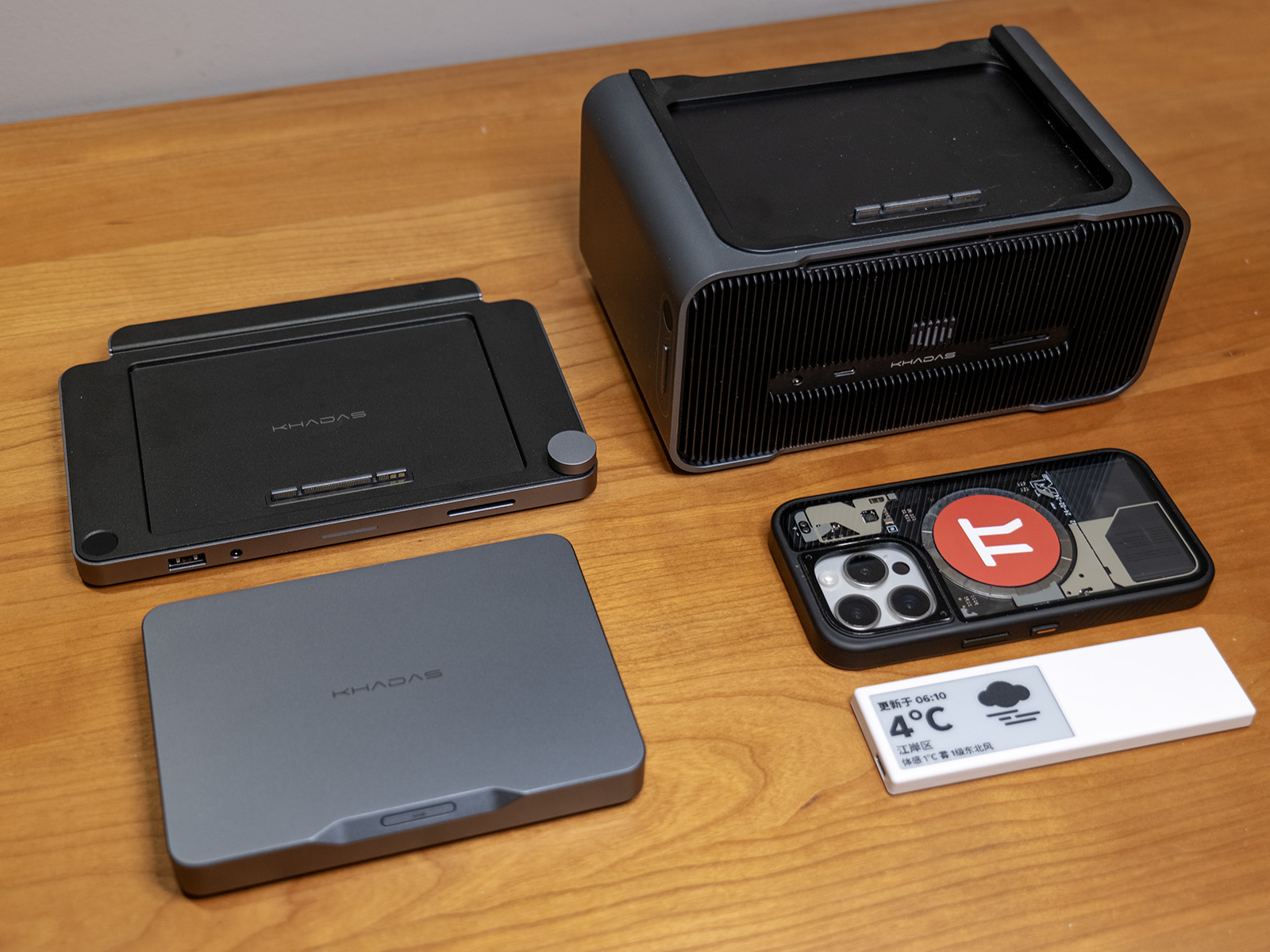
From October 2025 to January 2026, SSPAI partnered with modular mini PC pioneer Khadas to launch a hands-on trial program for Khadas’ latest product, the Mind 2. The program was conducted in two phases, with each phase selecting 10 SSPAI users to receive a complete Mind Family package—including the main unit and all expansion modules—for free trial.
We previously announced the winners of the first phase. Recently, the second phase has also concluded successfully. After evaluation, we are pleased to announce that the following two outstanding articles have received awards in the second phase of the trial program:
First Prize: “Khadas Mind 2: What Can This Palm-Sized Mini PC Actually Do?”, by so1ar, awarded with a full Mind Family set;
Excellence Award: “Perhaps This Is the Ideal Form of a ‘Cross-Scenario’ Personal Terminal: Hands-On with the Khadas Mind 2 After CES 2026,” by Sunflower No. 8, awarded with an Akko MOD007B tri-mode magnetic switch mechanical keyboard.
All other authors who submitted qualifying articles on time will receive participation awards, including a set of SSPAI merchandise and Khadas product discount coupons. We would like to thank all contributors for their active participation, and invite everyone to stay tuned for more hands-on programs featuring exciting new products from SSPAI.
Readers can browse all hands-on articles via the #Mind 2 Trial tag. The following is the Excellence Award–winning article from the second phase of the program.
Preface
Over the past few years, I’ve been trying to build a “cross-scenario” personal terminal of my own. While the term “cross-scenario” comes from Khadas, the underlying idea has been with me for a long time. What I’ve been looking for is not a hyper-productive machine that can put me into a working state anytime, anywhere, but a personal terminal that can stay on standby 24/7 and handle all of my needs across different scenarios. After years of work and life experience, I’ve come to realize that while work and life may be separated as much as possible, the person I am in life and the person I am at work are still the same. A device that integrates all of my memories, experiences, tools, and—most importantly—usage habits can truly blend into my daily life, become a part of it, and enhance both convenience and overall well-being.
To achieve this goal, I’ve experimented with solutions such as Windows To Go, cloud servers, ultrabooks paired with Thunderbolt eGPU docks, Windows handhelds with docking stations, and more. However, all of them eventually proved impractical due to various real-world pain points, making long-term use unsustainable. This lingering frustration stayed with me until I got to experience the Khadas Mind 2—a product that reignited my enthusiasm for the idea of a “cross-scenario” personal terminal.

Design and Build Quality
The Mind 2 measures 146mm × 105mm × 19mm and weighs 435g—roughly equivalent to two iPhone 15 Pro Max units (221g each), or an iPhone 15 Pro Max combined with a protective case and a 10,000mAh power bank. The device has a well-balanced weight distribution and doesn’t feel heavy in hand when used on its own. At the same time, the dense metal body provides just the right amount of heft, striking a good balance between premium feel and portability. Thanks to its thinner profile compared to other Mini PC products, it can easily fit into a waist bag or a small pocket in a laptop backpack. The combination of tactile feel, weight, and size makes you genuinely willing to carry it around at all times.
In terms of appearance, the chassis is made from CNC-machined matte dark gray anodized aluminum, with matte black cooling fins on the sides and a rear I/O panel that complement the overall understated, deep-toned color scheme. The rounded edges are comfortable to hold and don’t dig into your hand. The power button area features a chamfered design paired with an elongated button, resulting in an intuitive tactile response. Compared to other Mini PCs I’ve used over the past couple of years, the issue of sharp edges has been significantly improved, and the power button design feels more natural to use than the commonly seen flat circular buttons.
As for build quality, the metal components feel solid and robust, with no noticeable flex under pressure—unlike some metal-bodied laptops on the market that exhibit slight deformation when pressed. The plastic parts feature a finely textured matte finish that resists fingerprints and avoids the cheap plastic feel, while the edges of ventilation cutouts are smooth and free of burrs. The assembly quality is excellent, with tight material junctions, symmetrical port gaps, crisp button feedback, and well-balanced port insertion resistance. Overall, the fit and finish deliver a Mac-level experience—something that would genuinely soothe even the most detail-oriented perfectionists.

Additionally, the Mind Dock measures 187mm × 126mm × 17mm and weighs 490g, while the Mind Graphics module measures 197mm × 133mm × 100mm and weighs 2650g. Both share the same design language, materials, and build quality as the Mind 2, and are among the most satisfying electronic products I’ve used in recent years in terms of appearance and craftsmanship. Here’s an image comparing the full Mind Family setup with the more familiar BANGCASE for reference.

Performance Experience
Performance Specifications
The Khadas Mind 2 is available with two CPU configurations: Intel Ultra 5-125H and Intel Ultra 7-155H. There is also a Mind 2s variant featuring the Intel Ultra 7-255H. In terms of memory and storage, it offers options of 16GB / 32GB / 64GB LPDDR5X RAM and 512GB / 1TB / 2TB PCIe 4.0 SSDs.
There is already plenty of quantitative data on these core hardware specifications available online. What I would like to share instead is my own experience using it as a primary device: its performance is on par with a mainstream desktop PC equipped with an RTX 4060 Ti, and slightly below that of a gaming laptop powered by an RTX 5060.
When paired with the Mind Graphics module, Black Myth: Wukong (2K resolution / cinematic settings / ray tracing off / frame generation off) achieved an average frame rate of 31 FPS, while Cyberpunk 2077 (2K resolution / maximum settings / ray tracing off / frame generation off) reached an average of 65.4 FPS.
With 64GB of system memory and 16GB of VRAM, the Mind 2 also performs better than both my RTX 4060 Ti desktop and RTX 5060 gaming laptop in running local large language models. In my own tests, I observed the following inference speeds: gpt-oss:120b — 9.29 tokens/s; deepseek-r1:32b — 2.37 tokens/s; deepseek-r1:14b — 4.73 tokens/s; deepseek-r1:8b — 12.94 tokens/s, for reference.
Considering that this is a device released over a year ago, its performance aligns with my expectations. When factoring in the level of performance delivered within such a compact and quiet form factor, the overall experience actually exceeds expectations.


Game Performance Benchmark Results


Local LLM Performance Benchmark Results
Additionally, there is a 2230 M.2 SSD slot on the bottom of the device for future storage expansion. It is protected by a magnetic cover that can be removed by hand, making SSD installation quick and convenient. In the future, replacing the mounting screws with a quick-release latch would further improve the experience.
Port Configuration
In terms of standard I/O configuration, when paired with the Mind Graphics dock, the Mind 2 offers a number and specification of ports that far exceed Mini PCs of similar size and even rival larger ITX desktop systems—approaching the interface configurations of high-end desktop PCs on the market. It is fully capable of handling a wide range of application scenarios. I have compiled a table below to help compare the number and specifications of ports available across different components and combinations.
| Product / Combination | Multi-Display | Thunderbolt 4 | USB4 | USB-A | HDMI | DP | Ethernet | Audio | Card Reader | Fingerprint Reader | Power Interface |
|---|---|---|---|---|---|---|---|---|---|---|---|
| Mind 2 | 2 | 1×40Gbps | 1×40Gbps | 2×10Gbps | 1× HDMI 2.1 TMDS | – | – | – | – | – | 1× PD |
| Mind Dock | – | – | – | 3×5Gbps | 2× HDMI 2.0 | – | 1×2.5Gbps | 1×3.5mm | 1×200MB/s | 1 | 1× PD |
| Mind Graphics | – | 1×40Gbps | – | 3×10Gbps | 2× HDMI 2.1a | 1×DP1.4a | 1×2.5Gbps | 1×3.5mm | 1×200MB/s | 1 | 1× AC |
| Mind 2 + Mind Dock | 4 | 1×40Gbps | 1×40Gbps | 2×10Gbps3×5Gbps | 1× HDMI 2.1 TMDS2× HDMI 2.0 | – | 1×2.5Gbps | 1×3.5mm | 1×200MB/s | 1 | 1× PD |
| Mind 2 + Mind Graphics | 6 | 1×40Gbps | 1×40Gbps | 5×10Gbps | 1× HDMI 2.1 TMDS2× HDMI 2.1a | 1×DP1.4a | 1×2.5Gbps | 1×3.5mm | 1×200MB/s | 1 | 1× AC |
Beyond the standard interfaces, the Mind 2 series is equipped with the future-ready Mind Link interface. This connector is designed with a PCIe 5.0 ×8 bandwidth, offering a theoretical maximum throughput of 256GT/s. In the current Mind 2 + Mind Graphics setup, it can achieve a transfer rate of up to 128GT/s—far exceeding the capabilities of the commonly used Thunderbolt 4 interface, and even surpassing the not-yet-widespread Thunderbolt 5 standard. This interface is, in my view, one of the most promising aspects of the Mind ecosystem. With an upper limit of 256GT/s, it provides ample headroom not only for expanding to current RTX 50-series or future 60-series GPUs, but also for connecting additional device types down the line—or even deploying multiple Mind units in parallel for local large language model workloads.
Cross-Scenario Practical Experience
As of late January 2026—at a time when Intel’s third-generation Ultra CPUs have just been released and new machines are widely beginning to adopt RTX 50-series GPUs—the Mind 2 may not deliver top-tier performance. However, the “cross-scenario” experience it provides is no less impressive than many of this year’s newly launched products. This experience fully aligns with my expectations of what a true “cross-scenario” personal terminal should be. Below, I’ll share my impressions based on my own real-world usage scenarios.
Due to the nature of my industry and role, my workplace is not fixed. My typical computing needs include handling large datasets in Excel, performing basic image editing in Photoshop, and editing videos in CapCut. Outside of work, my primary forms of entertainment include competitive online games, AAA single-player titles, high-definition media consumption, and 3D modeling. To achieve a seamless cross-scenario experience across all these use cases, I’ve experimented with numerous solutions over time—but all of them were eventually abandoned due to unresolved pain points. Before diving into my experience with the Mind 2, I’d like to share some of these pitfalls.
| Solution | Pain Points |
|---|---|
| Running WTG on a portable SSD | Severe heat issues, unstable performance, risk of drive disconnection during long sessions;Poor hardware compatibility, frequent issues with both newer and older systems;Official support discontinued, making Windows 11 unusable through conventional means |
| Cloud PC | High long-term subscription costs;Insufficient real-world performance, heavy compression and frame drops;Extreme network dependence, complex operations nearly unusable on 4G/5G;Data and information security concerns;Low-performance hardware endpoints leading to poor user experience |
| Remote Desktop (RDP / Moonlight & Sunshine) | Extreme network dependence, complex operations nearly unusable on 4G/5G;Unstable home broadband upload speeds |
| Ultrabook + eGPU Dock | Compatibility issues, some laptops unable to recognize Thunderbolt 4 eGPU docks;Unstable operation of the dock itself;Poor product design—external power supply, bulky size, messy cabling, loud noise, and high heat output;Performance overhead from Thunderbolt 4 interface and eGPU controller |
| NAS User Folder Synchronization | Sync speeds limited by home/office bandwidth and NAS read/write performance;Highly network-dependent, with sync failures often leading to file inconsistencies |
In the past, mitigating these issues required investing a significant amount of time and effort. But once I started using the Mind 2—a device compact enough to fit into a pocket, yet powerful and spacious enough to meet most scenario requirements while allowing flexible expansion on demand—all of these pain points were effectively resolved.
Use Case 1 – Fixed Office Setup
In this scenario, my setup consists of the Mind 2 standalone unit paired with a PD-powered docking station. Peripherals needed for daily work—such as the mouse, keyboard, and printer—are all connected to the dock. With just a single cable plugged into the Mind 2, I can immediately enter my working state. Thanks to the strong performance of the Ultra 7 155H processor combined with 64GB of RAM, it easily handles everything from the Office suite to everyday image editing and video cutting tasks.
If the monitor used in this setup supports single-cable connectivity with reverse power delivery, the configuration can be simplified even further by eliminating the dock altogether. The Mind 2 can then be powered directly by the monitor, making it easy to adapt to peripherals regardless of whether they are older or newer devices.

Additionally, for users who require multi-display support in their workflow, the Mind 2 standalone unit supports dual USB-C video output. When paired with the Mind Dock, it can support up to four video outputs—sufficient for most multi-monitor setups even without using the Mind Graphics module.
Use Case 2 – Mobile Office
After the release of the Mind 2, Khadas announced plans for the Mind xPlay portable display. Although the product was only officially unveiled recently at CES 2026, I had already created a DIY setup using 3D printing to try out a similar experience in advance. I built a custom base that allows the Mind 2 to mount onto the Smartisan TNT GO portable display. Once installed, and combined with the display’s built-in camera, keyboard, and touchpad, it effectively transforms into a high-performance laptop.
The entire setup, including the keyboard, weighs around 1.6 kg. Compared to representative high-performance ultrabooks on the market that weigh around 1.48 kg, it is only about 100g heavier—and nearly identical to the ROG Flow Z13 2025 with keyboard at 1.59 kg—making it well within a practical range for portable work scenarios.
The TNT GO’s stylus supports the Microsoft MPP 2.0 protocol, allowing full compatibility with handwriting input in OneNote, the Office suite, and various design software. Personally, I often use it for simple 3D modeling, where the stylus and touchscreen interaction feel intuitive—very similar to the workflow of modeling on an iPad.


Mind 2 paired with a portable display for use as a laptop
With the detachable magnetic keyboard removed and using only the touchscreen, the combined weight of the Mind 2 and portable display drops to 1.2 kg—roughly the same as the standalone Flow Z13—allowing it to be handheld for short periods or supported against other surfaces. When held vertically, the Mind 2 sits near the palm, effectively serving as a grip for the tablet, making it even more comfortable to hold. In portrait mode, this setup significantly improves the experience of reading and annotating documents.


Mind 2 paired with a portable display for use as a tablet computer
There is currently one minor drawback to this usage method: the TNT GO itself is relatively thick, and when combined with the Mind 2, the overall thickness is noticeably greater than that of typical 2-in-1 tablets. Hopefully, the upcoming official Mind xPlay will better address this issue.
Use Case 3 – Home Entertainment
At home, I use a 4K@120Hz television, and my local network runs at 2.5Gbps. I’ve placed the Mind Dock on the TV cabinet and connected it to the network via Ethernet, paired with a wireless keyboard that includes a touchpad. Once I return home, I simply place the Mind 2 onto the Mind Dock and operate it from the sofa using the keyboard—instantly switching into relaxation mode without needing to repeatedly get up to interact with the computer.
Whether streaming online videos or playing high-quality media from a NAS, the Mind Dock’s 2.5Gbps Ethernet port ensures that buffering is virtually nonexistent. The only minor drawback during this process is that the Mind Dock’s built-in HDMI port does not support HDMI 2.1 output for 4K@120Hz HDR video. While it is sufficient for most content to fully showcase visual quality, manually switching to USB-C video output is still required for extremely high-quality playback scenarios. Hopefully, future versions of the dock will offer improved display output specifications.
Additionally, this setup includes a very convenient feature: the Mind Dock provides a 5Gbps USB-A port and a 200MB/s SD 4.0 card reader on the front panel. After returning from a shoot, I can directly insert the SD card into the dock for browsing. The USB-A port can be used to connect a card reader for accessing the Pocket 3’s TF card. Whether it’s 6K25p footage from a camera or 4K60p video from the Pocket 3, both interfaces offer sufficient bandwidth for smooth playback—saving me from having to fumble around with ports at the back each time.

Use Case 4 – Gaming and Entertainment
As the most critical component of the Mind ecosystem—Mind Graphics—I chose to connect it to the monitor in my study. The output interfaces of Mind Graphics fully meet the display requirements of my monitor at 2K@240Hz. While the desktop RTX 4060 Ti GPU may now be considered an N-1 generation product, in actual use, the online games I regularly play (such as Teamfight Tactics and Hextech ARAM) can run at maximum settings with full frame rates. For the single-player AAA titles I frequently enjoy (such as Black Myth: Wukong and Elden Ring), slightly lowering the graphical settings and enabling DLSS still allows for smooth gameplay with good visual quality. Considering that, as of December 2025, the top-ranked GPU in the Steam Hardware Survey remains the RTX 3060 released four years ago, the RTX 4060 Ti integrated into Mind Graphics—released two and a half years ago—should continue to meet mainstream gaming performance requirements for the next few years.
In addition, Mind Graphics features a dual-speaker system composed of a full-range driver and a high-frequency unit. Its audio performance is significantly better than that of built-in monitor speakers, and subjectively, I find the sound quality superior to desktop speakers in the RMB 500 price range. This allows for a satisfying audio experience while keeping desktop cable management simple.

Special Scenario 1 – Portable Entertainment
Beyond the more common usage scenarios mentioned above, I’ve also discovered a niche yet highly practical use case—pairing it with AR viewing glasses, which have gained considerable popularity over the past two years. Thanks to the compact size of the Mind 2 main unit, it can be placed steadily on a coffee table beside the sofa or on a bedside table. Powered by the Iris Xe integrated graphics, connecting AR glasses to the Mind 2 while lying on the sofa or in bed for large-screen viewing or playing strategy games offers a uniquely immersive experience. It effectively addresses both the limited onboard performance of AR glasses and the inconvenience of placing a full-sized PC in various casual environments.

Special Scenario 2 – Thunderbolt 4 eGPU Dock
Aside from being paired with the Mind 2, Mind Graphics has a hidden secondary use—as a Thunderbolt 4 eGPU dock and desktop speaker for laptops from other brands. When I first learned about this feature, I struggled to understand such a niche use case. However, after experiencing a situation during this year’s New Year holiday where the Mind 2 and Mind Graphics were split into two high-performance computers for emergency multiplayer gaming, I began to take this functionality more seriously.
While the price-performance ratio of Mind Graphics may not compare favorably to third-party Thunderbolt 4 eGPU enclosures paired with separately purchased GPUs, for users who already need the Mind 2, it effectively comes as an added-value bonus: a compact, quiet, and aesthetically pleasing desktop RTX 4060 Ti solution with a built-in 300W GaN power supply and integrated desktop speakers. Moreover, even as of 2026, products on the market that match Mind Graphics in terms of build quality, design, size, and functionality remain exceptionally rare. As such, this seemingly niche use case is worth highlighting separately for those who share similar needs.

The Future Is Approaching
After sharing so many of my personal experiences, as of the time of writing, CES 2026 has come to a close, and more detailed information about the products unveiled by various exhibitors is gradually becoming available. Among the many announcements from CES 2026, I was pleased to see long-awaited updates from Khadas.
At this year’s exhibition, Khadas introduced three new products: the Mind Pro, the world’s first modular mini PC powered by the Intel Panther Lake processor, with a volume of just 0.43L; the Mind Graphics 2, equipped with a desktop-grade RTX 5060 Ti and capable of delivering up to 180W of performance; and the Mind xPlay, which integrates a display, keyboard, touchpad, and a 48Wh battery. Building upon the existing Mind ecosystem, these new products upgrade the Mind host to Intel’s third-generation Ultra processors, further improving performance and energy efficiency; bring Mind Graphics up to the latest RTX 5060 Ti; and complete the final piece of the Mind ecosystem for mobile productivity. All three products are now available for overseas pre-order, and according to official information, will be launching in the domestic market soon.
Unlike cloud or streaming solutions—where data and computing units are separated from the user—or WTG-based approaches that separate the user and data from the computing unit, the Mind ecosystem presents what currently appears to be the most logical direction forward: integrating the user, data, and core computing unit into a seamlessly portable personal terminal, then leveraging a unified, high-bandwidth interface standard to adapt to different specialized scenarios. From Mind 1 to Mind 2, and now to the newly released Mind Pro, we can see that as the Mind ecosystem continues to expand, the Mind host itself—the core of the ecosystem—is evolving toward the ideal personal terminal. The Mind 2, born from this trajectory, is far more than just a Mini PC that is “a bit more powerful, a bit smaller, and a bit more refined in design.” It represents a significant step toward a truly “cross-scenario”—and even “all-scenario”—personal terminal.
Perhaps this is the ideal form of a “cross-scenario” personal terminal.
Leave a Reply