This article is TDS Studio’s eighteenth piece on SSPAI, and, as always, it is a full-platform first release.
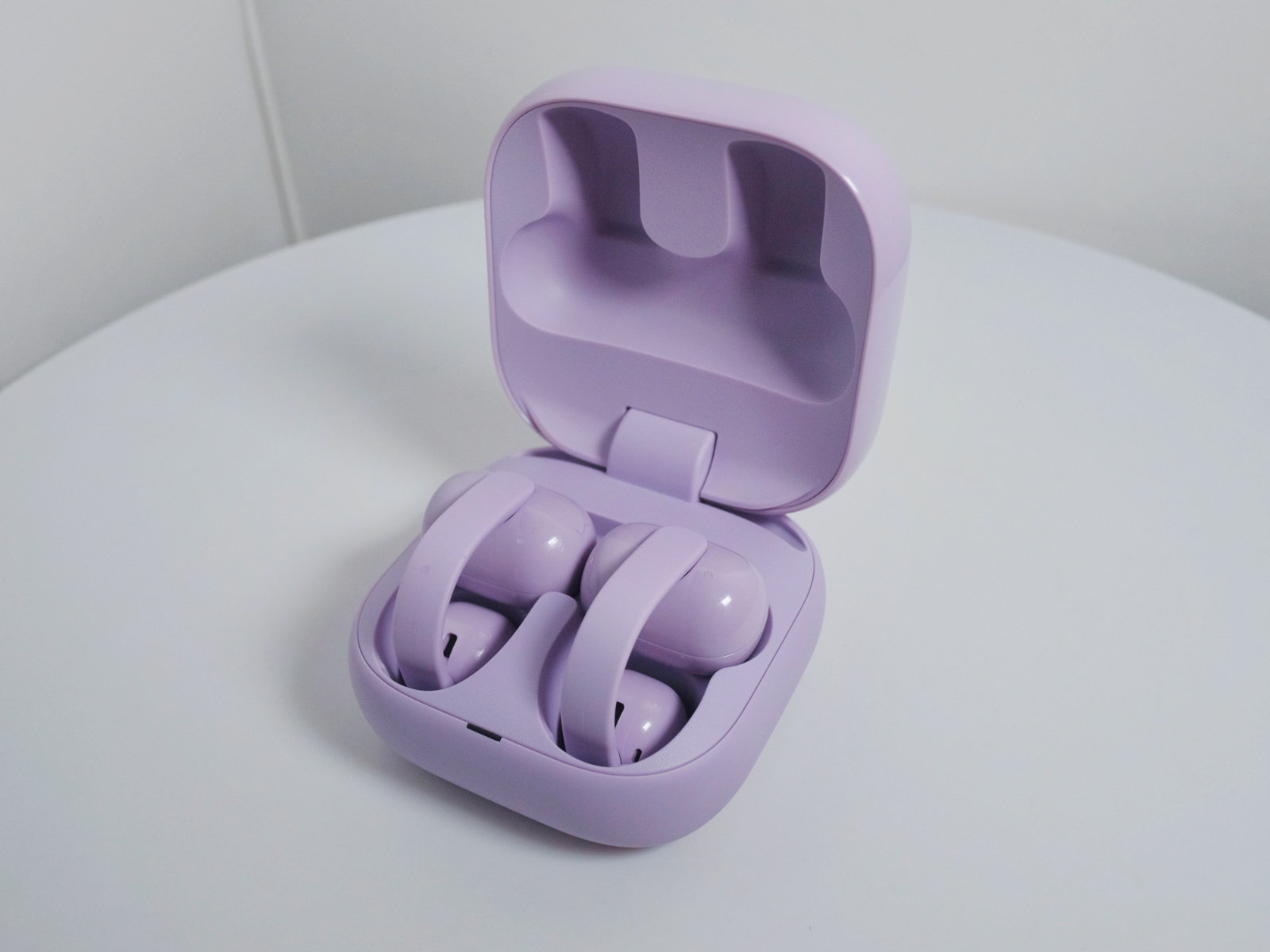
In our earlier review of the LinkBuds Open, we mentioned that in some regions it was marketed as “Sony’s ideal form of open wireless earbuds.” From my personal experience at the time, I didn’t really feel any particular inconvenience. However, it is ultimately a device that sits inside the concha. Even though its horizontal length was reduced compared to the first generation, users with smaller outer ears could still struggle to achieve a completely stable fit. Perhaps the LinkBuds Clip was created to address this need? With that in mind, we went ahead and picked up the purple version at launch. The initial out-of-the-box impression was surprisingly striking, but it was only after a period of rigorous comparison that we are now ready to share a detailed hands-on experience.
Packaging & Accessories | Package & Accessories

The LinkBuds Clip uses the same eco-friendly packaging as the second-generation LinkBuds products, sealed with a one-time adhesive strip. The design language is extremely restrained and minimal. There is no charging cable included; the only accessory is a pair of “Flex Cushions.” This is the main form-factor difference between the LinkBuds Clip and other mainstream clip-on earbuds. Essentially, they are soft silicone pads that slip over the C-bridge, designed to accommodate different thicknesses of the ear’s outer edge. We’ll focus on this more when discussing fit and wearing comfort.
Design, Fit & Acoustic Structure | Design, Fit & Acoustic Structure
The LinkBuds Clip comes in four default color options: Midnight Black, Bellflower Purple, Oxygen Green, and Oat White. Since we’ve already seen plenty of the black, white, and green combinations across previous LinkBuds models, we naturally chose the purple version—previously sold internationally as a co-branded colorway and now introduced as a standard option. Compared with the purple we’ve seen on the LinkBuds S and Fit, this one appears noticeably lighter.

The charging case shares the same overall form as the second-generation LinkBuds products, resembling a square macaron fresh out of the oven. Its overall volume is slightly larger than those two models, which also means silicone protective cases are not interchangeable.

The lid features a glossy finish and, this time, comes in a solid color without any marble-like decorative patterns. One-handed opening is fairly easy, with a comfortable hinge feel, though the magnetic hold securing the earbuds inside the case isn’t particularly strong.

The earbuds themselves adopt the familiar clip-on form factor. The C-bridge is flattened, with flexibility that sits between the AeroClip and the Bose Ultra Open. It feels more pre-shaped than the OpenDots One, and the clamping force is lighter than ambie’s product line. In terms of vertical resistance to twisting, performance is quite good. We compared several clip-on earbuds in the same price range, and the closest match in C-bridge elasticity would be the FreeClip series. The rear module is capsule-shaped, while the front acoustic chamber is relatively compact. Compared with the OpenDots One, the front chamber is similar in size, and smaller than the flatter chamber design of the AeroClip, though the sound port opening itself is relatively large.

In actual use, even without installing the “Flex Cushions,” the fit felt quite stable for me. The sense of enclosure from the C-bridge isn’t as strong as on the Bose Ultra Open or OpenDots One, but there was no noticeable up-and-down movement during running or jumping, and normal walking didn’t require frequent readjustment. We also asked a friend with thinner ear cartilage to try them; his feedback was that the pre-shaped C-bridge created more psychological instability compared to the stronger wrap provided by more flexible C-bridges.

That’s where the “Flex Cushions” come into play. They essentially add a buffer layer between the C-bridge and the edge of the ear. For me personally, they increased the sense of the earbuds’ presence, but for users with thinner ear cartilage, stability improved noticeably. While this accessory can technically be fitted to other clip-on earbuds, Sony does not currently sell it separately. Much like the ear supports on the LinkBuds Open, it would be better if more sets were included in the box.

Each earbud weighs 6.4 grams, with most of the weight concentrated in the rear module. The earbuds are rated IPX4 for splash resistance, which is adequate for an OWS product—fine for light rain or mild exercise.
Control & App | Control & APP
Without wide-area touch controls, the LinkBuds Clip uses a more “traditional” interaction method. As shown in the diagram, the tap zones are fairly specific. During initial use, it can take some getting used to—hence the need for a visual guide. That said, recognition response is quite fast, and you can adjust sensitivity in the app. The default control logic is as follows: double-tap on the left to switch modes; double-tap on the right for playback control; triple-tap on the right to skip tracks; four taps or more on either side are mapped to volume adjustment. All of these can be customized.

There is no automatic left/right ear detection or wear detection, which really should be included at this price point. Controls are accompanied by voice prompts. The default prompt volume is acceptable, though it can feel a bit quiet in very noisy environments. Fortunately, you can adjust prompt volume in the app and choose from eight different prompt languages.

Through the Sound Connect app, you can still access familiar features such as the equalizer, 360 Reality Audio measurement, control customization, and firmware updates.
There is no head-motion recognition, but Auto Play is retained. This feature automatically starts music playback based on different activity scenarios. Enabling it prompts you to pair an additional LE Bluetooth device. When you start running, it will automatically play a preset playlist. The first time you wear the earbuds each day, they announce the date, and you can also enable hourly time announcements. On the China mainland version, Quick Access continues to support services such as NetEase Cloud Music, Kugou, QQ Music, and Tencent Xiaowei. Available integrations vary by market.
Call | Call
Call performance is, in my personal experience over this period of use, where the LinkBuds Clip’s advantages are most clearly felt. Each side is equipped with two microphones and a bone-conduction pickup unit—making it one of the few clip-on earbuds that genuinely invests in call audio hardware.

We conducted call tests over carrier networks, and real-world stability proved to be very solid, placing it in the top tier among clip-on earbuds. Voice pickup is only slightly muffled, volume is sufficient, and voice isolation in high-noise environments is quite accurate (bone conduction is clearly doing its job). During calls, wind noise from the front and sides has relatively little impact, while wind coming from behind can reduce clarity. Overall, the LinkBuds Clip shows a clear advantage in default call loudness, clarity, and call noise reduction within the clip-on category.
Connection & Battery | Connection & Battery
It does not support high-bitrate codecs, so as usual we tested performance under AAC. In our familiar signal test environment, with AAC connected to the standard test device Xperia 5 III, near-field stuttering and packet loss were minimal, regardless of whether WLAN was turned on or off. At a distance of 7 meters with a load-bearing wall in between, there was no noticeable increase in stutter. Beyond 7 meters, occasional packet loss began to appear, and at around 9 meters the connection interruptions became clearly disruptive to the experience.
In terms of latency, there is no dedicated low-latency mode. Under default conditions, using AAC as the preferred codec when connected to the Xperia 5 III for streaming and local video playback, latency is roughly equivalent to slightly more than half a syllable at normal speaking speed, which is not particularly impressive.
It does support dual-device connections as well as features such as Windows Swift Pair.

For battery life, the official rating is 9 hours of continuous playback on the earbuds alone, and up to 37 hours in total with the charging case, which is relatively good among clip-on earbuds. Based on our standard testing procedure, using AAC with the Xperia 5 III, Auto Play disabled, default sound mode, DSEE set to Auto, and continuous playback at 50% volume (Apple Music Lossless streams and podcast content from Xiaoyuzhou), we recorded an earbud-only runtime of 7 hours and 49 minutes, measured from a full charge.
Charging performance was also tested. The earbuds charge fairly steadily at around 0.9W, which is on the lower end for TWS earbuds, though PD compatibility is not an issue. They also support quick charging, providing approximately 1 hour of playback from a 3-minute charge.
Driver, Sound Modes, Leak Control & Codec | Driver, Sound Modes, Leak Control & Codec
The LinkBuds Clip is equipped with a 10mm dynamic driver, with no further detailed specifications disclosed by Sony. Supported codecs are SBC and AAC, and it continues to support DSEE as well as Sony’s standard 360 Reality Audio spatial audio.

Here we’ll spend a bit more time on sound-related settings. The LinkBuds Clip is described as supporting the previously seen background sound effect modes, but these appear to require a future OTA update, as they are not present in the early firmware we tested. For clip-on earbuds, default loudness and sound leakage control are especially important, and Sony’s tuning this time clearly focuses on these aspects.
The two additional listening modes are “Voice Enhancement” and “Leakage Suppression.” The former can be understood as adding extra gain to the mid- and high-frequency range, making vocal information more prominent in noisy environments. The latter attenuates mid- and high-frequencies, resulting in lower overall perceived sound pressure, making it more suitable for environments like elevators or tightly packed study rooms. In our view, both modes are better suited for specific scenarios rather than everyday music listening—fine for podcasts or short videos, but not ideal for regular music. It’s worth noting that these two modes cannot be used simultaneously with the equalizer or DSEE.

For comparison, we fixed system volume at 50% and wore the earbuds normally. Personally, in Standard mode at this volume, most tracks mastered to current remastering standards are clear in a quiet indoor environment, though some listeners with hearing similar to mine may find the fullness slightly lacking. At around 60%, volume becomes more than sufficient. Since different systems, devices, and hearing conditions can affect judgment, we consistently used the Xperia 5 III—an often-featured device in our reviews—for comparison.
In Standard mode at 50% volume, leakage is only faintly perceptible beyond 15 cm, and almost imperceptible beyond 25 cm. In Voice Enhancement mode, mid- and high-frequency leakage is more noticeable, with slight perception still present around 25 cm, and only becoming reasonably controlled at around 30 cm. In Leakage Suppression mode, leakage is almost imperceptible beyond 10 cm, and even at very close distances it’s difficult to clearly make out content.
In a horizontal comparison with similarly positioned products, based on a not-particularly-rigorous unified measurement approach and subjective volume perception, leakage control from best to worst roughly ranks as follows:
LinkBuds Clip (Leakage Suppression mode) >> OpenDots One ≈ FreeClip > LinkBuds Clip (Standard mode) ≈ AeroClip > Bose Ultra Open Earbuds > LinkBuds Clip (Voice Enhancement mode) > ambie TW-01.
The equalizer offers ±6 dB adjustment across ten frequency bands. Preset EQ modes remain the familiar options, and the “Find Your Equalizer” feature is also supported. We’ll provide a recommended EQ setting to help reduce its sense of sharpness.

Sound Description | Sound Description
Based on default tuning, AAC codec, Standard mode, DSEE set to Auto.
The low end is moderate in quantity, perhaps even slightly restrained, with limited thickness and fullness. Elasticity is moderate, and sub-bass extension is relatively good among clip-on earbuds. Decay is a touch on the faster side, retaining a light sense of resonance. There isn’t much atmospheric bloom or density. Bass presence on the LinkBuds Clip is clearly not emphasized; in Standard mode it can feel similar to some semi-in-ear bass presentations, yet it remains quite a distance from the compensated low-end energy of something like the AirPods 4. Bass solidity also trails slightly behind the FreeClip series and OpenDots One, though within the clip-on category there are only a handful of models that deliver noticeably fuller bass anyway. Instruments with fundamentals in the lower-mid range do not exhibit obvious forwardness issues.
In the midrange, vocals are not positioned too close, with mouth shape well controlled and a noticeable emphasis on refinement. The tuning slightly favors line definition over texture, with no strong bias toward either male or female vocals, making it suitable for listeners who don’t seek especially thick vocal bodies. A mild sense of grain is retained, while overall smoothness is fairly average. Timbre rendering includes light embellishment—primarily to enhance pleasantness rather than introduce obvious coloration or distortion. Throat tones sit slightly higher, with a greater proportion of breathiness. Sibilance is clearly perceptible—arguably the most pronounced among Sony headphones in recent years. Overall vocal transparency is high, with a slight brightening.

For instruments, most are rendered with an emphasis on contour. Among string instruments, violins, violas, and guitars lack notable thickness, but plucked and bowed details are relatively abundant and stand out within the clip-on category. Cellos are not especially full-bodied, though clarity is quite good, with a smaller spatial footprint. In tracks that make heavier use of distortion effects, electric guitars exhibit an energy presence that many clip-on earbuds previously lacked. Brass instruments deliver a moderate sense of power; instruments like trumpets have sufficient brightness. Woodwinds offer ample airiness with a certain degree of energy. Harmonic overtones are comparatively rich and prominent for this category. Among percussion, kick drums lack strong presence, snares are clean and quick, cymbals are bright with a mild edge, and metallic timbre is kept under control.
Overall treble brightness is relatively high, with two noticeable peaks. This makes some tracks sound more stimulating in the high frequencies than most Sony Bluetooth headphones in the past, though not to an extent that would be intolerable for most listeners. Perception also varies depending on fit. We’ll provide EQ suggestions later. Ultra-high-frequency extension is quite good for clip-on earbuds; although AAC imposes a high-frequency roll-off, it is neither too early nor too steep. Combined with the OWS form factor, this reduces the sense of truncation.

Soundstage performance is quite good, with a sense of scale and edge diffusion. It’s hard to say the horizontal and vertical dimensions are perfectly equal; paired with a not particularly pronounced sense of height, the LinkBuds Clip presents a slightly oblate, spheroidal space. Separation between vocals and instruments is acceptable, and overall cohesion is decent. Resolution is respectable among higher-priced clip-on earbuds—clearly an improvement over the ambie series—but the richness of information (especially in the low end) still lags slightly behind the FreeClip 2 and OpenDots One. That said, the sense of “resolution” itself stands out. Dynamics are moderate, with fairly good transient response.
Overall Impression | Overall Impression

When I first tried the LinkBuds Clip, as a long-time EX1000 user, I immediately sensed that wide, bright character in the new tuning. The brilliance in the upper mids and highs made it quite attention-grabbing, and after years of listening to Sony’s warmer, thicker low-mid–focused tunings, it was genuinely exciting. However, after a more comprehensive evaluation, we feel there are still areas that could be better. As a product in the thousand-yuan range, the lack of left/right ear detection and wear detection is disappointing. Some may also find the sound a bit aggressive, and there’s no high-bitrate codec support—criticisms you may have already seen echoed in recent reviews across various media outlets. That said, it also addresses several real pain points in my view: unexpectedly strong call quality for a clip-on design, leakage control in Leakage Suppression mode that surpasses many semi-in-ear models, and a new structural approach accommodating different ear cartilage thicknesses. Ultimately, we’ve decided to give the LinkBuds Clip a KT MARK rating of IV. It’s not fully mature yet, and we hope to see the background sound features restored as spring arrives. We’re also looking forward to what new breakthroughs the upcoming WF-1000XM6 may bring.
KT MARK for the model discussed, under the market context at the time:
SONY LinkBuds Clip: IV (Recommend)

For details on the KT MARK rating system and the “non-interference principle” regarding interests, please search for “TDS Studio Rating Standards & Content Notes V202502” via major search engines.
KingTsui, TDS Studio.
Feb 2026
It’s a TDS production.
Some screenshots are provided by Sony; all other content is entirely original. Unauthorized reproduction, imitation of structure, or plagiarism is prohibited. All rights reserved.
Leave a Reply