Author: kiwi

  • TDS REVIEW | Hands-On With the Shokz OpenDots 2 and OpenDots Air Clip-On Open-Ear True Wireless Earbuds

    TDS REVIEW | Hands-On With the Shokz OpenDots 2 and OpenDots Air Clip-On Open-Ear True Wireless Earbuds

    This is the 23rd article from TDS Studio on SSPAI, and as always, it is being published exclusively here first.

    For a long time, we have regarded the Shokz OpenDots ONE as one of the best clip-on earbuds available. It offers clear advantages in both user experience and sound quality, to the point that even today we still consider it a highly worthwhile purchase.

    Recently, Shokz unveiled its second generation of clip-on earbuds. One model serves as the direct successor to the OpenDots ONE and is called the OpenDots 2. The other follows a strategy similar to what Shokz previously did with the OpenFit lineup: the OpenDots Air comes in at a lower price point while theoretically retaining most of the performance of its more premium sibling. We purchased both at launch and put them through extensive side-by-side testing.

    Since the review unit of the original OpenDots ONE had long since been returned to Shokz after our initial review, this comparison is based on two self-purchased new models and an OpenDots ONE kindly loaned to us by a reader. Special thanks to The Boy in the Rye for lending us the unit. As you’ll discover after reading this review, several of the first-generation model’s strengths have held up remarkably well.

    Package & Accessories|Package & Accessories

    The OpenDots 2 packaging largely follows the same approach as the first generation, featuring environmentally friendly paper packaging with generously rounded corners. The OpenDots Air, on the other hand, comes in a more conventional octagonal cardboard box. Neither package is particularly large, and both use disposable seals. The OpenDots 2 also includes a USB-C to USB-C charging cable, while the Air comes with no accessories at all (which is certainly one way to stay “lightweight”).

    Design, Fit & Acoustic Structure|Design, Fit & Acoustic Structure

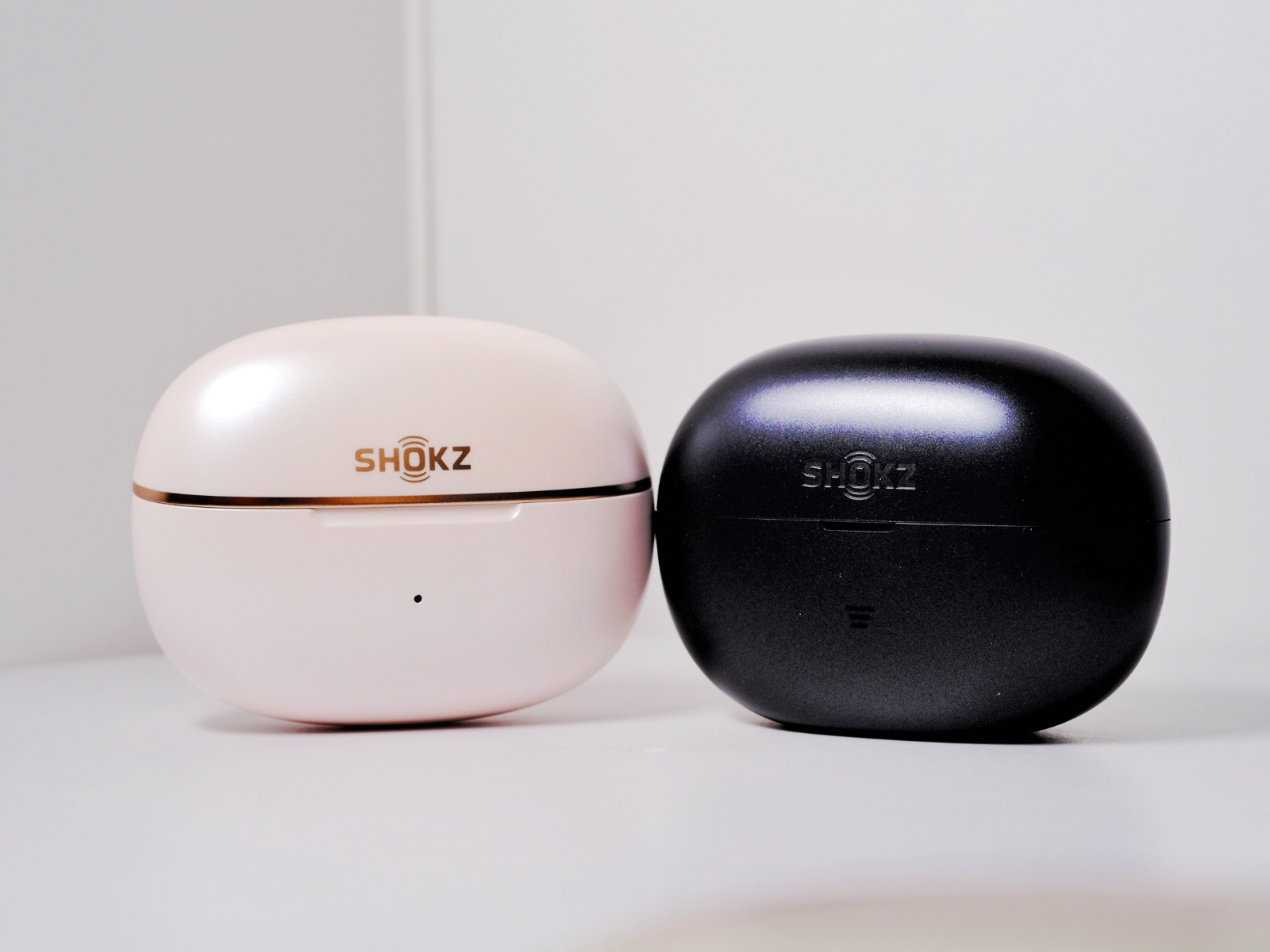
    The overall design of the OpenDots 2 closely follows that of its predecessor. In fact, it is difficult to spot any tooling changes with the naked eye. At launch, it is available in three colors. The unit we are showcasing is the “White Gold Kintsugi” version, which adds decorative accents compared to the previous generation’s white-and-gold finish. Ironically, these details make it feel a little less minimalist.

    According to Shokz, the White Gold Kintsugi colorway draws inspiration from the Japanese art of kintsugi, where cracks are repaired with gold powder. To be honest, however, the additional detailing slightly reduces the seamless visual appearance. The other options include “Black Meteor” and the subtly blue-tinted “Silver Cedar.” The OpenDots Air comes in “Midnight Black” and “Dawn Purple.” Based on what we observed in retail stores and our own subjective impressions, our color recommendations, from most to least appealing, are:

    • OpenDots 2 Silver Cedar
    • OpenDots 2 Black Meteor
    • OpenDots 2 White Gold Kintsugi
    • OpenDots Air Dawn Purple
    • OpenDots Air Midnight Black

    Midnight Black simply lacks a premium look. In fact, it is difficult to distinguish it visually from many budget earbuds in the entry-level segment. It is also more prone to attracting fingerprints and grease, making it harder to keep clean.

    The charging case of the OpenDots 2 is almost identical to that of the first generation. The White Gold Kintsugi version adds a champagne-gold trim around the case, while retaining the same shape and button layout. The surface finish has been changed to a pearl-like texture that feels somewhat reminiscent of a cosmetic product. The tactile feel has improved, but the smoother finish also makes one-handed opening and closing slightly more slippery. The hinge has been adjusted as well, resulting in a different lid-opening feel.

    The Air’s charging case is noticeably larger. The pairing button has been replaced with a touch-sensitive control located on the front, and the bottom has been flattened to allow it to sit more securely on a desk. The Air’s more budget-oriented positioning is also reflected in its build quality. At least on our unit, shaking the case makes it obvious that the earbuds are not held quite as securely by the magnets, loose enough that you can hear them move around inside. The OpenDots 2, by contrast, maintains the same solid build quality as the first generation, which remains commendable.

    The overall earbud design of the OpenDots 2 is also very similar to that of its predecessor. The rear module retains its capsule-shaped form, while the front module remains a relatively compact sphere. According to Shokz, the Dynamic Titanium Arc has been upgraded with improved flexibility. In our direct comparison, the rebound force does indeed feel slightly reduced, although this does not translate into any major difference during actual wear. The first-generation fit was already excellent to begin with. Each earbud weighs 6.4g.

    In terms of fit, the OpenDots 2 remains consistent with the first generation, offering moderate clamping force without creating excessive pressure at the front of the ear. Compared with Bose’s flexible C-Bridge design, Shokz’s Dynamic Titanium Arc offers better resistance to twisting. The wide titanium strip controls the relative movement between the front and rear modules, making accidental twisting and dislodging less likely. The “uneven silicone spacing” structure also contributes meaningfully to comfort. Areas more prone to pressure are cushioned with thicker silicone, distributing force more effectively across the complex contours of the ear compared with traditional hard plastic housings. In our opinion, both the first- and second-generation OpenDots remain among the most comfortable and secure clip-on earbuds currently available.

    The OpenDots Air adopts a different structural approach. Its titanium strip is slightly thicker and better suited to users with thicker ear contours. As a result, it is also more elastic, with noticeably stronger rebound force compared with the flagship series. Each earbud weighs 6.3g. The rear module resembles the more common clip-on earbud designs seen on the market. While it still uses soft silicone, it does not emphasize the uneven-thickness silicone structure found on the OpenDots 2. In our experience, the Air actually provides slightly better rear-ear contact, and its slightly smaller front chamber makes it more accommodating for users with smaller conchas.

    Overall, both products offer a very good wearing experience and are easy to position correctly on the first try. The OpenDots 2 is better suited to users with smaller ears, while the Air is more comfortable for those with thicker ear contours. Both provide a high level of stability.

    Compared with the first generation, the OpenDots 2 upgrades its dust and water resistance to IP57, while the charging case now carries an IP54 rating. This allows it to handle more demanding everyday environments. That said, as an open-ear wearable stereo (OWS) product, we still would not recommend using it in extremely humid conditions or underwater. The Air is rated IP55 for dust and splash resistance, which is more than sufficient for light rain and daily outdoor use.

    Controls & App|Control & APP

    Both the OpenDots 2 and OpenDots Air rely on pinching the upper and lower parts of the rear module, as well as tapping gestures, for controls. On the OpenDots 2, the default configuration assigns a single pinch or double tap to playback control, double actions for track switching, and long presses for volume adjustment. On the Air, a single pinch adjusts volume, a double pinch changes tracks, and a double tap controls playback. The control logic is not entirely consistent between the two models, and we would prefer to see greater standardization. Overall, however, the controls are reasonably responsive, and sensitivity can be adjusted through the app.

    The voice prompt volume is fairly average, though it can be adjusted independently. Both earbuds feature an ambidextrous design that eliminates the need to distinguish between left and right units. Internal sensors automatically detect wearing orientation in real time. Both models also include wear-detection sensors, which proved highly reliable during testing. However, after removing the earbuds, there is a roughly two-second delay before playback actually pauses.

    The Shokz app remains intuitive and easy to navigate, with clearly organized feature categories. Through the app, users can perform firmware updates, switch EQ presets, enable multipoint connectivity, customize controls, and locate misplaced earbuds. At present, the Find My Earbuds feature still relies solely on emitting a sound from the earbuds rather than providing actual location tracking. In noisy environments, this functionality is only marginally useful. A new drop-alert feature has also been added.

    Call Quality|Call

    The OpenDots 2 is equipped with a bone-conduction microphone working alongside traditional microphones, creating what Shokz calls a “Bone-Air Triple Microphone” system (a rather unusual name, admittedly). The Air continues to use a dual-microphone setup. Both models incorporate AI-powered noise reduction.

    We conducted our call-quality testing over a standard cellular network. The original OpenDots ONE still delivers very solid call performance and remains among the best in the clip-on earbud category. However, possibly due to early firmware optimization, the OpenDots 2’s voice pickup sounds slightly less clear than its predecessor, although overall loudness remains more than sufficient. In high-noise environments, however, the OpenDots 2 shows noticeable improvement in isolating the speaker’s voice, and wind noise during calls is kept to a minimal level.

    The OpenDots Air, by comparison, falls noticeably behind both flagship-series models in terms of pickup volume and clarity. Wind noise also has a much more pronounced impact on recording quality and call performance.

    Connection & Battery|Connection & Battery

    Since neither model supports high-bitrate audio codecs, we conducted our testing as usual using AAC.

    Moving to our familiar signal-testing environment, both earbuds performed well when connected via AAC to our standard test device, the iPhone 14. Whether WLAN was enabled or disabled, both models experienced very few instances of stuttering or packet loss at close range. The OpenDots 2 showed no significant increase in connection instability at a distance of 7.5 meters with a load-bearing wall in between. Beyond 8 meters, however, the listening experience began to degrade noticeably. The OpenDots Air started to experience occasional packet loss at around 6.5 meters with a load-bearing wall separating the device and earbuds, and performance became noticeably affected beyond 7 meters1.

    The OpenDots 2 delivers impressively strong wireless performance, placing it comfortably among the top tier of AAC-based TWS and OWS earbuds. The Air, by contrast, encounters more difficulties in complex signal environments and during longer-range transmission. That said, after updating to the second firmware version, its performance improved somewhat, with packet loss only becoming noticeable beyond 7 meters through a wall.

    As for latency, neither model includes a dedicated low-latency mode. Under default settings, using the AAC codec and prioritizing signal stability while connected to an Xperia 5 III, the OpenDots 2 exhibited roughly half a spoken syllable of delay during both streaming and locally stored video playback. This is fairly average performance. Surprisingly, the Air managed to perform even better in this regard, which was not something we expected.

    Both models also support multipoint connectivity with two devices simultaneously.

    When it comes to battery life, Shokz officially rates the OpenDots 2 for up to 10 hours of continuous playback from the earbuds alone and up to 40 hours with the charging case. The Air is rated for 9 hours and 36 hours respectively.

    Driver, Sound Modes, Leak Control & Codec|Driver, Sound Modes, Leak Control & Codec

    Both the OpenDots 2 and OpenDots Air are equipped with dual opposing 11.8mm dynamic drivers. They feature Bassphere 2.0 low-frequency aggregation technology (the Air uses the first-generation version) along with OpenBass 2.0+ dynamic compensation. Supported codecs are limited to SBC and AAC. Both models include four built-in EQ presets, including a Privacy Protection mode. This mode reduces overall volume while also trimming some low-frequency and ultra-high-frequency energy. The effect is noticeably less aggressive than Sony’s implementation. Custom EQ is also available, offering adjustment across five frequency bands within a ±5dB range, which is fairly standard.

    For OWS earbuds, actual sound pressure levels and leakage control are particularly important, so we compared both models using an iPhone 14 in standard listening mode. System volume was set to 50%, with the earbuds worn normally. Personally, at this volume level, most modern remastered tracks can be heard clearly in a quiet indoor environment, though listeners with hearing similar to mine may find the sound slightly lacking in fullness. At around 70% volume, however, both become more than sufficient for general listening. As always, different devices, operating systems, and hearing conditions can significantly affect perception, so keep that in mind. In terms of sound pressure, the two models perform similarly and remain broadly comparable to the original OpenDots ONE. The Air’s brighter upper-mid and treble tuning means that outdoors it can sometimes feel less full-bodied than the OpenDots 2 even when the volume is increased.

    When it comes to sound leakage, the OpenDots ONE in standard mode at 50% volume produces only faintly perceptible leakage beyond 15cm, becoming virtually inaudible beyond 20cm. In Privacy Protection mode, leakage is already almost imperceptible beyond 10cm, and even sitting very close makes it difficult to make out specific content. The OpenDots 2 improves upon the ONE in this area. At 50% volume in standard mode, leakage is only faintly noticeable beyond 10cm, and in Privacy Protection mode it becomes virtually undetectable beyond 5cm. The Air performs similarly to the ONE overall, though its Privacy Protection mode is more effective and approaches the OpenDots 2’s level.

    Simply put, both models remain among the very best clip-on earbuds currently available when it comes to leakage control.

    A few additional words about Dolby Audio support on the OpenDots 2. Compared with the Dolby implementation on the OpenDots ONE, low-frequency quality is noticeably improved, avoiding the occasional distortion that sometimes felt almost like a rendering bug on the previous model. During spatial audio testing with an iPhone 14, the compression-like sensation of rear-channel information is also reduced. At present, Dolby Audio on the OpenDots 2 is clearly moving in the right direction for Atmos playback. It still falls short of Apple’s own ecosystem products, but it has finally reached a point where it is genuinely worth enabling and experimenting with—a significant improvement.

    OpenDots 2: Subjective Sound Impressions|Sound Description

    Tested using AAC connected to an iPhone 14 with the default tuning.

    The bass carries slightly more quantity than the OpenDots ONE while maintaining good control over thickness and fullness. It remains reasonably punchy, with respectable extension for a clip-on design. Decay speed is moderate, preserving a small amount of reverberation. Atmospheric bloom remains relatively restrained, though there is slightly more richness than on the ONE.

    The OpenDots 2’s bass is noticeably more prominent than the ONE’s, with greater weight and body. Low frequencies are easier to perceive in noisy environments, and impact feels somewhat stronger. However, overall detail retrieval is not dramatically improved; technical performance remains broadly comparable. Instruments whose fundamentals sit in the lower-midrange gain a slight sense of forwardness. The OpenDots Air, by contrast, exhibits lower bass cohesion than the OpenDots 2, transitioning more gently with a slightly diffuse imaging presentation.

    In the midrange, vocals are positioned relatively close to the listener, with slightly larger imaging. Resolution remains reasonably high. Vocal texture takes precedence over edge definition, giving voices a pleasing sense of body. Compared with the ONE, vocal outlines are somewhat more pronounced, though not to the extent of becoming an analytical or line-focused presentation. There is no obvious bias toward either male or female vocals, though lighter vocal styles tend to work best. Grain has been smoothed out effectively, resulting in good overall refinement. The silver model presents a generally neutral tonality with a slight touch of warmth, avoiding excessive coloration or artificially enhanced excitement. Throat resonance sits relatively high, while breathiness is slightly more prominent than on the ONE. Sibilance and mouth sounds are both controlled well, contributing to a smooth and natural presentation. Overall transparency in the vocal range is strong, without obvious artificial brightness.

    Instrument reproduction strikes a balance between texture and definition. Among string instruments, violins, violas, and guitars sound more substantial than on the ONE, though they still stop short of sounding particularly thick. Details of bowing and plucking remain relatively abundant for a clip-on design. Cellos gain a more convincing sense of body compared with the ONE, though their scale within the soundstage remains somewhat compact. Brass instruments deliver respectable presence, while brighter instruments such as trumpets retain an appropriate sense of sparkle. Woodwinds sound natural, with slightly more air than on the ONE. Harmonic overtones are fairly natural, though not especially rich. Among percussion instruments, kick drums lack a strong sense of dominance, while snares decay slightly quickly. Cymbals exhibit moderate brightness without becoming harsh or excessively metallic.

    Treble brightness overall is moderate. There is enough energy to avoid sounding dull, but it never feels excessive or congested. Smoothness remains good. Ultra-high-frequency extension and information retrieval are both improved over the ONE, though roll-off still occurs somewhat earlier than ideal. Fortunately, when paired with an iPhone, the attenuation does not feel overly premature.

    The soundstage is reasonably spacious, with respectable width and depth. While not perfectly symmetrical, the relaxed and diffuse presentation around the edges contributes positively to the sense of space. Combined with an average but adequate perception of height, the OpenDots 2 creates a slightly flattened spherical soundstage. Separation between vocals and instruments is solid, and overall coherence is maintained. Resolution is quite good for a clip-on earbud, with a modest improvement in information retrieval compared with the previous generation. The improvement is not transformative, however. In terms of technical performance, it roughly matches the level of two generations of Huawei FreeClip operating without high-bitrate codecs, which is appropriate for the price range. The sense of analytical detail is present but restrained. Dynamic performance shows some improvement, while transient response remains moderate.

    OpenDots Air: Subjective Sound Impressions|Sound Description

    Tested using AAC connected to an iPhone 14 with the default tuning.

    The Air has a noticeably more colored sound signature than both the OpenDots 2 and the OpenDots ONE. Bass quantity is moderate, but its thickness and fullness are not as substantial as the OpenDots 2. Elasticity is decent, though extension into the sub-bass is less impressive. Decay speed is moderate, with very little lingering reverberation. Both the atmospheric bloom and overall richness are relatively restrained, resulting in a presentation that lacks a sense of solidity. To borrow a rather audiophile-style expression, it occasionally sounds a bit like “tapping on sheet metal.” At similar volume levels, the Air’s bass sounds thinner than both the ONE and the OpenDots 2, with more energy shifted toward the upper-midrange. Instruments whose fundamentals reside in the lower registers do not exhibit any obvious forwardness.

    In the midrange, vocals maintain a certain distance from the listener, with imaging slightly smaller than average. Resolution remains fairly respectable. Neither vocal texture nor edge definition is emphasized—both are present but not particularly strong. Vocal outlines are somewhat highlighted, though not especially focused, while body and thickness are noticeably lighter than on the ONE and OpenDots 2. There is no obvious preference for either male or female vocals, but slightly fuller vocal timbres tend to sound thinner and brighter than intended. Grain is minimal, while smoothness is merely average, largely because the upper registers receive greater emphasis. As a result, the overall tonality feels more energetic and youthful. Throat resonance sits relatively high, and breathiness is even more prominent than on the OpenDots 2. Mouth sounds are more noticeable than on the OpenDots 2, and sibilance is slightly more pronounced as well. Transparency in the vocal range is somewhat higher, accompanied by a clearly elevated sense of brightness.

    When it comes to instruments, most exhibit slightly stronger edge definition. Among string instruments, violins, guitars, and violas do not carry much body, though their energy is somewhat enhanced. While the amount of plucking and bowing detail is not as rich as on the OpenDots 2, those details are more prominently presented. Cellos have relatively vague imaging and occupy only a modest presence within the soundstage. Brass instruments do not deliver a particularly grand sense of scale, though brighter instruments such as trumpets possess plenty of sparkle. Woodwinds exhibit enhanced airiness at the expense of some naturalness. Instrument overtones are also somewhat emphasized. For percussion, kick drums remain relatively understated, while snares decay slightly quickly. Cymbals are brighter, carrying a certain degree of sharpness and metallic character.

    Treble overall has more body than both the ONE and the OpenDots 2. Energy levels are quite prominent, though without excessive peaks. Ultra-high-frequency extension is average and lacks the smoother, more natural roll-off exhibited by the OpenDots 2.

    Soundstage performance remains relatively spacious. Width is more expansive than depth, while the boundaries are not overly emphasized. Combined with an average sense of height, the OpenDots Air presents a soundstage that resembles a flattened spindle shape. Separation between vocals and instruments is respectable, and overall coherence is acceptable. Resolution falls slightly behind both generations of the flagship series, though the sensation of “detail retrieval” is more obviously highlighted. Dynamic performance is average, while transient response remains satisfactory.

    Overall Impression|Overall Impression

    Overall, the OpenDots 2 does improve upon the original Shokz clip-on earbuds in several areas, including better Dolby Audio implementation, superior bass quality, and even stronger sound leakage control. In most other respects, however, it largely maintains the performance level established by the first generation.

    Provided budget is not a concern, we still consider the OpenDots 2 and Huawei’s FreeClip 2 to be our primary recommendations among clip-on earbuds priced above the RMB 1,000 mark. At the same time, the original OpenDots ONE was already mature enough in most key areas that many aspects—particularly fit, build quality, and mid-to-high-frequency performance—leave little room for immediately noticeable improvements.

    Considering that the original OpenDots ONE remains available and can now often be found for a little over RMB 700, we would continue recommending it as the first choice for most consumers for quite some time. It already delivers more than enough in the areas that matter. Likewise, we do not believe existing OpenDots ONE users need to rush into upgrading, as the second generation does not provide a dramatically different user experience.

    As for the OpenDots Air, which launched at a price point above RMB 800, its main advantages seem limited to maintaining strong battery life and offering better compatibility for users with thicker ear contours. Its sound tuning is considerably more stylized, while build quality details and industrial design also involve certain compromises. At its current pricing, it is difficult to recommend over simply purchasing the discounted OpenDots ONE. It also falls behind competitors such as the LinkBuds Clip and AeroClip in direct comparisons. For now, we would give it a rating of III. Should its price eventually drop into the RMB 500 range, our evaluation would likely become somewhat more favorable.

    As for Shokz’s flagship clip-on series, our biggest wish remains unchanged: support for high-bitrate audio codecs. Beyond that, the products are already more than competent. Over the next two weeks, we’ll also be bringing hands-on impressions of OPPO’s and Xiaomi’s latest clip-on earbuds. We’ve already purchased both—and yes, the reviews are currently being written.


    The KT MARK ratings for the models discussed in this review, based on the market conditions at the time of evaluation:

    Shokz OpenDots 2: V (Excellent)

    Shokz OpenDots Air: III (Average)

    Reference firmware versions:

    • OpenDots 2: EU_V_04
    • OpenDots Air: EU_V_01
    • OpenDots ONE: EU_V_07

    For details regarding the KT MARK rating methodology and our conflict-of-interest policy under the “Non-Interference Review Principle,” please search for TDS Studio Rating Standards & Content Guidelines V202502. The document can be found through major search engines.

    KingTsui, TDS Studio.

    June 2026

    It’s a TDS production.

    All content is entirely original and independently produced. Unauthorized copying, plagiarism, imitation of writing structure, or derivative reproduction is prohibited. All rights reserved.

    1. After upgrading to the second firmware version, the situation has improved; packet loss now only occurs when the device is more than 7 meters away from a wall. ↩︎
  • Putting AI in Your Pocket—and Then Forgetting About It: One Month With the YoooClaw C·ONE Smart Device

    Putting AI in Your Pocket—and Then Forgetting About It: One Month With the YoooClaw C·ONE Smart Device

    When I first received the YoooClaw C·ONE, my initial impression before even opening the box was: this thing is tiny. The packaging was several times smaller than I had imagined. After opening it, I found that the C·ONE is a credit-card-sized ultra-thin matte purple card with no screen—just a slim LED light bar and a single button.

    For an AI device this minimalist—without even a screen, to be honest, I felt a little disappointed when I first unboxed it. It simply didn’t seem refined enough or geeky enough.

    However, after using it for a month, it has become the third electronic device I never leave home without, right behind my phone and earbuds. It even made me consider switching my primary phone from Android to iPhone. At this stage, its role is very clear: it is not a standalone smart device, but rather a “portable AI gateway” to the OpenClaw ecosystem—a device that fills the gaps within the broader AI ecosystem.

    What Exactly Is It?

    Before talking about the product itself, we need to clarify one thing first: why do we need a dedicated piece of hardware?

    The YoooClaw C·ONE is a multifunctional AI hardware gateway built around the OpenClaw ecosystem. More specifically, when connected to your phone via Bluetooth, it serves as a 24/7 online AI agent assistant, gateway, and information collector (voice, notifications, and other information), allowing you to access the capabilities and convenience of AI anytime and anywhere.

    Over the past month, my core usage scenarios have roughly fallen into four categories: capturing information on the go, collecting and organizing information from my phone, designing scenario-based functions, and gaining visibility into the OpenClaw backend.

    Extreme Battery Life and the App as the Missing Piece: The Philosophy of Subtraction and Addition

    Making a product simpler is easy. Building a complete and enjoyable experience on top of that simplicity is not.

    I’ve been using the YoooClaw C·ONE for a month and have only charged it twice in total. The last charge was more than ten days ago, and it still has 55% battery remaining. In the age of smart devices, I have never seen anything this power-efficient. Once you are no longer burdened by battery anxiety, the card truly blends into your EDC (Everyday Carry), becoming part of the background of your daily life. Like your glasses or your car keys, you know it’s there—and it’s always ready when you need it.

    While the hardware embraces subtraction, the YoooClaw app adds the missing pieces that make the experience work. I’ll focus on the app’s features in the sections below.

    An Information Catcher Anywhere, Anytime: More Than Just a Voice Recorder

    The C·ONE has only a single button, and in my opinion its most useful shortcut is the ability to start recording automatically with a double press. Whenever you need to record something, simply press the button twice and it will record the entire session while automatically transcribing it. Beyond generating a full transcript, C·ONE also produces detailed summaries and extracts key information such as names, dates, times, and numbers.

    For a long recording, C·ONE’s transcription will almost certainly be more comprehensive than notes organized manually—because it never misses those few sentences you failed to catch when your attention drifted.

    And its use cases extend far beyond meeting rooms and interviews. In everyday life, when I’m watching videos or listening to podcasts and come across something valuable, I would previously pause to take notes, grab screenshots, or manually write things down. All of that is actually quite cumbersome. With the C·ONE, I simply double-press the button to start real-time recording and double-press again when I’m done. The recording is then stored and processed in the background. When you come back to review it later, you’ll find that it doesn’t just convert speech into text—it organizes the content into a structured analytical report. This goes well beyond simple transcription.

    Here’s a real example. Recently, I watched a Bilibili video about “how one-person AI companies generate revenue.” After the recording was processed, what I received wasn’t just a block of transcribed dialogue. Instead, the content was organized into multiple sections such as “Industry Background and Trend Insights,” “Representative Success Stories and Key Data,” and “Step-by-Step Practical Workflow.” This kind of structured output is far more efficient and complete than stopping to type notes myself.

    That said, there is still a small issue visible in the example. “Vibe Coding” was recognized as “Web Coding.” In my view, this is an unavoidable challenge for current speech recognition systems when dealing with English terms. I occasionally run into the same problem when using voice input in WeChat Input as well.

    Scenario Features and a Window Into the OpenClaw Backend: An All-Around AI Assistant

    The real power of agents lies in their high degree of customization. But that is also where the barrier comes from—not everyone has the patience to learn prompt engineering and workflow configuration from scratch. And after using an agent for a while, you often have no idea whether it has created a bunch of unnecessary scheduled tasks, or whether it is even making use of the skills you carefully configured for it.

    The YoooClaw app does an excellent job of lowering that barrier through two key design approaches.

    The first is its Scenario feature. Think of it as a beginner-friendly ecosystem of ready-made workflows. If you’re new to AI agents, you don’t need to understand system prompts at all. You can simply subscribe to scenarios such as “Idea Capture,” “Notification Briefing,” or “Morning News Digest” with a single tap from the marketplace.

    Back when I was configuring OpenClaw skills myself, setting up something similar to “Idea Capture” could easily take several hours. I had to connect content sources, configure filtering rules, and set up scheduled deliveries. Now, I can simply search for something like “AI Industry News Briefing” in the scenario marketplace, enter a few keywords using an official template, and make a few basic adjustments. The system will then automatically push me a summary of the previous day’s industry developments every morning at 8 a.m., along with unread-message summaries from the AI-related group chats I follow. I can review everything while brushing my teeth in the morning and get up to speed on the most important information from the previous day in just five minutes, without having to search for it myself.

    The only concern here is privacy. To unlock some of these capabilities, you need to grant access to your phone’s notifications and messages. Whether sensitive or private data could potentially be exposed is something I can’t personally verify. Of course, you can choose not to grant those permissions and simply use the scenario features that gather information from external sources instead.

    The second is the visualization of skills, scheduled tasks, models, and usage statistics. For advanced users, these features are incredibly practical. In the past, when using OpenClaw, it often felt like a black box. You rarely knew which model was being called, how many tokens had been consumed, or which skill had been triggered. Some less capable models can’t even accurately identify themselves when asked—they simply read from files and claim to be whatever model name they find there. In the YoooClaw app, however, the operational logic behind OpenClaw is laid out clearly. You can see exactly which model is currently in use and how many tokens have been consumed today. Conversations show which tools were called and which skills were triggered. This level of transparency gives users a tremendous sense of control. If I hadn’t started using YoooClaw, I would never have discovered that my OpenClaw instance had accumulated more than 100 scheduled tasks. I had been wondering why my token plan was being consumed faster and faster. The moment I saw that enormous list of scheduled jobs, I immediately cleared them out. From now on, YoooClaw gives me a much more reliable way to manage those tasks and keep everything under control.

    An Imperfect Cut: The Compromises and Trade-Offs

    To be honest, during the first few days after receiving the C·ONE, I didn’t use it very often. I simply couldn’t remember to use it. Whenever I needed help with something, my instinct was still to pull out my phone and open WeChat, Feishu, or OpenClaw. After about a week, however, I gradually formed a habit: the C·ONE stayed magnetically attached to my phone at all times, ready whenever I needed it. I started using the recording function on the go, checking the Idea Capture feature daily for inspiration, and reviewing scheduled tasks on a regular basis.

    No product is perfect. As a first-generation device with virtually no direct competitors to reference, the C·ONE has had to pioneer its own category from scratch. In my opinion, it already delivers an experience worth around 80 out of 100. The remaining 20 points will likely come with time and iteration.

    That said, a month of use has also revealed several design issues and functional limitations.

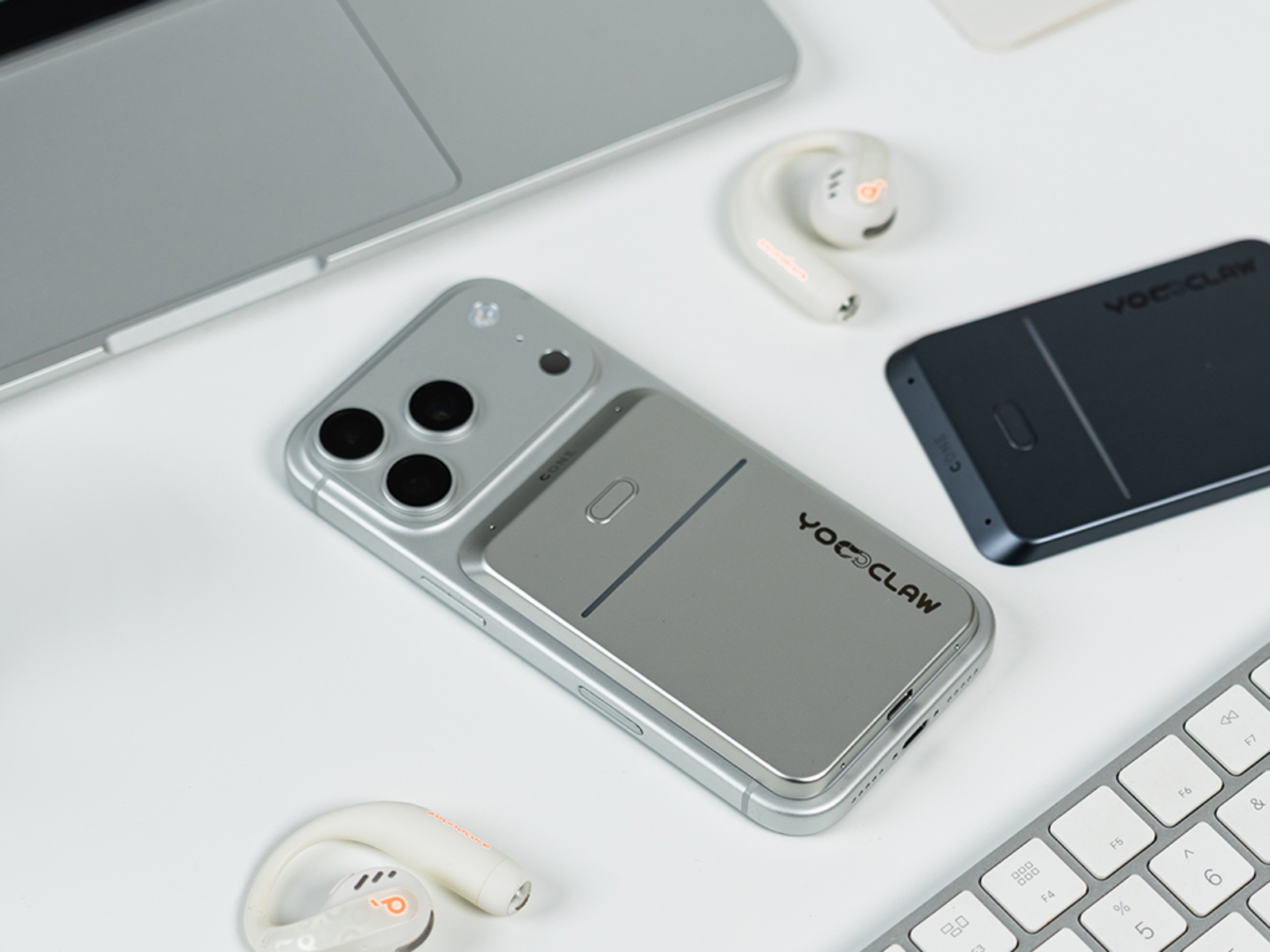
    The first is Android compatibility. My current primary phone is actually an OPPO Find X9 Ultra. After the Android version of the app became available about half a month ago, I tried pairing the C·ONE with it. Since most Android phones tend to have larger camera modules and MagSafe-compatible magnetic positions are generally lower on the back, attaching the C·ONE to a magnetic case causes the bottom half of the card to protrude roughly 5mm beyond the edge of the phone, sticking out like a stubborn little tail. Fortunately, the magnetic connection itself is strong enough that it doesn’t usually cause problems. On my two iPhones, however, the magnetic attachment feels nearly perfect. In fact, the color of the review unit I received happens to match one of my purple iPhones almost exactly.

    The second issue is the placement of the physical button and the risk of accidental activation. The button is located on the front of the card, likely for ease of access and visual symmetry. However, this also creates an awkward scenario: when I place my phone face-up on a desk, pressing against the back of the card can occasionally trigger recording unintentionally. I only discovered this after opening the app and finding a collection of strange conversations and recordings that I definitely didn’t intend to create. Whether through hardware revisions or firmware updates, I hope the team finds a way to address this issue. Over time, repeated accidental activations could waste battery life and consume storage space.

    The third issue is occasional plugin errors. During use, I sometimes encountered messages such as “plugin error” in the conversation window. This happened roughly three times, all during conversations with my local OpenClaw instance. I never encountered the issue when using the official Cloud Claw service, so it may be related to the stability of third-party plugins on the OpenClaw side. Retrying usually resolves the problem, and it isn’t frequent enough to be a major concern, but it can occasionally interrupt the experience.

    The fourth limitation is the lack of support for agents outside of OpenClaw and YoooClaw’s official Cloud Claw service. The agent ecosystem is growing rapidly, and some platforms may soon surpass OpenClaw in user numbers. Personally, I now spend more time using Hermes. In fact, on the very first night after receiving the C·ONE, I spent hours experimenting with different ways to connect Hermes to it. The only thing I managed to achieve was getting Hermes to control the C·ONE’s lighting effects. That little side project ended up being one of the most entertaining surprises of the past month. Fortunately, the company has already stated that Hermes support is coming soon, which I’m genuinely looking forward to.

    The final limitation is the inability to send images or files. This is probably the one feature that prevents YoooClaw from completely replacing tools like Feishu or WeChat in my daily workflow. Whenever I want OpenClaw to perform a task based on an image or document, I still have to switch back to another app to handle it. That said, this feels like a relatively straightforward issue to solve through future app or firmware updates, so I’m not particularly worried about it in the long run.

    Who Is It For Right Now?

    Starting at RMB 599, is it worth it? Personally, the price is actually lower than I expected. At RMB 599, I think the value proposition is quite strong. These days, it feels like any product with even a hint of AI attached to it rarely costs less than RMB 1,000.

    For you, however, the answer depends entirely on how you define your relationship with AI.

    • Beginners who want an affordable way to get started with AI: simply spend RMB 799 on the official YoooClaw Cloud Edition. Using the official cloud-based Claw is far easier and more cost-effective than deploying your own OpenClaw instance and carrying it around everywhere. The official cloud service is essentially plug-and-play, whereas OpenClaw still comes with a learning curve for newcomers.
    • Professionals who frequently need recording, transcription, and related workflow features: the C·ONE can become one of your most valuable assistants.
    • Existing OpenClaw users: if you are already using OpenClaw, the C·ONE feels like a natural hardware extension of the ecosystem. At this stage, I haven’t found a better alternative.

    Conclusion: The Best AI Products Are the Ones That Fade Into Everyday Life

    The YoooClaw C·ONE has its flaws and compromises, but when it comes to the question that matters most to me—how to make AI blend seamlessly into everyday life—it delivers an answer that I’m genuinely satisfied with.

    Looking back on the past month, the biggest change the YoooClaw C·ONE brought me was its ability to reveal workflows I had not yet built and potential issues within my OpenClaw setup before they became problems. It helped me make better use of the capabilities and conveniences that AI can provide. From that perspective alone, the RMB 599 price tag represents excellent value, and it has left me genuinely excited about the future evolution of YoooClaw’s products.

    That RMB 599 doesn’t just buy a piece of hardware. It buys a ticket that pulls AI out of the confines of a computer or phone screen and slips it into the small gaps of everyday life. Whether or not you need that ticket—that’s a question only you can answer.

  • SSPAI Morning Brief:China Summons Major E-Commerce Platforms Over Subsidy Practices as SANWA Unveils Innovative Pen-Style Wireless Mouse

    SSPAI Morning Brief:China Summons Major E-Commerce Platforms Over Subsidy Practices as SANWA Unveils Innovative Pen-Style Wireless Mouse

    Morning Brief

    1. Five E-Commerce Platforms Summoned Over “Billion-Yuan Subsidy” Issues
    2. Xbox Launches Business Reset Plan
    3. BOOX Unveils the Second-Generation BOOX Go 6
    4. Xiaomi Launches MiMo Code AI Coding Assistant
    5. SANWA Introduces a Pen-Style Mouse
    6. Philips Hue Launches World Cup-Themed Lighting Effects
    7. News Worth a Quick Look

    Five E-Commerce Platforms Summoned Over “Billion-Yuan Subsidy” Issues

    On June 11, the Beijing Municipal Administration for Market Regulation summoned Taobao (Tmall), JD.com, Pinduoduo, Douyin, and Xiaohongshu, notifying them of a second batch of typical issues identified during a comprehensive campaign targeting “involution-style” competition among online platforms and requiring corrective action. The issues involved misleading promotional claims, non-compliant formulation and disclosure of promotional rules, and failure to disclose information about product sellers. Among the findings, Taobao widely promoted its long-running “Billion-Yuan Subsidy” program as a “6.18 Billion-Yuan Subsidy” campaign, repeatedly refused to provide the actual subsidy amounts and the respective contribution ratios of the platform and merchants during the promotion period, failed to prominently disclose relevant rules, and did not display the qualifications of actual sellers for some products. Pinduoduo failed to clearly disclose the actual subsidy amount and funding ratio of its “Billion-Yuan Subsidy” program, could not provide supporting documentation, and included terms that unilaterally exempted the platform from its statutory responsibilities. JD.com’s “Billion-Yuan Subsidy” and “Billion-Yuan Agricultural Subsidy” campaigns did not disclose promotion periods, subsidy amounts, or funding ratios and could not provide evidence when requested, while its “Billion-Yuan Supermarket” campaign failed to disclose promotional rules. Douyin’s “6.18 Good Products Festival” and “Billion-Yuan Consumer Coupons” campaigns did not disclose promotional rules to consumers, and rule changes were made without a public consultation process for merchants. Xiaohongshu’s “Redeem Points for Gifts” campaign only disclosed the total number of prizes available, without specifying winning probabilities or prize forfeiture rules, and used wording such as “continued participation constitutes acceptance” to exclude consumers’ right to negotiate.

    Regulatory experts noted that irrational large-scale subsidies may distort market pricing mechanisms and squeeze merchant profit margins, while platform clauses that unilaterally waive responsibility could increase risks for consumers. Source


    Xbox Launches Business Reset Plan

    On June 10, Xbox CEO Asha Sharma and Chief Content Officer Matt Booty unveiled the 100-day Xbox Reset business restructuring plan. They stated that Xbox’s internally calculated operating margin for the current fiscal year was approximately 3%, down year-over-year and below the industry average. Excluding the acquisition of Activision Blizzard King, Xbox has invested more than $20 billion in subsidies across content, platform, and hardware over the past five years, while annual revenue declined by nearly $500 million during the same period. Xbox acknowledged that it had expanded too aggressively and failed to invest adequately in its core franchises. Going forward, the company plans to refocus on building a stronger lineup of stable first-party and third-party exclusive titles. On the hardware side, Xbox stated that procurement costs for console storage components have risen more than fourfold since autumn 2025 and are expected to exceed five times their level from two years earlier by the 2027 holiday season. Current production capacity is unable to meet demand, prompting Xbox to explore new business models and hardware partnerships for Project Helix, which is designed to run both Xbox and PC games. Bloomberg reported on the same day that Xbox plans to conduct layoffs after Microsoft’s fiscal year ends on June 30, although the exact number of affected employees has not yet been determined. Budgets for marketing and several other departments are also expected to be significantly reduced. Source


    BOOX Unveils the Second-Generation BOOX Go 6

    On June 11, BOOX launched the second-generation BOOX Go 6, a 6-inch ePaper reader, in overseas markets. The new BOOX Go 6 adds handwriting note-taking capabilities and can be paired with the separately sold InkSense Plus stylus, allowing users to annotate books, highlight passages, and create handwritten notes and to-do lists within the native note-taking application. The device features a 6-inch monochrome ePaper display with a resolution of 1448 × 1072 and 300 PPI, protected by a flat AG glass cover lens. It supports dual-tone front lighting with adjustable warm and cool color temperatures. The reader is equipped with 3GB of RAM and 32GB of storage, supports microSD card expansion, runs Android 11, and comes with the Google Play Store pre-installed. Connectivity options include 2.4GHz and 5GHz Wi-Fi, Bluetooth 5.0, and USB Type-C. It is powered by a 1500mAh lithium-polymer battery and measures 6.8mm thick while weighing approximately 160g. Color options include Plum, Stone, Shell, and Custard.

    The second-generation BOOX Go 6 is now available for pre-order through the official BOOX online store at a price of $199.99 and is expected to begin shipping around June 17. Source


    Xiaomi Launches MiMo Code AI Coding Assistant

    On June 11, Xiaomi MiMo officially released and open-sourced MiMo Code v0.1.0. Built on top of OpenCode and licensed under MIT, MiMo Code comes with the multimodal MiMo-V2.5 model available free of charge for a limited time. It also supports integration with mainstream models including DeepSeek, Kimi, and GLM, as well as third-party Token Plans, providing flexibility for developers with different needs.

    MiMo Code features a built-in persistent memory system that addresses long-session memory limitations through a three-layer mechanism consisting of project memory, conversation checkpoints, and task progress tracking. Xiaomi has also developed a dedicated Harness system specifically optimized for the MiMo model family, enabling deep integration between the models and the framework. Combined with Compose Mode, MiMo Code can automatically handle the entire workflow from design and planning to coding, testing, and review, aiming to deliver production-ready results. In addition, MiMo Code includes a built-in /dream command that is automatically triggered every seven days. A dedicated agent reads historical conversations and existing memory files, performs merging, deduplication, path validation, and compression, then consolidates fragmented memories into a compact and up-to-date state before updating global memory. MiMo Code also comes with integrated voice input and control capabilities powered by MiMo-V2.5-ASR speech recognition technology. Source


    SANWA Introduces a Pen-Style Mouse

    Japanese peripheral manufacturer SANWA has announced the 400-MAWB231 pen-style wireless mouse. Slightly larger than a standard ballpoint pen and weighing just 25g, the device is priced at 5,680 yen (approximately RMB 240.2).

    Users can operate the 400-MAWB231 much like holding a pen. A light touch on the tip performs a left-click, while the body includes buttons for right-click, scrolling, back, and forward functions. The 400-MAWB231 is equipped with a 1600 DPI blue LED optical sensor system and supports a tilt angle range of 40° to 70°. It offers both 2.4GHz wireless and Bluetooth connectivity, with a battery life of approximately 4.5 months on a full charge. Source


    Philips Hue Launches World Cup-Themed Lighting Effects

    Signify has launched the “Sports Live” real-time match lighting effects feature for Philips Hue and Philips Smart Lighting products. Available for a limited time starting June 11 in conjunction with major international football tournaments in 2026, the feature can be configured through the “Sync” page in the latest Hue app. Once enabled, the system uses live match data to trigger lighting effects during key moments such as goals, yellow cards, red cards, set pieces, and penalty kicks. It also provides pre-match countdown effects, victory-color animations for the winning team after the final whistle, and lighting effects reflecting whether a team is leading or the match is tied. Users can choose compatible color-capable lights, select their favorite team and room, and adjust lighting scenes, brightness levels, and delay settings to better synchronize with television broadcasts. Lighting effects will pause when playback is paused and automatically resynchronize with live match data when viewing resumes. Source


    News Worth a Quick Look

    • On June 10, Google released DiffusionGemma, an experimental open model that uses text diffusion and is distributed under the Apache 2.0 license. Built on research from Gemma 4 and Gemini Diffusion, the model can generate text up to four times faster than traditional autoregressive models on a standalone GPU. Generation speeds can exceed 1,000 tokens per second on a single NVIDIA H100 and more than 700 tokens per second on a GeForce RTX 5090. After quantization, the model can run on systems with as little as 18GB of VRAM. Source
    • In the latest announcement for the WindowsAppsSDK project, Microsoft confirmed that Windows 11’s local language model API requires only an RTX 30-series GPU or newer and at least 6GB of VRAM to run. The API allows developers to download Microsoft’s Phi Silica small language model and access local AI generation capabilities on-device. Previously, similar AI features on Windows generally required hardware that met Microsoft’s Copilot+ PC specifications. Source
    • Spider-Man: Brand New Day has officially been scheduled for release in mainland China on July 29. Source
    • iFixit has published its teardown of the Trump Mobile T1 smartphone, confirming that its internal structure is nearly identical to that of the HTC U24 Pro. According to the teardown, the HTC U24 Pro motherboard can even be installed directly into the T1 chassis and operate normally. Based on production timelines, component sourcing, and existing manufacturing lines, iFixit also concluded that the T1’s design, manufacturing, and the vast majority of its components originate from China, falling short of the “Made in USA” standard previously claimed by Trump. Source
  • 9 Remarkable Albums From May 2026 Worth Adding to Your Playlist

    9 Remarkable Albums From May 2026 Worth Adding to Your Playlist

    Among May’s album releases, we heard several deeply personal reflections on elders and roots. First came Chunzi by Lei Qing, released on May 1. Stripping away elaborate arrangements and affectations, he set out to make an album his grandma could understand. I already recommended this beautifully melodic and effortlessly relaxing record last month. Lei Qing’s live performances are equally remarkable. In late May, we saw him perform for the first time in Guangzhou. A drummer by background, he possesses an irresistible stage presence. Joined by longtime collaborators guitarist Wang Wei and percussionist Cola, he delivered a fluid and vividly engaging performance that left us eager to see them on stage again.

    Another work that looks back to its roots comes from Su Zixu and his band The Paramecia. Through Songs of Sorrow and Joy, they convey a deep attachment to their homeland and reflect on the countless facets of life. Su Zixu also does something rare here, revisiting the highs and lows of his own eighteen-year journey in music. Though arriving from a different path, he shares a similar goal with Lei Qing: to create an album that the older generation can understand and connect with. Once again, Su Zixu & The Paramecia have produced a landmark work for Chinese music through exceptional songwriting and performance. There is little doubt that Songs of Sorrow and Joy will appear on many year-end best-of lists. Su Zixu & The Paramecia have already begun touring, and this is one of 2026’s must-hear, must-see acts.

    In addition, Li Chang, the vocalist of Your Woman Sleep With Others, released an all-English solo album that serves as a conversation with himself. Meanwhile, DaWenXi Band has also embraced English-language songwriting on a new album, showcasing fresh breakthroughs in both musicianship and artistic vision.

    Without further ado, it’s time to dive into May’s surprises!

    Blue Curtain — The Joys and Sorrows of Once-in-a-Lifetime Encounters (EP) 1

    May 8, 2026

    Brief reunions, bright Taiwanese charm

    All the freshness and sunshine associated with Taiwanese indie music are packed into this three-song EP, fulfilling every fantasy you might have about a band from the island.

    Blue Curtain is a special band. Its members are old friends scattered across the globe who rarely get the chance to meet. They are not the typical band chasing a dream at all costs; their music exists because of the right people meeting at the right time.

    The melodies lean toward an earthy and approachable folk style, while the bright female vocals immediately draw attention. As the songs unfold, more surprises emerge: rich and thoughtfully layered arrangements featuring strings weaving through the music, flowing keyboards, and touches of groove, blues, and jazz.

    Three years ago, the band hinted at a second EP and then seemingly disappeared. Despite releasing only one previous EP—The Sunlit Island (2018), a work reflecting on beautiful memories and the idea of “farewell”—Blue Curtain’s impact has endured, remaining close to the hearts of listeners.

    Formed in 2016 and now entering its tenth year, Blue Curtain has finally released its second EP, The Joys and Sorrows of Once-in-a-Lifetime Encounters. The band has evolved from a group of young friends who saw each other constantly into people in their thirties, each occupied with their own lives. Tied down by work and responsibilities, they are scattered across Taipei, New York, London, Tokyo, and beyond, sometimes meeting only once every six months or even once a year.

    With so little time together, they decided to make music once again. In a single day at the end of 2024, they recorded the entire EP live in synchronized sessions. Much like the phrase ichigo ichie in the title, these three songs capture brief yet precious gatherings in life, singing about love in one’s thirties, confusion, and reflections on the passage of time.

    Because the EP was recorded live in a single flow, the performances feel remarkably natural, and listeners can sense the excitement and enjoyment of the band members reuniting to create together once more.

    By the end, the music leaves you refreshed and wanting more. Blue Curtain has already gone their separate ways again, each returning to their own pursuits. Until the next reunion, we’ll be waiting.

    Su Zixu & The Paramecia — Lamenting in Delight

    May 15, 2026

    A wanderer’s tender heart, singing sorrow and joy

    The album of the year is here.

    Three years after their last full-length release, Su Zixu & The Paramecia return with Lamenting in Delight, another complete and masterfully crafted Chinese progressive rock work.

    Through their formidable songwriting and performances, Su Zixu and The Paramecia have become standard-bearers for Chinese progressive rock and art rock. Every album they release feels less like a record and more like a carefully crafted work of art.

    In the past, Su Zixu & The Paramecia often embraced grand, sweeping emotions and a larger-than-life sense of heroism. Yet Lamenting in Delight reveals a new restraint and subtlety. Su Zixu’s vocals are delivered mostly in an intimate, heartfelt tone, with less of the forceful and flamboyant edge heard in earlier works. The arrangements are gentler and warmer as well, rarely erupting into confrontation or cathartic release. Instead, the album unfolds with the feeling of a story quietly told.

    Lamenting in Delight is a journey back to the roots for Su Zixu & The Paramecia. This time they write about the land that nurtures their people, focusing on the shared cultural foundations that connect us. Their gaze even turns inward. On the closing track, Eighteen Years Later, Su Zixu recounts his own life story after leaving home to make his way in the world. As he puts it, he wanted to create “music that our parents’ generation can understand.”

    The opening track, Like Ascending a Spring Terrace, begins with delicate guitar harmonics that gradually give way to flowing strings. Against a vivid springtime backdrop, Su Zixu sings with profound emotion about the twists and turns of fate, his lingering vibrato carrying wave after wave of tenderness.

    All Under Heaven Bustles is a personal favorite. Within its desolate atmosphere lies a portrait of the countless faces of human life. The melody is somber and tinged with melancholy, yet it also conveys the singer’s clarity and acceptance after seeing through the illusions of the world. Rather than leaving listeners discouraged, the song encourages a broader, calmer perspective, and that is what resonates most deeply with me.

    In The Narrow Gate Remains, Su Zixu unleashes the powerful, impassioned vocal style that has become one of his trademarks. The song’s philosophically charged imagery sparks reflection and imagination in every listener.

    Every track on Lamenting in Delight rewards repeated listening. The closing song, Eighteen Years Later, layers acoustic guitar and vocals in a simple, unadorned arrangement as Su Zixu tells his own story. Eighteen years of hardship, experience, and reflection flow through the performance. Most moving of all are the wordless humming passages between verses. They capture the tangled emotions of every soul who has left home in search of a future. As the song unfolds, we find ourselves shedding tears alongside Su Zixu.

    Su Zixu’s music mirrors the man himself. Upright and principled, yet famous for his fiery temper, his stubborn personality drives him to pursue excellence in every aspect of his art. His lyrics draw freely from language and imagery across centuries of Chinese culture, while his compositions bridge East and West, blending classical and contemporary influences. Every member of the band is a master musician, helping transform Su Zixu’s artistic visions into something richer, more vivid, and more complete.

    For music of such sophistication, the audience it attracts is remarkably engaged. Listeners savor every detail. In the comment sections, hidden experts emerge from everywhere: some analyze the complex time signatures, some marvel at the instrumental performances, some discuss the band’s artistic sensibilities, while others debate the philosophical ideas embedded in the lyrics. Even the heated arguments inspired by the songs are fascinating to read.

    If Su Zixu and his band are performing in your city, don’t miss the opportunity to see them live.

    Chinese American Bear — Dim Sum & Then Some

    May 8, 2026

    Rediscover the child that never quite grew up inside you

    Chinese American Bear was named the 2025 New Artist of the Year in CareForMusic’s “Emerging Voices” awards.

    This psychedelic pop duo hails from Seattle, Washington, and consists of Lingbo Anne Tong, who moved to the United States at a young age, and her husband Bryce Barsten. The two have been sweethearts since high school.

    Dim Sum & Then Some is their third album, a celebration of the things they love most: good food and the simple joys of everyday life. Chinese American Bear specializes in minimalist bilingual songwriting in both English and Chinese. Their music is consistently lighthearted, playful, and full of delight. The joy arrives in a direct, unfiltered way that is impossible to resist. At times, the songs may even feel like nursery rhymes, but listen more closely to the arrangements and you’ll discover something far more sophisticated than first meets the ear.

    Take Chant (Namo Amitabha Buddha), for example. Though built around a single Buddhist phrase, the track gradually expands under its carefree rhythm, layer upon layer, growing into a finely detailed and majestic sonic structure. Another song, Mama, which repeatedly calls out “It’s time to eat,” is built upon irresistibly danceable funk grooves. Intricate strings, guitar, and bass intertwine to elevate the anticipation and excitement that comes before a meal.

    Chinese American Bear draws heavily from the psychedelic music of the 1960s and 1970s while injecting a mischievous palette of electronic sounds. By decorating traditional pop foundations with experimental touches, they have crafted a musical identity that feels open-minded, curious, and endlessly imaginative.

    P.S. For those raising children, consider playing Chinese American Bear’s music for them. It’s hard to imagine a better choice when it comes to cultivating musical appreciation and creativity at an early age.

    DaWenXi Band — From Grey To Gold

    May 26, 2026

    The richness, DaWenXi style

    Rather than presenting opinions or rushing to convey a particular message, DaWenXi uses this English-language album to document a collection of essay-like reflections and passing thoughts.

    “In an era overflowing with the urge to express, we wanted to try ‘un-expressing,’” said vocalist Monkey in the album’s promotional materials. “Our lives are often surrounded by meaning and value, but moments of daydreaming and drifting off should also be allowed and respected.”

    Within the ecosystem of Chinese-language music, both artists and listeners often seek meaning and emotional resonance. This time, DaWenXi moves in the opposite direction, encouraging people not to use someone else’s melodies as a vehicle for their own declarations. There is no rush to guide, explain, or summarize anything. Instead, the band simply lets the sounds emerging from the cracks of the city find their way into the listener’s chest.

    The album’s emotional palette follows its title, gradually shifting from cold grayness toward brightness and warmth. As the songs unfold, listeners can travel alongside that emotional arc, watching the clouds part and eventually catching a glimpse of golden light.

    From a sonic perspective, DaWenXi has clearly poured tremendous care into the album, filling it with innovative ideas and experiments. Their command of melody has become increasingly refined. The opening track, Paper Plane, features a captivating guitar motif that anchors the song, while the organ passage in its latter half is equally striking. Waiting For You features a guest vocal performance by Helen Feng, the lead singer of Nova Heart. Together, the male and female vocals evoke a deep, chilly atmosphere reminiscent of medieval Europe, while the bass and guitar tones are deliberately shaped into something hauntingly cold. My Body incorporates lush string arrangements, Cannonball bursts with manic synthesizer textures, and Dream On threads exhilarating rhythmic variations through traditional rock guitar work. Throughout the album, DaWenXi demonstrates remarkable growth in its command of musical language. Instruments become flexible tools at the band’s disposal, resulting in a listening experience that feels vivid, agile, and constantly surprising. The closing title track, From Grey To Gold, is especially memorable, transitioning from soft rock through a saxophone-led bridge before leaping headfirst into the dazzling colors of a disco dance floor.

    By stripping away overt meaning, DaWenXi has devoted itself to constructing an album built upon musicality and sonic expression. The result is a distinctive form of alternative Chinese rock that invites listeners to climb toward a more fascinating and rewarding level of aesthetic appreciation.

    Gu Zhongshan Trio — Pocket People

    May 9, 2026

    Step into Gu’s pocket and let your imagination run free!

    Pocket People is the first full-length album in six years from renowned jazz guitarist Gu Zhongshan. The record explores the fusion of jazz harmony and funk music. Gu describes “pocket” as an elusive yet perfect space where everything blends together seamlessly. The term also carries another meaning in music: the state in which musicians lock into the groove with complete mutual understanding. This synchronized, silky-smooth interplay is often described as being “in the pocket.”

    The trio of Gu Zhongshan, bassist Fred Grenade, and drummer Nicholas McBride embodies that very idea. Their chemistry makes them true “pocket people,” and the album revolves around three key elements: distinctive instrumental tones, memorable melodies, and irresistibly infectious rhythms.

    When the technical side of a style becomes especially intricate, musicians can easily become absorbed in the craftsmanship itself.

    As an ordinary listener, however, I often wonder what this kind of highly technical music offers someone like me, since I neither play an instrument nor understand music theory. It reminds me of seeing guitar virtuoso Cory Wong perform at The Wiltern in Los Angeles. Even without any formal musical training, I was completely captivated by the energy and brilliance of his performance, experiencing firsthand the wonder of human beings creating and performing music.

    To me, truly great music can transcend analysis and technical understanding. It bypasses all the details and reaches directly into the heart, leaving you immersed in its spell. The new album from the Gu Zhongshan Trio works in exactly that way. These compositions are not merely demonstrations for guitar students or showcases for technical masters. You can just as easily ride along with Gu’s explosive playing, letting your mind wander wherever it pleases while the exhilarating music sweeps through your body and imagination.

    Jazz guitarist Zhang Xiongguan once shared his thoughts on how to appreciate jazz music. In an interview he gave me in 2017, he said that the first step is to approach jazz with the right mindset: “Some people think jazz is something very distant from our lives, as if it’s music that can only be appreciated while wearing a suit and tie and sitting properly in a concert hall. I don’t think that’s true. In its early days, jazz was music for ordinary people—after work, they’d go to a bar, have a drink, dance together, and enjoy themselves. That’s the environment jazz came from. So first of all, people shouldn’t think of it as something distant.”

    His second piece of advice was to begin with the rhythm. “Starting with the rhythm is probably the best entry point. Jazz harmony can indeed be complex, and some melodies can be complicated too, but the pulse of jazz is easy to feel because its sense of groove is so strong. Many dance styles are closely connected to jazz. Early swing music, for example, was inseparable from swing dancing. Swing bands performed for young people who wanted to dance, so if listeners focus on the rhythm, they’ll find jazz much easier to understand.”

    With that in mind, if you’re new to Gu Zhongshan’s latest album, I’d recommend starting with the track Party Loop. Climb aboard its fast-moving groove, take off at full speed, and let the ride begin.

    LICHANG.rar — CIAO

    May 14, 2026

    If you’re living under cloudy skies too

    While Your Woman Sleep With Others is on hiatus, frontman Chang Li-Chang has transformed himself into the compressed file “LICHANG.rar,” quietly working away on a full-length solo project and releasing the album CIAO.

    While Li-Chang was asleep, his cat Sadowsky slipped out of the house. He searched desperately, praying, consulting fortune tellers, staying up through the night looking for the cat, and even mistakenly caught the wrong one at one point. In the end, he turned to a professional cat catcher and was reunited with his beloved pet after 26 days. Yet amid the joy, he found himself wondering why the cat had lingered near home the entire time but never actually came back inside.

    The emotional ups and downs of losing a cat for 26 days and then getting it back are woven throughout CIAO. As you study the lyrics, the disappearance of a beloved pet unfolds into waves of complicated emotions. Unlike his work with the band, which often focused on larger themes or other people’s stories, CIAO lifts the curtain on Li-Chang’s own inner world. There are reflections on life’s circumstances, observations on relationships where feelings are not always returned, and moments of self-dialogue inspired by the cat’s temporary departure. Even though some tracks are driven by brisk rhythms, the album as a whole carries a melancholic tone, expressing lingering sadness and contemplation.

    The album is a journey through loss, companionship, and rediscovering oneself. In the album notes, Li-Chang writes: “CIAO may sound like a collection of love songs, but in truth, some of these words were spoken to an empty living room. What we’re waiting for isn’t always someone else to return—it may be ourselves.” In Italian, “CIAO” means both goodbye and hello, a single word that captures the dual states of reunion and separation.

    Throughout CIAO, you can still hear the core spirit of Li-Chang’s folk singer-songwriter roots, now elevated by rock-driven rhythms and enriched with colorful harmonies and inventive instrumentation. The result is a style of alternative folk that feels simultaneously relaxed and melancholy.

    Li-Chang says that if anyone else finds themselves living beneath cloudy skies, he highly recommends taking this album as prescribed.

    Waiting for the Right Moment — Too Many Bitter Days Gone By

    May 10, 2026

    Serious emotions from a rising rock newcomer

    Too Many Bitter Days Gone By is the debut album from Jiaxing-based band Waiting for the Right Moment. Bursting with the raw freshness and fearless energy of a young band, it channels a powerful sense of fate through post-punk’s driving rhythms and rough-edged soundscapes.

    The band blends a considerable amount of psychedelic rock into its post-punk foundation. According to the group, Too Many Bitter Days Gone By is meant to feel like a life telling its own story. A farmer on the plains, whose tears contain nothing but corn and wheat, is surrounded by an overwhelming sense of destiny. He struggles, rebels, and ultimately accepts his fate, until everything dissolves into time and space.

    There is something deeply captivating about the band’s rock energy. Whether the farmer’s story at the center of the album comes from lived experience or pure imagination remains unclear, but the persistent spirit of rebellion running through the music, combined with lyrics full of criticism and reflection, gives their work remarkable conviction.

    The band says that most of its creative inspiration comes from everyday details, drawing material from dreams and moments of contemplation. Through abstract metaphors, resolute instrumental performances, and vocals that shift between whispers, murmurs, and cries, they hope to communicate a profound and serious emotional force to the outside world.

    They have succeeded.

    Liang Yiyuan & Li Daiguo — A Study of Romantic and Marital Behavior in the New Era

    May 20, 2026

    Experimental music takes on love and marriage

    At first glance, the album cover appears to feature the Chinese character (“double happiness”), the traditional symbol of marriage. Look a little closer, however, and the character (“suffering”) seems to gain the upper hand.

    It’s hard to imagine how an instrumental album—let alone an experimental one—might portray romantic and marital behavior.

    So perhaps the best place to begin is with the track titles themselves, which offer clues to the album’s intentions: A Critique of Neo-Confucian Marital Rituals, Nora’s Eighth Departure, Miss Wu’s Unserious Binary Marriage, The Original Sin of Platonic Love in Schizophrenia, The Paradox of Demanding a Bride Price While Opposing Concubinage, Growing Tired of One Another Before Marriage, Liquidating the Emotional Extensions of Premarital Relationships

    These somewhat lengthy titles may serve as prompts, guiding listeners toward particular associations and reflections as they engage with the music. What conclusions listeners draw is another matter entirely. Perhaps some will come away even more disillusioned with love and marriage than before.

    The album carries a subtle sense of irony toward modern relationships. According to the creators, the work explores contemporary Chinese views on marriage: “The suona, an instrument long associated with wedding ceremonies, serves as the album’s central character and narrative voice. Through it, we tell the story of how love becomes woven into our lives amid constantly evolving social expectations and customs. Accompanying the suona are numerous other instruments that together create frequencies that resonate with the inner self, including cello, guzheng, yangqin, and piano. The album vividly portrays the strange yet fascinating form that modern marriage has evolved into today.”

    The album notes conclude with a special clarification: both Liang Yiyuan and Li Daiguo enjoy happy and fulfilling marriages themselves…Haha?

    Terence Lam — FIVE EASY PIECES (EP)

    May 29, 2026

    Terence Lam’s nostalgic karaoke session

    A short Cantonese covers EP paying tribute to the legendary Hong Kong composer Joseph Koo.

    Old songs, newly sung, yet their charm remains intact. Across all five tracks, the original arrangements retain their period character, with the instrumentation and orchestration preserved from Joseph Koo’s original works. In many ways, Terence Lam has staged his own karaoke session. His vocals are treated with generous reverb, echoing the production style commonly found in Hong Kong pop music of the 1980s and 1990s—where the accompaniment serves primarily as support while the lead vocal is pushed unmistakably to the front of the mix.

    Paint a Rainbow was originally the theme song for the 1984 TVB drama of the same name, first performed by Danny Chan. Its uplifting lyrics and melody encourage listeners to maintain confidence in the face of adversity. Meet Again Someday was originally sung by Albert Au as the theme song for the television drama Love Melody. The harmonica elements from the original recording are echoed in this new version, expressing the melancholy of parting and the helplessness that often accompanies life’s twists and turns. The Tycoon, originally the theme song for the 1977 television series of the same name, was a collaboration between Joseph Koo and legendary lyricist James Wong. First recorded by Paula Tsui and later famously covered by Leslie Cheung, it receives another reinterpretation here from Terence Lam. His soft and heartfelt vocals convey the feeling of thoughtful advice delivered with openness, wisdom, and calm. Family Affection was the theme song for the 1980 drama of the same name, also featuring lyrics by James Wong and originally performed by Roman Tam. Like many television theme songs of its era, it closely mirrors the emotions and destinies of the characters on screen, allowing the story to continue through the music itself. The final track, When I Was Young, comes from the children’s television series of the same name and paints a picture of innocent childhood life—fittingly arriving just in time for Children’s Day.

    Classic songs live on through new voices. As for how Terence Lam’s interpretations measure up, you’ll have to listen and decide for yourself.


    Every time you finish reading one of our roundups, doesn’t it make the Chinese music scene feel vibrant, energetic, and full of life? Which great albums did you discover in May? Feel free to share your favorites with us in the comments!

    Previous Editions:

    April Music Picks: Welcome Summer With These 8 Wonderful Albums

    Q1 2026 Music Picks: 8 Endlessly Replayable Albums to Soundtrack Your Spring

    1. An EP (Extended Play) typically refers to a short-form record containing between two and six tracks. ↩︎

  • SSPAI Morning Brief: Logitech Introduces the Mobi Fold Foldable Mouse as Insta360 Unveils the 8K Luna Ultra Gimbal Camera

    SSPAI Morning Brief: Logitech Introduces the Mobi Fold Foldable Mouse as Insta360 Unveils the 8K Luna Ultra Gimbal Camera

    Morning Brief

    1. Insta360 Unveils Its First Handheld Gimbal Camera Luna Ultra
    2. Logitech Launches Its First Foldable Mouse, the Mobi Fold
    3. Razer Introduces the Seiren V3 Pro Microphone
    4. Kensington Launches the Pro Fit Ergo TB675 Vertical Trackball Mouse
    5. Google Releases the Real-Time Speech Translation Model Gemini 3.5 Live Translate
    6. Microsoft Announces the Windows Ready Print Program

    nsta360 Unveils Its First Handheld Gimbal Camera Luna Ultra

    On June 10, Insta360 officially unveiled the Luna Ultra, the company’s first flagship dual-camera gimbal camera.

    According to Insta360, the Luna Ultra is a gimbal camera jointly developed with Leica and features a dual Leica Summicron optical lens system. The primary camera is equipped with a 1-inch 8K sensor, offering a 20mm equivalent focal length and an ƒ/1.8 aperture. It supports 14 stops of dynamic range and 8K 30fps Dolby Vision video recording. The secondary camera is a 1/1.3-inch super-telephoto lens with an ƒ/2.0 aperture, supporting up to 12× hybrid zoom and 6× lossless zoom. Users can switch between common focal lengths such as 1×, 2×, 3×, and 6× via the vertical zoom lever on the camera body. In terms of imaging capabilities, the Luna Ultra supports 4K 120fps high-frame-rate slow-motion recording, 10-bit I-Log format, and compatibility with the ACES cinema color management standard and DaVinci Resolve color-grading workflows.

    In terms of product design, the Luna Ultra comes with a detachable 2-inch OLED monitoring and remote-control display, supporting high-definition wireless video transmission and full camera control from up to 20 meters away. The display also integrates an independent wireless microphone for long-distance audio recording. Insta360 has also introduced a first-person head-tracking module, allowing the gimbal and lens to follow the direction of the user’s head movements when paired with a dedicated ear-hook accessory.

    Powered by a Qualcomm 4nm flagship chipset and dual independent imaging processors, the camera enables real-time 4K 60fps night enhancement and supports features including 4K ultra-HD portrait video, 4K Live Photos, portrait algorithms, beauty adjustments, Leica color presets, and cinematic film-style filters.

    Additional specifications include a total weight of approximately 232 grams, a built-in 1550mAh battery capable of up to four hours of continuous shooting, and fast charging that reaches 80% capacity in 23 minutes. The camera also includes 47GB of high-speed internal storage and supports direct connectivity with Insta360’s Mic series wireless microphones. Pricing starts at RMB 3,999 for the standard package and RMB 4,849 for the Creator Bundle. Source


    Logitech Launches Its First Foldable Mouse, the Mobi Fold

    On June 10, Logitech introduced its first foldable mouse, the Mobi Fold.

    According to Logitech, the Mobi Fold is designed primarily for portable productivity scenarios. The center section of the mouse features an accordion-style folding structure that the company claims can withstand more than 15 years of folding and unfolding. When folded, its footprint is reduced by nearly 50% compared to its expanded state, making it easier to carry in a pocket or bag. The design also supports an “open and use, fold and go” experience. Additionally, the device includes an intelligent closure protection feature to prevent accidental input while folded.

    In terms of specifications, the Mobi Fold is covered with a dust- and stain-resistant silicone exterior designed to conform to the shape of the user’s hand. Logitech claims the mouse can reduce muscle strain by 22% compared to using a laptop trackpad. It features a symmetrical design, a PixArt PAW3222 optical sensor with up to 4,000 DPI, quiet switches, and an adaptive scrolling system enabled through its touch panel. For battery life, the Mobi Fold includes a 100mAh battery that provides approximately one month of use per charge, while a one-minute quick charge delivers up to 22 hours of operation. The Mobi Fold is priced at $79.99. Source


    Razer Introduces the Seiren V3 Pro Microphone

    On June 9, Razer announced the Seiren V3 Pro, a professional-grade USB gaming microphone. The microphone is priced at RMB 1,999 in China and is now available through domestic e-commerce platforms.

    According to Razer, the Seiren V3 Pro supports studio-grade 32-bit floating-point audio recording, delivering a wider dynamic range. The microphone features a 16mm supercardioid condenser capsule, RGB-reactive streaming lighting effects, and a multifunction touch-sensitive mute button. Functionally, the Seiren V3 Pro integrates advanced audio DSP directly on the device, enabling AI-powered noise reduction, gain limiting, and other processing features.

    In terms of hardware design, the product features a unibody zinc-alloy chassis, a dedicated gain control knob, an integrated shock mount, and a detachable pop filter. It also provides both USB-C and XLR connectivity and comes paired with an adjustable shock-absorbing boom arm. Source


    Kensington Launches the Pro Fit Ergo TB675 Vertical Trackball Mouse

    On June 9, Kensington announced the Pro Fit Ergo TB675 thumb-operated vertical trackball mouse. It is available in both a wired single-mode version and a wireless tri-mode version, priced at $49.99 and $59.99 respectively.

    According to Kensington, the Pro Fit Ergo TB675 adopts a 60-degree ergonomic tilt design aimed at users with medium-sized hands, with the goal of improving comfort during prolonged use. The mouse features a 34mm trackball and a metal 4D scroll wheel, supports four DPI settings of 400, 800, 1200, and 1600, and offers nine programmable buttons. In addition, the Pro Fit Ergo TB675 incorporates a button-activated trackball ejection mechanism, allowing users to easily remove and clean the trackball. Connectivity options include both the wired single-mode version and the wireless tri-mode version. The wireless model delivers up to four months of battery life per charge and can simultaneously connect to two devices via Bluetooth. Source


    Google Releases the Real-Time Speech Translation Model Gemini 3.5 Live Translate

    On June 9, Google officially launched Gemini 3.5 Live Translate, its latest real-time speech translation model designed to provide live interpretation for multilingual calls, meetings, classes, livestreams, broadcasts, and other scenarios.

    According to Google, Gemini 3.5 Live Translate can automatically recognize more than 70 languages and generate fluent, natural translated speech while preserving the speaker’s tone, speaking pace, and pitch. Google noted that, unlike traditional turn-based translation systems that wait for a speaker to finish before beginning translation, the new model can continuously generate translated speech and strike a balance between “waiting for more context to improve translation quality” and “translating immediately to keep up with the speaker’s pace.” In addition, the model offers strong noise-resistance capabilities, helping applications adapt to noisy, complex, and unpredictable real-world environments.

    Gemini 3.5 Live Translate will be rolled out to Google Translate for Android and iOS globally. Developers can access the public preview through the Gemini Live API and Google AI Studio, while enterprise customers can use a private preview version within Google Meet. Source


    Microsoft Announces the Windows Ready Print Program

    On June 10, Microsoft announced that it is renaming the Modern Print Platform to Windows Ready Print and introducing printer driver selection controls in Windows 11, aiming to provide users and IT administrators with a simpler and more reliable modern printing experience.

    According to Microsoft, Windows Ready Print is intended to transition the Windows printing workflow away from traditional third-party printer drivers and toward a modern printing model based on the Internet Printing Protocol (IPP) using built-in Windows IPP drivers. Microsoft stated that beginning in July 2026, newly installed printers on supported devices will use Windows Ready Print by default, simplifying setup and reducing reliance on manufacturer-specific driver management.

    Microsoft also acknowledged that, due to compatibility considerations, not all environments support the new platform. As a result, Windows 11 will include driver selection controls. Users can configure the feature through Settings → Bluetooth & devices → Printers & scanners → “Use Windows Ready Print to set up printers by default.” When enabled, Windows will prioritize Windows Ready Print for printer setup; when disabled, the system will use manufacturer-provided driver configurations instead. Source

  • SSPAI Morning Brief: Apple Tightens App Store Guidelines as Dell Introduces a New Compact Ryzen-Powered Mini PC

    SSPAI Morning Brief: Apple Tightens App Store Guidelines as Dell Introduces a New Compact Ryzen-Powered Mini PC

    Morning Brief

    1. Apple Updates App Store Review and Subscription Rules
    2. Anthropic Unveils Claude Fable 5
    3. Xiaomi Releases MiMo V2.5-Pro-UltraSpeed
    4. Marshall Launches the Stockwell III
    5. Razer Introduces Its First XLR Microphone
    6. Dell Launches the Dell Pro Micro E Mini PC
    7. Beelink ME Pro 13500H Goes on Sale
    8. News Worth a Quick Look

    Apple Updates App Store Review and Subscription Rules

    Apple has updated its latest App Store Review Guidelines. Under the new rules, Apple may in the future remove certain mature-category apps from the App Store if they have not been updated, improved, or are no longer capable of attracting users over an extended period. The revised guidelines expand the previous rejection criteria that targeted saturated categories such as “fart,” “burp,” “flashlight,” “fortune-telling,” and “dating” apps, broadening them to restrict developers from “opportunistically creating variants of existing app categories or popular apps.” Apple now explicitly mentions wallpaper apps, simple timer apps, and sound-effect apps, requiring new submissions in these categories to provide “differentiated improvements” in order to pass review. Apple has also classified apps centered around drinking, farting, burping, and similar themes as low-quality, low-effort applications, warning that developers who repeatedly submit such apps may lose access to the Apple Developer Program. However, the existing App Store Improvements process will continue to notify developers when apps become outdated or receive little to no downloads, giving them an opportunity to improve their apps before removal. Source

    In addition, during WWDC 2026, Apple announced an expansion of the App Store’s App Bundles feature, allowing developers with overlapping user bases but without direct competitive relationships to jointly offer cross-app subscription bundles for the first time. Users can gain access to multiple apps at a lower price than subscribing to each app individually. Source


    Anthropic Unveils Claude Fable 5

    On June 9, Anthropic publicly launched Claude Fable 5, the first publicly available version of its Mythos model. The model is open for software engineering, knowledge work, and visual tasks, but includes hard safety restrictions in high-risk areas such as cybersecurity, biology, chemistry, and model distillation. Requests involving these domains will be blocked and automatically fall back to Claude Opus 4.8. Anthropic also stated that all traffic associated with Fable 5 and Mythos 5 will be retained for 30 days. According to the company, this data will not be used for training purposes and will only be used to defend against jailbreak attacks and reduce false positives.

    Mythos was initially released to a small group of partners as a preview in April before being expanded to hundreds of organizations across 15 countries, with a particular focus on critical infrastructure operators. Fable 5 is now available through the Claude API and Enterprise subscription plans, while Anthropic is simultaneously deploying Mythos 5 to organizations already approved for access to advanced models. Early evaluations indicate that Fable outperforms competing models in tasks such as complex long-horizon analysis benchmarks, generating complete applications in a single pass, tool usage, UI design, and game development. Both Fable 5 and Mythos 5 are priced at $10 per million input tokens and $50 per million output tokens, twice the cost of Opus 4.8. Users of the Pro, Max, Team, and seat-based Enterprise subscription plans can access the models at no additional charge until June 22. Starting June 23, the models will be removed from those subscriptions and will instead consume usage credits. Source


    Xiaomi Releases MiMo V2.5-Pro-UltraSpeed

    On June 9, Xiaomi MiMo announced a joint release with TileRT of the UltraSpeed mode for Xiaomi MiMo-V2.5-Pro. Through co-design between the model and the system, the mode achieves a generation speed of 1,000 tokens per second for trillion-parameter models on general-purpose GPUs. The MiMo-V2.5-Pro-UltraSpeed API has also been launched simultaneously. Pricing is three times that of MiMo-V2.5-Pro, while output speed is approximately ten times faster. However, the service is available exclusively through the API and is not included in the Token Plan. The trial period runs from June 9, 2026, through 23:59 on June 23, 2026. Source


    Marshall Launches the Stockwell III

    On June 9, Marshall introduced the Stockwell III portable Bluetooth speaker. Compared with the Stockwell II, battery life has increased from 20 hours to more than 40 hours, while the unit weighs less than 3 pounds (approximately 1.36 kg). It features IP55 dust and water resistance and incorporates Marshall’s proprietary True Stereophonic technology, delivering 360-degree audio regardless of placement position. A built-in dynamic loudness algorithm balances bass, midrange, and treble across different volume levels, while enhancing bass and treble performance at lower volumes. The design continues Marshall’s signature guitar-amp-inspired aesthetic, featuring a PU leather carrying strap, velvet lining, and a brass control panel that allows users to skip tracks, switch presets, and adjust volume. Modular and user-replaceable components include the carrying strap, battery, front and rear grilles, and silicone sleeve. The Stockwell III will be available in two color options, is expected to arrive at major retail channels on August 4, and is priced at $250. Source


    Razer Introduces Its First XLR Microphone

    On June 9, Razer unveiled the Seiren V3 Pro microphone, its first streaming and podcasting microphone with XLR support, priced at $249.99.

    Compared with the Seiren V3 Chroma, the Seiren V3 Pro primarily adds an XLR analog interface while also offering dual USB-C connectivity. Creators can use it as a plug-and-play USB microphone or connect it to an audio interface or mixer via XLR. In USB-C mode, it supports onboard DSP (digital signal processing), including AI noise reduction, a compressor, limiter, and expander. The microphone also features an integrated shock-mount structure and built-in pop filter. On the hardware side, the Seiren V3 Pro adopts a unified enclosure design and includes a gain knob, mute button, and an adjustable shock-absorbing boom-arm mount. It is equipped with a 30mm cardioid capsule and offers a frequency response range of 50Hz to 16kHz. On the software side, the Seiren V3 Pro supports Razer Synapse, enabling 32-bit float recording and integrated RGB lighting effects. Source


    Dell Launches the Dell Pro Micro E Mini PC

    On June 9, Dell listed a new Dell Pro Micro E mini PC on JD.com. The system is powered by an AMD Ryzen 5 150 processor and comes with 8GB of RAM and a 512GB SSD, priced at RMB 4,279. The device features a compact 1.2L chassis. For I/O, the front panel includes one USB-A 3.2 port and one USB-C 3.2 port, while the rear panel provides one RJ45 Ethernet port, two USB-A 2.0 ports, two USB-A 3.2 ports, one HDMI 2.1 port, and one DisplayPort 1.4a port. Source


    Beelink ME Pro 13500H Goes on Sale

    On June 8, Beelink announced the launch of the ME Pro NAS-oriented mini PC powered by an Intel Core i5-13500H processor. The barebones version (without storage) is priced at RMB 2,569. The i5-13500H edition of the ME Pro features a 2+4 drive-bay configuration, offering two 3.5-inch SATA drive bays and four M.2 SSD slots, including one PCIe Gen4×4 slot and three PCIe Gen3×2 slots. It is equipped with two DDR4 SO-DIMM memory slots. The system uses a unibody metal chassis, with a fabric-covered front panel and a magnetic MESH rear panel. Internally, it adopts a DIY-friendly drawer-style design that supports motherboard replacement. Cooling is handled by a vapor chamber and a turbo fan, while storage drives benefit from silicone and aluminum mounting brackets (for 3.5-inch drives only) to assist with heat dissipation. Networking is powered by a MediaTek MT7920 wireless card supporting Wi-Fi 6 and Bluetooth 5.4. Connectivity includes three 10Gbps USB-A ports (one front, two rear), one 40Gbps USB-C port, one 10GbE RJ45 port, one 2.5GbE RJ45 port, one HDMI 2.1 TMDS port, and one 3.5mm audio jack. Source


    News Worth a Quick Look

    • During the Nintendo Direct presentation held on June 9, Nintendo shared the latest updates on multiple first-party and third-party titles. Among the announcements, a remake of The Legend of Zelda: Ocarina of Time was officially revealed and confirmed for release later this year, while Kingdom Hearts IV was formally unveiled and confirmed to launch on the Nintendo Switch platform from day one. Source
    • Pebble founder Eric Migicovsky has confirmed that the Pebble Round 2 smartwatch will begin shipping in July, with all pre-orders expected to be fulfilled before September. Announced in January, the Pebble Round 2 is a revival of the lightweight, round-faced Pebble Round smartwatch. Priced at $199, it features updated hardware, slimmer bezels, and optional black or brown leather straps. The shipping schedule follows the broad rollout of the Pebble Time 2, which has already reached most pre-order customers. Meanwhile, the Pebble Index smart ring still has no confirmed shipping date. Source
    • Meta has removed code related to NameTag, an unreleased facial recognition system, from the latest version of the Meta AI app. Earlier, WIRED reported that the system had already been embedded in the Meta AI app, which is installed on more than 50 million devices. Designed for Meta smart glasses, NameTag was originally intended to convert faces captured by the glasses into unique biometric signatures known as faceprints and compare them against a facial database stored locally on a user’s device. Faces that could not be identified would be cropped, indexed, and stored locally for future processing. Source
  • SSPAI Morning Brief: WeChat Opens Its AI Ecosystem to Developers Through New Integration Program

    SSPAI Morning Brief: WeChat Opens Its AI Ecosystem to Developers Through New Integration Program

    Morning Brief

    1. WWDC26 Worldwide Developers Conference Opens
    2. Xiaomi Unveils the Xiaomi 17T Series Smartphones
    3. Viltrox Launches AF 75mm F1.8 and 90mm F2.2 EVO APS-C Camera Lenses
    4. Dasung Launches the Link 2 Smartphone-Shaped Screen Mirroring Device
    5. Hanvon Introduces the Clear Mobile Plus Smartphone-Shaped E Ink Reader
    6. Cyberspace Administration of China and State Administration for Market Regulation Jointly Issue the Guidelines for Online Review Activities
    7. WeChat Releases Guidelines for Developers Integrating with the WeChat AI Ecosystem
    8. News Worth a Quick Look

    WWDC26 Worldwide Developers Conference Opens

    In the early hours of June 9, the WWDC26 Worldwide Developers Conference officially kicked off. The opening keynote introduced iOS 27, iPadOS 27, watchOS 27, macOS 27 Golden Gate, visionOS 27, and other new operating systems. The updates focus on performance improvements, design refinements, enhanced child safety features, Apple Intelligence upgrades, and a significantly improved Siri AI experience. Developer preview versions are available now, with public releases scheduled for this fall.

    For detailed coverage, see Liquid Glass Refined, Apple Intelligence Gets a Major Upgrade: WWDC26 Keynote Recap.

    For more WWDC26 news and updates, stay tuned to the WWDC26 with SSPAI special coverage series.


    Xiaomi Unveils the Xiaomi 17T Series Smartphones

    On June 8, Xiaomi officially introduced the Xiaomi 17T series, consisting of the 17T and 17T Pro models.

    The Xiaomi 17T is powered by the Dimensity 8500-Ultra mobile platform and features a 6.59-inch 1.5K flexible OLED flat display with peak brightness reaching 3500 nits in various usage scenarios. Its camera system consists of a Leica professional triple-camera setup, including a 50MP Leica primary camera, a 50MP Leica 5× periscope telephoto camera, and a 12MP Leica ultra-wide camera. The primary camera uses the Light Hunter 800 image sensor. The device is equipped with a 7000mAh Xiaomi Jinshajiang battery, supports 67W fast charging, and carries an IP68 dust and water resistance rating. Available in Iridescent White, Ice Berry Purple, and Black, pricing ranges from RMB 2,999 (12GB + 256GB) to RMB 3,499 (12GB + 512GB). Source

    The Xiaomi 17T Pro is powered by the Dimensity 9500 mobile platform and features a 6.83-inch 1.5K flexible OLED flat display with peak brightness reaching 3500 nits. It comes with a Leica professional triple-camera system consisting of a 50MP high-dynamic-range main camera, a 50MP Leica 5× periscope telephoto camera, and a 12MP Leica ultra-wide camera. The main camera uses the custom Light Hunter 950 image sensor, capable of delivering a dynamic range of up to 13.5 EV. The device packs a 7000mAh Xiaomi Jinshajiang battery and supports 100W Xiaomi HyperCharge wired charging as well as 50W Xiaomi HyperCharge wireless charging. It also features IP68 dust and water resistance. Available in Black, Nebula Purple, and Midnight Blue, pricing ranges from RMB 3,999 (12GB + 256GB) to RMB 4,799 (16GB + 512GB). Source


    Viltrox Launches AF 75mm F1.8 and 90mm F2.2 EVO APS-C Camera Lenses

    On June 8, Viltrox officially unveiled two new EVO-series APS-C lenses: the AF 75mm F1.8 and AF 90mm F2.2. Priced at RMB 1,499 and RMB 1,699 respectively, both lenses are available in Sony E, Nikon Z, and Fujifilm X mounts. Depending on the mount version, the AF 75mm F1.8 weighs approximately 325–355 grams. It features a manual aperture ring, while the Sony E and Nikon Z versions additionally include a customizable Fn button, a CLICK switch for toggling between clicked and de-clicked aperture control, and an AF/MF focus mode switch. The lens uses an STM silent autofocus motor, features an optical design consisting of 11 elements in 9 groups, and offers a minimum focusing distance of 0.74 meters. The AF 90mm F2.2 weighs approximately 320–340 grams depending on the mount. It also includes a manual aperture ring, while the E- and Z-mount versions offer the same customizable Fn button, CLICK aperture switch, and AF/MF focus mode switch. The lens uses an STM silent autofocus motor, features an optical design of 10 elements in 8 groups, and has a minimum focusing distance of 0.74 meters. Source


    Dasung Launches the Link 2 Smartphone-Shaped Screen Mirroring Device

    Dasung’s Link 2 smartphone-style screen mirroring device (display) is now available on JD.com. The device features a 6.7-inch display and is priced at RMB 1,899. It comes in Deep Space Gray and Glacier Blue color options, measures 7 mm thick, and weighs 155 g. The front is equipped with a 6.7-inch 300 PPI 60 Hz monochrome E Ink display paired with a dual-tone front light supporting both warm and cool color temperatures. The device can connect to any smartphone that supports Miracast or AirPlay wireless casting protocols and also supports reverse touch control. Source


    Hanvon Introduces the Clear Mobile Plus Smartphone-Shaped E Ink Reader

    On June 8, Hanvon listed its new Clear Mobile Plus smartphone-style e-reader on JD.com. The device features a 6.13-inch monochrome E Ink display and is priced at RMB 1,899. Available in black and white color options, it measures 9 mm thick and weighs 198 g. The front is equipped with a 6.13-inch Carta 1300 monochrome E Ink panel with a resolution of 1648 × 824, paired with a 30-level adjustable warm and cool backlight system. On the rear, the device includes an 8 MP camera.

    The Clear Mobile Plus is powered by an octa-core processor, paired with 4 GB LPDDR4X RAM and 128 GB of storage. It features a 4,000 mAh battery, runs Android 14, and includes 5 GB of free mobile data per month. Source


    Cyberspace Administration of China and State Administration for Market Regulation Jointly Issue the Guidelines for Online Review Activities

    On June 8, the Cyberspace Administration of China (CAC) and the State Administration for Market Regulation (SAMR) jointly released the Guidelines for Online Review Activities. The guidelines clarify that individuals and organizations conducting online reviews must comply with laws, administrative regulations, and relevant national requirements, adhere to business ethics and accepted social norms, and uphold the principles of objectivity, fairness, comprehensiveness, and accuracy. The guidelines further require that when online reviews involve testing product functionality, performance, or other measurable characteristics, the testing must be carried out by inspection and testing institutions that hold legally recognized certification and accreditation, following applicable standards and technical specifications. For food-related testing, reviewers must possess the necessary qualifications, may not use non-standard testing methods, and may not evaluate items lacking nationally recognized testing standards. The guidelines also prohibit using different standards or methodologies when making horizontal or vertical comparisons between similar products. Where no actual product testing has been conducted and evaluations are based solely on subjective impressions, reviewers must clearly disclose this fact. In addition, website platforms are required to strengthen oversight of online review content and promptly handle related complaints and reports. Source


    WeChat Releases Guidelines for Developers Integrating with the WeChat AI Ecosystem

    On June 8, the WeChat team published the Guidelines for Developers Integrating with the WeChat AI Ecosystem, announcing that the WeChat Open Platform now provides streamlined access to the WeChat AI ecosystem. Mini Programs that integrate with the ecosystem will have opportunities to be recommended and invoked by WeChat AI, while Mini Programs that do not complete the integration process will not be accessible through WeChat AI. The platform offers both an automatic mode and a developer mode. WeChat AI is currently in a closed beta testing phase, with JD.com and Trip.com already confirming their participation in the testing program. Source


    News Worth a Quick Look

    • According to the Financial Times, OpenAI is planning the largest upgrade in ChatGPT’s history, aiming to transform it into a “super app” by introducing enhanced coding tools and AI agent capabilities in an effort to boost revenue ahead of a potential IPO. Citing more than a dozen current and former employees, the report states that the changes are part of a broader organizational restructuring within OpenAI. The company is reallocating resources toward the highly profitable enterprise market while intensifying competition with rival Anthropic. A major focus of the upgrade will be Codex, OpenAI’s coding tool, which is expected to receive significantly more resources. New features are scheduled to roll out gradually over the coming weeks, first through updates to the ChatGPT web app and mobile applications. To further increase user engagement, OpenAI is also redesigning the ChatGPT interface and introducing new prompts and features to encourage the use of coding tools, image generation capabilities, and third-party partner services such as Canva and Booking. Source
    • At the Xbox Showcase on June 8, Microsoft unveiled a new limited-edition gaming console, the Xbox Series X25 Limited Edition, along with a matching commemorative controller. The special-edition console comes with 1TB of storage and draws its design inspiration from the original Xbox. It features a semi-transparent OG Green shell, while the Xbox logo area on top includes green lighting effects. A 25th Anniversary logo is printed on the front panel. Microsoft also revealed that the console contains several hidden “Easter egg” details throughout both its hardware and exterior design, though the company has not yet disclosed their exact nature. At the same time, Microsoft introduced the Xbox Wireless Controller X25 Special Edition, which adopts the same classic translucent green design while retaining the traditional ABXY button color scheme. Source
    • According to Bloomberg, Moonshot AI is seeking a new funding round with a target valuation of $30 billion. Source
    • According to Bloomberg, Spotify is currently in discussions with music festival organizers in an effort to secure livestreaming rights for festivals and concerts, as the company looks to expand beyond music into video content. Source
    • Kimi, the AI model developed by Moonshot AI, has launched the Kimi China Football Support Initiative. Under the program, Kimi will donate 1 billion tokens to support Chinese football development for every goal scored during the 2026 FIFA World Cup. The donations will support grassroots programs, school football initiatives, youth coaching development, and nonprofit organizations using Kimi. Source
    • According to a June 7 report by Windows Latest, Microsoft has acknowledged that the current Windows Search experience falls well short of expectations. The company reportedly plans to prioritize local results over web content even when users enter as few as two characters. Windows Latest independently confirmed that a dedicated local-only search mode for Windows is currently under development. Microsoft is testing a new toggle that will allow users to completely disable web-based search results, restricting searches exclusively to local content. Users will also be able to disable Microsoft Store search results separately. At present, the mixed presentation of local and web results often creates a poor experience. For example, when searching for applications, Windows may occasionally prioritize web content instead of local programs. Although such behavior is not constant, the system frequently defaults to Bing-powered search results. Source
  • SSPAI Review | Best New Apps to Try This Week

    SSPAI Review | Best New Apps to Try This Week

    DockSide: Put the Empty Space Around Your Dock to Good Use

    • Platform: macOS
    • Keywords: Dock, File Transfer

    DockSide is a lightweight productivity utility designed specifically for macOS. It creates a persistent yet unobtrusive “Shelf” beside the Dock, allowing you to drag and drop files, images, links, text, applications, and folders for quick transfer and organization between different apps.

    The core purpose of DockSide is file staging and transfer, but unlike tools such as Yoink and Dropover, which mainly function as temporary drop zones, DockSide introduces a “temporary shelf” positioned directly alongside the native macOS Dock. The Dock is already one of the most important areas in a typical macOS workflow, and the space on either side of it often goes unused. By making use of these areas, DockSide eliminates the need for additional windows and avoids interrupting your workflow the way floating panels often do.

    The shelf on the left side can be used to store files, linked folders, temporary notes, and more. Files can be quickly accessed through simple drag-and-drop actions. Temporary notes can be created directly within the shelf by typing, pasting, or adding new entries, remaining available there until needed.

    For temporarily stored files, DockSide automatically creates a hidden folder inside the Downloads directory and generates copies to prevent accidental deletion. The app also offers a wide range of advanced settings, including support for up to eight shelf sections for organizing different types of content, automatic deletion of notes and files after 30 days, gesture controls for collapsing and expanding the shelf, and navigation between pages.

    DockSide can also function as a secondary Dock. Since it supports application icons, you can effectively create another Dock alongside the native macOS Dock.

    The shelf on the right side provides additional macOS system capabilities and information. By default, it automatically monitors the contents of the Desktop and Downloads folders, but you can customize it to display the contents of any two locations through the app’s settings. The display area can also be divided proportionally between the selected folders. Beyond file browsing, the right shelf can be configured for media controls and system information. The media view displays and controls currently playing music, with support for Apple Music, Spotify, and more. The information view can display up to eight device metrics, including CPU usage, storage capacity, network activity, and disk usage.

    DockSide supports search, keyboard shortcuts, and gesture-based controls. In terms of appearance, you can switch between light and dark modes, enable Liquid Glass effects, customize shelf height, adjust transparency, and more. You can download the app from the DockSide website. It includes a 14-day free trial, after which a license can be purchased for $5.99, covering up to three devices.


    Permute 4.0: Simplifying Your Multimedia Workflow

    • Platform: macOS
    • Keywords: Multimedia, Format Conversion

    Compared with processing multimedia files through complicated FFmpeg parameters, Permute has long been my preferred solution on the Mac. It avoids unnecessary complexity and lets you achieve the desired media format through simple drag-and-drop actions and clearly described output presets.

    This practical and easy-to-use multimedia tool has continued to evolve. In late May, Permute received its major 4.0 update. In addition to adopting the new Liquid Glass design language of macOS 26, it also introduces a number of convenient new features.

    When you launch Permute 4.0, the first thing you’ll notice is its redesigned user interface. Compared with Permute 3.x, the main window still focuses on its core purpose with a large file-drop area, but the finer UI elements have been fully refreshed to embrace the Liquid Glass aesthetic. After dragging a video file into the window, you’ll see the pre-conversion interface. Opening the output format dropdown reveals two new quick presets: High Quality and Small File, allowing you to choose based on your needs. At the same time, additional source-file handling options have been added, including deleting files directly, moving them to the Trash, or relocating them to a custom folder after conversion.

    For video processing, Permute 4.0 introduces an Auto Settings option for MP4 and HEVC presets. This can intelligently configure parameters such as file size optimization or maximum quality. Hardware acceleration is now also supported for ProRes presets.

    In terms of format conversion, Permute 4.0 improves its cropping tools. When importing videos or images, the crop interface now includes a pixel ruler. If you import audio files, a waveform view is displayed instead. You can also split files using CUE, EDL, or JSON files, and even create custom chapter-based splits. Additionally, subtitles and audio tracks can be dragged directly onto videos within Permute, allowing you to reorder tracks, assign titles, and edit metadata attributes.

    Another interesting feature in Permute 4.0 is the ability to combine images and music into a video. Simply add an image or audio file to the conversion queue, then choose the option to merge the two files and export them as a video. This capability can also be applied to an entire group, enabling batch creation of video outputs from all audio files within that group.

    Other updates in Permute 4.0 include color replacement tools, a completely redesigned metadata editor, automatic repair of webcam recordings, and more. Overall, this is a substantial upgrade built upon the foundation of Permute 3.x. Even if you’ve already used Permute 3.x before, the new features introduced in version 4.0 are well worth exploring.

    You can download and purchase Permute from its official website for $14.99, or access it through Setapp. Existing Permute 3 users can upgrade to version 4.0 for free, provided they have upgraded their system to macOS 26.x.


    Controller for HomeKit: If Siri Can’t Do It, Maybe I Can

    • Platform: iOS
    • Keywords: Smart Home, AI, Siri

    We can use Siri to control smart home accessories in HomeKit, but only for relatively simple tasks, such as “turn on/off a specific accessory in a specific room” or “set the temperature of a specific accessory in a specific room to a certain number of degrees.” That’s pretty much where Siri reaches its limits—anything more complicated and it starts to struggle.

    As for automation, while HomeKit’s underlying framework supports fairly sophisticated configurations, the Home app simplifies much of that functionality and doesn’t expose the full range of capabilities. Apple is expected to unveil a new version of Apple Intelligence built in partnership with Gemini at this month’s WWDC, but some developers in the iOS ecosystem have clearly decided not to wait around. The app featured today, Controller for HomeKit, aims to bypass Siri altogether and build its own AI-powered smart home experience.

    When you open Controller for HomeKit, you’ll notice a plus button in the upper-right corner of the main interface. Tap it, and you’ll find a Create with AI option in the creation menu. This feature is divided into three categories: Add Scene, Add Automation, and Add Workflow.

    Using AI to create a scene as an example, you can simply type a request into the input field or dictate it using voice recognition. Both Chinese and English are supported. Controller for HomeKit uses AI to interpret your intent and automatically generate the corresponding scene. Once the scene has been created, you can open its details, review the configuration, and tap the Save button in the upper-right corner to confirm it.

    Creating automations and workflows with AI follows almost exactly the same process as creating scenes, so there’s little need to repeat the steps. The only thing worth noting is that workflows require Controller Hub to be enabled, which in turn requires a Controller Plus subscription.

    After spending some time with it, it’s fair to say that Controller for HomeKit’s AI-powered creation features do an impressive job of understanding user intent and generating the appropriate scenes, automations, or workflows. If you have demanding HomeKit automation needs, Controller for HomeKit is definitely worth considering.

    Controller for HomeKit is available as a free download from the App Store. The Essentials subscription costs $4.99 per month or $39.99 per year, while the more advanced Plus subscription is priced at $8.99 per month or $79.99 per year.


    Universal Installer: An Elegant, All-in-One App Installer

    • Platform: Android
    • Keywords: Sideloading, App Installation, Shizuku

    The experience of sideloading apps on Android has become increasingly frustrating in recent years. Beyond the countless restrictions and confirmation dialogs added by heavily customized Android skins, Google itself has tightened app installation permissions. On top of that, there’s an ever-growing collection of package formats—APK, APKS, XAPK, and various website-specific formats from sources like ApkMirror. Finding a single tool that can handle every sideloading scenario has become surprisingly difficult.

    Fortunately, there are still plenty of tools that leverage Shizuku to take over Android’s system installer. Universal Installer is one of the most impressive examples I’ve discovered recently.

    Although I’ve tried quite a few similar tools, Universal Installer raises the bar through both thoughtful design and powerful functionality. It adopts Material 3 design principles and supports dynamic color theming. Combined with exceptionally smooth transition animations throughout the installation process, it transforms a utility that would normally be “invisible” into something genuinely elegant. Functionality-wise, it doesn’t cut corners either. In addition to supporting formats such as APKS, it can automatically handle split packages and OBB data for large apps and games, eliminating the hassle of manually extracting files.

    The most important part of any installer happens after you tap an APK file. In this regard, I believe Universal Installer strikes an excellent balance between practicality and usability. It presents an impressively detailed package information screen—including permissions, version details, and more—and provides advanced options that allow for deeper customization, giving users much more control over the installation process.

    Beyond manually installing files, Universal Installer also offers multiple ways to manage and transfer packages. It can directly scan your device storage for installation files, functioning much like a file manager. A built-in lightweight download tool allows you to paste official download links for large games, automatically downloading and installing them afterward. It also supports local network transfers: simply enable the service from the top-right corner of the main screen, and any device on the same network can upload apps directly.

    It’s fair to say that Universal Installer opens up virtually every possible channel for acquiring and installing app packages.

    Universal Installer doesn’t stop at handling new installations—it also takes care of the apps already on your device. It includes a comprehensive application management toolkit with features such as search and sorting, app information viewing, APK extraction and sharing, and batch uninstallation. When paired with Shizuku, Universal Installer unlocks even more advanced capabilities. For example, its “Installer Source Spoofing” feature can disguise installations as originating from Google Play, helping bypass certain annoying restrictions and warnings—or simply satisfying users with a bit of digital OCD, since “Installed from Unknown Sources” isn’t exactly pleasant to look at. It can also automatically approve permission requests for trusted apps, saving you from manually granting them the first time an app launches.

    On the security side, Universal Installer supports biometric authentication for both installation and uninstallation actions. It also integrates with VirusTotal through an API interface. Once you configure your API key, the app can compare package file hashes against VirusTotal before installation, helping you avoid potentially dangerous software.

    If you’re still putting up with Android’s default installer, I highly recommend setting up Shizuku and replacing it with Universal Installer. And even if you’re already using a third-party installer, this one is worth trying—you may find it surprisingly impressive. Universal Installer is available as a free download from Google Play, GitHub, F-Droid, and IzzyOnDroid.


    AirPlay Server: Turn Your Android Phone into an AirPlay Receiver

    • Platform: Android
    • Keywords: AirPlay, Android, Multi-Device Users

    Apple’s ecosystem has long been praised for the seamless connectivity and collaboration it provides across devices. In recent years, many Chinese Android manufacturers have taken a different approach, trying to integrate their own devices into the Apple ecosystem as much as possible. AirPlay Server follows a similar idea, allowing Android devices to function as AirPlay receivers capable of receiving both video and audio streams from Apple devices.

    Using AirPlay Server is remarkably straightforward. After installing the app, simply tap the Start button on the home screen, and your Android device will become discoverable as an AirPlay receiver. On your Apple device, open Screen Mirroring, search for the corresponding device name, and you can begin mirroring content from your Apple device to Android in real time.

    Using my iPhone as an example, following these steps allows the phone’s display to be mirrored directly to an Android device. Once connected, every action performed on the iPhone appears almost instantly on the Android screen. Latency is impressively low, and when audio is playing, the sound is also output through the Android device.

    If your setup happens to be an Android tablet paired with an iPhone, this provides a simple solution for viewing iPhone content on a larger screen.

    On the Android side, mirrored content is displayed in full-screen mode by default. Pressing the Back button returns you to the app’s main interface, where the mirrored content continues to be shown. If you need to use the Android device while simultaneously monitoring content from the Apple device, you can minimize the stream and display it in a floating window overlay.

    Beyond the basics, AirPlay Server also offers customization options for users with specific requirements regarding image quality and frame rate. The app includes a range of common resolution and frame-rate settings, along with built-in decoders optimized for different media formats.

    Audio streaming is equally well supported. Music currently playing on an Apple device can be transmitted to the Android device via AirPlay, with album artwork, playback progress, and track information displayed correctly on the Android side. The app also allows you to control playback and switch tracks directly from the Android device.

    If AirPlay Server sounds interesting to you, you can download it from F-Droid and give it a try. The app is open source and completely free to use.


    Touch Time: A World Clock with Grace and Charm

    • Platform: iOS
    • Keywords: World Clock, Design, Beautiful UI

    World clocks are hardly a new feature, nor are they something most people think about every day. They come preinstalled on almost every mobile device. But if you regularly use a world clock and find the one built into iOS a little too plain, Touch Time might offer a more elegant experience. Rather than simply telling you what time it is, it blends time with local light conditions and weather, allowing you to immerse yourself in the atmosphere of each location and feel closer to the passage of time itself.

    Touch Time’s biggest highlight is its UI design. Drawing inspiration from the Liquid Glass aesthetic, it combines dynamic backgrounds that reflect real-time sky colors and weather conditions in different locations. Whether it’s the endless daylight of Oslo’s midnight sun or a rainy afternoon in New York, you can instantly sense the mood of a place from the time list alone. For users who frequently communicate with overseas colleagues, clients, friends, or family members, this approach feels far more intuitive than simply checking time differences. You can also enrich each time card with features such as an analog clock, sun elevation indicator, temperature display, and more. If you find the visual richness distracting, however, you can open the menu in the upper-left corner and disable weather and sky color displays, returning the app to a more minimalist appearance.

    Touch Time also adds a timeline slider along the bottom of the app. By dragging the slider left and right—or rotating the dial in the “Clock Face” section—you can easily visualize how different time zones correspond to your local time. If you’re planning an international meeting at 2:00 PM, there’s a good chance you’ll be interrupting your colleague’s sleep in New York, so perhaps remember to budget for some overtime pay.

    To improve cross-time-zone coordination, the app includes multi-time-zone alarm and scheduling features. You can create alarms or events directly from any clock card, and the app will automatically calculate time differences and synchronize reminders to your local time. Based on the presets configured under Settings → Calendar, it can also attach city-specific time notes to newly created events, making it easier to share schedules with others. Paid users can additionally define their own availability windows, helping them quickly determine whether participants in different cities are within reasonable working hours when arranging meetings or activities, reducing the need for endless back-and-forth scheduling discussions.

    Beyond productivity features, Touch Time also delivers a surprising amount of emotional appeal. You can switch to the globe view from the upper-right corner of the home screen and watch time slowly move across the Earth as sunlight and shadow drift around the planet. Alternatively, in the Clock Face section, you can open the built-in filter camera and share your local scenery with friends elsewhere in the world, complete with global time stamps. Touch Time offers an in-app purchase that permanently unlocks advanced displays, availability windows, and other premium features for RMB 148. Since the purchase does not affect the core world-clock experience, it’s probably best to spend some time with the app first before deciding whether to upgrade.

    You can download Touch Time for free from the App Store.

  • SSPAI Morning Brief: Cloudflare Acquires Vite Creator Evan You’s VoidZero to Accelerate AI-Powered Web Development

    SSPAI Morning Brief: Cloudflare Acquires Vite Creator Evan You’s VoidZero to Accelerate AI-Powered Web Development

    Morning Brief

    1. Passenger Cars Keep Getting Heavier, Gaining Nearly 400 kg Over 12 Years
    2. iFixit Tears Down Counterfeit Apple Products from Huaqiangbei
    3. Cloudflare Acquires the Company Behind Vite
    4. rsync Sparks Controversy After an AI-Assisted Maintenance Bug
    5. OpenAI Discusses Equity Donation With the U.S. Government
    6. Average Vehicle Age on U.S. Roads Reaches 13 Years
    7. News Worth a Quick Look

    Passenger Cars Keep Getting Heavier, Gaining Nearly 400 kg Over 12 Years

    According to a report by CCTV, passenger cars on the market have been collectively “bulking up” in recent years. Data shows that the average curb weight of new passenger vehicles in China reached 1,704 kg in 2024, nearly 400 kg heavier than the 1,312 kg average recorded in 2012. Moreover, the pace of weight gain continues to accelerate. Between 2020 and 2024 alone, the increase in vehicle weight exceeded the total gain accumulated during the eight-year period from 2012 to 2020. New energy vehicles have become the primary contributors to this trend, with many mainstream models weighing more than two metric tons and some reaching as much as 3.8 tons—heavier than a light-duty truck.

    Experts attribute the increase largely to the automotive industry’s transition toward electrification and consumers’ growing demand for more features. As the industry remains in a rapid phase of EV adoption, components such as traction batteries add significant weight. In today’s mainstream household EVs, battery packs typically weigh between 500 and 650 kg, while long-range models equipped with larger batteries can reach 700 to 800 kg. At the same time, electric motors, power control systems, and battery protection structures integrated into the chassis further increase overall vehicle mass.

    The report notes that excessive vehicle weight reduces efficiency, accelerates tire and brake wear, and can lead to handling issues such as understeer. Energy consumption also rises significantly. For example, a three-ton battery-electric SUV typically consumes more than 20 kWh per 100 kilometers. Industry estimates suggest that reducing vehicle weight by 100 kg can lower energy consumption by approximately 7.5% per 100 kilometers. Additionally, every 20% increase in vehicle weight raises road surface damage rates to roughly 2.07 times the original level, increasing urban road maintenance costs.

    Policymakers have already begun addressing the issue. China’s national standard Limits of Energy Consumption for Electric Vehicles, Part 1: Passenger Cars came into effect on January 1 this year. Through stricter and more systematic performance requirements, the regulation pushes automakers toward meaningful technological upgrades and lower energy consumption. New purchase tax incentive standards set to take effect in 2026 stipulate that battery-electric vehicles with a curb weight exceeding 2,710 kg must achieve CLTC energy consumption of no more than 19.1 kWh per 100 kilometers to qualify for the 50% purchase tax reduction. This measure is expected to curb unrestricted vehicle weight growth to some extent.


    iFixit Tears Down Counterfeit Apple Products from Huaqiangbei

    Recently, iFixit released a video showcasing the teardown of counterfeit Apple products purchased from Shenzhen’s Huaqiangbei electronics market, including fake versions of the Apple Watch Ultra 3, AirPods Max 2, and AirPods Pro 3. All three products together cost less than $100.

    The counterfeit Apple Watch Ultra 3 came preloaded with apps such as Alipay, but many built-in icons—including Compass and Weather—had no actual functionality, merely toggling Night Mode when tapped. On the rear casing, a plastic shell decorated with painted fake sensors replaced the genuine ceramic and sapphire sensor assembly found on the authentic product. The display assembly method also differed significantly from Apple’s design. Inside, the fake watch used a 260 mAh lithium-polymer pouch battery, compared with the genuine model’s 542 mAh battery, and it was directly soldered to the motherboard.

    The counterfeit AirPods Max 2 replaced aluminum components with low-quality plastic. The headband exhibited unusual bending, while the ear cushions appeared prone to rapid wear. Although the device could reproduce a convincing Apple-style pairing animation, it lacked active noise cancellation entirely. Internally, the wiring featured crude soldering work, and steel weights fixed with resin had been added inside the ear cups to imitate the heft of the genuine headphones.

    The counterfeit AirPods Pro 3 used silicone ear tips glued directly onto the earbuds. Inside were pouch batteries and inexpensive soldered copper wires instead of proper flex cables. Apple’s force-sensor controls were replaced with physical buttons, and the counterfeit version lacked both heart-rate sensors and noise-canceling microphones.

    According to iFixit, these counterfeit products not only fail to deliver any of the advanced features they attempt to imitate, but also pose potential fire hazards due to their use of unbranded and uncertified batteries. Built with low-quality components and offering virtually no repairability, they are likely to become electronic waste in a very short time.


    Cloudflare Acquires the Company Behind Vite

    On June 4, Cloudflare announced its acquisition of open-source JavaScript tooling company VoidZero. Core products under the VoidZero umbrella—including the Vite build tool, Vitest testing framework, Rolldown, and Oxc—will be integrated into the Cloudflare Workers platform.

    VoidZero was founded in 2024 by Chinese developer Evan You, creator of the Vue.js framework and Vite. Following the acquisition, You and his team will join Cloudflare’s Emerging Technologies and Incubation (ETI) division. Cloudflare CEO Matthew Prince stated that as AI-assisted code generation continues to grow rapidly, development tools must become lighter and more efficient. The integration aims to provide developers and AI agents with the fastest path from local code creation to deployment across Cloudflare’s global network.

    Addressing concerns from developers about the future of the ecosystem, Cloudflare pledged that Vite and its related tooling would remain vendor-neutral, continue to be released under the MIT License, and stay community-driven. The company also announced a $1 million independent Vite Ecosystem Fund dedicated to supporting open-source contributors and maintainers outside both the Cloudflare and VoidZero organizations.

    According to official figures, Vite currently surpasses 130 million weekly downloads worldwide. Cloudflare’s Vite plugin alone accounts for approximately 13.9 million weekly downloads, representing more than 10% of the total. Financial details of the acquisition have not been disclosed.


    rsync Sparks Controversy After an AI-Assisted Maintenance Bug

    According to The Register, a recent backup failure in a new version of the veteran open-source file synchronization tool rsync has triggered a broader debate about the use of AI in maintaining critical open-source software. Originally created in the 1990s, rsync has become a widely used backup and synchronization component throughout the Unix and Linux ecosystem, with countless enterprise IT departments, NAS devices, and backend scripts relying heavily on its stability.

    After the release of rsync 3.4.3, some users reported that incremental backups were no longer functioning correctly. While investigating the bug, users discovered references to Claude in the project’s commit history, prompting widespread criticism. One developer angrily posted on GitHub, telling the maintainers to “do not vibe fuck up this software,” a comment that quickly received thousands of reactions in agreement.

    In response, rsync creator Andrew Tridgell, a veteran software engineer with 40 years of experience, published an article defending his approach. He acknowledged that the new version did contain a bug affecting certain backup workflows and apologized for the issue, but firmly rejected accusations that he had blindly accepted AI-generated code. Tridgell explained that he primarily uses tools such as Claude for what he described as “grunt work,” including rewriting legacy test suites in Python to strengthen security testing, and emphasized that all generated code undergoes rigorous manual review by himself.

    Tridgell also pointed out that the software maintenance landscape has changed dramatically. Open-source maintainers are now facing a flood of security vulnerability reports, many of which are themselves generated by AI. To cope with the resulting increase in workload, he stated that he has no intention of abandoning AI-assisted development and plans to continue using such tools in the upcoming rsync 3.5 release, which will focus heavily on security improvements.


    OpenAI Discusses Equity Donation With the U.S. Government

    According to CNBC, U.S. President Donald Trump and OpenAI CEO Sam Altman are discussing a proposal that would allow the U.S. government to obtain an equity stake in the company. Negotiations have reportedly been ongoing for more than a year, with OpenAI potentially donating a portion of its shares to establish an investment vehicle similar to a “public wealth fund.”

    The idea was first proposed by Altman to the Trump administration in 2025, with the goal of allowing the American public to directly participate in and benefit from the economic gains generated by advances in artificial intelligence. Trump confirmed the concept to reporters aboard Air Force One on June 5, saying that he is considering arrangements under which certain AI companies would contribute equity so that “the American people become, in effect, partners.” He also revealed plans to meet with executives from several AI companies in the near future. Altman reportedly held extensive discussions with lawmakers and government officials in Washington last week.

    The negotiations come amid growing political interest in how AI-generated wealth should be distributed. Senator Bernie Sanders, for example, previously proposed a plan to impose a one-time 50% equity levy on major AI companies to create a sovereign wealth fund, and recently discussed the idea directly with Altman. During Trump’s second term, the administration has pursued a variety of technology and industrial policies and has already acquired equity stakes in companies including Intel, IBM, as well as several quantum computing and critical minerals firms.

    At the same time, the White House is increasing regulatory oversight of the AI industry. Trump recently signed two executive orders: one directing national security agencies to accelerate the adoption of advanced AI models, and another requiring AI companies to provide government access to major models 30 days before their public release.


    Average Vehicle Age on U.S. Roads Reaches 13 Years

    According to The Wall Street Journal, the average age of vehicles currently on U.S. roads has reached a record 13 years, up 10% from a decade ago. Driven by high new-car prices and economic uncertainty, this trend is reshaping the American automotive industry, pushing automakers and dealerships to focus more on repairs and used-car sales rather than new vehicle purchases.

    The average price of a new vehicle in the United States is now approaching $50,000 (approximately RMB 338,000). Combined with elevated auto loan interest rates, the cost of ownership has become increasingly difficult for consumers who depend on cars for daily transportation. Supply-chain disruptions since the pandemic, along with the recent cooling of the U.S. electric vehicle market, have further encouraged consumers to delay purchases. At the same time, advances in vehicle materials and safety technologies have made modern cars capable of remaining on the road much longer than before.

    As weak new-car sales become the norm, automakers and dealers are increasingly turning their attention to the existing vehicle market. Maintenance and repair operations now account for roughly half of the gross profit generated by U.S. dealerships. Traditional manufacturers such as Ford and General Motors are expanding their presence in the after-sales market. Ford, for example, recently introduced mobile repair services that send technicians directly to customers and uses connected-vehicle data to pre-position replacement parts before a breakdown occurs. Major automakers are also steadily expanding their certified pre-owned vehicle programs.

    Meanwhile, competition in the automotive aftermarket is becoming increasingly intense. Long wait times and a lack of pricing transparency at authorized dealerships have driven more American car owners—including those whose vehicles remain under warranty—to independent repair shops and nationwide quick-service chains. In response, large dealership groups such as Penske are reducing showroom space to create additional service bays and introducing customer perks such as complimentary cappuccinos, Wi-Fi-equipped workspaces, and one-hour express maintenance services in an effort to win customers back.


    News Worth a Quick Look

    • On June 7, leaker Sonny Dickson shared new photos of a foldable iPhone dummy unit, claiming it represents the finalized exterior design. He also suggested that the device may be available in only a single color option: white. Based on the model, the outer display adopts an edge-curved full-screen design. The rear microphone has been upgraded to a five-hole configuration, with the flash positioned beneath it. Meanwhile, the front-facing camera on the inner display has been moved to the upper-left corner.
    • Mark Gurman reports that Apple held a highly confidential internal meeting in early 2025 to address the underwhelming reception of Apple Intelligence and delays affecting the next-generation Siri. Senior executives reportedly realized that the company had fallen significantly behind in the AI race, prompting a major strategic shift. Following the reorganization, Mike Rockwell, who previously led the development of Vision Pro, took over responsibility for Siri, while former AI chief John Giannandrea departed the company earlier this year. After assuming the role, Rockwell quickly restructured the team and, together with software engineering chief Craig Federighi and others, helped facilitate deeper cooperation between Apple and Google. The situation also changed Tim Cook’s management style, with the CEO becoming unusually hands-on in shaping Apple’s AI roadmap.
    • Valve has recently rolled out a major update to the Steam Store homepage. The redesigned storefront features larger and more prominent images, along with more detailed descriptions. A new “Quick Browse” feature allows users to preview recommended games without opening individual store pages. Wishlist and DLC sections, which previously appeared only during sales events and promotions, are now permanently available on the homepage. The update also introduces a “Personalized Calendar” that recommends upcoming releases based on each user’s interests.
  • SSPAI Morning Brief: Sony and Insta360 Push Camera Innovation with 65mm Cinema Imaging and AI-Powered Head Tracking

    SSPAI Morning Brief: Sony and Insta360 Push Camera Innovation with 65mm Cinema Imaging and AI-Powered Head Tracking

    Morning Brief

    1. Three Google Updates
    2. Huawei Unveils the Vision Smart Screen S7 X Pro
    3. Apple and Google Jointly Launch the Open-Source Eclipsa Video HDR Standard
    4. Sony Announces Development of the RIALTO 65 Image Sensor Module
    5. Insta360 Officially Unveils the Luna Ultra Gimbal Camera Head-Tracking Module
    6. Microsoft Plans to Use AI to Accelerate Windows 11 ARM Ecosystem Compatibility
    7. Apple Store Developer Billings and Sales Surpassed $1.4 Trillion in 2025
    8. News Worth a Quick Look

    Three Google Updates

    Google Launches the AI App Dreambeans

    On June 4, Google Labs introduced a new AI-powered app called Dreambeans. With user permission, the app integrates information from personal Google services and generates a limited number of daily lifestyle inspirations, encouraging users to put down their phones and engage more with real life. The app is currently available only to eligible Google AI Ultra subscribers in the United States on Android and iOS, while users with personal Google accounts can join a waitlist.

    According to Google, Dreambeans is built on personal intelligence technology and can integrate data from Gmail, Google Calendar, Google Photos, YouTube, Search history, and other Google services after receiving user authorization. Based on a user’s interests and preferences, it generates between 10 and 14 curated lifestyle notes or information snippets each day.

    Dreambeans can recommend content based on a user’s activities and interests. For example, it may suggest a newly opened café near the user’s home that matches their preferences. If a user has an upcoming puppy adoption recorded in Google Calendar, Dreambeans may surface educational content about raising young dogs. The app can also curate articles from across the web that align with the user’s interests. Source

    Google Releases and Open-Sources the Gemma 4 12B Multimodal Model

    On June 4, Google announced and open-sourced the Gemma 4 12B multimodal model, aiming to make local AI inference accessible on consumer-grade devices. According to Google, internal testing shows that the model can run on laptops and desktop computers equipped with as little as 16GB of system memory or VRAM.

    Gemma 4 12B features 12 billion parameters and maintains a relatively compact model size while delivering intelligence levels comparable to the larger Gemma 26B model. This design makes it particularly suitable for deployment on local devices, development environments, and edge-computing scenarios, lowering the hardware requirements for developers working with multimodal AI.

    On the multimodal front, Gemma 4 12B simplifies the handling of image, video, and audio inputs. Unlike traditional multimodal models that often rely on separate encoders to convert images or audio before passing them to the language model, Gemma 4 12B integrates input processing more directly, helping reduce deployment and operational complexity.

    The model is currently available across multiple platforms. Developers can try it directly through tools such as Ollama or download model weights from Hugging Face and Kaggle. Google also noted that developers can use Unsloth for efficient fine-tuning, enabling customized versions tailored to specific use cases. Source


    Google AI Edge Gallery Arrives on macOS

    On June 4, Google officially released a macOS version of its on-device generative AI application, Google AI Edge Gallery. According to Google, the app focuses on offline operation, privacy protection, and low-latency performance. Since models run locally on the user’s device, no processing needs to be uploaded to the cloud, making it suitable for scenarios where data privacy and responsiveness are especially important.

    Google currently provides access to five models within AI Edge Gallery: Gemma-4-12B-it, Gemma-4-E2B-it, Gemma-4-E4B-it, Gemma-3n-E2B-it, and Gemma-3n-E4B-it. Users can choose different models based on device performance and specific needs to experience generative AI capabilities locally.

    At the same time, Google AI Edge Eloquent has also arrived on macOS. The application is a free dictation tool that captures spoken input and converts it into text while removing verbal fillers and lightly refining the output to improve clarity. Google emphasized that Eloquent’s processing is performed entirely on-device rather than in the cloud. Source


    Huawei Unveils the Vision Smart Screen S7 X Pro

    Huawei has listed the Vision Smart Screen S7 X Pro on its official website. The TV is available in 65-inch, 75-inch, and 85-inch sizes, with pricing starting at RMB 6,299. Huawei has not yet announced an official release date.

    In terms of specifications, the Vision Smart Screen S7 X Pro features a Super MiniLED display with over one thousand local dimming zones and a resolution of 3840 × 2160. In Game Mode, the panel supports an effective refresh rate of up to 288Hz through frame interpolation technology and includes Huawei’s AI-powered precision backlight control algorithm. For audio, the TV is equipped with a three-way 2.1-channel surround sound system, with bass extending down to 60Hz. The device ships with HarmonyOS 4.3 and supports memory expansion technology.

    Feature-wise, the Vision Smart Screen S7 X Pro supports 4K Super Projection, AI fitness, AI motion-controlled games, large-screen karaoke, MeeTime video calls, remote assistance, remote home monitoring, and a dedicated children’s mode. Its remote control supports dual-device operation, allowing users to control both the TV and a set-top box with a single remote. Source


    Apple and Google Jointly Launch the Open-Source Eclipsa Video HDR Standard

    On June 4, Apple, Google, NBCUniversal, and the Society of Motion Picture and Television Engineers (SMPTE) announced a new HDR video standard called Eclipsa Video. The formal specification is named SMPTE ST 2094-50 and will be managed by the HDR10+ Technologies consortium.

    Within the broader HDR standards ecosystem, SMPTE ST 2094-50 is the newest member of the SMPTE dynamic HDR family and is designed to address dynamic HDR adaptation across different display devices. The standard introduces two new forms of dynamic metadata to help displays optimize image rendering based on their individual brightness capabilities.

    The first technology is known as the “Reference White Anchor Point.” This mechanism establishes a unified brightness reference for display devices, allowing bright areas in standard dynamic range (SDR) content to be mapped to a fixed reference point while reserving additional brightness headroom for HDR content.

    The second technology is called the “Dynamic Luminance Margin Curve.” Through this mechanism, content creators can embed display adaptation instructions directly into video files. When a display has limited brightness capabilities, the content can guide the device to dynamically adjust shadow and mid-tone regions while preserving highlight detail, reducing clipping and loss of image information.

    According to the HDR10+ Alliance, Eclipsa Video will first target smartphones before gradually expanding to additional device categories. The first Eclipsa Video-certified products are expected to launch later this year. Because Apple participated in the development of the standard, some industry observers speculate that future iPhone models may be among the first devices to support it, though no official confirmation has been provided. Source


    Sony Announces Development of the RIALTO 65 Image Sensor Module

    On June 3, Sony announced the development of the RIALTO 65 image sensor module. Designed specifically for Sony’s flagship CineAltaV 2 cinema camera, the module aims to expand the camera’s imaging capabilities from full-frame to the 65mm large-format category.

    According to Sony, the RIALTO 65 features a 65mm-format image sensor with a diagonal measurement of approximately 64.60mm, a width of 53.75mm, a height of 35.83mm, and a 3:2 aspect ratio. The module supports full-sensor 9.6K recording in a 3:2 open-gate format and offers multiple readout modes to accommodate different types of 65mm lenses, including certain professional lenses with smaller image circles.

    In terms of operation, the RIALTO 65 can either be mounted directly onto the CineAltaV 2 body or connected remotely via cable. Sony stated that the module is fully compatible with the existing CineAltaV 2 ecosystem, allowing the entire system to be upgraded into a 65mm-format digital cinema platform.

    Sony plans to showcase the RIALTO 65 at Cine Gear Expo in the United States on June 5, 2026, and will later present an engineering prototype at BIRTV 2026 in China this August. Source


    Insta360 Officially Unveils the Luna Ultra Gimbal Camera Head-Tracking Module

    On June 3, Insta360 released a new teaser video for the upcoming Luna Ultra and showcased its first-person head-tracking module. The module uses head-direction detection to synchronize the camera gimbal’s movement with the user’s head orientation in real time.

    The module features three-axis gimbal tracking and real-time head-motion detection, enabling an immersive shooting experience where “the camera looks wherever you look.” During recording, the system can precisely maintain the user’s point of focus at the center of the frame. The feature also makes it easier to capture dramatic high-angle and low-angle shots that are difficult to achieve with traditional POV setups, expanding the creative possibilities of first-person filming.

    For comfort and usability, the module adopts a lightweight ear-hook design and supports multiple shortcut controls. Users can double-tap the module to quickly recenter the gimbal, while a long press can be used to recalibrate its wearing position and other settings. Source


    Microsoft Plans to Use AI to Accelerate Windows 11 ARM Ecosystem Compatibility

    On June 4, Microsoft hosted a dedicated session at Build 2026 demonstrating how AI can help developers convert x86 applications into native Windows on Arm software, with the goal of further strengthening the Windows on Arm ecosystem.

    According to Adams, Microsoft’s Corporate Vice President of Customer Experience Engineering, the Windows on Arm application ecosystem continues to expand. Native Arm applications now account for 90% of total application usage time among Windows on Arm users. Microsoft believes native Arm software provides greater efficiency and higher performance for users’ core workflows.

    However, Microsoft also acknowledged that applications without native Arm support still affect user experience and enterprise adoption. Applications that have not yet been ported continue to rely on the Prism emulation layer on Windows on Arm devices. While the combination of native applications and emulation covers a large software library, it does not provide complete compatibility. Some legacy applications, enterprise software, and specialized tools may still perform poorly or fail to launch entirely.

    During the session, Microsoft explained that application migration often involves debuggers, profilers, compilers, and other development tools. AI can assist by handling repetitive code transformations, migration checks, and compatibility validation tasks, reducing the overall effort required for developers to adapt x86 applications to native Windows on Arm versions. Source


    Apple Store Developer Billings and Sales Surpassed $1.4 Trillion in 2025

    Apple announced that the global App Store ecosystem facilitated more than $1.4 trillion in developer billings and sales during 2025, setting a new all-time record.

    Of the billings and sales generated through the App Store ecosystem, more than 90% involved no commission payments to Apple. Since 2019, the size of the App Store ecosystem has nearly tripled. Tim Cook stated that developers remain at the heart of the App Store and that Apple will continue providing tools, technologies, and a trusted platform to help them build for the future.

    Breaking down the figures, the largest category was physical goods and services, which accounted for approximately $1.1 trillion in sales. Growth was primarily driven by grocery shopping, food delivery and pickup services, general retail, and travel-related services. Digital goods and services generated approximately $149 billion, largely from gaming, enterprise applications, and video streaming platforms. Developer revenue from in-app advertising reached approximately $151 billion.

    Artificial intelligence was also highlighted as a major theme in the report. Apple noted that more than 40 of the top 100 App Store applications in 2025 included consumer-facing AI features, and that these apps significantly outperformed other leading applications in terms of revenue growth. AI capabilities are increasingly being integrated into categories such as health and fitness, photo and video editing, and productivity tools, creating new opportunities for developer innovation.

    Apple also stated that developers can access the on-device large language models powering Apple Intelligence through the Foundation Models Framework, enabling AI features while preserving privacy and offline functionality without incurring inference costs. Apple added that its development tools, including Xcode, now incorporate AI-assisted coding capabilities to help developers streamline workflows and accelerate product iteration. Source


    News Worth a Quick Look

    • WinFuture has shared a set of promotional images for Microsoft’s upcoming Surface Pro 12. According to the leaked information, the new device is expected to be announced on June 16 and may feature Qualcomm’s Snapdragon X2 Elite processor. In terms of design, the Surface Pro 12 largely continues the familiar Surface Pro aesthetic, remaining very similar to the previous generation. The device retains relatively thick display bezels and the signature multi-angle rear kickstand. Promotional materials indicate that the new model will feature a bright OLED touchscreen designed to deliver high contrast and vivid colors, although no additional display specifications have been revealed beyond that. The leak also suggests that the Surface Pro 12 will be available in Black, Platinum, and Gold color options. On the hardware side, the top-tier 13-inch version is expected to be powered by the Snapdragon X2 Elite ARM processor featuring 12 Oryon cores and up to 32GB of memory. Storage options will reportedly include up to a 1TB PCIe 4.0 SSD, which users will be able to replace themselves. The primary focus of this generation is expected to be local AI capabilities. According to the leaked materials, the Snapdragon X2 Elite’s NPU can deliver up to 80 TOPS of AI performance, which Microsoft claims is sufficient for on-device Copilot-related AI tasks. Battery life is rated at up to 15.5 hours of local video playback, representing a 10% improvement over the previous generation. Source
    • OpenAI announced an upgrade to ChatGPT’s memory system. The new system is based on the Dreaming V3 mechanism and is designed to better synthesize long-term context such as user preferences, projects, and constraints, allowing ChatGPT to avoid starting from scratch in every conversation. The upgraded system automatically identifies and summarizes important details, presenting them on a dedicated Memory Summary page. Users can review what ChatGPT has learned about them, add or update personal information, and specify which topics should be brought up under particular circumstances. If users want to understand the source of a specific memory, they can also ask the model directly about it. The new memory system is already rolling out to Plus and Pro users in the United States and will expand to additional countries as well as Free and Go users in the coming weeks. Source