


The original Microsoft Edge offered remarkably smooth scrolling, thoughtful reading tools and exceptional battery life. Looking back at its demise also raises a larger question: what does the web lose when independent browser engines disappear?
***
Header image credit: KitGuru.
This article really should have gone out on 9 March: the date support for Edge Legacy ended. But then I realised that exactly six months later would be 9 September—a more fitting date for a remembrance. So I put it off until today.
Throughout this article, “Edge” means Edge Legacy, not the Chromium-based Edge.
9 March 2026 marked five years since support for Edge ended. For all the memes about its main purpose being to download Chrome, I was actually very fond of it. Even today, no other browser can match its EPUB reading experience, smooth scrolling or battery efficiency. Its reading mode was rather good, too.
Strictly speaking, Edge is not entirely dead. Like MSHTML and the newer WebView2, the EdgeHTML engine has become a lasting part of Windows, providing web rendering for UWP apps. There is currently no timetable for its complete retirement. As a standalone browser, though, it has disappeared from public view, just as Internet Explorer—IE from here on—has.
| Name | What it is | Notes |
|---|---|---|
| MSHTML | Internet Explorer’s HTML rendering engine | EdgeHTML was forked from it. |
| EdgeHTML | The original Edge’s platform for HTML, CSS, the DOM, layout and rendering | |
| Chakra | The JavaScript engine used by IE from version 9 onwards and by the original Edge | |
| Microsoft Edge | The browser launched with Windows 10 in 2015, built on EdgeHTML and Chakra | |
| Chromium-based Edge | Edge built on Chromium; the desktop version uses Blink and V8 | It inherited the product name, but not EdgeHTML. |
How it all began
By the time Windows 10 arrived, IE could no longer keep up with the demands of developing and using the modern web. IE 11 had brought plenty of modern features to the old relic, but it was still visibly struggling.
Meanwhile, IE’s long legacy meant that changes to MSHTML were constrained at every turn. And so EdgeHTML was born. It adopted a new user-agent string, dropped IE’s compatibility modes, supported modern web standards and delivered substantial performance improvements. Microsoft also had another opportunity to redesign its browser’s interface and features around the needs of modern users.
On 11 November 2014, Microsoft introduced a “living Edge document mode”—“living on the edge”—in the Windows 10 preview, announcing more than 2,000 interoperability fixes and 20 new platform features. Edge was still a new mode within IE at this point, but the central idea behind what would become EdgeHTML was already there: bring the web into the modern age without breaking the experience of browsing enterprise sites.
A more diverse web
There was another important part of the story: Microsoft wanted to preserve browser diversity. You can still read its reasoning in this blog post:
This interoperability-focused approach brought the obvious question of adopting an existing open-source rendering engine such as WebKit. While there were some advantages, upon further investigation it was not the right path forward for two important reasons. First, the Web is built on the principle of multiple independent, yet interoperable implementations of Web standards and we felt it was important to counter movement towards a monoculture on the Web. Second, given the engineering effort required, we found that we could deliver an interoperability focused engine to customers significantly faster if we started from our own engine (especially if unshackled from legacy compatibility concerns), rather than building up a new browser around an open-source engine. We will continue to look at open source and shared source models where it makes sense and look forward to sharing more details in coming posts.
To pull out the point—with my own question mark:
The modern web is built on multiple independent but interoperable (?) implementations of web standards. We believe we must resist the web’s drift towards a monoculture.
An independent browser engine has value in itself. Just as Gecko Quantum and WebKit do, EdgeHTML made the web more diverse simply by existing. I may spend a lot of time taking shots at Safari, but I recognise that wiping it out altogether would be a mistake. The same goes for Firefox: slow and poorly implemented though it may be, we still need it to exist.
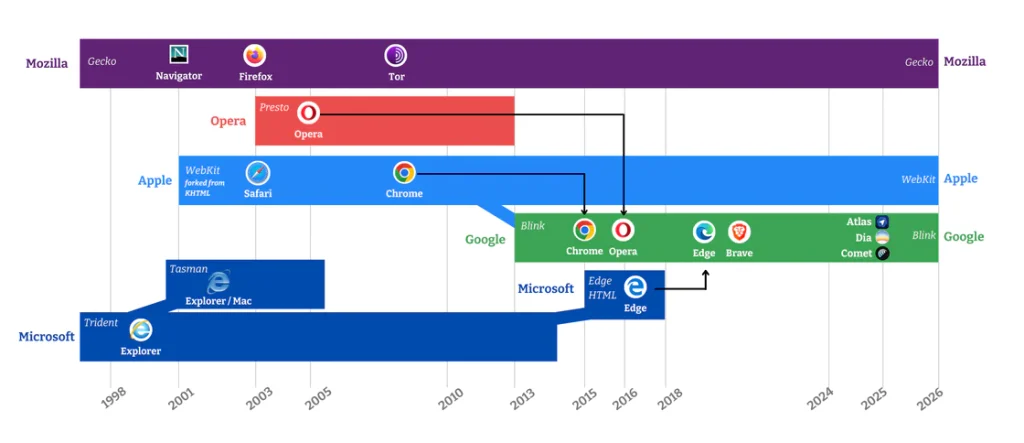
Image from Mozilla’s “Competition, Innovation, and the Future of the Web – Why Independent Browser Engines Matter”. Mozilla argues that when innovation rests on a single dominant engine, technical and economic power becomes concentrated, choice narrows, and the web risks developing to serve a handful of large platforms rather than the public interest. Browser engine diversity helps ensure that technology serves people, not shareholders.
Plenty of articles have explored the case for browser diversity, including “What is the Value of Browser Diversity?” and “Browser Engine Diversity”. Without diverse engine implementations, some APIs may not receive the scrutiny they deserve, or one company’s commercial interests may have rapid, far-reaching effects on the web.
Browser engines effectively determine what we can see online. If Chromium were the only engine in the world, Google would be able to dictate—and even block—content across the entire web itself. That is the problem with a monoculture.
As Edge headed towards its demise, Mozilla even published an obituary: “Goodbye, EdgeHTML”.
A bright new future
Microsoft unveiled Project Spartan in January 2015, explained its new engine in detail in February, and officially named the browser Microsoft Edge on 29 April. On 29 July 2015, Microsoft Edge launched alongside Windows 10.
From 2015 to 2018, major EdgeHTML releases arrived with Windows 10 feature updates. The first production release is generally known as EdgeHTML 12; subsequent versions took it through to EdgeHTML 18. Major engineering milestones included:
- Substantially improving compatibility between Edge and other browsers.
- Modernising the DOM implementation for substantial performance gains.
- Adding support for browser extensions.
- And, finally, Edge 18.
Edge got off to a very good start. It prioritised APIs already shared by other major browsers and used on real websites, rather than simply trying to tick more boxes on a standards checklist. It examined large numbers of URLs crawled by Bing to identify commonly used code, in the hope of resolving compatibility problems faster. Changing the user-agent string meant deliberately leaving IE modes behind: Edge would take on the modern web directly, expose the problems and fix them. The long-term goal was for EdgeHTML to run the same code as other browser engines without special treatment.
Edge also made extensive use of existing Windows APIs, including Media Foundation—an option that remains available in Chromium-based Edge—Windows Imaging Component and DirectWrite, to improve performance and reduce power consumption. PDFs were handled by Windows’ WinRT PDF renderer, and EPUBs had an excellent rendering engine of their own.
But this approach tied Edge tightly to the operating system. It could not be ported to other systems, or even brought to Windows 7. The seeds of EdgeHTML’s eventual demise were already being sown.
The smoothest smooth scrolling
I wonder how many people used Edge when it first came out. It felt like a next-generation experience—a glimpse of a future that neither Chrome nor Chromium-based Edge, even with smooth scrolling enabled, has managed to reach to this day.
It was the first time I realised scrolling could feel so graceful, rather than mechanical. Instead of translating each turn of the mouse wheel directly into a fixed amount of movement, Edge applied a velocity curve over time. As you kept scrolling, new input modified the animation already in progress, creating a sense of momentum without losing responsiveness. Edge also calculated the scrolling distance according to the size of the scroll container: the same wheel movement could take you further within a larger area of the page.
Its close integration with Windows’ DirectComposition and Direct Manipulation delivered a scrolling experience ahead of the rest of the industry. EdgeHTML handled scrolling asynchronously—as browsers generally do today—so it stayed fluid even when the page was busy with demanding tasks. Edge was the only browser to support asynchronous scrolling in the sidebar.
Of course, this experience was not easily portable to other operating systems either.
The best EPUB reader
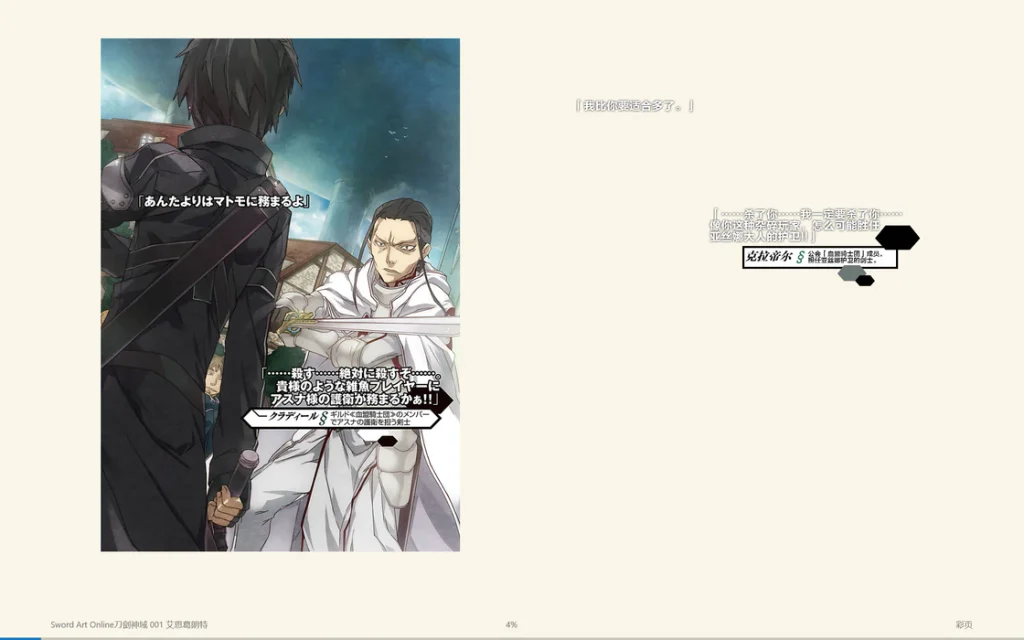
EPUB support was removed from the final versions of Edge—you need to uninstall update KB4601383 if you want to use it—but its EPUB reading experience was the best. Unlike Calibre’s bizarre, stuttering reading experience, Edge offered silky-smooth scrolling, a genuinely full-featured browser and outstanding UX design.
EPUBs were rendered as reflowable, paginated content, and the implementation did not rely on a shadow root. Page turns were elegant and fast—leagues ahead of certain readers that only let you scroll. You could annotate any page in ink, circling things and drawing directly on it.
Better font rendering
At the time, Chromium used Skia for font rendering, while Edge used Windows’ DirectWrite. Skia’s hard-coded settings made text look slightly thinner than Windows’ defaults. The difference was especially noticeable with Chinese, Japanese and Korean characters.
With Chrome 132, Chromium did eventually adopt the Edge team’s patch, bringing its font rendering closer to that of the original Edge.
Boy never meets girl
For PC users, Edge was available only on Windows 10, and major platform features arrived with Windows’ twice-yearly feature updates—which, as we all know, plenty of people simply never installed. Businesses that deferred operating-system upgrades could not get new EdgeHTML features promptly through a standalone browser update, as they could with Chrome or Firefox. The result was a host of compatibility problems between different versions of Edge itself.
A 2019 report by The Verge noted that businesses’ testing cycles and delayed deployment of Windows feature updates could leave their versions of Edge lagging behind for long periods.
Extensions were not available from day one either, leaving the browser’s extension ecosystem underdeveloped. Edge’s user base therefore remained small, feeding a vicious circle in which developers did not bother testing for it. Windows lets you use third-party browsers, after all, rather than force-feeding you Safari the way iOS and iPadOS do.
Poor compatibility with Edge was hardly a surprising result.
Then there was UWP—how is that glittering career going these days? Edge was built on UWP too, and UWP was not a mature application platform. To implement new features, Edge had to wait for UWP to fix bugs or add capabilities of its own. That slowed the browser’s development.
Meanwhile, the web, with Chrome setting the pace, was changing by the day. The first Chromium-based Edge was version 79; today it is already at 151. The Edge team simply could not keep up with Chrome’s release cadence.
So Edge died.
To improve web compatibility, escape Windows’ release schedule and go cross-platform, Microsoft decided to abandon EdgeHTML and move to Chromium. In short, development of EdgeHTML stopped, and support for Edge Legacy ended. EdgeHTML’s small user base meant limited returns for its ecosystem. By adopting Chromium, Microsoft could compete on browser interfaces, enterprise management, Windows integration, privacy and services while sharing the underlying costs of the web platform. For Microsoft, it was an eminently sensible business decision.
Three kingdoms
Browser engines were back to a three-way split—though, given EdgeHTML’s market share, perhaps it had never really been a four-way contest in the first place. Chromium had effectively become the standard for the web, with Firefox occasionally popping up to bark from the sidelines.
I was among the last to upgrade Edge. In fact, I would still like to keep the old version around, but I leave system updates enabled, so that is not an option. There were genuine shortcomings in its experience compared with Chrome. Edge would display nothing until the HTML had finished loading, leaving you staring at a white page. Chrome, by contrast, would render whatever it could as soon as it could, giving it a substantially faster initial display. And that is before we get to whatever mysterious little tricks Google kept pulling on its own sites.
Why summon Edge’s ghost?
It all began with Chrome’s decision in 2024 to end support for Manifest V2 extensions. Many extensions, including uBlock Origin, use Manifest V2. The debate has been going on for a long time. Every so often, another browser announces that it too is dropping V2 support, and out come the headlines: so-and-so is killing the world’s favourite ad blocker. Which, to be fair, is not wrong.
At first, plenty of browsers held back, including Chromium-based Edge. Brave and Vivaldi also continued supporting V2 extensions. By 2026, however, Edge had published its own retirement timetable for V2 extensions. This was entirely predictable. Every Chromium-based browser faces the same problem: Google has it by the throat. Once Google removes support from upstream Chromium, any downstream browser that wants to keep it must maintain a fork and continually backport subsequent features. Backporting is painful work, and it becomes harder as the updates accumulate. This year’s growing number of vulnerabilities discovered by AI, along with ever more frequent releases, has only increased that pressure. In the end, I expect most browser makers that want to stay current will follow upstream rather than maintain a fork. That excludes certain browsers which have not been updated in centuries and are still on Chrome 87.
And just like that, a change that many people may dislike spreads to nearly 90% of the world’s browsers, and there is nothing you can do about it. XSLT is being retired too. We can expect plenty more examples in the foreseeable future.
Would things be different if there were more well-maintained browser engines beyond Chromium? Perhaps. Firefox, at least, is still a browser developers have to target, and most Linux distributions use it as their default. Safari remains another compatibility target: on iOS and iPadOS, at the very least, we still need to consider whether Safari 16 will render a page correctly. It too is updated with the operating system, so the never-update brigade is a problem there as well. But the market shares of both are so small. So very small.
I miss reading EPUBs in Edge. I miss its smooth scrolling, its battery efficiency, its PDF support. If you want to use it now, you have to fire up a virtual machine and block updates. That is no way to use a browser day to day. What a shame.
A brief digression: Flash
Since Flash died, nothing like it has emerged. Even HTML5, JavaScript, CSS, Canvas, WebGL, WebGPU and WebAssembly combined still cannot do everything Flash could, never mind the dispiriting experience of developing with all those technologies. The modern web seems unwilling to allow another Flash to emerge, yet remains unmoved by Google’s monopoly. It is a curious state of affairs.
Flash provided a complete development environment and a consistent experience, even if, looking back, it was riddled with bugs. Browser makers joined forces to phase it out, but offered no replacement that did the same job. An SWF player was small and elegant; trimming an ecosystem such as Blink down to what you need is practically impossible for an individual developer. Any application that wants to tap into that ecosystem has to drag along the entire heap of digital junk.
A brief digression: XSLT
XSLT is being removed too. Without a polyfill, RSS XML pages will no longer be able to use XSLT to improve their presentation. That makes the experience much worse for anyone who happens to click through to the raw RSS XML. So I have added a separate landing page on my own site to act as a buffer.
Besides, why should I have to put JavaScript in RSS XML? How barbaric.
Share: