Category: Headphones

  • TDS REVIEW | Hands-On With the Shokz OpenDots 2 and OpenDots Air Clip-On Open-Ear True Wireless Earbuds

    TDS REVIEW | Hands-On With the Shokz OpenDots 2 and OpenDots Air Clip-On Open-Ear True Wireless Earbuds

    This is the 23rd article from TDS Studio on SSPAI, and as always, it is being published exclusively here first.

    For a long time, we have regarded the Shokz OpenDots ONE as one of the best clip-on earbuds available. It offers clear advantages in both user experience and sound quality, to the point that even today we still consider it a highly worthwhile purchase.

    Recently, Shokz unveiled its second generation of clip-on earbuds. One model serves as the direct successor to the OpenDots ONE and is called the OpenDots 2. The other follows a strategy similar to what Shokz previously did with the OpenFit lineup: the OpenDots Air comes in at a lower price point while theoretically retaining most of the performance of its more premium sibling. We purchased both at launch and put them through extensive side-by-side testing.

    Since the review unit of the original OpenDots ONE had long since been returned to Shokz after our initial review, this comparison is based on two self-purchased new models and an OpenDots ONE kindly loaned to us by a reader. Special thanks to The Boy in the Rye for lending us the unit. As you’ll discover after reading this review, several of the first-generation model’s strengths have held up remarkably well.

    Package & Accessories|Package & Accessories

    The OpenDots 2 packaging largely follows the same approach as the first generation, featuring environmentally friendly paper packaging with generously rounded corners. The OpenDots Air, on the other hand, comes in a more conventional octagonal cardboard box. Neither package is particularly large, and both use disposable seals. The OpenDots 2 also includes a USB-C to USB-C charging cable, while the Air comes with no accessories at all (which is certainly one way to stay “lightweight”).

    Design, Fit & Acoustic Structure|Design, Fit & Acoustic Structure

    The overall design of the OpenDots 2 closely follows that of its predecessor. In fact, it is difficult to spot any tooling changes with the naked eye. At launch, it is available in three colors. The unit we are showcasing is the “White Gold Kintsugi” version, which adds decorative accents compared to the previous generation’s white-and-gold finish. Ironically, these details make it feel a little less minimalist.

    According to Shokz, the White Gold Kintsugi colorway draws inspiration from the Japanese art of kintsugi, where cracks are repaired with gold powder. To be honest, however, the additional detailing slightly reduces the seamless visual appearance. The other options include “Black Meteor” and the subtly blue-tinted “Silver Cedar.” The OpenDots Air comes in “Midnight Black” and “Dawn Purple.” Based on what we observed in retail stores and our own subjective impressions, our color recommendations, from most to least appealing, are:

    • OpenDots 2 Silver Cedar
    • OpenDots 2 Black Meteor
    • OpenDots 2 White Gold Kintsugi
    • OpenDots Air Dawn Purple
    • OpenDots Air Midnight Black

    Midnight Black simply lacks a premium look. In fact, it is difficult to distinguish it visually from many budget earbuds in the entry-level segment. It is also more prone to attracting fingerprints and grease, making it harder to keep clean.

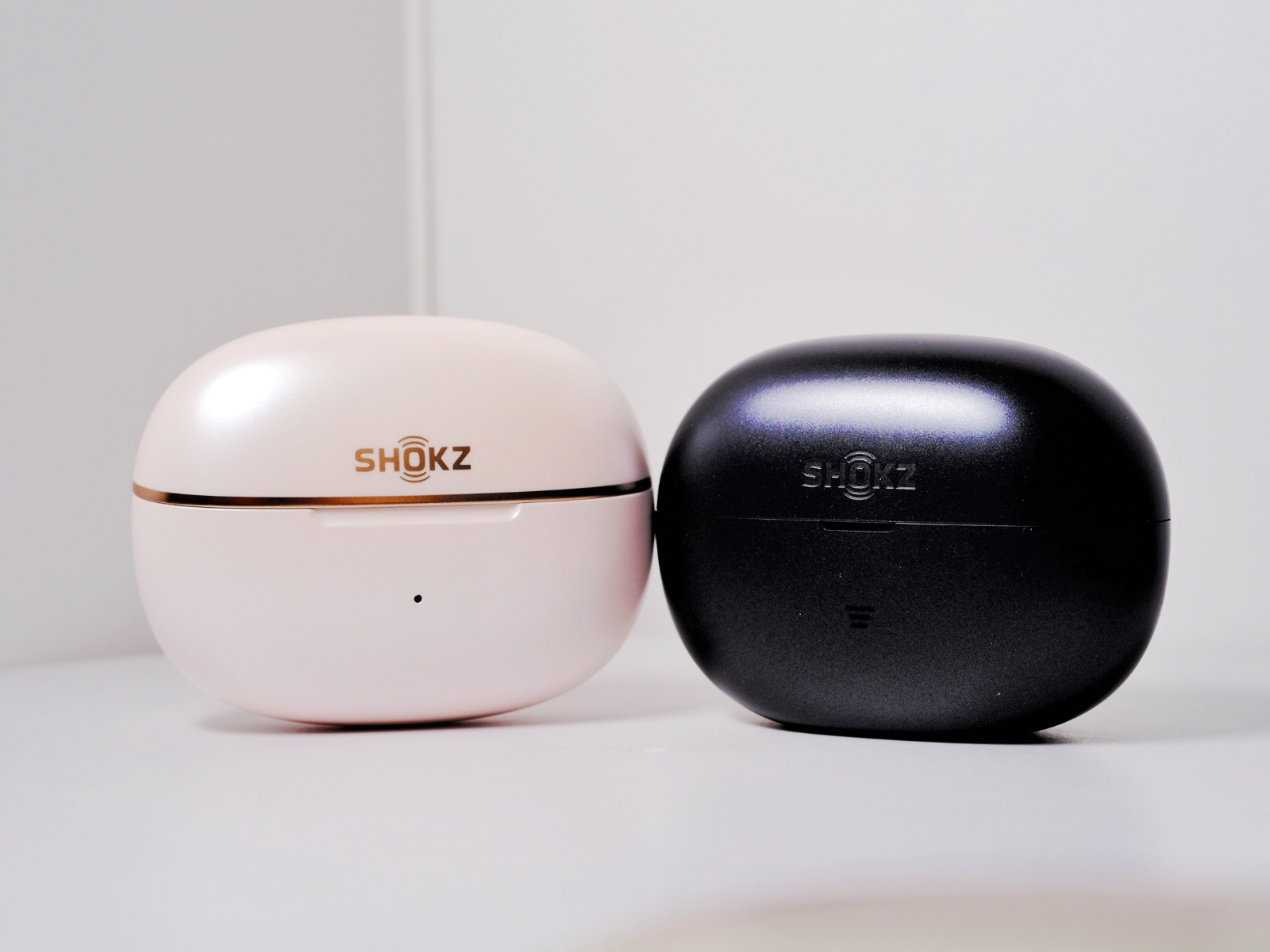
    The charging case of the OpenDots 2 is almost identical to that of the first generation. The White Gold Kintsugi version adds a champagne-gold trim around the case, while retaining the same shape and button layout. The surface finish has been changed to a pearl-like texture that feels somewhat reminiscent of a cosmetic product. The tactile feel has improved, but the smoother finish also makes one-handed opening and closing slightly more slippery. The hinge has been adjusted as well, resulting in a different lid-opening feel.

    The Air’s charging case is noticeably larger. The pairing button has been replaced with a touch-sensitive control located on the front, and the bottom has been flattened to allow it to sit more securely on a desk. The Air’s more budget-oriented positioning is also reflected in its build quality. At least on our unit, shaking the case makes it obvious that the earbuds are not held quite as securely by the magnets, loose enough that you can hear them move around inside. The OpenDots 2, by contrast, maintains the same solid build quality as the first generation, which remains commendable.

    The overall earbud design of the OpenDots 2 is also very similar to that of its predecessor. The rear module retains its capsule-shaped form, while the front module remains a relatively compact sphere. According to Shokz, the Dynamic Titanium Arc has been upgraded with improved flexibility. In our direct comparison, the rebound force does indeed feel slightly reduced, although this does not translate into any major difference during actual wear. The first-generation fit was already excellent to begin with. Each earbud weighs 6.4g.

    In terms of fit, the OpenDots 2 remains consistent with the first generation, offering moderate clamping force without creating excessive pressure at the front of the ear. Compared with Bose’s flexible C-Bridge design, Shokz’s Dynamic Titanium Arc offers better resistance to twisting. The wide titanium strip controls the relative movement between the front and rear modules, making accidental twisting and dislodging less likely. The “uneven silicone spacing” structure also contributes meaningfully to comfort. Areas more prone to pressure are cushioned with thicker silicone, distributing force more effectively across the complex contours of the ear compared with traditional hard plastic housings. In our opinion, both the first- and second-generation OpenDots remain among the most comfortable and secure clip-on earbuds currently available.

    The OpenDots Air adopts a different structural approach. Its titanium strip is slightly thicker and better suited to users with thicker ear contours. As a result, it is also more elastic, with noticeably stronger rebound force compared with the flagship series. Each earbud weighs 6.3g. The rear module resembles the more common clip-on earbud designs seen on the market. While it still uses soft silicone, it does not emphasize the uneven-thickness silicone structure found on the OpenDots 2. In our experience, the Air actually provides slightly better rear-ear contact, and its slightly smaller front chamber makes it more accommodating for users with smaller conchas.

    Overall, both products offer a very good wearing experience and are easy to position correctly on the first try. The OpenDots 2 is better suited to users with smaller ears, while the Air is more comfortable for those with thicker ear contours. Both provide a high level of stability.

    Compared with the first generation, the OpenDots 2 upgrades its dust and water resistance to IP57, while the charging case now carries an IP54 rating. This allows it to handle more demanding everyday environments. That said, as an open-ear wearable stereo (OWS) product, we still would not recommend using it in extremely humid conditions or underwater. The Air is rated IP55 for dust and splash resistance, which is more than sufficient for light rain and daily outdoor use.

    Controls & App|Control & APP

    Both the OpenDots 2 and OpenDots Air rely on pinching the upper and lower parts of the rear module, as well as tapping gestures, for controls. On the OpenDots 2, the default configuration assigns a single pinch or double tap to playback control, double actions for track switching, and long presses for volume adjustment. On the Air, a single pinch adjusts volume, a double pinch changes tracks, and a double tap controls playback. The control logic is not entirely consistent between the two models, and we would prefer to see greater standardization. Overall, however, the controls are reasonably responsive, and sensitivity can be adjusted through the app.

    The voice prompt volume is fairly average, though it can be adjusted independently. Both earbuds feature an ambidextrous design that eliminates the need to distinguish between left and right units. Internal sensors automatically detect wearing orientation in real time. Both models also include wear-detection sensors, which proved highly reliable during testing. However, after removing the earbuds, there is a roughly two-second delay before playback actually pauses.

    The Shokz app remains intuitive and easy to navigate, with clearly organized feature categories. Through the app, users can perform firmware updates, switch EQ presets, enable multipoint connectivity, customize controls, and locate misplaced earbuds. At present, the Find My Earbuds feature still relies solely on emitting a sound from the earbuds rather than providing actual location tracking. In noisy environments, this functionality is only marginally useful. A new drop-alert feature has also been added.

    Call Quality|Call

    The OpenDots 2 is equipped with a bone-conduction microphone working alongside traditional microphones, creating what Shokz calls a “Bone-Air Triple Microphone” system (a rather unusual name, admittedly). The Air continues to use a dual-microphone setup. Both models incorporate AI-powered noise reduction.

    We conducted our call-quality testing over a standard cellular network. The original OpenDots ONE still delivers very solid call performance and remains among the best in the clip-on earbud category. However, possibly due to early firmware optimization, the OpenDots 2’s voice pickup sounds slightly less clear than its predecessor, although overall loudness remains more than sufficient. In high-noise environments, however, the OpenDots 2 shows noticeable improvement in isolating the speaker’s voice, and wind noise during calls is kept to a minimal level.

    The OpenDots Air, by comparison, falls noticeably behind both flagship-series models in terms of pickup volume and clarity. Wind noise also has a much more pronounced impact on recording quality and call performance.

    Connection & Battery|Connection & Battery

    Since neither model supports high-bitrate audio codecs, we conducted our testing as usual using AAC.

    Moving to our familiar signal-testing environment, both earbuds performed well when connected via AAC to our standard test device, the iPhone 14. Whether WLAN was enabled or disabled, both models experienced very few instances of stuttering or packet loss at close range. The OpenDots 2 showed no significant increase in connection instability at a distance of 7.5 meters with a load-bearing wall in between. Beyond 8 meters, however, the listening experience began to degrade noticeably. The OpenDots Air started to experience occasional packet loss at around 6.5 meters with a load-bearing wall separating the device and earbuds, and performance became noticeably affected beyond 7 meters1.

    The OpenDots 2 delivers impressively strong wireless performance, placing it comfortably among the top tier of AAC-based TWS and OWS earbuds. The Air, by contrast, encounters more difficulties in complex signal environments and during longer-range transmission. That said, after updating to the second firmware version, its performance improved somewhat, with packet loss only becoming noticeable beyond 7 meters through a wall.

    As for latency, neither model includes a dedicated low-latency mode. Under default settings, using the AAC codec and prioritizing signal stability while connected to an Xperia 5 III, the OpenDots 2 exhibited roughly half a spoken syllable of delay during both streaming and locally stored video playback. This is fairly average performance. Surprisingly, the Air managed to perform even better in this regard, which was not something we expected.

    Both models also support multipoint connectivity with two devices simultaneously.

    When it comes to battery life, Shokz officially rates the OpenDots 2 for up to 10 hours of continuous playback from the earbuds alone and up to 40 hours with the charging case. The Air is rated for 9 hours and 36 hours respectively.

    Driver, Sound Modes, Leak Control & Codec|Driver, Sound Modes, Leak Control & Codec

    Both the OpenDots 2 and OpenDots Air are equipped with dual opposing 11.8mm dynamic drivers. They feature Bassphere 2.0 low-frequency aggregation technology (the Air uses the first-generation version) along with OpenBass 2.0+ dynamic compensation. Supported codecs are limited to SBC and AAC. Both models include four built-in EQ presets, including a Privacy Protection mode. This mode reduces overall volume while also trimming some low-frequency and ultra-high-frequency energy. The effect is noticeably less aggressive than Sony’s implementation. Custom EQ is also available, offering adjustment across five frequency bands within a ±5dB range, which is fairly standard.

    For OWS earbuds, actual sound pressure levels and leakage control are particularly important, so we compared both models using an iPhone 14 in standard listening mode. System volume was set to 50%, with the earbuds worn normally. Personally, at this volume level, most modern remastered tracks can be heard clearly in a quiet indoor environment, though listeners with hearing similar to mine may find the sound slightly lacking in fullness. At around 70% volume, however, both become more than sufficient for general listening. As always, different devices, operating systems, and hearing conditions can significantly affect perception, so keep that in mind. In terms of sound pressure, the two models perform similarly and remain broadly comparable to the original OpenDots ONE. The Air’s brighter upper-mid and treble tuning means that outdoors it can sometimes feel less full-bodied than the OpenDots 2 even when the volume is increased.

    When it comes to sound leakage, the OpenDots ONE in standard mode at 50% volume produces only faintly perceptible leakage beyond 15cm, becoming virtually inaudible beyond 20cm. In Privacy Protection mode, leakage is already almost imperceptible beyond 10cm, and even sitting very close makes it difficult to make out specific content. The OpenDots 2 improves upon the ONE in this area. At 50% volume in standard mode, leakage is only faintly noticeable beyond 10cm, and in Privacy Protection mode it becomes virtually undetectable beyond 5cm. The Air performs similarly to the ONE overall, though its Privacy Protection mode is more effective and approaches the OpenDots 2’s level.

    Simply put, both models remain among the very best clip-on earbuds currently available when it comes to leakage control.

    A few additional words about Dolby Audio support on the OpenDots 2. Compared with the Dolby implementation on the OpenDots ONE, low-frequency quality is noticeably improved, avoiding the occasional distortion that sometimes felt almost like a rendering bug on the previous model. During spatial audio testing with an iPhone 14, the compression-like sensation of rear-channel information is also reduced. At present, Dolby Audio on the OpenDots 2 is clearly moving in the right direction for Atmos playback. It still falls short of Apple’s own ecosystem products, but it has finally reached a point where it is genuinely worth enabling and experimenting with—a significant improvement.

    OpenDots 2: Subjective Sound Impressions|Sound Description

    Tested using AAC connected to an iPhone 14 with the default tuning.

    The bass carries slightly more quantity than the OpenDots ONE while maintaining good control over thickness and fullness. It remains reasonably punchy, with respectable extension for a clip-on design. Decay speed is moderate, preserving a small amount of reverberation. Atmospheric bloom remains relatively restrained, though there is slightly more richness than on the ONE.

    The OpenDots 2’s bass is noticeably more prominent than the ONE’s, with greater weight and body. Low frequencies are easier to perceive in noisy environments, and impact feels somewhat stronger. However, overall detail retrieval is not dramatically improved; technical performance remains broadly comparable. Instruments whose fundamentals sit in the lower-midrange gain a slight sense of forwardness. The OpenDots Air, by contrast, exhibits lower bass cohesion than the OpenDots 2, transitioning more gently with a slightly diffuse imaging presentation.

    In the midrange, vocals are positioned relatively close to the listener, with slightly larger imaging. Resolution remains reasonably high. Vocal texture takes precedence over edge definition, giving voices a pleasing sense of body. Compared with the ONE, vocal outlines are somewhat more pronounced, though not to the extent of becoming an analytical or line-focused presentation. There is no obvious bias toward either male or female vocals, though lighter vocal styles tend to work best. Grain has been smoothed out effectively, resulting in good overall refinement. The silver model presents a generally neutral tonality with a slight touch of warmth, avoiding excessive coloration or artificially enhanced excitement. Throat resonance sits relatively high, while breathiness is slightly more prominent than on the ONE. Sibilance and mouth sounds are both controlled well, contributing to a smooth and natural presentation. Overall transparency in the vocal range is strong, without obvious artificial brightness.

    Instrument reproduction strikes a balance between texture and definition. Among string instruments, violins, violas, and guitars sound more substantial than on the ONE, though they still stop short of sounding particularly thick. Details of bowing and plucking remain relatively abundant for a clip-on design. Cellos gain a more convincing sense of body compared with the ONE, though their scale within the soundstage remains somewhat compact. Brass instruments deliver respectable presence, while brighter instruments such as trumpets retain an appropriate sense of sparkle. Woodwinds sound natural, with slightly more air than on the ONE. Harmonic overtones are fairly natural, though not especially rich. Among percussion instruments, kick drums lack a strong sense of dominance, while snares decay slightly quickly. Cymbals exhibit moderate brightness without becoming harsh or excessively metallic.

    Treble brightness overall is moderate. There is enough energy to avoid sounding dull, but it never feels excessive or congested. Smoothness remains good. Ultra-high-frequency extension and information retrieval are both improved over the ONE, though roll-off still occurs somewhat earlier than ideal. Fortunately, when paired with an iPhone, the attenuation does not feel overly premature.

    The soundstage is reasonably spacious, with respectable width and depth. While not perfectly symmetrical, the relaxed and diffuse presentation around the edges contributes positively to the sense of space. Combined with an average but adequate perception of height, the OpenDots 2 creates a slightly flattened spherical soundstage. Separation between vocals and instruments is solid, and overall coherence is maintained. Resolution is quite good for a clip-on earbud, with a modest improvement in information retrieval compared with the previous generation. The improvement is not transformative, however. In terms of technical performance, it roughly matches the level of two generations of Huawei FreeClip operating without high-bitrate codecs, which is appropriate for the price range. The sense of analytical detail is present but restrained. Dynamic performance shows some improvement, while transient response remains moderate.

    OpenDots Air: Subjective Sound Impressions|Sound Description

    Tested using AAC connected to an iPhone 14 with the default tuning.

    The Air has a noticeably more colored sound signature than both the OpenDots 2 and the OpenDots ONE. Bass quantity is moderate, but its thickness and fullness are not as substantial as the OpenDots 2. Elasticity is decent, though extension into the sub-bass is less impressive. Decay speed is moderate, with very little lingering reverberation. Both the atmospheric bloom and overall richness are relatively restrained, resulting in a presentation that lacks a sense of solidity. To borrow a rather audiophile-style expression, it occasionally sounds a bit like “tapping on sheet metal.” At similar volume levels, the Air’s bass sounds thinner than both the ONE and the OpenDots 2, with more energy shifted toward the upper-midrange. Instruments whose fundamentals reside in the lower registers do not exhibit any obvious forwardness.

    In the midrange, vocals maintain a certain distance from the listener, with imaging slightly smaller than average. Resolution remains fairly respectable. Neither vocal texture nor edge definition is emphasized—both are present but not particularly strong. Vocal outlines are somewhat highlighted, though not especially focused, while body and thickness are noticeably lighter than on the ONE and OpenDots 2. There is no obvious preference for either male or female vocals, but slightly fuller vocal timbres tend to sound thinner and brighter than intended. Grain is minimal, while smoothness is merely average, largely because the upper registers receive greater emphasis. As a result, the overall tonality feels more energetic and youthful. Throat resonance sits relatively high, and breathiness is even more prominent than on the OpenDots 2. Mouth sounds are more noticeable than on the OpenDots 2, and sibilance is slightly more pronounced as well. Transparency in the vocal range is somewhat higher, accompanied by a clearly elevated sense of brightness.

    When it comes to instruments, most exhibit slightly stronger edge definition. Among string instruments, violins, guitars, and violas do not carry much body, though their energy is somewhat enhanced. While the amount of plucking and bowing detail is not as rich as on the OpenDots 2, those details are more prominently presented. Cellos have relatively vague imaging and occupy only a modest presence within the soundstage. Brass instruments do not deliver a particularly grand sense of scale, though brighter instruments such as trumpets possess plenty of sparkle. Woodwinds exhibit enhanced airiness at the expense of some naturalness. Instrument overtones are also somewhat emphasized. For percussion, kick drums remain relatively understated, while snares decay slightly quickly. Cymbals are brighter, carrying a certain degree of sharpness and metallic character.

    Treble overall has more body than both the ONE and the OpenDots 2. Energy levels are quite prominent, though without excessive peaks. Ultra-high-frequency extension is average and lacks the smoother, more natural roll-off exhibited by the OpenDots 2.

    Soundstage performance remains relatively spacious. Width is more expansive than depth, while the boundaries are not overly emphasized. Combined with an average sense of height, the OpenDots Air presents a soundstage that resembles a flattened spindle shape. Separation between vocals and instruments is respectable, and overall coherence is acceptable. Resolution falls slightly behind both generations of the flagship series, though the sensation of “detail retrieval” is more obviously highlighted. Dynamic performance is average, while transient response remains satisfactory.

    Overall Impression|Overall Impression

    Overall, the OpenDots 2 does improve upon the original Shokz clip-on earbuds in several areas, including better Dolby Audio implementation, superior bass quality, and even stronger sound leakage control. In most other respects, however, it largely maintains the performance level established by the first generation.

    Provided budget is not a concern, we still consider the OpenDots 2 and Huawei’s FreeClip 2 to be our primary recommendations among clip-on earbuds priced above the RMB 1,000 mark. At the same time, the original OpenDots ONE was already mature enough in most key areas that many aspects—particularly fit, build quality, and mid-to-high-frequency performance—leave little room for immediately noticeable improvements.

    Considering that the original OpenDots ONE remains available and can now often be found for a little over RMB 700, we would continue recommending it as the first choice for most consumers for quite some time. It already delivers more than enough in the areas that matter. Likewise, we do not believe existing OpenDots ONE users need to rush into upgrading, as the second generation does not provide a dramatically different user experience.

    As for the OpenDots Air, which launched at a price point above RMB 800, its main advantages seem limited to maintaining strong battery life and offering better compatibility for users with thicker ear contours. Its sound tuning is considerably more stylized, while build quality details and industrial design also involve certain compromises. At its current pricing, it is difficult to recommend over simply purchasing the discounted OpenDots ONE. It also falls behind competitors such as the LinkBuds Clip and AeroClip in direct comparisons. For now, we would give it a rating of III. Should its price eventually drop into the RMB 500 range, our evaluation would likely become somewhat more favorable.

    As for Shokz’s flagship clip-on series, our biggest wish remains unchanged: support for high-bitrate audio codecs. Beyond that, the products are already more than competent. Over the next two weeks, we’ll also be bringing hands-on impressions of OPPO’s and Xiaomi’s latest clip-on earbuds. We’ve already purchased both—and yes, the reviews are currently being written.


    The KT MARK ratings for the models discussed in this review, based on the market conditions at the time of evaluation:

    Shokz OpenDots 2: V (Excellent)

    Shokz OpenDots Air: III (Average)

    Reference firmware versions:

    • OpenDots 2: EU_V_04
    • OpenDots Air: EU_V_01
    • OpenDots ONE: EU_V_07

    For details regarding the KT MARK rating methodology and our conflict-of-interest policy under the “Non-Interference Review Principle,” please search for TDS Studio Rating Standards & Content Guidelines V202502. The document can be found through major search engines.

    KingTsui, TDS Studio.

    June 2026

    It’s a TDS production.

    All content is entirely original and independently produced. Unauthorized copying, plagiarism, imitation of writing structure, or derivative reproduction is prohibited. All rights reserved.

    1. After upgrading to the second firmware version, the situation has improved; packet loss now only occurs when the device is more than 7 meters away from a wall. ↩︎

  • Sony LinkBuds Clip Open-Ear Clip-On True Wireless Earbuds Review – TDS REVIEW

    Sony LinkBuds Clip Open-Ear Clip-On True Wireless Earbuds Review – TDS REVIEW

    This article is TDS Studio’s eighteenth piece on SSPAI, and, as always, it is a full-platform first release.

    In our earlier review of the LinkBuds Open, we mentioned that in some regions it was marketed as “Sony’s ideal form of open wireless earbuds.” From my personal experience at the time, I didn’t really feel any particular inconvenience. However, it is ultimately a device that sits inside the concha. Even though its horizontal length was reduced compared to the first generation, users with smaller outer ears could still struggle to achieve a completely stable fit. Perhaps the LinkBuds Clip was created to address this need? With that in mind, we went ahead and picked up the purple version at launch. The initial out-of-the-box impression was surprisingly striking, but it was only after a period of rigorous comparison that we are now ready to share a detailed hands-on experience.

    Packaging & Accessories | Package & Accessories

    The LinkBuds Clip uses the same eco-friendly packaging as the second-generation LinkBuds products, sealed with a one-time adhesive strip. The design language is extremely restrained and minimal. There is no charging cable included; the only accessory is a pair of “Flex Cushions.” This is the main form-factor difference between the LinkBuds Clip and other mainstream clip-on earbuds. Essentially, they are soft silicone pads that slip over the C-bridge, designed to accommodate different thicknesses of the ear’s outer edge. We’ll focus on this more when discussing fit and wearing comfort.

    Design, Fit & Acoustic Structure | Design, Fit & Acoustic Structure

    The LinkBuds Clip comes in four default color options: Midnight Black, Bellflower Purple, Oxygen Green, and Oat White. Since we’ve already seen plenty of the black, white, and green combinations across previous LinkBuds models, we naturally chose the purple version—previously sold internationally as a co-branded colorway and now introduced as a standard option. Compared with the purple we’ve seen on the LinkBuds S and Fit, this one appears noticeably lighter.

    The charging case shares the same overall form as the second-generation LinkBuds products, resembling a square macaron fresh out of the oven. Its overall volume is slightly larger than those two models, which also means silicone protective cases are not interchangeable.

    The lid features a glossy finish and, this time, comes in a solid color without any marble-like decorative patterns. One-handed opening is fairly easy, with a comfortable hinge feel, though the magnetic hold securing the earbuds inside the case isn’t particularly strong.

    The earbuds themselves adopt the familiar clip-on form factor. The C-bridge is flattened, with flexibility that sits between the AeroClip and the Bose Ultra Open. It feels more pre-shaped than the OpenDots One, and the clamping force is lighter than ambie’s product line. In terms of vertical resistance to twisting, performance is quite good. We compared several clip-on earbuds in the same price range, and the closest match in C-bridge elasticity would be the FreeClip series. The rear module is capsule-shaped, while the front acoustic chamber is relatively compact. Compared with the OpenDots One, the front chamber is similar in size, and smaller than the flatter chamber design of the AeroClip, though the sound port opening itself is relatively large.

    In actual use, even without installing the “Flex Cushions,” the fit felt quite stable for me. The sense of enclosure from the C-bridge isn’t as strong as on the Bose Ultra Open or OpenDots One, but there was no noticeable up-and-down movement during running or jumping, and normal walking didn’t require frequent readjustment. We also asked a friend with thinner ear cartilage to try them; his feedback was that the pre-shaped C-bridge created more psychological instability compared to the stronger wrap provided by more flexible C-bridges.

    That’s where the “Flex Cushions” come into play. They essentially add a buffer layer between the C-bridge and the edge of the ear. For me personally, they increased the sense of the earbuds’ presence, but for users with thinner ear cartilage, stability improved noticeably. While this accessory can technically be fitted to other clip-on earbuds, Sony does not currently sell it separately. Much like the ear supports on the LinkBuds Open, it would be better if more sets were included in the box.

    Each earbud weighs 6.4 grams, with most of the weight concentrated in the rear module. The earbuds are rated IPX4 for splash resistance, which is adequate for an OWS product—fine for light rain or mild exercise.

    Control & App | Control & APP

    Without wide-area touch controls, the LinkBuds Clip uses a more “traditional” interaction method. As shown in the diagram, the tap zones are fairly specific. During initial use, it can take some getting used to—hence the need for a visual guide. That said, recognition response is quite fast, and you can adjust sensitivity in the app. The default control logic is as follows: double-tap on the left to switch modes; double-tap on the right for playback control; triple-tap on the right to skip tracks; four taps or more on either side are mapped to volume adjustment. All of these can be customized.

    There is no automatic left/right ear detection or wear detection, which really should be included at this price point. Controls are accompanied by voice prompts. The default prompt volume is acceptable, though it can feel a bit quiet in very noisy environments. Fortunately, you can adjust prompt volume in the app and choose from eight different prompt languages.

    Through the Sound Connect app, you can still access familiar features such as the equalizer, 360 Reality Audio measurement, control customization, and firmware updates.

    There is no head-motion recognition, but Auto Play is retained. This feature automatically starts music playback based on different activity scenarios. Enabling it prompts you to pair an additional LE Bluetooth device. When you start running, it will automatically play a preset playlist. The first time you wear the earbuds each day, they announce the date, and you can also enable hourly time announcements. On the China mainland version, Quick Access continues to support services such as NetEase Cloud Music, Kugou, QQ Music, and Tencent Xiaowei. Available integrations vary by market.

    Call | Call

    Call performance is, in my personal experience over this period of use, where the LinkBuds Clip’s advantages are most clearly felt. Each side is equipped with two microphones and a bone-conduction pickup unit—making it one of the few clip-on earbuds that genuinely invests in call audio hardware.

    We conducted call tests over carrier networks, and real-world stability proved to be very solid, placing it in the top tier among clip-on earbuds. Voice pickup is only slightly muffled, volume is sufficient, and voice isolation in high-noise environments is quite accurate (bone conduction is clearly doing its job). During calls, wind noise from the front and sides has relatively little impact, while wind coming from behind can reduce clarity. Overall, the LinkBuds Clip shows a clear advantage in default call loudness, clarity, and call noise reduction within the clip-on category.

    Connection & Battery | Connection & Battery

    It does not support high-bitrate codecs, so as usual we tested performance under AAC. In our familiar signal test environment, with AAC connected to the standard test device Xperia 5 III, near-field stuttering and packet loss were minimal, regardless of whether WLAN was turned on or off. At a distance of 7 meters with a load-bearing wall in between, there was no noticeable increase in stutter. Beyond 7 meters, occasional packet loss began to appear, and at around 9 meters the connection interruptions became clearly disruptive to the experience.

    In terms of latency, there is no dedicated low-latency mode. Under default conditions, using AAC as the preferred codec when connected to the Xperia 5 III for streaming and local video playback, latency is roughly equivalent to slightly more than half a syllable at normal speaking speed, which is not particularly impressive.

    It does support dual-device connections as well as features such as Windows Swift Pair.

    For battery life, the official rating is 9 hours of continuous playback on the earbuds alone, and up to 37 hours in total with the charging case, which is relatively good among clip-on earbuds. Based on our standard testing procedure, using AAC with the Xperia 5 III, Auto Play disabled, default sound mode, DSEE set to Auto, and continuous playback at 50% volume (Apple Music Lossless streams and podcast content from Xiaoyuzhou), we recorded an earbud-only runtime of 7 hours and 49 minutes, measured from a full charge.

    Charging performance was also tested. The earbuds charge fairly steadily at around 0.9W, which is on the lower end for TWS earbuds, though PD compatibility is not an issue. They also support quick charging, providing approximately 1 hour of playback from a 3-minute charge.

    Driver, Sound Modes, Leak Control & Codec | Driver, Sound Modes, Leak Control & Codec

    The LinkBuds Clip is equipped with a 10mm dynamic driver, with no further detailed specifications disclosed by Sony. Supported codecs are SBC and AAC, and it continues to support DSEE as well as Sony’s standard 360 Reality Audio spatial audio.

    Here we’ll spend a bit more time on sound-related settings. The LinkBuds Clip is described as supporting the previously seen background sound effect modes, but these appear to require a future OTA update, as they are not present in the early firmware we tested. For clip-on earbuds, default loudness and sound leakage control are especially important, and Sony’s tuning this time clearly focuses on these aspects.

    The two additional listening modes are “Voice Enhancement” and “Leakage Suppression.” The former can be understood as adding extra gain to the mid- and high-frequency range, making vocal information more prominent in noisy environments. The latter attenuates mid- and high-frequencies, resulting in lower overall perceived sound pressure, making it more suitable for environments like elevators or tightly packed study rooms. In our view, both modes are better suited for specific scenarios rather than everyday music listening—fine for podcasts or short videos, but not ideal for regular music. It’s worth noting that these two modes cannot be used simultaneously with the equalizer or DSEE.

    For comparison, we fixed system volume at 50% and wore the earbuds normally. Personally, in Standard mode at this volume, most tracks mastered to current remastering standards are clear in a quiet indoor environment, though some listeners with hearing similar to mine may find the fullness slightly lacking. At around 60%, volume becomes more than sufficient. Since different systems, devices, and hearing conditions can affect judgment, we consistently used the Xperia 5 III—an often-featured device in our reviews—for comparison.

    In Standard mode at 50% volume, leakage is only faintly perceptible beyond 15 cm, and almost imperceptible beyond 25 cm. In Voice Enhancement mode, mid- and high-frequency leakage is more noticeable, with slight perception still present around 25 cm, and only becoming reasonably controlled at around 30 cm. In Leakage Suppression mode, leakage is almost imperceptible beyond 10 cm, and even at very close distances it’s difficult to clearly make out content.

    In a horizontal comparison with similarly positioned products, based on a not-particularly-rigorous unified measurement approach and subjective volume perception, leakage control from best to worst roughly ranks as follows:
    LinkBuds Clip (Leakage Suppression mode) >> OpenDots One ≈ FreeClip > LinkBuds Clip (Standard mode) ≈ AeroClip > Bose Ultra Open Earbuds > LinkBuds Clip (Voice Enhancement mode) > ambie TW-01.

    The equalizer offers ±6 dB adjustment across ten frequency bands. Preset EQ modes remain the familiar options, and the “Find Your Equalizer” feature is also supported. We’ll provide a recommended EQ setting to help reduce its sense of sharpness.

    Sound Description | Sound Description

    Based on default tuning, AAC codec, Standard mode, DSEE set to Auto.

    The low end is moderate in quantity, perhaps even slightly restrained, with limited thickness and fullness. Elasticity is moderate, and sub-bass extension is relatively good among clip-on earbuds. Decay is a touch on the faster side, retaining a light sense of resonance. There isn’t much atmospheric bloom or density. Bass presence on the LinkBuds Clip is clearly not emphasized; in Standard mode it can feel similar to some semi-in-ear bass presentations, yet it remains quite a distance from the compensated low-end energy of something like the AirPods 4. Bass solidity also trails slightly behind the FreeClip series and OpenDots One, though within the clip-on category there are only a handful of models that deliver noticeably fuller bass anyway. Instruments with fundamentals in the lower-mid range do not exhibit obvious forwardness issues.

    In the midrange, vocals are not positioned too close, with mouth shape well controlled and a noticeable emphasis on refinement. The tuning slightly favors line definition over texture, with no strong bias toward either male or female vocals, making it suitable for listeners who don’t seek especially thick vocal bodies. A mild sense of grain is retained, while overall smoothness is fairly average. Timbre rendering includes light embellishment—primarily to enhance pleasantness rather than introduce obvious coloration or distortion. Throat tones sit slightly higher, with a greater proportion of breathiness. Sibilance is clearly perceptible—arguably the most pronounced among Sony headphones in recent years. Overall vocal transparency is high, with a slight brightening.

    For instruments, most are rendered with an emphasis on contour. Among string instruments, violins, violas, and guitars lack notable thickness, but plucked and bowed details are relatively abundant and stand out within the clip-on category. Cellos are not especially full-bodied, though clarity is quite good, with a smaller spatial footprint. In tracks that make heavier use of distortion effects, electric guitars exhibit an energy presence that many clip-on earbuds previously lacked. Brass instruments deliver a moderate sense of power; instruments like trumpets have sufficient brightness. Woodwinds offer ample airiness with a certain degree of energy. Harmonic overtones are comparatively rich and prominent for this category. Among percussion, kick drums lack strong presence, snares are clean and quick, cymbals are bright with a mild edge, and metallic timbre is kept under control.

    Overall treble brightness is relatively high, with two noticeable peaks. This makes some tracks sound more stimulating in the high frequencies than most Sony Bluetooth headphones in the past, though not to an extent that would be intolerable for most listeners. Perception also varies depending on fit. We’ll provide EQ suggestions later. Ultra-high-frequency extension is quite good for clip-on earbuds; although AAC imposes a high-frequency roll-off, it is neither too early nor too steep. Combined with the OWS form factor, this reduces the sense of truncation.

    Soundstage performance is quite good, with a sense of scale and edge diffusion. It’s hard to say the horizontal and vertical dimensions are perfectly equal; paired with a not particularly pronounced sense of height, the LinkBuds Clip presents a slightly oblate, spheroidal space. Separation between vocals and instruments is acceptable, and overall cohesion is decent. Resolution is respectable among higher-priced clip-on earbuds—clearly an improvement over the ambie series—but the richness of information (especially in the low end) still lags slightly behind the FreeClip 2 and OpenDots One. That said, the sense of “resolution” itself stands out. Dynamics are moderate, with fairly good transient response.

    Overall Impression | Overall Impression

    When I first tried the LinkBuds Clip, as a long-time EX1000 user, I immediately sensed that wide, bright character in the new tuning. The brilliance in the upper mids and highs made it quite attention-grabbing, and after years of listening to Sony’s warmer, thicker low-mid–focused tunings, it was genuinely exciting. However, after a more comprehensive evaluation, we feel there are still areas that could be better. As a product in the thousand-yuan range, the lack of left/right ear detection and wear detection is disappointing. Some may also find the sound a bit aggressive, and there’s no high-bitrate codec support—criticisms you may have already seen echoed in recent reviews across various media outlets. That said, it also addresses several real pain points in my view: unexpectedly strong call quality for a clip-on design, leakage control in Leakage Suppression mode that surpasses many semi-in-ear models, and a new structural approach accommodating different ear cartilage thicknesses. Ultimately, we’ve decided to give the LinkBuds Clip a KT MARK rating of IV. It’s not fully mature yet, and we hope to see the background sound features restored as spring arrives. We’re also looking forward to what new breakthroughs the upcoming WF-1000XM6 may bring.


    KT MARK for the model discussed, under the market context at the time:

    SONY LinkBuds Clip: IV (Recommend)

    For details on the KT MARK rating system and the “non-interference principle” regarding interests, please search for “TDS Studio Rating Standards & Content Notes V202502” via major search engines.

    KingTsui, TDS Studio.

    Feb 2026

    It’s a TDS production.

    Some screenshots are provided by Sony; all other content is entirely original. Unauthorized reproduction, imitation of structure, or plagiarism is prohibited. All rights reserved.

  • Audio-Technica ATH-CKS50TW2 Review: Big Bass ANC Earbuds with Exceptional Battery Life

    Audio-Technica ATH-CKS50TW2 Review: Big Bass ANC Earbuds with Exceptional Battery Life

    This is TDS Studio’s seventeenth article on SSPAI, once again released as an all-platform exclusive.

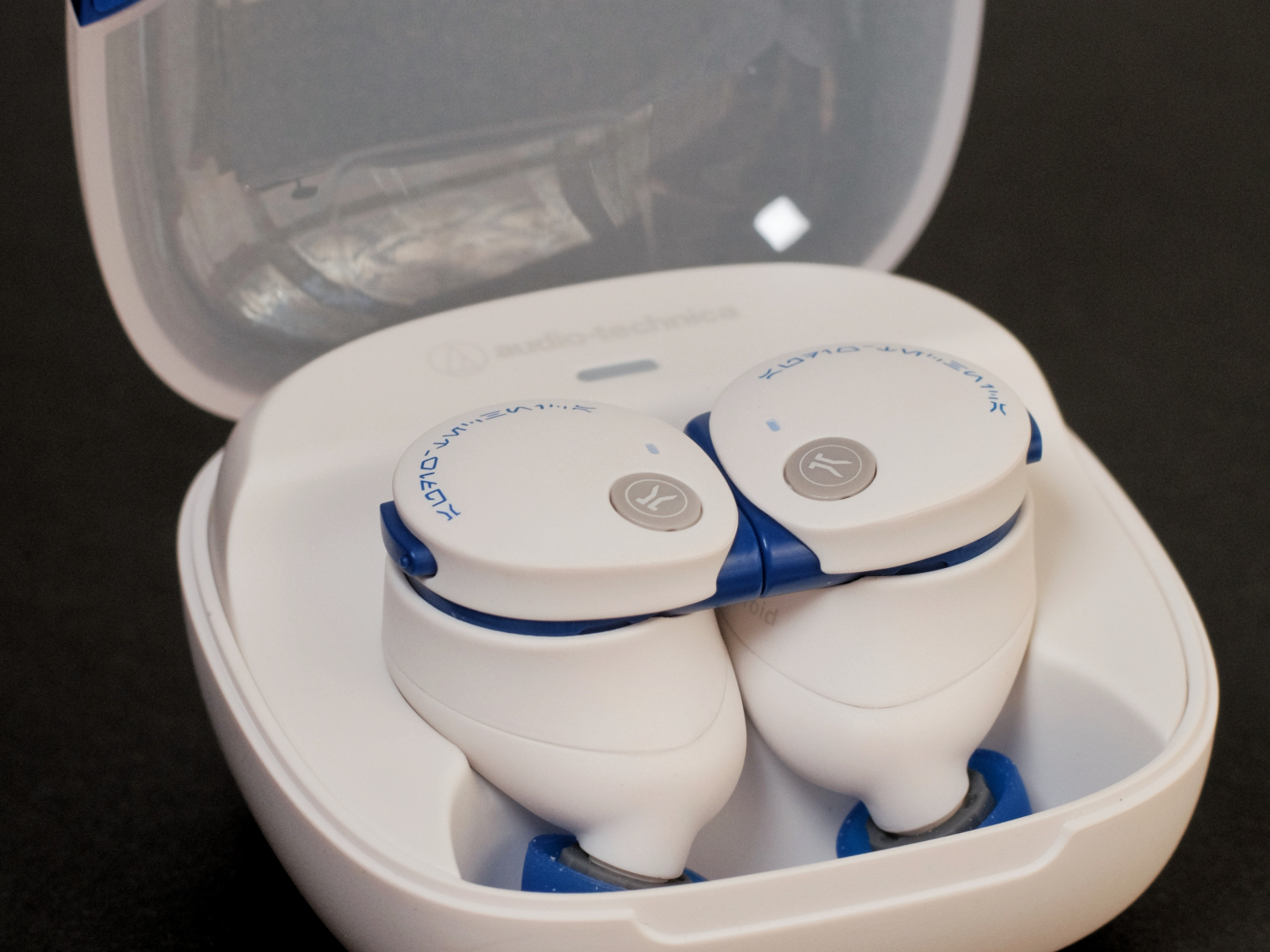
    Faced with such a complex model name, it’s only right that we begin an Audio-Technica review by explaining the naming. CKS indicates the Solid Bass series, which emphasizes low frequencies; 50 places it in the mid-range tier; and TW2 means it’s a true wireless model and the second-generation mainline entry in this series. That explanation sounds straightforward enough—but in reality, the CKS50TW2 is actually the third-generation product in the lineup. The progression goes roughly like this: CKS5TW → CKS50TW → CKS50TW2. One defining trait that runs through this series is its notably strong single-charge battery life, rather than an all-out focus on sound performance like the TWX7 or CKR7TW lines. This time, we borrowed the Star Wars Edition CKS50TW2 purchased from Version V; we previously mentioned this release in RKTALLK Episode 059, while the standard retail version had appeared earlier. Many thanks to Version V for the loan.

    Package & Accessories

    The retail packaging of the CKS50TW2 follows Audio-Technica’s familiar white-based design language, while the Star Wars Edition comes with a bespoke design and is priced USD 30 / JPY 3,520 higher than the standard version. Inside the box, you’ll find a short USB-C to USB-A charging cable and four sizes of ear tips.

    Design, Fit & Acoustic Structure

    Including both the standard retail colors and the Star Wars special editions, the CKS50TW2 is currently available in seven colorways: the retail off-white, black, and dark green, plus the Star Wars editions—R2-D2 white/blue, Darth Vader black/red, Grogu light green, and Mandalorian silver-gray. Notably, the Mandalorian version appears to have been sold via a limited-time lottery on the official store and is currently unavailable.

    All seven variants feature a semi-transparent charging case lid. The R2-D2 white/blue version we have uses a frosted white semi-transparent lid, paired with a pure white base that has no warm or cool tint, accented only by blue detailing around the magnetic latch. The case can be opened and closed with one hand, though it feels a bit lightweight. The earbuds rest flat inside the case, with the LED indicators also located within.

    The earbuds themselves use a “buds”-style in-ear design. In fact, within Audio-Technica’s TWS lineup, only the TWX series adopts a stem-style “pods” design—everything else uses this buds form factor. The CKS50TW2 housings are fairly large. Compared with the familiar CK3TW, they’re noticeably bigger by about two sizes, and larger than models like the recently reviewed LinkBuds Fit, WF-1000XM5, and AZ100—roughly on par with the TE-ZX1. That said, the inner side of the housing features some contouring, so the portion that actually contacts the concha and cymba isn’t extensive. Much of the visible faceplate sits above the surface of the ear. As a result, unless you have particularly small ears, the CKS50TW2 is reasonably comfortable to wear. Side-lying use, however, is essentially out of the question.

    The two earbuds can magnetically attach to each other via a set of contact points and also integrate a Hall sensor. This design is quite rare in the TWS space but is common—almost standard—in neckband-style Bluetooth earphones. The reason Audio-Technica chose this structure ties directly into the model’s excellent battery life, which we’ll discuss later. In any case, thanks to the reliable magnetic connection, you’re unlikely to lose a single earbud when carrying them outside the case; the two snapping together feels reassuringly secure.

    The CKS50TW2 is rated IP55 for dust resistance and splash protection, meaning light rain and regular workout sweat should pose no real problem.

    Control & App

    The circular ornament on the faceplate is not a touch surface. Control is handled via a physical button located toward the front edge on the rear side of the housing. It supports single, double, and triple presses, as well as two long-press durations, all of which can be customized in the app. You can also adjust the button response speed. At the default setting, there’s about a one-second delay when pausing playback, while other actions feel relatively snappy.

    Notification sounds are naturally a major highlight for a co-branded product. On the R2-D2 version, system events such as power on/off, connection, disconnection, low battery, noise-canceling toggles, and mode changes are all accompanied by R2-D2 voice samples. Both clarity and volume are more than adequate.

    Like the TWX7 and others, the CKS50TW2 uses Audio-Technica’s Connect app for control and fine-tuning. The default interface is laid out clearly, though the settings section packs in many options without further sub-categorization. Fortunately, the UI is intuitive. Below is an overview of the main screens and a closer look at what each function does.

    On the main page, the features are arranged as follows: ambient sound control, equalizer, low latency, timer, soundscape, and playback controls. The custom settings page is divided into Audio Settings and System Settings. All told, the range of controls available via the Connect app is extensive—more detailed than most TWS control apps I’ve used.

    The Private Timer is a standalone countdown tool independent of the system timer. It offers three alert tones and supports countdowns longer than one minute, making it handy for reminders during long listening sessions or as a simple alarm when wearing the earbuds for a nap.

    Sound Scape

    As with the TWX7, the CKS50TW2 supports the Sound Scape feature. To recap, many manufacturers—and even iOS itself—offer similar functions. For example, iOS “Background Sounds” includes three types of white noise plus ocean, rain, and stream sounds. Audio-Technica’s implementation, however, is a bit different. Apple’s background sounds are already among the better-sounding options in this category, with file sizes exceeding 60 MB and a fairly natural listening experience. Audio-Technica’s Sound Scape samples, on the other hand, are recorded using the company’s own professional microphone lineup.

    Sound Scape can be used in conjunction with the timer mentioned above. By default, it offers thirteen sounds: three white noises, four “healing” sounds, and six natural soundscapes.

    In the white noise category, beyond standard white noise and pink noise, there’s also “Quiet Office,” which sounds like a calm office with air conditioning running. The sense of space isn’t cramped, and the proportion of AC noise can be freely adjusted. Combined with active noise canceling, it creates a surprisingly convincing environmental simulation. It can be useful for those who work better with ambient sound—assuming you don’t mind AC noise.

    The natural sound category includes six options, all rendered with convincing realism and a strong sense of space. In the ocean soundscape, the stereo imaging of waves rolling in is particularly impressive. Wind in a forest is notoriously difficult to record, yet the sound of wind moving through leaves is recreated here with notable fidelity. I won’t go into each one in detail—you can try them yourself in person.

    More distinctive are the four sounds categorized as “healing.”

    “Rejuvenation” blends synthesized choral vocals with forest ambience, flowing water, and birdsong. “Tranquility” is built on pad-style synthesizer tones, lightly accented with natural sounds. “Journey” also uses pad tones, but with slower, subtler pitch changes, resulting in a deeper, more subdued feel. “Serenity” sounds fuller and richer, combined with subtle effects—very much the kind of audio you might listen to at night. In short, these are well suited for meditation, breathing exercises, and similar scenarios, carrying a clear sense of zen-like calm.

    Beyond the features shared with the TWX7, the Star Wars edition of the CKS50TW2 adds three exclusive custom sound effects: random R2-D2 sounds, white noise from inside the Millennium Falcon, and cockpit signal tones from an X-wing fighter. All are fun and surprisingly authentic. As a fan of another niche sci-fi IP myself, I can’t help but say—if there’s ever a Doctor Who collaboration with a TARDIS interior soundscape, I’d buy it without hesitation.

    ANC, Transparency & Call

    Thanks to its relatively large housings, the CKS50TW2 already offers decent passive isolation. Compared with the TWX7, however, the overall improvement in noise cancelation isn’t just down to passive isolation—it also reflects tangible progress in active noise cancelation. This may be the first time an Audio-Technica mainstream product has made me think its ANC is genuinely “quite good.” With ANC enabled, the CKS50TW2 noticeably suppresses steady low-frequency noise, and it also does a respectable job of reducing the lower body of human voices. While in very noisy environments you can still sense a gap in effective bandwidth coverage compared with most Skyline Level models, it’s already very usable in practice. On top of that, ear pressure is reasonably well controlled, with no obvious discomfort.

    As for wind noise, the CKS50TW2 doesn’t include a dedicated wind-noise reduction mode. In real-world testing, however, wind interference was only mildly noticeable when facing away from strong wind. Wind coming from the front or sides is largely cleaned up once ANC is enabled, barely affecting normal listening—an area where it performs quite satisfactorily.

    In transparency mode, the naturalness of ambient sound is good, with no deliberate boosting of specific frequency bands. Although there is still some roll-off in the high frequencies and it’s not a fully high-fidelity passthrough, among Japanese brands aside from Sony, this places it firmly in the top tier. The wearer’s own voice does sound slightly muffled, something to keep in mind during conversations. Wind noise in transparency mode isn’t particularly severe either, becoming noticeable mainly when the wind comes from the side or behind.

    The talk-through feature also carries over. Audio-Technica defines this as automatically switching to transparency mode and lowering music volume when enabled. You can adjust it in three levels within the app.

    For calls, pickup volume is moderate, and clarity is usable though not outstanding. In carrier-network call tests, voices remain somewhat emphasized even in noisy environments. The tonal character sounds a bit muffled, but stability is good. Wind noise during calls depends heavily on direction: frontal wind has minimal impact, while side or rear wind introduces more noticeable interference.

    Overall, the CKS50TW2’s noise cancelation is practical and well-rounded. It doesn’t excel dramatically in any single area, but its combined ANC performance, wind-noise handling, and transparency naturalness all place it toward the upper end of the Fine Level tier. That said, the depth of active noise cancelation doesn’t offer a strong advantage over similarly priced competitors and still trails the Skyline Level group. For everyday use, however—especially when combined with its passive isolation—it’s more than sufficient. Taking everything into account, we believe the CKS50TW2’s overall noise-cancelation performance earns it a place in the TDS Noise Cancelation Pyramid at the In-Ear Fine Level, with an above-average ranking within that tier.

    Connection & Battery

    It doesn’t support high-bitrate codecs, so we tested it under AAC as usual. In our standard signal test environment, paired with the Xperia 5 III using AAC, packet loss and stuttering were minimal whether WLAN was on or off. At a distance of 7 meters with a load-bearing wall in between, there was no noticeable increase in stuttering, while packet loss began to meaningfully affect the experience at around 9 meters.

    In terms of latency, it supports a dedicated low-latency mode. Following our test procedure—AAC codec, Xperia 5 III as the source, and streaming video playback—subjective latency with low-latency mode enabled stayed under half a syllable at normal speech speed. This is perfectly usable for most video viewing and gaming scenarios that don’t demand ultra-tight synchronization. Without low-latency mode enabled, latency exceeded half a syllable and became more noticeable.

    Battery life is where things get truly impressive. Official figures list 15h/25h of continuous playback from the earbuds alone (ANC on/off), and up to 40h/60h total with the charging case (ANC on/off)—frankly, staggering numbers. During our loan period, it wasn’t feasible to run a single uninterrupted test of that length, but several simplified half-cycle tests largely confirmed the claims. Whether it’s Audio-Technica or AVIOT, non-flagship sound-focused models still seem wildly “overpowered” when it comes to single-charge endurance.

    In charging tests, the CKS50TW2 was able to charge steadily at a power level of around 1.2 W, with no issues regarding PD support. It also supports wireless charging. Below are the results of the wireless charging test.

    Charging TypeChargerAudio-Technica ATH-CKS50TW2
    Qi WirelessTESTV “KuaiLeNengLiang” Teardown Test PadFront charging position: 2 W; rear charging position: no charging
    Qi WirelessLǜli Qi2 2-in-1 W702Primary charging position: 1 W; secondary charging position: no charging
    WiredAnker Nano II 100 WAll three ports supported; input power stable at around 1.2 W
    Third-Party Charging Compatibility Test Results

    Driver, Sound Modes & Codec

    The CKS50TW2 is equipped with a 9 mm dynamic driver. Supported codecs include SBC, AAC, and LC3.

    In our previous article on the TWX7, we mentioned that when enabling the equalizer, Audio-Technica displays a specific prompt indicating that the sampling rate will be limited to 48 kHz. The impact of EQ on sound is well known, and limiting the sampling rate to enable EQ is a reasonable trade-off. With the CKS50TW2, however, the highest supported codec is AAC, so this prompt no longer appears. The five default presets are Original, Bass Boost, Clear Vocal, V-shaped, and Treble Enhance, and their sonic effects largely align with what their names suggest.

    The custom equalizer allows adjustment across five frequency bands with a ±12 dB range. You can also independently set left/right channel balance in the app, as well as fine-tune volume in 16-step, 32-step, or 64-step increments—particularly useful for users who find one volume step too loud and the next too quiet.

    Sound Description

    Based on ANC off, AAC codec, and default sound mode.

    The low end has slightly elevated quantity, with generous thickness and fullness. Elasticity is good, and sub-bass extension is acceptable. Decay is not especially fast, leaving some residual reverberation. There is a noticeable sense of ambience and bloom, but it never feels excessive. The bass presentation is very much in line with what you’d expect from a bass-focused series, yet in most everyday tracks it doesn’t come across as overpowering. It recalls the tuning approach of earlier Audio-Technica CKS wired earphones—rather than simply piling on energy, it presents bass with a thick, relaxed texture. Bass imaging is on the larger side, and instruments with fundamentals in the lower mids exhibit a slight forward tilt.

    In the midrange, vocals are positioned relatively close, with slightly larger mouth shapes and limited emphasis on fine articulation. Texture takes priority over line definition, with moderate thickness. Grain is smoothed out, resulting in generally good overall smoothness. There is a mild warm coloration; the tonality isn’t strictly neutral, but it also avoids any sense of energy buildup. Throat tones are well behaved, breathiness is sufficient, and details like saliva sounds are polished and kept from protruding. Sibilance is present but softened—audible without being sharp or piercing. Overall, vocals are not dark, with a subtle lift in brightness that seems designed to balance the bass-forward character.

    For instruments, texture again takes precedence over sharp outlines. Among strings, violins, violas, and guitars lean slightly warm, with plucked and bowed details that aren’t particularly forward or attention-grabbing. Cellos feel a bit loose in body definition and occupy a larger portion of the soundstage. Brass instruments convey a good sense of power; trumpets and other brightness-dependent instruments have adequate sparkle but roll off relatively early. Woodwinds show a slight enhancement in airiness, with a natural presentation. Harmonic content is relatively rich. In percussion, kick drums have a clear presence, snares decay a bit slowly, and cymbals are bright enough without sounding harsh or overly metallic.

    Treble overall has moderate brightness, though the upper-mid transition region is somewhat thickened. The response is generally smooth, without pronounced sharp peaks. Ultra-high-frequency extension is not particularly strong, with an earlier and steeper roll-off compared with the TWX7.

    Soundstage width is average. The forward-leaning imaging of the low and lower-mid frequencies makes the space feel less expansive, with a noticeable sense of boundaries. Both horizontal and vertical dimensions feel just sufficient rather than spacious. Combined with a decent sense of height, the overall spatial shape resembles a spindle. Separation between vocals and instruments isn’t especially strong, though coherence is good. Resolution doesn’t stand out at the sub–¥1,000 RMB price point, falling into a second-tier level of detail for its class. It sounds less clear than the TWX7, but this restrained sense of “resolution” contributes to a more fatigue-free, listenable presentation. Dynamics are adequate, while transient response is unremarkable.

    Overall Impression

    Compared with the TWX7 we discussed earlier, the CKS50TW2 doesn’t devote all its effort to sound tuning. Instead, it positions itself as a product with a wide range of interesting and practical features. The ANC performance is a pleasant surprise, and the sound tuning suits mainstream listening preferences, though it doesn’t stand out in terms of versatility or technical prowess. Its real strengths lie in its exceptionally long battery life, stable connectivity, and thoughtful functional details.

    The standard retail version has remained stably priced below ¥18,000 JPY for an extended period. The Star Wars collaboration edition carries only a modest premium, and at the time of writing, some retailers are even offering discounts that bring it close to the standard version’s price when converted to RMB. For readers who can accept a small premium, this makes it a genuinely interesting option.

    KT MARK at the time of evaluation:

    Audio-Technica ATH-CKS50TW2: IV (Recommend)

    TDS ANC Pyramid

    Audio-Technica ATH-CKS50TW2: In-Ear Fine Level

    For details on the KT MARK rating system and our “non-interference in evaluation” policy regarding commercial interests, please search for TDS Studio Rating Standards & Content Notes V202502 on major search engines.

    KingTsui, TDS Studio
    Feb 2026

    It’s a TDS production.

    Some images are sourced from Audio-Technica. All other content is original. Unauthorized reproduction or imitation of content or structure is prohibited. All rights reserved.

  • SSPAI Morning Brief: SpaceX Acquires xAI, Adobe Ends Animate

    SSPAI Morning Brief: SpaceX Acquires xAI, Adobe Ends Animate

    Morning Brief

    1. SpaceX acquires xAI
    2. Adobe discontinues Animate
    3. Hypergryph responds to overseas payment issues in Arknights: Endfield
    4. Malicious skills found in the OpenClaw skill library
    5. ROG Kithara premium gaming headset announced and released
    6. Rumors You Can Just Glance At

    SpaceX acquires xAI

    On February 2, SpaceX announced its acquisition of Elon Musk’s artificial intelligence company xAI. The deal makes SpaceX the most valuable private company in the world, with a valuation reaching USD 1.25 trillion. In the acquisition memo, Elon Musk stated that the primary goal of this acquisition is to build space-based data centers, aiming to avoid the power consumption and cooling challenges associated with running AI in large terrestrial data centers. Source


    Adobe discontinues Animate

    On February 2, Adobe announced that it will discontinue Adobe Animate effective March 1, 2026, and remove the application from its official website, after which users will no longer be able to purchase it. Enterprise customers will be able to continue using the app, download content, and receive technical support until March 1, 2029. Other users will be able to keep using the app, download content, and access technical support until March 1, 2027. Adobe Animate was previously known as Adobe Flash Professional / Macromedia Flash and has been used to create vector graphics and animations. In its announcement, Adobe stated that due to technological advancements and the emergence of new platforms and paradigms, better applications are now available to support users’ creative needs. The company recommends After Effects or Adobe Express as alternatives. Source


    Hypergryph responds to overseas payment issues in Arknights: Endfield

    On February 1, Hypergryph responded to Southern Metropolis Daily regarding a serious PayPal payment interface error that occurred on January 22, the launch day of Arknights: Endfield, affecting overseas servers. According to Hypergryph, when the payment issue occurred, most overseas regions were outside peak gaming hours. Upon receiving user feedback, the company promptly disabled the PayPal payment option, and the overall response was considered timely. In total, 3,429 orders were affected, with the total amount involved not exceeding USD 80,000. Fewer than 1,800 users were impacted, and the highest abnormal charge for a single user reached USD 5,289. As of that day, Hypergryph had completed full refunds for all affected users. Source


    Malicious skills found in the OpenClaw skill library

    According to OpenSourceMalware, between January 27 and February 1, two waves totaling more than 230 malicious skills were published to OpenClaw (formerly ClawdBot/MoltBot) skill repositories, including ClawHub and GitHub. These malicious skills primarily target cryptocurrency traders, disguising themselves as legitimate crypto trading automation tools while stealing and exfiltrating sensitive information on Windows and macOS. All of the malicious skills share the same underlying strategy and rely on sophisticated social engineering to persuade users to execute harmful commands. Once run, these commands steal trading API tokens, wallet private keys, SSH credentials, browser passwords, and other sensitive data. Source


    ROG Kithara premium gaming headset announced and released

    On February 2, the ROG Kithara premium gaming headset was officially released and made available for purchase. Developed in collaboration with audio manufacturer HIFIMAN, the headset features a 100 mm HIFIMAN planar magnetic driver tuned by ROG, along with an open-back design. It comes with a balanced, interchangeable headphone cable, making it compatible with DACs, amplifiers, game consoles, and PCs. The headset is also equipped with a full-bandwidth inline MEMS microphone. The launch price is CNY 1,999. Source


    Rumors You Can Just Glance At

    • Tencent announced on February 2 that QQ Classic Farm will officially return on February 6, launching simultaneously on QQ and WeChat. Based on current official teasers, this new release will include a mobile version and largely retain the gameplay of QQ Farm, which first launched in 2009. Players take on the role of a farmer—planting crops, raising animals, managing agricultural products—and can visit friends’ farms to “steal crops” or “plant weeds” as mischievous interactions. Source
    • Baidu’s autonomous ride-hailing service Apollo Go (Luobo Kuaipao) officially announced it will launch in Qingdao at 9:00 a.m. on February 3, with operations limited to the Hongdao area of Chengyang District. Available vehicle options include Arcfox models and the Luobo 06, featuring a “business-class ultra-spacious cabin,” 135-degree intelligent ten-point massage heated seats, and support for VIP music streaming. Users can hail rides by logging into their Baidu account via the Apollo Go app or mini program, and will receive an SMS notification when the vehicle arrives. Source
    • According to The Wall Street Journal, Apple is considering shifting the production of some lower-end processors away from TSMC to another supplier. The report does not name the alternative manufacturer, though prior rumors have suggested that Intel may begin supplying chips for Apple in 2027 or 2028, potentially including processors for some Mac and iPad models. Source
    • According to DigiTimes, Apple’s rumored plan to enter the smart glasses market later this year has already begun to impact the AR optics supply chain. The report says multiple Taiwanese AR optics suppliers are investing to expand capacity and shift R&D focus. Kinko Optical has reportedly invested around USD 5.6 million to develop a new AR/VR/MR research center, while companies such as Asia Optical, MetaOptics, Chung Yang Optics, and Zhihui Innovation are also accelerating related product development. Source
    • Recently, media outlets discovered that a Google app called Desktop Camera was listed on the Google Play Store on January 28. The app description suggests a minimalist UI, closely resembling ChromeOS or the Pixel Camera interface. It is currently speculated that this app may be a system component of the previously rumored “desktop-style Android interface,” Aluminium OS. Source
  • SSPAI Morning Brief: OpenAI Introduces Prism, a New AI Platform for Scientific Research

    SSPAI Morning Brief: OpenAI Introduces Prism, a New AI Platform for Scientific Research

    Morning Brief

    1. Sennheiser releases CX 80U and HD 400U wired earphones
    2. Sonos releases multi-channel power amplifier Amp Multi
    3. Bigme unveils B10 color E Ink office notebook
    4. Three updates related to Google Gemini
    5. Yahoo launches AI Q&A search tool Yahoo Scout
    6. Alibaba releases Qwen3-Max-Thinking
    7. Anthropic launches interactive Claude app
    8. OpenAI releases scientific research AI collaboration space Prism
    9. Rumors You Can Just Glance At

    Sennheiser releases CX 80U and HD 400U wired earphones

    On January 26, Sennheiser officially unveiled the CX 80U wired in-ear earphones and the HD 400U wired over-ear headphones. As upgraded versions of the CX 80S and HD 400S, both new models replace the traditional 3.5 mm jack with a USB-C connector and feature a built-in digital converter that supports 24-bit/96 kHz lossless audio playback, along with an in-line remote equipped with an integrated MEMS microphone.

    The CX 80U uses a dynamic driver with an impedance of 28 Ω and a frequency response of 17 Hz–20 kHz, and comes with three sets of silicone ear tips in different sizes. The HD 400U features a 32 mm dynamic driver with an impedance of 18 Ω and a frequency response of 18 Hz–20 kHz, a foldable closed-back design, and includes a carrying pouch. Both products went on sale on January 26, 2026, with the CX 80U priced at USD 40 and the HD 400U at USD 100. Source


    Sonos releases multi-channel power amplifier Amp Multi

    On January 27, Sonos officially introduced its first professional-grade multi-channel streaming power amplifier, Amp Multi, designed specifically for large residential properties and complex custom installation scenarios. Amp Multi features a gallium nitride (GaN) power architecture and Class D post-filter feedback (PFFB) technology, delivering eight channels of 125 W (8 Ω) each in a compact 1.5U chassis, and can be configured as four independently controlled zones. Its hardware configuration includes a quad-core 1.9 GHz A55 processor, Wi-Fi 6, and dual Ethernet ports. It supports Apple AirPlay 2 and Spotify Connect, and each channel can drive up to three Sonos Architectural series speakers. Pricing has not yet been announced, and the product is expected to go on sale in the coming months through authorized installers. Source


    Bigme unveils B10 color E Ink office notebook

    On January 27, Bigme launched the 10.3-inch B10 4G color E-Ink office tablet on overseas platforms. The device is powered by a Dimensity 1080 processor and comes with 8 GB of RAM, 256 GB of storage, and Android 14. It supports 4G connectivity across major bands and is equipped with a 6,900 mAh battery, an eight-microphone array, a 4,096-level pressure-sensitive stylus, and fingerprint recognition. The B10 features a Kaleido 3 color E-Ink display with up to 30 FPS refresh rate and 36 levels of adjustable dual-tone (warm/cool) color temperature. It also includes both front and rear cameras, supporting document scanning, OCR text recognition, and video conferencing.

    The Bigme B10 adopts a design with eight customizable touch keys and comes with four built-in AI models, supporting features such as meeting speech-to-text transcription. An optional keyboard accessory is available. The B10 is priced at USD 699, with a pre-sale price of USD 594. Source


    Three updates related to Google Gemini

    On January 27, Google announced the introduction of Agentic Vision capabilities to the Gemini 3 Flash model. This feature aims to shift image understanding from static processing to a dynamic process based on a “Think, Act, Observe” loop. By combining visual reasoning with Python code execution tools, the model can autonomously perform actions such as zooming in to inspect details, rotating and cropping images, drawing bounding-box annotations, conducting visual math calculations, and generating charts. Technical tests show that with agentic vision enabled, Gemini 3 Flash achieves a 5–10% quality improvement across most visual benchmarks and partially mitigates hallucination issues in long-form visual tasks. The feature is now officially available via the Gemini API (including Google AI Studio and Vertex AI), where developers can enable Code Execution in the toolbar to use it. Source

    At the same time, Google also announced that Gemini 3 has been officially set as the default underlying model for its global “AI Overviews” feature, and that it has introduced a seamless “AI Mode” conversational experience. This allows users to ask follow-up questions directly below AI Overviews, turning search from one-way information display into contextual, streaming conversations. Google said that the model upgrade also improves reasoning quality for complex questions. The new AI Overviews and AI Mode conversation features are now available globally on both mobile and web search, with the basic service offered free to all users. Source

    Finally, Google announced that its entry-level AI subscription plan, Google AI Plus, has officially launched in 34 additional countries and regions worldwide, including the United States. Priced at USD 8 per month, the plan is aimed at everyday users and provides access to the Gemini 3 Pro model, Deep Research, and the Nano Banana Pro model. Subscribers also receive 200 GB of Google One storage and unlock AI filmmaking tool Flow, image-to-video tool Whisk, and advanced research features in NotebookLM (including support for up to 100 input sources and audio overviews). Notably, existing Google One Premium 2 TB members will automatically receive all AI Plus features, and new subscribers can enjoy a promotional price of USD 4 per month for the first two months. Source


    Yahoo launches AI Q&A search tool Yahoo Scout

    On January 27, Yahoo announced the launch of its AI-powered Q&A search feature, Yahoo Scout, which is supported by Anthropic’s Claude. The feature deeply integrates 50 billion user profiles and 18 trillion consumer behavior signals accumulated by Yahoo over the past three decades. It supports synthesizing information from across the web—including Yahoo’s own channels such as News, Finance, and Sports—using natural language, and presents the results in the form of structured tables, rich multimedia cards, and prominent blue source links. Each answer contains an average of up to nine cited sources. At the same time, the feature has been embedded across Yahoo’s entire product lineup, offering enhanced experiences such as email summaries, real-time financial market analysis, news comment trend extraction, and in-depth breakdowns of sports events.

    Yahoo Scout is currently available in beta in the United States, with access via a standalone web version as well as iOS and Android apps. The service remains free to use and is planned to be monetized through bottom-page advertising and affiliate commissions. Source


    Alibaba releases Qwen3-Max-Thinking

    On January 26, Alibaba released its flagship reasoning model Qwen3-Max-Thinking, with total parameters exceeding one trillion. The model underwent large-scale reinforcement learning post-training and has enhanced its native agent capabilities for autonomously calling tools across multiple key benchmarks, enabling on-demand use of search engines and code interpreters. It also supports test-time scaling techniques, significantly improving reasoning performance. On major reasoning benchmarks, it surpasses Gemini 3 Pro, while also substantially reducing model hallucinations.

    Qwen3-Max-Thinking is now available on Qwen Chat, and its corresponding API (model name: qwen3-max-2026-01-23) has been released via Alibaba Cloud. Source


    Anthropic launches interactive Claude app

    On January 26, Anthropic announced the launch of an interactive app for its Claude chatbot, allowing users to directly connect everyday workplace tools such as Slack, Canva, Figma, Box, and Clay within the chat interface. Salesforce integration will be added later. Claude can send Slack messages on users’ behalf, generate charts, or access cloud files within these services, depending on which app permissions are enabled.

    In a blog post, Anthropic said that tasks such as data analysis, content design, and project management are inherently better suited to dedicated visual interfaces. When combined with Claude’s intelligence, users can significantly improve efficiency in ideation, revision, and iteration. The new feature is currently available to Claude Pro, Max, Team, and Enterprise subscribers, and can be enabled and managed at claude.ai/directory. Source


    OpenAI releases scientific research AI collaboration space Prism

    On January 27, OpenAI officially unveiled Prism, an AI-native collaborative workspace designed specifically for scientific research, and simultaneously announced the acquisition of the cloud-based LaTeX platform Crixet as its underlying infrastructure. Prism deeply integrates the GPT-5.2 Thinking model, enabling AI to directly understand paper structures, formulas, and references within project environments. It supports automatically generating TikZ diagrams, retrieving and citing papers from arXiv, auto-formatting bibliographies, and converting handwritten formulas or sketches on whiteboards into LaTeX code. In addition, Prism offers real-time multi-user collaboration and can generate graduate-level course plans and accompanying exercises based on specific research topics.

    Prism is currently available for free to all users with a personal ChatGPT account, supporting the creation of unlimited projects and collaboration seats. It will also be rolled out soon to ChatGPT Business, Team, Enterprise, and Education plans. Source


    Rumors You Can Just Glance At

    • On January 28, Samsung began teasing a new privacy protection feature that will be introduced on Galaxy devices. The feature is designed to address the risk of “shoulder surfing” in public places through deep integration of hardware and software. It is said to adjust display visibility at the pixel level to selectively obscure password entry, specific app interfaces, and notification pop-ups, allowing only the person directly in front of the screen to clearly view certain content. Source
    • On January 26, Meta announced plans to begin testing premium subscription services for its three major apps—Instagram, Facebook, and WhatsApp—in the coming months. The subscription system aims to unlock more powerful productivity, creativity, and AI-enhanced features through paid plans, while keeping the core basic experience free. Source
    • According to reports from several media outlets and a settlement agreement recently submitted to a federal court in San Jose, Google has agreed to pay USD 68 million to settle a class-action lawsuit over illegal recordings made by its Google Assistant voice assistant. The case centers on Google Assistant’s “false accept” mechanism, in which devices are activated and capture sensitive user audio for human review or targeted advertising even without hearing the “OK Google” wake word. This is similar in nature to Apple’s previous settlement of USD 95 million over comparable issues with Siri. The settlement covers U.S. users who, since May 18, 2016, have had accounts associated with devices preinstalled with Google Assistant (including Pixel phones, Google Home smart speakers, and Nest Hub displays). Under the agreement, eligible device purchasers are expected to receive compensation of USD 18 to USD 56, while affected individuals living in environments with such devices may claim USD 2 to USD 10. Source
    • According to internal documents obtained by the New Mexico Attorney General’s Office, Meta CEO Mark Zuckerberg personally led and vetoed a decision to add parental control features to the company’s AI chatbots, instead pushing for looser safety restrictions. The allegations stem from a lawsuit filed by the state of New Mexico accusing Meta of failing to protect children from sexual harassment. A previous investigation by The Wall Street Journal had also pointed out risks that Meta’s AI bots could engage in sexually explicit conversations with minors or impersonate them. As a result, Meta suspended access to AI character features for teen accounts last week while developing relevant parental control tools. Source
    • On January 27, Google accidentally leaked screenshots of a desktop interface codenamed Aluminum OS (ALOS) on the Chromium bug tracker. The images came from an HP Elite Dragonfly Chromebook powered by a 12th-generation Intel Core processor, running system version ZL1A.260119.001.A1 based on Android 16. The screenshots show a desktop environment optimized for large-screen multitasking, featuring a taskbar, second-level time display, an M3E battery icon, a Gemini AI entry point, and a screen recording control panel. The bundled Chrome browser also supports desktop extensions. This further confirms earlier rumors that Google is testing a deeply integrated version of Android and ChromeOS on Chromebooks. Source
  • New Stuff 231|What Have the Editors at SSPAI Been Buying Recently?

    New Stuff 231|What Have the Editors at SSPAI Been Buying Recently?

    @Tp: Moondrop LAN 2 REF Edition + MC2

    • Reference price: Earphones ¥299, upgrade cable ¥139

    Picking up from the previous post, when I went to buy the NiceBuds, I first noticed the ¥99 Bamboo 2 in the shop and felt a bit tempted. But after browsing around on Bilibili, I realized it didn’t really have anything that stood out to me. On top of that, many people mentioned issues like easily broken pins and inconsistent volume between the left and right earpieces, so I passed on it. While looking up related impressions, I discovered that the LAN 2—released in two versions—actually received quite decent reviews. After some comparison, I decided to pick one up to get a taste of what people call “Hi-Fi.”

    Moondrop’s LAN 2 comes in a POP version and a REF version. The former has a moderate boost in the low frequencies and, according to the official description, is more suitable for pop music, while the latter is better suited for instrumental listening. Since I don’t like that kind of bass that pounds your head, I chose the REF version. In my personal experience, the REF version gives a very clean and transparent listening impression. Especially when listening to instrumental albums with no vocals, such as The Moonlight Zoo, or the orchestral sections in Sodagreen’s album Winter, Ended, each instrument is clearly distinguishable while still blending together harmoniously. Even with pop music, the REF version performs quite well to my ears.

    What surprised me the most was how these earphones helped me notice small details in arrangements that I used to overlook. For example, at the beginning of Wu Qingfeng’s Outsider, there’s a faint “da-da” sound in the background. I first noticed this detail with the LAN 2 REF. When I went back to listen with other earphones, I found that the sound was actually there too—but it was easily masked by other melodies and hard to pick out.

    In terms of comfort, the LAN 2 is quite comfortable for me. The stock cable in particular is soft and slim, making it much more comfortable than a similar in-ear model I tried before. After switching to the MC2, however, the cable became thicker, and the over-ear section no longer used the relatively rounded, wrapped design of the stock cable, making the cable feel much more noticeable on my ears.

    MC2 (left) vs. stock cable (right)

    As for why I bought the MC2 cable: on one hand, the stock cable uses a 4.4 mm connector. Although Moondrop includes a 4.4-to-3.5 mm adapter, having an extra dangling adapter never feels quite right. On the other hand, I wanted in-line controls to change tracks. While the three-stage volume buttons on the side of the iPod nano 7 can be used to skip tracks without waking the screen, I still have to take the device out, which is a bit inconvenient. As for sound quality, honestly, I can’t really tell any difference between the stock cable and the MC2.

    For an ordinary listener like me, who isn’t a hardcore audiophile, the LAN 2 REF version does bring a somewhat different listening experience. At the very least, since getting it, I’ve switched my daily listening from EarPods to these.

    @张奕源Nick: Snapmaker U1 Color 3D Printer

    Note: We also produced a video hands-on of the Snapmaker U1 at the same time. The content differs from New Stuff and can be used as a supplement to the text version. Click to watch.

    Friends, I’ve recently been wanting to properly organize both my home and office desks, which is what got me interested in 3D printing.

    The 3D printing community strongly embraces the open-source spirit, and on various model platforms you can find all kinds of fun and practical storage box designs. For someone like me, with potentially large and ongoing needs, batch printing makes more sense than buying finished products—both economically and in terms of customization. With 3D printing, you can adjust dimensions and even iterate through trial and error, which fits my personalized needs much better.

    As it happens, Snapmaker (Kuàizào Technology) recently launched their consumer-grade color 3D printer, the Snapmaker U1, on JD.com. Our office got one right away, and I kicked off my 3D printing journey by “borrowing the company machine.”

    Snapmaker U1 exterior

    The biggest highlight of the Snapmaker U1 is a system called SnapSwap™—an independent four-head parallel setup. Put simply, this system allows four independent print heads to work on a single print job together, eliminating the need for mid-print filament swapping and purging, and enabling true one-pass multicolor printing.

    The basic idea works like this: before a print job starts, the U1 preheats all four print heads. Once preheating is complete, all four heads remain on standby. During printing, when a specific head is needed, the machine switches to it directly. The U1 uses a steel-ball positioning coupling structure, ensuring precise alignment and secure locking when the print-head exchanger grabs a head—without relying on screws, magnets, or additional motors. The entire head-switching process can be completed in as little as five seconds.

    Independent four-head parallel system: all four print heads stay on standby, and the machine simply “grabs” whichever one it needs

    This independent four-head system isn’t just for show—it delivers real efficiency gains. With traditional single-head printers, multicolor printing requires filament swapping and purging, which means stopping the print mid-job and manually changing materials. After each swap, the printer also has to purge the nozzle, producing a significant amount of waste. This back-and-forth costs both time and material, making it far from economical. With the U1, manual filament swapping and purging are eliminated. All four heads are prepared in advance, and automatic head switching during printing is so fast it’s practically negligible. In effect, you can complete multicolor prints in roughly the same time as single-color ones, dramatically boosting efficiency.

    The machine can also print with multiple materials in a single job

    Thanks to this capability, there are plenty of time-saving workflows you can explore. I often print storage boxes of the same size in different colors, so when setting up a job I’ll place multiple models in different colors on the same build plate. That way, the printer can produce multiple components in one go, saving the time of repeatedly starting new jobs, reheating the machine, and reloading materials. If you want the finished product to look a bit more playful, you can also assign colors while arranging the layout. From my simple comparisons, as long as the base model is the same, there’s little difference in total print time between single-color and multicolor jobs. So the strongest impression the U1 left on me is that even multicolor printing remains highly efficient—you don’t have to worry about it slowing you down.

    You can tweak colors during layout to fully leverage the U1’s efficiency advantages

    And because there’s no repeated mid-print filament swapping, the U1 only needs to purge the print heads once at the start of each job. The larger and more frequent your print batches, the more material cost you save. All waste material is neatly collected in the waste box, which only needs to be emptied about once a week.

    The waste box is hidden at the rear of the machine

    Beyond its core four-head parallel system, the Snapmaker U1 performs well in other areas too.

    First, print quality is solid. All my print jobs use the standard 0.4 mm nozzle and the default 0.2 mm layer height, yet the U1 still delivers sufficiently fine layers and detailed results.

    The built-in Charmander model: scales and horns are rendered with impressive detail

    Second, nearly all functions are automated—one-click filament unloading and loading, automatic multi-head calibration, automatic bed leveling, and more. Combined with parameter adjustment and camera monitoring via the mobile app, you can basically walk away once a print starts. Many of my prints are set up after work and left to run overnight in the office; I just pick up the finished parts the next day, which is incredibly convenient.

    Real-time print progress monitoring via the mobile app

    Snapmaker has a strong following overseas. While searching for tutorials and references, I came across many YouTube creators reviewing and sharing their experiences, and the maker community seems to really appreciate Snapmaker’s high value-for-money products with a distinct design ethos. Interestingly, before the U1 arrived, our office already had an older 3D printer, but few people paid much attention to it. Since getting the U1, however, many colleagues have started asking how to print their own items or proposing product ideas. It really shows that when a printer is efficient and easy to use, it can spark creativity.

    Multicolor products printed with the Snapmaker U1

    The Snapmaker U1 is currently available in stock on JD.com. After national subsidies, prices start at RMB 4,504.15, making it highly competitive in its class. If you’re looking for a low-fuss, high-efficiency desktop color 3D printer, the Snapmaker U1 is definitely worth a look.

    @鲸鱼鱼: Cookie Budget — Lifetime Membership

    • Reference price: RMB 68

    As a long-time SSPAI reader, I feel a certain obligation to tinker with budgeting apps—and to spend money on an app to track how I spend money. After using MoneyWiz and MOZE on and off for several years, I realized my needs are actually very basic: by the end of the month, I just want to know roughly where my money went. For me, these professional, feature-heavy budgeting apps feel a bit “over-specced.” So when I heard that MOZE’s subscription price was about to increase, even though I was reluctant to part with its polish and professionalism, the higher fee made me reconsider whether it was really necessary. That’s when I started looking for a new budgeting app.

    After asking fellow editors and AI for recommendations, I downloaded several budgeting apps to try briefly. Cookie Budget stood out as the one that impressed me the most at first glance. First, its overall design is clean, and the little cookie icon—true to its name—adds a touch of cuteness. Second, Cookie offers a feature specifically for tracking software subscriptions, with support for multiple currencies and automatic entries upon renewal. Subscription management and expense tracking are unified in one place, so there’s no need to jump between apps—perfect for my lazy instincts. Third, in terms of functionality, it covers everything I need, including iCloud sync and basic reports.

    Widgets, icons, and subscription management

    However, as I explored more features, I also noticed some less intuitive design choices. Cookie’s accounting logic differs slightly from MoneyWiz and MOZE. For example, the latter apps use receivables and payables to cover scenarios like loans, reimbursements, and paying on someone else’s behalf. In Cookie, these are split into more specific entry points, such as lending assets, borrowing assets, reimbursement records, or initiating a bill refund to calculate split payments. Take splitting the cost of milk tea with colleagues as an example: in MOZE, one transaction plus a receivable does the job, but in Cookie, you need to record the total first and then handle the split as a refund-based AA collection. The receivable flow feels more roundabout. That said, laziness really is the primary productivity driver—I simply treat all AA receivables as reimbursements. While this sacrifices some statistical granularity, the steps align better with my thinking and feel smoother to use. There’s another limitation in Cookie’s categories as well: a single transaction can’t be assigned to multiple categories. If you buy groceries, household supplies, and toys in one supermarket trip, you have to record three separate transactions in Cookie.

    The reimbursement record and subscription management buttons are also inconsistently placed—one on the left, the other on the right

    In addition, Cookie feels a bit rough around the edges in some details:

    • Expense categories support hierarchies, but all default categories are single-level. Some are very broad, like clothing, food, housing, and transportation, while others—such as water bills, electricity bills, or snacks—really belong at a second level. It takes quite a bit of effort to reorganize everything properly.
    • Subscription information defaults to the “app subscriptions” category, but for convenience I deleted that category and replaced it with a broader “applications & software” category. When creating new subscriptions, however, they still default to the now-nonexistent “app subscriptions” category. I couldn’t find any way to change this default, so I have to manually adjust it every time.
    • The feature hierarchy isn’t very clear, and some actions are hidden away. Subscriptions have auto-recording enabled by default, but there’s no option to toggle this when creating a new subscription. For subscriptions where I want to confirm renewal at expiration, I can only disable auto-recording afterward by going into the subscription details and using the menu in the top-right corner.

    That said, Cookie overall meets my needs and simplifies my workflow for both subscription tracking and general expense logging. The development team has also maintained a steady cadence of one or two updates per month in recent years, continually refining the product. And considering that its lifetime membership price is relatively affordable among budgeting apps, it still feels like a worthwhile investment overall.

    @路中南: Cat Slow Feeder

    • Reference price: RMB 20

    I have two cats at home. The pure-black older one was adopted years ago from a rescue shelter in Shenzhen with Lao Mai, and it’s of the same lineage as the office’s calico cat, Diandian. However, this creature has had one habit unchanged for years: eating far too fast. Perhaps that’s exactly why it’s overweight (7 kg+), and why it occasionally vomits piles of undigested kibble—something that’s become even more frequent in winter. If it happens when no one’s home and the robot vacuum blindly rolls over it, the trouble can be huge. And yes, that did happen to me last month.

    Let’s just call it Black Pig. From its official name “Juanjian,” to the nickname “Little Black,” and finally to the moniker “Black Pig,” it only took about two years. Over those two years, I tried quite a few methods to ease its vomiting (it’s heartbreaking to watch your clumsy eldest vomit): switching to warm water in winter (helpful, but easily contaminated by dust), making a DIY rolling bottle feeder (which it completely ignored, only charging like a pig whenever the automatic feeder dispensed food), and so on. This time, Taobao recommended a cat slow feeder, and after using it for two weeks, here are my thoughts.

    Why is it called a “slow feeder”? Because the cat has to “solve a puzzle” to earn its food reward. Before buying, I read a lot of reviews for similar products, and many negative ones complained that “my cat doesn’t know how to use it,” so the feeder ended up unused. I, however, was full of confidence—and that’s thanks to our second cat, Er Huang. The uniquely named second son, a mischievous spirit cat who purrs the moment you touch his haunches. His “intelligence fur length” (note: the fluffy fur at the tips of a cat’s ears—folklore says its length is directly proportional to a cat’s intelligence) should have no trouble with a level-three difficulty feeder. And sure enough:

    The look a smart cat gives while watching a dumb cat eat

    Comparing the two cats’ behavior, Er Huang uses his paws to flip and dig out the kibble underneath with ease. Black Pig, on the other hand, only knows how to push around with his head. Sometimes he even has to follow the second cat while eating just to get a few bites.

    The confusion of a pig who only knows how to shove with his head (4× speed)

    Either way, Black Pig’s eating speed has slowed down. And because I put more fragrant, tastier domestic cat food in the tray (ad space available here), Black Pig now refuses to eat the diet food from the automatic feeder. Instead, he either sneaks off alone to shove the puzzle tray in search of food, or tails along behind the second cat to eat some leftovers.

    This tray is definitely a “I bought it and I’m OK with it, but I wouldn’t recommend you buy it” kind of product. First, it requires a certain level of feline intelligence. Second, it’s better suited for larger items like freeze-dried treats or snacks, rather than regular kibble. Kibble tends to get stuck in the narrow gaps of the mechanisms, making it hard for cats to retrieve, and over time it also goes stale.

    @JIAJUN: Mickey Paw Mug

    • Reference price: Mickey Paw Mug: ¥129, Pingu Money Tree: ¥79, Mushroom: ¥89

    Sometime last autumn or winter, a gift suddenly appeared on my desk—air-dropped by a colleague. When I opened it and saw Mickey’s little paw, I could only think: wow, this is way too good a gift.

    As a present, it’s a solid 120 out of 100. Perhaps to achieve that adorable paw shape, the mug itself is very large and very heavy. Although the official demo shows two different ways to use it, only after actually trying it did I realize how taxing it is to drink from something with a net weight of 780 g. With the first grip, holding hot water makes your hand feel scalded, and it also feels a bit unstable; with the second, hand-supporting grip, the feel is completely different from a normal mug and hard to get used to. I personally give its practicality a 60 at best, and had no choice but to give up on using it as a daily cup.

    For a while, I couldn’t think of a better use for it, so I put it back in its box and let it lie quietly in a corner.

    After N days, during a major cleanup at home, I felt it would be such a waste to leave something this cute unused. Looking around, I noticed that it fit perfectly with a Pingu money tree I already had at home—turns out it makes a pretty nice flower vase, and I was very satisfied. A few months later, the other unused paw finally found its own plant as well: a mushroom from Furry Forest.

  • SSPAI Morning Brief: AMD Launches New Driver Supporting FSR Redstone and More

    SSPAI Morning Brief: AMD Launches New Driver Supporting FSR Redstone and More

    Morning Brief

    1. AMD launches new driver supporting FSR Redstone
    2. iFixit launches AI assistant FixBot
    3. Insta360 launches Insta360 GO Ultra mini time-lapse kit
    4. Fairphone releases new Fairbuds XL modular headphones
    5. Alibaba Tongyi Qianwen releases Qwen Code v0.3.0
    6. JetBrains announces discontinuation of Fleet product line
    7. State Administration for Market Regulation issues two mandatory standards for civilian drones

    AMD launches new driver supporting FSR Redstone

    On December 10, AMD announced the launch of a new graphics card driver supporting FSR Redstone, designed to reshape gaming graphics and performance using machine learning capabilities. FSR Redstone is a new ML real-time rendering technology, which AMD unveiled earlier this year. Its goal is to enhance lighting, reflections, and motion smoothness without sacrificing frame rates.

    FSR Redstone includes three core features:

    1. Radiance Caching: By predicting indirect lighting, it reduces ray-tracing computation, making overall scene lighting more cinematic.
    2. Ray Regeneration: This feature regenerates ray-traced details, making reflections, shadows, and material edges sharper and more realistic.
    3. ML Frame Generation: Using high-intensity gaming training models, it generates additional frames for smoother high-speed motion performance. Source
    Compatibility status of FSR Redstone, image captured from AMD website

    iFixit launches AI assistant FixBot

    On December 9, repair expert team iFixit introduced FixBot, an AI-powered repair assistant designed to significantly lower the barrier to device repair through the use of artificial intelligence.

    The assistant integrates visual schematics, professional repair guides, and expert-level troubleshooting techniques. To address the common issue of users “not having a free hand” during repairs, FixBot places special emphasis on hands-free guidance, offering step-by-step voice instructions for a truly interactive repair experience.

    Unlike general-purpose AI models, FixBot’s intelligence is built on iFixit’s extensive vertical-domain database. Over more than 20 years, the team has constructed the internet’s largest repository of repair procedures, covering more than 72,000 products—from smartphones such as the iPhone to motorcycles and beyond.

    iFixit has not yet announced subscription pricing, but to promote the service, all paid premium features are currently available to users for free. iPhone users can now download the app and try the service. Source


    Insta360 launches Insta360 GO Ultra mini time-lapse kit

    On December 9, Insta360 introduced the Insta360 GO Ultra mini time-lapse kit, featuring a multifunctional pre-recording charging base and a pre-recording neck-mounted battery holder. With a built-in 4800mAh battery, the kit is designed to make first-person POV shooting more convenient.

    In terms of hardware, the camera is equipped with a 1/1.28-inch CMOS sensor and a 5nm AI chip, supporting up to 4K 60FPS high-frame-rate video recording. It includes a magnetic clip and magnetic neck lanyard, allowing hands-free first-person filming.

    On the feature side, the camera offers a dedicated night-video mode with AI noise reduction, brightness restoration, and dynamic-range optimization to deliver clean, bright footage in low-light environments. It includes a variety of built-in popular filters for easy straight-out-of-camera results; supports 4K 2× lossless zoom and HDR video; and can capture 50-megapixel photos. It also features Live Photo mode, seven built-in photo filters, and a new layered battery design. With the expansion module, it can record up to 200 minutes of 1080P footage, or 70 minutes on its own. A microSD card slot is included.

    The camera body, display module, and battery compartment can be detached to unlock more shooting angles. It comes with a 2.5-inch flip touchscreen, and when separated, supports wireless image transmission control. The kit is priced at 2,878.2 RMB. Source

    Product promo image, via Insta360

    Fairphone releases new Fairbuds XL modular headphones

    On December 9, Fairphone introduced the 2025 edition of the Fairbuds XL over-ear headphones. The new model upgrades its driver units while maintaining the modular, easy-to-repair design of the 2023 original. Pricing also remains unchanged at 229 USD.

    The Fairbuds XL (2025) replaces the PU leather used on the 2023 model’s headband and ear cushions with mesh and bird-eye mesh materials to improve breathability and comfort. It supports a 30-minute auto-shutdown and extends the warranty to three years. The headphones offer a more balanced stereo output, support Qualcomm aptX HD 24-bit wireless audio, include active noise cancellation and transparency mode, and deliver up to 30 hours of wireless playback.

    Fairphone notes that the magnets used in the new headphone drivers are made from 100% recycled rare-earth materials. The product also incorporates 92% recycled aluminum and solder paste made with 100% recycled tin, while the entire assembly process is powered by renewable energy. In addition, Fairphone will begin offering Fairbuds XL upgrade components starting at the end of Q1 2026. Source

    Product image via press source

    Alibaba Tongyi Qianwen releases Qwen Code v0.3.0

    On December 9, Alibaba’s Tongyi Qianwen officially released version 0.3.0 of its AI command-line tool, Qwen Code. The update adds full support for Stream JSON, significantly upgrades internationalization capabilities, and strengthens overall security and stability. Ecosystem compatibility has also been improved, with added support for ModelScope Provider and enhanced handling of stream_options.

    Qwen Code is a command-line AI workflow tool optimized for the Qwen3-Coder model. By leveraging advanced code understanding, automated tasks, and intelligent assistance features, it aims to boost developer productivity. Source


    JetBrains announces discontinuation of Fleet product line

    On December 8, JetBrains announced that it will discontinue distribution and updates for the Fleet project. Beginning December 22, 2025, Fleet will no longer be available for download through the Toolbox App or other channels. Existing users may continue using previously downloaded versions, but server-dependent features—such as the AI assistant—may gradually stop functioning. The Fleet team has decided to cease competing with existing IDEs and code editors, and will instead build a new product focused on agent-centric development workflows, using the Fleet platform as its foundation. This new product will adopt a new name, inherit Fleet’s technical groundwork and team expertise, but shift entirely in terms of target market and product positioning. JetBrains promises to continue sharing updates on the progress of this new agent development environment. Additionally, JetBrains announced that starting with version 2025.3, the Islands theme will become the default appearance for JetBrains IDEs. Source


    State Administration for Market Regulation issues two mandatory standards for civilian drones

    On December 9, the State Administration for Market Regulation approved and released two mandatory national standards: Requirements for Real-Name Registration and Activation of Civil Unmanned Aircraft (GB 46761—2025) and Specifications for Operational Identification of Civil Unmanned Aircraft Systems (GB 46750—2025). Both standards will take effect on May 1, 2026.

    Among them, the Requirements for Real-Name Registration and Activation of Civil Unmanned Aircraft standard outlines the workflow for real-name registration and activation of drones. It provides detailed rules on registration entities, registration management and inquiry, deregistration, data exchange interfaces, and security protection measures. It explicitly requires that drones must not have flight capability before activation or after deactivation. The Specifications for Operational Identification of Civil Unmanned Aircraft Systems standard mandates that drones must actively transmit their identity, location, speed, status, and other information to regulators upon startup and throughout the entire flight, enabling authorities to monitor flight conditions in real time.

    The implementation of these two mandatory standards supports the effective enforcement of the Interim Regulations on Unmanned Aircraft Flight Management, providing crucial safeguards for the safe and orderly development of the drone industry. Source

  • Heart Rate Monitoring, Noise Cancellation, Spatial Audio: AirPods Pro 3 All-Round Experience from Daily Use to Workouts

    Heart Rate Monitoring, Noise Cancellation, Spatial Audio: AirPods Pro 3 All-Round Experience from Daily Use to Workouts

    I suppose I can count as something of a headphone enthusiast. I started with the MX500 and CX300, and over the years I’ve played with everything from a few hundred to several thousand—or even tens of thousands—of yuan. I still regularly use six pairs today, but the one I use the most is still the AirPods. Simply because they’re just too convenient.

    But AirPods aren’t perfect yet. They can’t fully replace all my other headphones. When I need great sound quality, I’ll still reach for my Sennheiser over-ears plugged into an amp. When I need something for sports, I’ll choose a pair with longer single-session battery life, a more secure fit, and proper water resistance. When I need to completely isolate external noise, I’ll go for my custom-molded in-ears that physically block out sound.

    Yet the new AirPods Pro 3 have genuinely captured my attention. It really looks like it might be that “all-in-one,” well-rounded, hexagon-warrior, chosen-one device.

    The convenience AirPods are known for goes without saying. The new acoustic design reportedly improves sound quality and even brings spatial audio. IP57 dust and water resistance, an innovative heart-rate sensor, and 8 hours of single-charge battery life check all the boxes for sports headphones. And with twice the noise-cancelling power, it also meets the needs of isolating external sounds.

    Can the AirPods Pro 3 be used with three generations?

    Unexpectedly Strong Sports Capabilities

    The biggest innovation of the AirPods Pro 3 is undoubtedly the built-in heart rate sensor. This isn’t Apple’s first attempt at integrating a heart rate sensor into earbuds—its adopted child Beats used one more than half a year earlier, but according to professional foreign media tests, it was almost unusable. Will the AirPods Pro 3 be any better? Let’s take a look at what might be the only fully Chinese-language review of the AirPods Pro 3’s heart-rate-monitoring feature.

    What is a heart rate monitor

    Let’s start with a simple explanation of what a heart rate monitor is and what it’s used for.

    Heart rate has always been the most important metric for quantifying exercise intensity. Heart rate data reflects intensity, efficiency, metabolism, oxygen consumption, lactate accumulation, and fatigue/recovery status. It helps guide your training and ensures you don’t overwork—or underwork—yourself.

    But heart rate is not the best metric. Temperature, humidity, dryness, and even your mood can greatly affect heart rate, making it far less precise than power output as a real-time indicator of exercise intensity.

    However, that doesn’t mean heart rate is useless. For winter base training, recovery from injury, or beginners just starting out, using heart rate zones for low-intensity aerobic training is an extremely friendly and effective method.

    In addition, for those trying to lose weight, staying within Zone 2 guided by heart rate can make training more efficient—and more enjoyable.

    Today’s common heart rate monitors come in two forms: bio-electrical (ECG) chest straps and optical heart rate sensors.

    Bio-electrical or ECG chest straps are the most common type of heart rate monitor. They typically come as a strap worn across the chest—one of the infamous “two great embarrassments of sports gear,” along with compression tights.

    These straps measure the tiny electrical currents across your skin to determine heart rate, using the same underlying principle as medical ECG machines. This is a mature and highly accurate monitoring technology. Chest straps range from basic models costing a bit over a hundred yuan to high-end models costing over a thousand, with more advanced metrics. The downside: they’re not very comfortable to wear.

    For this test, the baseline device used is the Garmin HRM-Tri triathlon heart rate strap: formerly Garmin’s flagship product and a benchmark for heart rate straps. A versatile all-rounder, it not only provides basic heart rate monitoring but also tracks advanced running dynamics such as stride length, cadence, and vertical oscillation. It also has excellent waterproofing, can be worn for swimming, records heart rate during the swim and syncs afterward, and supports HRV measurements.

    Photoplethysmography (PPG) heart-rate monitoring works by using photodiodes to project light through the skin. Because changes in blood flow cause variations in hemoglobin density, a PPG sensor calculates heart-rate data by detecting differences in light reflection. This technology can experience slight inaccuracies due to sweat, motion, temperature, or ambient light interference, which manufacturers compensate for through their own algorithms.

    The strengths and weaknesses of these two heart-rate measurement methods are almost opposite. In real-world use, even high-end optical sensors may show occasional anomalies in the data and cannot match the 100% stability and accuracy of electrical-current-based sensors.

    But optical sensors are far superior in wearing comfort. They can be built into armbands, wristbands, and watches, and can even support 24/7 continuous monitoring. Apple has taken this even further by integrating optical heart-rate sensors into the already highly compact Beats earbuds and AirPods Pro 3—an impressive engineering feat.

    Comparing the AirPods Pro 3 and Watch Heart-Rate Sensors

    For comparison, I used the Garmin Fenix 7X sports watch, my primary optical heart-rate device. Heart-rate monitoring is just one of the built-in functions of a sports watch, yet the range of metrics it gathers is the most comprehensive: basic heart rate and HRV, blood-oxygen saturation, VO₂ max, respiratory rate, and more. After OTA updates, it even supports advanced running dynamics—like cadence and vertical oscillation—previously exclusive to high-end chest straps, though its accuracy still can’t fully match a dedicated heart-rate strap.

    A smartwatch can display heart rate and trends in real time

    Comfort of Wearing

    AirPods Pro 3 > Garmin Fenix 7X >> Garmin HRM-Tri chest strap.

    AirPods Pro 3 is undoubtedly the most comfortable, because you simply don’t feel it at all. There are no bumps or special materials on the earbuds themselves, and Apple made the whole sensor module so compact that unless you’re really familiar with product design, you wouldn’t even guess there’s a heart-rate sensor hidden inside.

    You’d never guess there’s a heart-rate sensor in there without looking at Apple’s official images

    Next is the watch. For people used to wearing watches, it’s completely natural and doesn’t require any extra step before a workout. Ever since I started using a sports watch, I almost stopped touching my chest strap. But the watch’s sensor does protrude noticeably, and after long wear it leaves clear marks on the skin. Some people even experience mild allergic reactions or slight burns from the optical sensor.

    The chest strap is, unsurprisingly, the most uncomfortable. If it weren’t for testing the accuracy of the AirPods Pro 3, I honestly wouldn’t bother wearing it.

    If you don’t know what it feels like to wear a chest strap, here’s a reference

    Test Data and Analysis

    First is the indoor bike trainer test, which provides the most controlled environment. The test covers Zones 1 through 7, from aerobic to anaerobic intensity. In all charts, green represents the baseline Garmin chest strap, blue is the Garmin Fenix 7X optical heart-rate sensor, and red is AirPods Pro 3.

    AirPods Pro 3 performed unexpectedly well.

    As you can see, the three lines almost completely overlap, with no major heart-rate drops or data anomalies. In the summary data below, all three devices show nearly identical average heart rates, and the AirPods Pro 3’s peak heart rate is only 1 bpm lower—well within acceptable error margins.

    Surprisingly, the AirPods Pro 3 actually performed better than the theoretically more professional Garmin device. If you look closely, you’ll notice that whenever power output fluctuates, heart rate also shows small variations. The Garmin chest strap (green line) reacts the fastest, and in some cases it’s the only one that responds at all. That’s why chest straps remain the most precise and detailed heart-rate measurement devices.

    But the AirPods Pro 3 performed better than the Garmin watch. During a large 500-watt power change, the AirPods Pro 3 responded faster than the watch.

    Next, let’s zoom in. During a sudden anaerobic burst, the chest strap is still the fastest, but the AirPods Pro 3 follow up very quickly—while the Garmin watch hesitates for a moment before catching up.

    In two sets of 300-watt high-power outputs, the trend remains the same.

    And during a longer period of medium-to-high power output, all three devices were able to measure heart-rate changes accurately enough within acceptable range. But when it comes to detecting subtle heart-rate fluctuations, only the chest strap can truly capture the details—this is determined by the measurement principle itself. For the vast majority of people, though, all three devices are entirely sufficient.

    What about outdoor conditions, where things get more complicated?

    As it happened, Beijing’s weather in October was unpredictable, so I tested them during a race.

    In this round of testing, the AirPods Pro 3 didn’t perform as well as they did indoors—the delay was slightly longer (see the last three red boxes). But overall performance was still very impressive. In fact, at the beginning of the activity, the AirPods Pro 3 entered the correct state even faster than the Garmin watch (first red box).

    Even when pushing to peak heart rate, the AirPods Pro 3 showed no issues, and their accuracy was not affected by sweat or other factors.

    AirPods Pro 3’s heart-rate measurement accuracy far exceeded my expectations. It’s remarkably good — completely usable. Keep in mind that AirPods Pro 3 measure from the auricle, which has only sparse capillaries, making the challenge much greater than that of a smartwatch. Apple’s technical capability is truly terrifying.

    If I have to nitpick, it’s that the overall curve is too smooth. This was already somewhat noticeable in the indoor tests, but indoor heart rate fluctuations are smaller, so it wasn’t obvious. Outdoors, where heart rate changes more dramatically, the curve lacks the small micro-variations that a normal heart-rate curve should show.

    But whether for elite athletes or beginners, heart-rate data is mostly for logging, not ultra-precise measurement. So aside from someone like me who zooms in on curves, almost no one would notice this.

    Data Collection and Expandability

    It’s a pity that AirPods Pro 3’s excellent heart-rate measurement capability is not fully utilized. Currently, only iPhone can extract heart-rate data, and even then, only a few native workout apps on iOS 26 support it — and you need to have music playing for it to work. You can’t use them as a standalone heart-rate device.

    Third-party app support is currently poor. Mainstream platforms like Strava and Zwift can’t use it. The only third-party app I found that supports it is Keep, but you need a subscription to enable it, which makes it hard to evaluate.

    It can’t be detected as a Bluetooth heart-rate monitor

    At the moment, AirPods Pro 3 cannot be recognized by more professional sports devices as a Bluetooth heart-rate sensor. The only thing that sort of works is the Apple Watch. According to Apple, when AirPods Pro 3 are used together with Apple Watch, the system uses algorithmic fusion to make the heart-rate data more accurate.

    Can AirPods Pro 3 Be Used as Sports Earbuds?

    AirPods Pro 3 improve fit. The new foam tips primarily enhance passive noise isolation but also incidentally improve stability. Paired with the new design, even without ear hooks, they stay secure during running and cycling.

    With an IP57 rating, they’re safe from sweat and can even theoretically be rinsed under water.

    Anyone who exercises often knows you rarely have free hands to answer calls. AirPods Pro 3 add gesture-based controls: shaking your head to decline and nodding to accept. Too bad it never once worked for me—maybe my movements weren’t big enough?

    Battery life is rated at 8 hours, or 6.5 hours with heart-rate monitoring. This easily covers a weekend 100-km cycling session. In my test, I listened continuously for 6 hours and consumed 72% battery—consistent with the 8-hour claim. For heart-rate monitoring, my multiple tests averaged 18% consumption per hour, suggesting about 5.5 hours of battery life. My highest was 20% in one hour.

    I suspect this is due to differing noise-cancellation loads, because one earbud consumed significantly more—and it happened to be the one facing constant wind. This leads to AirPods Pro 3’s fatal flaw as a sports earbud—wind noise is very loud.

    Because of the protruding stem, AirPods Pro 3 naturally catch wind. Whether ANC is on, transparency is on, or ANC is off entirely, the wind noise is always obvious. When cycling, it’s present 100% of the time—even at slow speeds. For running, it appears at around a pace of 4:00/km.

    You won’t be unable to hear audio, but it’s definitely loud. And when wind varies from side to side, the imbalance becomes uncomfortable—a common scenario in both running and cycling.

    Overall, AirPods Pro 3 are not a perfect sports earbud—and they weren’t designed to be. But their heart-rate monitoring is genuinely phenomenal. For indoor light exercise users without professional sports gear, they can absolutely serve as auxiliary training equipment, helping guide workout intensity and safety. Paired with ANC in a gym, they should be great.

    Given such impressive heart-rate performance, I’m very excited to see where Apple takes health monitoring technology next.

    Convenient and Comfortable Daily Earphones

    I believe many people, like me, always wear earphones when going out alone—both to isolate themselves from the world and to make the journey less boring. In this scenario, AirPods are undoubtedly the best choice.

    When the first-generation AirPods were released, Apple was heavily mocked—cutting off the EarPods’ wires just to make a quick profit? Yet once AirPods hit the market, both the media and consumers ended up eating their words: they were surprisingly good. No wonder—AirPods are simply excellent.

    Unlike traditional Bluetooth earphones, AirPods don’t require complicated pairing. They seamlessly switch between iPhone, Mac, and iPad. There’s no power switch—they’re ready to use right out of the case. Controls are simple; a tap plays, pauses, or skips tracks. Wearing them is effortless; the EarPods design is actually very well-engineered for long-term comfort. Most importantly, AirPods feature a semi-open design, so they don’t completely block out external sound, allowing conversations without removing the earphones.

    AirPods Pro 3 continues these advantages. The Apple ecosystem still achieves seamless switching most of the time, though I’ve encountered a few cases where incoming iPhone calls couldn’t be answered while connected to a Mac.

    In terms of wearing comfort, the AirPods Pro 3 is slightly inferior to the regular AirPods due to its physical structure. The semi-open design makes it easy to hear ambient sounds. Transparency mode can be a bit noisy—fine in quiet environments, but in an office or on the street, external sounds come through clearly. Turning off transparency mode gives a more in-ear isolation effect, though the new foam tips may feel slightly pressurized after extended wear. Overall, it’s still excellent, akin to a 99 versus 90 comparison with standard AirPods.

    Control-wise, it’s similar. The tap controls on the first and second-generation AirPods were the most convenient. The AirPods Pro series now consolidates all functions on the earphone stem, using different pressure levels and tap counts to skip tracks, answer calls, switch noise cancellation modes, and adjust volume. You just need to get used to the small stem; it’s not as instantly intuitive as tapping the original AirPods.

    Another feature I really like on the AirPods Pro 3 is the sleep mode—music automatically pauses when you fall asleep. I suspect this leverages the heart rate monitoring, similar to how a smartwatch tracks sleep. Once it detects you’re asleep, it automatically stops playback. Anyone who has ever slept with headphones knows the frustration of being abruptly woken by an unexpected track—after all, timers are rarely precise.

    Another significant downgrade: reduced battery in the case one notable compromise is the reduced battery in the charging case. Officially, the total playback time dropped from 30 hours to 24 hours, but in practice it feels even less. Previously, AirPods cases could go ten days or more without needing a charge, whereas with the AirPods Pro 3, after just a few uses, the battery seems noticeably lower.

    Here’s a quick record of battery top-ups: on average, a charge gives about 13 hours, the minimum is 8 hours, and the maximum is 17 hours. It’s not very stable. Interestingly, after heavy usage (like a 6-hour session), topping up doesn’t seem to restore much battery, while after lighter usage, the same top-up might feel like it drains faster.

    Sound Quality—Hardly Worth Discussing

    While all manufacturers love to tout their headphones’ sound quality, for Bluetooth earbuds, sound quality is largely a moot point. On one hand, Bluetooth transmission protocols inherently limit bitrate. Even high-end headphones supporting LDAC or APT-X Lossless peak around 1 Mbps. Four years ago, AirPods 3 claimed “lossless” support, and yet the AirPods Pro 3 still only supports the modest AAC codec.

    On the other hand, Bluetooth earbuds—especially in-ear ones—prioritize battery life over powerful DAC chips or large drivers, so HiFi-grade sound is impossible from both hardware and software perspectives.

    Does sound quality matter? Yes, but not as much as you might think. The human ear and brain are fascinating: I’ve listened to in-ear monitors costing tens of thousands, and large over-ear setups costing hundreds of thousands. Initially, the sound impresses—the soundstage feels expansive, the details smooth—but over time, it’s just “good-sounding music.” Different gear shows its strengths mostly in direct comparisons, but after prolonged listening, you acclimate and it all feels normal.

    Sennheiser Orpheus—Sold for 200,000 in the ’90s

    There’s a difference between active and passive listening. Active listening is like visiting an art museum to appreciate a master painting—every subtle brushstroke brings pleasure. Passive listening is like hanging a reproduction at home; you rarely scrutinize it, but glimpsing it in passing still lifts your mood.

    Manufacturers understand this. Meticulous HiFi music, like museum-grade art, appeals to a niche audience. It’s often more fun to offer something playful and engaging, like spatial audio.

    Spatial audio is a next-generation audio technology based on Dolby Atmos, designed around the listener in a point-to-point audio format. It can separate individual instruments and vocals across 360-degree positions, making sounds appear from above, in front, or behind you, creating the sensation of being in the center of the stage.

    Take my favorite spatial audio track, the musical number Satisfied from Hamilton, as an example. Angelica Schuyler, Hamilton’s sister-in-law, performs a toast song at Hamilton’s wedding.

    At the beginning, when Angelica delivers her lines, you can hear her calling out the bridesmaids and groomsmen in front, while harmonies come from behind your ears. It feels as if you are standing at the wedding, right between Angelica and the bridal party.

    Then the song moves into Angelica’s stream of thoughts and flashback memories, with notes swirling from all directions like a vortex, pulling you into the flow of time. You can hear snippets of the earlier track A Winter’s Ball coming from various directions, following Angelica’s recollection of first meeting Hamilton.

    Lin-Manuel Miranda uses parallel narrative in this song—two stories unfolding across a single time dimension. With traditional stereo music, all sound comes from one angle, making it hard to perceive depth. Spatial audio lets you “stand on the stage” as Angelica, experiencing her frustration and uncertainty firsthand. Coupled with video, it allows a deeper understanding of this groundbreaking musical.

    Currently, the best spatial audio experience is still a home theater setup. AirPods render spatial audio through headphones, which cannot fully replicate the sensation of being in the center of the stage. You can hear harmonies around you, but precise front/back positioning is limited. This is not a limitation of AirPods specifically—headphones in general face this challenge.

    So far, I’ve only experienced true home-theater-level spatial audio on Sonos’ Bluetooth headphones, Ace. This requires decoding full Dolby Atmos through Sonos speakers, then transmitting it via WiFi to the headphones. This points to another technical frontier for wireless headphones—WiFi audio. If Apple wants to push AirPods’ sound quality further, this is a potential path. Xiaomi has already demonstrated it, and Apple has related technology: Apple TV and HomePod can transmit Dolby Atmos audio via WiFi.

    Overall, in terms of sound quality, the AirPods Pro 3 is similar to its predecessors—above average, capable of providing enjoyable sound, but not exceptional.

    Top-Tier Noise Cancellation

    I’m very sensitive to the ear pressure changes caused by noise cancellation. I once tried the first-generation AirPods Pro, but I couldn’t stand the dizzying feeling of ear pressure shifting when ANC was on—it gave me a headache immediately, like a tightening curse. For a long time, on long trips or in noisy environments, I relied on a FiiO Bluetooth ear-hook paired with custom in-ear monitors for pure physical noise isolation.

    Active Noise Cancellation vs. Passive Noise Cancellation

    But as I mentioned at the start, AirPods are a must-have. Carrying an extra set of headphones is a hassle, so I’ve tried different noise-canceling headphones, including the AirPods 4 ANC version. Semi-open designs greatly reduce sudden ear pressure changes, but they compromise noise cancellation, making them unsuitable for long trips.

    The AirPods Pro 3, however, deliver outstanding noise cancellation. The new foam ear tips fully isolate external noise, and the new multi-hole design keeps ear pressure changes minimal—acceptable for me. Among all the noise-canceling headphones I’ve tried, only the Sonos Ace can achieve zero ear pressure change, but that’s a bulky over-ear design, not practical for travel.

    AirPods Pro 3 can fully replace my custom in-ear monitors while adding convenient features like automatically switching to transparency mode and lowering music volume during conversation—a true showcase of technological convenience.

    Summary

    The AirPods Pro 3 is a top-tier noise-canceling headphone, an excellent everyday headphone, a headphone with adequate sound quality, and, within limits, a top-notch in-ear sports headphone. It’s not a perfect “hexagonal warrior,” but it does cover all six sides and works hard to expand its boundaries.

    If you’re hesitating between different headphones, AirPods Pro 3 is the one you can choose blindly. For features that competitors have, like noise cancellation and sound quality, it excels. For features competitors lack, like the seamless ecosystem experience, it also excels. Its limitations stem either from form factor constraints, like spatial audio, or from overreaching beyond its abilities, like in the sports headphone category. But for users doing indoor workouts, yoga, or dance, AirPods Pro 3 is fully capable of supporting exercise.

    AirPods Pro 3 can rightfully claim to be the most versatile TWS Bluetooth headphone today, with enormous potential for future development. Imagine the possibilities when heart-rate monitoring is paired with health algorithms—the user base is far larger than that of the Apple Watch. With the newly launched real-time translation across Mainland China, the AirPods line truly deserves to be called Apple’s greatest product after the iPhone.

  • Mid-Range True Wireless Earbuds Roundup and Recommendations (2025 Year-End Edition) – TDS Unfiltered Thoughts

    Mid-Range True Wireless Earbuds Roundup and Recommendations (2025 Year-End Edition) – TDS Unfiltered Thoughts

    True Wireless Earbuds

    This article is TDS Studio’s fifteenth piece on SSPAI, and as always, it debuts across all platforms simultaneously.

    We previously hinted that we planned to publish a mid-range TWS comparison during the Double 11 period. However, right in the middle of testing, vivo and iQOO released their updated TWS models, so we added the new contenders to the lineup. That pushed our schedule back a bit — thanks for your patience.

    Our selection criteria for the five contenders this time were as follows: First, their original retail prices fall within the 300–500 RMB range — shopping-festival discounts or government subsidies are not considered. Second, the models must be popular choices within this price segment. Third, we need to have covered their experience before (though not necessarily on SSPAI; coverage of their previous generations also counts). Following the usual logic of TDS REVIEW’s wireless comparisons, we focused on six major categories: fit and comfort, controls and app experience, signal performance, battery life, overall ANC performance, and sound quality. All evaluations are based on the newest firmware available at the time of writing. We removed redundant sections related to design, packaging, and spatial audio performance — the latter being something most products in this price bracket don’t do particularly well anyway.

    Our lineup this round includes: vivo TWS 5 / iQOO TWS 5 — the latest models, with the vivo TWS 5 represented by the Hi-Fi edition. For context, iQOO’s TWS lineup used to correspond with vivo’s numbering: TWS 1 aligned with vivo’s third generation, TWS 2 aligned with vivo’s fourth. This year, both brands jumped directly to the fifth generation in sync. We have previously reviewed the iQOO TWS 2, which we introduced as a strong example of low-frequency noise reduction and wide codec support. For this round, we focus on the subtle differences between the two TWS 5 models, and where they have progressed or regressed compared with their predecessors. OPPO Enco Free4 is included because — prior to the release of the TWS 5 series — it was the unavoidable ANC benchmark in this price range. Moondrop’s Dreamback 2, meanwhile, is the essential pick when discussing sound quality in this segment. With these five models, we cover old vs. new, different strengths, and a diverse lineup.

    We also maintain long-term evaluation notes for many other models consistently sold within this price tier — including TEZO Que, vivo TWS 4, Edifier Lolli Pro 5, Beats Solo Buds, CMF Buds 2 Plus, TOZO NC20, Redmi Buds 6 Pro, Sony WF-C510, BGVP Q3, among others. These may be referenced in the comparison summary, and you’re welcome to discuss any specific questions in the comments.

    Fit

    All five earphones in this comparison use a stem-style pods design. The shells of the Enco Free4 and Dreamback 2 are noticeably fuller vertically than the AirPods Pro 2, which means they occupy more space in the concha and feel more present when worn. The three vivo/iQOO models are nearly identical in shell structure and are flatter by comparison, closer to the AirPods Pro 2. Their horizontal length isn’t significantly different from one another, so for users with larger auricles or conchas, the Enco Free4 and Dreamback 2 may feel more substantial and secure — while users with smaller ears may find the AirPods Pro 2 and vivo-series models much easier to adapt to.

    Overall, all five models use relatively conventional shell shapes and should fit most people well. If you have small ears, the vivo models are the safest choice. If your pods-style TWS earphones tend to slip out during daily wear, remember to choose the glossy version — matte finishes actually feel more slippery.

    Controls

    The TWS 2 uses a control area located toward the front of the stem, supporting pinch gestures and vertical sliding. In real-world use, it’s very difficult to trigger correctly — sliding is often misread as a playback command before your finger even moves. In the current firmware, the required pinch force is higher than that of similar implementations from Apple, Xiaomi, Baseus, and others. Another issue is the delayed feedback tone, which makes the interaction feel less responsive.

    Both TWS 5 models use a touch-sensitive area on the upper outside of the stem — a more traditional design. Feedback responsiveness has improved significantly compared with the previous generation, though there’s still a slight perceptible delay. The default volume of voice prompts isn’t very loud, though it is clear enough — just remember to increase it in the app.

    The Free4 also uses a touch area on the upper outside of the stem, with a clear groove design. The stem itself is flat, so touching or pressing it never feels awkward. Feedback is quick, and the default prompt volume is moderate yet clear — you can even change the prompt sound or adjust its loudness. Wear detection is also reasonably responsive, and even frequent on-off actions rarely lead to misdetection.

    The Dreamback 2 uses a touch area on the upper part of the stem. Out of the box, both sensitivity and recognition accuracy are excellent, and the controls feel very responsive. Thanks to a newly added physical bump in the structure, blind operation accuracy is also improved. Voice prompt clarity is good, and you won’t have trouble hearing notifications in most environments. Unfortunately, the Dreamback 2 does not include a wear-detection sensor.

    App Features

    All five products come with their own apps, and we tested them on third-party Android systems.

    The vivo earphones app and OPPO/OnePlus’s “Huanlü” app share a similar UI style with their respective system interfaces. One issue with vivo’s app is that when multiple earphones are connected, sometimes only one device’s settings can be adjusted, and even after the audio output has switched to another earphone in the background, the app may still fail to recognize the correct device. Occasionally, after a device successfully connects and its status is shown, the settings may remain unadjustable for a long time due to a bug.

    The main features worth introducing are two sound-related options. The first is DeepX Stereo Sound—though called “stereo,” it’s essentially a frequency-band adjustment based on the original audio, similar to an EQ. The different modes generally match their names in terms of perceived sound, and they’re worth trying.

    The second is Personalized Hearing Compensation, which seems to tailor audio output based on the user’s hearing condition. There are three default presets, designed according to age groups—presumably because hearing degradation patterns vary across ages. But to be honest, judging from the quality of the sample audio, the perceived compensation is minimal. As for the custom compensation option, it determines whether certain frequency bands need boosting by testing your ability to recognize subtle tones. Still, with the sample tones provided, it feels like the compensation does almost nothing—since I can clearly hear all the test tones anyway.

    The Huanlü app allows seamless switching between sound effects when the device is connected to two sources simultaneously, which is very convenient for users who frequently switch between a phone and a computer. My only complaint about Huanlü is that the reboot and reconnection time during firmware updates can be somewhat inconsistent. As for the equalizer, the Enco Free4 supports ±6 dB adjustments across six frequency points, though it does not offer any Q-factor controls.

    As for the so-called “AI features,” the vivo Earbuds app and OPPO’s Huanlü app do not have these capabilities built in, so they still rely on OriginOS / ColorOS for support. Third-party systems cannot access these features.

    The Moondrop app interface is comparatively more minimalistic. Introduced alongside the Dreamback 2 during the launch event were Moondrop’s AI Tuning Assistant and the interactive DSP that first appeared on the Space Travel 2. You can now adjust three gain levels, three presets, and access a graphical EQ interface that supports tuning five frequency bands from +3 dB to –12 dB, along with Q-value adjustments. However, it’s important to note that DSP tuning is currently unavailable under LDAC / LHDC. Fortunately, after switching back to LDAC, all previously configured DSP settings are preserved.

    A new addition is AI Lab, also known as the Moondrop Yuki AI Tuning Assistant. It allows natural-language conversations and uses an online large model to interpret your intentions. You can tell it the subjective direction you want to adjust toward, or even ask it to emulate the sound signature of another headphone model. It will offer EQ suggestions based on its database and can even explain the subjective listening changes corresponding to those EQ settings. In our tests, asking it for simulations returned surprisingly complete and thoughtful recommendations.

    In summary, among all the companion apps, OPPO’s Huanlü is currently the most stable in day-to-day use, while Moondrop’s app offers the richest set of sound-related features.

    Noise Cancellation, Transparency, and Call Quality Overview

    Setting aside existing noise-cancellation reviews, this section focuses purely on comparison. Following the usual TDS REVIEW workflow, we tested the earbuds subjectively across several environments, including:

    1. Subway commute scenarios with loud, stable low-frequency noise and some human voices, used to judge differences between modes and low-frequency noise-reduction depth
    2. Busy café environments dominated by human voices and complex noise, used to judge noise-cancellation bandwidth
    3. Quiet library scenarios without obvious stable noise, used to evaluate noise floor and ear pressure
    4. Street-corner scenarios with complex but generally low-pressure noise and occasional sudden peaks, used to evaluate the naturalness of transparency mode
    5. Wind-noise simulation, speech scenarios, and call-simulation tests

    Noise-Cancellation Depth

    In terms of overall perceived noise reduction, all five earbuds are very usable in common daily environments such as public buses, subways, subway stations, and shopping malls. With deep ANC enabled and without choosing specific scenario-based modes, the strongest low-frequency performance comes from the sibling duo: iQOO TWS 5 and vivo TWS 5 Hi-Fi Edition. They most noticeably suppress stable low-frequency noise, approaching the level of AirPods Pro 2.

    Next is the iQOO TWS 2. Its perceived low-frequency depth is close to the first two, but its mid-low-frequency attenuation is slightly weaker. When we previously recommended it, its peak low-frequency ANC performance was a major reason. Following that is the OPPO Enco Free4. Its overall low-frequency ANC depth is not as aggressive as the three vivo-system models.
    Lastly, the Moondrop Space Travel 2 shows a more balanced ANC depth overall, though its low-frequency and mid-low-frequency transitions are not as pronounced as the others.

    Noise-Cancellation Bandwidth & Mid-Frequency Performance

    All five earbuds demonstrate clear improvement in ANC bandwidth, and all can cover the main vocal frequency range to a significant extent—though generally still slightly behind the AirPods Pro 2.

    After direct comparisons, we believe the best bandwidth coverage and mid-frequency attenuation still come from the vivo/iQOO TWS 5 models. Next are the Moondrop Space Travel 2 and OPPO Enco Free4. The iQOO TWS 2 ranks last.

    The two TWS 5 models perform well in both bandwidth extension and mid-frequency attenuation. The Enco Free4 has bandwidth coverage similar to the Space Travel 2, but its mid-frequency noise-reduction perception is stronger, reducing more vocal energy. The iQOO TWS 2, being a previous-generation product, already lagged behind the Free4 in mid-frequency depth during earlier evaluations, and within these five models it remains the weakest performer in this category.

    Ear Pressure Control

    In terms of actual ear pressure experience, the lightest is the Shuiyueyu Dreamback 2, which uses feedforward noise cancellation and has a moderate depth of noise cancellation, resulting in almost no noticeable ear pressure and allowing for longer, more comfortable listening. The next in line is the iQOO TWS 2, which, in its initial firmware, already had minimal ear pressure, and the current firmware has improved this further. The OPPO Enco Free4 and iQOO TWS 5 have a moderate ear pressure feel, which is more noticeable compared to the first two. For first-time noise-cancelling headphone users, this might be more perceptible. The worst ear pressure control is on the vivo TWS 5 Hi-Fi version, which may be due to it being a new product, and there is still significant room for improvement in its ear pressure management.

    Wind Noise Suppression

    In terms of wind noise suppression, all models were tested under their default noise cancellation settings without any dedicated wind noise suppression mode. The Enco Free4 performed excellently, automatically adjusting to a lower depth of noise cancellation when wind noise was detected. The effect on wind noise suppression is quite noticeable, and it quickly returns to the original noise cancellation depth once the wind disappears. The vivo TWS 5 and iQOO TWS 5 also have adaptive capabilities, but their response times are a bit slower than the Free4, and some wind noise still remains after the adjustment.

    The Dreamback 2 and iQOO TWS 2 are relatively average in wind noise suppression in their default modes, but the Dreamback 2 has a dedicated manual wind noise suppression option. When enabled, it provides the strongest wind noise reduction among these five models, although this comes at the cost of further reducing noise cancellation depth. Therefore, considering the overall noise cancellation experience and wind noise suppression, the Enco Free4 is sufficient for most scenarios, while those who want to avoid wind noise affecting their listening experience can opt for the Dreamback 2 with the wind noise suppression feature activated.

    Transparency Mode / Ambient Sound

    In terms of ambient sound reproduction, the iQOO TWS 2 gives a noticeably “screened” feel, while the others are similar in terms of naturalness. Among them, the iQOO TWS 5 and Enco Free4 have a slight emphasis on high frequencies, creating a peak-like effect, while the Dreamback 2 has more emphasis on human voices. The adaptive logic of both TWS 5 models can trigger frequent adjustments, especially when the environment’s noise falls into a completely different frequency range, creating a lagging adjustment effect.

    In terms of voice clarity, the Free4 and both TWS 5 models are better, with almost no muffled feel to the speaker’s voice, while the Dreamback 2 and TWS 2 have a more noticeable muffling effect.

    Call Performance

    For calls, we tested in a mobile operator’s VoLTE environment. The best call clarity is from the Shuiyueyu Dreamback 2, followed by the OPPO Enco Free4, with the Free4’s voice slightly thinner in tone. The iQOO TWS 5’s call noise cancellation is not as effective at suppressing surrounding noise as the vivo TWS 5 Hi-Fi version, but both are comparable in performance, though the sound is more muffled. The iQOO TWS 2 has less muffling but overemphasizes low frequencies, making sibilant sounds and breath noises more pronounced.

    Overall Noise Cancellation Assessment

    Overall, all five products meet the basic standard required for daily commuting, representing a significant improvement compared with sub-¥500 models from just a few years ago. From the perspective of noise cancellation perception alone, we recommend prioritizing the two TWS 5 models and the Enco Free4. If you care more about comfortable noise cancellation, minimal ear pressure, and the least impact on sound quality, the Dreamback 2 is the better choice.

    Compared with the iQOO TWS 2, the new TWS 5 models show clear improvements: deeper mid-to-low-frequency noise reduction, better adaptive behavior, improved wind-noise handling, and largely resolved background noise issues. The Free4 provides a balanced approach, paying equal attention to wind-noise control and cancellation depth. Dreamback 2 does not achieve the same cancellation depth as the new models from major smartphone brands, but its lower ear pressure and feedforward ANC—designed to minimize distortion of the sound—make it ideal for users who prioritize comfort and audio integrity. Ultimately, your choice should depend on your own needs and usage scenarios.

    In this same price segment, the Edifier Lolli Pro 5 and TOZO NC20 also offer strong noise-cancellation depth, while the BGVP Q3 and Beats Solo Buds prioritize passive isolation—great options for users who do not need active noise cancellation but prefer the buds-style fit.

    Connectivity & Battery Life

    Signal Stability

    iQOO TWS 2:

    Equipped with Qualcomm’s second-generation S3 audio platform, the TWS 2 already has a strong foundation for reliable wireless performance, which is reflected in real-world usage. Under Snapdragon Sound + aptX Adaptive at 96 kHz, as well as LDAC in “Best Effort” mode, its connection to an Xperia 5 III remains very stable, with no disconnections and only rare stutters. However, with WLAN enabled and LDAC pushed to 990 kbps, stuttering and packet loss become quite common.

    vivo TWS 5 Hi-Fi Edition / iQOO TWS 5

    When connected to the standard test device Xperia 5 III using LDAC in “Signal Priority” or “Best Effort” mode, both models exhibit very few stutters or packet loss regardless of whether WLAN is enabled or disabled. Even at a distance of 5 meters with a load-bearing wall in between, performance remains largely stable without noticeable degradation. Only when the distance exceeds around 6.5 meters through a wall do stutters and dropouts begin to appear.

    On the same device, switching to “Sound Quality Priority” mode changes the situation slightly. In RF-dense environments, enabling LDAC Sound Quality Priority may cause occasional stutters, which become a bit more frequent when WLAN is active. When both conditions—wall obstruction and WLAN enabled—occur together, packet loss increases further. In extremely congested environments such as train stations, noticeable stuttering is expected.

    For LHDC testing, we used the LHDC One standalone transmitter—the standard testing device that supports the full LHDC-V 1 Mbps specification. With a wall and roughly 9 meters of separation, dropouts occur. Without obstruction at around 10 meters, stability is generally not an issue. For users of the Hi-Fi edition, we recommend switching to LHDC in complex wireless environments.

    OPPO Enco Free4

    As a TWS earphone that supports the LHDC-V 1 Mbps specification, the Enco Free4 was tested using the LHDC One standalone transmitter. However, just as some users previously experienced with the Enco X2, when connected to the universal LHDC transmitter, the Free4 only engages the older LHDC mode at a 48 kHz sample rate.

    Under LHDC 48 kHz and AAC, the Free4’s basic signal stability is acceptable. When connected to the Xperia 5 III, dropouts occur at around 5 meters with a wall in between. Without obstructions, stability is generally fine within a 10-meter range. As for “Fluid Bluetooth,” it is only available when paired with an OPPO smartphone.

    ShuiYueYu DreamBack 2

    When connected to the standard test device Xperia 5 III using LDAC in “Signal Priority” or “Best Effort” mode, both WLAN on and off, there is minimal stutter or packet loss. Even at a distance of 5 meters with a load-bearing wall between, the performance remains stable with no noticeable increase in stuttering. It is only after 7 meters of separation with a wall that stuttering and packet loss become apparent.

    With the same device, switching to “Sound Quality Priority” mode causes occasional stuttering in signal-dense areas when LDAC Sound Quality Priority is activated. This effect is slightly increased when WLAN is on. When both wall obstructions and WLAN are active, packet loss and stuttering increase further. In highly signal-dense environments, such as train stations, there is noticeable stuttering.

    Under LHDC 48kHz, packet loss and stuttering occur at around 8.5 meters with a wall in between. Compared to the first generation, DreamBack 2 shows a significant improvement in signal stability. In daily usage, you can reliably use LDAC or LHDC, but in signal-dense areas where your phone isn’t kept close, switching to AAC is more reliable.

    For all five of the tested earphones, after switching to AAC, the test results with both Xperia 5 III and iPhone 14 were stable, even when WLAN was on or off, ensuring smooth signal performance over considerable distances.

    Latency

    Following our latency testing process, in a traditional Bluetooth (non-LE Audio) environment, when low-latency mode is enabled, the connection to the standard test devices Xperia 5 III (LDAC, aptX series, AAC), LHDC One (LHDC), and iPhone 14 (AAC) was tested with streaming video playback. The subjective experience is as follows.

    Battery Life & Charging

    For battery life support, our standard testing procedure is as follows:
    Connect to the Xperia 5 III using LDAC in “Best Effort / Signal Priority” or AAC codec, enable ANC, disable spatial audio and low-latency mode, keep all other settings at default, set volume to 50%, and continuously play streaming music (Apple Music Lossless) and podcast programs (Xiaoyuzhou). Playback continues until one side of the earbuds fully depletes its battery.
    Each earbud undergoes at least three full test cycles to avoid anomalies caused by single-sample outliers.

    Sound Performance

    Specifications

    Subjective Evaluation – iQOO TWS 2

    Based on ANC off, LDAC codec, all sound effects disabled.

    The low frequencies have a moderate amount, with slightly emphasized thickness and fullness. You can sense a mild mid-bass hump. Sub-bass extension is decent, with good elasticity. Attack and decay speed are moderate, with very minimal lingering resonance. Atmosphere is not overly colored, and smearing is minimal—just enough to set the tone. Instruments with fundamentals in the lower midrange do not lean forward excessively.

    The midrange places vocals at a slight distance, with a slightly smaller mouth shape than usual. In most tracks, you will not encounter an exaggerated “big mouth” effect, and the imaging is refined. TWS 2 presents vocals with a slightly textured, weightier quality. It handles male and female voices similarly well, though it suits thicker vocal timbres slightly better, while maintaining only a moderate amount of grain. The throat region is slightly elevated in presence, with more breathiness and some retained sibilance. Vocal transparency is good—there is no muffled coloration.

    Regarding instruments, their texture and definition do not lean strongly in any particular direction. For string instruments such as violins, violas, and guitars, body resonance is not heavily emphasized, while bowing and plucking details are a bit pronounced but not protruding unnaturally. Cellos have a solid sense of body, but still slightly thinner than standard. Electronic instruments—synths, electric guitars—can sound relatively stimulating. Brass instruments have adequate grandeur; trumpets and other bright brass exhibit slightly elevated brilliance. Woodwinds perform reasonably and without surprises. Harmonics are not the most natural, but the quantity is quite sufficient for this price range. Percussion presence is appropriate, though upper-frequency impact—especially from cymbals—can feel somewhat sharp.

    The treble region has moderate brightness overall, with detectable peaks in certain bands that add刺激感 to cymbals and similar transients, occasionally affecting long-term listening comfort. Fortunately, it stops just short of turning into “shattered glass.” Upper-treble extension is impressive for this price class, with roll-off not arriving too early, though still a bit faster than ideal.

    Soundstage size is not large but remains well-structured, with relatively equal width and depth. Vocal–instrument separation is decent, and overall coherence is maintained. Resolution is above average for its class, with a slightly emphasized “sense of detail.” Dynamics are good, and transients are responsive.

    Additional Note: Differences Between iQOO TWS 2 and vivo TWS 4 Hi-Fi Edition

    Subjective Evaluation – vivo TWS 5 / iQOO TWS 5

    Based on ANC off, LDAC codec, Hi-Fi edition, all sound effects disabled.

    The low frequencies have a moderate amount, with some added thickness and fullness. Elasticity is decent, and sub-bass extension is good. Attack and decay speeds are moderate, retaining a light touch of resonance. The overall ambience has mild bloom and a slightly richer character. In default tuning, the TWS 5 Hi-Fi edition delivers a rather solid low end—less in quantity than the Enco Free4 and TWS 4 Hi-Fi edition, but with healthier energy distribution, while still clearly leaning toward a pop-oriented tuning. Instruments with fundamentals in the lower midrange lean forward slightly.

    In the midrange, vocals sit relatively close but not “in your face,” with a moderate mouth size and good refinement. The tuning emphasizes vocal texture more than contour definition. There isn’t a strong preference toward male or female vocals, but the earbuds tend to suit more robust, firm, and energetic vocal timbres; lighter voices may sound slightly thickened. Grain is noticeably polished, delivering decent smoothness. Timbre coloration is perceptible, leaning a bit warm. The throat region is slightly elevated, with a touch more breathiness. Details like saliva sounds are highlighted, and sibilance is mildly present. Overall vocal transparency is moderate, without artificial brightness.

    For instruments, most are also rendered with texture taking priority over definition. String instruments—violins, guitars, violas—have some thickness, sounding fuller rather than sharp or attention-grabbing. Bowing and plucking details are improved from the previous generation, but not heavily emphasized. Cellos have a moderate sense of body, slightly oversized in spatial proportion. Brass instruments offer decent grandeur, though trumpets and other bright brass lean a bit conservative. Woodwinds have acceptable air and a touch of added thickness. Harmonic content is relatively abundant. In percussion, the kick drum is prominent, snares decay at a moderate speed, and cymbal brightness is moderate without harshness.

    The treble region overall is not very bright, though there are mildly emphasized peaks. Upper-treble extension is average, with a slightly quick—but not prematurely early—roll-off. Compared to the TWS 2, upper-band energy is more conservative across the board.

    Soundstage is moderate in size with clear boundaries, maintaining some width and depth. Combined with a reasonable sense of “height,” it forms a fairly full, flattened-sphere-like space. Separation between vocals and instruments is acceptable, and overall cohesion is good. Resolution is aligned with expectations for this price tier, slightly improved from the previous generation, with only a mild emphasis on “perceived detail.” Dynamics are good, and transients are average.

    Additional Note: Differences Between iQOO TWS 5 and vivo TWS 5 Hi-Fi Edition

    Compared with the previous generation’s noticeable differences, the TWS 5 lineup is much closer this time. The iQOO TWS 5 adds a bit of thickness in the upper midrange and lower treble, giving some instruments a more pronounced attack and adding a touch more “sweetness” to vocals. Low-frequency solidity and prominence are slightly reduced compared to the vivo model. Broadly speaking, both share a similar tuning style; the vivo Hi-Fi edition sounds a bit warmer, while the iQOO variant leans slightly more colored in the upper mids/treble—nothing drastic. In contrast to standard mode, the Hi-Fi edition’s “Master Pro” profile sounds even more neutral and balanced.

    Subjective Evaluation – OPPO Enco Free4

    Based on ANC off, AAC codec, Dynaudio edition “Ultimate Sound,” Golden Sound disabled.

    The low frequencies have slightly elevated quantity, with notable thickness and fullness. Elasticity is decent, and sub-bass extension is average. Attack and decay speed are moderate, but there is a noticeable amount of lingering resonance. The ambience has little smearing yet still sounds rather rich. The default tuning of the Enco Free4 makes the low end feel a bit overwhelming in the head. The quality itself isn’t bad—there’s no mushiness—but for a lot of recent Western pop, the bass is simply too showy. Low-frequency instruments are pushed prominently forward. Instruments with fundamentals in the lower midrange lean heavily toward the front.

    In the midrange, vocals sit slightly close, with moderate mouth size and a somewhat emphasized refinement. Vocal texture is not prioritized as much as contour definition; thickness is limited, and lines are clearly drawn. There’s no strong leaning toward male or female vocals, but in general the tuning favors lighter, more delicate vocal timbres—rough, grainy, thick voices tend to lose their character here. Timbre coloration is minimal, especially in the upper midrange of the vocal fundamental, where accuracy is decent. Grain is noticeably polished, making the sound quite smooth. The throat area sits at a normal height, but breathiness is slightly more abundant. Sibilance is mildly present, and some mouth-noise details (saliva, lip sounds) can stand out. Overall vocal transparency is relatively high without artificial brightness.

    For instruments, the Enco Free4 generally balances texture and contour—except for instruments with lower fundamentals, which can sound distinctly off. In the string family, violins, violas, and guitars have an appropriate thickness, with bowing/plucking details mildly emphasized. Cellos feel physically solid, though disproportionately enlarged in the soundstage. Brass has decent power (especially under the Dynaudio tuning), and trumpets or other bright brass have sufficient sparkle. Woodwinds maintain decent timbre accuracy, but the sense of air feels unnatural—too tense and overly highlighted rather than rich. Harmonic content is insufficient and less natural. In percussion, the kick drum is over-present, snares are tightened aggressively, and cymbals skew bright with some metallic tinge.

    Treble brightness is moderate-to-slightly-bright, with both overall sparkle and discernible localized peaks—not the smoothest treble. Upper-treble extension is acceptable; even with AAC there is some retained top-end detail. Under LHDC the roll-off is less abrupt.

    The Enco Free4 creates a space that isn’t congested, offering reasonable width and depth with fairly sharp edges and low diffusion. Combined with mildly compressed height, the soundstage forms a slightly flattened, moderately sized sphere. Separation between vocals and instruments is decent—vocals don’t drown despite the strong bass. Cohesion is average. Resolution ranks upper-mid within the sub-¥500 TWS category, with some emphasis on “perceived detail.” Dynamics and transients are respectable.

    Overall, the Enco Free4 is a classic “fun tuning” with excessive bass and elevated ends on both sides of the spectrum—immediately impressive, but difficult to listen to for long. I strongly recommend reducing low-frequency gain or switching to the “Pure Vocal” preset.

    Additional Note: Differences Among Free4 Preset Tunings

    Among the three defaults in the regular (non-Dynaudio) version, “Pure Vocal” is the one I recommend—its bass quantity is the most restrained of the three. However, it also introduces problems: cymbals become more aggressive, brass instruments gain sharper metallic overtones, and vocal breathiness is more pronounced. In terms of frequency balance, though, it’s the healthiest. Compared with the regular version, the Dynaudio edition adds the “Dynaudio Signature” profile, which still retains heavy bass and adds some looseness to the texture. There’s also added room-like reverberation. Honestly, it still isn’t a particularly healthy tuning.

    Subjective Evaluation – Moondrop Dreamback 2

    Based on ANC off, LDAC codec, default “Pop” sound profile, medium gain.

    The low frequencies have moderate quantity, with neither notable thickness nor fullness. Elasticity is good, and sub-bass extension is excellent. Attack and decay lean slightly fast, with very little lingering resonance. Of the three sound modes, this one offers the strongest ambience, though smearing and richness are still relatively low. Dreamback 2’s bass has commendable layering and contributes supportive weight without drawing excessive attention. Even in the “Pop” profile—its highest bass-gain option—the energy distribution remains fairly healthy. Instruments with fundamentals in the lower midrange do not tilt forward.

    In the midrange, vocals sit relatively close with a slightly large mouth size and high refinement. Dreamback 2 balances texture and contour well; thickness is moderate, and lines are outlined with some emphasis but not excessively. There’s no strong male/female vocal bias, and it generally suits voices that aren’t too thick or grainy. Grain is lightly polished, giving overall smooth presentation. Timbre coloration is minimal, with only subtle adjustments in the upper mids—neither warm nor cold. The throat region sounds natural, breathiness is mildly highlighted, and mouth-noise details come forward a bit without harming listenability. Sibilance is only noticeable in extreme cases. Vocal transparency is quite high with a slight lift in brightness, yet the tonality remains natural.

    For instruments, most maintain a balance between texture and contour, with slight brightening in some cases. In strings—violins, guitars, violas—thickness is moderate, and bowing/plucking details are clear and sufficiently present. Cellos have realistic body and proportional size within the space. Brass has respectable power, and trumpets or other bright brass gain adequate brightness (sometimes slightly too much in certain modes). Woodwinds have good air and decent naturalness. Harmonic content is plentiful for a true wireless earphone. In percussion, the kick drum has moderate presence, snare decay is quick, and cymbals are generally bright without sharpness—metallic overtones stay controlled.

    Treble is fairly bright with notable overall energy. Smoothness is respectable, with peaks somewhat polished down. Upper-treble extension is very good for a TWS, with roll-off neither early nor abrupt.

    The soundstage is moderate in scale, with slightly sharp boundaries and respectable width and depth. Combined with a reasonable sense of height, Dreamback 2 in its Pop tuning produces a slightly flattened spherical sound field. Separation between vocals and instruments is strong for a TWS, and overall coherence is intact. Resolution is very good thanks to the excellent driver, with a mild emphasis on “perceived detail.” Dynamics and transients are solid.

    Additional Note: Differences Among Dreamback 2 Preset Tunings

    All three profiles mainly adjust bass levels. My preferred option is the default “Pop” tuning mentioned above. The “Standard” and “Monitor” profiles progressively flatten the low end. Compared with the first-generation Dreamback’s default tuning, Dreamback 2’s default brings a bit more upper-mid gain, resulting in slight added brightness.

    Sound Trends of Other Models in a Similar Price Range

    TEZO Que: A pleasing balance with good vocal texture. This tuning suits podcast listeners well and also delivers a natural impression for most pop and electronic genres, without particularly strong coloration or emphasis.

    Edifier Lolli Pro 5: A fuller, rounder sound with solid mid-bass quality and firm instrumental body. It follows a mildly V-shaped tuning.

    beats Solo Buds: Bass elasticity is good with added fullness, vocals are refined, and treble brightness is moderate. Overall energy is a bit concentrated, still fitting into a lightly V-shaped profile.

    CMF Buds 2 Plus: Prominent, highly elastic low frequencies—this is a clearly bass-focused tuning.

    TOZO NC20: Treble extension is better than CMF’s, and bass quantity is slightly more restrained. It represents a mild V-shaped, pop-oriented tuning.

    Redmi Buds 6 Pro: The stock tuning has noticeably elevated bass. It is a classic “V-shape,” though with lower technical performance than CMF.

    Sony WF-C510: A traditional Sony-style tuning for their lower-midrange dynamic models—thicker mids and bass, less treble presence, a warm tone, and overall average technicalities.

    BGVP Q3: Among all listed models, its technical performance ranks second only to Dreamback 2. As the only dual-mode wired/wireless TWS, its bass is tight and focused, vocals maintain both good listenability and some transparency, and treble smoothness is acceptable.

    Summary and Recommendations

    Overall, the five main units we selected this round all exceed the average standard. The lineup is based partly on survey data we gathered earlier on Weibo and partly on our own judgment, while doing our best to avoid exaggeration or unfair comparisons.

    The noise cancellation performance of the vivo TWS 5 and iQOO TWS 5 is excellent. The sound performance of both versions is generally fine, but it’s recommended to choose your preferred sound profile, as the default mode tends to emphasize both ends of the frequency spectrum. There are no major issues with cross-platform compatibility or signal performance. The Hi-Fi version has good support for LHDC and LDAC, making it a top choice for Android users prioritizing noise cancellation in this price range.

    The OPPO Enco Free4 also delivers solid noise cancellation performance, making it one of the most comprehensive noise-cancelling options in this price range, just below the TWS 5. However, the default sound profile emphasizes the bass quite a bit. There are some compatibility issues with LHDC on different devices, so it’s recommended for users of Oppo and OnePlus devices, or those within the OPPO ecosystem.

    The iQOO TWS 2 is technically a previous-generation product, but it’s still quite easy to find. It’s a representative of the mid-to-low-range phone brands that started to emphasize deep bass noise cancellation. Compared to the same generation vivo TWS 4 series, it has well-calibrated sound. With good support for LDAC and aptX Adaptive, it remains a solid noise cancellation option for users with Qualcomm-based SoC phones, but it’s not as highly recommended as the first two.

    Shuiyueyu Menghui 2 is the only one among these models that prioritizes sound quality. Its overall noise cancellation perception is slightly weaker compared to the others, but its noise cancellation has minimal impact on the sound quality. The sound performance is very high, and it also offers a highly flexible tuning function. It’s the only model in the sub-500 RMB price range that supports spatial audio rendering (see our TDS REVIEW of Menghui 2) and wireless charging. This model is recommended for users who prioritize sound quality, with noise cancellation as a secondary feature.

    This is our mid-range TWS comparison for the end of 2025. Compared to the previous two mid-range comparisons, the general level of the models has improved. It’s clear that after hitting a bottleneck in active noise cancellation depth, competition has shifted back to the relatively low-to-mid price market. This comparison covers fewer points than a standard TDS REVIEW, which is something we’ve been thinking about. We’d love to hear your feedback on the aspects you’d like to see in future comparisons in the comments section.

    KT MARK and Noise Cancellation Pyramid:

    Past products are included, and those that should be downrated in the current market context are marked with an asterisk. The table shows the updated ratings.

    For information about the KT MARK scoring system and our “no interference with evaluations” principle, please search for “TDS Studio Scoring Criteria and Content Explanation V202502” on mainstream search engines.

    KingTsui, TDS Studio
    Nov 2025
    It’s a TDS production.

    All content is independently created; please do not plagiarize or copy the structure. All rights reserved.