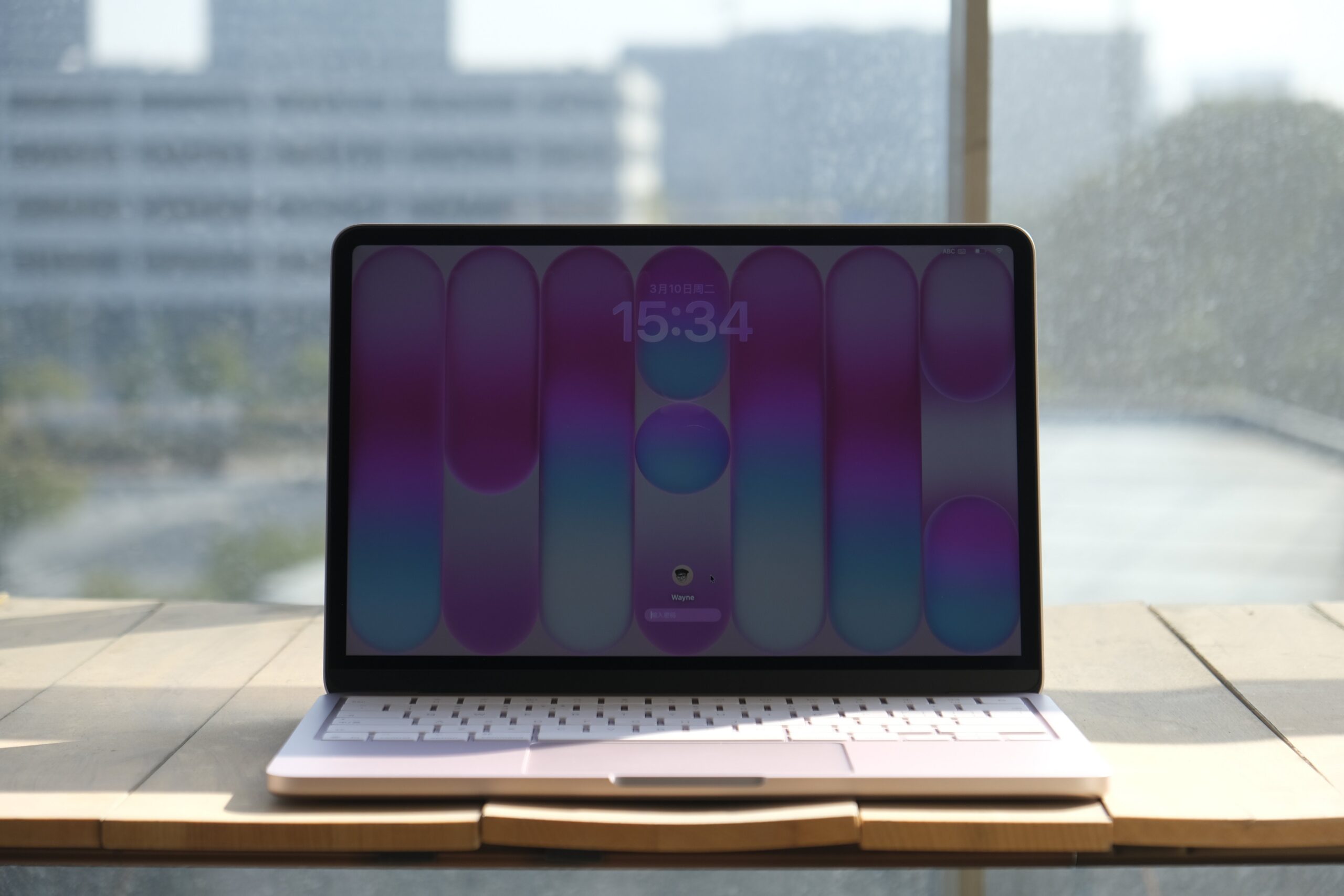
Equipped with 8 GB of memory, 256 GB of storage, no fingerprint unlock1, a display that doesn’t support the P3 wide color gamut, and even powered by a chip originally used in smartphones—it’s hard to imagine this is a laptop released in 2026. Yet this is exactly what Apple’s long-anticipated new member of the Mac family looks like: the MacBook Neo.
Let’s start with the design. The MacBook Neo is one of the few Macs in recent years to feature a colorful lineup of finishes. It comes in four options: silver, peach pink, citrus yellow, and indigo blue. From the color choices alone, you can tell Apple put considerable thought into the visual identity of this new model.

Take the peach pink unit I have on hand as an example. In addition to the unibody aluminum chassis finished entirely in pink, the keyboard has also been customized to match the device color. On the peach pink model, the keys have a subtle pink tint, and even the rubber feet on the bottom of the chassis are pink to complete the look.

On the software side, beyond the exclusive matching wallpapers designed for the four color variants of MacBook Neo, Apple has also added a new option in System Settings under “Appearance” > “Theme” color called “This Mac.” Selecting this option automatically sets the system accent color to match the color of your current MacBook Neo. This option does not appear on other Mac models.

When it comes to weight, many people had assumed that the long-rumored Mac equipped with the A18 Pro chip would revive the ultra-thin 12-inch display design. Instead, the MacBook Neo feels far more conservative than expected in its external design.
The overall look of the MacBook Neo continues the family design language seen on the current MacBook Pro and MacBook Air, with slightly softer transitions along the edges. The device’s footprint is roughly comparable to a 13-inch MacBook Air, although the Neo is slightly smaller in both width and depth, resulting in a more compact body.
When I first picked up the MacBook Neo at Apple’s launch event, I realized the device didn’t feel quite as light as I had imagined. The official specifications published later on Apple’s website confirmed this impression: although the MacBook Neo has a more compact footprint, it is actually 0.14 cm thicker than the similarly sized MacBook Air. The weight difference is minimal, but technically the Neo is slightly heavier as well.
So if you were hoping for a brand-new Mac laptop that would push portability even further, the MacBook Neo might not meet that expectation. That said, this doesn’t mean the device isn’t portable. For daily commuting or carrying it around, it’s still a lightweight Mac notebook. The portability advantages that define the MacBook Air remain present here, and the colorful finishes might even make you more inclined to take it with you wherever you go.

The MacBook Neo features a 13-inch Liquid Retina display with 500 nits of brightness. Unfortunately, whether for cost reasons or to differentiate it from other Macs, the display only supports the sRGB color space rather than the wider P3 color gamut. P3 offers broader color coverage and can produce richer, more accurate colors when viewing photos or working on design projects.
You can watch Apple’s technical explanation video to better understand the advantages of P3 compared with sRGB, or try web tools such as Wide Gamut to see the visual differences between the two color spaces on a supported device.

That said, aside from this limitation, the MacBook Neo’s display still maintains Apple’s usual high standards. For most everyday usage scenarios, you likely won’t notice a significant difference compared with the displays on other Mac notebooks.
The typing experience on the MacBook Neo’s color-matched keyboard feels identical to other Mac laptops. Whether it’s the key travel or the tactile feedback when pressing the keys, I couldn’t detect any meaningful differences. However, the situation changes once you move to the trackpad.
If you’re familiar with Macs, you’ll know that both MacBook trackpads and Apple’s Magic Trackpad have long used the Force Touch system. This technology relies on pressure sensors to detect varying levels of force, while the Taptic Engine simulates the feedback of a physical click through precise vibration.

The MacBook Neo, however, returns to a traditional mechanical trackpad design. The feedback experience is noticeably different. With Force Touch, the simulated click feedback feels tighter and more precise. With the mechanical trackpad, you can clearly feel the physical travel of the click, and the feedback isn’t quite as crisp. Personally, I still prefer the feel of the Force Touch trackpad.
Fortunately, the trackpad on the MacBook Neo still supports most of the gestures and interactions found on modern Mac trackpads. You can perform nearly all the familiar macOS touch operations. However, there is one thing to note: because a mechanical trackpad cannot detect pressure, the single-finger force-click gesture used for look-up actions has reverted to the older three-finger tap method on the MacBook Neo.

When it comes to ports, the MacBook Neo only includes two USB-C ports on the left side of the chassis, supporting USB 3 and USB 2 speeds respectively. The USB 3 port supports DisplayPort output, allowing you to connect an external monitor. You also don’t need to worry about mixing up the two ports—if you plug a high-speed external SSD into the slower USB 2 port, the system will automatically display a reminder. Finally, the MacBook Neo also includes a 3.5 mm headphone jack on the lower left side of the chassis, though it does not support high-impedance headphones.

For audio, the MacBook Neo’s dual speakers are positioned along the lower sides of the device and support Dolby Atmos playback and spatial audio. In actual use, the multimedia performance is fairly good, but the overall sound layering feels somewhat thin. This is especially noticeable in the vertical soundstage, where the audio tends to feel more like it’s spread across a flat plane, lacking the depth found on other MacBook models.

In terms of performance, the MacBook Neo is currently the only Mac that does not support configurable hardware options. Aside from choosing a color, the only customizable option is storage capacity. The combination of 8 GB of memory and the A18 Pro smartphone chip has also led many people to question its everyday performance and overall user experience.
First of all, although the MacBook Neo uses the A-series chip originally designed for the iPhone, both the A-series and M-series chips share the same ARM architecture. This means you don’t need to worry about application compatibility. Whether it’s native macOS apps or iOS / iPadOS apps that support Mac, they all run smoothly on the MacBook Neo.
The A18 Pro chip used in the MacBook Neo was originally introduced with last year’s flagship iPhone 16 Pro, and its performance is already at a desktop-class level. Based on several benchmark runs I performed on the MacBook Neo, the highest results I recorded were a single-core score of 3468 and a multi-core score of 8104. The single-core score actually surpasses the M3 chip, while the multi-core performance is noticeably weaker, roughly comparable to the M1.
I also used the MacBook Neo to edit a 4K 60 fps video project composed of more than ten clips. The final video length was 1 minute and 40 seconds, and exporting the project took around 3 minutes and 30 seconds. During the editing process, whether manipulating the timeline or using more demanding features such as the magnetic mask, the MacBook Neo maintained a generally smooth experience. However, the waiting time during heavy processing was more noticeable compared with models equipped with higher memory capacity.
The real pressure appears during the export phase. While exporting, switching windows, invoking Spotlight, or interacting with other applications resulted in noticeable stutters. Checking Activity Monitor revealed that Final Cut Pro and related video encoding services had already pushed the 8 GB of unified memory close to its limit, which in turn affected the overall multitasking smoothness of the system.

There is no doubt that the A18 Pro chip in the MacBook Neo is fully capable of handling everyday video editing or running some less demanding games. For light creative work, performance itself is not the main issue. What truly limits the experience is the lack of headroom caused by the 8 GB of memory, especially during sustained high-load tasks such as exporting video.
Although it may seem like I’ve pointed out many shortcomings of this new Mac device, most of those comparisons were made against existing Mac notebooks. The MacBook Neo was never intended to replace the MacBook Air or other models. Instead, its goal is to lower the entry barrier and bring the refined design and rich application ecosystem of macOS to more users.

From its pricing and positioning, the MacBook Neo is essentially an entry-level laptop—what we might traditionally call a “netbook.” Yet this netbook offers better design, a stronger ecosystem, and better performance than many products in the same category.
Especially in the current industry environment where memory prices continue to rise, many rumors suggest that more brands may reduce or even abandon entry-level laptop product lines in the future. Because of that, a product like the MacBook Neo actually feels quite rare.
Of course, I wouldn’t recommend choosing the MacBook Neo impulsively unless you are already certain that it will meet your needs for the next two or three years. In my opinion, the MacBook Neo is a Mac with a very clearly defined target audience and usage scenario. For older family members, it’s a computer that is simple and reliable to use; for children, it could also serve as an excellent first Mac for exploring the world of computers.
- The MacBook Neo features Touch ID fingerprint unlocking exclusively on the 512GB storage model. The 256GB model includes a function key lock. ↩︎
Leave a Reply