
Category: Macbook

  • SSPAI Morning Brief: PlayStation Tests Personalized Game Pricing as China Approves Its First Brain–Computer Interface Medical Device

    SSPAI Morning Brief: PlayStation Tests Personalized Game Pricing as China Approves Its First Brain–Computer Interface Medical Device

    Morning Brief

    1. China’s market regulator cracks down on misleading ads with “big claims and tiny disclaimers”
    2. CCTV’s 3.15 Gala exposes “data poisoning” attacks on large AI models
    3. PlayStation Store tests dynamic pricing, with different prices for different users
    4. Adobe reaches settlement with the U.S. Department of Justice over deceptive subscription cancellation practices
    5. MacBook Neo rated the most repairable Apple laptop in 14 years
    6. China approves its first brain–computer interface medical device
    7. Other News Worth a Quick Look

    China’s market regulator cracks down on misleading ads with “big claims and tiny disclaimers”

    On March 13, China’s State Administration for Market Regulation (SAMR) issued a notice titled Notice on Strengthening the Regulation of Prompting Language in Advertisements, launching a six-month campaign to clean up related advertising irregularities.

    The notice requires:

    • Cracking down on misleading “big headline, tiny disclaimer” advertising. Ads that use hard-to-read small text to indicate restrictions or unfavorable information will be targeted; in serious cases they may be classified as false advertising;
    • Investigating cases where required prompting language is missing or intentionally weakened. Advertisements for pharmaceuticals, health supplements, and similar products must clearly display legally required warnings; AI-generated content must also be clearly labeled. Unauthorized use of another person’s likeness may be deemed false advertising;
    • Investigating advertisements that use absolute language. Terms such as “No.1” or “Best” will be strictly scrutinized. If unclear industry scope definitions lead to consumer misunderstanding, such ads may be classified as false advertising;
    • Strengthening oversight of cited claims and advertiser self-verification. Citations must indicate their sources; when advertisers use their own data as proof, timeframes, regions, and other limiting conditions must be clearly stated. Distorting data, presenting probabilistic conclusions as certainty, or omitting limiting conditions may all constitute false advertising;
    • Enhancing supervision of major advertising distribution channels. Internet platforms and outdoor advertising publishers must fulfill their responsibilities and ensure that disclaimers and prompt information are prominently displayed in advertising designs.

    CCTV’s 3.15 Gala exposes “data poisoning” attacks on large AI models

    On March 15, China Central Television’s annual “3.15 Consumer Rights Gala” exposed a black-market industry chain dedicated to “poisoning” AI large models and manipulating their outputs.

    The report explains that GEO originally refers to marketing optimization for generative AI search results, similar to SEO during the traditional search engine era. However, some illicit service providers are exploiting Generative Engine Optimization (GEO) techniques to flood the internet with fake promotional articles. These articles interfere with how AI models gather and cross-validate information, allowing companies to manipulate AI outputs so that advertisements or fabricated claims appear as the “standard answers” recommended by AI to consumers.

    During the program, industry insiders demonstrated the process. They randomly purchased a piece of software called the “Liqing GEO System” and fabricated a fictional smart wristband named Apollo9. The GEO software immediately generated promotional articles containing absurd claims such as “quantum entanglement sensors” and “black-hole-level battery life,” then automatically published them across multiple self-media accounts. Within two hours, major AI models had already scraped these posts. When users later asked for smart band recommendations, the AI repeated the fabricated promotional claims verbatim. After publishing additional fake product reviews generated by the GEO system, two AI services began recommending the wristband near the top of their responses within three days.

    The report revealed that the growing demand for GEO services has led to the emergence of numerous companies and platforms specializing in mass content publishing. These operations handle bulk posting requests, automatically releasing hundreds of machine-generated spam articles every day and earning tens of yuan per article.


    PlayStation Store tests dynamic pricing, with different prices for different users

    According to the PlayStation price tracking website PSprices, the PlayStation Store is conducting large-scale A/B testing of dynamic pricing. The testing has been quietly underway for more than four months and expanded in March to the United States—PlayStation’s largest market—covering over 70 regions worldwide across Europe, the Americas, and Asia, and involving more than 190 games. Japan is the only major market not included in the test.

    The testing was discovered through analysis of backend API data. Under the dynamic pricing system, players are randomly divided into groups. Some selected users see exclusive discounted prices lower than the standard retail price when browsing the same game, with discounts reaching up to 27.8%. Games included in the dynamic pricing test range from popular third-party titles by major publishers such as 2K and Rockstar to key first-party releases including Marvel’s Spider-Man 2, God of War: Ragnarök, and Helldivers 2.

    Data released so far suggests that Sony has created multiple test groups targeting different markets and user segments to evaluate various discount levels. This personalized pricing has also appeared in specific promotional events. For example, during a recent sale, ordinary players saw a 25% discount for Helldivers 2, while some users in experimental groups were offered discounts as high as 56%.


    Adobe reaches settlement with the U.S. Department of Justice over deceptive subscription cancellation practices

    On March 14, Adobe agreed to pay a $75 million fine and provide $75 million worth of free services to affected users to settle a lawsuit filed by the U.S. Department of Justice over allegations that it concealed subscription cancellation penalties.

    The lawsuit began in 2024, with the core dispute focusing on Adobe hiding expensive early termination fees within supplementary clauses or hyperlinks in user agreements. If users canceled an annual subscription plan midway, they could be charged 50% of the remaining subscription cost, often amounting to several hundred dollars. Adobe was also accused of creating complicated phone-based customer service processes that deliberately made cancellation more difficult. At the time, the Department of Justice argued that Adobe’s practices violated the Restore Online Shoppers’ Confidence Act, which is intended to prevent deceptive billing practices in online services.

    Under the settlement agreement, Adobe did not admit to any wrongdoing. The company has not yet clarified which users will qualify for the free service compensation or what form it will take, stating only that eligible users will receive notifications. Adobe also emphasized that it has improved its sales processes in recent years, making cancellation terms clearer at the time of purchase.

    The settlement is also seen as another instance of the Trump administration scaling back consumer protection lawsuits initiated during the Biden era. Previously, the Federal Trade Commission and the Department of Justice reached settlements in major cases involving Amazon Prime subscriptions and Ticketmaster’s ticketing services.


    MacBook Neo rated the most repairable Apple laptop in 14 years

    On March 13, iFixit released a teardown report for Apple’s budget laptop MacBook Neo, awarding it a repairability score of 6 out of 10 and calling it “the most repairable MacBook in 14 years.”

    The teardown revealed significant changes to the internal design. The most notable update is the complete abandonment of Apple’s long-used glued-in battery, replaced instead with a battery tray secured by 18 screws. This design greatly reduces the difficulty and risk of battery replacement. The move is believed to prepare Apple for upcoming European Union regulations set to take effect in 2027, which will require batteries in portable devices to be replaceable. Tests also showed that the device no longer imposes software restrictions on non-original parts. After replacing components such as the display, battery, or even the Touch ID fingerprint module, users only need to run Apple’s official calibration software for proper compatibility, without triggering warnings about non-genuine parts.

    Other internal components of the MacBook Neo also demonstrate a higher level of modular design. The USB-C ports and 3.5 mm headphone jack are separate modules, meaning they can be replaced individually without swapping out the entire motherboard. The disassembly process for the display antenna and hinges has also been significantly simplified. In the control area, the keyboard still requires removing 41 screws but has moved away from the previous riveted structure. Meanwhile, the trackpad has dropped its force-touch functionality, making it easier to repair and cheaper to replace.


    China approves its first brain–computer interface medical device

    According to Bloomberg, on March 13 China’s National Medical Products Administration approved the country’s first commercial invasive brain–computer interface (BCI) product. The device was developed by Neuracle and is designed to help adult patients with partial paralysis caused by spinal cord injuries improve hand grasping ability by controlling a robotic glove with their thoughts.

    The approved system integrates an implanted brain sensor, a robotic glove, signal decoding algorithms, and related medical software. It has previously been tested on 36 patients. Unlike devices such as Elon Musk’s Neuralink, which implant electrodes directly into the cerebral cortex, Neuracle’s sensor is placed outside the brain’s outermost membrane. This approach is relatively less invasive, but because it has fewer signal detection channels, the current system is limited to patients who still retain some upper-arm function. It cannot yet enable more advanced interactions, such as allowing fully paralyzed patients to browse the internet or play games.

    Brain–computer interfaces have been identified as one of six strategic emerging industries in China’s latest five-year plan. Authorities have pledged to streamline regulatory approval processes and are already working on guidelines for potential medical insurance reimbursement. Following news of the first commercial product approval, shares of related companies—including Sanbo Brain Science, Innovational Medical, and Nanjing Panda Electronics—have all surged by more than 10%.

    Investment and financing activity in the global brain–computer interface sector is also accelerating. Last week, another Chinese company competing in the Neuralink space, StairMed, completed a 500 million RMB funding round led by Alibaba and plans to conduct 40 additional human implant procedures this year. Chengdu-based Gestala, which is developing alternative BCI technologies, also announced a 150 million RMB seed round. In the United States, Science Corp recently raised $230 million to advance the commercialization of its implantable devices.


    Other News Worth a Quick Look

    • On March 14, 360 held a launch event in Beijing, unveiling the so-called “360 Secure Lobster” client and the “360 Secure Lobster Box” hardware terminal, along with a security product called “360 Lobster Guardian” designed specifically to address OpenClaw security issues. 360 claims this is the first OpenClaw agent product in China designed around a “security mode.” The company also promoted the solution as addressing what it describes as the four major obstacles hindering OpenClaw adoption—“difficult installation, difficult maintenance, instability, and security risks.” According to 360, the Secure Lobster product line provides a comprehensive “fully prepared out-of-the-box, all-around protection” solution aimed at allowing ordinary users to benefit from the technology and achieve what it calls “Lobster freedom.” Zhou Hongyi personally helped install and deploy “360 Secure Lobster” for users at the company’s headquarters campus.
    • According to The Information, ByteDance has paused the global release of its latest AI video generation model, Seedance 2.0, due to copyright disputes with major Hollywood studios. The model had originally been scheduled to open to global users in mid-March this year.
    • Mark Gurman reports that:
      • Apple is deeply adapting iOS 27 for a foldable iPhone, introducing split-screen multitasking to the iPhone for the first time. Because the foldable panel must be purchased from Samsung at a high price, combined with a complex hinge mechanism and premium materials, the device will be very expensive;
      • Apple’s first smart home device with a 7-inch display, originally scheduled to launch in March this year, has been delayed to September due to ongoing development delays in the new version of Siri and related AI features;
      • Liquid Glass will not undergo major changes in iOS 27. Although Alan Dye, the vice president who led the design, left with several key team members for Meta late last year, the interface has been in development for years and is deeply integrated into Apple’s ecosystem. His successor Steve Lemay will focus primarily on optimization;
      • Apple will not consider equipping the MacBook Neo with high-end components such as touch displays within the next three years.
  • MacBook Neo Hands-On: Apple’s Most Affordable MacBook Yet

    MacBook Neo Hands-On: Apple’s Most Affordable MacBook Yet

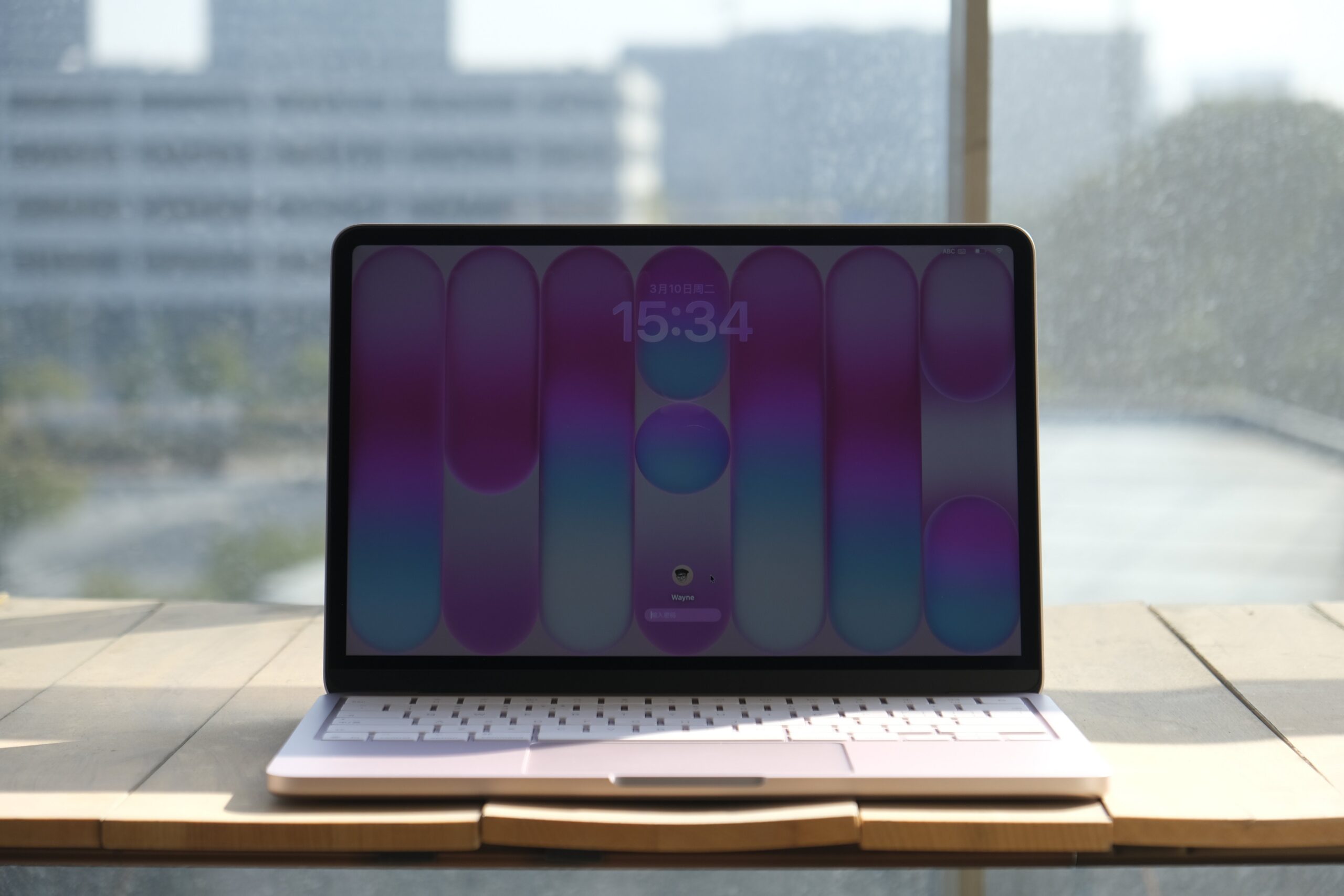
    Equipped with 8 GB of memory, 256 GB of storage, no fingerprint unlock1, a display that doesn’t support the P3 wide color gamut, and even powered by a chip originally used in smartphones—it’s hard to imagine this is a laptop released in 2026. Yet this is exactly what Apple’s long-anticipated new member of the Mac family looks like: the MacBook Neo.

    Let’s start with the design. The MacBook Neo is one of the few Macs in recent years to feature a colorful lineup of finishes. It comes in four options: silver, peach pink, citrus yellow, and indigo blue. From the color choices alone, you can tell Apple put considerable thought into the visual identity of this new model.

    Take the peach pink unit I have on hand as an example. In addition to the unibody aluminum chassis finished entirely in pink, the keyboard has also been customized to match the device color. On the peach pink model, the keys have a subtle pink tint, and even the rubber feet on the bottom of the chassis are pink to complete the look.

    On the software side, beyond the exclusive matching wallpapers designed for the four color variants of MacBook Neo, Apple has also added a new option in System Settings under “Appearance” > “Theme” color called “This Mac.” Selecting this option automatically sets the system accent color to match the color of your current MacBook Neo. This option does not appear on other Mac models.

    When it comes to weight, many people had assumed that the long-rumored Mac equipped with the A18 Pro chip would revive the ultra-thin 12-inch display design. Instead, the MacBook Neo feels far more conservative than expected in its external design.

    The overall look of the MacBook Neo continues the family design language seen on the current MacBook Pro and MacBook Air, with slightly softer transitions along the edges. The device’s footprint is roughly comparable to a 13-inch MacBook Air, although the Neo is slightly smaller in both width and depth, resulting in a more compact body.

    When I first picked up the MacBook Neo at Apple’s launch event, I realized the device didn’t feel quite as light as I had imagined. The official specifications published later on Apple’s website confirmed this impression: although the MacBook Neo has a more compact footprint, it is actually 0.14 cm thicker than the similarly sized MacBook Air. The weight difference is minimal, but technically the Neo is slightly heavier as well.

    So if you were hoping for a brand-new Mac laptop that would push portability even further, the MacBook Neo might not meet that expectation. That said, this doesn’t mean the device isn’t portable. For daily commuting or carrying it around, it’s still a lightweight Mac notebook. The portability advantages that define the MacBook Air remain present here, and the colorful finishes might even make you more inclined to take it with you wherever you go.

    The MacBook Neo features a 13-inch Liquid Retina display with 500 nits of brightness. Unfortunately, whether for cost reasons or to differentiate it from other Macs, the display only supports the sRGB color space rather than the wider P3 color gamut. P3 offers broader color coverage and can produce richer, more accurate colors when viewing photos or working on design projects.

    You can watch Apple’s technical explanation video to better understand the advantages of P3 compared with sRGB, or try web tools such as Wide Gamut to see the visual differences between the two color spaces on a supported device.

    For reference only.

    That said, aside from this limitation, the MacBook Neo’s display still maintains Apple’s usual high standards. For most everyday usage scenarios, you likely won’t notice a significant difference compared with the displays on other Mac notebooks.

    The typing experience on the MacBook Neo’s color-matched keyboard feels identical to other Mac laptops. Whether it’s the key travel or the tactile feedback when pressing the keys, I couldn’t detect any meaningful differences. However, the situation changes once you move to the trackpad.

    If you’re familiar with Macs, you’ll know that both MacBook trackpads and Apple’s Magic Trackpad have long used the Force Touch system. This technology relies on pressure sensors to detect varying levels of force, while the Taptic Engine simulates the feedback of a physical click through precise vibration.

    The MacBook Neo, however, returns to a traditional mechanical trackpad design. The feedback experience is noticeably different. With Force Touch, the simulated click feedback feels tighter and more precise. With the mechanical trackpad, you can clearly feel the physical travel of the click, and the feedback isn’t quite as crisp. Personally, I still prefer the feel of the Force Touch trackpad.

    Fortunately, the trackpad on the MacBook Neo still supports most of the gestures and interactions found on modern Mac trackpads. You can perform nearly all the familiar macOS touch operations. However, there is one thing to note: because a mechanical trackpad cannot detect pressure, the single-finger force-click gesture used for look-up actions has reverted to the older three-finger tap method on the MacBook Neo.

    When it comes to ports, the MacBook Neo only includes two USB-C ports on the left side of the chassis, supporting USB 3 and USB 2 speeds respectively. The USB 3 port supports DisplayPort output, allowing you to connect an external monitor. You also don’t need to worry about mixing up the two ports—if you plug a high-speed external SSD into the slower USB 2 port, the system will automatically display a reminder. Finally, the MacBook Neo also includes a 3.5 mm headphone jack on the lower left side of the chassis, though it does not support high-impedance headphones.

    For audio, the MacBook Neo’s dual speakers are positioned along the lower sides of the device and support Dolby Atmos playback and spatial audio. In actual use, the multimedia performance is fairly good, but the overall sound layering feels somewhat thin. This is especially noticeable in the vertical soundstage, where the audio tends to feel more like it’s spread across a flat plane, lacking the depth found on other MacBook models.

    In terms of performance, the MacBook Neo is currently the only Mac that does not support configurable hardware options. Aside from choosing a color, the only customizable option is storage capacity. The combination of 8 GB of memory and the A18 Pro smartphone chip has also led many people to question its everyday performance and overall user experience.

    First of all, although the MacBook Neo uses the A-series chip originally designed for the iPhone, both the A-series and M-series chips share the same ARM architecture. This means you don’t need to worry about application compatibility. Whether it’s native macOS apps or iOS / iPadOS apps that support Mac, they all run smoothly on the MacBook Neo.

    The A18 Pro chip used in the MacBook Neo was originally introduced with last year’s flagship iPhone 16 Pro, and its performance is already at a desktop-class level. Based on several benchmark runs I performed on the MacBook Neo, the highest results I recorded were a single-core score of 3468 and a multi-core score of 8104. The single-core score actually surpasses the M3 chip, while the multi-core performance is noticeably weaker, roughly comparable to the M1.

    I also used the MacBook Neo to edit a 4K 60 fps video project composed of more than ten clips. The final video length was 1 minute and 40 seconds, and exporting the project took around 3 minutes and 30 seconds. During the editing process, whether manipulating the timeline or using more demanding features such as the magnetic mask, the MacBook Neo maintained a generally smooth experience. However, the waiting time during heavy processing was more noticeable compared with models equipped with higher memory capacity.

    The real pressure appears during the export phase. While exporting, switching windows, invoking Spotlight, or interacting with other applications resulted in noticeable stutters. Checking Activity Monitor revealed that Final Cut Pro and related video encoding services had already pushed the 8 GB of unified memory close to its limit, which in turn affected the overall multitasking smoothness of the system.

    There is no doubt that the A18 Pro chip in the MacBook Neo is fully capable of handling everyday video editing or running some less demanding games. For light creative work, performance itself is not the main issue. What truly limits the experience is the lack of headroom caused by the 8 GB of memory, especially during sustained high-load tasks such as exporting video.

    Although it may seem like I’ve pointed out many shortcomings of this new Mac device, most of those comparisons were made against existing Mac notebooks. The MacBook Neo was never intended to replace the MacBook Air or other models. Instead, its goal is to lower the entry barrier and bring the refined design and rich application ecosystem of macOS to more users.

    From its pricing and positioning, the MacBook Neo is essentially an entry-level laptop—what we might traditionally call a “netbook.” Yet this netbook offers better design, a stronger ecosystem, and better performance than many products in the same category.

    Especially in the current industry environment where memory prices continue to rise, many rumors suggest that more brands may reduce or even abandon entry-level laptop product lines in the future. Because of that, a product like the MacBook Neo actually feels quite rare.

    Of course, I wouldn’t recommend choosing the MacBook Neo impulsively unless you are already certain that it will meet your needs for the next two or three years. In my opinion, the MacBook Neo is a Mac with a very clearly defined target audience and usage scenario. For older family members, it’s a computer that is simple and reliable to use; for children, it could also serve as an excellent first Mac for exploring the world of computers.
    1. The MacBook Neo features Touch ID fingerprint unlocking exclusively on the 512GB storage model. The 256GB model includes a function key lock. ↩︎
  • SSPAI Morning Brief: Apple Unveils MacBook Neo as OpenAI Prepares New AI Model

    SSPAI Morning Brief: Apple Unveils MacBook Neo as OpenAI Prepares New AI Model

    Morning Brief

    1. Apple introduces MacBook Neo
    2. Claude Code launches voice mode
    3. Setapp allows individual app purchases or subscriptions
    4. OpenAI confirms an upcoming new model
    5. Keychron releases the B11 Pro foldable keyboard
    6. ASUSTOR launches the flagship NAS AS7224RDX

    Apple introduces MacBook Neo

    On March 4, Apple officially unveiled the long-rumored “colorful entry-level” MacBook, with the new lineup named MacBook Neo.

    Further viewing: Hands-on photos of MacBook Neo from SSPAI

    MacBook Neo is powered by the A18 Pro processor, comes standard with 8GB of memory and a 13.0-inch Liquid Retina display, and features one USB 3 port and one USB 2 port. The device supports up to 16 hours of streaming video playback. It weighs 1.23 kg and includes a dual-speaker system with spatial audio support, Wi-Fi 6E, Bluetooth 6, and a 1080p FaceTime HD camera. The base model includes 256GB of storage, while the 512GB version additionally comes with Touch ID.

    MacBook Neo is available in four colors: silver, peach pink, citrus yellow, and indigo blue. The 256GB version is priced at 4,599 yuan, while the 512GB version costs 5,299 yuan. The product will officially go on sale on March 11. Source

    Product appearance images, provided by the news source

    Claude Code launches voice mode

    On March 3, Anthropic announced the gradual rollout of a new Voice Mode in its programming tool Claude Code, signaling that the developer-favored concept of “intuitive programming” is evolving toward a more efficient era of “voice programming.”

    The voice module is built directly into the underlying architecture of Claude Code. After receiving beta access, users will see a prompt prominently displayed on the welcome screen inviting them to enable the feature. During actual use, developers only need to press and hold the space bar on the keyboard to speak and input development requests, then release the key to quickly send the voice command to the AI for execution.

    In terms of pricing, Anthropic emphasized that the voice interaction feature will not incur any additional subscription fees. As the feature rolls out more broadly, users on the existing Pro, Max, Team, and Enterprise tiers will all be able to experience this new capability designed to improve development efficiency at no extra cost. Source


    Setapp allows individual app purchases or subscriptions

    On March 3, the MacPaw team announced that it will introduce new purchasing options for its Setapp platform, including standalone subscriptions and one-time purchase plans for specific apps. Under the new model, applications such as Bartender, Downie, and AlDente Pro, along with MacPaw’s own apps like CleanMyMac, Moonlock, and Gemini 2, will offer a variety of subscription and purchase plans, including monthly, yearly, and one-time purchase options. These purchase or subscription plans can all be accessed through Setapp, without requiring users to subscribe to the full Setapp service.

    Currently, more than 60 apps support the new purchase and subscription options, and the list of participating applications will be updated and announced regularly in the future. Source


    OpenAI confirms an upcoming new model

    On March 4, shortly after launching the GPT-5.3 Instant model, the OpenAI team stated on social media that GPT-5.4 “will arrive sooner than you think.” Since the GPT client shows that the older 5.1 model will be discontinued on March 11, some users speculate that OpenAI may officially release version 5.4 around that time. Source


    Keychron releases the B11 Pro foldable keyboard

    On March 4, the Keychron brand introduced the B11 Pro foldable portable keyboard. The product features a flat Alice layout, which is more ergonomic than the traditional horizontal layout, while remaining compatible with macOS, Windows, and Linux. The B11 Pro adopts an inward-folding design, with an ABS body and a matte black PU leather back. It uses scissor-switch mechanisms and comes with concave ABS keycaps. In terms of connectivity, the keyboard supports tri-mode connections including USB-C wired, 2.4GHz wireless, and Bluetooth 5.3 wireless, with a “dual 1kHz” polling rate. The entire keyboard weighs 258g and includes a built-in 250mAh battery rated for up to 138 hours of battery life, supporting automatic power-off when folded and automatic power-on when unfolded. The price is set at $64.99. Source

    Product appearance image, photo sourced from news outlets

    ASUSTOR launches the flagship NAS AS7224RDX

    On March 3, ASUSTOR, a subsidiary of ASUS, announced the launch of its 4U rackmount flagship NAS, the AS7224RDX (Lockerstor 24R PRO Gen2), featuring 24 drive bays. The AS7224RDX is powered by an AMD Ryzen 7 PRO 7745 eight-core processor and provides 24 SATA bays supporting either 3.5-inch or 2.5-inch drives. It also includes PCIe Gen5 ×8 and PCIe Gen5 ×4 expansion slots, one M.2 2280 PCIe Gen5 ×4 slot, two 10GbE network ports, and two 1GbE network ports.

    In addition, the device features four DDR5 UDIMM memory slots supporting up to 192GB of ECC memory, and comes preinstalled with 16GB DDR5-4800 ECC memory and a 32GB SATA DOM. It is powered by a pair of 550W Platinum redundant power supplies and equipped with four 60mm cooling fans. The system also provides four USB-A 5Gbps ports and one HDMI port for service purposes. Source

    Product appearance images, provided by the news source

  • SSPAI Morning Brief: Apple Unveils M5 Chips and New MacBooks as Google Rolls Out Pixel Feature Drop

    SSPAI Morning Brief: Apple Unveils M5 Chips and New MacBooks as Google Rolls Out Pixel Feature Drop

    Morning Brief

    1. Apple unveils M5 series chips, Studio Display, and new MacBook models
    2. Unihertz releases the new full-keyboard smartphone Titan 2 Elite
    3. Four AI updates
    4. Google releases the Spring 2026 Pixel Feature Drop
    5. Speedtest and Downdetector are being sold
    6. Chrome adjusts the update cycle for the stable version
    7. Highguard announces shutdown on March 12
    8. Briefs worth a quick look

    Apple unveils M5 series chips, Studio Display, and new MacBook models

    On March 3, Apple introduced the M5 series chips and simultaneously refreshed the MacBook Pro, MacBook Air, and Studio Display / Display XDR product lines.

    The M5 series adopts a Fusion architecture that integrates two 3-nm chiplets into a single SoC. The M5 Pro and M5 Max feature a new 18-core CPU architecture composed of 6 super cores and 12 performance cores. Multi-thread performance improves by up to 30% compared with the M4 series and up to 2.5× compared with the M1 series. GPU configurations scale up to 40 cores, with each core integrating neural network accelerators. Peak AI compute performance improves by more than 4× over the previous generation, while ray tracing performance increases by up to 35%. In terms of memory, M5 Pro supports up to 64GB with 307GB/s bandwidth, while M5 Max supports up to 128GB with 614GB/s bandwidth. The M5 series also integrates a 16-core Neural Engine, a media engine supporting AV1 decoding, a Thunderbolt 5 controller, and memory security protection features. Source

    New MacBook Pro models powered by the M5 series start at RMB 17,999 for the 14-inch M5 Pro version and RMB 21,999 for the 16-inch model; the 14-inch M5 Max version starts at RMB 29,999 and the 16-inch version at RMB 31,999. Orders open on March 4, with official sales beginning on March 11. Source

    Apple also introduced 13-inch and 15-inch MacBook Air models powered by the M5 chip, featuring a 10-core CPU and up to a 10-core GPU. Base storage starts at 512GB and can be configured up to 4TB. The new generation SSD delivers twice the read and write performance. In terms of connectivity, the devices debut Apple’s N1 wireless chip, supporting Wi-Fi 7 and Bluetooth 6, and include two Thunderbolt 4 ports capable of driving up to two external displays. The machines use a fanless silent design and feature a 12MP Center Stage camera and Liquid Retina display, with battery life of up to 18 hours. The new MacBook Air is available in Sky Blue, Midnight, Starlight, and Silver, with the 13-inch model starting at RMB 8,499 and the 15-inch model at RMB 9,999. Orders open on March 4, with sales beginning March 11. Source

    Finally, the new Studio Display features a 27-inch 5K Retina display with brightness up to 600 nits. The Studio Display XDR upgrades to a 27-inch 5K Retina XDR panel using mini-LED backlighting with 2,304 local dimming zones. It supports a 120Hz ProMotion adaptive refresh rate (47Hz–120Hz), SDR brightness up to 1000 nits, HDR peak brightness up to 2000 nits, a contrast ratio of 1,000,000:1, and newly adds support for the Adobe RGB color gamut. Both displays include a 12MP Center Stage camera with Desk View support, a studio-quality three-microphone array, and a six-speaker system supporting spatial audio. For connectivity, the lineup adds Thunderbolt 5 downstream support, providing two Thunderbolt 5 ports and two USB-C ports, and supports daisy-chaining up to four displays. Each unit includes a Thunderbolt 5 Pro cable. Studio Display supports up to 96W power delivery, while the XDR version supports up to 140W reverse charging.

    The Studio Display with a tilt-adjustable stand starts at RMB 11,999, while the Studio Display XDR with tilt- and height-adjustable stand starts at RMB 24,999. Orders open on March 4, with sales beginning March 11. Source


    Unihertz releases the new full-keyboard smartphone Titan 2 Elite

    On March 3, Unihertz announced the Titan 2 Elite, a new full-keyboard smartphone in its Titan series, at MWC 2026. The device adopts a compact candy-bar design reminiscent of classic BlackBerry phones and comes in black and orange color options. It features a 4.03-inch AMOLED display with a 120Hz refresh rate, and the secondary rear display from the previous generation has been removed to achieve a slimmer and lighter design. The phone is powered by the MediaTek Dimensity 7400 processor, with an alternative Dimensity 8400 Pro version also available, and includes 12GB of RAM and 512GB of storage. The 3.5mm headphone jack has been removed, while the programmable side button and infrared transmitter remain.

    On the software side, the Titan 2 Elite ships with Android 16. Unihertz promises security updates through 2031 and Android version upgrades up to Android 20. The Titan 2 Elite will launch on Kickstarter for crowdfunding in March this year, with pricing yet to be announced. Source


    Four AI Updates

    OpenAI Releases GPT-5.3 Instant
    On March 3, OpenAI released GPT-5.3 Instant. The new model improves response relevance, conversational fluency, and web search capabilities, while significantly reducing mechanical replies, redundant disclaimers, and overly stiff tone tendencies. Compared with GPT-5.2 Instant, it particularly improves responses involving sensitive topics, addressing previous issues where the model could appear overly cautious or overly preachy. It also enhances the integration quality of web search results, reduces excessive reliance on search outputs, and resolves earlier cases where responses occasionally contained “link dumping” or loosely organized information. The update also substantially adjusts dialogue styles that users previously described as “awkward,” “out of place,” or overly forceful in tone, while significantly reducing hallucination rates across a wide range of topics.

    GPT-5.3 Instant is available immediately to all ChatGPT users. Developers can access the model through the API under the name gpt-5.3-chat-latest. Updates for the Thinking and Pro variants are expected to roll out soon. GPT-5.2 Instant will remain available for paid users under the “Legacy Models” dropdown menu for three months and is scheduled to be officially retired on June 3, 2026. Source

    Google Releases Gemini 3.1 Flash-Lite
    On March 3, Google officially launched Gemini 3.1 Flash-Lite. The model features a context window of up to one million tokens and supports multimodal inputs including text, images, audio, and video. It delivers a maximum output speed of 389 tokens per second. Pricing is set at $0.25 per million input tokens and $1.50 per million output tokens. The model’s knowledge cutoff date is January 1, 2025.

    A preview version of Gemini 3.1 Flash-Lite is now available to developers via Google AI Studio and the Vertex AI platform. Source

    Anthropic Introduces Memory Import Tool
    On March 3, Anthropic announced that the memory feature of its AI assistant Claude is now available to free users. The feature is implemented through standardized prompts: users can copy a specific prompt provided by Anthropic into other AI chat tools and request them to export all stored user preferences, personal details, project goals, and behavioral adjustments. The returned structured text can then be pasted into Claude’s memory settings to complete the import and integration process. Source

    Alibaba Releases Qwen3.5 Small Model Series
    On March 2, Alibaba’s Qwen team released the Qwen3.5 Small model series, including four parameter sizes: 0.8B, 2B, 4B, and 9B. Built on the Qwen3.5 architecture, the series features native multimodal capabilities and has been optimized through large-scale reinforcement learning (RL). The 0.8B and 2B versions focus on high-speed inference for edge devices, the 4B version is positioned as a lightweight multimodal foundation for AI agents, and the 9B version aims to narrow the performance gap with larger models. Base models are also provided across the entire lineup. The weights have been released on Hugging Face and ModelScope, where they are freely available for research and industrial applications. Source


    Google releases the Spring 2026 Pixel Feature Drop

    On March 3, Google rolled out the March Pixel Drop for Pixel devices. The update adds real-time location sharing in Google Messages to the Find Hub tracking network and introduces lost luggage tracking in partnership with 10 airlines (requiring compatible tags). A customizable Calling Card feature is also introduced, allowing users to personalize their call screens with photos and fonts, while the Google Play Store adds a short-video feed to enhance app discovery. Pixel 10 series–exclusive Magic Cue now supports restaurant recommendations, and the Circle to Search feature expands with enhanced virtual try-on and video shopping capabilities. The home screen also gains six AI-generated icon styles. Pixel Watch receives several updates, including phone-loss alerts, quick payments without waking the device, earthquake alerts, and satellite SOS coverage across Europe, Canada, Hawaii, and Alaska. These updates will roll out gradually starting today. Source


    Speedtest and Downdetector are being sold

    On March 3, digital media company Ziff Davis announced that it will sell its Connectivity business unit, which includes Ookla Speedtest and Downdetector, to Accenture for $1.2 billion in cash. The division generated $231 million in revenue in 2025, representing a substantial return compared with the $15 million Ziff Davis paid to acquire it in 2014. Ziff Davis stated that the deal is intended to sharpen the company’s strategic focus, with future efforts centered on core media brands such as IGN, Mashable, and Everyday Health. The transaction is expected to close in the coming months, and both Speedtest and Downdetector will continue operating normally during the transition period. Source


    Chrome adjusts the update cycle for the stable version

    On March 3, Google announced that the update frequency for the Chrome browser’s stable release across all platforms will change from once every four weeks to once every two weeks. The adjustment applies to desktop, Android, and iOS platforms, aiming to accelerate feature delivery and simplify post-release debugging. The first stable version under the new schedule will be Chrome 153, scheduled for release on September 8. Beta versions will be released three weeks ahead of the stable version, while weekly security updates for milestone versions will remain unchanged. The Canary and Dev channels, as well as the extended eight-week stable release cycle for enterprise users, will continue as before.

    For Chromebook hardware, ChromeOS will follow the new cadence after completing platform-specific testing. Further details regarding update policies for managed devices will be announced later. Source


    Highguard announces shutdown on March 12

    On March 3, developer Wildlight Entertainment announced that its shooter game Highguard will officially shut down on March 12. The title was developed by a team composed of former members from Apex Legends, Call of Duty, and Titanfall, and was showcased as the closing highlight at The Game Awards 2025. Since its release on January 26, 2026, the game once attracted up to 2 million players but ultimately failed to establish a player base large enough to sustain long-term operation. The studio is reportedly partially funded by Tencent and laid off most of its staff in February. The game will receive its final update over the next two days, including a new character and new weapons. Source


    Briefs worth a quick look

    • Swedish media outlet Svenska Dagbladet reported that Meta AI smart glasses (such as Ray-Ban Meta) allegedly captured users’ private videos and financial information without their knowledge and sent the data to reviewers outside the European Union. The claim was revealed by an AI data annotator in Nairobi, Kenya, who said that while processing visual data used to train large language models (LLMs), they encountered highly sensitive content including nudity, people using the toilet, intimate behavior, and even credit card numbers. Meta declined to comment on the report. Source
    • Apple’s official regulatory compliance page briefly listed a previously unknown device called MacBook Neo (Model A3404), identified as part of the 2026 MacBook lineup, though the page has since been removed. According to earlier rumors, the device is expected to target the education and consumer entry-level market and may use an iPhone-series processor rather than an M-series chip. Source
  • SSPAI Morning Brief: Honor Launches Magic8 Pro Air and More

    SSPAI Morning Brief: Honor Launches Magic8 Pro Air and More

    Morning Brief

    1. Honor releases new models including the Magic8 Pro Air
    2. Anker and Feishu jointly launch the Anker AI Voice Recorder Buds
    3. Xiaohongshu rolls out Community Guidelines 2.0
    4. ASUS stops releasing new smartphones
    5. Rumors You Can Just Glance At

    Honor releases new models including the Magic8 Pro Air

    On January 19, Honor held a product launch event, unveiling new devices including the Honor Magic8 Pro Air, Honor Magic8 RSR, and the Honor 500 Pro MOLLY 20th Anniversary Limited Edition.

    The Honor Magic8 Pro Air is powered by the Dimensity 9500 processor and features a 6.31-inch Honor Oasis Eye-Care display. It measures 71.9 mm in width, just 6.1 mm in thickness, and weighs 155 g. The rear camera setup includes three cameras: a 50-MP 1/1.3-inch f/1.6 main camera with a 23 mm equivalent focal length and OIS support; a 50-MP f/2.2 ultra-wide camera; and a 64-MP periscope telephoto camera with 3.2× optical zoom, f/2.6 aperture, and OIS support. It also includes a color temperature sensor and a flicker sensor. The phone is equipped with a 5,500 mAh battery and supports IP68 and IP69 dust and water resistance. It supports eSIM and has dual physical SIM card slots. Color options include Light Orange, Fairy Purple, Feather White, and Shadow Black. Pricing ranges from RMB 4,999 (12 GB + 256 GB) to RMB 5,999 (16 GB + 1 TB), with an additional RMB 500 discount available through government subsidies.

    The Honor Magic8 RSR is a co-branded model created in collaboration with Porsche Design. It features an ultra-microcrystalline nano-ceramic body and has largely the same overall configuration as the Magic8 Pro, powered by the Snapdragon 8 Elite Gen 5 chipset. The Magic8 RSR supports Honor’s Hongyan dual-satellite communication (Tiantong satellite calling and BeiDou satellite messaging) and offers an optional professional imaging kit. It is available in Moonstone and Slate Gray, priced at RMB 7,999 (16 GB + 512 GB) and RMB 8,999 (24 GB + 1 TB).

    The Honor 500 Pro MOLLY 20th Anniversary Limited Edition is a collaboration with POP MART and comes with an exclusive gift box containing various themed accessories. It is priced at RMB 4,499 (16 GB + 512 GB). Source


    Anker and Feishu jointly launch the Anker AI Voice Recorder Buds

    On January 19, Anker announced via its official WeChat account that it has partnered with Feishu to introduce a new form-factor hardware product—the Anker AI Recording Bean. The device weighs just 10 grams, roughly the size of a broad bean, and features a dual MEMS microphone array. With the charging case included, the total weight is about 48 grams. It supports both Bluetooth and Wi-Fi transmission modes, offers up to 8 hours of battery life on its own, and up to 32 hours when used with the charging case. The product focuses on unobtrusive wearability and instant recording, supporting AI-powered visual real-time summaries, multilingual transcription and translation, and the generation of illustrated “fishbone diagrams” that can turn messy discussions into clear conclusions and to-do lists. It also supports one-tap syncing of recording summaries to Feishu multi-dimensional spreadsheets, where quality checks and analysis can be completed automatically based on user-defined rules. The hardware is now available on JD.com, priced at RMB 899. Source


    Xiaohongshu rolls out Community Guidelines 2.0

    On January 19, Xiaohongshu rolled out Community Guidelines 2.0, which merge the previous Community Guidelines and Community Business Guidelines into a single framework with three sections: sincere sharing, friendly interaction, and orderly operations. In the “sincere sharing” section, Xiaohongshu calls on users to proactively disclose the use of AI-assisted tools, avoid creating false personas, and refrain from flaunting consumption levels far beyond those of ordinary people. The “friendly interaction” section requires users not to maliciously speculate about the motives of content creators, to engage in rational dialogue, and to avoid posting inflammatory remarks or making unfounded accusations against others. The “orderly operations” section prohibits marketing practices such as posing as ordinary users or manipulating reviews, as well as the abuse of the reporting mechanism. Source


    Rumors You Can Just Glance At

    • According to foreign media outlet Windows Central, Microsoft is introducing an “ad-supported model” to Xbox Cloud Gaming. This would allow users who have purchased digital Xbox games but are not subscribed to Xbox Game Pass to play cloud games for free by “watching ads.” In cloud computing, “idle computing power” is one of the most expensive forms of waste. By rolling out an ad-supported Xbox Cloud Gaming service, Microsoft could increase Azure server utilization during low-demand periods, while also providing stronger commercial justification for the continued expansion of its data centers, as cloud and AI become core parts of the company’s strategy. Source
    • There are rumors that the Google Pixel 10a will be announced on February 18 and go on sale on March 5. The device is said to feature 8 GB of RAM, with overall specifications largely similar to the Pixel 9a, and a starting price of EUR 549. Source
    • Matthew Forsyth, Director of Developer Experience Product Management and Chief Product Evangelist for the Google Play Store, said on X that Android’s app sideloading process will add extra steps to ensure users fully understand the risks of installing apps from unverified developers. However, advanced users will still be able to choose “skip verification and install directly,” and sideloading will not be restricted. This explanation is largely consistent with what has been observed in recent versions of the Google Play Store: while new warning messages pop up emphasizing developer verification requirements, the need for an internet connection, and potential risks, users are still allowed to proceed with installation. Source
    • Apple’s U.S. website shows tightening supply of M4 Pro / Max MacBook Pro models, with delivery dates pushed back to after February 6. Custom configurations of the 14-inch MacBook Pro with a 16-core M4 Max chip and 128 GB of memory are now scheduled for delivery as late as March 17. Combined with earlier rumors—and considering that Apple often extends shipping times for current models ahead of new product launches—this may indicate that the M5 Pro / Max MacBook Pro lineup will quietly appear on Apple’s website on January 28. Source
    • According to insiders, Xiaomi’s second-generation in-house SoC, Xuanjie O2, may adopt TSMC’s N3P process (third-generation 3 nm) rather than the company’s latest 2 nm node. Xiaomi is also planning to apply the Xuanjie O2 to “non-smartphone” products to further expand the use of its self-developed chips, including tablets, cars, and computers—starting with tablets, followed by PCs and vehicles. Source
    • According to TechCrunch, Meta’s social platform Threads has surpassed X in mobile daily active users, reaching 141.5 million, compared to X’s 125 million. Source
    • Bungie, a studio under Sony, has announced that its new shooter Marathon (also known as Lost Starship: Marathon) will launch on March 5 at a price of USD 39.99, and will be released simultaneously on PC, Xbox Series X|S, and PlayStation 5. Source
    • Zootopia 2 has surpassed Inside Out 2 at the box office, reaching USD 1.703 billion, becoming the highest-grossing Hollywood animated film of all time and ranking ninth in global box office history. Source
  • From Retina Classics to the Future of Apple Silicon: Ten Years, Three Generations, and My MacBook Evolution

    From Retina Classics to the Future of Apple Silicon: Ten Years, Three Generations, and My MacBook Evolution

    Preface

    As someone entering middle age, I’ve already started to feel nostalgic.

    Before the iPhone, the Apple product that left the deepest impression on me was probably the MacBook. As the first computer I bought with my own money after starting work, my MacBook journey happened to span three distinct eras:

    • Astonishing & iconic: MacBook Pro with Retina (2014, 13-inch);
    • A performance beast: MacBook Pro with i7 (2019, 16-inch);
    • A chip-driven reinvention: MacBook Pro with M2 Pro (2023, 14-inch).

    Over the past decade-plus, the MacBook lineup has undergone dramatic changes. These weren’t just incremental hardware upgrades, but profound shifts in design philosophy, user experience, and ecosystem integration.

    A side-by-side look at the three MacBook Pros

    As my primary productivity tool, this piece isn’t merely a list of devices. It’s a decade of growing alongside the MacBook—a record of how I used it to move from being a reader to becoming a content creator.

    The MacBook Pro that travels with me on business trips

    Planting the Seed: MacBook Air

    Starting in 2006, Apple abandoned PowerPC and fully transitioned to Intel, ushering in a new era of collaboration between Apple and Intel.

    In 2008, Steve Jobs pulled a laptop out of a manila envelope in that now-legendary keynote moment. With its unibody aluminum design—so thin that even its thickest point was slimmer than competitors’ thinnest—it didn’t just stun the audience in the room. It also planted a seed deep in my heart.

    The Stunning Impact of Retina

    In early 2015, I bought my first Apple device: a 13-inch MacBook Pro with Retina (the base model).

    If the MacBook Air stood for thin and light, then this generation of the MacBook Pro with Retina represented balance. In terms of design, it carried on the unibody aluminum chassis, with an excellent build quality. By removing the optical drive and mechanical hard disk, Apple ensured a slimmer profile—far lighter and thinner than the laptops I used back in college. The glowing Apple logo on the lid remains a classic to this day.

    More importantly, it offered an exceptionally rich selection of ports: MagSafe magnetic charging, HDMI video output, an SD card slot, Thunderbolt 2, and two USB-A ports. It was a true “all-round productivity machine” that could handle almost any task without the need for a dongle.

    The display deserves special mention. Seeing a Retina screen for the first time was genuinely breathtaking, and even by today’s standards, it still holds up well. I remember a friend who had just bought a MacBook Air (non-Retina); after seeing my screen, they immediately regretted their purchase.

    With an Intel Core processor, a Retina display, plentiful ports, and a scissor-switch keyboard—paired with macOS’s clean interface, free from pop-ups and virus anxiety—it laid the foundation for my trust in the MacBook as a machine that is “open the lid and get to work,” stable and reliable.

    Thanks to the Thunderbolt 2 port, I also entered the era of a dual-monitor desk setup: the MacBook Pro as the main machine, connected to a Xiaomi 34-inch curved display, forming my version 1.0 desktop setup.

    My desk setup in 2019
    My desk setup in 2020

    A Small Interlude

    The Product I Most Hope to See Revived: the 12-inch MacBook

    The design of the 12-inch MacBook could be considered the pinnacle of Apple’s design at the time—and even today, it hardly feels outdated. Limited by its performance, however, it could only ever be a toy for a very small group of users. With the arrival of the M-series chips, which offer far better performance, thermals, and power efficiency, this line has become the product I most want Apple to bring back.

    A Monster and the Controversy

    A Leap in Performance and Intel’s Struggle

    As my work began to demand more performance, I upgraded to the 2019 16-inch MacBook Pro (i7 processor, 32GB RAM). There’s no denying it: at the time, this machine was a bona fide performance monster.

    From dual-core to six-core, from 13 inches to 16 inches—the performance jump was massive. Image editing times dropped dramatically, and running multiple virtual machines became effortless. This was Apple pushing the Intel-based MacBook Pro to its absolute limits.

    But constrained by thermal design, it also gave rise to the infamous “single heat pipe trying to tame an i9” moments—one of the reasons I opted for the i7 instead. Under heavy load, the chassis temperature would spike rapidly, and the fans would roar like a jet taking off, seriously affecting my focus while working.

    That said, the return of the scissor-switch keyboard, the excellent speakers, and Touch ID were all welcome highlights of this generation. On the downside, only Thunderbolt 3, USB-C, and the headphone jack remained. All other ports were cut—even staples like the SD card slot and HDMI—making external expansion a clear drawback.

    The Touch Bar was another source of controversy. Intended to replace physical function keys, it did bring novelty to certain applications, but ultimately proved to be a productivity hindrance rather than a help.

    While I fully acknowledge that the 16-inch MacBook Pro was a powerful, workstation-class machine, who could have imagined that in less than two years it would be replaced by ARM-based MacBook Pros?

    To better tame this performance beast and improve the overall experience, I chose the following accessories to build my desktop setups from version 2.0 to 3.0.

    • Thunderbolt 3 dock: a single cable to solve everything—connecting external displays while providing stable power and data transfer, greatly reducing the clutter of multiple cables on the desk.
    • Cooling: to address the high heat output of Intel chips, I initially placed the laptop on a stand. This not only raised the screen to eye level, reducing neck strain, but also helped with airflow. Still, passive cooling wasn’t enough for the i7, so I later added an active liquid-cooling solution. Even then, the results were far from ideal.
    My desk setup in 2021
    My desk setup in 2022
    My desk setup in 2023

    Reshaping and the Future

    In 2020, Apple kicked off its transition to the ARM platform.

    Fifteen years later, the Mac once again changed its chip architecture.

    For Apple, raw performance may not be the ultimate goal, but power efficiency and thermal control are areas where it refuses to compromise. During the years of collaboration with Intel, many Mac products suffered from overheating issues. With the rapid maturation of the ARM architecture, Apple could finally move it onto the Mac with confidence.

    People who are really serious about software should make their own hardware.

    Today, Mac chips are designed entirely by Apple. By integrating various functions onto a single chip, Apple not only reduces costs but also achieves tighter integration. In-house silicon enables Macs to work more seamlessly with other Apple devices, strengthening the ecosystem and breaking down barriers between products.

    The M-chip Revolution: A Cross-Generation “Dimensionality Reduction”

    Moving from Intel flagships to a MacBook Pro powered by the M2 Pro chip was nothing short of a generational leap.

    The most immediate sensation is “calmness.” Tasks that once sent fans into a frenzy can now be completed quietly and coolly by the M2 Pro. At the same time, it achieves a near-perfect balance between performance and battery life. Intel laptops used to feel like they lost their soul once unplugged; M-series Macs can deliver a full day of efficient work without ever touching a power outlet.

    In terms of design, Apple performed a kind of “course correction.” With a return to a more classic look, today’s MacBook Pro may not appear as thin and light as before—but the Pro line has always been a tool for professionals. Thinness was never the core of “Pro”; usability is. This return to practicality is the best interpretation of what “Pro” truly means.

    Compared to the Intel era, the return of MagSafe, HDMI, and the SD card slot—along with support for high-impedance headphones—signals that Apple has finally acknowledged the core, practical needs of professional users.

    The Mini-LED display delivers stunning contrast, and ProMotion’s high refresh rate turns every scroll and every viewing moment into a visual pleasure. As for the notch, that’s simply a matter of personal taste.

    After experiencing the size and weight of the 16-inch model, I decisively chose the 14-inch this time. It strikes a better balance between performance and portability—lighter than the 16-inch, yet more powerful than the 13-inch.

    As for this generation of desk setup, the guiding principle was “subtraction.” I removed all unnecessary accessories and upgraded the external display to an LG UltraFine 4K, aiming to match the color accuracy of the MacBook Pro’s built-in screen.

    My desk setup in 2024
    My desk setup in 2025

    MacBook and Apple Vision Pro

    At present, Apple’s MacBook lineup positioning is already very clear:

    • MacBook Air focuses on light productivity: 13-inch and 15-inch;
    • MacBook Pro targets professional use: 14-inch and 16-inch.

    There are rumors that in the spring of 2026 Apple will release a MacBook aimed at the education market, powered by an A-series chip and priced lower. If this model does arrive, Apple’s MacBook lineup will become even more complete and better aligned with different user needs.

    Apple Vision Pro

    With the release of Apple Vision Pro, it’s natural to ask: will it eventually replace the MacBook as the next-generation productivity tool?

    For MacBook users, Vision Pro brings qualitative improvements in several areas:

    First is the “infinite” and “mobile” nature of physical displays. Vision Pro offers the Mac Virtual Display feature, fundamentally redefining the concept of a workspace. While MacBooks are constrained by physical screen size, Vision Pro can project the Mac desktop onto a massive, adjustable virtual display—essentially letting you carry a top-tier 100-inch monitor with you at all times.

    Second is an upgrade in multitasking space. Traditional MacBook multitasking relies on Mission Control or switching between apps. In Vision Pro, the Mac desktop can exist as one window, surrounded by natively running web pages, email, or even 3D models. This hybrid layout of Mac + visionOS apps greatly enhances the intuitiveness of multitasking.

    Finally, Vision Pro naturally ushers in a shift in the “center of computation.” In the past, the MacBook was the computing core and the screen was merely for display. In the era of spatial computing, the MacBook gradually becomes a high-performance computing module without a screen. Users may no longer care about the MacBook’s display quality, brightness, or size, because the visual experience is taken over by the headset.

    Image generated by Google Gemini

    That said, the current Vision Pro experience is far from perfect: wearing comfort, the limited number of third-party visionOS apps, and the exploration of efficient input methods are all issues that still need to be addressed.

    So at this stage, the relationship between the two is more about coexistence and complementarity rather than direct replacement. The MacBook, with its powerful M-series thermal management and long battery life, is well suited for sustained, high-intensity workloads (such as code compilation or complex modeling), while Vision Pro focuses on delivering extreme visual presentation and spatial interaction.

    Epilogue

    My ten-year journey with the MacBook is also a microcosm of Apple’s shift from a hardware-spec arms race to an ecosystem built around in-house chips. We’ve lived through the golden age of the classic scissor-switch keyboard, the growing pains of the butterfly keyboard, and the struggles of Intel processors—only to finally arrive at the perfect triangle brought by Apple silicon: battery life, performance, and silence.

    For me, the core value of the MacBook has long gone beyond the simple combination of a screen and a processor. It represents a way of working that is efficient, stable, and aesthetically pleasing. That’s also why I’ve consistently held the MacBook in higher regard than the iPhone.

    Across these three pivotal evolutions over ten years, which generation of MacBook design or experience is your favorite? Feel free to share your own experiences in the comments.

  • New Stuff 228|What Have Minority Editors Been Buying Lately?

    New Stuff 228|What Have Minority Editors Been Buying Lately?

    Many readers are often curious about what the editors at SSPAI actually buy. Through the “Editors’ New Stuff” column, we hope to introduce the interesting gadgets and products that our team members have recently started using — and let them personally share what the experience of using these “new stuff” has really been like.

    Content Note: If any installment of the New Stuff column includes commercial content, it will be clearly marked as “Advertisement” within that entry.


    @Sideface: MacBook Air 13 (M4)

    • Reference price: ¥5599 (after government subsidy)

    My MacBook Pro (2017), after eight years of loyal service, has recently started showing its age—its fans spin up loudly and frequently, several butterfly-switch keys no longer pop back up when pressed, and even with a full battery, it lasts less than an hour once unplugged… All signs, loud and subtle, are telling me this old fellow is ready to retire.

    This year’s Double 11 wasn’t particularly exciting, but after browsing a few e-commerce platforms, I ended up buying an M4 MacBook Air base model on JD.com. After the subsidy, the actual price was ¥5599—roughly the same as an iPhone 17 standard model. The biggest reason I chose the base Air is that features that once required an extra ¥1500 upgrade—like 16 GB RAM—and the Retina display, which couldn’t even be added for extra money back then, are now standard across the entire lineup. Even the most entry-level configuration no longer has any significant compromises. The only downside is that the box contents are getting increasingly minimal: no Apple stickers this time, though thankfully the 30W charger is still included.

    As one device replaces another, eight years have passed, and the MagSafe charging port, long-travel keyboard, and physical function row that were once removed have gradually returned—along with the somewhat awkward notch. Meanwhile, the once-trendy butterfly keyboard and TouchBar have quietly faded out with the rise of the M-series chips. For a true productivity tool, practical, durable, and easy to use matters far more than quirky innovation.

    What I’m not entirely used to with this generation of Air is the shift from the wedge shape to a chunky rectangular slab. Whether visually or in hand, it just doesn’t feel that “Air.” Especially the top lid—so flat it lacks even a hint of curvature. Every time I glance at it, I mistake it for a 15-inch model. Holding it feels contradictory as well: it looks thick and heavy, yet feels surprisingly light. And while the black finish does attract fingerprints, it’s undeniably gorgeous.

    Since the chips are different and my old laptop had accumulated a messy amount of files, I skipped migrating data and set up this Air as a brand-new device. Right after activation, the first thing I did was disable auto-update to keep macOS on version 15.6—preserving the now-discontinued Launchpad layout. Then I went to Settings → Accessibility → Display, turned on Reduce Transparency, and enabled Dark Mode so the black status bar blends nicely with the notch.

    This is my first time using an M-series MacBook, and what surprised me most is that it can install iOS apps. I’ve been working on an article about the “HarmonyOS Star River Interconnection” iOS client, and on my Intel-based Pro, the App Store simply showed it as unsupported. The next day, I switched to the M-series Air, and suddenly the previously greyed-out button became a clickable Install—which felt pretty novel.

    As for battery life—a major factor in my decision to upgrade—I’ve heard that M-series MacBooks can last an entire day unplugged. I haven’t used mine long enough to confirm this yet, but I’ll need more time before reaching a verdict.

    @Microhoo: Osmo Action 6

    • Reference price: ¥2998

    The iPhone 17 series introduced a square front-facing sensor, enabling full-frame vertical capture without sacrificing image quality—a design that’s both practical and innovative, and quickly became a fan-favorite. Watching the keynote, the first thing that came to my mind was the 1/1.1-inch square sensor on the Osmo 360. If square sensors help simplify dual-lens stitching on 360° cameras, then for action cameras—devices that should never be constrained by orientation—a square sensor makes even more sense.

    Unsurprisingly, that very sensor has now made its way into the Osmo Action 6. You no longer have to rotate the camera just to shoot vertical video; you’ll always get full-quality footage regardless. For an action camera that relies heavily on mounting accessories, flipping the camera isn’t just inconvenient—it’s often physically impossible due to how accessories are designed.

    With aspect ratio locked, your footage remains consistent no matter how you orient the camera.

    But vertical video is only one “convenience” brought by a square sensor. The real advantage shows up in stabilization and flexible cropping. We all know image stabilization is the defining strength of action cameras and a key factor in any comparison. But stabilization isn’t “free”—digital stabilization works by cropping the edges of the frame, sacrificing some field of view. Even if you maintain the same viewing angle, digital stabilization still has a physical limit. A square sensor, with larger surface area for the same diagonal size, widens that limit and gives stabilization more room to breathe.

    And flexible cropping means you can choose horizontal, vertical, or any aspect ratio you need after shooting. Especially in extreme sports like cycling or diving—where it’s often difficult to predict your final output format—free-crop mode captures as much as possible so you can compose later without regrets.

    Alongside the square sensor, the other major upgrade on the Osmo Action 6 is the new F2.0–4.0 variable aperture. Action cameras have a unique trait: they’re fixed-focus. This requires smaller apertures for sharpness across the frame, but bright apertures are still crucial—especially for low-light imaging, the Achilles’ heel of action cams. The variable aperture solves this physically: a wide aperture for cleaner night shots, and a smaller one for daytime sharpness and controlled motion blur.

    To complement the larger aperture, DJI also introduced a new macro lens accessory. Once attached, it locks the aperture at F2.0 and shortens minimum focus distance to 11 cm, giving depth-of-field effects traditional action cameras simply can’t achieve. But where I think it shines most is in night shooting. I’ve never liked the “Super Night” computational mode—it brightens the scene and reduces noise, sure, but looks overly processed and imposes limits on resolution, stabilization, and Log compatibility.

    When shooting in normal mode—especially if you want to maintain proper ISO and shutter speeds—aperture becomes the single most important variable. Since the default manual mode tops out at F2.6, the macro lens becomes incredibly useful by allowing F2.0 throughout the shot. Here’s a quick demonstration of brightness differences between F2.0, F2.8, and F4.0 under fixed ISO and shutter:

    Square sensor and variable aperture are the two upgrades I find most meaningful on the Action 6, but realistically, their improvements are incremental on paper. So if your only question is: “Is the Action 6 a massive leap over the Action 5 Pro?” then the discounted previous generation might offer better value.

    But if you have specific shooting needs and care about image quality, the Action 6 is arguably a milestone product in the action-camera category—a device that establishes a new technical direction for action cams aiming at professional workflows, while retaining the classic form factor.

    Especially now, when smartphone video quality is soaring and thumb-sized “micro cameras” are quickly gaining traction, action cameras face an increasingly awkward position. In this context, the Action 6 feels like a bold self-reinvention. I’m genuinely curious to see how the Action series will build upon these optical foundations to hold its ground in future generations.

    @Lotta: Tidying Time

    • Reference price: ¥29.7

    A cozy simulation game that had been teased for a year or two finally launched on Steam last week. A friend thought I’d like it and grabbed it for me while it was on release discount. I was initially drawn in by its adorable art style, though I assumed the gameplay would be monotonous. But once I actually started playing, I got unexpectedly hooked—telling myself “just one more level” while blasting through twelve in a row.

    The core gameplay is all about sorting and placing: turning messy gray items into “lit-up” ones, categorizing them, and arranging them neatly in each scene. Following the little black cat, you progress through 20 levels—pet supply shop, a travel vlogger’s window nook, student dorm room, office desk, private kitchen, refrigerator, and more—no two scenes are repeated.

    Between levels, short dialogue-driven story bits reveal what’s going on with each scene’s owner. The environments are impressively detailed: a breakfast cart with a QR payment code, childproof outlet covers in a nursery, travel gear with long/short camera lenses, lens caps, lens pouches… Even every book and magazine has its own title. Every object comes with a brief description.

    This design has pros and cons. On the plus side, it makes immersion easy and the experience richer; on the downside, the gameplay can feel repetitive when you’re placing every single egg back into its carton or fitting every steamed bun into its basket. And each time you start a level and see that mountain of clutter, there’s a moment of panic—but finishing the arrangement brings real relief and satisfaction… before you voluntarily dive into the next level (panic all over again).

    So whether it counts as a “relaxing” game depends on the player. But as something to play casually during small breaks, it’s genuinely fun. Each level includes three hidden-object achievements triggered by placing special items correctly (e.g., placing a car key into the car). Beyond that, placements are not restricted—anywhere in the scene counts as long as everything is inside. You can breeze through by tossing things anywhere, or carefully design your own layout. A great pick for players who enjoy decorating in Animal Crossing.

    @Tp: “Moonlight Zoo” Concert Tickets

    • Reference price: ¥780 × 2

    After wrapping up the Twenty Years, One Moment tour earlier this year, Sodagreen’s pianist Gong Yuchi not only released his second solo album The Moonlight Zoo, but also began a concert tour of the same name in November. Both the album and the tour are rooted in his longing for his departed pets—imagining a “Moonlight Zoo” where all lost animals could find their way home again.

    During the album’s pre-release phase, several tracks were revealed in advance. Among them, “The Moonlight Zoo” and “Stairway To Light” left a particularly strong impression on me from the very first listen. So while preordering the album, I also made up my mind to attend the Guangzhou stop of the concert tour.

    Perhaps because concerts (as opposed to pop concerts) are more niche, the ticket-buying experience was unbelievably smooth—I got two ¥780 VIP tickets without any trouble. The seats were dead center, which made the overall experience fantastic. When the performance ended past 10:30 p.m., I still felt a lingering sense of wanting more.

    The thematic execution of this concert was truly impeccable. The stage was decorated with silhouettes and lighting inspired by various animals, creating the atmosphere of a “zoo.” Gong and the string ensemble performed as if surrounded by these shadowy creatures. Lighting effects shifted to express different moods and scenes, drawing the audience powerfully into the story. The opening track even featured a burst of light that radiated from the center of the stage outward—it felt as if we were stepping into a time tunnel and truly entering the “Moonlight Zoo.”

    Between pieces, a simple narrative unfolded through dialogues between Gong and a little dog, giving the entire concert the charm of an old-school Disney animation: a warm, straightforward storyline paired with beautiful classical arrangements, like a fairytale dedicated to pet lovers. Every audience member received a random wristband printed with an animal, symbolizing that we were all visitors to this magical zoo. During the song-request segment, requests were made based on the animal on your wristband—it was a delightful touch.

    I drew a deer and a penguin

    Since we bought VIP tickets, we received not only the program booklet but also an extra signed card—something genuinely meaningful as a keepsake.

    Before entering, I worried I might get sleepy during the show. But the moment the very first note sounded, I was instantly pulled into this “Moonlight Zoo.” By the time I checked my watch at the final bow, I couldn’t believe that two and a half hours had passed so quickly.