Category: CAMERA

  • From Aesthetic “Mysticism” to Modding Craze: A Brief Look at the Past and Present of Instant Cameras

    From Aesthetic “Mysticism” to Modding Craze: A Brief Look at the Past and Present of Instant Cameras

    In today’s fashion and photography circles, the retro trend is sweeping through with unstoppable momentum. Among them, CCD cameras have gone viral for their distinctive vintage image quality, and standing alongside them at the top of the trend are instant cameras. Compact and portable, with a press of the shutter, a warm sheet of film slowly slides out, and within minutes, light and shadow are fixed into a tangible form—this unique sense of ritual has captivated countless young people.

    Yet instant cameras are also something people both love and hate. Their operation appears extremely simple—no complicated parameter settings, no need for professional post-editing—yet it’s difficult to guarantee consistent results. A failed shot can be caused by lighting that’s just a bit off, or an angle that’s slightly wrong. As a result, the internet is flooded with countless “tutorials” and “tips” for instant photography. Some tools, like “exposure helpers,” have a bit of scientific basis, but advice such as “preheating metering for one minute” or “not moving the photo at all before it fully develops” carries more than a hint of mysticism.

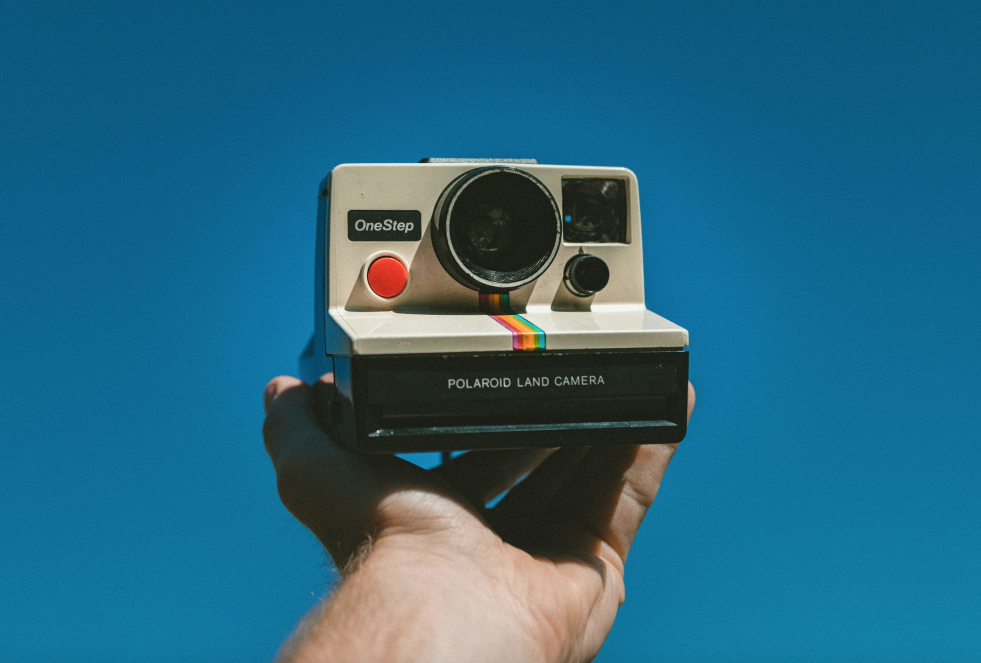
    Polaroid’s classic design and rainbow color scheme are many people’s first impression of instant camera products. Image from Unsplash

    In fact, these so-called “mystical” practices largely reflect a lack of photographic fundamentals among instant camera users, as well as a limited understanding of how instant imaging actually works. As the saying goes, it’s not enough to know that something works—you should also know why it works. To truly master an instant camera and escape the curse of wasted shots, it’s worth starting from the beginning, lifting the veil on its mysteries, and exploring the technological evolution and historical story behind this small device.

    The Birth of Instant Imaging: Breaking the “Delayed Gratification” of Film

    Instant cameras did not appear out of thin air; they are essentially an important branch of film photography. The core motivation behind their invention was to break the “delayed gratification” inherent in traditional film photography.

    Looking back to the early 20th century, film photography was still in its infancy, and cameras at the time were effectively “disposable.” After finishing a roll of film, users couldn’t remove it themselves—they had to mail the entire camera, along with the film, back to Kodak. Skilled technicians at the factory would process the film in darkrooms, develop and print the photos, and then send both the pictures and the camera back to the user. This process could take anywhere from a few days to several weeks.

    Early cameras were essentially simple boxes that reproduced the pinhole imaging principle. Image from the internet

    Later, the invention of the film cartridge changed this situation. By sealing the light-sensitive film inside a cartridge, it allowed individual users to set up simple darkrooms at home and handle development themselves. But no matter how the technology evolved, the core workflow of traditional film photography remained unchanged: exposure, development, fixing, and washing—each step indispensable. The wait for images to appear still demanded considerable patience.

    The birth of Leica cameras greatly simplified the process of taking photos. Image from the internet

    For those who valued efficiency, this long wait was undoubtedly frustrating. So was it possible to package developer and fixer—essential darkroom chemicals—directly into the film itself, allowing shooting and imaging to happen simultaneously? This seemingly bold idea was eventually brought to life by the American company Polaroid.

    In 1948, Polaroid introduced the Model 95 camera, paired with TYPE 40 peel-apart film, officially ushering in the era of instant imaging. Though simple in structure, this camera leveraged the core advantage of instant photography to completely transform the industry—people no longer had to wait for darkroom processing. After pressing the shutter, they could manually peel apart the film and see the image appear within seconds. Photography thus moved beyond “delayed gratification” and entered a brand-new era of instant results.

    Early Polaroid instant cameras. Image from the internet

    Giants in Rivalry: Kodak’s Defeat and Fujifilm’s “Overtaking on the Curve”

    The enormous potential of instant imaging quickly caught the attention of film industry giants, setting the stage for a battle over patents and market dominance.

    As the undisputed leader of the film industry at the time, Kodak was naturally unwilling to miss out on this opportunity. In 1976, Kodak launched its own instant imaging products, attempting to enter Polaroid’s core market directly. However, from core technologies to product design, these offerings overlapped heavily with Polaroid’s patents, and Polaroid soon filed a lawsuit for patent infringement.

    Kodak EK4 instant camera. Image from the internet
    Kodak film pack. Image from the internet

    This legal battle dragged on for a full decade, with both sides locked in relentless disputes in court. In 1986, a final ruling was delivered: Kodak lost the case. Not only was it required to pay massive damages, but it was also ordered to immediately cease all production and sales of its instant imaging products. After this defeat, Kodak completely withdrew from the instant imaging field and never returned.

    At the same time, Fujifilm was still a minor player in the film industry, largely following Kodak’s lead. Half a century ago, Fujifilm had relied on Kodak’s technical licensing to release its first instant imaging product, the Fotorama. Interestingly, while Polaroid was fully engaged in its lawsuit with Kodak, it took a relatively hands-off approach toward Fujifilm in the Asia-Pacific market, giving Fujifilm valuable breathing room to grow.

    Fotorama camera. Image from the internet

    When news of Kodak’s defeat broke, Fujifilm quickly demonstrated keen strategic awareness. It decisively distanced itself from Kodak and instead extended an olive branch to Polaroid. The two eventually reached a crucial cross-licensing agreement: Fujifilm traded its advanced magnetic recording media manufacturing technology in exchange for Polaroid’s core instant imaging development technology.

    In the following decade, Fujifilm became Polaroid’s “partner” in the Asia-Pacific region, producing and selling instant imaging products under license and enjoying steady growth. It wasn’t until 1998, when Polaroid’s core patents expired, that Fujifilm’s true comeback began. That same year, Fujifilm went independent and launched the brand-new instax series of instant cameras. With designs better suited to Asian markets and more accessible pricing, it officially entered direct competition with Polaroid.

    The instax series has become the dominant force in today’s instant camera market. Image from the internet

    Meanwhile, Polaroid’s fortunes took a sharp downturn. In 2001, due to the rise of digital photography and poor business performance, the once-dominant instant imaging giant filed for bankruptcy protection. After seven years of struggle, Polaroid ceased its core operations entirely in 2008. Although the brand was later revived through fan-backed investment, today’s Polaroid is legally distinct from the original company that once held its core technologies—only the name remains as a vessel for retro nostalgia.

    Holding Polaroid’s licensed technology while completing its own R&D, Fujifilm naturally became the sole inheritor of instant imaging technology, taking up the mantle of instant photography as its most legitimate successor.

    instax promotional posters on e-commerce platforms. Image from the internet

    From Luxury Toy to Mass Trend: The Democratization of Instant Cameras

    Having explored the competition over film and technology, let’s now turn to the cameras themselves. Before the digital era, photography was always an “expensive hobby,” and instant imaging was even more so.

    In its early days, Polaroid’s customer base consisted almost entirely of affluent elites. On one hand, the cost of instant film was extremely high, making it unaffordable for ordinary households; on the other, Polaroid positioned its cameras as “high-end luxury products,” with meticulous attention to design and performance. The Polaroid SX-70 featured in Jay Chou’s Greatest Works of Art music video is a perfect example of that era’s pinnacle.

    MV screenshot

    Released in 1972, the SX-70 is often regarded as a miracle of industrial design. It featured a folding SLR structure, measuring only a few centimeters thick when closed and easily fitting into a pocket; when opened, its four-element glass lens delivered sharp, clear images. Later versions even introduced sonar autofocus technology—considered “black magic” in the 1970s—capable of completing distance measurement and focusing in just 0.07 seconds, achieving precise focus even in low-light conditions. Combining aesthetics, performance, and portability, the SX-70 earned its status as a legendary camera.

    Fujifilm’s early Fotorama series, developed under competitive pressure from Polaroid, was equally refined. Folding SLR structures, glass lenses, and autofocus features were all standard. The 500AF model released in 1999 was widely regarded as a “flagship king,” matching Polaroid’s top models in performance. At the time, many believed instant cameras would continue evolving toward greater professionalism and higher performance.

    Early instant cameras were closer in form to traditional cameras. Image from the internet

    However, Polaroid’s dramatic collapse served as a stark warning to Fujifilm. After 2000, digital photography rapidly took over the market with its advantages of “zero shooting cost” and “instant preview,” while traditional film photography became increasingly marginalized due to its high cost and steep learning curve. Fujifilm understood that continuing down a high-end path might lead to the same fate as Polaroid.

    As a result, Fujifilm decisively adjusted its strategy, ushering in the “democratization” of instant cameras. It introduced smaller, more affordable mini film formats, along with a series of simple point-and-shoot automatic cameras. These models eliminated complex manual controls, adopted fully automatic exposure, and featured compact, colorful, and approachable designs—all at prices accessible to ordinary consumers.

    This transformation allowed instant cameras to shed their label as “luxury toys” and become widely embraced cultural products. From students on campus, to street fashion enthusiasts, to newlyweds at weddings, instant cameras—with their portability and ritualistic charm—found their way into everyday life. Over the past two decades, they have carved out a unique path of survival within the overwhelming tide of digital photography.

    Compared to the 500AF, Fujifilm’s newer WIDE400 may seem extremely “stripped-down,” but it likely better meets the needs of the mass market. Image from the internet

    “Only the young fail to appreciate film, mistaking digital for treasure.” Fifteen years ago, when I first encountered instant cameras, I was full of disdain. At the time, my Nikon digital camera could shoot endlessly and display images instantly, while each sheet of instant film cost several dollars, and a failed shot meant irreversible loss. For a young man in his early twenties, full of energy and ambition, the so-called “ritual” of instant photography seemed utterly worthless.

    Today, times have changed. With the widespread adoption of smartphones, “everyone is a photographer,” and photography has shifted from a simple tool for documentation to a medium for personal expression and emotion. But along with this shift comes the overabundance of automation and AI: one-click AI retouching smooths skin and enhances beauty, algorithms optimize composition automatically, and an overwhelming flood of digital images fills our lives, blurring the line between real and artificial.

    In this context, people have begun to long for the “warmth” of film photography—the irreplicable grain, the anticipation during development, and the tangible weight of a physical photograph. Instant cameras, once forgotten in the corner, have thus returned to the public eye, even sparking a new wave of popularity.

    The Pain Points of Instant Cameras: The Origin of the Modding Craze

    For a long time, instant imaging had a more professional product line known as peel-apart film, with both cameras and image quality far surpassing today’s instant cameras. Because of the existence of peel-apart film, modifying instax cameras was once seen as a thankless effort, and thus remained a niche practice. It wasn’t until 2016, when Fujifilm announced the discontinuation of FP-100C peel-apart film, that the market was left with only instax and a barely surviving Polaroid.

    At the time, digital cameras were at their peak, while smartphone photography was rapidly advancing. Even instax itself began embracing digital technology, launching instant photo printers. The discontinuation of peel-apart film alone did not cause much of a stir in the industry.

    Discontinued FP-100C peel-apart film. Image from the internet

    Users may start as beginners, but they don’t remain beginners forever. As users’ photography skills improved, the shortcomings of Fujifilm’s stock instant cameras gradually became apparent—the “democratized” design was a double-edged sword. On one hand, it lowered the barrier to entry; on the other, it severely limited the ceiling of what these cameras could achieve.

    For advanced users, three major pain points of stock cameras had long become the “ceiling” of image quality. First is the limitation of focusing. Almost all stock instant cameras use a fixed hyperfocal design, lacking true focusing capabilities. They can only adjust depth of field through lens extension, with a minimum focusing distance of no less than 0.6 meters, making macro photography nearly impossible. In contrast, Polaroid and Fotorama models from half a century ago were often equipped with manual or autofocus systems—by modifying the film pack mechanism to adapt modern film, precise focusing can be restored.

    Many instant cameras in history were equipped with focusing systems. Image from Unsplash

    Second is rigid exposure control. Current stock instant cameras use fixed apertures, relying solely on built-in metering components to adjust shutter speed. Once the metering system ages or fails, or when facing complex lighting conditions, overexposure or underexposure becomes common, with no way to manually correct it. The so-called “mystical tutorials” online are essentially users’ desperate attempts to compensate for unreliable metering.

    Later instant camera products often rely on fixed focus and simplified exposure systems—when aperture falls short, flash steps in. Image from Unsplash

    Finally, there is framing inaccuracy. Most stock instant cameras use a rangefinder-style structure, which introduces noticeable parallax errors in close-range shooting, making true “what you see is what you get” impossible. SLR structures solve this perfectly—medium format SLRs like Bronica, Mamiya, and Hasselblad can achieve seamless adaptation simply by attaching an instant film back. However, such equipment is bulky and heavy, significantly reducing portability.

    It is precisely these insurmountable limitations that gave rise to the “modding craze” within the instant camera community. For advanced users, modification is not only the only way to overcome hardware limitations, but also a statement of individuality and technical mastery.

    Modding an instant camera is far from simple tinkering—it is a precise craft that integrates mechanical engineering, optics, and electronics. Today, the modding community can generally be divided into three major approaches, each with its own philosophy and use cases.

    The first is the revival of vintage models. The core idea is to modify classic cameras like Polaroid and Fotorama, whose original film has been discontinued, by redesigning film compartments and replacing mechanisms to adapt them to modern Fujifilm instax film. These classic models already feature professional capabilities such as manual focusing and adjustable exposure, but were abandoned due to film discontinuation. After modification, they not only bring “obsolete plastic” back to life, but also allow users to experience the professional feel of instant imaging from half a century ago. Modified Fujifilm SLIMACE models are representative of this approach.

    The second is hybridization with film cameras. This is a more “hardcore” method, where users completely disassemble the internals of stock instant cameras and integrate them with traditional film cameras through cutting, welding, and bonding, enabling film cameras to shoot instant photos. However, this process permanently alters the original structure, making it irreversible. As a result, users typically experiment with affordable domestic film cameras like the Seagull 4B or Seagull 203, while modifications involving high-end models like Mamiya or Rolleiflex are extremely rare.

    A Seagull camera modified into an instant camera—this approach significantly alters the original structure

    The third is modular upgrades. This is the most flexible and favored approach among professional users, centered on leveraging modular camera systems to create interchangeable instant film backs. Medium format SLRs like the Mamiya RB/RZ67, which already support interchangeable backs, can easily switch between film and instant photography by using a custom instant back. Some users take the opposite approach, mounting medium format lenses from Mamiya or Schneider directly onto stock instant camera bodies. Popular setups like pairing a WIDE400 with a Mamiya lens preserve portability while significantly enhancing image quality.

    Medium format interchangeable backs can greatly improve instant imaging performance

    Regardless of the method, instant camera modding demands high technical skill and a steep learning curve, far beyond the reach of casual users. In an era dominated by “one-click shooting” and AI-generated images, many find it hard to understand why anyone would invest time, money, and effort into building a camera that runs counter to mainstream trends. The true appeal of instant camera modding has never been about recreating nostalgic aesthetics—it lies in using precise, rational engineering to break free from the “mysticism” of stock cameras.

    Repeatedly calibrated focus parameters, meticulously tuned aperture and shutter combinations, and manually calculated exposure values—all represent a deliberate battle against unpredictable lighting and the randomness of failed shots. Modding enthusiasts are not chasing luck or surprise; what they seek is complete control over the final image with every press of the shutter—to transform “possibly good” into “consistently excellent,” turning uncertainty into clarity.

    This persistence is not about romantic nostalgia, but about the triumph of technology. It frees instant photography from the label of “luck-based shooting” and, in the age of digital precision, continues to sustain the vitality of instant imaging in a more professional and hardcore way.
  • vivo X300 Ultra Camera Preview: Pushing the Boundaries of Smartphone Photography

    vivo X300 Ultra Camera Preview: Pushing the Boundaries of Smartphone Photography

    One year after its release, the vivo X200 Ultra delivered an impressive answer to the industry with its creative and forward-looking imaging design. In terms of market performance, it not only doubled the first-day pre-order sales compared with its predecessor, but also went on to break vivo’s historical sales record for high-end models, helping the brand achieve remarkable growth in the ultra-premium Android flagship segment.

    Notably, although the X200 Ultra was launched exclusively in China, it still made its way into global markets through various channels and received widespread acclaim. Leading imaging outlet DPReview praised it as “committed to becoming a camera more professional than a phone,” highly recognizing its bold strategy of establishing golden focal lengths; the authoritative British photography magazine Digital Camera World did not hesitate to call it “possibly the most powerful camera phone ever”; meanwhile, the well-known photography blog Phillipreeve described it as “the end of portable cameras.”

    As a highly distinctive imaging flagship with a far-reaching vision, the X200 Ultra took a different path at a time when the industry was still obsessing over the traditional “standard main camera” while neglecting other lenses. With its evenly balanced 14mm, 35mm, and 85mm golden focal length system, it demonstrated that a true “imaging flagship” is not merely about stacking specifications, but about aligning with the compositional instincts of real photographers. This has also become its unique significance in the history of mobile imaging development.

    Now, the vivo X300 Ultra is already on the horizon. Based on a wave of recent official teasers and disclosures, we have written this article to offer an early look at the optical breakthroughs and ecosystem changes that the next generation “V-series imaging flagship” is set to bring.

    Building a Better “Video Camera”

    If the design principle of the vivo X200 Ultra was to “think from the perspective of professional photographers,” then based on the information currently available, the X300 Ultra feels more like “the best camera recommended to you by a professional photographer.” Hardware iterations and specification upgrades are merely the easily quantifiable surface. The deeper progress lies in its overall performance. For video creators in particular, it offers entirely new possibilities for using a smartphone as a serious filming device.

    Fifth-Generation ‘Thanos Telephoto’: Reviving the Glory of the Micro Gimbal

    In fact, after experiencing the X300 Pro, I already felt that this so-called “Thanos telephoto” had reached a point where it could hardly improve further—of course, that’s because it is already excellent. Photography is ultimately a physical game, and the optical limitations imposed by the compact size of smartphones make it difficult to keep improving endlessly the way traditional cameras can. Yet the X300 Ultra still presents a new solution.

    Image source: Weibo @vivo韩伯啸

    The X300 Ultra will adopt the brand-new, deeply customized Samsung HP0 sensor developed under the BluePrint imaging system. Its biggest hardware advancement is the debut of an ultra-wide 3° optical stabilization angle, pushing stabilization standards to the professional-level CIPA 7.0 rating, and pairing it with a 60 fps high-refresh tracking autofocus engine. Since traditional flagship telephoto lenses usually offer stabilization angles of only around 1°, this two-to-three-times leap delivers visibly gimbal-level stabilization, making high-magnification shooting remarkably easy. Combined with a doubled capture frame rate, smartphone telephoto lenses will no longer be limited to photographing static subjects—they will also become powerful tools for tracking wildlife and capturing extreme sports.

    At the same time, with further optimizations in color science, autofocus, HDR, and power consumption, the telephoto video capabilities build upon the already widely praised “concert-shooting powerhouse” of the previous generation, making telephoto video one of the strongest real-world advantages of the X300 Ultra compared with competing devices.

    35mm New 200MP: The Humanistic Golden Eye of Mobile Photography

    The 35mm main camera on the X300 Ultra is set to upgrade to the same 200-megapixel specification as the telephoto lens, and will debut the brand-new LYTIA-901 sensor jointly customized by BluePrint and Sony. It features a massive 1/1.12-inch sensor, while the lens structure has been upgraded from the previous generation’s luxurious 7P design to 1G+6P (1G ALD PRO + ultra-low reflection coating, paired with 6P ALE and ALM coatings). While the single-pixel light-gathering area sees a significant leap forward, ghosting control has also improved, and optical stabilization has been further enhanced to the industry-leading CIPA 6.5 standard.

    Image source: Weibo @vivo韩伯啸

    Compared with other flagship phones on the market that still commonly rely on a roughly 23mm wide-angle main camera, the vivo X300 Ultra stands alone globally with the extreme combination of “35mm + 200MP + 1/1.12-inch.” It not only leads the pack in light-gathering capability, but also offers creators unparalleled clarity and immense cropping flexibility for scenarios such as street photography and portrait close-ups.

    If the telephoto camera gives video creators a major boost of confidence, then this lens is what will truly delight photographers—especially street photography enthusiasts. If you are skilled in post-processing and color grading, it may well rival today’s most sought-after compact cameras, or even replace them altogether in a single device.

    14mm Ultra-Wide: The End of ‘Secondary Camera’ Compromise

    The X200 Ultra has been treasured by many landscape photographers because it gave the often-neglected wide-angle lens on smartphones image quality comparable to the main camera. On the X300 Ultra, the ultra-wide camera will feature Sony’s LYTIA-818 sensor—one that has previously been widely used as the main camera in other high-end flagships, and is now boldly “downshifted” into this position for the first time. It features a large 1/1.28-inch sensor and raises ultra-wide video stabilization to CIPA 6.0.

    Image source: Weibo @vivo韩伯啸

    At present, most flagship ultra-wide cameras still remain stuck in the small-sensor era of 1/2-inch or smaller. With a main-camera-level sensor, the X300 Ultra completely fills the final gap in the multi-camera system. It eliminates the noticeable drop in image quality when switching focal lengths, while the dramatic increase in light intake and powerful HDR capabilities make it the ideal choice for capturing grand landscapes. At the same time, this is also a lens specifically designed for high-spec video. The combination of powerful stabilization and a large sensor brings a qualitative leap in low-light ultra-wide video performance.

    Toward a Professional “V-Mirrorless”: Breaking the Boundaries of Focal Length

    The three extremely high-spec built-in lenses lay the foundation for this phone’s professional “V-mirrorless” concept, and the accompanying accessory ecosystem further reveals its ambitions.

    After first introducing the 200mm teleconverter, the vivo X200 Ultra and X300 series captured more than 50% of the rental market share throughout 2025, firmly securing the top position. Perhaps in order to fulfill the promise that “even the mountaintop is VIP,” the vivo X300 Ultra further upgrades the external teleconverter lenses and supporting components.

    On the X300 Ultra, the 200mm teleconverter receives its first upgrade. Its overall weight has been reduced by 27% to just 153g, and its size has been significantly reduced, earning it the nickname “Lipstick 200.” Yet despite the reduced weight and size, the number of lens elements has increased from 13 to 15, resulting in stronger image quality while achieving an impressive CIPA 6.5 stabilization rating—continuing to defend its dominance as the ultimate “concert-shooting tool.”

    In addition, the company has introduced a new 400mm teleconverter, called the “Cannon 400.” The equivalent 400mm focal length delivers the highest magnification in the industry, supporting direct optical output of 200MP images and achieving a remarkable 17.4× pure optical zoom (based on a 23mm reference). Combined with the Thanos telephoto’s new 3° optical stabilization and 60fps high-refresh tracking autofocus, even with the teleconverter attached it still maintains CIPA 4.5 stabilization. Even at an extreme focal length of 1600mm, it remains highly usable, fully unlocking capabilities for wildlife photography and extreme long-range shooting within the ecosystem.

    At the same time, compared with the previous generation where shooting modes were limited when using external teleconverters, the X300 Ultra now fully supports 14 shooting modes while using the teleconverter. In addition to portrait, stage, and slow-motion modes, it newly supports features such as Live Photo, dual-view recording, and beauty capture during recording.

    Image source: Weibo @vivo韩伯啸

    Starting with the X300 Ultra, vivo has officially built a “ZEISS Master Lens Group” spanning from 14mm, 35mm, and 85mm to 200mm and 400mm. These five lenses—three built-in and two external—follow an extremely strict shared standard: large sensors across the board, ZEISS optics throughout, high image quality, golden focal lengths, and stabilization across the entire focal range.

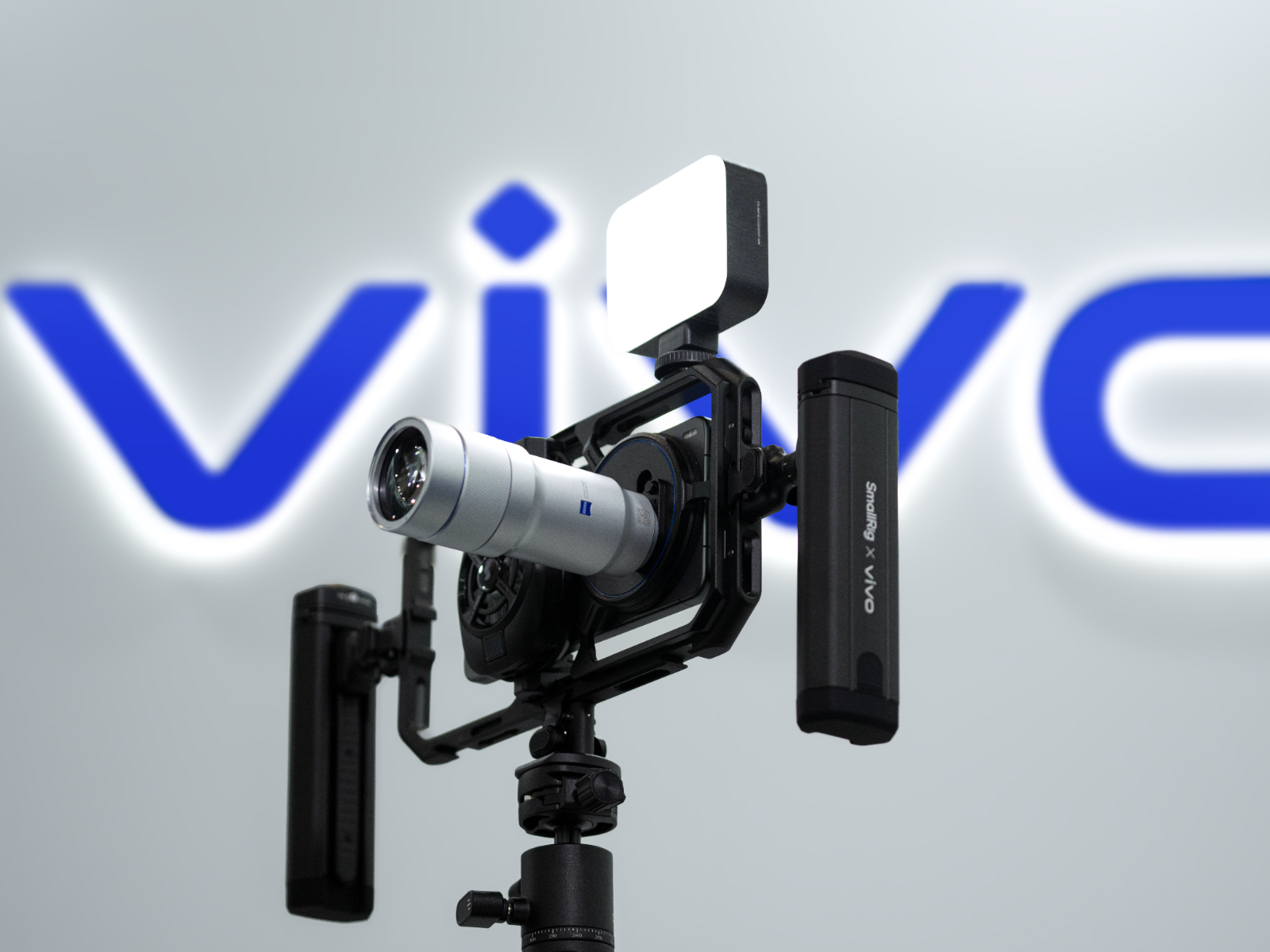
    Paired with a dedicated photography grip and an official camera cage unveiled simultaneously at exhibitions, vivo’s vision is clear: it is no longer satisfied with creating a smartphone that rivals a camera, but is instead attempting to become a pocket-sized imaging system capable of partially replacing mirrorless ecosystems in fields such as wildlife photography, high-spec concert recording, and professional video production.

    Finally: The Last Piece of the Puzzle

    As of the publication of this article, official teasers have also revealed that the vivo X300 Ultra will feature a brand-new multispectral camera. From the perspective of professional imaging—especially video production—it aims to completely solve one of the most critical pain points when multi-camera systems move toward professional use: color consistency and white balance accuracy under extreme conditions.

    In the past, mobile imaging often relied on AI algorithms to “guess” colors, which has been one of the main reasons behind the “smudged” look and the so-called “plastic” feel in images. The addition of a spectral camera not only enables a visibly more natural “what you see is what you get” rendering, but also greatly expands the color grading flexibility for professional creators in post-production workflows. More importantly, it represents a key step for mobile devices toward the color science standards of professional cinema cameras.

    From initially experimenting with three fixed focal lengths to now fully embracing hardware-driven advancements and an external accessory ecosystem, vivo can hardly be called anything less than a relentless “disruptor” in the industry’s exploration of imaging. At a time when algorithm-driven imaging is gradually leading to aesthetic fatigue among the public, a “V-mirrorless” approach—grounded in optical hardware and expanding boundaries through a professional photography perspective—may well be the new solution many of us have been waiting for.

  • SSPAI Morning Brief: Mistral Unveils Voxtral Transcribe 2, a New Speech-to-Text AI Model

    SSPAI Morning Brief: Mistral Unveils Voxtral Transcribe 2, a New Speech-to-Text AI Model

    Morning Brief

    1. Mistral releases the Voxtral Transcribe 2 series of speech-to-text models
    2. Canon launches a limited edition PowerShot G7 X Mark III camera
    3. The maintainer of the sudo project publicly seeks sponsorship
    4. Microsoft deprecates the “3D Viewer” app
    5. Rumors You Can Just Glance At

    Mistral releases the Voxtral Transcribe 2 series of speech-to-text models

    Mistral AI announced on February 4 the release of two models in the Voxtral Transcribe 2 series: Voxtral Mini Transcribe V2, designed for batch processing, and Voxtral Realtime, built for real-time transcription. Among them, Voxtral Realtime has been open-sourced under the Apache 2.0 license.

    Voxtral Realtime features a 4B parameter scale and is designed for low-latency use cases. It adopts a new streaming architecture that enables live transcription while reducing end-to-end latency to under 200 ms. Voxtral Mini Transcribe V2 focuses on delivering a high cost-performance transcription API, with accuracy outperforming GPT-4o mini Transcribe and Gemini 2.5 Flash, and supports processing up to three hours of audio per request.

    Both models support 13 languages, including Chinese. In terms of pricing, the Voxtral Mini Transcribe V2 API is priced at USD 0.003 per minute, while Voxtral Realtime costs USD 0.006 per minute. Source


    Canon launches a limited edition PowerShot G7 X Mark III camera

    Canon announced on February 5 a limited edition PowerShot G7 X Mark III camera to commemorate the 30th anniversary of the PowerShot series. Priced at USD 1,299, the bundle includes a limited-edition Peak Design wrist strap and a 32GB SD card, with shipments scheduled to begin in April 2026.

    This limited edition retains the same core specifications as the PowerShot G7 X Mark III originally released nearly seven years ago, with the primary differences focusing on appearance and design details. The camera comes in a graphite gray finish, adds a knurled control ring on the front, and features a 30th-anniversary emblem. In terms of hardware, it is equipped with a 20.1-megapixel sensor, a 3-inch flip-up touchscreen, and a 24–100mm equivalent ƒ/1.8–2.8 lens, along with a dedicated microphone input. For video, it supports uncropped 4K at 30fps and 1080p slow motion at 120fps, and also allows direct live streaming to YouTube via Wi-Fi. Source


    The maintainer of the sudo project publicly seeks sponsorship

    On February 4, Todd C. Miller, the maintainer of the sudo project, announced that he is publicly seeking sponsorship for sudo. Miller has been solely responsible for maintaining the project since 1993. Previously, Quest Software had sponsored sudo starting in 2010, but that partnership ended in February 2024, roughly coinciding with Miller’s departure from its subsidiary One Identity.

    After losing corporate sponsorship, sudo has continued to receive updates and has patched several high-severity vulnerabilities, including issues that allowed local users to bypass privilege controls and directly obtain root access. Miller stated that he currently has no plans to hand the project over to others, but warned that a prolonged lack of stable funding would inevitably affect development progress. He also noted that much of the critical open-source infrastructure relies too heavily on a small number of maintainers—a structural problem that is increasingly threatening the broader computing ecosystem, and one that has been widely discussed in recent years across communities and public forums such as GitHub. Source


    Microsoft deprecates the “3D Viewer” app

    Microsoft announced on February 5 that the “3D Viewer” app has been added to its deprecation list. The app was previously preinstalled with Windows 10 and was designed for lightweight viewing and rendering of 3D models. It was originally positioned to support mixed reality scenarios and underwent several name changes over the years. Microsoft has confirmed that the app will be removed from the Microsoft Store starting July 1, 2026. Existing users will still be able to run it, but it will no longer receive feature updates or security maintenance.

    Microsoft recommends alternatives such as Babylon.js Sandbox, while the open-source community tends to favor local applications like F3D and MeshLab. Source


    Rumors You Can Just Glance At

    • Reports indicate that macOS 26.3 RC has added two new SoC identifiers, T6051 and T6052, associated with platform codes H17C and H17D, respectively. Based on Apple’s historical numbering conventions for its M-series chips, these identifiers are widely speculated to correspond to the upcoming M5 Max and M5 Ultra. Notably, however, no identifiers believed to belong to the M5 Pro have appeared so far. Source
    • Google officially announced the Pixel 10a smartphone on February 5. Positioned for budget-conscious users, the device is scheduled to launch on February 18. Google has not yet disclosed detailed hardware specifications. In terms of design, the Pixel 10a closely resembles the Pixel 9a, with the most notable change being a rear camera module that sits flush with the back panel rather than protruding. According to previously leaked information, the phone may feature a 6.3-inch 120Hz display, a dual rear camera setup consisting of a 48MP main camera and a 13MP ultra-wide lens, and an “enhanced” Tensor G4 chip paired with 8GB of RAM. Storage options are expected to include 128GB and 256GB variants. The battery capacity is rumored to be around 5,100mAh, with support for 23W wired charging. Source
    • According to The Information, rising memory prices across the industry have led to tighter supply, while NVIDIA has been prioritizing manufacturing capacity for AI chips. As a result, the launch of the RTX 50 series SUPER graphics cards is expected to be delayed. Under these circumstances, the next-generation RTX 60 series aimed at gamers is also likely to see its mass production timeline pushed back, with large-scale manufacturing now projected to begin toward the end of 2027. This suggests that the RTX 60 series may not reach the market until 2028 or even later. Source
  • Best New Apps to Try: PReview’s Latest Recommendations

    Best New Apps to Try: PReview’s Latest Recommendations

    OpenClaw: A Personal Digital Assistant AI Tool

    • Platform: macOS / Windows / Linux
    • Keywords: AI, Personal Assistant

    @Vanilla: Over the past week, the locally self-deployed AI tool OpenClaw (originally named Clawdbot, later renamed Moltbot) has truly taken over timelines, even sparking a small wave of Mac mini purchases. Unlike traditional chatbots, OpenClaw’s biggest strengths lie in three areas: controllable privacy, freedom of model choice, and convenient invocation.

    In this installment of PReview, I don’t want to dwell on dry parameters or technical principles. Instead, I’d rather talk about what OpenClaw actually is—and what it can do for your digital life.

    OpenClaw is neither a simple large language model nor a plain coding CLI. It is, in essence, a local “digital life hub.” It integrates a modular architecture including Model, Agent, Skill, and MCP, and achieves cross-platform access and asynchronous scheduling through a Gateway that resides on a Mac mini or a server. No matter where you are, you can interact with it in real time through various instant messaging tools.

    At the same time, all memories, file indexes, and personal habits generated within OpenClaw are stored in your own local workspace (such as Memory.md, index databases, and Skills scripts). According to the official claims, you retain full control over your data sovereignty, with no need to worry about privacy leaks.

    If you happen to own a Mac mini, that’s naturally the best option—it effectively gives you a low-power personal server running 24/7, with seamless access to Apple-ecosystem-related Skills. If you don’t have a Mac mini, there’s no need to buy one specifically: cloud providers like Tencent Cloud, Alibaba Cloud, Cloudflare, and DigitalOcean all offer OpenClaw-specific server images, making one-click deployment extremely convenient.

    Next, I’d like to share two real-world use cases from my recent experience with OpenClaw.

    In the past, doing Vibe Coding usually meant sitting in front of desktop clients like Claude Code, Codex, Gemini CLI, or Antigravity. Now, I simply send instructions to a bot via a chat app on my phone, and OpenClaw automatically handles all the logic writing and debugging on the server side, returning the results in real time.

    For example, I recently switched my primary iPhone input method to “Cang Input,” but wasn’t satisfied with its default skin. I took an existing hskin theme file and dropped it directly to the bot, asking it to precisely tweak the skin code based on my aesthetic preferences and typing habits. Once the adjustments were done, I imported the generated skin file directly on my phone—the entire process without touching a computer keyboard.

    I’ve also created a personal knowledge base locally on my computer, complete with source files, indexes, and management scripts. Through OpenClaw, I can issue commands to this knowledge base remotely—whether it’s syncing newly added file indexes or invoking Python for deep full-text search, analysis, or even assisted writing, all of it can be done instantly from a mobile device. This way, I get the comprehension power of large models without uploading my private database to cloud services, truly achieving “data stays local, compute goes with you.”

    For now, I’ll stop here with the introduction to OpenClaw. I plan to write a more in-depth article later to explore it in greater detail. In my view, OpenClaw’s greatest success isn’t some revolutionary technological breakthrough, but rather how precisely it captures real user needs—vastly expanding the boundaries of AI usage through its Gateway and Channels.

    While there is still ongoing discussion around its local control permissions and privacy boundaries, it’s hard to deny that the world depicted in the film Her feels closer than ever. And OpenClaw might just be the first truly handy tool to help you build your own version of “Samantha.”


    Celestia: A Universe Database You Can Freely Roam

    • Platform: iOS / iPadOS / macOS / Android / Windows
    • Keywords: Universe, Science Education

    @大大大K: When it comes to “star map” tools, most of us probably think of apps like Stellarium. That said, Stellarium focuses more on observing the night sky from Earth’s perspective, and the sense of scale at a truly cosmic level can feel a bit limited. If what you want instead is the experience of freely roaming through space and landing on planets, then Celestia is well worth a try.

    In fact, Celestia is far from a newcomer—its initial release even predates Stellarium, with mobile apps arriving around 2020. As an open-source project, it never achieved the same level of mainstream recognition as Stellarium. I only discovered Celestia recently, after being inundated with space-related short videos and wanting a more “immersive” experience.

    What sets Celestia apart is that it doesn’t just let you observe the universe—it lets you move through it freely. By default, Celestia locks the view onto a celestial body itself, and swiping the screen allows you to view it from different angles. Switch from the “Object” perspective to “Camera” mode in the toolbar, and you can observe the universe in a full 360 degrees centered on your current position (though most of the time, all you’ll see is darkness). If you spot a celestial object that catches your interest, simply long-press on it to bring up a menu and select “Go To,” and Celestia will whisk you at light speed to hover above it.

    Even better, Celestia offers a wealth of deeply immersive features. Take the time control function in the menu, for example: it allows you to observe changes in celestial bodies across different time scales at any speed you choose. Using the “Lambda Aurigae binary system” that I stumbled upon by chance as an example—when I cranked up the time flow to extreme speeds, I could see the two bodies performing a kind of cosmic “waltz” in space. That, in turn, sparked my curiosity about this special type of system, leading me to learn that “Castor” and the famous “Sirius” are also similar binary systems.

    Beyond that, thanks to the power of the open-source community, Celestia supports a highly extensible plugin system. Whether it’s real-world spacecraft, higher-resolution nebulae and galaxy packs, or even fictional celestial bodies and spacecraft from works like 2001: A Space Odyssey and Star Trek, all of these can be loaded into Celestia. Hardcore sci-fi fans can even install script plugins and treat Celestia as a sandbox game set in space.

    Overall, while Celestia may not boast a flashy UI, it offers extremely robust functionality and impressive depth. Whether you use it as a pocket science education tool or as a way to spark children’s interest in space exploration, it’s an excellent choice.

    Celestia also supports a remarkably wide range of devices and platforms. On desktop, it runs on Windows, macOS, and Linux and can be downloaded from the official website, though the source code itself hasn’t seen updates for many years. On mobile, it supports Android, iOS, and even visionOS, and is still actively updated as of 2026. You can download it from the official website, Google Play, the App Store, and F-Droid.


    Halide Mark III: A New Approach to Photographic Style

    • Platform: iOS / iPadOS
    • Keywords: Camera, Style Photography

    @ElijahLee: The renowned mobile photography app Halide has released a public preview of Mark III, introducing a new image style system called Looks. Looks are not simple color filters; instead, they are stylistic processing methods embedded directly into the act of shooting. Unlike traditional preset filters, they capture and process the image algorithmically at the moment of exposure.

    After downloading the latest version of Halide from the App Store, open the app and tap the new “③” button on the screen to switch to Mark III. The app currently offers two Looks: Process Zero II and the black-and-white film style Chroma Noir.

    Process Zero II is an upgraded version of the original Process Zero. During capture, it disables all computational photography features, resulting in images with stronger contrast, finer detail, and a more natural overall look. The upgrade adds HDR support, improving performance in high-contrast scenes such as sunsets and vivid color environments, and it can also be used in conjunction with ProRAW. Of course, if you ultimately feel that HDR isn’t right for you, it can be turned off in Settings → Looks.

    Mark III can also apply Process Zero II to ProRAW files, preserving both the flexibility of Apple ProRAW and the natural rendering of Process Zero. If you don’t want to completely eliminate the influence of computational photography, Mark III includes a Tone Fusion slider for this exact need. It allows you to adjust highlights and shadows, restoring detail in bright and dark areas.

    Chroma Noir is a moderately high-contrast black-and-white film look designed to more faithfully simulate film characteristics. The team emphasizes that it’s not just about tonal adjustment—it also incorporates physical effects such as enhanced halation, using real-world light values to build its imaging engine.

    Finally, Halide is experimenting with bringing HDR support to film simulation. Traditional film, despite its centuries-long history, has been constrained by the low dynamic range of print media, making it incapable of truly representing high dynamic range imagery. If film aesthetics don’t appeal to you but you still enjoy black-and-white photography, you can disable film simulation in the app’s settings.

    Halide Mark III is expected to officially launch in the summer. What’s currently available is a public preview that can be accessed via an in-app toggle, with incomplete features and a limited selection of Looks. More carefully designed Looks will be added in the future. You can download Halide for free from the App Store, but experiencing Mark III requires a paid subscription: ¥68 per month, ¥148 per year, or ¥398 for a lifetime license.


    Escape Launcher: A Minimalist Home Screen to Help You Escape Your Phone

    • Platform: Android
    • Keywords: Home Screen, Launcher

    @Peggy_: Many years ago, the Android ecosystem was a vibrant landscape of diverse apps. Even within the niche of third-party launchers, there was no shortage of well-known options like Nova Launcher and Lawnchair. As Android has gradually matured and refined its own system features, however, many of these third-party launchers have faded away. In contrast, a new wave of minimalist third-party launchers—built around design philosophies entirely different from stock Android—has begun to flourish.

    Escape Launcher is one such app. Its developer has been quietly updating it for over a year now. Through a series of deliberate design choices, Escape Launcher maintains minimalism in both form and function. Visually, its main screen contains nothing but a text-based list of apps. Swiping right brings up phone-wide and per-app usage statistics, while swiping left reveals the full list of installed apps.

    The apps shown on Escape Launcher’s home screen are entirely user-defined. On first launch, you’re asked to select a set of essential apps to appear on the home screen, and you can add or remove apps later via settings. Other customizable options are limited to whether the time and date are displayed, and the size and style of the time. As for widgets, testing shows that Escape Launcher only supports displaying a single widget above the app list on the home screen—minimalism taken to an almost frugal extreme. Adding a widget also tends to hurt the visual balance, so it’s probably best to skip widgets altogether.

    On the usage statistics screen, Escape Launcher shows your total phone usage for the day, what percentage of the day that usage represents, and whether it exceeds the app’s recommended limit. The main panel then breaks things down by individual app, using red and green arrows to clearly indicate whether usage has increased or decreased compared to the previous day. To further reduce screen time, Escape Launcher also includes an app countdown feature: when enabled, a selected app will display a countdown every time you open it, and only launch once the timer finishes.

    In the app list view, while I understand the good intentions behind minimalist launchers avoiding icons altogether, searching for apps in a wall of text undeniably adds friction for users. Fortunately, Escape Launcher puts real thought into lowering that barrier. A prominent search bar makes manual searching easy, and if even tapping that feels like too much, you can enable “auto-start search” in settings. With this turned on, every swipe to the app list immediately brings up the keyboard, allowing you to type and launch apps almost instantly.

    Overall, Escape Launcher’s design is clean and restrained, with built-in color themes that are easy on the eyes. Customization options are limited, but the details are thoughtfully handled—for example, long-pressing anywhere opens settings, tapping the clock jumps straight to the system clock app, and tapping the date opens your default calendar. If you’re looking for both a third-party launcher and app usage tracking in one place, Escape Launcher is well worth considering.

    Escape Launcher is open source and completely free. You can download and try it via F-Droid.


    Posturr: A Posture-Reminder Utility for Mac

    • Platform: macOS
    • Keywords: Posture Reminder

    @化学心情下2: Perhaps because I’m fairly tall, I often find myself unconsciously hunching forward when using a computer. After years of this habit, it’s taken a toll on my neck. So the question becomes: is there a way to constantly nudge myself into maintaining proper posture while working at my desk?

    Posturr is a small utility I recently discovered on GitHub that does exactly that—reminding you to sit properly while using your computer. The idea behind it is fairly simple: using Apple’s Vision framework, Posturr accesses your device’s camera to detect your posture. When you start slouching or bending forward, it immediately blurs the screen so you can’t see anything clearly. Only when you straighten up and sit properly does the screen return to normal.

    On first launch, Posturr walks you through a visual calibration process for your posture. You just need to follow the on-screen instructions: when a focus point appears in one corner of the full-screen black calibration page, look at the screen and press the spacebar to complete the setup.

    After that, Posturr minimizes itself to the menu bar and begins monitoring via the camera. When your posture starts to slip or you hunch forward, not only does the screen content instantly blur, but the Posturr menu bar icon also changes—from a “standing figure” to a “slipping figure”—as a clear reminder that your posture is off. If you don’t sit up straight, you won’t be able to see the screen properly. In practice, this pushed me to sit more upright just so I could see what I was doing. While it’s admittedly less comfortable than slouching forward with my neck stretched out, it feels well worth it when I think about my long-term health.

    In the settings, you can also fine-tune a number of options. For the blur effect, in addition to the default Blur, you can choose Vignette (where the screen gradually darkens) or Border (where the screen edges change color). You can also enable options like automatically pausing the blur when you step away, or when your laptop display becomes the only active screen—adding a bit more flexibility and personalization.

    There’s also a statistics section that shows roughly what percentage of your total computer usage time was spent with incorrect posture while detection was enabled.

    Overall, Posturr has been extremely useful for someone like me who already struggles with poor posture. This kind of strong, enforced feedback helps me gradually break the habit of slouching and craning my neck while using a computer. If you’re like me and tend to sit poorly when working on a Mac, this is definitely a tool worth trying. You can download and install Posturr for free from its GitHub page.


    Sidebar Calendar: A Sidebar Calendar Widget

    • Platform: macOS
    • Keywords: Calendar, Widget

    @Snow: Sidebar Calendar is a desktop widget app that brings your schedule to the edge of the screen for constant visibility. Whether you’re overwhelmed by a packed workload or hopping from one online meeting to another, simply turning on your screen ensures you won’t miss important events.

    Unlike typical apps that live in the menu bar or appear as desktop widgets, Sidebar Calendar places your schedule along the left or right edge of the screen. No matter what’s currently on display, clicking the corresponding screen edge reveals a vertically arranged, hour-by-hour agenda for the day, sliding out from the sidebar. From here, you can view or edit events directly, or quickly create new ones by click-dragging to select a time range. To provide clearer reminders, the app also shows explicit text prompts in the menu bar while an event is in progress.

    Right-click within the agenda to open the settings panel, and enable “Settings – Display Reminders” to manage your to-dos for the day directly in the schedule view. The app automatically pulls relevant items from the system Reminders. Double-clicking an empty spot on the timeline lets you quickly add a to-do with the selected time set as its deadline.

    In the app’s settings, beyond toggling whether to display to-dos, you can customize theme colors, time formats, hide/show behavior, interface width, keyboard shortcuts, and more. For better schedule awareness, I recommend enabling “Settings – Collapsed Calendar” and “Time Indicator.” The former condenses your events into semi-transparent colored bars pinned to the screen edge, while the latter adds a red time line to clearly show the current moment. Used together, a quick glance at your screen is enough to understand your schedule’s progress and what’s already been completed—helping you avoid missing important tasks.

    Sidebar Calendar is currently priced at ¥38 and is available for download on the App Store.

    App News

    Google has recently and unexpectedly leaked a preview of the interface for Aluminium OS, a new desktop operating system based on Android and ChromeOS. The preview showcases a multi-window environment and a taskbar-style interface. The system is reportedly expected to see an official release in 2026. Source

  • New Stuff 234|Hands-On With Huawei Mate X7’s Professional Photography Kit

    New Stuff 234|Hands-On With Huawei Mate X7’s Professional Photography Kit

    @Lao Mai: Huawei Mate X7 Professional Photography Kit

    • Reference price: ¥1,699

    Pairing a foldable phone with a professional photography kit is definitely not something most people would do. But Huawei teamed up with Tietou to specifically develop this product, and as SSPAI, we had to try it for ourselves to see what it’s really about.

    First off, there’s no need to question the materials or build quality of Tietou’s products. Everything feels solid and well made, fully matching the premium feel of the Mate X7. The packaging even carries a “Designed by Huawei” label, so it’s likely that Huawei was deeply involved and set specific requirements for the final product.

    The overall design is well thought out and balances everyday practicality. When used just as a phone case, it comes with a built-in metal stand that works in both landscape and portrait orientations. The combination of matte metal and finely textured vegan leather, along with a grid-patterned suede lining inside, protects the phone body well and doesn’t feel inferior to other phone cases priced at three or four hundred yuan.

    The Bluetooth grip attaches at the stand position and feels very secure, with a dedicated anti-drop locking mechanism. You can basically hold it with one hand and shoot comfortably. The grip has separate buttons for photo and video, along with zoom and exposure controls, and even a front/rear camera toggle for quick selfies. It’s quite thoughtfully designed. It also supports a standard screw mount, so you can attach it to a tripod.

    As for the lens, there’s a central adapter that slides onto the camera ring of the case, and the lens is then mounted onto that adapter. The advantage is that you can remove the lens at any time and go back to the native camera. One thing to note is that the lens only mounts over the telephoto camera and covers the other lenses, so if you want to use the main camera, you’ll need to remove the external lens. This is probably part of the design logic. Still, it would be even better if there were a dedicated inner dust cover.

    Finally, let’s talk about image quality. This isn’t a teleconverter in the traditional sense, since Huawei’s built-in 10× telephoto is already very capable. The value of this lens lies in allowing you to capture up-close details and depth-of-field effects at around 13.5×, essentially a lossless extension rather than a pure “super-telephoto for birding.” At 27×, you can still get usable results to capture some unique scenes, whereas the native 27× zoom relies heavily on AI reconstruction. You can see more sample photos here.

    Overall, the kit leaves a pretty good impression. The Mate X7 itself leans toward being a true all-around flagship this time, with a complete camera setup, a stronger hinge, and improved water resistance. It works well for everyday business use, and if you actually want to head out, travel, or get a bit adventurous, there’s no need to switch phones. This photography kit complements that by meeting travel photography needs, delivering better image quality and detail at telephoto ranges beyond 10×. It’s slightly more expensive than similar products, but in my opinion, it’s worth it.

    Oh, and I also paired it with a magnetic wrist strap from Xiao Sun, along with a matching shoulder strap. It really makes the whole setup look the part.

    @Lotta:

    Shanghai Translation Publishing House Brass Clips

    • Reference prices: Cold Crow Café brass clip ¥39; “Sea Book Fair” painted brass clip ¥48

    I’d had the cultural merchandise from Qihai Manufacturing Bureau, an imprint under Shanghai Translation Publishing House, sitting in my favorites for ages. They fall squarely into that category of beautifully made, slightly pricey, and of somewhat questionable practicality. So it wasn’t until a recent sitewide discount that I finally made up my mind and bought two clips: the “Cold Crow Café” brass clip and the “Sea Book Fair” painted brass book clip.

    The design of “Cold Crow Café” is inspired by the writer Franz Kafka. In Czech, the word for “crow” shares the same pronunciation as Kafka’s surname, which is where the name comes from. The front resembles a café sign, engraved with words like “DRINKS, SNACKS, SALAD,” while the back features quotes from Kafka’s letters: “A book must be the axe for the frozen sea within us” and “AUTHOR OF THE NIGHT,” suggesting that the café hosts a reading night once a month. The vintage aesthetic, the tactile depth of the engraving, and the strong literary backstory make it genuinely hard not to fall in love with.

    Compared with the brass clip itself, which gleams with a metallic sheen under the light, the packaging feels rather plain. It’s just a thin paper box printed with related graphics, and the clip isn’t very well secured inside. When it arrived, it was already rattling around in the box, though fortunately there were no obvious signs of damage from shipping.

    The “Sea Book Fair” isn’t a real event either, but another fictional setting created by Qihai Manufacturing Bureau. The front shows a sailing ship, while the back depicts a palace known as the “Crystal Pavilion,” the venue where the book fair is supposedly held. There’s a hole on the back of the clip so it can be hung up to hold manuscripts, tickets, postcards, and the like. The blue painted finish is very beautiful, though quite a bit of color rubbed off onto the inside of the box during shipping. In actual use, you might occasionally rub off a tiny bit of blue paint as well, but it’s almost negligible.

    If you’re just clipping loose papers or notebooks, I’ve bought acrylic clips for a few yuan that do the job just as well, aside from being lighter. But when it comes to holding thicker, heavier book pages, that’s where a brass clip really earns its keep. It may sound like I’m forcing myself to invent use cases for them, but when something this good-looking comes into my home, as long as it can stay in sight and please the eye, it doesn’t really matter what it’s used for.

    Cream Puppy Spring Couplets

    • Reference price: ¥43

    Big data really nailed my taste this time. The moment I saw this set of Spring Festival couplets, I ordered it almost without hesitation—it’s just too cute. Compared with the Pingu couplets I bought last year, the cuteness level has gone up another notch, though the price has doubled as well. The Pingu gift box had 19 pieces for a bit over 50 yuan, while this set comes with just seven pieces priced at 49 yuan. That said, these couplets are made of felt, which seems more durable, and as an original design from an independent shop, the price feels acceptable (especially considering how adorable they are).

    Product images from the seller

    The theme of this set is cream puppies. On a dark gray pedestal tray sits a pile of bright red strawberries and a canelé, with a cute cream puppy standing on top of each one. The text reads, “Meow-meow and woof-woof by your side / life as sweet as cream.” As traditional couplets go, they’re neither properly parallel nor particularly strict in tonal patterns, so those who care about such details may want to think twice.

    The packaging is very simple: all seven pieces are rolled together and placed in a transparent bag, with adhesive strips and 3M magnetic stickers included. The print quality is quite good, with almost no color difference. The seller does note that machine cutting may leave slight white edges, but unless you look very closely, it’s hard to spot any flaws.

    They’re so cute that I couldn’t bear to put them on the front door, so I stuck them on the interior room doors instead. Although the seller’s example shows all seven pieces displayed together, mixing and matching them in groups works just as well. I felt that putting everything on one door looked a bit crowded, so I split them into two groups and put them on two different doors—sharing the love (not really).

    At first, I worried that the strawberry-and-cream elements might not match the festive New Year vibe, but once they were up, the bright red color did feel celebratory. The room instantly became more lively and cheerful.

    @waychane: New AirTag

    • Reference price: ¥249

    Apple recently released a new generation of AirTag, and I just got my hands on the new model today. Here are some quick impressions.

    Starting with the design: there are no changes at all in terms of appearance, size, or thickness between the new and old AirTag. This means that accessories purchased for the previous AirTag—such as key rings and protective cases—remain fully compatible with the new version.

    The only visible difference in appearance lies in the printed text around the device. On the older AirTag, the text uses an initial capital letter followed by lowercase letters, while the new AirTag switches to all-uppercase text and adds an extra “NFC” label.

    The main upgrades in the new AirTag compared to the old one are in tracking range and speaker volume. As for volume, you can clearly hear that the new AirTag is louder, with a noticeably higher pitch. The sound feels sharper and more piercing to the ear.

    In terms of tracking range, based on my real-world testing at home, the new AirTag does indeed start picking up signals from a slightly greater distance than the old one. With a load-bearing wall in between, the new AirTag was able to detect a weak signal when I was just two or three steps away from the wall. With the old AirTag, however, I had to move almost right up to the wall before it could begin detecting the AirTag in the other room.

    Left: New AirTag

    As for accessories, Apple’s official key ring has, unsurprisingly, moved away from leather and continues to use the FineWoven material introduced earlier. In terms of feel, it’s relatively smooth, and visually I think it still looks refined enough. Whether this key ring will be as prone to staining or marks as the previous FineWoven phone cases, though, will have to be seen after some longer-term use.

    @Clyde: Belkin Stage PowerGrip

    • Reference price: ¥239

    Is it a 9,000mAh power bank that doubles as a “camera grip,” or a Bluetooth shutter grip that just happens to work as a power bank? No matter how you look at it, Belkin’s Stage PowerGrip is the kind of product that sparks an immediate urge to buy. As soon as it finished its overseas trial run and appeared on domestic e-commerce platforms, I predictably failed to resist a colleague’s recommendation and placed an order right away.

    As a power bank, the Stage PowerGrip supports 7.5W wireless charging. There’s no brute force or magic here, but considering that, on one hand, the iPhone 17 and Pixel 9 Pro I have on hand are both rather stingy when it comes to wireless charging specs, and on the other hand, this product is clearly positioned for photography use, which inevitably comes with noticeable heat buildup, this charging power actually feels acceptable. The 9,300mAh capacity is enough to charge the above devices nearly twice over. Add to that 3C certification and a 10N strong magnet that I’ve tested and confirmed won’t shake loose, and there’s really not much to nitpick about the overall wireless charging experience.

    On the wired side, single-port wired charging tops out at a not-at-all “speeding” 15W. Since it comes with a built-in USB-C cable and also includes an extra USB-C port, you can technically charge three devices at the same time when combined with magnetic wireless charging. That said, aside from emergencies, I doubt anyone would actually do this—the efficiency is indeed quite low.

    So between the two ways of thinking mentioned at the beginning, I personally lean toward seeing this as a camera grip that just happens to function as a power bank. At its core, the Belkin Stage PowerGrip is a Bluetooth shutter controller designed with camera ergonomics in mind. The grip area doesn’t use any particularly special materials to differentiate it, but the surface texture is well done and provides decent anti-slip performance. The circular ring around the charging coil, shaped like a camera lens, and the spot that looks a bit like a viewfinder—though it’s more likely where a flash would be—are used to house a small display showing remaining battery level, charging status, and Bluetooth shutter connection status. These details show a bit of thoughtful design.

    The Belkin Stage PowerGrip even includes a standard 1/4-inch tripod screw mount on the bottom. Combined with the magnetic attachment, it works for horizontal shots, vertical shots, and even shooting upside down. In terms of grip orientation, you can basically use it however you’d use a camera. The only real downside is the somewhat odd placement of the shutter button. If it were on the top instead of the front, it would probably feel more natural to use.

    One more thing: since it connects via Bluetooth and maps the shutter to the volume buttons, this shutter button only supports taking photos. Half-press focusing, zooming, and similar functions are off the table.

    In fact, beyond its dual roles as a part-time power bank and a plastic photography accessory, the Belkin Stage PowerGrip also works quite well as a wireless charging stand. The camera-grip form factor means it can stand upright with a stable center of gravity, and the magnetic design further reduces cable clutter compared to typical wireless charging docks. At home, I often just leave charging enabled and drop my Pixel or iPhone onto it, using the screensaver or standby display as a secondary screen. Seen this way, charging might actually be the least important function of this product.

  • SSPAI Morning Brief: Google Unveils the Universal Commerce Protocol (UCP), and More

    SSPAI Morning Brief: Google Unveils the Universal Commerce Protocol (UCP), and More

    Morning Brief

    1. Google unveils the Universal Commerce Protocol (UCP)
    2. Apple and Google reach a partnership on AI models
    3. Xianyu launches a collectible consignment service “Yuligou”
    4. Anthropic announces the launch of an AI healthcare service
    5. OpenAI acquires AI healthcare company Torch
    6. Google removes AI-generated summaries for searches involving specific medical keywords
    7. Instagram mistakenly sends millions of password reset emails due to a system bug
    8. China’s first 3D-printed aircraft engine completes its maiden flight
    9. Rumors You Can Just Glance At

    Google unveils the Universal Commerce Protocol (UCP)

    Recently, Google, together with retail giants such as Walmart, Shopify, and Etsy, introduced a new standard for AI shopping agents called UCP (Universal Commerce Protocol), which was officially announced at the NRF (National Retail Federation) conference in the United States. UCP is a new open standard designed to unify digital commerce. Google plans to integrate UCP-related services into its search engine and Gemini in the future, enabling users to find desired products more accurately and quickly when searching or interacting with AI, and to complete purchases directly via Google Pay without leaving the interface. It is also worth noting that at the same conference, Walmart officially announced a partnership with Google that will allow consumers to shop for products at Walmart and Sam’s Club directly through Gemini. This service will launch first in the United States and will later expand to global markets. Source


    Apple and Google reach a partnership on AI models

    On January 12, Google and Apple released a joint statement announcing that the two companies have entered into a long-term collaboration. The next generation of Apple Foundation Models will be built on Google’s Gemini large language model and cloud technologies. These models will power Apple Intelligence features as well as a more personalized version of Siri scheduled to launch later this year. The statement said that after careful evaluation, Apple believes Google’s AI technology is the best fit for Apple Foundation Models, and that Apple Intelligence will not alter its existing privacy commitments, including on-device processing and Private Cloud Compute. Previous reports claimed that Apple pays Google about USD 1 billion annually to integrate Gemini, and that the new Siri model would have around 1.2 trillion parameters. After the announcement, Elon Musk commented on X, saying that given Google also owns Chrome and Android, this collaboration looks like an “unreasonable concentration of power.” Source


    Xianyu launches a collectible consignment service “Yuligou”

    Recently, Xianyu has “quietly” rolled out its new trendy-toy consignment service, Yuligou. Under this program, Xianyu officially inspects the seller’s items. Yuligou strictly controls goods shipped directly from official sources to ensure authenticity and traceability. Items are either ordered by sellers through official brand channels (such as official apps, mini programs, or Tmall flagship stores) and shipped to the warehouse by changing the delivery address, or shipped directly into the warehouse by Xianyu-certified brand partners. From receiving and quality inspection, warehousing and listing, to order picking, packing, and shipping, the entire in-warehouse process is recorded on video, with professional procedures providing peace of mind. To avoid players relying on “luck-based blind draws,” all items sold on Yuligou are pre-inspected confirmed units rather than blind boxes. In addition, sellers set their own prices. The platform compares listings and displays the current lowest price for each item in real time, making it easier for buyers to compare prices and make purchases. Source


    Anthropic announces the launch of an AI healthcare service

    On January 11, Anthropic officially announced that its AI product, Claude, will roll out a healthcare service compliant with the U.S. Health Insurance Portability and Accountability Act (HIPAA). The service will be available to hospitals, medical institutions, and individual users for handling protected health information. Claude has also integrated multiple scientific databases and enhanced its support for biomedical research. For individual users, Anthropic will allow people to export their personal health data from apps such as Apple Health and Function Health, making it more efficient to organize medical records and share them with healthcare providers. Anthropic said that Banner Health, one of the largest nonprofit healthcare systems in the United States, already has more than 22,000 clinicians using Claude, with 85% reporting improvements in work efficiency and accuracy. The company is also collaborating with organizations including Novo Nordisk and Stanford Medicine. In addition, all healthcare-related responses are supported with citations from authoritative sources such as PubMed and the NPI Registry, and medical user data will not be used to train the model. Source


    OpenAI acquires AI healthcare company Torch

    On January 13, OpenAI announced its acquisition of the AI healthcare company Torch. Founded less than a year ago, Torch has released an iOS app designed to bring together users’ medical and health data — including hospital lab results, medication records, wearable device data, and direct-to-consumer testing services — into a single place, providing a unified “medical memory” for connected AI services. The four founders of Torch will join OpenAI. People familiar with the matter said the deal was an equity transaction valued at over USD 100 million. Source


    Google removes AI-generated summaries for searches involving specific medical keywords

    Recently, while testing Google’s AI summary feature, The Guardian found that for some medical-related keywords — such as several specific liver function blood test indicators — the summaries generated by Google omitted conditions that are crucial for interpreting those metrics and instead presented only numerical values. Experts interviewed by The Guardian said that some of these summaries were misleading and could cause users to misjudge their own health conditions. After the report was published, Google quietly removed the AI summary feature for the related keywords. A Google spokesperson said the company would not comment on individual removals, but that when the AI summary feature performs inappropriately, Google will make broader improvements and take action under its policy framework when necessary. Source


    Instagram mistakenly sends millions of password reset emails due to a system bug

    Over the past weekend, millions of users around the world received password reset emails from Instagram. Security organizations and media outlets suggested that Instagram might have suffered an information leak. Meta responded that there was a vulnerability in its system that allowed external third parties to bypass the normal verification process and submit password reset requests in bulk for some Instagram users. Because the requests appeared to be legitimate, the system automatically sent genuine reset emails to the registered email addresses of affected users. Meta emphasized that this was only a flaw that triggered the sending of reset emails and did not mean that its internal systems had been illegally accessed. The company said it has identified and fixed the issue, and users who received the emails can simply ignore them. Source


    China’s first 3D-printed aircraft engine completes its maiden flight

    According to People’s Daily, a turbojet aircraft engine produced using 3D printing technology and developed by the Hunan Power Machinery Research Institute of AECC (Aero Engine Corporation of China) has successfully completed a test flight in Dingbian County, Shaanxi Province. This marks China’s first domestically developed 3D-printed turbojet engine, filling a gap in the engineering application of full-engine 3D printing in the country. In the past, subtractive manufacturing required machining from a solid block of raw material, resulting in significant material waste. By contrast, 3D printing is an additive manufacturing process, with material utilization exceeding 90%. It also enables precision designs that traditional manufacturing processes cannot achieve, such as labyrinth-style cooling channels and integrated load-bearing structures, making designs more open and flexible. In addition, 3D printing technology allows manufacturers to switch between different products without adjusting production lines. Small-batch and customized production can shorten the R&D cycle by more than 30%. Source


    Rumors You Can Just Glance At

    • At CES 2026, Qualcomm officially unveiled its Snapdragon X2 Plus chip. The chip features a third-generation Oryon CPU, an integrated Adreno X2-45 GPU, and the latest Hexagon NPU. This brings notable performance gains over the previous generation, along with a significant reduction in power consumption, and more balanced improvements in AI and ray tracing performance. According to currently leaked CineBench benchmark scores, Apple’s M4 chip still leads in single-core performance with 173 points, compared to 133 points for the X2 Plus. In multi-core performance, however, the X2 Plus narrowly edges out the Apple M4 with 1,011 points versus 993 points. Source
    • According to the latest support documentation released by Microsoft, Microsoft Lens has been discontinued on both Android and iOS as of January 9, 2026. Starting February 9, the app will no longer be supported and will be removed from Google Play Store and Apple’s App Store. Users will still be able to scan documents until March 9, after which new scan requests will no longer be possible, though existing scan records can still be accessed via the last signed-in Microsoft account. Microsoft recommends switching to OneDrive for document scanning. OneDrive includes a built-in scanning feature that can be accessed by tapping the “+” icon at the bottom of the app interface. However, OneDrive does not save scanned files locally, storing them in the cloud instead. Source
    • Google has confirmed that Chrome 150, scheduled for release later this year, will be the last version to support macOS 12 Monterey. Source
    • Due to Australia’s ban on social media use by minors under the age of 16, Meta has removed 544,052 underage accounts since December 11, including 330,000 Instagram accounts, 170,000 Facebook accounts, and nearly 40,000 Threads accounts. Source
    • According to leaker Ice Universe, Samsung will adopt a new main camera sensor, the S5KHP6, on the S27 Ultra. The sensor has the same size as the HP2 released in 2023. Source
    • Microsoft announced the immediate retirement of the Microsoft Deployment Toolkit (MDT), an enterprise deployment tool first released in 2003. The software will no longer be supported, its download packages will be removed, and no future compatibility updates will be provided. Source
  • Beyond a “Budget Alternative”: Young Photographers’ First 50mm F/1.4 Lens

    Beyond a “Budget Alternative”: Young Photographers’ First 50mm F/1.4 Lens

    50mm is one of the most classic—and most frequently discussed—focal lengths in photography. It doesn’t have the wide-angle tension of 35mm, nor the spatial compression of 75mm and above. Its perspective is straightforward and close to what the human eye sees, making it adaptable to a wide range of shooting scenarios. For many photography enthusiasts, it’s an indispensable lens.

    My 50mm Journey

    I’ve always had a soft spot for 50mm lenses. In 2018, I bought the much-talked-about Sigma 50mm F1.4 DG HSM. With its excellent optical design, it significantly improved image quality at wide open apertures, challenging the then-common belief that “large apertures must be stopped down to be usable.” That experience left a deep impression on me.

    After that, however, I went a long time without buying any new lenses. Despite a steady stream of new releases, as an ordinary consumer I didn’t feel that my choices had really increased. The 50mm market seemed to have settled into a fixed pattern: if you wanted top-tier image quality, you had to choose a Japanese-brand original lens priced above 5,000 RMB; if your budget was limited, your only options were lenses around the 1,000 RMB range—lightweight, but requiring compromises in handling and build quality, typically domestic F1.8 lenses. For users with a 2,000–3,000 RMB budget who wanted a well-balanced lens in terms of image quality, handling, and build, the middle ground was almost completely empty. That changed with the arrival of the Viltrox AF 50mm F1.4 Pro FE. It gave me the same eye-opening feeling I had seven years ago when I first used that Sigma lens, to the point where I started to think that this lens really could be young photographers’ first 50mm F1.4.

    Differentiated Competition

    To explain why this lens stands out, it helps to start by comparing it with original-brand lenses. A few years ago, domestic autofocus lenses were often seen as mere “budget alternatives.” They lagged noticeably behind originals in autofocus performance, coatings, and overall experience, and were chosen only out of necessity. The Viltrox 50mm F1.4 Pro represents a different approach: instead of focusing solely on low price, it aims to match Sony’s mid-to-high-end original lenses in key areas like image quality and build.

    Its competitive strategy is quite clear. In terms of handling, for example, it features a metal barrel, a physical aperture ring, and customizable buttons—configurations usually reserved for high-end original lenses. This clearly sets it apart from entry-level lenses that use plastic bodies and simplified controls (such as Sony’s own FE 50mm F1.8 or some domestic lenses). In hand, it feels solid, with precise and reassuring operational feedback. Its self-developed dual HyperVCM autofocus motors also deliver noticeably better quietness, speed, and decisiveness than the FE 50mm F1.8.

    When it comes to the most important aspect—image quality—especially background blur at large apertures, it performs very well. The out-of-focus transitions are smooth, highlights are clean, and I didn’t notice obvious “double-line” bokeh or “cat’s eye” shapes. This places it ahead of some early domestic fast lenses, and even certain original-brand entry-level lenses, bringing it closer to high-end performance. These aspects of the shooting experience and image rendering will be discussed in more detail later.

    Of course, compared with the Sony FE 50mm F1.4 GM, it still falls short in autofocus speed and overall system integration—but it also costs less than one-third of the price. It has found its position with remarkable precision: offering a compromise for users who are dissatisfied with the image quality and feel of entry-level F1.8 lenses, yet find flagship original F1.4 lenses too expensive. It proves that domestic lenses can win photographers’ active choice through solid performance and accurate positioning—not merely through low prices.

    Lens Design Language

    Opening the box, its design language feels very similar to that of Japanese manufacturers: clean and restrained, with no unnecessary information. Three sides of the box are printed with the English brand logo, while the other two display illustrations of this Viltrox 50 Pro lens, along with the specific model and corresponding mount information. A serial number label and the manufacturer’s contact details are affixed to the bottom.

    The lens itself is tightly secured in thick foam. The package also includes a lens pouch with a pleasantly solid feel, as well as a lens hood.

    In the hand, the lens barrel feels smooth, yet after being tested by someone like me who tends to have sweaty hands, it doesn’t easily retain fingerprints. A closer look reveals a finely textured surface that enhances grip stability while reducing the risk of slipping. The lens features an aperture ring near the base, with clear, well-defined clicks when rotated. There is also an orange weather-sealing gasket around the mount, further improving protection and reliability. For users who value operational efficiency, the lens is equipped with customizable buttons that can be assigned according to personal shooting habits.

    Mounted on a Sony camera body, the lens gives a strong sense of cohesion. From the materials used to the overall shape and even the logo design, everything feels well integrated. Without prior knowledge, it would be hard to tell it apart in overall build quality from products made by major international brands.

    The lens uses a 77mm filter thread. For a 50mm F1.4 lens, it is indeed slightly on the larger side. That said, considering the image quality and autofocus performance it delivers, I find this compromise in size acceptable. After all, for many users, this will be their “first F1.4 autofocus standard prime,” and such a minor inconvenience is easy to live with.

    That said, the aforementioned sense of “slight imbalance” mainly applies to compact bodies without a pronounced viewfinder hump, such as the A7C. When mounted on models like the A7M4 or A7R5, the overall proportions are likely to feel much more balanced.

    Optical Design

    ItemSpecification
    Focal Length & Format50mm, full-frame
    Maximum ApertureF1.4
    Optical Construction15 elements in 11 groups, including 3 ED (Extra-low Dispersion) elements, 1 UA (Ultra-high-precision Aspherical) element, and 8 HR (High Refractive Index) elements
    AutofocusEquipped with a self-developed dual HyperVCM motor, supporting face/eye detection and tracking
    Minimum Focusing Distance0.45 m
    Filter Thread77mm
    WeightApprox. 800 g (E-mount version)
    Professional FeaturesDust- and splash-resistant construction, customizable Fn button, clicked/de-clicked aperture ring, and a Type-C port for firmware updates

    According to the official MTF charts, this lens performs exceptionally well at its maximum aperture of F1.4. The field curves are relatively flat, and overall performance remains stable. In particular, at the center of the frame, the MTF values approach the theoretical limit of 1, in some cases even outperforming the results at F8, demonstrating outstanding resolving power.

    As the image field transitions toward the edges, from the center to roughly the mid-frame area, the MTF values at maximum aperture remain above 0.8. Even at the extreme edges of the frame, overall MTF values largely stay above 0.6, indicating that edge performance degradation is well controlled.

    It is also worth noting that at maximum aperture, the solid lines representing contrast and the dashed lines representing resolution closely track each other and follow similar curves. This suggests that the lens is capable of delivering smooth transitions and pleasing bokeh with good texture. Its real-world image rendering will be demonstrated in detail in the upcoming shooting samples section.

    Q&A Before You Start Shooting

    Q1: Why does the lens often hesitate after pressing the shutter, or sometimes not respond at all?

    A1: Follow the instructions in the manual to check whether the latest firmware is installed. I encountered this issue as well. After updating to the newest firmware, it was largely resolved. Autofocus responsiveness can reach about 80–85% of original-brand lenses. There is still slight lag, but since I don’t mainly shoot sports or other scenarios that demand extremely low latency, the overall experience is acceptable to me.

    Q2: Why can I hear a slight sound inside the lens barrel when slowly shaking the lens?

    A2: This lens uses Viltrox’s self-developed HyperVCM floating focus structure. When the lens is not powered on, the internal lens group is not locked in place and may produce a slight sound when the lens is moved. This is a normal physical phenomenon, similar in principle to the loose sound of a camera’s in-body stabilization mechanism when the camera is powered off. Once the lens is powered on, the sound disappears. If you still hear obvious abnormal motor noise during normal powered-on shooting, it is recommended to contact Viltrox customer support for inspection.

    Real-World Shooting Experience

    I tested this lens in both portrait and documentary-style shooting scenarios, hoping to provide some useful reference for everyone.

    Portrait photography: Even at maximum aperture, images remain sharp with clear detail, fully meeting the sensor demands of bodies like the A7C. I believe it can also handle high-resolution sensors such as the A7R5 with ease. When placing the subject at one-third of the frame (for example, using a golden ratio composition), the lens’s excellent field flatness still delivers solid image quality, with no need to worry about edge degradation.

    The lens also performs consistently across different focusing distances. Some lenses look fine at around one meter but start to show weaknesses at very close or very distant focusing ranges. This is mainly because their optical designs are optimized for common shooting distances; at extreme close-up or long-distance focus, the balance of aberration correction (such as spherical aberration and field curvature) can be disrupted, leading to a drop in sharpness. With this lens, however, whether shooting close-up facial portraits or distant full-body shots, the subject remains consistently clear.

    Soft out-of-focus rendering: In actual shooting, I could clearly feel that the out-of-focus highlights are round, with smooth edge transitions and almost no harsh “double-line” bokeh. This is thanks to the ultra-high-precision UA aspherical element, which effectively suppresses spherical aberration and “onion ring” artifacts. At the same time, the inclusion of three ED elements ensures clean, color-pure bokeh, while the 11 rounded aperture blades allow highlights to remain nicely circular even when stopped down. Even in complex scenarios such as rows of figurines, the lens is able to deliver smooth and pleasing background transitions. It can be said that Viltrox’s comprehensive balancing of aberrations in its optical design allows the F1.4 aperture to represent not just light-gathering capability, but a high-quality expression of bokeh.

    Night scenes and low light: The F1.4 aperture shows a significant advantage at night. I can lower ISO for cleaner images, or increase shutter speed to capture motion while keeping noise under control, giving me much greater creative freedom. I strongly agree with the view of a certain Bilibili creator: in creative work, the only thing that should limit you is your imagination. This lens gives me a tool to explore more possibilities.

    Humanistic and Landscape Photography:50mm is a true “sweet spot” focal length. In real-world shooting, I’ve noticed that when something catches my attention and I raise the camera, the distance is usually around 2–3 meters. At this range, photographing people allows for half-body compositions that include environmental context; photographing architecture lets you focus on specific structural details. When using a 50mm lens for landscapes or architecture, I find myself less obsessed with capturing the entire scene (since it’s often impossible anyway), and more focused on the relationships between lines and structures, and between structure and light and shadow—often resulting in unexpected perspectives.

    Backlit Performance:In backlit situations, thanks to excellent coating technology, the lens controls chromatic aberration very well. Image contrast and detail remain strong, and even when the light source enters the frame directly, there is no obvious purple fringing or color dispersion at the edges. Overall performance is impressive.

    Expectations and Conclusion

    Looking back on the time spent with the Viltrox AF 50mm F1.4 Pro FE, what it brought me was far more than just satisfying images—it was a long-missed sense of things being “just right.”

    At the 3,000 RMB price point, it precisely enters a market segment that had been vacant for a long time. It does not compromise the core experience because of labels like “domestic” or “high value for money.” Instead, with Pro-level optical performance, professional-grade handling and protection, and a mature design language, it convincingly demonstrates that domestic lenses are fully capable of breaking free from the stereotype of being merely “cheap substitutes,” and can become creative tools that photography enthusiasts actively choose—and take pride in using.

    Of course, I have no intention of putting it on a pedestal. After using it for some time, I do hope that its size can be further reduced without sacrificing image quality, and that firmware tuning can continue to mature. But no matter how much one talks about performance, ignoring the reality of budget may be theoretically correct, yet practically unhelpful. For a beginner photographer who wants to step into the world of large apertures and explore the layers of dreamlike beauty hidden behind glass elements, it is hard to avoid considering this “first 50mm F1.4 for young photographers.”

    This lens opens a door to a much broader creative space for enthusiasts on a limited budget. When evaluating whether a lens is worth buying, the meaning of “budget” goes far beyond the number itself. When you own a lens that offers strong performance at a reasonable price, you naturally feel more at ease—you don’t have to constantly worry about whether the oils on your hands might seep into the barrel through tiny gaps every time you hold it, nor imagine that every accidental bump could cause hidden internal damage. Instead, you can devote yourself fully to creating, confidently leveraging its strengths: creamy bokeh, richly detailed subject rendering… everything serving the single purpose of capturing that precious moment in your mind.

    Within a limited investment, it delivers an almost complete professional-level experience and performance. For users searching for a versatile standard prime—whether newcomers looking to move beyond a kit lens, or experienced photographers in need of a high-quality backup—this Viltrox lens offers an option that is hard to ignore and highly persuasive. Its release clearly shows that the path forward for domestic lenses lies not in blindly piling on specifications or racing to the bottom on price, but in directly competing on key aspects of the user experience while maintaining sincerity in pricing.

    For me, this lens feels more like a clear signpost, marking the moment when domestic lenses have finally crossed the difficult exploratory stage of “the long road as hard as iron,” and truly stepped onto a new starting point of renewal and progress. From the Sigma 50mm F1.4 DG HSM | Art a decade ago to this AF 50mm F1.4 Pro FE today, I’m glad to witness the continuous growth of domestic lenses—gradually shedding the labels of “cheap” and “imitative,” and earning their place in the market through genuine competitiveness and quality. The road ahead is still long, but with this solid first step, we have good reason to believe that the future will bring more products with distinctive character, excellent performance, and reasonable prices—offering users truly rich choices. For the future of Made in China, we can hold even higher expectations.

  • New Stuff 230|What Have the Editors at SSPAI Been Buying Lately?

    New Stuff 230|What Have the Editors at SSPAI Been Buying Lately?

    @Tp: Inart 1/12 Destined One Deluxe Edition

    • Reference price: ¥608

    After earning the Platinum trophy in Black Myth: Wukong, I’d been hoping that one day I could own a 1/12-scale articulated figure of the Destined One. So when Inart unveiled a gray prototype at an exhibition, I already knew that once it went on sale, I’d definitely pick one up. Only recently—after players who paid in full had already received their figures and enjoyed them for over a month—I finally got the payment notice for my deposit order and received my very own 1/12 Destined One.

    You Truly Delight Me, Little Monkey

    Although I’d previously bought a 1/12 Zhu Bajie, once I got my hands on this Destined One, I still couldn’t help but marvel at the level of detail. Even at a 1/12 scale, it manages to present distinct textures through a mix of hard plastic, soft rubber, and fabric clothing. The armor’s surface details and weathered paintwork are especially refined. There’s even a wire embedded in the tail, allowing you to pose it freely into whatever shape you like.

    To be honest, before buying it I was a bit worried about articulation. Zhu Bajie’s articulation hadn’t been particularly impressive, but this figure exceeded my expectations. In addition to the poseable tail mentioned earlier, the lower body uses a soft rubber armor combined with fabric clothing to avoid restricting hip movement, leaving thigh articulation completely unhindered. To better convey dynamic poses, the forearms include ball joints, and even the feet feature individually articulated joints for the big toe and the other four toes.

    The accessories are also impressively abundant. I went with the Deluxe Edition, which adds a long staff for displaying the “staff stance,” a pair of swinging-staff effect parts, and—most importantly—the monkey head. Compared to the standard version’s head with the “bronze monkey mask,” the look without the headpiece actually better evokes my impression of the Destined One. Among the shared accessories, the weapon “Beast Staff · Ermine” uses a three-section assembly with metal pegs and foolproof design, so there’s little worry about damage. In addition, there’s a Shrinking Talisman and two interchangeable gourds, making the overall play value quite high.

    A Big, Full Box (Even the Accessories Are Packed in Three Layers)

    That said, the weapon itself does have some weight—especially once the effect parts are attached—so you’ll need to spend a bit of time adjusting the wrist joints to keep it from drooping under the load.

    All in all, this Destined One figure exceeded my expectations. While ¥608 admittedly isn’t cheap, compared to some Japanese manufacturers that charge over ¥1,000 RMB for figures that come with only a few extra hands, Inart’s offering feels like excellent value for money.

    @西鸽: Li Auto AI Glasses Livis (Olive Green, Matte, Non-prescription, Sunglasses Lens)

    • Reference price: ¥1,869.15 (after subsidies)

    Colleagues at my company are using various AI glasses, to the point where they’ve practically become everyday office gear. I’d also been curious to try a different brand. It just so happened that Li Auto put the Livis smart glasses on sale, so I quickly picked up a pair and wanted to share my impressions.

    I didn’t watch the launch event and had no idea what features they offered. The next day I checked the official site, thought the glasses looked pretty good, and placed an order. Since I didn’t need prescription lenses, they shipped directly and arrived on the third day. Since these are Li Auto glasses, I naturally wondered whether they would integrate with Li Auto vehicles. I drive a Li ONE—an older model that doesn’t even get system updates anymore—so I didn’t expect full support from a new smart device. After looking into it, though, it turns out there’s basically no support at all.

    First, I assumed there would be a HUD feature. The Li ONE doesn’t have a HUD, so I thought maybe smart glasses could serve as a kind of “physical add-on” for older models. But that’s not the case. What’s a bit funny is that I asked this same question to a Li Auto staffer, Doubao, and Gemini:

    Only Gemini clearly told me that these glasses do not have an in-lens HUD, and even pointed out the gap between product marketing and user understanding. Kind of interesting.

    Of course, being able to see a HUD clearly doesn’t mean the glasses themselves have one. According to the AI, the intended meaning of this marketing point is that wearing the glasses lets drivers see the car’s built-in HUD more clearly—the glasses themselves do not include a HUD.

    So how much linkage is there between the Livis glasses and the Li ONE? Basically none. With the glasses already connected to my phone, I can give voice commands to the glasses, which then pass them to the Li Auto Assistant app on my phone. That app itself already has simple vehicle controls, like unlocking doors or opening windows and the trunk. If I’m outside the car, this just saves me from taking out my phone; if I’m inside the car, it’s not practical at all, because it would trigger both the glasses and the in-car system’s “Li Auto Assistant” at the same time.

    The product page on the official website is also very vague about Li ONE integration—what exactly you can “use immediately” isn’t really explained.

    So it’s pretty clear: if you don’t have an L-series or newer Li Auto vehicle, the Livis glasses are essentially just a smart voice assistant that works with your phone (via the Li Auto Assistant app), plus an independent device with audio recording, music playback (the sound quality is much better than bone-conduction), and photo/video recording.

    The version I bought is the sunglasses model. For office use, it’s fine as a Bluetooth audio device for listening to music and recording, but wearing sunglasses indoors feels odd, which rules out another usage scenario.

    So in the end, let’s just look at the appearance. At the very least, my kids say they look cool. And I do enjoy wearing the Livis while chasing after them and recording videos—it’s a lot more convenient than holding up a phone.

    @Microhoo: DJI Mini 5 Pro

    • Reference price: ¥4,788 (standard kit)

    I’ve always felt that the Mini series is the hidden gem among all DJI drones. Because of DJI’s precise product segmentation—and the fact that many people mistakenly label it as “entry-level”—the Mini lineup ends up landing right at that “good enough” sweet spot. The result is a bit awkward: if you just want to buy a drone to play around with, nearly ¥5,000 isn’t cheap; but if you’re looking for a serious aerial creation tool, its overall strength can feel just a bit short, making it tempting to stretch up to the Air or even the Mavic series.

    With expectations already low, when the Mini 5 Pro was announced I barely glanced at DJI’s official release. I only registered that it had switched to a 1-inch sensor and didn’t look much further. But over the past few months, after seeing countless hands-on experiences shared by creators across different platforms, I slowly pieced together the full picture of what had changed—and suddenly realized that the Mini I’d always wanted had finally arrived.

    For other drone models, I usually recommend going “as complete as possible,” because a real-world flight time of just over twenty minutes passes in the blink of an eye, and extra batteries mean more peace of mind. But since the core appeal of the Mini 5 Pro is its compactness—its footprint is about the size of a smartphone—I actually think the standard kit is perfectly fine. I mainly use it in scenarios like hiking and mountaineering, where minimizing weight is critical. When I come across a great vantage point, I fly it, then toss it back into my bag and plug in a charging cable. Especially since the Mini 5 Pro’s internal storage has been upgraded to 42GB, that’s more than enough for a single trip’s worth of shooting.

    My only real regret is that, even though the screenless remote included in the standard kit is already very lightweight, it’s still an extra thing to carry. Before getting it, I had imagined that the Mini series might be able to fly directly via a phone connection like the Neo, so I could just slip it into my pocket and go. In reality, that’s not possible—you still need the remote. That said, it’s understandable. With the Mini 5 Pro’s new transmission technology, its flight range has improved significantly, and combined with its strong acceleration, using just a phone would probably mean flying out of signal range in the blink of an eye. Still, I hope DJI will consider ultra-lightweight users and add a simplified phone-only control mode in the future, even if it comes with heavily limited range and speed.

    It’s also worth mentioning that while light weight is the Mini 5 Pro’s standout trait, its biggest advantage is actually traveling abroad with it. Multiple generations of the Mini series have kept their weight at 249g not out of obsession, but because under the drone regulations of most countries, drones under 250g are exempt from complicated registration and filing procedures. This is especially true in places like Europe and Japan, which are ideal for aerial sightseeing and often have specific exemptions or simplified processes. This is the main reason I’ve always been drawn to the Mini series. As mentioned earlier, it’s not an entry-level product for beginners at all—instead, it’s a true “all-rounder” suited to most people.

    The two most important upgrades of the Mini 5 Pro are, first, its 50MP 1-inch sensor camera. Almost every user has praised it as a “Pocket 3 that can fly.” I’m not sure whether it’s the same sensor used in the Pocket 3, but after watching some comparison videos, the image quality is strikingly similar. In situations with drastic changes in ambient light and white balance, however, the Mini 5 Pro responds noticeably faster than the Pocket 3—likely thanks to improvements in the new chip’s processing power. Given how well-regarded the Pocket 3 is, I don’t think the Mini 5 Pro’s imaging quality will feel outdated anytime soon, at least until display technology enters its next generation.

    I also took a couple of photos—one outdoors at noon with extreme dynamic range, and one in a pitch-black city scene—just to get a sense of its imaging capabilities.

    The other major upgrade is the “full trickle-down” of obstacle avoidance. Building on the previous generation’s omnidirectional obstacle sensing, the Mini 5 Pro adds a forward-facing LiDAR sensor that was previously reserved for flagship models. This not only improves obstacle avoidance but also makes it effective in low-light environments. That said, I’d still treat it as an emergency measure—when it comes to crashing drones, there are only two outcomes: zero or one. Don’t take chances; always fly carefully.

    Like its predecessor, the Mini 5 Pro supports lossless vertical shooting, and thanks to a greater rotation angle, it can now perform horizon-breaking camera moves similar to those on the Mavic 4 Pro. All of this can be achieved through the built-in one-tap video creation features. Which brings me to my recurring plea: since DJI is already lowering the barrier to entry as much as possible, I really hope they’ll eventually offer a phone-only control option to further reduce what you need to carry in certain scenarios.

    All things considered, the Mini 5 Pro is, in my view, the first truly “complete” small drone. Especially when you factor in regulatory weight limits, its overall capabilities exceed expectations. Compared with other models, it fits into more use cases as well. Unless you’re a commercial aerial photographer, the Mini 5 Pro is an extremely reliable choice. Once I’ve got the time and money, I’ll definitely be taking it out on more trips.

    @Lotta: BlanBunny The Wizard of Oz Tea Book Gift Box

    • Reference price: ¥127

    If you’ve ever wandered through the commercial streets of tourist attractions, you may already be familiar with the brand BlanBunny. Its teal-blue, European-style vintage storefronts, giant rabbit statues wearing top hats, and richly ornate gift boxes often make it one of the most eye-catching shops on the street, tempting passersby to step inside. Even though the relatively high prices often persuade people to leave empty-handed, there’s usually one or two finely made items that end up quietly saved in a wishlist or buried deep in a shopping cart—just waiting for a good deal to trigger an impulse purchase.

    The Wizard of Oz gift box was exactly such a purchase during the Double 11 shopping festival. Inside the box are 10 different teas, two sachets of each, enough to brew 20 cups in total. It includes some sweet-and-tangy fruit and floral teas that I’m not particularly fond of, such as Grape Serenade and Creamy Strawberry Oolong; some pure teas that I do enjoy, like Gardenia Yuhua Tea, Jasmine White Tea, and Osmanthus Oolong; as well as more exotic herbal options, including South African rooibos and mangosteen yerba mate.

    The tea is packaged in a rather distinctive perforated aluminum stick, designed to be brewed by stirring. As you stir, the color of the tea gradually releases into the water, which adds a bit of playful charm to the process. That said, for lighter-flavored teas like Osmanthus Oolong, the infusion does need to steep longer than it would in a standard tea bag.

    Even the most monotonous workdays occasionally need a splash of non-routine color, and that’s exactly what draws me to BlanBunny—their lavish design. Each tea comes with its own illustration and a Wizard of Oz-themed name, and the gift box cover even includes a detachable illustrated booklet and a tea “map.” Compared with Japanese brands that are also known for extravagant packaging—where small candies or sweets can easily cost over a hundred yuan—BlanBunny doesn’t feel overly superficial. In terms of design and visual richness, it’s every bit on par with Japanese brands, making it a great choice as a small gift when meeting friends.

  • SSPAI Morning Brief: Xiaomi Releases the MiMo-V2-Flash Model, FIFA to Launch a New Game, and More

    SSPAI Morning Brief: Xiaomi Releases the MiMo-V2-Flash Model, FIFA to Launch a New Game, and More

    Morning Brief

    • Xiaomi releases the MiMo-V2-Flash model
    • Adobe Firefly updates its video editing features
    • Baidu Mind Map announces the specific shutdown date
    • Leica to support the Capture One tethered workflow
    • Let’s Encrypt introduces a Generation Y certificate hierarchy
    • FIFA to jointly launch a new game with Netflix

    Xiaomi releases the MiMo-V2-Flash model

    On December 16, Xiaomi released the open-source MoE model Xiaomi MiMo-V2-Flash. The model has a total of 309B parameters, with 15B active parameters, and is designed specifically for agentic AI with a strong focus on speed.

    According to Xiaomi, MiMo-V2-Flash ranks in the global Top 2 among open-source models across multiple agent benchmarks. Its coding capabilities surpass those of all other open-source models and are on par with the flagship closed-source model Claude 4.5 Sonnet, while its inference cost is only 2.5% of that model’s and its generation speed is doubled.

    The model adopts a hybrid architecture combining Global Attention and Sliding Window Attention (SWA) at a 1:5 ratio, with a window size of 128, a native context length of 32K, and extended training up to 256K.

    Xiaomi also launched an online AI chat service, Xiaomi MiMo Studio (https://aistudio.xiaomimimo.com), where users can experience Xiaomi MiMo-V2-Flash. The service supports deep reasoning and web-connected search. Source


    Adobe Firefly updates its video editing features

    On December 17, Adobe rolled out an update to Adobe Firefly, introducing a new video editor that supports precise, text-prompt–based editing. The update also brings in multiple third-party models for image and video generation, including Black Forest Labs’ FLUX.2 and Topaz Labs’ Astra.

    With the new editor, users can modify video elements, colors, and camera angles using text prompts. A timeline view has also been added, making it easier to adjust frames, audio, and other video properties.

    In addition, Topaz Labs’ Astra model can be used to upscale video resolution to 1080p or 4K. Black Forest Labs’ FLUX.2 image generation model is set to arrive in the app as well, alongside a newly launched collaborative canvas feature.

    Adobe stated that the FLUX.2 model is available starting today across all Firefly apps, while Adobe Express users will gain access to the model beginning in January next year. Source


    Baidu Mind Map announces the specific shutdown date

    On December 16, Baidu Mind Map announced via an official notice that, due to product adjustments, the service will be officially discontinued on March 31, 2026. Baidu also reminded users to export and save important data locally in advance to avoid potential data loss. Source


    Leica to support the Capture One tethered workflow

    On December 11, Leica announced a partnership with Phase One to bring tethered shooting workflow support to Leica cameras and the Capture One photo editing software.

    When a Leica camera is connected to a computer running Capture One, photos can be transferred directly, and the camera can be remotely controlled from the computer, allowing photographers to shoot and edit simultaneously. Since Capture One also has an iPad version, this workflow can be used in on-location shooting scenarios as well.

    However, at present, Leica cameras do not support wireless tethered shooting. Only the SL3, SL3-S, M-EV1, M11-P, and Q3 models can display a live view feed while shooting. In addition, Phase One is offering a benefit to Leica users: all registered Leica members who own eligible camera models can receive a free three-month trial of Capture One Pro. Source


    Let’s Encrypt introduces a Generation Y certificate hierarchy

    On December 17, the free digital certificate provider Let’s Encrypt announced via its blog that it is transitioning from the X-generation root certificate system to the Y-generation certificate hierarchy. This change involves issuing two new root certificates (ROOT CAs) and six intermediate certificates. The new certificates will be cross-signed by the existing X-generation root certificates X1 and X2.

    ACME profiles are currently undergoing transitional adjustments. By May 13, 2026, the default profile will switch to the new Y-generation certificate hierarchy. However, due to upcoming root program requirements, the new intermediate certificates do not include the TLS client authentication extended key usage. As a result, starting in February 2026, Let’s Encrypt will discontinue support for TLS client authentication. Users who encounter issues or need more time to migrate to the Y-generation certificates may continue using the tlsclient profile until May 2026, after which the new profile must be enabled.

    In addition, beginning this week, some users may start seeing newly issued Y-generation certificates. This also marks the official rollout of Let’s Encrypt’s short-lived certificates, including support for issuing short-lived TLS certificates to IP addresses—meaning TLS certificates can now be issued without relying on domain names.


    FIFA to jointly launch a new game with Netflix

    On December 18, the International Federation of Association Football (FIFA) announced that it will collaborate with Netflix to launch a new FIFA football game. The game will be led in development by the Delphi Interactive team, with Netflix Games handling publishing, and will be closely themed around the 2026 World Cup. However, neither party disclosed concrete details about the game’s content or development progress, stating only that information related to the gameplay experience will be revealed in 2026. Source

  • A Square-Format Ultra-Wide Prime Camera

    A Square-Format Ultra-Wide Prime Camera

    Introduction

    If I asked you to guess a camera:

    • It has a native 1:1 square-format sensor, just like classic 6×6 medium-format cameras;
    • It uses an ultra-wide lens around 12mm, capable of capturing a dramatically expansive field of view;
    • It’s also a fast-aperture prime lens with a physical variable aperture for depth-of-field control. Sounds a bit like a “wide-angle modded version” of a Ricoh GR, doesn’t it?

    But if I tell you its actual name—DJI Action 6 (hereafter AC6)—your first reaction might be: “Isn’t this just an action camera?”

    This sense of “discrepancy” may not be a flaw in product design at all, but rather a sign that the logic of the market has quietly shifted.

    Suppose the number of people in extreme sports communities has actually remained fairly stable—yet you’ll notice that action-camera sales continue to rise year after year. What does that imply? It implies that more and more people are buying these devices with the mindset of “buying a camera,” not “buying an action camera.”

    Some features that seem to have little to do with sports scenarios also indirectly confirm this trend: direct-connect microphones, starburst effects enabled by the variable aperture, portrait mode… DJI clearly wants to position it as an all-purpose camera, not merely a tougher, more stable “action camera.”

    Image source: DJI official website

    All these features and accessories exist to help it break free from the limitations of “only shooting ultra-wide action footage,” making users more inclined to see it as a compact creative tool.

    I don’t ski, and I’m not brave enough to go skydiving. I intend to use the Action 6 as an ultra-wide prime camera. Based on my daily shooting habits, I want to see what kind of images it can capture once it’s stripped of its “action” label.

    01 A More Camera-Like Attempt: The Addition of a Physical Aperture

    In the past, the logic of action-camera lenses was simple: ultra-wide, fixed-focus, fixed aperture.

    This time, the AC6 introduces a physical variable aperture (F2.0–F4.0). In actual use, the variable aperture functions mostly as a “brightness switch,” with limited impact on image quality. In Auto mode, under normal daylight conditions, it typically stays at F2.8; in low-light environments, it switches to F2 to allow more light in, and it almost never switches automatically to F4. If you want to capture starbursts, you’ll need to manually set it to F4.

    Minimum focusing distance improvement:
    This is a parameter upgrade that many people might overlook. In DJI’s promotional materials, the selling point of the F4 aperture is mostly centered on starburst effects.

    Image source: DJI official website

    However, in real-world use, the improvement in minimum focusing distance is likely more practical. At F2.8, the minimum focusing distance is about 35 cm. At F4.0, it shortens to 20 cm. I also tested whether the aperture would automatically stop down when shooting at close range; it does not.

    In default Auto mode, the AC6 still adjusts the aperture based on scene brightness rather than scene content, prioritizing “ensuring sufficient light” above all. This means it isn’t as “smart” as a smartphone. If you want to shoot close-ups, you’ll need to manually switch to F4.0, which increases the operational steps.

    02 A Square Format That “Can Only Shoot Video”

    The funniest thing about this camera is this: it has a square sensor, yet when you want to compose in a 1:1 square format, you can only shoot video, not photos.

    In actual use, the camera still feels far better suited for video than for stills. Shooting video is smooth and seamless—the recording, playback, and review flow naturally. Shooting photos, on the other hand, is barely acceptable. After pressing the shutter, capturing a 38-megapixel JPEG takes about 4 seconds; shooting JPEG+RAW takes around 5 seconds. During this time, you cannot take the next shot—you must wait for the current image to finish writing before shooting again. With this camera, you absolutely cannot rush photography; you just have to take it slow.

    All sample images below were captured using the 38 MP (4:3) format, JPEG, Auto aperture mode, and Auto exposure, with composition adjustments and color editing applied afterward.

    1:1 and 2.35:1 Cinematic Feel: An Alternative Way to Use Ultra-Wide

    Pairing an ultra-wide lens with an elongated cinematic aspect ratio creates a fascinating chemistry: removing extra information from the top and bottom instantly amplifies the horizontal tension of the frame.

    By placing the camera close to the ground or foreground and using the exaggerated perspective of the ultra-wide lens—then cropping to a wide aspect ratio—you get instant dynamism.

    F2.8 ISO600 1/100s
    F2.8 ISO400 1/125s
    F2.8 ISO450 1/125s

    A wide aspect ratio can also capture more architectural lines on both sides of the street, creating a strong sense of narrative.

    F2.8 ISO450 1/800s
    F2.8 ISO250 1/250s
    F2.8 ISO600 1/350s
    Manual F4 adjustment ISO700 1/160s

    Square compositions force you to eliminate distractions on the left and right, keeping only the core geometric balance.

    Below are several sample shots to help you feel the mood of the square format:

    F2.8 ISO450 1/180s
    F2.8 ISO300 1/100s
    F2.8 ISO800 1/320s
    F2.8 ISO300 1/240s
    F2.8 ISO200 1/100s

    03 Smartphones Also Have Ultra-Wide Lenses—How Big Is the Image Quality Gap?

    “Since flagship phones now have increasingly good ultra-wide cameras, is there really still a need to buy an AC6 purely for image quality?”

    To answer this question, I mounted the iPhone 16 Pro Max (which doesn’t even count as a flagship anymore) and the AC6 on the same tripod and compared them through real-world shooting.

    I tested daytime and nighttime image quality, stabilization, audio recording, exposure behavior, brightness, and color tendencies. If you’re interested, you can watch the full comparison on Bilibili. If you can’t watch the video, below is a text-version summary.

    1. Image Quality Comparison

    Sharpness: Based on the sample shots, the actual resolving power of the two devices is similar.

    The AC6 applies more sharpening and noise reduction, resulting in heavier smearing. In photo mode, you cannot adjust noise reduction or texture intensity. In daytime scenarios, AC6’s image quality tends to look better. However, at night, the AC6 over-sharpens to the point that highlights are more likely to show unnatural artifacts.

    Blue signage shows black edging

    White balance: Across all indoor and outdoor test scenes, the smartphone’s image consistently leans yellow, while the AC6 is closer to real-life visual perception.

    The AC6 also reproduces blues more accurately

    Dynamic range: The two devices handle brightness with entirely different strategies.

    The AC6 prioritizes highlight suppression. The smartphone lifts shadows aggressively, tolerating more blown-out highlights.

    The smartphone’s image is overall about one stop brighter, but the entire frame appears slightly washed out, lacking the AC6’s clarity and transparency.

    Comparison of tree branch detail in bright highlights

    Flare resistance:

    Under identical camera movements, the AC6 displays flare earlier than the phone, with green elliptical artifacts.

    When moving forward while shooting, the AC6 also produces flare more frequently than the smartphone.

    2. Stabilization Comparison

    For easier testing, both devices recorded 4K/60P video in a 16:9 aspect ratio. The smartphone’s action-stabilization mode was turned off, while the AC6 was set to its “SuperStrong Stabilization” mode, with image-quality priority enabled and Standard (distortion correction) equivalent to 15mm.

    Daytime scenes:

    • During normal walking, the difference between the smartphone and the AC6 is minimal—both perform excellently.
    • During running, the AC6 delivers noticeably better stabilization with smoother transitions.

    Night scenes: In both normal walking and running, the AC6 performs better overall.

    3. Audio Recording Comparison

    Without external microphones, both devices recorded 4K/60P, 16:9 video. The test scenario was an outdoor live band performance.

    The smartphone used default audio settings; the AC6 was set to stereo channels with wind-noise reduction at the standard level.

    Live recording environment

    The smartphone performs better overall, offering clearer separation between vocals and instruments and a wider dynamic range. The audio can also be mixed in post, resulting in stronger presence and immersion.

    With the AC6, recording gain seems somewhat high, and the captured audio is loud, with vocals and instruments blending together. This may be an optimization intended for sports scenarios. If you care about audio quality, it’s recommended to use a DJI Mic with the AC6.

    4. Differences in User Experience

    If we look only at image quality, the phone is not far behind. But the true value of the AC6 lies in “freeing your mindset.”

    A dead phone battery triggers anxiety (subway rides, replying to messages, navigation, payment—all still required). But when the AC6 runs out of power, the worst case is simply: you stop shooting, or swap in another battery. This “battery separation” creates a sense of ease. Combined with the camera’s physical advantages—“pick it up and shoot,” “drop it into a puddle and it’s still fine”—this is the true competitive edge of such devices.

    Below is a table summarizing the test results so you can quickly compare based on your own usage needs:

    Comparison CategoryDJI OSMO ACTION 6iPhone 16 Pro Max
    Image sharpnessSimilar to the phone, slightly less noiseSimilar to the AC6
    Brightness tendencyPrioritizes highlight detailPrioritizes shadow detail
    Stabilization⭐ Comparable to the phone in daytime, overwhelmingly better at night
    Flare resistanceMore prone to flare under identical camera movement
    Auto white balance⭐ Highly consistent indoors and outdoors, very accurateConsistently yellowish
    Audio⭐ Better separation of vocals and instruments, adjustable in post

    04 A Few Things That Require Adjustment: Pain Points in the User Experience

    Although I’ve tried to think of it as a “mini camera,” in actual use there are moments when certain frustrating flaws make it clear: as a camera, it still isn’t mature enough.

    1. Extremely Slow Shutter Lag
    The AC6 does indeed offer high-resolution stills (38 MP), but its processing speed doesn’t keep up. When shooting full-resolution photos, after pressing the shutter you need to wait about 4 seconds before the camera finishes processing the previous image and becomes ready for the next shot. This essentially eliminates any possibility of continuous capture. In these moments, it really does feel like using a medium-format camera—slow composition, slow shooting.

    2. “Blinding” Burst Mode
    If you can’t tolerate the slowness of single-shot capture and switch to burst mode, the preview freezes completely while shooting, providing no real-time view of what’s being captured. When photographing moving subjects, this is basically shooting blind.

    3. Crippled Features in Photo Mode
    In photo mode, you cannot use built-in filters, cannot use 2× lossless zoom, cannot adjust texture or noise reduction for JPEG output, and cannot use portrait mode.

    4. Front-Screen Swipe-Up Unlock
    This is the one thing I most want to complain about.

    The swipe-up gesture to unlock the front screen fails at an extremely high rate. Even without gloves—just using bare fingers—I often need to swipe around 10 times before it finally unlocks by luck. The rear screen does not have this issue.

    To this day I still haven’t found a reliable unlocking trick. If anyone knows the secret, please teach me in the comments. When you need to quickly check framing for a selfie, this kind of interaction friction seriously breaks the shooting rhythm.

    5. Low-Angle Shooting Is Slightly Painful
    Although the AC6 is well-suited for low-angle shots (e.g., ground-level perspectives), the lack of a flip screen means you literally have to lie on the ground to see the display. In this regard, it’s definitely less elegant than competitors like the Insta360 Ace Pro 2.

    6. “Computational Compromises” in Video Mode
    When shooting square-format footage, there are still software limitations.

    Resolution lock: When recording video in the square aspect ratio, the resolution is forced to 4K—you cannot switch to 1080p for a more storage-friendly option.

    Feature limitations: Built-in filters and image-enhancement features are disabled in this mode. The 2× lossless zoom is also unavailable.

    Conclusion

    Returning to the question from the very beginning: when an action camera is no longer used for action, what is it?

    The answer may not lie in the spec sheet, but in the people around us.

    On social media, I’ve noticed more and more middle-school and high-school students wearing action cameras around their necks as they move through campus. They use them to record their lunchtime sprint to the cafeteria, to document the battle for a shower stall in the dorms, and to capture the moment they pack up spicy hot pot from the dining hall to save on living expenses.

    Of course, most of what they carry are previous-generation Action 4 units—or even older models. After all, compared to the nearly 3,000 RMB price of the AC6, those older, thousand-yuan devices are far more attainable as a “first camera.” But whether new or old, the reasons they choose this category are the same.

    Here, “ultra-wide” carries two meanings:

    It is the physical 15mm lens, because it can greedily fit every classmate’s face into one frame, contain the embrace at the finish line during the school sports meet, the noise-filled hallways between evening study sessions, and the rising steam of the cafeteria’s hot meals.

    It is also a metaphor for a “wide-open life.” Precisely because of this exaggerated angle of view, those fleeting, irreversible moments of youth can be preserved whole within this small black square.

    The arrival of the AC6 is not so much about pushing users to upgrade, but about revealing the direction this entire category is evolving toward—shifting from a simple “recording device” to an “all-purpose camera.”

    Whether an action camera is used for action doesn’t matter to most people who don’t do sports at all. What matters is that it captures the world a little wider, so that when you look back in the future, you can see more.

    Thank you for reading this far. If you enjoyed my article, feel free to follow.

    I’m 钟桦服—see you in the next piece.