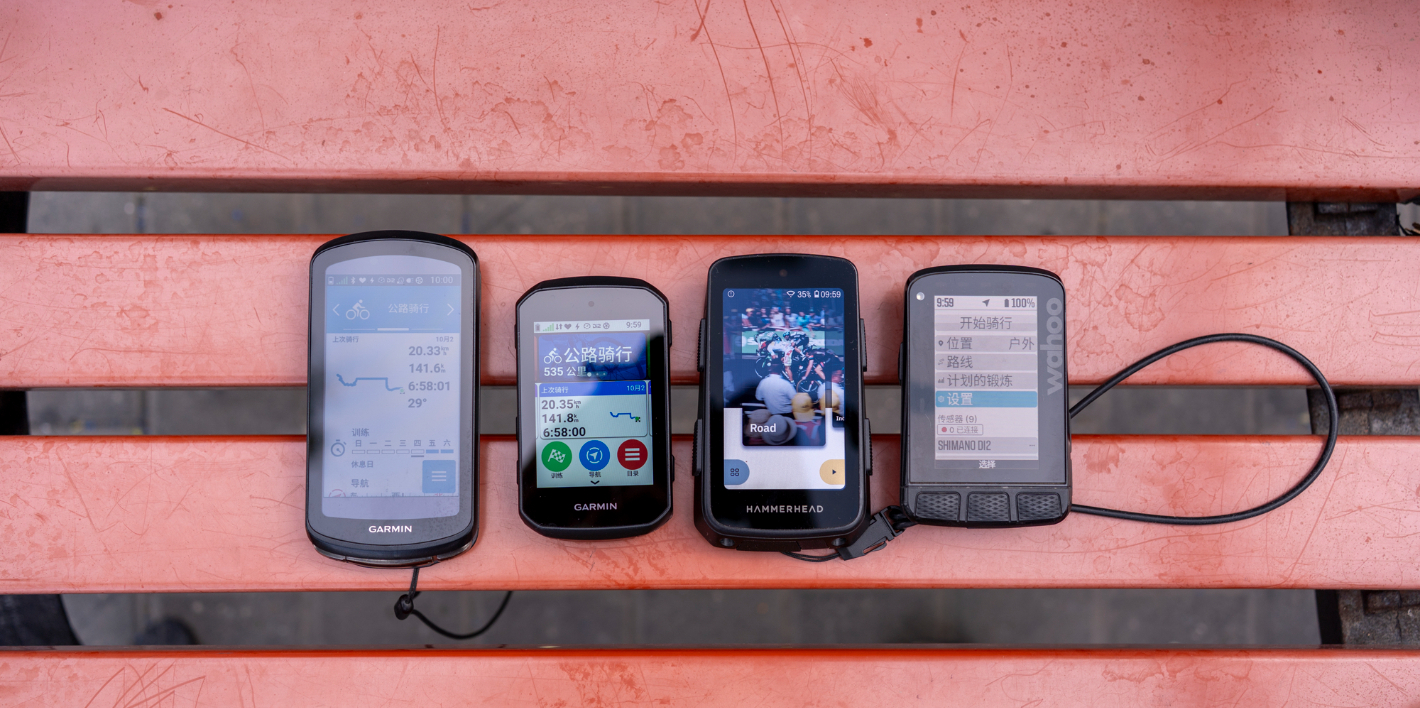
For a long time, Garmin has firmly occupied the top spot in the high-end cycling computer market—an undisputed king. But as the saying goes, power shifts over time, and it’s hard for any single brand to dominate forever.
In recent years, emerging brands like Wahoo and Hammerhead have entered the scene and successfully taken a slice of the pie from Garmin. So today, in the high-end cycling computer market, how should you choose among these three?

First, it’s important to be clear about one thing: cycling has a learning curve. If you’re a complete beginner and happen to have experienced friends—or are part of a cycling group with helpful riders who can answer questions—then simply buy whatever they’re using. That way, when you run into issues, someone will be able to help you.
Another practical rule is to buy what most people around you are using, especially when it comes to Garmin. Garmin offers many group-riding and social features, and the more people using it, the more fun and useful those features become.
If neither of these conditions applies, then just go with Garmin without overthinking it. It has the largest user base, and almost any problem you encounter will already have an answer somewhere.
In this comparison review, Garmin is represented by the Edge 1040 and 1050 (with the 850 making occasional appearances), Hammerhead by the Karoo 3, and Wahoo by the Roam 2. Some features have been updated on the Roam 3—Roam 3 users are welcome to add notes and corrections in the comments.

Basic Feature Comparison
Boot Time
In terms of pure boot time, the three aren’t actually that far apart. From fully powered off to powered on, both Garmin and Wahoo take just over 40 seconds, while Hammerhead takes around 50 seconds. However, in real-world outdoor use, the difference from powering on to acquiring a GPS signal is much more noticeable.
On open roads, Garmin can sometimes lock onto GPS almost immediately after booting—you can start riding right away. Usually it only takes a few seconds, though occasionally it may take up to a minute.
Wahoo is a bit slower. From booting up to acquiring GPS, it typically takes between 30 seconds and one minute, but it’s relatively consistent and stable.

Hammerhead is where things get rough. Although it takes about 50 seconds to boot, it’s not actually usable at that point. Like an Android phone, it still needs time to load background frameworks after booting. Getting the ride screen fully ready takes another 10–20 seconds, and GPS acquisition pushes the total time to ride-ready to at least a minute and a half. The upside is that the boot animation looks pretty nice.
Some of you may have noticed that I specifically mentioned “pure boot time” earlier. That’s because Garmin supports sleep mode—just press the power button once and it wakes instantly. There’s no need to shut it down, and it barely consumes power. Press again and you can start riding immediately.
So in real-world usability, Garmin wins by a mile. It’s always ready, and the difference compared to other bike computers is like using a Mac versus Windows.
Subjective Score:
- Garmin 5/5
- Wahoo 4/5
- Hammerhead 3/5
GPS Speed and Tracking
Before using high-end cycling computers, I never imagined this feature could differ so much. But the first time I used a Wahoo, it hit me hard—the speed readings were noticeably slow. Sometimes even when the bike had already stopped, the computer would still show a speed in the teens.
At first I thought Wahoo was just bad. But after using Hammerhead, I realized it was the same there. Garmin is simply on another level.

Even though all three support dual-frequency, multi-constellation GPS, there are still clear differences in responsiveness. In areas with heavy obstruction and interference—like the complex overpasses around Yuting Bridge on Beijing’s South Second Ring Road—both Wahoo and Hammerhead occasionally lose signal. Garmin, on the other hand, has never dropped signal for me. In short tunnels, Garmin is also the only one that may still retain a signal.
In addition, the latest Garmin 50-series introduces 5 Hz GPS sampling, recording position data five times per second—five times the standard rate. If you have high demands for GPS accuracy, Garmin is your only choice.
Subjective Score:
- Garmin 5/5
- Wahoo 3/5
- Hammerhead 3/5
Bike Computer Screens
This is a tough one to answer, because each has its own strengths—it really comes down to personal preference.
Purely in terms of display quality, Hammerhead is the best. Whether it’s color reproduction or resolution, it’s almost on par with smartphones from a few years ago. The screen reaches a DPI of 292, and paired with Android, you could practically watch Bilibili on it. Its UI design is also the best among all bike computers.

For everyday viewing, Hammerhead offers the best experience. Garmin 1050 and 850, which also use LCD panels, come next—mainly falling short in UI and map data. Older Garmin models like the 1040, which use a transflective display, show a noticeable drop in visual quality. Wahoo, with its transflective + matte screen, performs the worst in terms of display clarity.

However, the situation flips around at noon under strong summer sunlight and at night.
Under direct midday sun, active-emissive displays like those on Hammerhead and the Garmin 1050 simply can’t compete with sunlight—physics wins. Using a front-mounted out-front mount helps a bit, but if the unit is mounted on the handlebar, reflections become severe and the screen is almost unreadable.
The Garmin 1040’s transflective display also reflects sunlight, but the content remains readable, thanks to the nature of the panel. Wahoo’s matte screen goes a step further by diffusing sunlight, making it the most readable at noon. That said, other bike computers can use third-party matte screen protectors, so Wahoo doesn’t hold a unique advantage here.

Nighttime—or low-light—use is where things get awkward. LCD screens can be too glaring, especially when entering tunnels. Brightness adjustment often lags by half a beat, so when you enter a tunnel, a blast of white light hits your eyes—like checking your phone after the lights go out. Even at 0% brightness, the screen can still feel too bright during night rides.

Beyond display quality, screen tuning also differs, mainly in responsiveness. Even though Garmin and Hammerhead both use LCD panels, Hammerhead’s page-switching is noticeably slower than Garmin’s, and Wahoo is even slower. That said, since you don’t flip pages that often while riding, this doesn’t have a major impact.
Subjective Score:
- Garmin 4/5
- Wahoo 3/5
- Hammerhead 4/5
Real-World Battery Life
This round is actually closely tied to the previous one, because screen quality and battery life are almost inversely related. Hammerhead and Garmin’s 50-series both use LCD screens that require constant active backlighting, which significantly increases power consumption.
Hammerhead is rated for 15 hours of battery life, but in real use, an 8-hour session with 6 hours and 46 minutes of actual riding consumed 76% of the battery. That works out to roughly 10 hours in theory—but given the nature of Android, it’s safer to think of it as 8–9 hours in practice.

On Garmin’s side, the 1050’s battery life was cut in half from 45 hours down to 20 hours—still barely acceptable. The 850, however, drops straight to 12 hours. The upside is that Garmin doesn’t exaggerate its numbers: after 6 hours of riding, the 850 used 51% battery, which lines up well with a true 12-hour total.

Wahoo sits comfortably in the middle with 17 hours of battery life. The Roam 3 has been upgraded to 25 hours, though according to some overseas reviews, Wahoo may be playing a bit of a trick with the battery percentage—it doesn’t drop linearly over time.
All in all, battery life is something you should choose based on your own needs. For me, 16 hours is the key threshold. Anything above that is great: four weekday rides at 2 hours each, plus another 8 hours left for a long weekend ride, then one charge.
The two models hovering around 10 hours are theoretically usable as well. Looking back at over a decade of my ride records, I’ve only exceeded 10 hours once—and that was a 200+ km ride. Most people simply don’t ride more than 10 hours in a single session. Still, with a 10-hour battery, there’s always a bit of anxiety for unplanned rides—like early electric cars. If you suddenly feel inspired to go farther or change your route, you’re never quite sure whether it’ll make it.
In short: choose based on your needs.
Subjective Score:
- Garmin 3/5
- Wahoo 4/5
- Hammerhead 3/5
Cycling Computer Controls and Interaction Logic
When it comes to controls, each brand has its own strengths, and all three follow very different philosophies.
In my view, Garmin is basically a condensed history of mobile phones.
Back in the feature-phone era, Garmin’s control logic was exactly like classic phones: a directional pad to move through options, confirm and back buttons to operate, plus dedicated start and lap buttons for quick actions.
Then, with the smartphone era, Garmin adopted full touch interaction—tap where you want, swipe to navigate. On the 10×0 series, the directional keys were removed entirely because they were no longer needed. You get swipe gestures, pull-down menus, and pull-up menus. Overall, there’s nothing particularly impressive about it, but no glaring flaws either.


Wahoo, whether to deliberately differentiate itself from competitors or simply out of a “pure athlete mindset,” has almost nothing you can directly operate. The whole philosophy is automation. The three buttons at the bottom change functions dynamically and correspond to what’s shown on the screen.
The downside is that some interactions become very awkward. For example, before touchscreens were introduced in the latest generation, once you flipped to the next page, you couldn’t directly go back—you had to cycle all the way around. It’s essentially a one-way revolving door. Another example: on segment and climb pages, you can’t press the lap button to manually mark laps or timing. There are plenty of similar annoyances.

Hammerhead, as the youngest of the three, benefits from having no historical baggage. Since it’s built around Android from the start, its interaction logic is almost identical to a smartphone’s. For beginners, there’s basically zero learning cost.
The surrounding physical buttons also feel very intuitive once you get used to them: top left and top right flip pages, bottom left and bottom right move backward and forward. These buttons can also be combined with long presses or dual-button presses to trigger additional actions. Among all the cycling computers I’ve used, Hammerhead has the best button design.

Overall, I think Hammerhead is the best in terms of control and interaction. Garmin is a bit more cumbersome—new users who never lived through the feature-phone era will face some learning curve. Wahoo, on the other hand, actually has functional limitations. You’re forced to adapt to its logic, but that logic isn’t particularly user-friendly.
For users who like to teach themselves, Garmin also has the most comprehensive official tutorials and documentation, with extensive text and video guides. The downside is that they’re a bit dry and you have to dig around on the official website. Hammerhead comes next, offering clear, practical, and lively animated tutorials on its website—but there’s no Chinese version, which raises the barrier a bit. Wahoo’s documentation, frankly, offers very little help.
Subjective Score:
- Garmin 4/5
- Wahoo 3/5
- Hammerhead 5/5
Comparison of Core Cycling Functions
Data Pages
The most important function of a cycling computer is data display and data recording. Yet even in this area—which should be an open-book exam—some players still manage to mess it up badly. At that point, it’s not that Brand A is too strong; it’s simply that Brand B didn’t try hard enough.
The first difference lies in visualization. Wahoo pioneered the use of color to represent different zones, which is extremely helpful for quickly grasping information during intense riding. Hammerhead takes visualization a step further, adding not only color but also refined animations. Garmin, by comparison, sticks to relatively simple graphics, which makes it fall behind in terms of aesthetics.

Next comes data integration, where Garmin clearly does the best job. Garmin can display three or even more data points within a single field, while Hammerhead and Wahoo have to stick to one data item per field, plain and simple.

Finally, there’s data richness—and here it’s honestly a case of disappointment. Garmin has accumulated years’ worth of metrics; competitors could almost just copy them and still fail. Both Wahoo and Hammerhead are missing data you’d reasonably expect to find: real-time ambient temperature, lap-average power-to-weight ratio, climb segment statistics, secondary target information during workouts, and more.
You could say Hammerhead has lots of data—it natively supports advanced metrics like body temperature and aerodynamic drag—but you need third-party accessories for those. And yet, despite all that, Hammerhead doesn’t even offer a full-ride elevation profile.

Wahoo is slightly better, but it has some fatal flaws. There’s no location-based auto-lap, and no page that aggregates data across repeated laps. This seriously affects both repeat climb training and circuit training. That alone is enough for me to give Wahoo a death sentence, not to mention the brain-dead translations—like showing a huge, blunt “Climb” prompt before a climb.
Garmin not only offers the richest data set, but also has the killer weapon that is Connect IQ. Not pretty enough? There are tons of dashboards in IQ.
Jealous of Wahoo’s color-coded zones? Just download a plugin from IQ.
Slope updates too slow? Install a gradient plugin—it can even show current elevation.
There are also dedicated plugins for third-party devices like radars and anemometers. It’s practically all-powerful.
Hammerhead technically supports third-party apps too, but their usability is simply too low.

Subjective Score:
- Garmin 5/5
- Wahoo 4/5
- Hammerhead 4/5
Cycling Computer Navigation
Navigation is another area many people care about. Quite a few riders hope that by buying a high-end cycling computer, they’ll get a navigation experience close to that of a smartphone. But once they actually start using one, disappointment often follows. You can’t really say they’re similar—it’s more accurate to say they’re not related at all.

The core reason is that the logic behind cycling computer navigation is fundamentally different. Smartphone navigation is about finding a place, while cycling computer navigation is about following a route.
On a phone, the logic is: where do I want to go, and how do I get there? Third Ring Road or Fourth Ring Road—it doesn’t matter, as long as you arrive.
On a cycling computer, the logic is: which route am I riding, which climbs am I doing, and I follow this predefined route. Even if the goal is a specific destination, the route still needs to be planned in advance, with climbs and road choices factored in. There’s no getting around that.
Routes suggested by apps like Gaode or Baidu aren’t necessarily suitable for cycling. So once a route is planned, there’s really no such thing as “changing the destination on the fly.” If a section becomes unridable, you switch the entire route—either reselect a new route or push a new one from your phone.

Many beginners don’t understand this distinction, and cycling computer manufacturers try to accommodate them by adding on-device search and rerouting. But honestly, these features aren’t very good. Even the flagship models from all three brands can give you some truly dumb navigation suggestions. I’d rather pull out my phone, take a quick look, and manually find my way back to the original route.

If you strictly follow route navigation, the three brands also present guidance differently.

Garmin pops up a full-screen alert with both a map and text instructions telling you where to go. In a familiar city, this can feel a bit cumbersome. Switching to text-only works better, and the latest 1050 and 850 models also add voice prompts—similar to a phone—which is more convenient.

Hammerhead switches to a dedicated navigation page, then jumps back to the original page after you pass the turn. Like Garmin, this feels a bit overkill in familiar cities; a simple text prompt at the bottom would be enough.

Wahoo, on the other hand, uses text-only instructions with simple icons. In familiar areas, this works well, and the way it squeezes the prompt into a single data bar is quite elegant. However, at complex intersections or in unfamiliar cities, the lack of a pop-up map makes it easy to miss turns.


Additionally, Garmin allows you to manually dismiss navigation pop-ups. Hammerhead requires you to switch back manually, which is a bit more cumbersome. Wahoo’s text prompts can’t be manually dismissed at all.
Subjective Score:
- Garmin 4/5
- Wahoo 3/5
- Hammerhead 4/5
Cycling Maps
Garmin comes with nationwide curated cycling routes preloaded out of the box. You can directly search for a route you want to ride on the cycling computer itself and navigate to it.
There are also Trailforks and FORKSIGHT modes, which I personally don’t use very often. The former integrates global MTB trail data from Trailforks, while the latter lets you see upcoming trail names, remaining distance, elevation gain, and other information. Any mountain bikers in the comments want to chime in?

Hammerhead offers a similar feature—Suunto Heatmaps—but due to network restrictions, it’s not usable in mainland China.

However, Hammerhead has a real trump card: third-party apps such as Gaode (Amap) or Baidu Maps, which can provide a navigation experience similar to that on a smartphone. That said, this requires an active internet connection. For example, you can search for a destination at home, start navigation, and then head out. Or you can connect to your phone’s hotspot while on the road, search within the map app, and then start navigation.
As for Wahoo, this is a missing feature altogether—there are no additional map options available.
Subjective Score:
- Garmin 5/5
- Wahoo 0/5
- Hammerhead 4/5
Companion Software
The biggest difference between modern smart cycling computers and traditional ones lies in their companion software, and this is where the three brands really diverge.
Starting with Garmin, the oldest player in the game: it has evolved from the desktop internet era all the way into the mobile internet era, so you get both web and mobile clients. However, the heavy historical baggage means a lot of legacy “spaghetti code” that no one dares to touch, resulting in a pretty messy software experience.
The web interface is acceptable, but the mobile app is by far the worst among the three. First of all, sync speed is pure Schrödinger’s cat—this is the most commonly complained-about issue. Based on my own experience, Garmin watches sync the fastest, followed by the 50 series, then the 30 series, with the 40 series being the slowest. Among them, the 840 and 540 are tolerable, while the 1040 is the slowest of all, often requiring a full reboot before ride data will sync successfully.
That said, the Garmin app has improved a lot compared to earlier versions. You can now complete most device settings directly from the cycling computer, input text via your phone’s keyboard, and perform deeper training analysis and planning—topics I’ll cover in more detail later.

Wahoo, on the other hand, managed to steal market share from Garmin largely thanks to one key differentiator: full device setup directly on the phone, with near-instant synchronization. While Wahoo doesn’t have a web interface—making detailed data comparisons and analysis a bit inconvenient—when it comes to the mobile app experience, Wahoo is miles ahead.
You can control and configure the entire device from the app, and data syncs instantly. Whether it’s ride data, training plans, or routes, the moment you tap “confirm,” it appears on the computer. The user experience is excellent. That said, I’ve heard that the new app introduced with the ACE and Roam 3 is pretty rough—Roam 3 users, feel free to share your experiences in the comments.
Hammerhead is another outlier altogether. Since the cycling computer itself is essentially an Android phone, you can’t really use one phone to control another phone. As a result, all device settings must be done directly on the unit. Fortunately, the workflows and interaction logic are fairly well designed, and the data visualizations are clear and intuitive, so it’s still quite usable.

That said, network restrictions further limit an already minimal companion app. Without a “scientific” internet connection, you can’t even load ride data or routes in the mobile app. To view your data, you’ll need to open the website on a computer. Thankfully, the website itself is well done, and the app can at least function as a basic communication and data transfer bridge—which doesn’t require special network access.

Subjective Score:
- Garmin 2/5
- Wahoo 5/5
- Hammerhead 3/5
Third-Party Platform Support
Once you’ve accumulated some riding experience, you’ll usually reach this stage. Whether it’s cycling social platforms like Strava, data analysis platforms like Intervals.icu (ICU), route planning tools like Komoot, or even race-oriented power guidance platforms like BestBikeSplit, all of them require proper support from your cycling computer’s ecosystem.
There are two main aspects here. The first is the number of supported platforms. At present, Garmin clearly leads in third-party support—whether in sheer platform coverage or depth of integration. Thanks to its massive and high-quality user base, not supporting Garmin is almost equivalent to not wanting to scale at all. Strava even made a fuss about this some time ago and eventually had to back down and play along.

Wahoo is generally fine as well. All the platforms I know support Wahoo, although some data fields may be less comprehensive than Garmin’s. Hammerhead fares worse: quite a few platforms don’t support it. If you’re a heavy user of a specific platform, this is something you really need to check beforehand.

The second aspect is synchronization speed. Here, Garmin once again ranks last. On the one hand, it’s limited by the slow ride data sync mentioned earlier—you first have to sync to Garmin’s servers before the data can be pushed to third-party platforms like Strava, which is inevitably a few beats slower than Wahoo’s near-instant syncing.
On the other hand, Garmin forces an all-or-nothing approach: either everything syncs automatically, or you have to manually download the data file and upload it to a website for syncing, which is cumbersome. By contrast, both Wahoo and Hammerhead allow you to selectively sync individual rides to specific platforms. Personally, I really dislike cluttering my Strava with low-value rides, so when using Garmin, I simply choose not to sync to Strava at all.

Subjective Score:
- Garmin 4/5
- Wahoo 4/5
- Hammerhead 3/5
Third-Party Hardware Support
Beyond third-party platform support, third-party hardware support is just as important.
For most people, the primary requirement is support for electronic shifting systems. Here, Garmin is once again the clear winner. Support is native and feature-rich: not only can you configure the shifting system directly on the head unit, but the latest 50 series can also track how long each gear is used and the proportion of time spent in each gear.

After pairing electronic shifting, you can do much more than basic controls like page switching or start/pause via the shifters. You can also use the shifter buttons to control music playback on the phone connected to the head unit—play/pause, next track, volume—as well as control bike lights (on/off or flashing), trigger a camera to take photos or record video, and more.

Wahoo is weaker in this regard. Shifter buttons can only be mapped to basic head-unit button functions, with no real configurability and no control over additional devices. Whether newer models like the Ace or Roam 3 have improved here, Roam 3 users are welcome to clarify in the comments.
Hammerhead is a rather special case. Because it was acquired by SRAM, Shimano officially cut off native support for Hammerhead. As a result, control now relies on a third-party app called Ki2. In my experience, Ki2 is feature-complete and rich, and in practice it’s not worse than Garmin’s implementation. However, there is always the risk that a future Shimano firmware update could break it entirely.
SRAM users don’t need to worry as much, since support is truly native. That said, the feature set is not as extensive—but that’s largely on SRAM, as there simply aren’t many buttons to work with.

Beyond electronic shifting, power meters are another commonly used accessory. Generally speaking, devices using the ANT+ protocol work fine across the board, though some head units offer more data or features than others. Cycling dynamics data in particular is an area where Garmin excels—especially with Garmin pedal power meters and the latest Favero models. If you’re using either of these, a Garmin head unit is strongly recommended.

Then there are more niche devices like wind sensors or real-time lactate measurement tools. I haven’t personally used these, so I can’t speak in detail about support. For now, it’s clear that Garmin supports almost all of them, for the same reasons as its dominance in third-party platforms. Hammerhead, thanks to its Android-based system, can integrate more deeply at the system level: it natively supports devices like the GiBLI aerodynamic sensor and hDrop sweat monitoring sensors. In theory, this gives it an edge here.
Subjective Score:
- Garmin 5/5
- Wahoo 2/5
- Hammerhead 4/5
Advanced Cycling Features Comparison
Segment Features
Segment support is almost a must-have for any bike computer that wants to compete in the high-end market. Once you enter a segment, a dedicated segment page pops up automatically, showing real-time progress, elapsed time, and whether you’re ahead of or behind your PR or competitors. It’s highly engaging and fun. This feature even gave rise to a near-IPO company—Strava—and 99.9% of bike computers’ segment functionality is essentially powered by Strava. Without Strava, devices like Wahoo are almost unusable in this regard.
The only real exception is Garmin. As an industry giant, Garmin obviously doesn’t want such a critical feature entirely in someone else’s hands, so it maintains its own segment system. That said, it’s currently in a semi-abandoned state: you can’t add new segments, and the total number of segments is much smaller. Still, it works—and it’s free. You can’t complain too much about something that costs nothing. With all the recent drama around Strava, who knows—maybe Garmin will pick it back up again.

Thanks to its roots in the desktop-internet era, Garmin still carries some traces of the old open-source days. If you connect the device to a computer and use a few technical workarounds, you can actually import Strava segments into a Garmin head unit for free. You won’t get real-time leaderboard updates, but as a personal segment-chasing tool it’s more than sufficient—and you save 383 yuan a year.
Setting aside the “free segments” angle, Wahoo offers the best segment experience overall. As Strava’s best partner, it shows distance to segment end, time gained or lost, and is the only one that still lets you view your completion time for that attempt after finishing the segment.

Garmin comes next. Compared to Wahoo’s elevation profile display on the segment screen, Garmin instead shows a small map. Personally, I don’t like this—it’s hard to read and takes up screen space. When riding segments, I rarely need navigation anyway.
Garmin also has a notable limitation compared to Wahoo and Hammerhead: only one segment can appear on the same stretch of road. You can’t switch between multiple overlapping segments like on the other two. It’s not hugely useful, but still—I might not need it, but you can’t not have it, right?

Previously, some users claimed that segment features couldn’t be used while navigation was active. I specifically tested this to clear things up: segments do work with navigation enabled.
Hammerhead’s segment feature is more of an entertainment feature. It uses cartoon-style icons to show whether you’re catching someone or being caught. For example, different crown icons represent KOM and QOM, and if you’re in contention for the fastest time, you can directly challenge the crown.
When you achieve a good result, you even get celebratory animations—very gamified. The trade-off is fewer data fields. Combined with Hammerhead’s card-based screen layout, it’s just about sufficient.

Subjective Score:
- Garmin 4/5
- Wahoo 5/5
- Hammerhead 3/5
Climb Planning
Climb planning is, in my view, one of the best inventions in bike computers in recent years. It was pioneered by Garmin on the 530 and 830 under the name Climb Pro. By analyzing route data, the device can determine how many climbs a route contains and, upon reaching the base of a climb, automatically pop up a dedicated page similar to the segment feature. This page shows your current position on the climb in real time, as well as how much distance and elevation remain to be conquered. Compared with the more competition-oriented segment feature, climb planning is much better suited to the general riding public, especially when tackling unfamiliar routes.

Once introduced, it quickly became very popular, and both Wahoo and Hammerhead followed suit with their own versions, called Summit and Climber respectively. Hammerhead went even further by evolving the feature to work without loading a route in advance: the head unit uses your current location to match map data and predict whether there is a climb ahead. Garmin and Wahoo soon updated their systems to offer similar functionality.

However, in China, Garmin—despite having an official local presence and mainland versions—actually struggles with this feature. Because it uses compliant, officially licensed maps, the contour line data can be offset compared to reality, making automatic Climb Pro almost unusable. It may even trigger while you’re descending. The traditional route-based Climb Pro also had this issue when the 1040 was first released, though that China-specific bug has since been fixed. At present, the solutions are either to replace the entire device map with OSM open-source maps, or to use Climb Pro only when navigating a preloaded route.
Wahoo and Hammerhead, which use globally unified maps, don’t have this issue, though they can still misjudge occasionally—for example, triggering on overpass ramps. It’s recommended to set the climb threshold to level 3 in the settings.
That said, both Wahoo and Hammerhead lack the ability to preview how many climbs a route contains before starting navigation; you can only see climbs after you begin riding. Wahoo also doesn’t offer a detailed elevation profile, only a rough gradient indication.

On the climb page itself, Wahoo provides the richest set of information, with up to seven data fields available. Garmin’s 40-series offers only two, with most of the screen taken up by the elevation profile; the 50-series improves this to six fields, though you still need Connect IQ add-ons to get enough information.

Hammerhead sticks to its signature card-style layout, showing only four data fields. The real-time gradient under the elevation chart is also quite inaccurate and doesn’t match the actual slope, and the color grading is a mess—red doesn’t appear until 12.6%. For normal riders, most climbs are shown as green. Are these thresholds set by Froome or what?


Subjective Score:
- Garmin 2/5
- Wahoo 4/5
- Hammerhead 3/5
Training Control
Another money-saving feature of high-end bike computers is training control: using the head unit to control a smart trainer. Training workouts from training software can be synced directly to the bike computer, which then automatically controls the trainer—just pedal and go. This alone can save you several hundred yuan a year on Zwift subscriptions.

Garmin still does this best. Beyond its broad platform support mentioned earlier—covering virtually all mainstream and niche training platforms and trainers—Garmin’s interface is also the most intuitive and user-friendly.
For scheduled workouts, both Garmin and Wahoo display the day’s training on the home screen, allowing you to start with a single tap. Hammerhead, by contrast, requires diving two levels deeper into menus, which feels a bit cumbersome.

Garmin also supports dual training targets—for example, holding a certain power while maintaining a specific cadence—enabling more precise muscle-group training.

In addition, Garmin presents training targets most clearly: a gauge-style display shows whether you’re above or below target, and a pull-down menu reveals both the current target and the full workout profile. Wahoo shows only numbers without graphics, while Hammerhead relies solely on tabbed views.


Finally, Garmin’s power control is relatively precise, allowing adjustments in 5-watt increments on top of the planned workout power, which is more intuitive than percentage-based adjustments used by others.
Subjective Score:
- Garmin 5/5
- Wahoo 4/5
- Hammerhead 3/5
Training Programs
Earlier we mentioned that bike computers can directly control smart trainers for workouts—but where do those training programs come from? There are generally a few options: pay a coach to design a personalized plan, buy structured plans from professional platforms like TrainingPeaks, or, if you have some experience, find free programs online. On this front, all three brands are similar: once the workouts are synced, you just follow along and train.

The difference is that Garmin comes with built-in free training programs. The most basic is the “Daily Suggested Workout,” which consists of simple aerobic, interval, or sprint sessions. These workouts automatically adjust based on your current condition. The overall difficulty is on the easier side, but it’s more than enough to get beginners out of the “starter zone.”

For more advanced users, there’s the “Garmin Coach” program. It’s very similar to what I used to pay over ¥1,000 per year for on TrainerRoad. You choose your training goal and frequency, input your personal conditions, and Garmin generates a targeted training plan that’s fairly scientific. For riders under 4 W/kg, following this plan is absolutely sufficient.

If you’re even more seasoned, you can create your own training workouts. This can be done easily on both the web and in the app. Personally, most of my training now relies on self-built workouts—after all, as an amateur, there’s no need to push things too hard.
Wahoo has something similar called 4DP, which seems to have been launched alongside its new app. The heavy push for the new app is likely tied to this feature, since it costs about $18 per month. The system can also generate personalized training plans and analyses, but I haven’t used it long enough to fairly judge how good it is.

As for Hammerhead, it doesn’t really offer any of these fancy features—it sticks to a minimalist approach.
Subjective Score:
- Garmin 5/5
- Wahoo 3/5
- Hammerhead 0/5
Training Analysis
Post-ride data analysis is just as important. For advanced riders with strong analytical skills, the cycling computer is merely a recording tool, while the real analysis happens on professional platforms like Intervals.icu (ICU) or WKO. But not everyone understands metrics like CTL, ATL, or TSB. For most riders, a high-level training analysis is more than enough.
In this area, Garmin is still far ahead. After each ride, it tells you the training focus of that session, and based on long-term data, it can analyze what type of rider you are—an all-round GC rider or a climber, for example. Garmin breaks this down into three metrics: “Anaerobic Capacity,” “Aerobic Capacity,” and “Aerobic Endurance.” It’s like a game character panel showing three core attributes. Knowing your strengths and weaknesses makes it much easier to train with purpose, and tapping into the analysis also gives you Garmin’s training suggestions as references.

Garmin can also estimate your FTP based on each ride and provide recommendations on rest and training focus. When selecting a route, Garmin can even show the ability requirements of that route, helping you judge whether you can complete it.

Wahoo and Hammerhead lag far behind here. They don’t even offer basic FTP estimation—you have to input it manually. Wahoo does a bit better if you pay extra for the previously mentioned 4DP system, which provides some analysis and suggestions. But honestly, after spending thousands on a high-end cycling computer, paying extra on top of that feels a bit hard to swallow.

Subjective Score:
- Garmin 5/5
- Wahoo 3/5
- Hammerhead 1/5
At this point, all the horizontal comparisons are complete, and you can choose based on your own needs. In practice, it really comes down to two things: whether a must-have feature exists only on one brand (such as Garmin’s Connect IQ), and whether a brand is missing a critical feature (like Wahoo’s lack of location-based lap marking). Once you line these up, the choice becomes quite straightforward.
Overall Subjective Score:
- Garmin 67/80
- Wahoo 54/80
- Hammerhead 50/80
The Final Easter Egg
Previously, a reader replied and roughly explained how they use a Garmin cycling computer. When riding a completely unfamiliar Gran Fondo, they import the route file provided by the event organizer, and the computer then generates navigation data from it.
Based on this navigation data, you can not only see the required riding abilities for the route, but also set up power guidance that tells you how to ride each section. At intersections, you get turn-by-turn prompts; when approaching sharp corners, you also receive gradient warnings to avoid being caught off guard on unfamiliar roads and braking too late. When encountering climbs, the climb planning feature kicks in, showing how many kilometers and how much elevation remain on that climb, making it easier to manage your effort distribution, and so on.
This is a very typical example of fully leveraging the advanced features of a cycling computer—every extra dollar spent on a high-end device is put to good use. The difficulty of Gran Fondos is well known: even experienced riders with a 4 W/kg power-to-weight ratio wouldn’t dare say they can ride one easily. Having more technological assistance is certainly a good thing.
At the same time, we should recognize that many cyclists aren’t that strong. For some, even a 100 km flat ride can be a major challenge. More guidance is naturally beneficial, and this has also been a key focus of Garmin’s feature updates in recent years.
Beyond this point, the remaining content is essentially Garmin-exclusive. Other high-end options like Wahoo and Hammerhead don’t offer corresponding features. If these are must-have capabilities for you, then Garmin is basically the locked-in choice.
Connect IQ
At present, Connect IQ is Garmin’s biggest ace for keeping me onboard. Without Power Plus, I honestly wouldn’t know how to ride anymore. A single data field can simultaneously show real-time power, power zone, zone distribution, AP, and NP—who else can do that?
There are also plugins that show real-time gradient, real-time wind speed and direction, real-time power curves, and even pedaling force analysis—implemented via IQ plugins before Garmin officially released its latest power pedal hardware. I could easily write a separate article just about commonly used plugins.

Among competitors, only Hammerhead, thanks to its Android system, can install some third-party apps and plugins. Some of them are quite interesting, such as converting wind speed into an equivalent “perceived gradient.” However, many plugins suffer from severe latency issues. For example, speed and power plugins similar to Power Plus can lag by around ten seconds, making them completely unusable. Others have incomplete data displays or lack proper optimization, essentially feeling like half-finished products.

In my personal view, if competitors truly want to go head-to-head with Garmin, building a robust third-party app ecosystem is unavoidable—especially for domestic brands. Why not develop similar capabilities? After all, programming resources in China are second to none.
Group Ride
Also known as Group Ride, this feature is especially well suited for bike shops, clubs, or small riding groups. You can see each other’s location and speed directly on the cycling computer. One person can plan the route and share it with everyone, and during the ride you can even send short text messages to chat with each other.
After the ride, there are ranking statistics, and the latest systems have added leaderboards for speed, heart rate, and power. It’s highly gamified and very fun to play with. If everyone you ride with uses Garmin, this becomes a genuinely enjoyable feature.

Corresponding to this is LiveTrack sharing. It’s similar to Group Ride, but instead uses a web link to let others track your real-time location and speed. During long rides, you can send this link to family members to ease their worries. This is a feature that Wahoo and Hammerhead also offer in similar forms.
Real-Time Stamina
Real-Time Stamina is a stamina metric calculated by Garmin based on your data, similar to a health bar in a game. It estimates how much farther or longer you can continue riding. During the ride, you can see this “health bar” change: green indicates recovery, red indicates consumption. On descents or during low-power riding, the bar will recover accordingly, letting you know at any moment how much you still have left in the tank.

Power Guidance
In professional racing, coaches design power output strategies based on each rider’s abilities and the characteristics of the course, especially in individual time trials. Power Guidance is essentially a simulation of this concept. The cycling computer can generate a power output plan based on the route and the intensity level you choose.
While it can’t help advanced riders chase PRs the way a professional coach or platforms like BestBikeSplit can, it’s more than sufficient to help beginners complete challenging routes.

Various Alerts
Although Garmin mainly targets the mid-to-high-end market, it has clearly put a lot of thought into beginners. Many features are designed specifically for them. While the actual user share of these features may not be high, some genuinely useful ones include the following:
Nutrition and Hydration Reminders
Older models would periodically remind you to drink water and eat, with post-ride statistics afterward. Starting with the newer 50-series, Garmin introduced more sophisticated algorithms that assess your physical condition, route difficulty, temperature, and humidity to intelligently estimate when to remind you to refuel.
Corner Warnings
Garmin compares map data with your real-time position to determine whether a turn is coming up ahead. This is quite useful on unfamiliar routes. If you’ve watched enough crash compilation videos on Bilibili, you’ll notice that many crashes might have been avoided if riders had just heeded a simple warning before a corner.
Hazard Alerts
By leveraging user-reported road conditions, Garmin can pop up advance warnings for obstacles, potholes, stray dogs, slippery roads, and more. I initially thought this was useless, but during one ride in heavy fog near dusk, on a familiar route I hadn’t ridden in a long time due to an injury, a newly added speed bump caught me by surprise. Without the warning from the cycling computer, hitting it at high speed could have been genuinely dangerous.

Incident Detection
Even with road and hazard alerts, accidents can still happen. If you’re riding alone and crash without immediate help, the situation can be risky. Garmin cycling computers can detect a crash and automatically send a message with your current location to preselected contacts. If Group Ride mode is enabled, your riding partners will also be notified, allowing for immediate rescue.
Theft Alarm
This can be enabled when you briefly leave your bike unattended. If the bike is moved, the computer will emit an alarm sound and send a notification to your phone. In China, this feature is basically useless.
Mountain Bike Training Features
Garmin may be the only cycling computer manufacturer that is still actively developing features specifically for mountain biking. I haven’t ridden MTB in a long time myself, so I’ll briefly summarize this section based on the official descriptions—MTB veterans are welcome to add more details in the comments.
MTB Endurance and Downhill Modes
MTB Endurance mode records each lap as well as total elevation gain and descent, while Downhill mode automatically laps each completed descent.
MTB Ride Dynamics
Mountain bike metrics track key indicators such as the number of jumps, jump distance, and airtime during each ride.
GRIT and FLOW
Grit evaluates ride difficulty based on GPS, elevation, and other data. Flow measures how smoothly you descend, helping you continuously push your limits.
Timing Gates
You can set timing points along a route to record split times, allowing you to track performance in real time.
This may well be the only written comparison in the Chinese internet ecosystem that puts these three brands side by side as high-end cycling computers. After reading through it all, do you think they live up to their several-thousand-yuan price tags? Feel free to share your thoughts in the comments.
Leave a Reply