This article’s outline was generated by Gemini. I completed the content creation, and the article was polished by Gemini afterward. My personal writing isn’t great, so if you’re sensitive to AI-generated content, please accept my apologies!
Introduction: “Network Speed Anxiety” and the “Bare-Bones House” of Stock Android
Friends who use Pixel phones or other near-stock Android systems are probably familiar with the joke about a “bare-bones house.” While we enjoy the purest Android experience, there are always some missing localized features that drive people crazy—and “real-time network speed display” is one of them.
In China’s complicated network environment, a speed indicator is almost a necessity for me. The awkward part is that Google seems to have never planned to support this feature at the system level. So we have no choice but to turn to third-party apps on the Google Play Store. However, after going through similar apps on the market—such as NetSpeed Indicator and Internet Speed Meter—I found that even in 2026, the experience is still far from satisfactory.
Most of these “veteran apps” have outdated UI designs. Many of their interfaces are stuck in the Android 4.4 era or the first generation of Material Design, and they always look out of place on modern Android systems. The actual speed display isn’t great either: it’s either a tiny status-bar icon with barely readable numbers and units, or a floating window plastered with the “display over other apps” permission reminder. Feature bloat is another problem—I just want a speed indicator, yet they often bundle in traffic statistics, detailed usage analysis, and a bunch of features I don’t need.
Most critically, they all share one fatal flaw: when a proxy tool is enabled, the reported network speed is wildly inflated. Pixel users have probably run into this—your real download speed is only 5 MB/s, but the floating window shows 10 MB/s.
Why Is the Network Speed in These Tools Always Inaccurate?
Simply put, this is the fault of Android’s old statistics mechanism. Traditional speed-meter apps usually read the system’s total traffic interfaces directly. When a proxy tool is enabled, data packets first pass through the physical network interface (such as wlan0) and are counted once. Then the data is unpacked and forwarded to the proxy tool’s virtual interface (such as tun0), where it gets counted again.
Most legacy apps simply add up the traffic from all interfaces, which results in displayed speeds that are often double the real speed.
Fortunately, AI-assisted programming has been booming lately. Since I couldn’t find a perfect alternative, an idea came to me: why not let AI help me write a network-speed app tailored specifically for Pixel?
And that’s how Pixel Meter was born.
What Makes Pixel Meter So Good?
As an app built to solve my own needs, Pixel Meter mainly addresses two core problems.
Accurate Traffic Statistics (Say Goodbye to Inflated Numbers)
Pixel Meter abandons the outdated global-statistics approach and instead uses the new API TrafficStats.getRxBytes(ifaceName) introduced in Android S (API 31).
This API allows an app to precisely obtain traffic data from a specific network interface. With a built-in whitelist and blacklist mechanism for network interfaces, Pixel Meter can intelligently filter out duplicate data from virtual interfaces created by proxy tools. Most importantly, this is achieved without requiring root access or Shizuku permissions—making it both efficient and accurate.
Possibly the Most Elegant Display Method Available
The Live Update Notification is, in my view, Pixel Meter’s biggest secret weapon. On Android 16 and some other high-version systems that support this feature, live update notifications avoid the space constraints and poor readability of traditional status-bar icons, allowing much richer information to be displayed more flexibly.
Let’s look at a comparison:
Traditional approach: a crowded status bar where the numbers and units are hard to read
Pixel Meter, on the other hand, takes advantage of the notification area’s real-time update capability. Although there is a character limit (7 characters), it’s more than enough to clearly show “number + unit”:
Live update approach vs. floating window
More importantly, it doesn’t look like a third-party patch at all. Instead, it feels like a native system feature—clean, natural, and seamlessly integrated.
Behind the Scenes: I Provided the Ideas, AI Wrote the Code
The arrival of the AI era has completely changed the barrier to entry for individual developers.
In the past, I tried building a few small tools myself (such as an app to automatically skip ads), but I often gave up halfway because of the tedious initial setup and the long wait for positive feedback. The effort required was too high, the results too slow, and enthusiasm was easily drained.
Another incubation project that went from full of excitement to something I never wanted to open again
But this time was completely different. During the development of Pixel Meter, I adopted a new “human–AI collaboration” model:
I handled: architecture design, requirement analysis, and “code reviews” plus course correction when the AI made mistakes.
Gemini handled: writing the concrete implementation code, generating documentation, and even preparing store-listing materials.
I used AntiGravity together with a custom GEMINI.md rules file. It’s like giving the AI a form of “long-term memory,” allowing it to remember our previous architecture discussions and coding standards. Even in a new session, it can read these “memory files” and quickly get back into development mode.
Letting AI recommend and decide on the tech stackArchitecture design discussionsReading the “memory” files when starting a new session allows Gemini to quickly “recall” the project’s requirements.
The final numbers were surprising: Pixel Meter has already released three versions, and about 90% of the code was generated by Gemini. Even the GitHub repository’s README, the privacy policy, and the promotional copy and featured images on Google Play were all created by it.
You’re Invited to Try It Out
At the moment, Pixel Meter is open-sourced on GitHub. You can also head to the Google Play Store and search for “Pixel Meter” to download and use it directly.
Whether you’re looking for a clean, no-frills network speed indicator, or you’re simply curious about the code quality of AI-assisted development, you’re more than welcome to give Pixel Meter a try.
SK Hynix says it has no plans to exit the consumer storage market
China’s State Administration for Market Regulation opens investigation into Trip.com Group in accordance with the law
Insta360 releases Link 2 Pro series webcams
Google Chrome to restore support for the JPEG-XL image format
Apple confirms Pixelmator for iOS will stop receiving updates
Hannsnote launches Lumo reading tablet
Garmin releases quatix 8 Pro marine smartwatch
IKEA launches Kallsup Bluetooth speaker
Zhipu teams up with Huawei to open-source GLM-Image, the first SOTA multimodal model trained on domestic chips
Rumors You Can Just Glance At
SK Hynix says it has no plans to exit the consumer storage market
In response to recent market rumors claiming that “SK Hynix plans to discontinue consumer storage products,” SK Hynix told Jiemian News that the company has not discussed or planned to exit the consumer products business, and that such claims are inaccurate.
At an internal meeting disclosed last year, SK Hynix noted that growth in commodity DRAM capacity is expected to be limited and may struggle to keep up with steadily rising demand, potentially pushing memory prices even higher. According to presentation slides from that meeting shared by BullsLab, SK Hynix forecasts that, aside from high-bandwidth memory (HBM) and SOCAMM modules, capacity growth for commodity DRAM will remain constrained through 2028. The main reason is that major memory manufacturers are gradually shifting more production capacity toward AI-related demand, leaving only modest increases in capacity allocation for the consumer market. Source
China’s State Administration for Market Regulation opens investigation into Trip.com Group in accordance with the law
Recently, based on preliminary verification, the State Administration for Market Regulation (SAMR), in accordance with the Anti-Monopoly Law of the People’s Republic of China, has opened a formal investigation into Trip.com Group Co., Ltd. on suspicion of abusing its market dominance to engage in monopolistic practices. Source
“Recently, Trip.com received a notice from the State Administration for Market Regulation informing us that a formal investigation has been initiated, in accordance with the law, into alleged monopolistic behavior involving our company. We will actively cooperate with the regulatory authorities throughout the investigation, fully implement all regulatory requirements, and work together with all parties in the industry to build a sustainable market environment. At present, all of the company’s business operations are running normally, and we will continue, as always, to provide high-quality services to our users and partners.”
Insta360 releases Link 2 Pro series webcams
Insta360 officially released its flagship Link 2 Pro series webcams on January 14.
The Link 2 Pro series includes two models: the Insta360 Link 2 Pro and the Link 2C Pro. Both feature a large 1/1.3-inch sensor and support 4K ultra-high-definition resolution, making the series well suited for nighttime or low-light indoor meetings and live-streaming scenarios. The Link 2 Pro series also introduces dual native ISO technology and optimizations for HDR mode. In addition, it is equipped with a directional microphone to ensure clear audio capture even in open offices or noisy outdoor environments. As for design differences, the Insta360 Link 2 Pro comes with a built-in tracking gimbal, while the Link 2C Pro uses a fixed mount.
In terms of features, the Link 2 Pro series supports Link Controller, which uses AI algorithms to separate the subject from the background and deliver a natural depth-of-field effect close to that of DSLR cameras. The products are also equipped with AI tracking and a dual-axis gimbal, support automatic framing, can connect seamlessly with the Wave stabilizer, and offer features such as automatic speaker recognition.
In terms of pricing, the Insta360 Link 2 Pro starts at RMB 1,758, while the Insta360 Link 2C Pro starts at RMB 1,398. Source
Google Chrome to restore support for the JPEG-XL image format
On January 13, Google re-integrated the JPEG-XL image format into the Chromium browser engine. The feature is implemented using jxl-rs, a secure decoder written in Rust, to meet Chromium’s security requirements. At present, JPEG-XL support is disabled by default; users need to enable the #enable-jxl-image-format option on the chrome://flags page to use it.
Chromium had supported JPEG-XL in earlier versions. However, Google removed support for the format with the release of Chrome 110 in 2022, citing the limited number of websites adopting it. Since then, Google has shifted its focus to promoting the adoption of the AVIF image format.
It is worth noting that at the end of last year, the PDF Association designated JPEG-XL as the preferred format for embedding HDR images in PDF files. Source
Apple confirms Pixelmator for iOS will stop receiving updates
On January 13, Apple released Pixelmator Pro for iPad and launched the Apple Creator Studio subscription service. At the same time, Apple disclosed the future plans for the existing iOS versions of Pixelmator and Photomator in the Q&A section at the bottom of its official website.
Apple clearly stated that Pixelmator will no longer receive updates. The app will retain its basic image editing features, such as cropping, color adjustment, and effects, and users can continue to use it normally. Another app, Photomator, will continue to be available as a standalone product on the App Store and is expected to receive ongoing feature updates and support in the future. Source
Hannsnote launches Lumo reading tablet
On January 14, Hannspree released the Lumo reading tablet. Designed for low-power reading scenarios, the device features a 7.8-inch reflective LCD display without a backlight, relying on ambient light reflection to deliver a viewing experience close to that of an e-ink screen.
In terms of hardware, Lumo is equipped with a 1024 × 768 display panel with a 60 Hz refresh rate, powered by a MediaTek Helio G99 processor, and includes a 3000 mAh battery. It also comes with a 5 MP front camera and an 8 MP rear camera.
To improve usability in low-light environments, Hannspree offers an optional front light accessory. According to official figures, with the front light turned on at maximum brightness, the device can still deliver about 6.5 hours of battery life. Pricing for the Hannspree Lumo is set at €369. Source
Garmin releases quatix 8 Pro marine smartwatch
On January 13, Garmin unveiled its flagship marine smartwatch, the quatix 8 Pro. Designed for offshore and professional maritime scenarios, the device integrates inReach satellite communication technology and an LTE cellular module to address the common challenges of communication and signal coverage at sea.
According to Garmin, even when users are about 50 miles (approximately 80.5 km) offshore, the quatix 8 Pro can send and receive text messages, make voice calls, and check real-time weather information without relying on a smartphone. The watch also features a built-in SOS emergency function, allowing users to send distress signals directly to the 24/7 Garmin Response emergency coordination center in case of unexpected situations.
On the software side, Garmin has introduced a Boat Mode for the quatix 8 Pro. When the system detects that the user is in a maritime environment, it prioritizes features such as autopilot control, trolling motor status, and vessel data. Once ashore, the interface switches back to a layout focused on everyday apps and health data to better suit office work or fitness use.
In terms of hardware, the quatix 8 Pro features a 47 mm titanium bezel and a sapphire crystal lens, along with a 1.4-inch high-brightness AMOLED display. In smartwatch mode, battery life can reach up to 15 days. In addition to marine-specific functions, the device supports 24/7 health monitoring, Garmin Pay contactless payments, and more than 100 sports modes, including water sports such as wake surfing and water skiing. Garmin stated that the quatix 8 Pro is scheduled to go on sale on January 16, 2026, with a starting price of USD 1,299.99. Source
IKEA launches Kallsup Bluetooth speaker
During CES 2026, IKEA unveiled the Kallsup portable Bluetooth speaker. The product features a cube-shaped design and focuses on affordability and portability. It measures approximately 70 × 70 × 70 mm, uses a plastic корпус, and is equipped with anti-slip feet on the bottom, making it suitable for carrying around or for desktop use.
In terms of colors, Kallsup is available in bright pink, bright green, and white. For connectivity, the speaker supports Bluetooth 5.3 and introduces a “broadcast mode.” According to IKEA, this mode allows up to 100 Kallsup speakers to be wirelessly connected at the same time to expand audio coverage.
The body is equipped with only two physical buttons—for power and Bluetooth pairing—and provides operation feedback through audio prompts. For battery life, Kallsup has a built-in rechargeable battery and charges via USB-C. Official figures show that it can play continuously for about 9 hours at 50% volume. IKEA stated that Kallsup is scheduled to go on sale in April 2026, priced at USD 10. Source
Zhipu teams up with Huawei to open-source GLM-Image, the first SOTA multimodal model trained on domestic chips
On January 14, Zhipu announced that it has jointly open-sourced a new-generation image generation model, GLM-Image, together with Huawei. The model was developed end-to-end—from data processing to model training—based on Ascend Atlas 800T A2 computing hardware and the MindSpore AI framework. Zhipu stated that GLM-Image is the first state-of-the-art (SOTA) multimodal model to be fully trained on a domestic AI chip platform.
In terms of model architecture, GLM-Image adopts a self-developed hybrid design combining “autoregressive + diffusion decoder,” enabling joint modeling of image generation and language models. By optimizing the tokenizer design, the model can adaptively handle inputs of different resolutions and natively supports image generation tasks ranging from 1024 × 1024 to 2048 × 2048 at arbitrary aspect ratios, without requiring separate training for each resolution.
Regarding application performance, Zhipu noted that GLM-Image performs stably on image generation tasks involving complex logical relationships and textual explanations, making it suitable for scenarios such as scientific illustrations and schematic diagrams. In content creation for e-commerce images and multi-panel comics, the model can maintain consistency of subjects and visual style across multiple images while improving the accuracy of text generation. In addition, it is suitable for producing visually complex layouts such as social media covers, posters, and commercial promotional graphics.
Beyond text- and layout-related tasks, GLM-Image also supports image generation across a variety of subjects and shot types, including portraits, pets, landscapes, and still life. The model has now been open-sourced on GitHub, Hugging Face, and the ModelScope community.
Rumors You Can Just Glance At
Recently, a quirky app called “死了么” topped the paid apps chart on the Chinese App Store. As the app has also seen explosive growth overseas, the development team has decided to officially update its global brand name to “Demumu.” At the same time, the official team posted on social media last night inviting netizens to suggest more creative Chinese names for the app. Source
According to CCTV News, on January 13 local time, the U.S. government approved NVIDIA to export its H200 AI chips to China. This decision is expected to resume shipments of H200 chips to Chinese customers. Earlier, U.S. President Trump had stated on social media that the U.S. would allow NVIDIA to sell H200 chips to China. The related sales are subject to approval and security review by the U.S. Department of Commerce. Meanwhile, the U.S. side will also collect about 25% in fees from the related transactions. In other related information, an NVIDIA spokesperson previously told the Global Times that compliant sales of H200 chips to authorized Chinese customers would not affect the company’s supply to other global markets. In addition, according to Tencent Technology citing informed sources, the channel price of an 8-card H200 module is about RMB 1.4 million, higher than that of the H20. In terms of performance density (TPP), the H200 reaches a computing power value of 15,832, about 6.7 times that of the H20. Source
According to Reuters, multiple informed sources revealed that Chinese customs authorities notified relevant officials this week not to allow the import of NVIDIA H200 AI chips. At the same time, Chinese government officials convened domestic technology companies and explicitly required that, in principle, companies should not purchase H200 chips unless there is an irreplaceable necessity. The instructions did not specify the reasons, nor did they clarify whether this constitutes a formal ban or a temporary measure. It is also currently unclear whether H200 chips that have already been ordered will be affected. Source
Welcome to this episode of Pai Review. You can use the table of contents to quickly jump to the sections you’re interested in. If you’ve discovered other apps worth checking out, or topics you’d like us to cover, feel free to join the discussion in the comments.
NotePlan 3.2: Simplified Chinese support, new integrated HTML plugins, and more
Platforms: iOS / iPadOS / macOS / Web
Keywords: task boards, team collaboration
@ElijahLee: NotePlan, the all-in-one time management tool that combines tasks, notes, and calendars, has been updated to version 3.2. The update adds multilingual support, including Simplified Chinese, as well as a lock screen widget for quick capture, integrated HTML plugins, support for the Liquid Glass design style, and more.
First up is multilingual support. NotePlan 3.2 now fully supports Simplified Chinese. For an app that is both complex and highly professional, native language support makes it much easier for users to get started. The new version also adds localization for Japanese, Italian, Korean, and Russian, along with VoiceOver accessibility support.
On mobile, the update introduces a new lock screen widget focused on quick capture. You can add tasks, start voice transcription, or create a note directly from the lock screen.
This lock screen widget supports custom configuration. In the widget settings, you can choose where the note content is saved and under which heading. In terms of content, the editor supports rich text formatting such as tasks, bullet points, quotes, and more. Functionally, it supports multiple input methods including voice transcription, typing, handwriting, and drawing.
On macOS, NotePlan has introduced integrated HTML plugins and provides multiple plugin templates and tutorials to help users get started quickly. In “Settings – AI & Plugins,” you can manage all plugins, download updates, and use them.
The main integrated HTML plugins in this update are the Dashboard plugin and the Linear Calendar plugin. The Dashboard plugin is a dashboard-style plugin that displays statistics, summary views, task progress, and more in the sidebar, allowing you to quickly review your work status. The Linear Calendar (calendar view plugin) provides an enhanced calendar view that integrates both the macOS calendar and the NotePlan calendar.
HTML plugins run directly within the main NotePlan window. When you open an HTML plugin, it automatically appears in the sidebar, and you can switch to it at any time just like switching between notes, calendars, or tasks. This makes HTML-based plugins much more practical in daily workflows, without the need to open a separate window.
NotePlan officially mentioned that more plugins are in development, but users can also follow the tutorials to quickly create their own plugins using Claude Code or Cursor—even without prior coding experience.
In NotePlan 3.19, the app added support for the Liquid Glass design style. The sidebar becomes floating and shows the background color of notes through it, the command bar and menus are updated with a more transparent glass-like texture, and the overall icon set is more unified and modern.
You can download NotePlan for free from the App Store. With a paid subscription, you can unlock features such as cross-platform sync, Markdown export, and integrated HTML plugins. Pricing is USD 12 per month or USD 99.99 per year. Setapp users can get it for free.
Typeless: Making Voice Input Truly Practical
Platforms: iOS / macOS / Windows
Keywords: voice input, AI transcription
@Vanilla: Most voice input methods on the market (such as WeChat Input, Doubao Input, iFlytek Input, etc.) focus on reproducing human speech with 100% accuracy, but overlook the fact that people don’t speak perfectly—they make slips, pause, and stumble. Typeless changes this. Instead of merely aiming for “accurate transcription of sound,” it aims to “reconstruct the original expression in the mind.”
Before getting into its advanced features, I’d like to first introduce Typeless’s solid basic capabilities, because these are the foundation that keeps me using it.
First is mixed-language input. Typeless supports more than 100 languages, and its recognition of mixed Chinese and English—what I use most often—is excellent. There’s no need to switch keyboards or languages; it just works.
Next are the practical built-in keys. The Typeless input interface includes @, space, delete, and a Return key. The Return key is context-aware: in WeChat it means “send,” in documents it’s “new line,” and in search fields it becomes “search.”
Then there’s the personalized dictionary. Typeless lets you create custom entries manually or by voice, accurately matching rare words or proper nouns. This ensures accuracy in the output and saves you from tedious corrections.
Finally, there’s whisper recognition. Typeless allows input by speaking very softly. For introverts like me, it can accurately recognize quiet whispers into the microphone in public places, avoiding “social death.” Typeless also works while media is playing—for example, I can dictate while listening to music with AirPods. It doesn’t interrupt playback; the music just becomes background audio and doesn’t affect recognition accuracy.
If the basic features are the skeleton, then AI is the soul of Typeless, solving the pain points of traditional voice input:
Typeless supports automatic removal of filler words. It can identify and eliminate interjections like “um,” “uh,” “that is,” as well as repeated content caused by stuttering or hesitation, keeping only the meaningful information.
Typeless supports real-time speech editing, which is its killer feature compared to other voice input methods. When I say, “Tomorrow morning at 7… ah no, let’s make it 3 p.m.,” Typeless automatically corrects this to “Tomorrow at 3 p.m.” and outputs only the final result, rather than recording the whole correction process.
Typeless supports intelligent formatting. When it recognizes lists (such as shopping lists) or multi-point content, it automatically formats them into separate lines and lists, and adapts the layout to the writing context of the app.
Typeless supports scenario-based tone polishing. It adjusts tone based on the type of app. For example, in text messages it keeps casual phrases like “kinda wanna,” while in Gmail it automatically converts them into the more formal “kind of want to.”
Typeless isn’t a flashy demo from a big tech company—it genuinely solves the problem that “voice input isn’t practical enough.” On iPhone, it’s great for replying on WeChat and other instant messaging apps, saving you from typing while still producing messages that are easy for others to read. On desktop, Typeless is well suited for writing and capturing ideas. It supports seamless switching with a physical keyboard, making it suitable as your primary input method, with the keyboard used for quick fine-tuning.
Typeless can be downloaded for free from the App Store and its official website, with a free Pro trial for the first month. Subscription pricing is USD $12 per month (billed annually) or USD $30 per month, mainly to unlock the monthly limit of 4,000 words.
TypeLouder: A Keyboard Sound Effects App Recommended by Luo Yonghao
Platform: macOS
Keywords: keyboard sound effects
@化学心情下2: Last week I recommended a mechanical keyboard and mouse click sound simulator called Funkey. This week, I’m recommending another similar keystroke sound app. This time it’s TypeLouder, which focuses more specifically on simulating keyboard sounds. The app lets you set different keyboard sound profiles and adjust volume levels, so even when typing on a membrane keyboard, you can still experience the satisfying feel of a mechanical one.
In principle, TypeLouder works much the same way as Funkey: it converts key presses into simulated mechanical keyboard sounds. The difference is that TypeLouder first asks you to choose the type of mechanical switch—such as brown, red, blue, or black switches—then set the volume. You can also preview the sound that will be produced when typing, giving you a clear idea of both loudness and tone in advance.
This approach is much more intuitive than Funkey’s method of listing a large number of keyboard model names. After all, with many modern mechanical switches, the differences in sound are often subtle, while the bigger distinctions lie in key travel stages and tactile feedback.
More importantly, TypeLouder can automatically adjust its volume based on your surroundings, so you can enjoy the intense clicking sounds without getting awkward side-eyes from people nearby.
TypeLouder also offers some thoughtful settings. For example, you can choose the audio output device (so the sounds play only in your headphones, letting you enjoy them privately without bothering others). You can decide whether the space bar or return key should produce sounds, and you can switch between different switch sound profiles using keyboard shortcuts. Overall, it’s very convenient.
@Peggy_: You leave home and realize you forgot your keys. You get to your desk and notice you didn’t bring your water bottle. You return home only to find your charger is still at the office… little things like these happen all the time. I still remember a college classmate whose behavior was legendary—almost every time he was halfway to somewhere, he’d suddenly realize he’d left something in the dorm and turn back.
PocketCheck is designed to solve exactly these easy-to-forget little things, or to constantly remind people who are especially forgetful. Through scheduled prompts and persistent notifications for important items, PocketCheck provides reminders right when you need them. First, you can set up a checklist of things to carry based on your needs when going out. If your forgetfulness is really serious, you can even take photos of the items or note where they are stored. Then, you can set time-based reminders according to your usual departure times, so that before you head out, you’ll be soul-questioned: “What’s in your pockets?”
Besides serving as an item checklist, you can also get creative and use PocketCheck as a “put-things-back” list, to avoid forgetting to return items to their original places after using them. For work tasks with relatively fixed workflows, PocketCheck can also act as a supervisor for task completion. It allows you to set an “active” status for items in a list; when you open the relevant task, the app shows a persistent notification and indicates how many activities are currently active.
In terms of notifications, PocketCheck lets you enable alerts for individual lists and freely choose which days of the week to be reminded. It also supports periodic reminders, prompting you to occasionally open the app to confirm that you’ve packed your items properly or completed your tasks. Of course, you can also set quiet periods during which no reminders are received, such as while sleeping at night.
Overall, PocketCheck’s features are clearly aimed at people who are prone to forgetting things. By combining persistent notifications, interval reminders, and task activation states, it tries to help us forget less—or even not forget at all—when it comes to important matters. You can download PocketCheck from F-Droid to try it out; the app is completely free.
Danji: Schedule & Sponsored-Content Management for Creators
Platform: iOS
Keywords: media schedules, business management
@Snow: Danji is a schedule and business-collaboration management tool designed specifically for media professionals, content creators, and freelancers. With its AI engine and built-in analytics, you can quickly create schedules and sponsored-content projects from screenshots or short text, and clearly track income, payments received, and other financial details—addressing common pain points like chaotic schedules and difficult bookkeeping.
Danji’s centralized management focuses on two areas: schedules and sponsored projects. For schedule management, in addition to filling in project info, contact details, costs, publishing progress, and reimbursement status, it also distinguishes between online and offline events. For offline events, it intelligently calculates departure times based on travel methods such as flights, high-speed rail, or driving, automatically syncs with the system calendar, and provides targeted reminders. You can also place schedule widgets on your home screen for more intuitive alerts.
For sponsored-content management, the app supports full-cycle tracking from “to be executed,” to “in progress,” to “published,” making it easy to adjust plans and monitor progress. Each project can include the contract amount, payment status, commission status, and commission amount. The app then automatically calculates net income in its statistics based on payments received, giving you a clear picture of each project’s financial performance.
Danji’s most thoughtful feature is its use of AI to parse chat screenshots, itineraries, or text and automatically generate schedules or sponsored projects. Contacts, transport details, project amounts, commissions, and more can all be recognized accurately and imported quickly, saving the time required to create entries manually. The app also offers Shortcuts support, allowing you to build screenshot workflows for even higher efficiency.
At the moment, however, Danji can only recognize a single screenshot at a time. To improve accuracy, it’s recommended to import long screenshots that include full conversations with project overviews. If you only import an itinerary, Danji may mistakenly treat departure points or destinations as the project name and location—ironically reducing efficiency instead of improving it.
As a business-management tool, rich analytics are essential. Danji’s charts clearly show monthly and yearly income and expenses, as well as the proportion of online vs. offline work. They also dig deeper into payment performance by industry, brand, and agency, generating payment-rate rankings to help identify reliable partners and potential risks—enabling more refined and professional business management.
The long-standing outlining and information-organizing app OmniOutliner has been updated to a major 6.0 version, adding support for the Liquid Glass design style and introducing features such as Omni Links. Source
Instagram reportedly experienced a sensitive user data leak. The company later stated that the issue causing the system to send emails asking users to reset their passwords has been fixed, that user data was not affected, and that such emails can be safely ignored. Source
Public Platform Assistant mini program to discontinue service
Leica is independently developing a full-frame CMOS sensor
Withings Body Scan 2 smart scale debuts at CES 2026
Nintendo fixes unstable network connectivity issue with the Switch 2 dock
Vietnam introduces mandatory rules on skippable ad durations
Honor unveils multiple new products
On January 5, Honor introduced the Honor Power2 smartphone via an online launch event, alongside the Honor Pad X10 Pro, Honor Pad 10 Pro, and a range of Honor Choice IoT products.
The Honor Power2 features the industry’s first 10,080 mAh fourth-generation Qinghai Lake battery, while keeping the device thickness to 7.98 mm. It supports 80W SuperCharge fast charging and 27W reverse charging, and incorporates a smart charging engine to improve charging efficiency and battery longevity.
In terms of connectivity, the Honor Power2 is equipped with the Hongyan six-wing antenna system and Honor’s in-house RF enhancement chip C1+, supporting 25 antennas in total. It also adopts a parallel dual-rail antenna design to improve performance in weak-signal environments. For positioning, it uses a multi-source fused positioning engine with support for dual-frequency GPS and triple-frequency BeiDou. On the performance side, it debuts the Dimensity 8500 Elite chipset and features an over-40,000 mm² Ice-Sealed liquid cooling system. The device has passed SGS Gold Label five-star certifications for drop resistance, impact resistance, and compression resistance, offers IP68, IP69, and IP69K dust and water resistance, and comes with a 6.79-inch 1.5K eye-care display and a 50-megapixel OIS main camera.
Core product highlight image, image sourced from Honor.
The Honor Power2 is available in Sunrise Orange, Snowfield White, and Phantom Night Black. Pricing is set at RMB 2,699 for the 12 GB + 256 GB version and RMB 2,999 for the 12 GB + 512 GB version, with government-subsidized prices of RMB 2,294.15 and RMB 2,549.15 respectively. Pre-orders are now open, with official sales scheduled to begin at 10:08 a.m. on January 9. Source
Douyin to support Dolby Vision
On January 5, Dolby Laboratories and Douyin announced a partnership under which Douyin will bring Dolby Vision to users on the platform, enabling the creation and sharing of higher dynamic range video content.
According to Dolby, iPhone users can now publish and watch Dolby Vision videos within the Douyin app, and can use Douyin’s built-in editing tools as well as compatible editing apps such as Jianying to create Dolby Vision content. Support for more device types will be rolled out gradually.
Dolby noted that the rise of short-video platforms has reshaped how people share and consume content. Through this collaboration, the two parties aim to make it easier for creators to use Dolby Vision on mobile devices for both content creation and distribution. Source
Public Platform Assistant mini program to discontinue service
Tencent WeChat’s Public Platform Assistant mini program announced on January 3 that it will cease providing services starting March 2, 2026. According to the official statement, users who wish to continue managing public accounts on their phones can download the “Public Account Assistant” app from app stores, or manage their public accounts via “WeChat” → “Official Accounts.” Source
Leica is independently developing a full-frame CMOS sensor
Recently, Dr. Andreas Kaufmann, owner and Chairman of the Supervisory Board of Leica Camera AG, revealed in a podcast that Leica is currently independently developing a full-frame CMOS sensor. The project reportedly began around four years ago, in 2022, around the time of the Leica M11’s release. The entire development process is expected to take about five years, meaning that the earliest Leica M12 model equipped with Leica’s in-house CMOS sensor could appear as soon as 2027.
By way of comparison, the Leica M11, Q3, and SL3 use customized versions of Sony’s IMX455 sensor. The exact sensor models used in the M10R, Q2, and SL2 remain somewhat disputed, but they are also supplied by Sony. Meanwhile, the SL2-S and SL3-S use customized versions of Sony’s IMX410 sensor. Source
Withings Body Scan 2 smart scale debuts at CES 2026
Smart health brand Withings unveiled the Body Scan 2 smart scale at CES 2026. The new model primarily features a redesigned form factor and adds functions such as hypertension risk detection and cellular health assessment.
In terms of design, Body Scan 2 moves the display from the surface of the scale to the pull-out handle used for ECG measurements, allowing users to view data more easily.
On the sensor side, the Body Scan 2 can measure up to 60 different body metrics. Its most notable new feature is impedance cardiography (ICG), which evaluates the heart’s ability to pump blood to organs throughout the body, enabling hypertension risk assessment. Another newly added capability, bioelectrical impedance spectroscopy (BIS), uses extremely low-intensity electrical currents to measure total body water, from which it derives key indicators such as cellular age, active cell mass, and metabolic efficiency. All collected data is analyzed by Withings’ “clinically validated” AI models to generate more accessible health insights, including hypertension risk evaluations and assessments of blood glucose regulation. The system also combines these results with the user’s vital signs to identify health trends and provide a range of recommendations for improving overall health.
Product appearance images, courtesy of Withings.
The scale is priced at $599.95 and is scheduled to go on sale in the second quarter of 2026. Source
Nintendo fixes unstable network connectivity issue with the Switch 2 dock
Recently, Nintendo quietly addressed an issue with unstable Ethernet connectivity on the Switch 2 dock through firmware version 21.1.0. Some players reported that after installing the update, performing a full power-off restart allowed the Ethernet port to connect to the network normally.
Players speculate that the earlier instability may have been caused by a defect in the Realtek chip used in the Switch 2, and that this update could represent a workaround Nintendo has found for a potential hardware issue. Source
Vietnam introduces mandatory rules on skippable ad durations
Recently, the Vietnamese government issued Decree No. 342 (Decree 342/2025), which introduces more detailed regulations for digital advertising and will take effect on February 15, 2026. Under the decree, platforms running online video and animated image ads in Vietnam must ensure that users can skip or close ads within a maximum of five seconds. Longer “non-skippable” ad formats lasting 7 to 30 seconds will no longer be permitted.
The new rules also apply to static image ads, requiring advertisers not to implement mechanisms that force users to wait before closing ads. For pop-up and other non-fixed-position ads, the decree prohibits the use of hard-to-identify or misleading close buttons, and requires that users be able to close ads with a single, clear action.
In addition, the decree mandates that online ads provide clear icons and guidance to allow users to report illegal content, and to opt out of or stop viewing inappropriate ads. For ads deemed illegal by authorities, advertisers, service providers, distributors, and publishers must remove or disable them within 24 hours of receiving notice. Telecommunications operators and internet service providers are also required to restrict access to the relevant illegal ads or services within 24 hours of receiving an official request. Source
Welcome to this episode of Pai Review. You can use the table of contents to quickly jump to the sections you’re interested in. If you’ve discovered other apps worth checking out, or topics you’d like us to cover, feel free to join the discussion in the comments.
New Apps Worth Paying Attention To
Although SSPAI has long been dedicated to discovering and introducing quality apps across platforms, there are still many excellent apps—impressive in design, functionality, interaction, and overall experience—that we haven’t yet covered. They might be long-standing apps, or newly released ones, and we’ll introduce them to you here.
Bauhaus Clock: A New macOS Screensaver Option
Platform: macOS
Keywords: screensaver, clock
@PlatyHsu: Screensavers already sound like a concept from a bygone era. Today, their role is more about visual decoration and temporary screen masking. Especially on larger external displays, a good-looking screensaver tends to draw quite a bit of attention. Perhaps because macOS already comes with a rich set of built-in screensavers—and because the screensaver development framework has long been neglected—it’s been rare in recent years to see truly good third-party screensavers (those cash-grab listings on the App Store don’t count).
Bauhaus Clock is the first genuinely good macOS screensaver I’ve discovered in a long time. If you’ve used iOS 6, you probably still remember the Swiss railway clock in the Clock app back then. Bauhaus Clock follows a similar idea: its core function is simply to display a realistic Bauhaus-style clock on the screensaver screen.
Displaying a clock isn’t difficult in itself, but Bauhaus Clock gets the details remarkably right. From the metallic sheen of the hands, to the shadows cast on the dial, to the recessed luminous coating on the markers, everything is rendered with great fidelity. There are three movement styles to choose from: quartz (one tick per second), mechanical (one-quarter tick per step), and digital (smooth movement). In quartz mode especially, the developer even recreated the subtle wobble of the hands as they move.
The dial comes in 13 color themes. When switching themes, the markers, numerals, and hands all change to matching colors along with the dial. I especially recommend Glacier blue, Pistachio green, and Lavender purple—color combinations that make you want to steal them outright for a blog theme.
At night, Bauhaus Clock automatically switches to dark mode along with the system theme. The effect resembles a wall clock after the lights go out: luminous markers glow softly with a grainy texture against a pure black background (14 colors available), faintly outlining the hands.
The other “small touches” in Bauhaus Clock are equally well executed. For example, none of the controls in the settings panel use standard system styles; instead, they’re custom-drawn, with highlights and shadows that feel distinctly skeuomorphic. Another detail is that the clock markers subtly jitter at intervals to prevent burn-in (even though Macs don’t currently use OLED displays—perhaps this is for users with OLED external monitors, or simply preparation for future OLED MacBooks).
If there’s one downside… anything with “Bauhaus” in its name is rarely cheap, and Bauhaus Clock is no exception. At $19, its price is already on par with many indie apps. The developer spends quite a bit of space in the FAQ explaining why it’s worth the price—no need to read it to guess the reasons: meticulous craftsmanship, free updates, never discounted, and so on. At this price, it’s hard for me to strongly recommend it. If it perfectly matches your aesthetic, or can serve as visual material (à la MKBHD), then this clock is genuinely beautiful and worth what it costs. Otherwise, saving the money might already buy you a month’s worth of emotional value from ChatGPT.
Bevel: An All-in-One Health Assistant That Covers Both Fitness and Nutrition
Platform: iOS / watchOS
Keywords: health data, fitness training
@Vanilla: Bevel is a health app on iOS that also offers an Apple Watch companion, enabling integration across health monitoring and workout training. Recently, Bevel made its core features free to use, keeping only Bevel Intelligence as paid, unlockable content. As a health app, Bevel offers an extremely comprehensive feature set, covering most of our needs related to fitness and overall health. Let me walk you through it.
The Bevel app is divided into four tabs: Home, Journal, Fitness, and Vitals. As the name suggests, the Home tab serves as a dashboard, aggregating data such as stress, energy, nutrition, and various health metrics. The Journal tab allows us to manually log health-related behaviors such as caffeine intake, mood, added sugar, ketogenic diet, hydration, alcohol, device usage in bed, and pre-sleep meals. It also displays automatically recorded data, including steps, strength-training time, and cardio duration.
The Fitness section presents workout-related data such as monthly views, activity summaries, effort output, muscle balance, and training frequency. This is also where you can add, manage, and sync strength-training modules. The Vitals tab shows metrics like VO₂ max, HRV baseline, resting heart rate baseline, body weight, and body fat percentage.
That said, my favorite features in Bevel are tucked away behind the plus button in the bottom-right corner. Tapping it opens an add menu, where functions are mainly split into two categories: nutrition and training. For nutrition, you can log each meal in multiple ways, including text input, image import, taking photos, scanning, or direct search. For training, you can automatically generate templates based on your needs, view existing templates, or log individual activities.
Here I want to focus on Bevel’s strength-training template feature. Whether you’re using automatically generated templates or creating your own, you can choose exercises from a large movement library and add them to your templates. Each exercise comes with animated demonstrations and detailed guides, clearly showing primary and secondary muscle groups. Once a workout starts, the Apple Watch client syncs automatically, and you can record the weight and reps for each set at any time. Doesn’t this moment remind you of the Strong app?
As a paid feature, Bevel Intelligence can chat with you in real time, offer personalized suggestions based on your condition, and even generate nutrition and training plans directly for you, which is very convenient. If you’re looking for a health or fitness tracking app, Bevel is well worth trying—it offers most features for free and is exceptionally feature-rich.
Bevel is available for free on the App Store. All features except the AI functions are free to use, with a subscription price of RMB 328 per year.
Qie Ting: Luo Yonghao Launches an AI Book Explanation Tool
Platform: iOS
Keywords: audiobooks, AI narration
@Snow: Last week, Luo Yonghao unveiled an AI audiobook app incubated by his team, called Qie Ting, at his so-called “Tech Spring Festival Gala.” Unlike traditional audiobooks that focus on vividly reading texts aloud, Qie Ting relies on an AI engine to first understand the full content and then reinterpret it, using scripts of 30,000–40,000 words or 1–2 hours of audio to help you absorb information efficiently.
Qie Ting carries forward the refined, light-skeuomorphic design language of Smartisan OS. Its main bookshelf screen currently includes content from more than 10,000 books. If you’re not sure where to start, you can narrow things down using the category buttons at the top, or jump to the rankings page and explore included titles from lists such as Douban Hot Picks or recommendations from The Beijing News.
As mentioned at the beginning, Qie Ting’s core feature is not “audiobooks” in the sense of word-by-word narration, but rather book “explanations.” By tapping the “Play Book Explanation” button, you can access key points distilled by the AI engine, along with supplementary background and extended information. It’s essentially the book equivalent of film or TV explainers: the AI creator helps condense the core storyline, organize the structure and logic, cite references to broaden context, and even convey its own interpretations and takeaways. Because this kind of secondary creation is constrained in length, it can only present certain facets of the original work and cannot fully reproduce it. For this reason, I don’t think Qie Ting can completely replace reading the original book. I’d recommend using it more as a way to filter interests or as a supplementary follow-up. Qie Ting currently does not support directly reading e-books; if an explanation sparks your interest, you can tap the in-app purchase link to buy the corresponding physical book via JD.com.
Each explanation in Qie Ting is available in both text and audio formats. You can choose to read the text in full screen, or have it read aloud by an AI voice. The AI narration supports basic features such as fast forward and rewind, playback speed adjustment, sleep timers, shuffle, and continuous playback. You can choose from four voice models: Xiao Wen (male), Xiao Su (female), and their respective “Late Night” versions. Compared with the standard voices, the late-night versions are deeper and more soothing, making them especially suitable for listening before sleep. You can also optionally add background music to the AI narration to further enhance the listening atmosphere. Unfortunately, the celebrity voice models and timbre-cloning features demonstrated at the tech event have not yet been rolled out in this version, so overall vocal expressiveness falls slightly short of expectations.
In addition, Qie Ting currently does not support importing or analyzing local books. Given that the existing library is still relatively limited in scope, it may not cover everyone’s reading needs. That said, considering its relatively low paywall—free users have no limits on reading volume, with differences mainly in audio quality and ads—it works well as a supplementary reading tool.
You can download Qie Ting for free from the App Store.
FunKey: Bringing Realistic Mechanical Keyboard Typing Sounds to the Mac
Platform: macOS
Keywords: typing sounds
@化学心情下2: Beyond the clear sense of rhythm that provides positive feedback while typing, the mechanical sounds produced by a mechanical keyboard can also bring auditory pleasure to the act of input—whether your colleagues or roommates sharing the space find it pleasurable is perhaps another matter. On Mac keyboards, the relatively “short” key travel inevitably makes some users who are already accustomed to mechanical keyboards feel that the experience lacks a certain “punch.” Fortunately, a developer has finally noticed this “problem” and released a mechanical keyboard sound effect app for Mac users: FunKey.
Although it may sound a bit like an absurd case of overengineering, after actually buying and using it, I found FunKey to be quite entertaining. The app doesn’t just offer mechanical keyboard sound effects—it even includes mouse click sounds. You could say that if you can think of it, FunKey probably provides it.
In FunKey, there are more than a dozen mouse sound effects alone, which you can freely choose from according to your preferences. As for mechanical keyboard sounds, FunKey also offers a wide variety, with the settings menu describing the general tonal characteristics of each option. There are simply too many variations to describe one by one, so if you’re interested, it’s best to try them out yourself.
You can download FunKey from the Mac App Store. It is priced at RMB 22.
Anx Reader: A Cross-Platform Reader Integrated with Large AI Models
@大大大K: I’ve recently been reading some English novels, and quite often I still need to rely on Chinese translations for reference. Manually creating bilingual files is too much trouble, while the built-in translation tools in most reading apps feel overly mechanical and fail to capture the “spirit” of literary works. I later stumbled upon Anx Reader, an open-source and free app that supports integration with large AI models. It not only translates quickly, but also enables a range of Q&A features.
Anx Reader supports true cross-platform use and runs on Windows, Android, iOS, macOS, and HarmonyOS. The app mainly adopts a Material 3 design style, with some controls on iOS featuring a liquid-glass-like effect. Anx Reader also offers dedicated optimizations for E-Ink devices: when E-Ink mode is enabled, the app switches to black text on a white background and adapts to the refresh behavior of e-ink screens.
When it comes to reading features, Anx Reader’s standout strength lies in its AI support. There is a dedicated AI tab in the app’s navigation bar; tapping it opens a conversational mode where you can ask the AI to summarize, explain, or analyze a specific book, or to provide summaries and suggestions based on your overall reading activity within the app. You can also dive into the AI settings to define custom prompts for specific conversation types, enabling more targeted and relevant responses.
During reading, you can tap the AI button in the top-right corner to have the AI generate a mind map and reading guide for the book. You can also use word selection search or full-text translation to assist with reading foreign-language materials. The AI-generated translations are more natural than those from typical translation tools, and they do a better job of conveying the colloquial expressions often found in novels.
In addition, Anx Reader supports data synchronization via WebDAV, delivering a more seamless cross-platform experience. However, during synchronization, Anx Reader may upload your book files. If you’re using services that charge based on data usage, such as Nutstore, you’ll want to keep an eye on your bandwidth consumption.
Anx Reader is currently available for free download from its official website and GitHub. Note that iOS users need to pay when downloading via the App Store, though the developer encourages users to install it for free on iOS devices through self-signing.
App Updates You Shouldn’t Miss
Beyond “new” apps, many familiar names on the App Store continue to iterate and roll out updates, adding more interesting and practical features. SSPAI aims to help you filter through App Store updates worth paying attention to, so you can quickly catch up on the latest developments from apps and their developers.
Life Footprints 2: Annual Summary and 3D Globe Mode Added
Platform: iOS
Keywords: location tracking, annual summary
@ElijahLee: The location-tracking app Life Footprints has released a major 2.0 update, introducing a 2025 annual summary, a new 3D globe mode in the trajectory overview, an ink-black map style, and custom time-range viewing.
First up is the 2025 annual summary, which appears on the map on the app’s home screen. The summary consists of 10 pages, analyzing the 10 cities you visited in 2025, the total number of location points recorded throughout the year, the average number of points recorded per day, as well as various daily habits. At the end, you can generate a concise annual recap to save or share on social media. If you don’t see the annual summary entry in the app, you can tap the globe icon in the bottom-right corner to reprocess the data.
In the trajectory overview, the new version adds a 3D globe mode that displays your global footprints on a three-dimensional Earth. Notably, this is a real-time, data-rendered 3D globe that you can freely rotate to explore. It also includes small delightful touches such as stars, airplanes, and meteors. Tapping the globe lets you enter full-screen mode, where a lively BGM soundtrack plays automatically. For users who travel across countries or continents, this feature is particularly appealing—your footprints are no longer flat data points, but transformed into a kind of spatial memory.
The update also adds an ink-black map style, which—along with the turquoise green option introduced in the previous version—looks especially refined. Custom time-range viewing is available on the home screen: you can view trajectory statistics by default ranges such as a single day, a month, or a full year, or manually select start and end times to generate a trajectory map for a specific period. This feature is ideal for recording life stages such as travel or business trips, slicing your footprint data into meaningful time segments for easier reflection later on.
You can download Life Footprints for free from the App Store. Most features are available at no cost, while a subscription unlocks exclusive profiles, trajectory analysis, sports modes, and more. The subscription fee is RMB 12 per year.
As in previous years, toward the end of the year I reviewed my annual spending using Qianji’s statements and a Notion database. Based on my actual usage throughout the year, I then consolidated everything into this annual favorites list. On the one hand, this serves as part of my year-end self-review; on the other, it’s also a relaxed and enjoyable way to share and exchange thoughts with everyone in the sspai Matrix community.
Before officially getting started, I want to clarify four points:
All of the products mentioned were purchased with my own money; there is no brand collaboration involved, so please feel free to read with confidence;
“Lightweight” is a new idea I introduced this year. Before buying anything, I ask myself: if I had to move to a new city and start a new life next month, would I bring this item with me;
When selecting my annual favorites, I try to prioritize products that are either “highly cost-effective” or genuinely “eye-opening.” Expensive products don’t really need my recommendation—everyone already knows how good they are;
This year, I experimented with using AI to create the accompanying images, making the article look a bit more polished overall. Of course, this also has its downsides: the lack of real-world photos makes the piece feel slightly less “human.” I’d really appreciate any feedback you have on this.
Digital Products
Since this is an article for the sspai Matrix community, let’s start with what many of you are probably most interested in: digital products.
Angry Miao Infinity Mouse
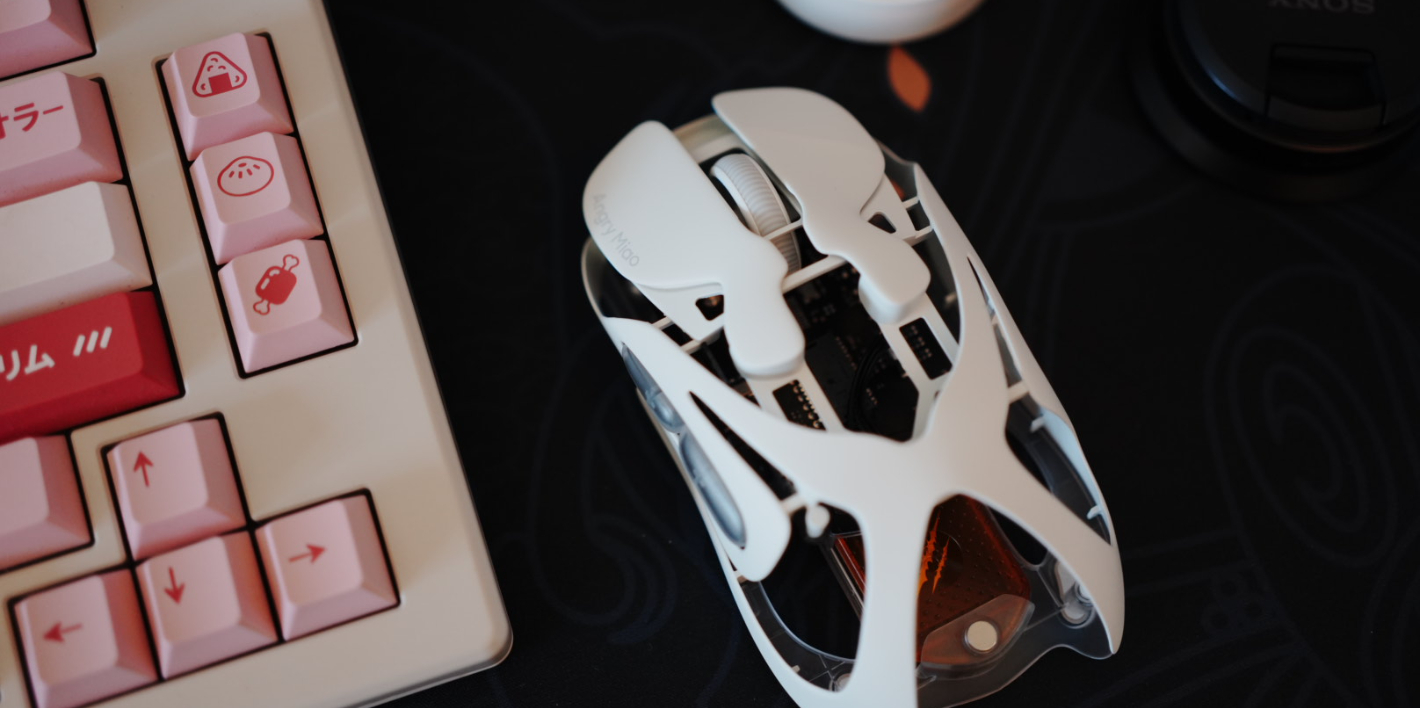
I put the Angry Miao Infinity Mouse in first place because it’s my personal choice for hardware of the year. I also want to give a quick shout-out to Tao—back in early August, he managed to snag the new Cloud White version as a birthday gift for me. Nearly five months have passed, and every time I use the Angry Miao Infinity Mouse, I still get that “can’t put it down” feeling.
The biggest difference between the Angry Miao Infinity Mouse and a typical mouse lies in its battery-swap design (something NIO car owners will probably appreciate even more). Angry Miao designed two hot-swappable magnetic batteries: one attaches to the mouse for normal use, while the other attaches to the 2.4G receiver module and charges in real time. Swapping batteries takes less than two seconds from start to finish, so you never have to worry about the mouse running out of power. I’d go so far as to call it a “genius-level design.”
Beyond the core battery-swap system, the design of the Angry Miao Infinity Mouse also hits my aesthetic sweet spot. Inspired by the Cloud White colorway from Isle of Dogs, it features a UV-coated finish and a hollowed-out magnesium-aluminum alloy body. Combined with its ultra-light weight of 49 grams (39 grams in wired mode), it delivers top-tier performance in both looks and hand feel.
If you’re considering the Angry Miao Infinity Mouse for gaming, there’s no need to worry about performance. It’s equipped with the PAW3950 sensor, offering 30,000 CPI native sensitivity, 750 IPS tracking speed, and 50G acceleration. The 2.4G receiver supports up to an 8000 Hz polling rate. As for the switches, it uses TTC Orange Dot optical switches V2, with the switch lifespan extended to hundreds of millions of clicks. The Angry Miao Infinity Mouse also supports the AM Master driver platform, allowing you to customize button mapping, RGB lighting effects, DPI settings, macros, and more.
NuPhy Node 75
Because my daily workflow involves both a desktop computer (for work) and a MacBook Air (for personal use), I needed an external keyboard that could connect to two machines at the same time. This not only saves what is already limited desk space, but also avoids the hassle of constantly swapping keyboards. Last month, I happened to see someone on Weibo sharing NuPhy’s low-profile keyboard, the Node 75. Both the price and the design fit my needs perfectly, so I picked it up for 325 RMB.
The biggest drawback of the WOB Rainy75 I used before was its weight. It was inconvenient to move around on the desk and couldn’t be placed on top of the MacBook Air’s keyboard area for use. As a result, I was constantly picking up and putting away this heavy chunk of aluminum, occasionally bumping into other items on the desk in the process. The NuPhy Node 75, on the other hand, is made entirely of plastic, which naturally makes it much lighter and a perfect fit for my needs. It’s easy to pick up and store, and in daily use I simply place it directly on the MacBook Air’s keyboard area, saving desk space. Even when I occasionally need to use Touch ID, lifting such a lightweight keyboard is effortless. I connect it to the MacBook Air via Bluetooth and to the desktop via the 2.4G receiver, switching quickly with FN + number keys, which is very convenient. One thing worth mentioning is that switching to 2.4G mode is almost instantaneous, with virtually no latency. Switching to Bluetooth takes about one to two seconds to reconnect, which is still acceptable.
I chose the low-profile version of the NuPhy Node 75 (Super Red switches, 45 gf). The typing feel is well-balanced: quiet enough for office use, yet not as soft and bouncy as the low-profile optical switches on the ROG Azoth RX LP. The retro white design is also very clean and understated, making it low-key enough for an office environment without drawing too much attention from colleagues. The dot-matrix design on the top of the keyboard is another highlight. The dot-matrix light on the left indicates the currently connected device, while the dot-matrix area on the right can be slid to adjust the system volume. It’s genuinely practical rather than a gimmick.
Anker Capsule Power Bank
As iPhone batteries have grown larger and battery life optimization has continued to improve, I’ve found that iPhones released in recent years can basically cover a full day of use for me. As a result, power banks have become more of an optional accessory—something I only really need for occasional business trips or travel. A product in the form factor of the Anker Capsule Power Bank fits this kind of usage perfectly.
This Anker power bank measures 77 × 36 × 25 mm and weighs just 100 grams, so it’s no burden at all even when carried in a pocket. The 2900 mAh capacity isn’t enough to fully charge an iPhone, but it’s more than sufficient for an emergency top-up. It also comes with a built-in Type-C connector, allowing you to plug it in and charge directly, eliminating the need to carry a cable and avoiding the awkward “dangling power bank” situation.
Mac mini M4
Since its launch last year and its subsequent inclusion in national subsidies, the Mac mini M4 has enjoyed an excellent reputation. I bought the “16 GB + 256 GB + 10-gigabit Ethernet” version earlier this year for around 4,000 RMB, which I already thought was a great deal. I didn’t expect that during the 618 shopping festival, with national subsidies and education discounts stacked together, the price would drop to below 3,000 RMB—arguably the most cost-effective Apple product ever.
Turning to the Mac mini M4 itself, performance upgrades are clearly the main highlight. With the M4 chip and a 16 GB base memory configuration, the Mac mini has transformed from an entry-level macOS experience machine into a standard Mac that’s powerful enough for most people. On top of that, the Mac mini M4 now supports HDMI-CEC and HDMI 2.1. For LG C4 users like me, this means enjoying a 4K HDR display with a 120 Hz variable refresh rate, along with synchronized sleep and wake control between devices—an excellent overall experience.
Pixel 9 Pro
The Pixel 9 Pro I bought in January may be the most emotionally conflicted piece of tech I’ve owned this year. In fact, before buying a Pixel, I had already managed my expectations—and that’s also why, despite being a long-time Google fan, I had put off buying a Pixel phone for so many years. Next, I’ll talk in detail about my love-hate relationship with the Pixel 9 Pro.
First of all, a major reason I finally decided to buy the Pixel 9 Pro was its design. In my view, this is the first generation where Pixel can truly be called “good-looking.” I don’t like large foreheads, and I don’t like rear fingerprint sensors. While it’s true that the Pixel 9 series’ display (uniform narrow bezels on all four sides, flat panel) and frame design (flat edges, polished metal) look very similar to the iPhone 14 Pro series, good design often converges. At the same time, the Pixel 9 Pro is lighter and has more rounded edges, making its in-hand feel far superior to Apple’s Pro lineup.
Second, stock Android is undoubtedly the core selling point of this phone. On the Pixel 9 Pro, I get to experience the latest features and UI interactions of pure Android. Every time I unlock the phone, there’s a refreshing, almost uplifting feeling. Gemini deserves special mention here: the leading model combined with deep, system-level integration turns Pixel phones into a benchmark for AI hardware in today’s market. The only issue is that, as someone deeply invested in the Apple ecosystem, it’s very difficult for the Pixel to become my primary phone. The lack of seamless sharing, the inability to pair with an Apple Watch, and the absence of certain ecosystem-exclusive apps are all very real constraints. Of course, this isn’t a problem with Pixel or Android itself, but rather an ecosystem choice dilemma faced by me as a regular consumer.
Finally, there’s the unavoidable and unsolvable issue of localization. As everyone knows, Pixel has never officially entered the mainland Chinese market, so 5G doesn’t work properly. Google also tightened restrictions even further in an October system update this year. Initially, with help from @Clyde, I enabled 5G connectivity through Root and tools like PixelIMS and Network Signal Guru. Later, I managed to “keep it alive” using Shizuku and an IMS plugin. The problem is that 5G enabled through these methods is unstable, and I frequently encountered dropped data connections and call failures. The final straw for me was emergency calling: once, after getting into a traffic accident while driving and needing to call the police, I discovered that my Pixel couldn’t dial emergency numbers like 110 or 122 at all.
As a result, the Pixel 9 Pro became my favorite phone—yet one I rarely use. Eventually, I restored it to factory settings, with no OEM unlocking and no Root. This way, I can normally use features like Google Wallet and Pixel Studio, and easily update to the latest version of stock Android without flashing. I take the Pixel 9 Pro with me when traveling abroad, using it for contactless payments, navigation, photography, and public transportation. But once I’m back home, the Pixel 9 Pro’s greatest role may simply be serving as an emotional connection between me and Google.
Clothing & Accessories
This year can be considered the first year in which I seriously reflected on my personal style, everyday outfits, and systematically learned about fabrics, materials, and functional use cases. With Tao’s help, I carried out a “carpet-bombing” cleanup of my wardrobe, recycling everything that didn’t fit, was worn out or faded, or had strange, mismatched styles. What remained were only the pieces I genuinely like and am willing to wear. When adding new clothing, in addition to brand, price, and fit, I also consider fabric characteristics and how each piece fits into an overall layering system. Using the “three-layer clothing system” as a foundation, I make targeted additions to fill specific gaps.
Watch the Wind — Three Pieces
I’ve actually known for a long time that Uncle Bo has been running his own clothing brand, but due to price and design considerations, I never pulled the trigger. During this year’s Singles’ Day sale, however, a post he shared on social media gained some traction and reminded me of the brand. I checked out this year’s releases on the Taobao store and found a few pieces that suited me quite well, so I ended up ordering three items over time. None of these are from this autumn/winter’s new releases, though—I haven’t managed to snag anything since Drop 5. Hopefully Uncle Bo will produce more in the future.
The piece I’m most satisfied with is the WtW half-placket pullover fleece mid-layer. It uses a 160 gsm lightweight fleece fabric that balances warmth and lightness very well. I especially like the half-placket collar design: it looks distinctive, and the snap closure is more convenient than either zippers or buttons.
The second piece is the WtW stretchable, machine-washable merino wool fitted base layer. The fabric is composed of 96% merino wool and 4% elastane, and with a fiber diameter of 19.5 microns, it’s very comfortable even when worn directly against the skin, without the itchiness commonly associated with regular wool. In terms of fit and design, this piece is more stylish than comparable products from Icebreaker, and it works fine even when worn on its own—unlike Icebreaker pieces, which tend to look more like thermal underwear. That said, the construction quality isn’t as good as Icebreaker’s. After one hand wash, I noticed significant seam tape peeling at the edges. At 350 RMB, it’s about 130 RMB cheaper than the Icebreaker Oasis 200, so it really comes down to personal trade-offs.
The third piece is the WtW garment-dyed lightweight dynamic insulated half-placket sweatshirt. It uses the increasingly popular PrimaLoft Active Evolve fabric (95 gsm version) from the past couple of years. As a mid-layer, it’s impressively lightweight while still offering decent warmth. For me, though, the half-placket design on this piece feels a bit restrictive, and visually it’s not as appealing as the half-placket pullover fleece mid-layer mentioned earlier.
Lululemon ABC Flannel Elastic-Waist Pants
Lululemon is a brand that offers almost no value at full retail price, but once you pick things up at deep discounts during shopping festivals, it becomes a clear “worth it.” After reorganizing my wardrobe this year, I realized that all the pants I had left were either too thick or too thin—nothing suitable for temperatures around 10°C. That’s when I set my sights on these Lululemon ABC flannel elastic-waist pants. I paid 479 RMB after the Singles’ Day discount; the regular price outside of promotions is 1,080 RMB. Even more interestingly, this pair is actually a new release for the winter of 2025.
In terms of fit, these pants lean toward a business-casual style. They’re made from brushed flannel fabric with a small amount of wool added, giving them a soft and comfortable feel. When worn directly against the skin in winter, they don’t have that “instant chill” sensation. I especially like wearing them on workdays: the relaxed cut is particularly important for long hours of sitting at a desk, and they’re also very easy to style. The “Heathery Black Pine” color looks more like black indoors, but under bright outdoor light, it takes on a subtle dark green tone.
OriginalGear Evolve Multi-Purpose Pants
In winter in the Jiangsu–Zhejiang–Shanghai region, I try to get by with just a single pair of pants. Only when temperatures drop to around freezing and I really can’t take it anymore do I consider adding long underwear. The biggest problem with long underwear is that it’s hard to balance comfort, warmth, and looseness. That’s why the OG Evolve pants—ultra-light yet warm—completely changed my winter pants-wearing habits.
The OG Evolve multi-purpose pants use PrimaLoft Active Evolve fabric (95 gsm), with a CLO value above 0.55. The entire pair weighs around 100 grams, almost perfectly balancing lightness, thinness, and warmth at the same time. The material is also very skin-friendly, making it comfortable to wear directly against the skin.
Of course, PrimaLoft Active Evolve isn’t without its drawbacks. Its biggest weakness is wind resistance—or rather, the lack of it. Even indoors, walking around at home wearing only the Evolve pants, I can feel a noticeable chill on my legs. Because of this characteristic, the Evolve pants are actually better suited for layering. At home, I usually throw on a pair of lounge pants over them. Outdoors, I layer an Arc’teryx Gamma Pant on top for wind protection. This combination easily fends off the “winter magic attacks” of the Jiangsu–Zhejiang–Shanghai region. If I could offer one suggestion to OG’s founder, it would be to make the pants slightly longer in the next iteration.
Speaking of PrimaLoft Active Evolve, some of you might be curious how it compares to Polartec Alpha Direct. I actually own a pair of Alpha Direct pants from another domestic brand. The cut and overall weight are similar to the OG Evolve pants, but the price is nearly double. To put it simply: when stationary, their warmth is about the same; when moving, Alpha Direct has better breathability; in terms of comfort, PrimaLoft Active Evolve feels more skin-friendly. For me, that makes PrimaLoft Active Evolve the more cost-effective choice.
Smartwool Merino Wool Socks
I actually mentioned Catman’s wool socks in last year’s annual recommendations, but after wearing them for a while, I realized they have two major drawbacks. One is poor breathability—they make my feet sweat easily. The other is that once my feet sweat, they become very slippery. As a result, they’ve basically been demoted to winter house socks. Still unwilling to give up, I picked up a pair of the famously well-regarded Smartwool socks while shopping at Paddy Pallin in Melbourne this year, just to hit the free-shipping threshold. There were so many styles that I didn’t do any research and simply chose one at random.
The first time I wore them after returning home, I was convinced that Smartwool truly deserves its reputation as the “god of wool socks.” First, the fit is excellent—the socks conform well to the shape of the foot, and the wool isn’t itchy at all. They’re comfortable and snug, forming a stark contrast with Catman’s wool socks. Second, Smartwool socks are anti-slip. Since they’re designed specifically for outdoor activities, this is something you don’t have to worry about at all. Finally, they’re sweat-absorbing and odor-resistant. To test this, I wore the same pair for five consecutive days, and there was genuinely no noticeable odor (at a normal distance—not by sticking my nose right up to them). The only issue is the price: at full retail, they’re hard to justify. When they’re discounted by half, though, they’re well worth buying via overseas shopping.
Montane PROTIUM XT Fleece
To be honest, I hesitated for quite a while about whether to include this piece. Before Links and Li Xian released their hiking video in Kulagangri, this “British Maotai” brand was still relatively niche in the outdoor world. But starting from the third day after the video went live, the “Li Xian same model” effect kicked in. The PROTIUM XT fleece and the “custard bun” KAMEN XT down jacket quickly sold out.
My original reason for buying this fleece was to fill a gap in my mid-layer lineup—a hooded fleece. My Patagonia R1 Air is a fleece jacket, and on windy winter days, I really want a warmer hood when heading out. A hooded fleece fits this scenario perfectly.
Once I had it in hand, I realized the PROTIUM XT fleece was much thicker than I expected—thicker even than Tao’s Patagonia R2 CrossStrata—yet it costs only about half to two-thirds of the price. This means that in addition to serving as a mid-layer, the PROTIUM XT can also be worn directly as an outer layer when the wind isn’t too strong. One morning in Zhejiang, with temperatures around 3°C, I tried heading out wearing a combination of “PROTIUM XT fleece + a POLARTEC PolarSport fleece sweatshirt + Icebreaker Oasis 200 merino long-sleeve base layer.” The warmth and insulation were excellent—I even broke a sweat after finishing a bowl of soy milk for breakfast.
As a British brand, Montane is actually quite reasonably priced in the UK. Some colorways of the PROTIUM XT fleece sell for as little as £65 on third-party platforms, making it possible to get one at a relatively low price through overseas shopping or purchasing agents. Prices on the domestic Tmall flagship store are slightly higher than on Montane’s UK official site, but still well within a reasonable range—unlike some other popular outdoor brands where the price gap between domestic and overseas markets is huge.
As for downsides, personally I find Montane’s tailoring and finishing not quite on par with top-tier brands like Arc’teryx or Patagonia. That said, considering the price, I’m perfectly willing to accept this relatively minor difference.
Home & Daily Essentials
Tanita Body Weight Scale
I’ve actually bought quite a few so-called smart body fat scales. Setting aside build quality and data accuracy, their “smart” features basically boil down to connecting to various apps and giving you a health analysis based on weight and body fat. Without exception, those apps are all incredibly annoying—crammed with shopping malls, communities, and check-in features—and syncing data to HealthKit is also a hassle.
So I decided to go back to basics. No more body fat measurements, no more health diagnostics, no more data syncing. I just wanted a simple, straightforward scale. After some searching, I ordered this Tanita scale, and after using it for a year, I’ve been very satisfied. First, the design is extremely minimalist—completely different from those smart body fat scales—and it blends in nicely at home without looking out of place. Second, the all-plastic body means that stepping on it barefoot in winter doesn’t feel icy cold. By contrast, smart body fat scales usually have four metal contact areas, and stepping on those barefoot in low temperatures is genuinely freezing. Finally, saying goodbye to all those bizarre apps also means saying goodbye to data anxiety. All I need is a simple number showing my weight.
Hero Thunder Distribution Tool (WDT Needle)
I’ve always been pretty laid-back when it comes to coffee distribution, so channeling during extraction was almost inevitable. I figured I’d buy a cheap distribution needle—basically just a few steel wires stuck into a cork. To be honest, the results were terrible, and it still couldn’t achieve even distribution. Of course, there are plenty of expensive options on Taobao. Press down on them and the needles rotate automatically, achieving very even distribution by design, since vertical movement is eliminated and only horizontal concentric rotation remains. But at around 300 RMB, I really couldn’t bring myself to buy one.
So instead, I found a lower-cost alternative in the same category. It replaces the downward pressing action with manual rotation, costs only 62 RMB, and works very well—one of those results that’s immediately intuitive and easy to understand.
Feather Double-Edge Razor Blades
I might be one of the few people left who still sticks with a manual razor. Since college, I’ve used various Gillette razors, but honestly, they were never that great. Around 2018, on a former colleague’s recommendation, I bought a Rockwell razor on Amazon. It’s very old-school, with replaceable blades, and it shaves smoothly and cleanly. However, after Amazon exited the Chinese market, I could no longer buy replacement blades for the Rockwell.
That changed this year when I found Feather’s Tmall flagship store. Seeing that five blades cost just 30 RMB, I decided to give them a try. To my surprise, these Feather double-edge blades fit my Rockwell razor perfectly and perform beautifully—smooth and clean shaves, a perfect replacement for the original Rockwell blades. At this rate, it looks like I’ll be able to use this Rockwell razor for the rest of my life.
Qinghexun Air Purifier Filters
After moving into a new office building last year, I was worried about formaldehyde, so I moved one of my Xiaomi air purifiers from home to my desk and kept it running 24/7. The problem is that official Xiaomi filters are too expensive. I tried buying third-party filters on Xianyu—they were cheap, but I never really felt at ease using them. Later, I happened to come across the brand Qinghexun on Xiaohongshu. I learned that it’s a subsidiary of Beijing Hengjianlun, a strategic partner of Toray in Japan, with its own dust-free production facilities and seven filter production lines. Their filters are compatible with various Xiaomi air purifier models and use Toraymicron triple-protection filter paper from Japan’s Toray. That convinced me to place an order on Taobao.
Once the filters arrived, I could tell immediately that even the packaging was on a completely different level compared to the small workshop products I’d seen on Xianyu. The filter itself looked well made, and the RFID chip was perfectly recognized by my Xiaomi air purifier. During the Double 12 sale, I stocked up on two more Pro All-in-One flagship filters, which support antibacterial, anti-mold, antiviral, anti-allergen functions, as well as formaldehyde removal. Calculated out, each filter cost just 86 RMB.
Xiaomi Air Circulation Fan
Because my apartment is on the top floor and the bedroom faces south, it cools down very slowly in summer even with the air conditioner on. As someone with fairly high demands for a good sleep environment, I decided to add a circulation fan to address the persistently high indoor temperature. After some comparison, I chose the Xiaomi Air Circulation Fan for three reasons: first, the design is quite minimalist and doesn’t look out of place in the bedroom; second, it runs very quietly—when sleep mode is enabled at night, it’s almost inaudible; third, it can be integrated into HomeKit via Home Assistant and the official Mi Home plugin, allowing me to turn the air conditioner and fan on or off together with a single tap in the Home app or via Siri.
As a circulation fan, the Xiaomi Air Circulation Fan also met my expectations perfectly. On the one hand, it helps disperse the cold air blown out by the air conditioner, preventing it from quickly sinking to the floor. On the other hand, it directly lowers the surface temperature of the body. With the low airflow in sleep mode, there’s no need to worry about getting chilled.
Food & Wellness
Yourongnaida Coffee Beans
Ever since I downed two cups of Yourongnaida’s Saturday-limited cold brew (Panama Altieri Mimosa Geisha) in one go back in June, Yourongnaida has basically supplied almost all of my coffee beans for the second half of the year. I checked my Taobao order history and realized that since June, I’ve bought 19 bags of Yourongnaida beans—safe to say I’m a loyal fan.
For espresso blends, you can buy the seasonal limited editions without overthinking it. They’re slightly more expensive than the regular blends, but the quality is consistently high. I’ve bought everything from the spring and summer editions all the way through the fall and winter ones, with multiple repeat purchases for each season—never a miss. For pour-over beans, I recommend a cost-effective option with a very distinctive flavor: Colombia Milan Estate Caturra anaerobic washed. It works well for pour-over and SOE Americanos. The first time I tried this bean was at Slab Town, where I ordered a combo featuring it—the hot Americano left a particularly strong impression. I won’t recommend the expensive beans, because expensive beans are almost always good, and don’t really need recommending.
Code Black Coffee Beans
For international beans, I’d like to recommend the Australian brand Code Black. When Tao and I were in Melbourne, we visited a Code Black café in person, and both the milk-based drinks and cold brew were excellent. So when I came back to China, I brought home a bag of the Santuario Project, a Colombian SOE. I’ve used it for Americanos, pour-over, and cold brew, and it’s been great every time—so good that even Tao, who usually doesn’t like black coffee, really enjoyed it.
Later on, I bought another bag through an Australian proxy: Code Black’s Ex-Wife espresso blend. It’s a blend of beans from Brazil, Guatemala, and Ethiopia, and the overall impression is very balanced. It works equally well for milk-based drinks and black coffee. If it weren’t for the long proxy shipping times, this would be a blend I’d repurchase endlessly.
Guanghua Silver Rice Vermicelli
As non-Cantonese, Tao and I learned about this rice vermicelli from Houpi Orange. After trying it once, there was no turning back—we’ve been repurchasing it ever since.
In terms of texture, silver rice vermicelli is quite similar to the rice noodles from my hometown. However, it has a slightly rougher bite, and even if you cook it longer, that texture remains. This is completely different from the softer, chewier texture of my hometown’s rice noodles. As for cooking methods, it works well boiled or stir-fried. I usually boil it—it cooks very quickly, is low in calories, yet surprisingly filling. This makes it an excellent staple for fat-loss meals. Just add some beef and vegetables, plus half a spoon of garlic crisp oil, and the scale starts dropping fast. For storage, just keep it in a cool place. Since it’s dehydrated and vacuum-sealed, there’s no need to worry about spoilage. One pack per meal—just cut it open and toss it into the pot.
Midea Dishwasher UP2Pro
Tao and I had wanted to buy a dishwasher for a long time, but our old apartment didn’t have space reserved for a built-in model, and countertop models often involve complicated plumbing and drilling, so we kept putting it off. This year, however, considering the upcoming arrival of a baby and the need to thoroughly clean and sterilize tableware and baby bottles, we finally decided to get one. After looking around, we chose the Midea UP2Pro dishwasher. With national subsidies and various discounts, it cost less than 1,400 RMB, and it supports three installation methods: countertop, semi-built-in, and wall-mounted.
Before the installer arrived, we cleared off the kitchen countertop and made space next to the sink, where there happened to be a power outlet. When the installer came, he told us that drilling into a stainless-steel sink is quite difficult and suggested drilling into the marble countertop instead. We agreed. In the end, the setup involved drilling a single hole for the inlet hose, while the drain hose was inserted directly into a small compartment of the sink, saving us from having to drill a second hole.
The Midea UP2Pro supports features like one-touch baby-care sterilization washing and one-touch hot-air drying. On the control panel, you can directly select modes such as fruit and vegetable wash, baby-care wash, quick wash, intensive wash, and standard wash. In the Midea app, there are additional options like eco wash, self-cleaning, and seafood wash. In daily use, we usually give the dishes from all three meals and our coffee cups a quick rinse, load them into the dishwasher, and after dinner run a “quick wash,” which takes 30 minutes, followed by up to two hours of drying as needed. We’re extremely satisfied with both the washing and drying results—the dishes come out very clean, with almost no water marks. Ever since we bought the Midea UP2Pro, our willingness to cook at home has increased significantly. It ensures food safety, saves money that would otherwise go toward eating out or ordering takeout, and even helps us improve our cooking skills—truly a win on all fronts.
Decathlon EL520 Elliptical Trainer
Whenever Tao and I go to the gym for cardio workouts, the elliptical is always our first choice. So when it came time to choose home fitness equipment, an elliptical was our top priority as well. Compared with a treadmill, an elliptical takes up less space and weighs less, making it easier to transport and install. After considering factors such as stride length, flywheel weight, and brand after-sales support, we ultimately chose the Decathlon EL520 elliptical trainer. Once we had narrowed it down, we went straight to a Decathlon brick-and-mortar store to try it out. After the trial, we were very satisfied with the stride length, stability, and smoothness, so we placed an order on Taobao.
The morning after placing the order, the unit was delivered directly to our home, and in the afternoon an installer came to set it up. The entire installation took about 30 minutes. We’ve been using it ever since without any issues. Using an elliptical at home is probably one of the most suitable forms of exercise: it doesn’t disturb downstairs neighbors, and you can work out while watching TV, which greatly reduces the boredom of cardio. It’s now become a daily must-do activity for both Tao and me.
That wraps up my 2025 annual favorites. If you have any questions or other recommendations, feel free to share and discuss them in the comments.
Welcome to this edition of Pi Review. You can use the table of contents to quickly jump to the sections you’re interested in. If you’ve discovered other interesting apps or topics you’d like us to cover, feel free to join the discussion in the comments.
New Apps Worth Paying Attention To
While SSPAI has long been committed to discovering and introducing high-quality apps across platforms, there are still many excellent apps—impressive in design, functionality, interaction, and overall experience—that we haven’t yet covered. Some may be long-standing apps, others newly released. We’ll be introducing them to you here.
Powo: Hang a Photo Wall on Your iPhone Home Screen
Platform: iOS
Keywords: photo wall, widgets
@ElijahLee: Powo lets you turn a curated collection of photos into a desktop-style photo wall and place it directly on your iPhone Home Screen, so you can revisit your favorite memories without even opening the app.
Creating a photo wall with Powo is very straightforward. The app offers five photo wall templates to choose from. Simply go to the Photos tab, select the images you want to “hang” on the wall, and you’re done. Each photo is framed with a Polaroid-style border, creating a realistic, skeuomorphic look.
The photo wall also comes with a wide range of decorative tools. Beyond photos, you can freely add figurines, stickers, posters, captions, holiday elements, ticket stubs, and more. If you want to add your own custom decorations, that’s easy too. The customization feature allows you to select images from your system library and instantly turn full-size photos into stickers, vinyl records, CDs, and other decorative elements, all with impressively realistic results.
Powo also offers powerful freeform editing and layout options. You can customize the background, colors, and border styles of your photo wall—whether you’re aiming for a felt-board look to suit close relationships, or a dark-toned style better suited for photography showcases. Photos themselves come in multiple styles, with mounting options like push pins or small wooden clips. Any photo or decorative element on the wall can be tapped to adjust its size and hanging angle, making the overall effect feel even more lifelike. If you’re not satisfied with how photos overlap, the app even provides layer-order controls.
Once your photo wall is complete, you can add it to your iPhone Home Screen via a Powo widget and enjoy your memories without opening the app. Of course, you can also export the photo wall within the app to save it locally or share it on social media.
Powo is available for free on the App Store. Most features are usable at no cost, but the free version is limited to creating one photo wall, with up to five photos per wall, and does not support customization features. Upgrading removes these restrictions, with pricing at CNY 3 per month, CNY 18 per year, or a one-time purchase of CNY 38.
Mental Math: Practice Calculations Anytime, Anywhere
Platform: Android
Keywords: calculation, mathematics
@Peggy_: After starting work, aside from routine lesson reviews, I’ve found myself using my brain far less than before. For a while, I turned to sudoku to pass the time and keep my mind active. The app I’m introducing today—Mental Math—can serve as another simple tool for mental exercise. Mental Math is a puzzle-style app whose core function is to generate arithmetic problems. Because the types of calculations, difficulty levels, and even the number of questions can all be freely customized, it works both as a brain-training game for adults and as a practical tool for elementary school students to practice their calculation skills.
After opening the app, the first step is to set the practice mode. There are two options: a fixed number of questions or a timed session. The number of questions can be set from a minimum of 10 to a maximum of 50, while timed sessions range from 1 to 5 minutes. Once the mode is selected, you can further design the calculation types. Available operations include addition, subtraction, multiplication, and division. Tapping an operator selects it, and dragging the slider on the right adjusts the difficulty—the larger the number, the more challenging the problems become. Perhaps in order to keep the app lightweight and the difficulty manageable, Mental Math does not offer mixed-operation questions.
After completing the initial setup, you can enter the quiz interface. Once all questions are finished, Mental Math provides feedback on the session, including total time spent, accuracy rate, and a list of questions with their answers. As you complete more exercises, the app aggregates your results and assigns an overall star rating.
Of course, if you’re just looking to do a few quick exercises out of boredom, you can choose Random Mode. The app will automatically generate 20 questions for you. However, since the difficulty in this mode is unpredictable, it’s not well suited for younger students.
So the next time you’re bored and about to open TikTok out of habit, you might consider doing a few calculations instead to keep your mind active. Or if you have children in the lower or middle grades of elementary school who need regular arithmetic practice, Mental Math is also a solid option. For kids, short sessions during spare moments—paired with instant feedback—can be an effective way to train.
You can download and try Mental Math via F-Droid. The app is completely free.
TranscribeX: A Local-First Power Tool for Speech Transcription
Platform: macOS
Keywords: text extraction, speech transcription
@化学心情下2: TranscribeX is a speech-to-text transcription tool for macOS. Compared with many transcription apps that rely on online AI models, TranscribeX’s biggest advantage lies in its fully local AI–based approach. All transcription is performed locally, meaning data is stored entirely on your device—ensuring a much higher level of data security and privacy.
In terms of functionality, TranscribeX offers multiple ways to capture audio, including importing audio and video files, recording directly, hooking into recording-type applications, and importing from sources like YouTube. On the model side, it supports Apple’s built-in intelligence models as well as locally downloaded large models. Supported transcription models include Whisper, NVIDIA Parakeet, and others.
To get started, you first need to set the default model and default transcription language under Transcription in the settings. Then return to the main screen and click Import to bring in the audio or video file you want to transcribe. In my case, I selected a two-hour YouTube video. From there, you simply wait in the transcription workspace until the progress bar completes.
TranscribeX splits the audio into multiple time segments and displays the transcribed text by segment. This allows you to start organizing and reviewing the completed portions immediately while the rest of the transcription is still running, significantly improving overall processing efficiency.
Once the transcription is finished, you can export the text in multiple formats, making it easy to continue working with it in other apps. You can also translate the transcribed text into other languages directly within the app.
In testing, transcribing a two-hour audio file took nearly one hour. This may partly be due to the limited performance of my M1 MacBook Air. Even so, overall accuracy was quite high, and the results were well suited for further editing, organization, and summarization.
You can download and use the basic features of TranscribeX for free from the official website. Purchasing the Pro version unlocks additional local models and a range of advanced features. Setapp users can access the paid version of TranscribeX directly.
Artwall: Turn Your Favorite Album Covers into Wallpapers
Platform: HarmonyOS
Keywords: wallpapers, music albums
@侧脸君: Artwall is a distinctive wallpaper app on the HarmonyOS platform, built around a clever idea—combining album artwork with wallpapers. With its unique image-processing algorithms, virtually any album cover can be transformed into a stunning phone wallpaper.
The interface and features are extremely simple. Just enter a song title or artist name, tap to view the album-cover wallpapers, and download them. At the moment, Artwall does not support setting wallpapers directly within the app—you’ll need to manually go to your gallery to set the image as your wallpaper.
Although Artwall doesn’t offer an option to choose wallpaper resolution, the resolution is tightly bound to the device being used. If you’re on a Huawei foldable device, the wallpaper resolution and layout saved for folded and unfolded states will differ accordingly.
A good idea naturally sparks the urge to share—especially when it satisfies both “showing off your wallpaper” and “sharing your music taste” at the same time. Just five days after its first release, more and more screenshots of wallpapers generated by Artwall have already begun circulating on social media, highlighting users’ distinctive musical preferences.
You can download Artwall from the HarmonyOS App Gallery. The app is completely free.
Summary Expressive: An AI Summarization Tool with Bilibili Support
Platform: Android
Keywords: video summarization
@大大大K: One of the most common uses of AI tools is solving the “TL;DR” problem. Whether it’s a text running thousands of words or images packed with information, AI can easily extract the key points. For video content, however, the mainstream approach still relies on subtitles or transcripts provided by video platforms, converting them into structured text for analysis. This is where a third-party tool like Summary Expressive comes in, feeding platform-generated transcripts to AI models.
Summary Expressive supports multiple content formats, including plain text, web links, images, Word documents, and PDFs. Simply select a file within the app and the AI can quickly generate a summary—tasks that are trivial for modern AI models and don’t even require separate conversion tools. Video summarization is different, though: subtitles and transcripts embedded by video platforms aren’t always standardized like documents or images, which is why Summary Expressive is particularly useful here.
Summary Expressive supports video links from YouTube and Bilibili. After pasting a video link, you can choose the desired length of the summary. In practice, longer summaries aren’t dramatically longer in word count, but they do provide more comprehensive coverage. Medium and short summaries tend to omit some details. The app also offers a text-to-speech feature for summaries, making it ideal for quickly reviewing video content while commuting.
Summary Expressive supports major AI model APIs both domestic and international, including OpenAI, Gemini, and DeepSeek. If you want to summarize Bilibili videos, you’ll need to log in to your Bilibili account in the settings beforehand.
You can now download Summary Expressive for free from GitHub and Google Play. The GMS version requires Google Play Services and downloads image-recognition models online, while the standalone version includes built-in models—choose whichever best suits your needs.
App Updates You Shouldn’t Miss
Beyond brand-new releases, many familiar faces on the App Store continue to iterate and evolve, adding features that are both interesting and genuinely useful. At SSPAI, we aim to help you filter through the updates that are truly worth your attention, so you can quickly stay up to date with the latest moves from apps and their developers.
PhotonCam 1.30 Update: A More Refined Editing Experience for Pro-Level iPhone Photography
Platform: iOS / iPadOS
Keywords: mobile photography
@Vanilla: iPhone photography enthusiasts may already be familiar with PhotonCam. While it’s not a household name, this third-party camera app stands out for its rich feature set, polished design, and well-thought-out interactions. At the same time, the developer actively embraces new system features and keeps pace with advances in imaging technology, allowing users to enjoy a more professional photography experience on the iPhone. Recently, PhotonCam rolled out version 1.30—its final major update of 2025—focused primarily on improving the photo-editing experience. Let’s take a look.
First, PhotonCam has updated the HDR display behavior of the focus indicator. More specifically, when adjusting depth-of-field effects on HDR photos within PhotonCam, you can tap the screen to position the focus indicator. In the new version, the area covered by the focus indicator is now rendered with HDR effects as well, making it easier to accurately select the desired focus point.
Second, the new version also refines the behavior of parameters such as fading and brightness adjustments, and introduces a setting that automatically falls back to SDR when the system crops HDR photos under strong lighting conditions. PhotonCam has also improved its launch speed, allowing you to enter shooting mode faster and capture moments more promptly. In addition, a new photo queue feature has been added: when shooting in burst mode or when photos require longer processing times (such as long exposures at night), PhotonCam displays a real-time counter on the gallery button in the lower left corner, indicating how many photos are currently being processed.
Finally, PhotonCam has introduced several new Lock Screen widgets, including options for wide-angle, telephoto, and ultra-wide lenses. However, the developer has clarified that tapping these widgets will only open the app, rather than directly switching to the corresponding focal length. It’s unclear whether this is due to system permission limitations or other design considerations.
That covers the main highlights of PhotonCam’s 1.30 update. If you’re looking for a full-featured third-party photography app on iPhone that balances both shooting and editing capabilities, PhotonCam remains a very solid choice. PhotonCam is available on the App Store under a “free download + in-app purchase” model, with subscription options priced at CNY 12 per month or CNY 68 per year, as well as a one-time lifetime purchase option for CNY 88.
Controller for HomeKit 8.1: Introducing State Logic
Platform: iOS / iPadOS / macOS / watchOS
Keywords: smart home, HomeKit
@Snow: Last week, Controller for HomeKit rolled out version 8.1, introducing an all-new States feature. Compared with the native Home app or Aqara’s “Scenes,” which apply a one-time batch change to device states, States enable Controller to support much more complex logical layering, allowing users to build far more flexible automation flows.
Within Workflows, you can create all kinds of state logic. For example: when “Dog at Home” is active, enable the balcony door sensor and alarms; when “Deep Cleaning” is active, pause all motion-triggered lighting rules; when “Guests Visiting,” keep all living room lights permanently on; when “Watching a Movie,” silence all notifications and alarms. On the surface, each individual state may look similar to a scene, but the real power lies in the fact that States not only support logical stacking, they can also be used as triggers, conditions, steps, or stop events within a wide variety of workflows.
For instance, if you’re about to do a deep clean after walking the dog, you can enable both the “Dog at Home” and “Deep Cleaning” states at the same time. This way, the lights won’t constantly change while you’re cleaning, and you’ll still receive notifications if your dog is causing trouble on the balcony. You can also use “Guests Visiting” as a workflow trigger: while turning on the lights to welcome visitors, the system can notify your family members and immediately lock the study door—preventing curious kids from wreaking havoc on your “collection.”
Back in version 7.4, when Hub Mode was introduced, Controller already brought external control links to non-HomeKit users. With this update, the new States feature also supports external control URLs. This means you can use local Shortcuts, or third-party workflow tools like IFTTT, to trigger vacation modes via calendar events or quickly change states from non-Apple devices.
After the 8.0 update, the developer restructured Controller’s pricing model. The original subscription / lifetime purchase option has been renamed Controller Essentials, with the lifetime price remaining unchanged. However, continued access to Hub Mode, Automate Workflows, and the new charting features now requires a Controller Plus subscription. Non-Essentials users must pay CNY 598 per year, while Essentials users can subscribe for CNY 228 per year, both with a 7-day free trial. The price barrier for Controller has clearly risen, so it’s recommended to try it out before deciding whether to commit to further payment.
Picking up from the previous post, when I went to buy the NiceBuds, I first noticed the ¥99 Bamboo 2 in the shop and felt a bit tempted. But after browsing around on Bilibili, I realized it didn’t really have anything that stood out to me. On top of that, many people mentioned issues like easily broken pins and inconsistent volume between the left and right earpieces, so I passed on it. While looking up related impressions, I discovered that the LAN 2—released in two versions—actually received quite decent reviews. After some comparison, I decided to pick one up to get a taste of what people call “Hi-Fi.”
Moondrop’s LAN 2 comes in a POP version and a REF version. The former has a moderate boost in the low frequencies and, according to the official description, is more suitable for pop music, while the latter is better suited for instrumental listening. Since I don’t like that kind of bass that pounds your head, I chose the REF version. In my personal experience, the REF version gives a very clean and transparent listening impression. Especially when listening to instrumental albums with no vocals, such as The Moonlight Zoo, or the orchestral sections in Sodagreen’s album Winter, Ended, each instrument is clearly distinguishable while still blending together harmoniously. Even with pop music, the REF version performs quite well to my ears.
What surprised me the most was how these earphones helped me notice small details in arrangements that I used to overlook. For example, at the beginning of Wu Qingfeng’s Outsider, there’s a faint “da-da” sound in the background. I first noticed this detail with the LAN 2 REF. When I went back to listen with other earphones, I found that the sound was actually there too—but it was easily masked by other melodies and hard to pick out.
In terms of comfort, the LAN 2 is quite comfortable for me. The stock cable in particular is soft and slim, making it much more comfortable than a similar in-ear model I tried before. After switching to the MC2, however, the cable became thicker, and the over-ear section no longer used the relatively rounded, wrapped design of the stock cable, making the cable feel much more noticeable on my ears.
MC2 (left) vs. stock cable (right)
As for why I bought the MC2 cable: on one hand, the stock cable uses a 4.4 mm connector. Although Moondrop includes a 4.4-to-3.5 mm adapter, having an extra dangling adapter never feels quite right. On the other hand, I wanted in-line controls to change tracks. While the three-stage volume buttons on the side of the iPod nano 7 can be used to skip tracks without waking the screen, I still have to take the device out, which is a bit inconvenient. As for sound quality, honestly, I can’t really tell any difference between the stock cable and the MC2.
For an ordinary listener like me, who isn’t a hardcore audiophile, the LAN 2 REF version does bring a somewhat different listening experience. At the very least, since getting it, I’ve switched my daily listening from EarPods to these.
@张奕源Nick: Snapmaker U1 Color 3D Printer
Note: We also produced a video hands-on of the Snapmaker U1 at the same time. The content differs from New Stuff and can be used as a supplement to the text version. Click to watch.
Friends, I’ve recently been wanting to properly organize both my home and office desks, which is what got me interested in 3D printing.
The 3D printing community strongly embraces the open-source spirit, and on various model platforms you can find all kinds of fun and practical storage box designs. For someone like me, with potentially large and ongoing needs, batch printing makes more sense than buying finished products—both economically and in terms of customization. With 3D printing, you can adjust dimensions and even iterate through trial and error, which fits my personalized needs much better.
As it happens, Snapmaker (Kuàizào Technology) recently launched their consumer-grade color 3D printer, the Snapmaker U1, on JD.com. Our office got one right away, and I kicked off my 3D printing journey by “borrowing the company machine.”
Snapmaker U1 exterior
The biggest highlight of the Snapmaker U1 is a system called SnapSwap™—an independent four-head parallel setup. Put simply, this system allows four independent print heads to work on a single print job together, eliminating the need for mid-print filament swapping and purging, and enabling true one-pass multicolor printing.
The basic idea works like this: before a print job starts, the U1 preheats all four print heads. Once preheating is complete, all four heads remain on standby. During printing, when a specific head is needed, the machine switches to it directly. The U1 uses a steel-ball positioning coupling structure, ensuring precise alignment and secure locking when the print-head exchanger grabs a head—without relying on screws, magnets, or additional motors. The entire head-switching process can be completed in as little as five seconds.
Independent four-head parallel system: all four print heads stay on standby, and the machine simply “grabs” whichever one it needs
This independent four-head system isn’t just for show—it delivers real efficiency gains. With traditional single-head printers, multicolor printing requires filament swapping and purging, which means stopping the print mid-job and manually changing materials. After each swap, the printer also has to purge the nozzle, producing a significant amount of waste. This back-and-forth costs both time and material, making it far from economical. With the U1, manual filament swapping and purging are eliminated. All four heads are prepared in advance, and automatic head switching during printing is so fast it’s practically negligible. In effect, you can complete multicolor prints in roughly the same time as single-color ones, dramatically boosting efficiency.
The machine can also print with multiple materials in a single job
Thanks to this capability, there are plenty of time-saving workflows you can explore. I often print storage boxes of the same size in different colors, so when setting up a job I’ll place multiple models in different colors on the same build plate. That way, the printer can produce multiple components in one go, saving the time of repeatedly starting new jobs, reheating the machine, and reloading materials. If you want the finished product to look a bit more playful, you can also assign colors while arranging the layout. From my simple comparisons, as long as the base model is the same, there’s little difference in total print time between single-color and multicolor jobs. So the strongest impression the U1 left on me is that even multicolor printing remains highly efficient—you don’t have to worry about it slowing you down.
You can tweak colors during layout to fully leverage the U1’s efficiency advantages
And because there’s no repeated mid-print filament swapping, the U1 only needs to purge the print heads once at the start of each job. The larger and more frequent your print batches, the more material cost you save. All waste material is neatly collected in the waste box, which only needs to be emptied about once a week.
The waste box is hidden at the rear of the machine
Beyond its core four-head parallel system, the Snapmaker U1 performs well in other areas too.
First, print quality is solid. All my print jobs use the standard 0.4 mm nozzle and the default 0.2 mm layer height, yet the U1 still delivers sufficiently fine layers and detailed results.
The built-in Charmander model: scales and horns are rendered with impressive detail
Second, nearly all functions are automated—one-click filament unloading and loading, automatic multi-head calibration, automatic bed leveling, and more. Combined with parameter adjustment and camera monitoring via the mobile app, you can basically walk away once a print starts. Many of my prints are set up after work and left to run overnight in the office; I just pick up the finished parts the next day, which is incredibly convenient.
Real-time print progress monitoring via the mobile app
Snapmaker has a strong following overseas. While searching for tutorials and references, I came across many YouTube creators reviewing and sharing their experiences, and the maker community seems to really appreciate Snapmaker’s high value-for-money products with a distinct design ethos. Interestingly, before the U1 arrived, our office already had an older 3D printer, but few people paid much attention to it. Since getting the U1, however, many colleagues have started asking how to print their own items or proposing product ideas. It really shows that when a printer is efficient and easy to use, it can spark creativity.
Multicolor products printed with the Snapmaker U1
The Snapmaker U1 is currently available in stock on JD.com. After national subsidies, prices start at RMB 4,504.15, making it highly competitive in its class. If you’re looking for a low-fuss, high-efficiency desktop color 3D printer, the Snapmaker U1 is definitely worth a look.
@鲸鱼鱼: Cookie Budget — Lifetime Membership
Reference price: RMB 68
As a long-time SSPAI reader, I feel a certain obligation to tinker with budgeting apps—and to spend money on an app to track how I spend money. After using MoneyWiz and MOZE on and off for several years, I realized my needs are actually very basic: by the end of the month, I just want to know roughly where my money went. For me, these professional, feature-heavy budgeting apps feel a bit “over-specced.” So when I heard that MOZE’s subscription price was about to increase, even though I was reluctant to part with its polish and professionalism, the higher fee made me reconsider whether it was really necessary. That’s when I started looking for a new budgeting app.
After asking fellow editors and AI for recommendations, I downloaded several budgeting apps to try briefly. Cookie Budget stood out as the one that impressed me the most at first glance. First, its overall design is clean, and the little cookie icon—true to its name—adds a touch of cuteness. Second, Cookie offers a feature specifically for tracking software subscriptions, with support for multiple currencies and automatic entries upon renewal. Subscription management and expense tracking are unified in one place, so there’s no need to jump between apps—perfect for my lazy instincts. Third, in terms of functionality, it covers everything I need, including iCloud sync and basic reports.
Widgets, icons, and subscription management
However, as I explored more features, I also noticed some less intuitive design choices. Cookie’s accounting logic differs slightly from MoneyWiz and MOZE. For example, the latter apps use receivables and payables to cover scenarios like loans, reimbursements, and paying on someone else’s behalf. In Cookie, these are split into more specific entry points, such as lending assets, borrowing assets, reimbursement records, or initiating a bill refund to calculate split payments. Take splitting the cost of milk tea with colleagues as an example: in MOZE, one transaction plus a receivable does the job, but in Cookie, you need to record the total first and then handle the split as a refund-based AA collection. The receivable flow feels more roundabout. That said, laziness really is the primary productivity driver—I simply treat all AA receivables as reimbursements. While this sacrifices some statistical granularity, the steps align better with my thinking and feel smoother to use. There’s another limitation in Cookie’s categories as well: a single transaction can’t be assigned to multiple categories. If you buy groceries, household supplies, and toys in one supermarket trip, you have to record three separate transactions in Cookie.
The reimbursement record and subscription management buttons are also inconsistently placed—one on the left, the other on the right
In addition, Cookie feels a bit rough around the edges in some details:
Expense categories support hierarchies, but all default categories are single-level. Some are very broad, like clothing, food, housing, and transportation, while others—such as water bills, electricity bills, or snacks—really belong at a second level. It takes quite a bit of effort to reorganize everything properly.
Subscription information defaults to the “app subscriptions” category, but for convenience I deleted that category and replaced it with a broader “applications & software” category. When creating new subscriptions, however, they still default to the now-nonexistent “app subscriptions” category. I couldn’t find any way to change this default, so I have to manually adjust it every time.
The feature hierarchy isn’t very clear, and some actions are hidden away. Subscriptions have auto-recording enabled by default, but there’s no option to toggle this when creating a new subscription. For subscriptions where I want to confirm renewal at expiration, I can only disable auto-recording afterward by going into the subscription details and using the menu in the top-right corner.
That said, Cookie overall meets my needs and simplifies my workflow for both subscription tracking and general expense logging. The development team has also maintained a steady cadence of one or two updates per month in recent years, continually refining the product. And considering that its lifetime membership price is relatively affordable among budgeting apps, it still feels like a worthwhile investment overall.
@路中南: Cat Slow Feeder
Reference price: RMB 20
I have two cats at home. The pure-black older one was adopted years ago from a rescue shelter in Shenzhen with Lao Mai, and it’s of the same lineage as the office’s calico cat, Diandian. However, this creature has had one habit unchanged for years: eating far too fast. Perhaps that’s exactly why it’s overweight (7 kg+), and why it occasionally vomits piles of undigested kibble—something that’s become even more frequent in winter. If it happens when no one’s home and the robot vacuum blindly rolls over it, the trouble can be huge. And yes, that did happen to me last month.
Let’s just call it Black Pig. From its official name “Juanjian,” to the nickname “Little Black,” and finally to the moniker “Black Pig,” it only took about two years. Over those two years, I tried quite a few methods to ease its vomiting (it’s heartbreaking to watch your clumsy eldest vomit): switching to warm water in winter (helpful, but easily contaminated by dust), making a DIY rolling bottle feeder (which it completely ignored, only charging like a pig whenever the automatic feeder dispensed food), and so on. This time, Taobao recommended a cat slow feeder, and after using it for two weeks, here are my thoughts.
Why is it called a “slow feeder”? Because the cat has to “solve a puzzle” to earn its food reward. Before buying, I read a lot of reviews for similar products, and many negative ones complained that “my cat doesn’t know how to use it,” so the feeder ended up unused. I, however, was full of confidence—and that’s thanks to our second cat, Er Huang. The uniquely named second son, a mischievous spirit cat who purrs the moment you touch his haunches. His “intelligence fur length” (note: the fluffy fur at the tips of a cat’s ears—folklore says its length is directly proportional to a cat’s intelligence) should have no trouble with a level-three difficulty feeder. And sure enough:
The look a smart cat gives while watching a dumb cat eat
Comparing the two cats’ behavior, Er Huang uses his paws to flip and dig out the kibble underneath with ease. Black Pig, on the other hand, only knows how to push around with his head. Sometimes he even has to follow the second cat while eating just to get a few bites.
The confusion of a pig who only knows how to shove with his head (4× speed)
Either way, Black Pig’s eating speed has slowed down. And because I put more fragrant, tastier domestic cat food in the tray (ad space available here), Black Pig now refuses to eat the diet food from the automatic feeder. Instead, he either sneaks off alone to shove the puzzle tray in search of food, or tails along behind the second cat to eat some leftovers.
This tray is definitely a “I bought it and I’m OK with it, but I wouldn’t recommend you buy it” kind of product. First, it requires a certain level of feline intelligence. Second, it’s better suited for larger items like freeze-dried treats or snacks, rather than regular kibble. Kibble tends to get stuck in the narrow gaps of the mechanisms, making it hard for cats to retrieve, and over time it also goes stale.
Sometime last autumn or winter, a gift suddenly appeared on my desk—air-dropped by a colleague. When I opened it and saw Mickey’s little paw, I could only think: wow, this is way too good a gift.
As a present, it’s a solid 120 out of 100. Perhaps to achieve that adorable paw shape, the mug itself is very large and very heavy. Although the official demo shows two different ways to use it, only after actually trying it did I realize how taxing it is to drink from something with a net weight of 780 g. With the first grip, holding hot water makes your hand feel scalded, and it also feels a bit unstable; with the second, hand-supporting grip, the feel is completely different from a normal mug and hard to get used to. I personally give its practicality a 60 at best, and had no choice but to give up on using it as a daily cup.
For a while, I couldn’t think of a better use for it, so I put it back in its box and let it lie quietly in a corner.
After N days, during a major cleanup at home, I felt it would be such a waste to leave something this cute unused. Looking around, I noticed that it fit perfectly with a Pingu money tree I already had at home—turns out it makes a pretty nice flower vase, and I was very satisfied. A few months later, the other unused paw finally found its own plant as well: a mushroom from Furry Forest.
WeChat Official Accounts roll out “paid boosting” feature
Ubiquiti launches AC1200 travel router UTR
Logitech releases G304 X LIGHTSPEED mouse
China Media Group releases its Top 10 Domestic and International Science & Technology News of 2025
NVIDIA reaches licensing agreement with AI chip startup Groq
Google lists Android Mini Bot Maze figurine
Rumors You Can Just Glance At
WeChat Official Accounts roll out “paid boosting” feature
On December 24, WeChat Official Accounts officially rolled out the “Paid Boosting” feature. Creators can access the “Paid Boosting” module in the Official Accounts backend and choose already published content for promotional boosting. Specifically, the feature allows creators to either increase readership or gain new followers. This service is paid and purchased using WeChat Beans. For individual creators with fewer than 10,000 followers, a free “Content Boost” feature is available. Together, “Paid Boosting” and “Content Boost” form a complementary traffic growth system that combines paid promotion with free incentives. Source
Ubiquiti launches AC1200 travel router UTR
On December 22, Ubiquiti announced the launch of the UTR Travel Router (UniFi Travel Router). This model allows users to sync their home network configuration while traveling, ensuring a consistent connectivity experience on the go. The UTR travel router measures 95.95 × 65 × 12.5 mm, weighs 89 g, has no built-in battery, and is powered via USB-C. It features a 1.14-inch status display. The router provides two 1GbE RJ45 uplink Ethernet ports, supports AC1200 Wi-Fi, and includes a USB-C port that supports USB network sharing. The official price is USD 79. Source
Logitech releases G304 X LIGHTSPEED mouse
On December 24, Logitech China listed the G304 X LIGHTSPEED mouse on its official website. The mouse retains the classic G304 design, but switches from replaceable batteries to a built-in 290 mAh lithium battery, with a claimed battery life of 106 hours. It uses a USB-C port for charging, weighs 57 g, and features a centered weight balance. The mouse supports both 2.4 GHz wireless and wired connections, is equipped with the HERO 25K sensor and the new-generation LIGHTSPEED technology, and comes in black, white, purple, and pink color options. Pricing has not yet been announced. Source
China Media Group releases its Top 10 Domestic and International Science & Technology News of 2025
On December 24, China Media Group released its Top 10 Domestic and International Science & Technology News of 2025. Source
2025 Top 10 Domestic Science & Technology News:
China builds three world-class science and technology innovation centers
The State Council issues Opinions on Deepening the Implementation of the “AI+” Initiative
Tianwen-2 successfully launched, marking China’s entry into asteroid exploration and sample return
“Artificial Sun” fusion device sets a “hundred-million-degree for a thousand seconds” record
China’s large-scale AI model DeepSeek draws global attention
“Zuchongzhi-3” quantum computing prototype sets a new world record
China’s first electromagnetic catapult aircraft carrier Fujian commissioned, ushering the PLA Navy into the three–aircraft-carrier era
Shenzhou-22 spacecraft launched in an emergency mission, creating a historical milestone with “uncrewed” operations
A series of robotics competitions held as China’s embodied intelligence industry flourishes
2025 Top 10 International Science & Technology News:
China leads rapid global development of renewable energy
Most detailed connectivity map of the mammalian brain completed
Antimatter qubits demonstrated for the first time
AI-powered virtual cells open a new paradigm for biological research
China launches an international scientific program in the field of fusion
Gravitational wave signals verify Hawking’s black hole area theorem
World’s first scalable photonic quantum computer prototype unveiled
Artificial “form vision” research restores sight to blind patients
Scientists observe a massive black hole merger event
World Federation of Engineering Organizations General Assembly releases the Shanghai Declaration 2025
NVIDIA reaches licensing agreement with AI chip startup Groq
On December 24, AI chip startup Groq announced that it has entered into a non-exclusive licensing agreement with NVIDIA covering Groq’s inference technology. Under the agreement, NVIDIA will be able to use Groq’s technology in future chip designs, while several Groq executives—including its founder and president—will join NVIDIA. CNBC reported that the deal effectively amounts to NVIDIA acquiring Groq for $20 billion in cash, but NVIDIA denied this claim to other media outlets. Groq’s announcement also stated that the company will continue to operate independently, and that its GroqCloud business will remain in operation. Groq focuses on developing Language Processing Unit (LPU) chips designed to deliver high-performance, low-cost inference. Source
Google lists Android Mini Bot Maze figurine
Google’s official store has recently listed an Android a-MAZE-ing Collectible figurine. The figure stands about 3 inches (approximately 7.6 cm) tall, features a fully transparent shell, and contains a green marble maze structure inside. Users can tilt the figurine in different directions to guide a small metal ball through the maze. The robot’s arm joints are also articulated. The collectible is currently priced at $24. Source
Rumors You Can Just Glance At
According to The Information, OpenAI is discussing increasing the weight of sponsored advertising content within relevant Q&A responses in ChatGPT, as well as adding pop-up ads to the sidebar to better support shopping and similar use cases. Sources say OpenAI intends to remain “restrained” in its approach to advertising. Source
On December 24, according to Yicai, Bilibili stated that individuals who fabricated and spread false information claiming that “all Bilibili videos will require a paid membership to watch starting next year” have been apprehended and placed under administrative detention in accordance with the law. Bilibili also said it reserves the right to pursue further legal action against those responsible. Source
GTA copyright holder Take-Two Interactive has ordered DOS.Zone to take down an original GTA: Vice City save/load tool that allowed the game to be played directly in a web browser. Source
Microsoft Distinguished Engineer Galen Hunt, whose LinkedIn post previously drew widespread attention, has posted again to clarify rumors that “Microsoft will rewrite Windows in Rust to replace C and C++,” which were sparked by his earlier remarks. Source
Gmail’s Hindi-language help documentation has mentioned a feature allowing users to change their @gmail.com email address, noting that the change will be “gradually rolled out to all users.” Users will be able to change their Gmail address once every 12 months, up to a maximum of three times. Source
Around 1:00 a.m. local time, Steam store servers experienced a large-scale outage, with connection issues also affecting some Valve game servers. Services are currently being gradually restored. Source
Welcome to this edition of SSPAI Review. You can use the table of contents to quickly jump to the sections you’re interested in. If you’ve discovered other interesting apps or topics worth paying attention to, feel free to join the discussion in the comments.
New Apps Worth Paying Attention To
While SSPAI has long been dedicated to discovering and introducing high-quality apps across platforms, there are still many excellent apps—outstanding in design, functionality, interaction, and overall experience—that we haven’t yet covered. They might be long-standing apps or newly released ones, and we’ll introduce them to you here.
Awake: A New App From a Veteran Developer—You Must Complete Tasks to Turn Off the Alarm
Platform: iOS, iPadOS
Keywords: Smart alarm clock, daily briefing
@ElijahLee: Awake is a smart alarm clock app designed to make sure you actually wake up—by requiring you to complete tasks before you can turn the alarm off. It comes from the developer of the well-known scheduling app Structured. Awake is more than just a simple alarm clock; it’s a personalized morning assistant.
Getting started with Awake is very straightforward. When you first open the app, a short and simple onboarding flow teaches you how to use it to wake up. In the tutorial, you’re required to rotate your iPhone three full circles before moving on to the next step—this perfectly reflects Awake’s design philosophy: you must complete a task to dismiss the alarm. In the following steps, you configure your wake-up time, bedtime, and alarm cycle in just three steps to finish setting up the alarm. Thanks to iOS AlarmKit, alarms set via Awake have system-level priority and cannot be disabled.
Awake’s interface is clean and minimal. The app displays your upcoming bedtime, sleep, and wake-up times in a timeline (Schedules) view for the next few days, which you can browse by swiping up or down. The most creative feature is the set of tasks (Missions) required to turn off the alarm. When the alarm goes off, you can’t simply swipe it away—you have to complete a task. Awake offers two free tasks: rotating your iPhone and solving math problems. It also supports tasks via third-party apps such as the puzzle app Art of Fauna and the language-learning app Lengo. With a paid subscription, you can unlock additional tasks like turning on room lights, scanning a QR code, or walking a few steps. These tasks help activate your brain and shake off drowsiness more effectively.
The Morning Briefing feature displays a short summary after you dismiss the alarm, helping you start the day more prepared. You can customize the briefing content yourself; currently supported items include the current weather, calendar events, Structured tasks, and one sec Pomodoro sessions, with future plans for sleep analysis, daily podcasts, and more. This feature feels like a morning stand-up meeting—shifting you from passively waking up to actively planning your day.
You can download Awake for free from the App Store. Most features are available at no cost, while a paid subscription unlocks all alarm-dismiss tasks, all briefing integrations, all alarm sounds, support for multiple timelines, and more. Pricing is RMB 5.75 per month (early-bird price RMB 3.99/month), RMB 22 per year (early-bird price RMB 15.8/year), or a one-time purchase of RMB 156.
Alyx: Scientifically Tracking Caffeine, Letting Coffee and Health Coexist in Harmony
Platform: iOS
Keywords: Caffeine
@Vanilla: I think many coffee lovers like myself have had concerns like these: Did I drink too much coffee today? Will that afternoon cup affect my sleep quality at night? If you share these worries, you might want to try an app called Caffeine Tracker: Alyx. It lets you log coffee intake in multiple ways and automatically calculates caffeine content, then uses intake time and sleep time to estimate how much caffeine remains in your system—helping you understand, in real time, how caffeine is affecting your body. Compared with the feature list itself, I’m even more interested in Alyx’s UI interactions and its use of AI.
Let’s start with how you log coffee. Alyx supports two main ways to add new records.
The first is to tap the “+” button in the bottom-right corner of the app. You can quickly log a drink using presets or by creating your own caffeinated beverages. Alyx comes with a rich set of built-in templates—Espresso, Espresso-Based, Brewed Coffee, Cold Coffee, Instant Coffee, Tea, Energy Drink, Soda, and more—covering pretty much all the caffeinated drinks you’re likely to encounter in daily life.
If you can’t find what you’re looking for among the templates, you can create a custom drink. When doing so, you can either manually enter the caffeine content or let AI automatically identify it for you. In addition to drink templates, you can also directly input a caffeine amount, or type in a description and let Apple Intelligence analyze the caffeine content from text. Before logging, you’ll also need to specify the exact date and time of intake.
The second method leverages Apple Intelligence’s Visual Lookup API, allowing you to add caffeine intake simply by taking a photo. Long-press the camera button on the right side of the iPhone to bring up the Visual Lookup capture interface. Take a photo of the drink, tap the “Search” button in the bottom-right corner, switch to the “Alyx” tab, and you’ll see Alyx automatically identify the beverage and its caffeine content. Choose the appropriate option, and it’s added to Alyx automatically.
Beyond these two core input methods, Alyx also integrates with system features like Siri Shortcuts, widgets, and action buttons, making it easy to trigger logging in ways that fit different users’ habits and preferences.
Alyx offers a variety of charts, including yearly intake, weekly intake, daily intake, caffeine metabolism curves, and sleep correlations, helping you understand how coffee impacts your health. It also includes an AI-powered sleep prediction feature that provides real-time analysis based on caffeine intake, intake timing, and sleep schedules.
At the very bottom of the main screen, there’s also an “Honors Board,” showing the highest caffeine intake across different time spans—monthly, weekly, daily, or per single intake. In the settings, you can change the theme colors, manage your drink library, and adjust parameters like sleep time and daily caffeine limits.
As a caffeine tracking and analysis app, Alyx really stands out in both UI interaction design and feature depth. For coffee enthusiasts—or anyone reliant on caffeine—it’s an excellent health management tool. That said, it’s worth noting that Alyx’s AI sleep analysis should be treated as a reference only. When I fed the same scenario to Gemini 3.0 Pro, I got completely different results.
Alyx is free to download from the App Store, but a subscription is required to unlock features in the Caffeine Club, such as adding custom drinks, viewing more charts and widgets, and accessing sleep analysis. Pricing is $1.99 per month or $9.99 per year.
GitHub Store: A One-Stop Hub for Discovering Open-Source Projects
Platform: Android / Windows / macOS / Linux
Keywords: Open-source projects
@BigBigBigK: If you’re looking for free and open-source app projects, what could possibly beat GitHub? In the past, I could only learn about great GitHub projects through social media and similar channels. That changed a few days ago when I discovered an app called GitHub Store. It brings together nearly all application projects on GitHub—mobile and desktop alike—so you can tap into GitHub’s virtually endless resources through a single app.
GitHub Store itself is a cross-platform client written in Kotlin, with a UI fully built around the Material 3 design language. On Android, it also supports dynamic color theming. In terms of functionality, GitHub Store uses GitHub’s official search API to fetch project information across the entire site, then filters repositories based on whether they have installable release assets, supported platforms, version tags, and more. It also pulls in README.md files and statistics, making it easy for users to review each project.
The Trending and New tabs in GitHub Store only surface apps relevant to the current platform you’re using. The search function, however, has no such restrictions—you can even search for macOS or Windows apps while using the Android version.
The desktop version of GitHub Store is relatively more basic, while the Android version offers richer features. For example, it can automatically update installed apps (though for now it only tracks apps installed via GitHub Store itself), or directly add repositories to Obtainium for more granular installation management. It can also integrate with AppManager, a high-privilege tool, to manage and control app behavior.
One thing to note is that GitHub Store will prompt you to log in after a few uses. By linking to GitHub through a third-party app and using a personal token, you can lift API rate limits. GitHub Store supports Android, Windows, and Linux, and can be downloaded for free from GitHub.
Traffic Light: A More Beautiful Way to Track Your Data Usage
Platform: Android
Keywords: Data usage tracking
@Peggy_: I’m not sure what kind of mobile plan everyone is on these days, but since I’ve long had Wi-Fi at home and at school, I don’t use much mobile data. To cut costs, I downgraded to a cheaper plan—and from then on, I started rationing my data whenever I was out. Traffic Light is a beautifully designed data usage tracking app, and its biggest strength is simply how good it looks.
To get Traffic Light to accurately track your data usage, you’ll need to grant the necessary permissions in advance—such as disabling battery optimization to prevent the system from killing it in the background, and granting usage access so it can collect data more precisely. Once authorized, you can clearly see your Wi-Fi usage and mobile data usage at a glance.
On its statistics pages, Traffic Light shows data usage for the current day and week. Wi-Fi and mobile data are displayed in different colored blocks, and the vertical axis of the chart includes a horizontal reference line that adjusts based on your usage, making it easy to quickly gauge overall consumption. If you want to see detailed daily usage, just tap the history statistics page in the center of the main screen.
When it comes to design, nearly every button in Traffic Light’s interface is interactive. From the button used to change themes to each small icon on the statistics pages, tapping them triggers haptic feedback and icon animations, which revert on a second tap. These touches make what would otherwise be a dull data-tracking tool feel lively and fun.
Beyond usage statistics, you can also grant notification permissions to have Traffic Light display current network speed and real-time data usage. Overall, while its functionality isn’t irreplaceable, its polished design and attention to detail make it a pleasant app to keep on your phone and play around with from time to time.
You can download and try Traffic Light via F-Droid. The app is open-source and completely free.
App Updates You Shouldn’t Miss
Beyond brand-new apps, many familiar faces on the App Store are constantly iterating and updating, adding more interesting and practical features. SSPAI aims to help you filter through the app updates worth paying attention to, so you can quickly catch up on the latest developments from apps and their developers.
Cuto 3.1: Set Curated Live Wallpapers on iPhone
Platform: iOS / Android
Keywords: Live wallpapers
@化学心情下2: Cuto has long been a wallpaper app I keep installed on both iPhone and Android, largely because its wallpapers are handpicked and consistently high in quality. The app recently released version 3.1, introducing live wallpaper support, allowing your selected wallpapers to come to life when the screen lights up.
The principle behind live wallpapers is actually quite simple. iOS already allows users to set Live Photos as lock screen wallpapers, and Cuto’s live wallpapers are essentially Live Photos. All you need to do is download these Live Photos and set them as wallpapers in the system to see the animated effect.
Open Cuto’s “Live Wallpapers” collection, or look for wallpapers marked with a Live icon in the top-left corner. Find and download a live wallpaper, then open its preview page and tap the play button in the bottom-left corner to preview the animation. If you’re satisfied, tap the download button in the bottom-right corner to save the wallpaper to your system photo library.
Next, go to the “Wallpaper” section in iOS Settings, select the live wallpaper you just downloaded, and manually set it as your lock screen wallpaper. On the settings page, tap the Live icon to enable the animation, and your live wallpaper setup will be complete.
Due to iOS system limitations, the animation effect only plays for a few seconds when the screen lights up. Additionally, since iOS does not provide an API for configuring live wallpapers, there’s no way to automate the process with Shortcuts—you’ll need to set them manually.
According to the developers, future updates to Cuto will support user-created live wallpapers, such as a “video to Live Photo” feature that lets you convert videos into lock screen live wallpapers with one tap. Live wallpaper support for the Android version is also in development. Compared with iOS, Android imposes fewer restrictions, allowing for higher image quality and smoother animations.
Cuto’s live wallpaper feature requires a subscription to download. You can visit the official website to download Cuto for your platform of choice.
Lorqa Update: Floating Real-Time Subtitles With Custom Model Support
Platform: macOS
Keywords: AI
@Snow: Lorqa is a local AI translation app for macOS. In last week’s 1.3.3 update, it added support for using on-device AI engines to transcribe audio or video currently playing on the system in real time, automatically generating corresponding subtitles and translations. These subtitles can appear as floating overlays anywhere on the screen, significantly lowering the barrier to watching content without subtitles.
Using Lorqa’s real-time subtitles is very straightforward. On first use, follow the prompts to grant “Screen Recording & System Audio” permissions. After that, simply switch to the “Real-Time Subtitles” page, select a recognition model and the target translation language, and enable real-time translation. The recognized subtitles and translated text appear as long-form text in the app window. Once translation is complete, you can export the results as .txt or .md files for further processing.
Lorqa also offers floating subtitle overlays. Just click the “Floating Subtitles” button in the bottom-right corner to enable them. The overlay supports customization of font size, background opacity, original and translated text colors, and maximum width. Because Lorqa relies on system audio permissions, its use cases aren’t limited to local video translation—music, podcasts, online videos, video calls, and online meetings can all be assisted with Lorqa.
I describe it as “assisted translation” because, at present, Lorqa’s recognition speed and translation accuracy aren’t sufficient to fully stand on their own. It typically needs nearly two seconds to complete segmentation and translation. For English documentaries with clear pronunciation, moderate pacing, and more formal language, this delay doesn’t significantly impact comprehension. But in film and TV scenarios, even with the “Aggressive” transcription mode introduced in version 1.3.6, Lorqa struggles to segment speech clearly in fast, overlapping dialogue—and segmentation errors further reduce translation accuracy.
In addition to an “English Recognition Model,” Lorqa also includes a “Multilingual Recognition Model” supporting 25 languages, including French, German, and Bulgarian. However, because you can’t manually specify the language, speech recognition largely depends on luck. When I tried using it to recognize the Slovenian song Sanremo Memory, it alternated between translating into English and Russian—hard to call it accurate; it was more like a complete case of talking past each other.
Since I’m using an M1 MacBook Air, with relatively limited local compute power, that may also affect responsiveness to some extent. In the latest 1.3.6 version, Lorqa has opened up model configuration for Ollama and LM Studio. If you’ve deployed third-party models that are better at translation, you can try connecting them for potentially better results.
Lorqa uses a “free + in-app purchase” model. You can subscribe for RMB 38 per year or make a one-time purchase for RMB 68. The annual subscription includes a 7-day trial, so it’s recommended to try it before deciding whether to pay.
The animation editing and creation app Procreate Dreams released a major 2.0 update, adding support for selection and transformation, GIFs, advanced export options, and more.