Category: Robot

  • What Editors Are Buying: New Stuff Vol. 236

    What Editors Are Buying: New Stuff Vol. 236

    @Lotta:

    OPPO Find X9

    • Reference price: ¥3884.41 (16+256)

    It’s been more than two years since I last changed my phone, and my Xiaomi had definitely started to feel like it was due for an upgrade if I wanted to enjoy a smoother experience again. So, with strong encouragement from friends and family, I ended up receiving this OPPO Find X9. I won’t go into the specific specs or system experience—that would be both boring and feel a bit like an ad. Instead, I’d like to share my decision-making process when choosing this phone and some pleasant surprises I encountered after switching to ColorOS.

    Because I have a basic need to run two instances of WeChat, I ruled out iOS from the start when choosing an operating system. The iPhone 11 I bought previously still serves as my backup device to this day. On top of that, I wanted a phone with solid imaging performance for everyday outings—whether for documenting life or photographing food. After some consideration, the final contenders came down to OPPO and vivo.

    Initially, we were actually drawn to the vivo X300. Its relatively smaller screen and Fuji-style NC and CC filters were quite appealing. But after trying it out in an offline store, I found that I preferred the feel of ColorOS. The color performance brought by the Hasselblad collaboration also looked great, and I had always been curious about how well ColorOS’s “forced compatibility” with Apple’s ecosystem would work. So during the recent Taobao New Year shopping festival, with stacked discounts and government subsidies, I managed to get this Find X9 for under ¥4000.

    Perhaps because it’s a cross-brand upgrade, using the OPPO Find X9 has given me a constant sense of novelty. Sometimes I’m impressed by how smooth the animations are; other times, it’s the fun little system features that catch my attention. Meanwhile, a friend who upgraded from an iPhone 15 to an iPhone 17 last year said after transferring their data that it “felt like nothing had changed.” In comparison, brand-hopping actually makes each phone upgrade feel more interesting.

    After using it for a while, there are three main aspects of this phone that have pleasantly surprised me: Fluid Cloud, the photo editing features in the system gallery, and compatibility with the Apple ecosystem.

    Although it has a different name, Fluid Cloud is essentially what everyone knows as the “Dynamic Island.” Unlike the iPhone’s Dynamic Island, which requires third-party apps to adapt before they can appear on it, Fluid Cloud can be made compatible through AI recognition. This is especially useful when dealing with pickup or delivery codes—just press the shortcut button on the left side to pin them to the Fluid Cloud for easy viewing.

    Regardless of the implementation, as long as it can present the information I need when I need it, it’s a good feature.

    Then there’s the gallery. As we all know, traditional gallery apps simply add editing features on top of photo viewing—boring and uninspiring. But in today’s highly competitive imaging environment, manufacturers are equipping their gallery apps with various capabilities. In addition to common features like AI object removal and AI color adjustment, what surprised me most about the OPPO Find X9 was its collage function.

    Simply select a few photos in the gallery and choose the collage option to generate a composition based on specific ratios and templates. Tap on one of the photos at the top and select “Out of Frame,” and the system will automatically cut out the subject and overlay it onto the other images. Compared to ordinary collages, this allows you to display multiple photos at once while preserving the integrity of the main subject—and even adds a bit of dynamism. Most importantly, it’s extremely convenient: no need to download third-party apps or manually outline selections. You can create an interesting collage in just a short amount of time.

    Although my main phone has always been an Android device, most of my other gadgets are part of the Apple ecosystem. For a long time, my main phone couldn’t integrate well into my workflow. The biggest issue for me was that my Apple Watch couldn’t receive notifications from it. So after switching to the OPPO Find X9, I immediately installed the relevant interoperability apps on my Apple devices to bridge the gap.

    Starting with the iPhone: while promotional materials often highlight AirDrop compatibility, in actual use it’s not very different from third-party file transfer apps like LANDrop or LocalSend—you still need to operate within the “OPPO Connect” software. If there’s anything unique, it’s the ability to simulate an NFC tag to trigger the iPhone’s App Clips pop-up, somewhat similar to Alipay’s tap-to-interact feature. It’s clever, but not quite the same as native iPhone tap-to-transfer. As for message syncing, since my iPhone doesn’t have a SIM card and rarely receives notifications, I haven’t really tested this feature yet.

    Compared to the iPhone, the Apple Watch integration experience is actually better. After downloading the corresponding app on the Apple Watch and pairing it through the OPPO Health app on the phone, health data can be synced to the main device. Not only that, the Apple Watch can also receive notifications from the phone—which, for me, is one of the fundamental aspects of true ecosystem integration.

    As for the Mac, I rarely need to operate my phone through my computer. Even when file transfers are required, I usually rely on LANDrop. So for now, I don’t feel a strong need to integrate my Mac with the phone. Perhaps I’ll try it in the future and see if it brings any surprises.

    As for AI features, I haven’t explored them in depth yet, so I won’t go into detail here. Overall, I’m very satisfied with the OPPO Find X9 and hope it will serve me well as my main device in the days to come.

    Cherry Maruko Dessert Gift Box

    • Reference price: ¥130

    This festive and adorable Cherry Maruko–themed gift box was recommended to me by the algorithm—and how could I possibly not buy it? On top of that, I’ve always liked the Cherry Maruko IP, so I placed the order without hesitation. The full set includes the gift box, a gift bag, 16 desserts, one Maruko greeting card, and four red envelopes. The print quality is excellent, and I’m very satisfied with it.

    Each compartment inside the box features different animated characters and blessing messages when opened, creating a ritual-like experience reminiscent of an Advent calendar. If you’re sitting around with friends, playing games while drawing dessert blind boxes, it sounds like it could be a lot of fun.

    Among the 16 types of desserts, there’s a mix of both Chinese and Western styles. Aside from the chocolate varieties—which may lose their shape due to melting—the rest are all quite delicate in appearance. I tried the Magical Pastry – Cherry Maruko Rose Soy Milk Treat, and it pleasantly surprised me. Unlike most pastries on the market, it’s not overly sweet. As someone whose sweetness tolerance maxes out at a single bite of a KFC egg tart, this was just right. The Love Core Pastry – Strawberry-Filled Matcha Chocolate has a sweeter outer chocolate layer and a slightly tangy freeze-dried strawberry filling inside, which balances out nicely in one bite.

    Store product images

    Attentive readers may have already noticed one minor drawback—the pattern on the box features a snake rather than a horse. So if you’re planning to give it as a gift, you may want to consider other designs. The brand also offers more than 20 New Year–themed gift boxes, such as “Fortune-Filled New Year,” “Prosperity Every Day,” and “Endless Blessings,” all of which are suitable for festive occasions. If you’re looking for attractive holiday gifts, these are worth considering.

    @什么陈: UNIQLO Puffy Crossbody Bag

    • Reference price: ¥99

    Last weekend, I happened to notice that UNIQLO’s backpacks were on sale while shopping. Since I usually need to carry a laptop for commuting, and this bag was just the right size, I decided to try it on.

    The design is simple and fairly casual, with three color options available: black, light beige, and chestnut. I ultimately chose black, as I think it’s easier to match with everyday outfits. The strap length is adjustable, so it can be worn either over one shoulder or crossbody. I used to prefer shoulder bags, which eventually led to uneven shoulders, so now I tend to go for crossbody styles that help distribute the weight more evenly.

    The capacity is quite decent—it can fit a 14-inch laptop, and there’s still room for a light jacket when heading out. The internal compartments are practical: two open storage sections can hold tissues, keys, or a power bank, while a zippered inner pocket is perfect for storing important items like a wallet or ID. Most convenient of all are the two independent side pockets, which are deep enough for a water bottle or a folding umbrella. They’re easy to access and help prevent spills from affecting other items inside the bag.

    That said, there is a minor downside. Since the bag itself is lightweight and the material isn’t particularly thick, it can lose its shape when overfilled—but it’s still within an acceptable range.

    Image source: official

    The surface material has been treated to resist moisture. While it’s not fully waterproof, light rain or accidental splashes will bead up and roll off instead of soaking in immediately. For those who frequently carry a laptop outdoors, this definitely adds some peace of mind.

    Overall, if you’re looking for an affordable daily commuter bag that can fit a laptop and offers well-organized compartments, this one is worth considering. It may not have any standout design features, but it performs well across the board. Another model currently on sale offers even more storage compartments and is often used as a camera bag—photographers might want to take a look.

    Image source: official

    @一只索狗: Adapro Touch Finger Robot

    • Reference price: ¥92.8

    The inconvenience of upgrading a home with smart features is definitely one of the biggest pain points of renting. Since many household appliances don’t actually belong to you, replacing them outright can feel wasteful—but continuing to use them without connectivity can also be inconvenient. Take the landlord-provided electric heater in my room, for example.

    I had known for a long time about products like finger robots (such as SwitchBot), which can physically press switches to control home appliances without needing to replace existing hardware. So after forgetting to turn off my heater for the Nth time before leaving home, I started thinking about how to give it some kind of network connectivity.

    But the problem was that the heater’s control panel uses touch-sensitive input rather than physical buttons, meaning a traditional finger robot with a mechanical actuator wouldn’t be able to solve the issue. One of the amazing things about domestic manufacturing is that you can always find surprisingly niche solutions—so I came across this touch-based finger robot.

    The principle itself is quite simple: two contact points simulate a finger tap, while the small box contains a communication module and a battery. The model I bought integrates with the Mi Home ecosystem, and if you already have a device that supports a Bluetooth Mesh gateway, you can enable remote control.

    There are two ways to simulate touch input. One is a single tap with adjustable touch duration, which can also replicate a long press. The other is a toggle mode, which separates the “on” and “off” touch actions for easier status identification.

    Since it only has two contact points, I’ve currently assigned them solely to the heater’s power switch. Setting the other one for temperature adjustment didn’t feel ideal—only increasing or only decreasing would both be a bit awkward. Using the included adhesive, it can be mounted directly onto the appliance. After integrating it with Mi Home, it more or less meets my needs for remote control and automation.


  • CES 2026 Roundup: The Weird and Wonderful Stuff You Might Have Missed

    CES 2026 Roundup: The Weird and Wonderful Stuff You Might Have Missed

    If last year’s CES was still half about showing off muscle and half about goofing around, then this year’s show is fully powered by the strong winds of AI. Everyone is desperately trying to “do something wild,” to the point where, without a bit of absurdity, it’s hard to leave any impression at all in the sea of people.

    Some of these stunts actually come with decent ideas behind them, and a few have even turned into real products. But the overarching theme this year is obviously AI: AI can be slapped onto anything. In 2025, when everyone has outsourced their imagination to prompts, conventional products instead start to reveal a different kind of beauty—one that doesn’t rely on AI to exist.

    So what flashy new gadgets did CES 2026 bring us? Here’s a roundup of some of the more unusual “memory points.”


    Dell’s laptop: undoing a “betrayal of the ancestors”

    Last year, Dell made what many would call a decision that betrayed its lineage: renaming its product lines to Dell, Dell Pro, and Dell Pro Max, claiming this would make it easier for customers to find the AI PC that suited them (it didn’t). Perhaps after seeing big brother Microsoft’s Copilot struggle over the past year, Dell suddenly realized that whether the name sounds like Apple’s or whether it has AI positioning doesn’t really matter—the only thing that matters is sales.

    So the XPS, which had been put in the coffin for a year, was lifted back out at CES 2026.

    As for the specs, nothing special—pretty standard. The design is the classic XPS look. Pricing-wise, the XPS 14 starts at USD 2,049 (about RMB 14,310), and the XPS 16 starts at USD 2,199.99 (about RMB 15,365). Dell also said an Ubuntu version of the XPS 14 will be available later, which should be a bit cheaper.


    Aqara’s smart lock lets you walk in without even noticing

    But you still feel tired when you get home from work, right?

    At CES 2026, Aqara unveiled the world’s first Apple Home smart lock with UWB support: the Smart Lock U400. Thanks to its ultra-wideband chip, if you’re using an iPhone or Apple Watch, the door will automatically unlock as you approach—no need to say “open sesame.” Once you’re inside, it even locks itself for you.

    Of course, Android users don’t need to feel left out. It also supports fingerprint, NFC, and passcode unlocking, and uses the Matter over Thread protocol, so it can join ecosystems like Google Home, Home Assistant, and Samsung SmartThings.

    All in all, UWB has been in smartphones and wearables for years now, and it’s about time it unlocked more truly “frictionless” scenarios in smart homes. Hopefully, Aqara—long known for its close ties with Apple—can use this smart lock to nudge other manufacturers as well.


    Sony’s console highlight wasn’t at CES

    Probably feeling that the PS5 is already five years old and the market is getting a bit tired, Sony rolled out a brand-new color lineup for its controllers and consoles on January 8: The Hyperpop Collection.

    In plain terms, that means limited-edition, high-saturation reskins for DualSense controllers and PS5 Slim console covers—in Nintendo red, Xbox green, and Sony blue. Patch it up, repaint it, and sell it for another year.

    As for pricing, the console covers are USD 75 (about RMB 524), and the controllers are USD 85 (about RMB 594). Want a PS6? Keep dreaming. All I know is that a friend who just bought a PS5 Pro is grinding his teeth right now, because Sony almost simultaneously launched a new model called CFI-7100B01. Not many changes—just some optimizations to performance, cooling, and noise control, plus a bit more battery life for the bundled DualSense controller, while keeping the overall price the same.

    He’s probably mad that Sony didn’t bother to announce something this important at CES for everyone to hear about, huh?

    Lenovo squeezes an ultrawide “beltfish screen” into a laptop

    At CES 2026, Lenovo showcased the Legion Pro Rollable, a gaming laptop with a roll-out display. The key feature: once you open it, you can physically adjust the screen size—from the original 16 inches horizontally expanding to 21.5 or even 24 inches.

    According to Lenovo, the screen has three modes: 16 inches is “Focus Mode,” 21.5 inches is “Tactical Mode,” and 24 inches is “Arena Mode.”

    Image: The Verge

    But honestly, compared with hardcore gamers, I think this machine would sell better to office workers commuting on the Beijing–Shanghai high-speed rail or flights. The three sizes could just as well be renamed “Boss Mode,” “Manager Mode,” and “Corporate Drone Mode.” Also, the Legion Pro Rollable is still only a concept for now, and there’s no word yet on whether it will actually go on sale.


    Intel’s new chip, supposedly with longer battery life

    This year at CES, Intel unveiled its new Core Ultra 300 series processors based on the Intel 18A (2 nm) process. Intel claims that its top-end X9 388H model delivers up to 60% higher multi-threaded performance, 77% better gaming performance, and battery life extended to as much as 27 hours.

    Wait a second—why did Thunderbolt 5 turn into Thunderbolt 4…

    Congratulations: in the past, you could still apply for an x86 Windows laptop and use “no power on the plane” or “the computer is lagging” as excuses to delay the urgent task your boss suddenly dumped on you. In the future, you might—still be able to use the same excuses. After all, specs on paper are one thing; Windows is another.


    This Dutch company is also here to grab a piece of “Teacher Luo’s underwear”

    DuRoBo, a company from the Netherlands, unveiled a phone-sized (6.13-inch) e-reader called Krono at CES 2026. Judging by its looks alone, there’s nothing particularly special about it, and its specs—6 GB RAM + 128 GB storage, running Android 15—can only be described as just barely adequate.

    But unlike traditional e-ink readers in the past, it integrates an AI assistant called Libby. With a press of the button on the left side of the device, you can easily record voice notes, and the AI will transcribe them into text.

    You really have to admit: once you put AI into “Teacher Luo’s underwear,” it can feed quite a few tech companies.


    This Samsung speaker looks like a MagSafe power bank

    After getting a taste of success in home-decor-friendly products with its Frame TVs and wall-art Bluetooth speakers, Samsung this time launched a new Wi-Fi speaker lineup at CES aimed at blending into living-room interiors: Music Studio 5 and Music Studio 7.

    The Music Studio 5 comes with a 4-inch woofer and a tweeter, while the Music Studio 7 features a 3.1.1-channel spatial audio system and supports 24-bit/96 kHz high-resolution audio, and can link up with other Samsung speakers for synchronized playback.

    But I really want to know whether the designer of the Music Studio 7 once looked over at the desk next door during work slacking time and noticed a MagSafe power bank.


    My house isn’t big, but cleaning has gone 3D

    When robot vacuum cleaners were first born, they were basically round plates with a few wheels. But this design has an unsolvable problem: it can’t handle height differences or stairs. For households with split-level floors or multi-story villas, if you want to be lazy and not sweep the floor yourself, you have to buy one for every floor.

    To address this, Roborock and MOVA (Dreame) offered two very different solutions—one adds legs, the other adds wings. Roborock’s G-Rover claims to be the “world’s first wheeled-legged robot vacuum,” combining multiple sensors and AI navigation to automatically climb up or down when it encounters stairs or changes in floor height.

    MOVA Pilot 70 goes one step further: why not just give it wings like a drone?

    While these technologies do solve a major long-standing problem for robot vacuums, in terms of their core job—cleaning—there doesn’t seem to be much new to talk about. Or is it that today’s cleaning problems are already too trivial for mopping robots to really show their skills? If you’re using one, share your thoughts in the comments.

    It turns out Kindle is what puts nail technicians out of work

    Anyone who gets their nails done regularly knows the drill: it takes time and damages your nails. Now iPolish claims to solve this with “digitally color-changing nails.”

    Using material technology derived from Kindle e-readers, iPolish has created a nail product that can change color under certain conditions. It charges via a companion wand, pairs with your phone, and can switch among more than 400 colors in just five seconds.

    Most importantly, compared with other expensive, borderline-abstract gadgets at CES, this one is actually pretty affordable. The starter kit costs only USD 95 (about RMB 663) and includes two different nail shapes, while replacement sets start at just USD 6 (about RMB 42).

    This might be the product from CES 2026 that I most want to get…


    AI has Tony—maybe this really works

    A friend once described Google I/O by saying, “even stray cats passing by have to shout ‘AI.’” At CES 2026, the message is: even hair clippers are AI.

    You’ve probably experienced getting a “bowl cut” from Teacher Tony at a barbershop. But with these clippers called Glyde, you can block Tony and cut the hairstyle you want at home. Just pick your desired style in the Glyde app, put on a positioning cap, and ask someone to hold the clippers for you. During the haircut, the AI automatically controls how far the blades extend, trimming only the parts needed according to your preset style preferences.

    That said, the clippers currently seem suitable only for short hair. Glyde still can’t be used alone—you need someone else to hold them—and it’s unclear whether the app supports fine-grained settings like trimming bangs.


    You don’t need a sledgehammer to kill a chicken, but I do need ultrasound to cook

    This time, Seattle Ultrasonics brought us an ultrasonic knife called the C-200. When you press the orange button on the handle while cutting, the blade vibrates more than 30,000 times per second, making it much sharper—while your hand feels nothing unusual at all.

    The ultrasonic knife is priced at RMB 2,712 and will start shipping in March this year.

    Of course, for environmental reasons, the knife doesn’t come with a USB-C charging cable. Think wired charging for a knife isn’t elegant enough? Then you can buy a storage + wireless charging set to magnetically mount the knife on the wall, priced at RMB 3,288.


    From desk setups to showing off your “partner”: AI moves onto your desktop

    At CES 2026, Razer unveiled a 3D holographic AI assistant called Project AVA, which can display five different characters as holographic projections on your desk.

    Razer says Project AVA is a desktop AI companion. Built on last year’s concept of an esports AI coach, it can stay by your side 24/7, “bridging the gap between virtual assistants and physical companionship.”

    Similar products also exist, such as Lepro Ami from China. It doesn’t use holographic projection, but instead relies on a curved OLED display.

    I can’t help but wonder: after AI takes over the world, will it start putting humans into bottles to play with too?


    So… Rolex or Apple Watch? What a dilemma

    According to the creator of this watch strap, David Ohayon, speaking at CES, he absolutely hated having to decide every morning in his mansion whether to wear a Rolex or an Apple Watch. Now, he no longer has to.

    If you happen to own both a Rolex and an Apple Watch, this USD 400 (about RMB 2,800) strap might be worth considering. It lets you wear both watches on the same wrist—one to tell the time, the other to track your activity (and maybe check whether the more expensive watch is more accurate).

    If your finances are even stronger than those of the people who buy those framed TVs mentioned earlier, you can also opt for the titanium version, priced up to USD 700 (about RMB 4,885, not including the smartwatch or the Rolex). And if you’re not using an Apple Watch, versions for Samsung, Google, and Fitbit are also available.

    I think the next step for this guy is figuring out how to stop the strap from pinching arm hair on both sides.


    CES’s ultimate oddball: the anti-AI lamp, Light Saver

    I’ll admit that AI is indeed great and capable of many things. But when it comes to AI devices inside the home, most of them rely on cameras to collect data. Imagine if your fridge, speakers, clothes-folding robot, robot vacuum, picture frame, and desktop companion all had cameras. One day your home might get hacked—or the AI might awaken—and all these devices could suddenly “defect.”

    sPresto thought about this tricky problem too, so they introduced an “anti-AI” lamp called Light Saver. It’s designed specifically to disable the cameras in these devices by emitting light that is harmless to human eyes but interferes with camera sensors, rendering them unable to capture images.

    Light Saver is suitable for places that value privacy, such as homes, hotels, hospitals, and archives, helping prevent secret filming. And considering that “this year’s CES probably couldn’t even happen without AI,” sPresto’s anti-AI lamp almost feels like a sharp, rebellious outlier in an age obsessed with playing it smooth.


    At this price, the frame itself is part of the art

    At CES 2026, more than one company launched smart picture frame products.

    For example, Fraimic introduced its Smart Canvas color e-ink smart frame, which looks almost like a physical print. The smaller size is 13.3 inches, priced at USD 399 (about RMB 2,791); the larger one is 31.5 inches, priced at USD 999 (about RMB 6,990). Add the RMB 20 print I bought on Taobao, and who’s to say what’s hanging on the wall isn’t a piece of art with some real value?

    Another company, Vinabot, released a picture frame that can move—and even talk. They say the inspiration comes from the magical portraits in Harry Potter. All you need to do is upload a photo and a simple prompt, and the person in the frame can come to life and chat with you, including deceased celebrities or loved ones. As for the price, Vinabot says it will launch on Kickstarter soon, starting at USD 299 (about RMB 2,086) after a 40% discount.

    Both frames can generate images directly via large AI models based on your needs.

    But at this point, I don’t know why, I suddenly thought of the idle iPad Air sitting in my hands.


    By the time I finish a shower, I’ve already made a fortune

    There’s a common way to describe how fast Wall Street tycoons make money: in the time it takes you to do XXX, they’ve already earned an N-digit sum.

    Superheat brought a hot water heater built on a similar idea to CES 2026. It doesn’t use fire, electricity, or natural gas to heat water, but Bitcoin-mining ASIC chips instead. Their thinking is that mining chips generate so much heat anyway—rather than struggling to dissipate it, why not use that heat to warm water?

    What if you hit the jackpot while taking a shower?

    Superheat says the installation cost is USD 2,000 (about RMB 13,967.5), and its power consumption is about the same as a regular water heater—basically free crypto mining.

    To be fair, the design of this heater does look great, very Jonathan Ive-like. I’d recommend domestic manufacturers take notes.


    For emotional companionship, cute may matter more than realistic

    Perhaps as people have grown increasingly lonely in recent years, many products designed to provide emotional value with AI have also appeared at CES.

    For instance, Takway brought an egg-shaped virtual pet, similar to a Tamagotchi. After you buy it, you first have to incubate it for two days, then it “hatches” and “grows” a cute little face. Next, you have to take care of it for a while and raise it into an adult egg—otherwise it dies and everything resets.

    Once it grows up, it can take care of itself and keep you company. It will even go out on its own, then come back and tell you where it went and what fun things it did. (Hmm? Why does that sound so familiar?)

    You can also buy little outfits to dress it up.

    When it reaches 51 years old, it won’t die anymore—unless you stop charging it. No idea how they came up with that setting.

    Another similar product is the bionic panda Anan. It comes from Shenzhen and is designed to provide companionship for the elderly and people with cognitive impairments, as well as timely reminders to prevent forgetfulness. It can also collect certain data to help caregivers understand the health condition of those being cared for.

    Compared with making those very abstract humanoid robots, I think this approach is pretty good.

    After all, eggs and pandas are much cuter, right?

    Conclusion

    That wraps up our CES 2026 roundup. Given the limited space, many major and interesting products didn’t make it in. As for some of the truly abstract, hopelessly AI-obsessed creations—like an ice maker that uses AI to reduce workplace noise—we won’t dive into those here either.

    Feel free to share in the comments the CES 2026 moments that left the deepest impression on you, along with your spiciest takes. And here’s hoping next year’s CES will be even more fun.

  • Ditching the Remote Is the First Step Toward a Robot’s Sense of Life: The First Full-Web Hands-On of Vbot “Big Head”

    Ditching the Remote Is the First Step Toward a Robot’s Sense of Life: The First Full-Web Hands-On of Vbot “Big Head”

    Editor’s note: The following text version is a polished, written rearrangement based on the video’s verbatim transcript. AI tools were used in the process, and the images are screenshots from the original video. The goal is to help you quickly browse the key information. It is recommended to watch the original video alongside this article for a more complete picture.


    This is Vbot’s first product, “Big Head.”

    I’ve been especially excited about this episode, because it’s going to be different from what we’ve done before. I’ll start with the physical design of Big Head itself, and move earlier into its mobility performance; then I’ll cover the hardware specifications that many people care about, explain why it doesn’t need a remote control, and what kind of perception capabilities it has. Later on, I’ll also talk about quite a few standout features that rarely appear in past robot reviews, many of which are highly practical. Big Head performed far beyond my expectations, and I didn’t anticipate this episode becoming so long—there are simply too many details worth talking about. I hope you enjoy it. This might well be the beginning of the next generation of home robots.

    Appearance

    Let’s start with the design. As a To-C (consumer-oriented) product, Big Head stands out from other small robot dogs that lack a head: with its head design, it is noticeably taller when standing and looks much more like a real puppy. Its standing dimensions are 61 cm × 34 cm × 57 cm, and it weighs about 14 kg.

    The body makes extensive use of curved lines, giving it a cuter and more approachable feel. The aluminum alloy on the outer sides of the thighs is treated with a powder-coating process, so scratches and bumps are not very noticeable, and there’s no need to be overly protective during long-term use.

    In terms of details, Vbot’s Big Head features larger knee joint limiters. The underside of the body is slightly raised, so when it lies down, your hand won’t get caught between the thigh and the lower leg, nor will it be pressed under the body (either would be very painful). The mass-production version adds soft material wrapping between the joints and the body, with no exposed joints on the outside, so there are no safety hazards.

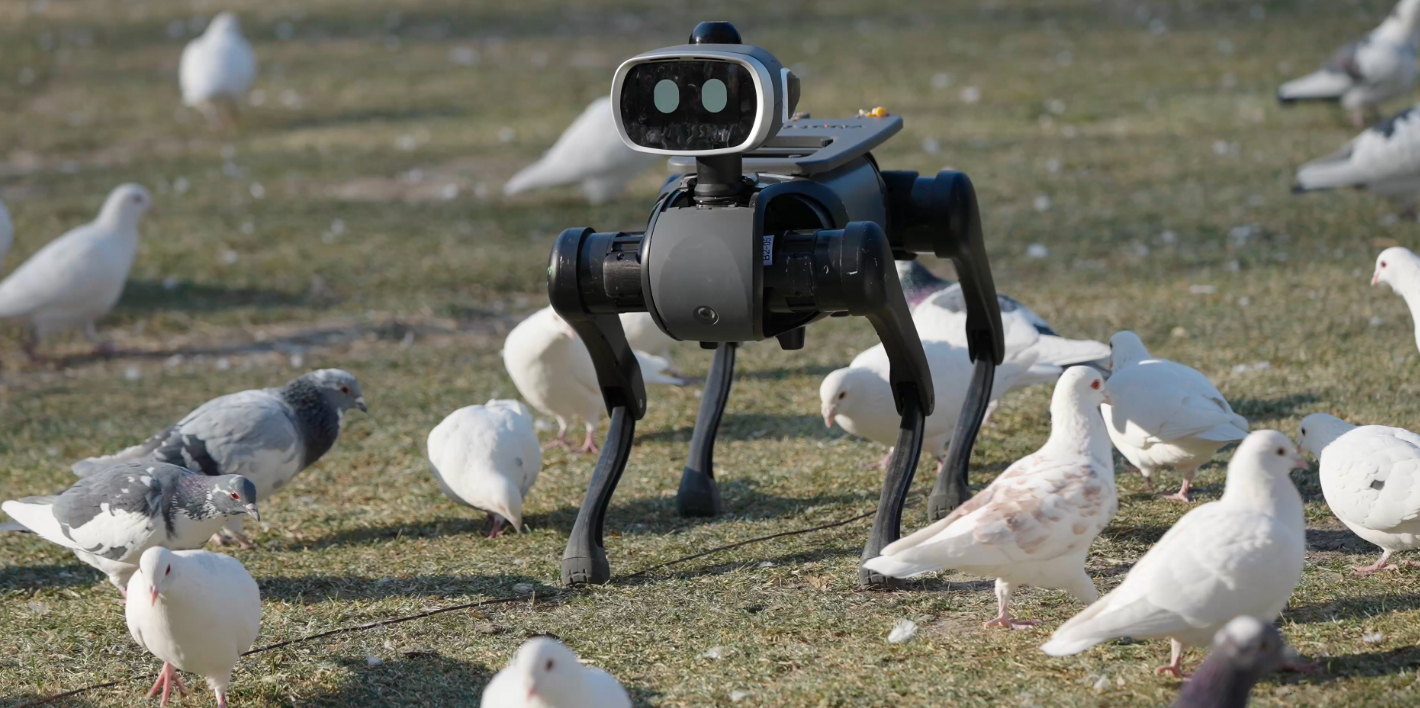
    After a few days of use, I found that not only do humans like Big Head—it also attracts some small animals, mainly dogs, which become very curious about it. Alpacas and deer tend to keep a bit of distance. Whether pigeons come over doesn’t seem to have much to do with Big Head; as long as there’s food, they’ll fly in. When Big Head is still, everything feels peaceful and calm; once it starts moving, the pigeons take off.

    I think its “human-friendly” and “animal-friendly” qualities come partly from its design, and partly from the fact that it runs very quietly—there’s almost no audible noise.

    As a home robot dog, Big Head supports silent foot pads and is suitable for indoor use. But if it could only be used indoors or only on flat terrain, then there wouldn’t be much point in it being a quadruped robot at all. So next, let’s talk about its mobility performance.

    Mobility Performance and Navigation

    As you can see, this is a wild IROS obstacle course site. Any robot dog that can decisively traverse terrain like this is no simple machine. The following is a video segment of “Big Head” moving through complex terrain, showcasing several of its capabilities: first, its motion control does not require mode switching; when encountering relatively high steps, it can adjust its leg-lifting height within just a few frames to ensure passability. This detail is only noticeable in slow motion—at normal speed, you’d hardly catch it, only feeling that it walks well and that its leg adjustments are extremely fast. Everyday steps and curbs are all handled smoothly as well.

    Its cruising speed can reach 14 km/h, with a top speed of 18 km/h. Overall, its mobility performance is excellent. Its disturbance rejection strategy is not overly aggressive: instead of using extremely high step frequency, it keeps its adjustments restrained and stabilizes its posture as much as possible while prioritizing user safety. In this kind of usage scenario, “Big Head” also has to account for the possibility of being messed with at close range by “rowdy kids (me).” From a safety standpoint, this design choice is very reasonable.

    Next, let’s take a look at the overall hardware configuration of “Big Head.”

    First, battery life—something I care a lot about, because carrying a dead robot home is both awkward and troublesome. “Big Head” offers 3 to 6 hours of runtime with a 594 Wh battery. The battery is not swappable, but that isn’t really a problem: the large capacity means you can head out without worrying about changing batteries, and there’s essentially no range anxiety. For charging, it supports both a Type-C port and a wireless “dock-and-charge” station, with a maximum charging power of up to 240 W, taking about 2.5 hours for a full charge.

    In terms of perception, “Big Head” is equipped with a 16-beam LiDAR and a stereo depth camera system, supporting 1080p video transmission. It uses the DiGuA Robotics S100P chip, providing up to 128 TOPS of AI computing power. Many of the features I’ll talk about next are closely tied to these perception capabilities and hardware specs.

    Lead, follow, navigate, tow—some of these functions are fun, some are special, and some are almost unheard of, yet they are all simple to use. The four-microphone array can detect the direction of sound and provide head-movement feedback—“Big Head” really is listening to me.

    I give the command: “Big Head, Big Head, start leading.”

    The leading function is a lot like walking a dog: “Big Head” walks in front, autonomously perceiving obstacles, finding its way, and planning routes. When it reaches an intersection, it chooses a path on its own; if I want to take a different one, I just tug the leash slightly from the side to guide it, and it will switch to the route I choose.

    These visuals show the world as “Big Head” sees it: perception results, route planning, depth information, its understanding of the road, and a top-down view. You might already recognize shades of autonomous driving here. “Big Head” knows where the road is and where it can go—but it doesn’t yet know when to stop. If I want it to halt, for example to tie my shoes or greet someone, I just pull the leash from behind.

    To resume leading, I don’t even need to give another voice command—just give “Big Head” a gentle nudge on the backside. The overall interaction feels very natural, a real-world version of “cyber dog-walking.”

    It’s worth noting that the leading function does not require positioning systems or high-precision point clouds. It relies solely on its onboard LiDAR and vision to perceive the environment. This means “Big Head” can explore and unlock new maps with me even in unfamiliar places.

    Now let’s look at following. I think this may currently be the most fully realized follow mode in the robotics industry, truly turning “Big Head” into a “little sidekick.” This uses an included accessory: a UWB beacon.

    I give the command: “Big Head, Big Head, follow me.”

    With obstacle avoidance enabled, “Big Head” locks onto the beacon, tracks its target precisely, and doesn’t drift or lose the subject the way vision-only solutions sometimes do. But even that alone would only count as “pretty good.”

    Vbot also offers an expansion board accessory, which can be mounted on “Big Head’s” back with hand-tightened screws. A basket can be installed on top for carrying items. “Big Head” supports a payload of 10 kg, with a maximum of 12 kg. The structure is solid and also supports quick release, making it easy to carry things or remove the module—already impressive.

    The expansion board also includes a standard 1/4-inch screw mount commonly used in the imaging industry, allowing you to attach action cameras, 360-degree cameras, camera gimbals, or even smartphone gimbals for follow-shot filming. I personally love this feature.

    There’s another great design detail: the UWB beacon has a built-in microphone. You can press its button and speak directly to “Big Head,” avoiding wind noise or other ambient sounds interfering with command recognition.

    Navigation is a feature I’ve rarely experienced on consumer robot dogs—it’s more common in industrial-grade products, mainly for scheduled inspection tasks. With “Big Head,” you first map the navigation area; usually walking it twice is enough. After mapping, you can tap a location on the map in the mobile app to name it, then give the command: “Big Head, Big Head, take me to the restaurant.”

    Each navigation run may involve different people and changing street scenes, yet “Big Head” still performs very well, showing a certain level of generalization ability. Night navigation is no problem either. And it doesn’t get boring along the way—every so often, “Big Head” draws attention to itself and reports the navigation progress. For me, the most convenient part is that there’s no need to set the robot’s position or orientation on the map beforehand; you can start navigating right away. It’s very user-friendly for ordinary users.

    Towing mode is for situations where you need to move faster or when the environment and obstacles are more complex: you simply pull “Big Head” along. I also made a point of confirming that its head structure has been reinforced, so using it as a leash attachment is reliable. The two degrees of freedom in the head (rotation and pitch) showed no issues at all during several days of use.

    After seeing all these features, I think you can understand why “Big Head” doesn’t need a remote control. Still, a remote option exists as a safety backup, tucked away in the secondary menu of the mobile app. It supports one-handed operation and offers plenty of movements to try, so I won’t go into detail here.

    But remote control doesn’t stop at remote control—there’s also a particularly interesting mode: the Avatar proxy. I can join this world in the form of “Big Head,” remotely control the robot itself, and experience extremely low network latency. With a new perspective and a different identity, I can run outdoors, greet passersby, and approach small animals. You have to realize: a person in their twenties or thirties chasing pigeons on a lawn looks pretty strange to others—that’s the kind of self-restraint adults impose on themselves.

    Remotely controlling a robot dog, however, is different. If I want, I can lie on the couch and chase pigeons until “Big Head” is almost out of battery. I can greet puppies and, within safe limits, interact with children. In truth, every adult was once a child—only a few still remember it. At this moment, I am one of those few.

    While playing, I once asked, “Can we turn on ‘Big Head’s’ microphone for live voice chat?” The answer I got was: “Absolutely not!” On second thought, that makes perfect sense. If you came across such an adorable robot dog and it suddenly spoke in the deep voice of a grown man, the sense of mismatch would be overwhelming—like when Disney’s LinaBell character head falls off and the staff inside greets you in a thick Beijing accent. The fairy tale would shatter in the most terrifying way.

    Of course, you can now type what you want to say (or use speech-to-text) and have “Big Head” speak it in its own voice. You really should try this—it gets some hilarious reactions.

    I believe many people can find a kind of pure, genuine, age-independent joy in “Big Head,” or in things that seem childish on the surface. I haven’t felt this way in a long time.

    There’s also a feature called “Dance to the Beat”: “Big Head” can recognize audio waveforms picked up by its microphone and generate movements according to the rhythm of the music, focusing on hitting the beat. In the past, whether robot dogs danced on beat largely depended on how accurately you pressed the play button for the music. Now, letting “Big Head” listen and generate beat-matched movements on its own solves that problem.

    A Sense of Life

    If the features mentioned earlier already show “Big Head’s” playfulness and technical autonomy, then what comes next is what fascinates me the most about it: its sense of life.

    Where does this sense of life come from? I see unpredictable autonomous decision-making, and movements that align with biological intuition.

    Here is an example of “Big Head’s” chain of thought. The command was: “Let Big Head look for something it finds interesting.” No one knows what it will choose, so every time I’m eager to see what kind of response it gives.

    The most surprising instance was when “Big Head” noticed an advertisement display. It wanted to get a closer look: first walking over, then lifting its head to look up. That head-raising motion matched biological instinct perfectly, but I had no expectation of it at all—seeing it for the first time was genuinely stunning. “Big Head” knows what it is interested in, knows that tall things need to be looked at by raising its head, and can even recognize that the image in the ad is a robot dog, judging it to be one of its “own kind.”

    Another time, many people stood in front of “Big Head” and asked it to find someone it found interesting. No one knew who it would pick, but being chosen by a robot dog is truly a delightful experience. “Big Head” would actively walk up and interact with the person it was interested in.

    Its spatial-agent capabilities allow “Big Head” to complete complex, multi-step tasks in the real world, such as going to find someone to get a bottle of water and then bringing it back. You might think that’s not particularly hard—but this is only the beginning.

    In past reviews, we were used to using a product to gaze into the future. This time, I hope you can look at the present instead: using today’s existing technologies, Vbot has already delivered a large number of innovative experiences for everyday users, listening to user needs and polishing the details thoroughly. Many things that usually require DIY modifications already have official solutions among the original accessories. For me, “Big Head” has almost no barrier to entry.

    Even though I understand what hardware and technologies are behind these features, I still find myself immersed in the “magic” they create. Sometimes “Big Head” leads the way ahead of me; sometimes I have a little sidekick at my side. A huge number of its movements and expressions are designed by animators, to the point that it can even give you the illusion of a cartoon character—and you never once need to think about “where the remote control is.”

    Epilogue

    The past few days with “Big Head” have felt more like the future—yet they’re happening right now.

    This robot dog is already far beyond the level of a mere “early taste” product. I genuinely want to have “Big Head” with me for the New Year, and I’d be happy to keep it by my side for a long time to come.

    Alright, thank you for reading all the way to the end. I hope you enjoyed this episode, and that you liked seeing all the different sides of “Big Head” in the review. Thanks to Vbot for creating such an amazing product—this was a truly satisfying review to make. Thanks as well to the Vlight Club at Beijing Forestry University for their support, which made it possible for us to complete this episode smoothly. There’s more robot review content currently in production, so stay tuned. See you in the next video.

  • SSPAI Morning Brief: Apple Adjusts App Store and iOS Rules in Japan, and More

    SSPAI Morning Brief: Apple Adjusts App Store and iOS Rules in Japan, and More

    Morning Brief

    1. Apple adjusts App Store and iOS rules in Japan
    2. Jizhi Dynamics launches the multi-form embodied robot TRON 2
    3. China Media Group unveils the mascot for the 2026 Spring Festival Gala
    4. Hainan Free Trade Port completes island-wide customs closure
    5. Volcengine officially releases the Doubao Large Model 1.8
    6. OpenAI announces developers can submit apps to ChatGPT
    7. Rumors You Can Just Glance At

    Apple adjusts App Store and iOS rules in Japan

    On December 18, Apple announced a series of adjustments to the App Store and the iOS system in Japan to comply with the regulatory requirements of the Mobile Software Competition Act (MSCA). Under the new rules, developers are allowed to offer third-party payment methods within their apps, direct users to websites to complete purchases, or distribute apps through alternative app marketplaces, alongside the introduction of a new fee structure. The overall framework is similar to the EU’s DMA, but differs in areas such as the parallel presentation of payment options, app distribution channels, and interoperability requirements.

    In addition, the MSCA is driving several system-level changes, including allowing users to choose default browsers, search engines, and navigation apps during setup, as well as opening the side button to eligible third-party voice assistants. In terms of protections for minors, Apple has introduced stricter restrictions on payments and external links for children’s apps and underage users. These changes began rolling out with the iOS 26.2 update and apply only to iOS apps distributed in Japan. Source


    Jizhi Dynamics launches the multi-form embodied robot TRON 2

    On December 18, LimX Dynamics announced the launch of its multi-form embodied robot TRON 2 and opened pre-orders, with a starting price of RMB 49,800. The product features a modular design that allows a single core body to rapidly switch between multiple configurations—such as dual-arm, bipedal, and wheeled-leg forms—covering use cases ranging from fine manipulation to mobility across complex terrain.

    In terms of system capabilities, TRON 2 is equipped with high-degree-of-freedom embodied dual arms and all-terrain locomotion, and supports the integration of multimodal perception components. The product offers open APIs and standardized hardware interfaces, enabling compatibility with mainstream Vision-Language-Action (VLA) models, and is accompanied by secondary development tools and a data platform, targeting applications in research, industry, and embodied intelligence–related fields. Source


    China Media Group unveils the mascot for the 2026 Spring Festival Gala

    China Media Group has revealed the mascots for the 2026 Spring Festival Gala: four fine horses named “Qiqi,” “Jiji,” “Chichi,” and “Chengcheng,” which made their debut together. According to the announcement, the mascot designs draw inspiration from iconic depictions of horses across different periods of Chinese history, incorporating traditional motifs such as flowing cloud patterns and mountain-cloud patterns, symbolizing auspicious wishes for success and a bright future. Source


    Hainan Free Trade Port completes island-wide customs closure

    According to the official Hainan Free Trade Port WeChat account, starting December 18, 2025, the Hainan Free Trade Port will officially implement an island-wide customs closure. After the closure takes effect, the relationship between Hainan and areas outside the island will be defined as the “first line,” with “outside the island” including not only foreign countries and regions, but also Hong Kong, Macao, and Taiwan.

    The account also released two catalogues. The first is a prohibited and restricted list, covering goods and items that are banned or restricted from import and export; goods and items not on the list may move freely. The second is the catalogue of taxable imported goods (also known as the “zero-tariff negative list”): goods not included in this catalogue may enter the free trade port exempt from import duties. After the customs closure, the policies of “zero tariffs, low tax rates, and a simplified tax system” will gradually be extended to a broader scope.

    For businesses, the Hainan Free Trade Port means a wider range of policy benefits with lower thresholds; for individuals, it means that purchasing various products in Hainan will become more affordable. Source


    Volcengine officially releases the Doubao Large Model 1.8

    At the Volcano Engine Force Core Power Conference held on December 18, ByteDance officially released Doubao Large Model 1.8. The model has been specifically optimized for multimodal agent scenarios, with enhanced capabilities in tool invocation, complex instruction understanding, and OS agent–related functions, significantly improving its planning and execution performance when handling complex tasks.

    Volcano Engine stated that in multiple public benchmarks, Doubao 1.8 achieved best-in-class or near-best results in tasks such as visual reasoning, general visual question answering, spatial understanding, and video understanding; it ranks among the global leaders on the general agent benchmark BrowseComp; and in foundational language model capabilities such as mathematics and reasoning, its overall performance is also close to that of the world’s top general-purpose models. Doubao 1.8 is now available on Volcano Engine and has opened its API to enterprises and developers. Source


    OpenAI announces developers can submit apps to ChatGPT

    On December 17, OpenAI announced that the previously launched ChatGPT app feature is now open for developer submissions. Developers can apply for listing in accordance with the app submission guidelines in order to publish their apps on the ChatGPT platform. OpenAI stated that it has provided a range of resources to help developers build higher-quality applications.

    At the same time, an app directory has gone live within ChatGPT. Users can browse recommended apps or search through all published apps in the directory. The directory can be accessed via the Tools menu, or directly by visiting chatgpt.com/apps. Developers can also use deep links on other platforms to take users directly to their app’s dedicated page within the directory.

    In the current early stage, developers can set up outbound links within their ChatGPT apps to guide users to their own websites or native apps to complete transactions for physical goods. In the future, OpenAI will explore additional monetization options, including digital goods, and will provide further details based on real-world usage and interactions between developers and users. Source

    In addition, ChatGPT has also been integrated into the Apple Music app, allowing users to search for songs and generate playlists directly within Apple Music. Source


    Rumors You Can Just Glance At

    • In the latest Android 2512 Canary build, the system has added a new “Satellite” Quick Settings tile along with a “Satellite Connectivity” settings page, which displays availability status and lists apps that support satellite networks. The tile will show as enabled, available, or unavailable depending on whether the user’s carrier plan supports NTN (Non-Terrestrial Network) roaming. Code indicates that the system will present different lists of satellite-enabled apps based on whether the device and plan support LTE-NTN or narrowband NB-NTN. In addition to the already announced Google Maps, Messages, and WhatsApp, apps such as AccuWeather, Google Weather, Snapchat, and X also appear on the candidate list. This suggests that satellite communication capabilities within the Android ecosystem may continue to expand, though these features are still in testing and development. Source
    • According to Bloomberg, TikTok CEO Shou Zi Chew revealed in an internal memo that TikTok and ByteDance have signed binding agreements with Oracle, Silver Lake, and MGX to establish a U.S. joint venture primarily owned by American investors, advancing TikTok’s long-delayed divestment plan. The transaction is expected to be completed on January 22, 2026, pending multiple preparatory steps and regulatory approvals. Source