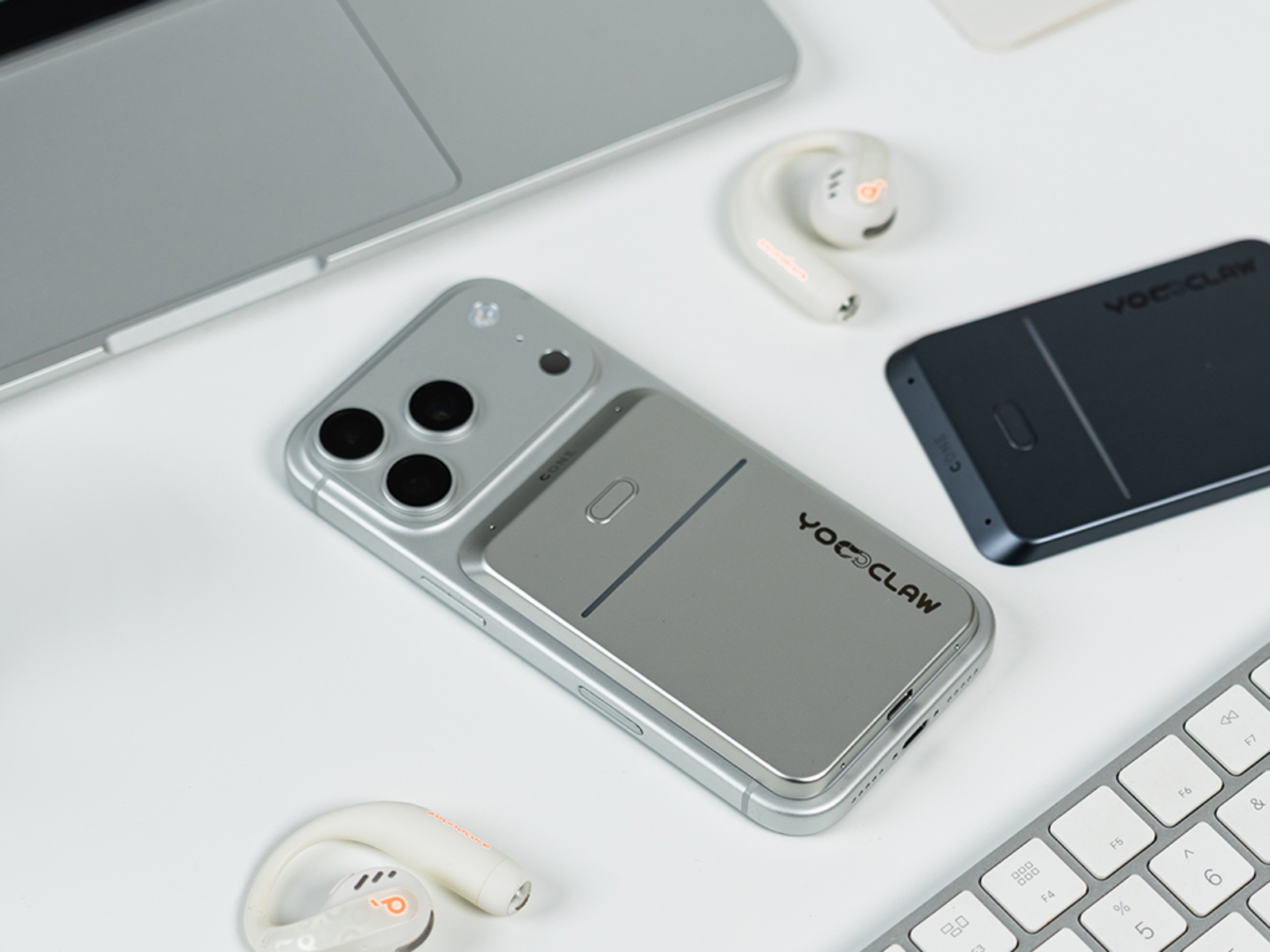
When I first received the YoooClaw C·ONE, my initial impression before even opening the box was: this thing is tiny. The packaging was several times smaller than I had imagined. After opening it, I found that the C·ONE is a credit-card-sized ultra-thin matte purple card with no screen—just a slim LED light bar and a single button.
For an AI device this minimalist—without even a screen, to be honest, I felt a little disappointed when I first unboxed it. It simply didn’t seem refined enough or geeky enough.

However, after using it for a month, it has become the third electronic device I never leave home without, right behind my phone and earbuds. It even made me consider switching my primary phone from Android to iPhone. At this stage, its role is very clear: it is not a standalone smart device, but rather a “portable AI gateway” to the OpenClaw ecosystem—a device that fills the gaps within the broader AI ecosystem.
What Exactly Is It?
Before talking about the product itself, we need to clarify one thing first: why do we need a dedicated piece of hardware?
The YoooClaw C·ONE is a multifunctional AI hardware gateway built around the OpenClaw ecosystem. More specifically, when connected to your phone via Bluetooth, it serves as a 24/7 online AI agent assistant, gateway, and information collector (voice, notifications, and other information), allowing you to access the capabilities and convenience of AI anytime and anywhere.
Over the past month, my core usage scenarios have roughly fallen into four categories: capturing information on the go, collecting and organizing information from my phone, designing scenario-based functions, and gaining visibility into the OpenClaw backend.
Extreme Battery Life and the App as the Missing Piece: The Philosophy of Subtraction and Addition
Making a product simpler is easy. Building a complete and enjoyable experience on top of that simplicity is not.
I’ve been using the YoooClaw C·ONE for a month and have only charged it twice in total. The last charge was more than ten days ago, and it still has 55% battery remaining. In the age of smart devices, I have never seen anything this power-efficient. Once you are no longer burdened by battery anxiety, the card truly blends into your EDC (Everyday Carry), becoming part of the background of your daily life. Like your glasses or your car keys, you know it’s there—and it’s always ready when you need it.
While the hardware embraces subtraction, the YoooClaw app adds the missing pieces that make the experience work. I’ll focus on the app’s features in the sections below.


An Information Catcher Anywhere, Anytime: More Than Just a Voice Recorder
The C·ONE has only a single button, and in my opinion its most useful shortcut is the ability to start recording automatically with a double press. Whenever you need to record something, simply press the button twice and it will record the entire session while automatically transcribing it. Beyond generating a full transcript, C·ONE also produces detailed summaries and extracts key information such as names, dates, times, and numbers.
For a long recording, C·ONE’s transcription will almost certainly be more comprehensive than notes organized manually—because it never misses those few sentences you failed to catch when your attention drifted.
And its use cases extend far beyond meeting rooms and interviews. In everyday life, when I’m watching videos or listening to podcasts and come across something valuable, I would previously pause to take notes, grab screenshots, or manually write things down. All of that is actually quite cumbersome. With the C·ONE, I simply double-press the button to start real-time recording and double-press again when I’m done. The recording is then stored and processed in the background. When you come back to review it later, you’ll find that it doesn’t just convert speech into text—it organizes the content into a structured analytical report. This goes well beyond simple transcription.
Here’s a real example. Recently, I watched a Bilibili video about “how one-person AI companies generate revenue.” After the recording was processed, what I received wasn’t just a block of transcribed dialogue. Instead, the content was organized into multiple sections such as “Industry Background and Trend Insights,” “Representative Success Stories and Key Data,” and “Step-by-Step Practical Workflow.” This kind of structured output is far more efficient and complete than stopping to type notes myself.
That said, there is still a small issue visible in the example. “Vibe Coding” was recognized as “Web Coding.” In my view, this is an unavoidable challenge for current speech recognition systems when dealing with English terms. I occasionally run into the same problem when using voice input in WeChat Input as well.


Scenario Features and a Window Into the OpenClaw Backend: An All-Around AI Assistant
The real power of agents lies in their high degree of customization. But that is also where the barrier comes from—not everyone has the patience to learn prompt engineering and workflow configuration from scratch. And after using an agent for a while, you often have no idea whether it has created a bunch of unnecessary scheduled tasks, or whether it is even making use of the skills you carefully configured for it.
The YoooClaw app does an excellent job of lowering that barrier through two key design approaches.
The first is its Scenario feature. Think of it as a beginner-friendly ecosystem of ready-made workflows. If you’re new to AI agents, you don’t need to understand system prompts at all. You can simply subscribe to scenarios such as “Idea Capture,” “Notification Briefing,” or “Morning News Digest” with a single tap from the marketplace.
Back when I was configuring OpenClaw skills myself, setting up something similar to “Idea Capture” could easily take several hours. I had to connect content sources, configure filtering rules, and set up scheduled deliveries. Now, I can simply search for something like “AI Industry News Briefing” in the scenario marketplace, enter a few keywords using an official template, and make a few basic adjustments. The system will then automatically push me a summary of the previous day’s industry developments every morning at 8 a.m., along with unread-message summaries from the AI-related group chats I follow. I can review everything while brushing my teeth in the morning and get up to speed on the most important information from the previous day in just five minutes, without having to search for it myself.
The only concern here is privacy. To unlock some of these capabilities, you need to grant access to your phone’s notifications and messages. Whether sensitive or private data could potentially be exposed is something I can’t personally verify. Of course, you can choose not to grant those permissions and simply use the scenario features that gather information from external sources instead.


The second is the visualization of skills, scheduled tasks, models, and usage statistics. For advanced users, these features are incredibly practical. In the past, when using OpenClaw, it often felt like a black box. You rarely knew which model was being called, how many tokens had been consumed, or which skill had been triggered. Some less capable models can’t even accurately identify themselves when asked—they simply read from files and claim to be whatever model name they find there. In the YoooClaw app, however, the operational logic behind OpenClaw is laid out clearly. You can see exactly which model is currently in use and how many tokens have been consumed today. Conversations show which tools were called and which skills were triggered. This level of transparency gives users a tremendous sense of control. If I hadn’t started using YoooClaw, I would never have discovered that my OpenClaw instance had accumulated more than 100 scheduled tasks. I had been wondering why my token plan was being consumed faster and faster. The moment I saw that enormous list of scheduled jobs, I immediately cleared them out. From now on, YoooClaw gives me a much more reliable way to manage those tasks and keep everything under control.


An Imperfect Cut: The Compromises and Trade-Offs
To be honest, during the first few days after receiving the C·ONE, I didn’t use it very often. I simply couldn’t remember to use it. Whenever I needed help with something, my instinct was still to pull out my phone and open WeChat, Feishu, or OpenClaw. After about a week, however, I gradually formed a habit: the C·ONE stayed magnetically attached to my phone at all times, ready whenever I needed it. I started using the recording function on the go, checking the Idea Capture feature daily for inspiration, and reviewing scheduled tasks on a regular basis.
No product is perfect. As a first-generation device with virtually no direct competitors to reference, the C·ONE has had to pioneer its own category from scratch. In my opinion, it already delivers an experience worth around 80 out of 100. The remaining 20 points will likely come with time and iteration.
That said, a month of use has also revealed several design issues and functional limitations.
The first is Android compatibility. My current primary phone is actually an OPPO Find X9 Ultra. After the Android version of the app became available about half a month ago, I tried pairing the C·ONE with it. Since most Android phones tend to have larger camera modules and MagSafe-compatible magnetic positions are generally lower on the back, attaching the C·ONE to a magnetic case causes the bottom half of the card to protrude roughly 5mm beyond the edge of the phone, sticking out like a stubborn little tail. Fortunately, the magnetic connection itself is strong enough that it doesn’t usually cause problems. On my two iPhones, however, the magnetic attachment feels nearly perfect. In fact, the color of the review unit I received happens to match one of my purple iPhones almost exactly.
The second issue is the placement of the physical button and the risk of accidental activation. The button is located on the front of the card, likely for ease of access and visual symmetry. However, this also creates an awkward scenario: when I place my phone face-up on a desk, pressing against the back of the card can occasionally trigger recording unintentionally. I only discovered this after opening the app and finding a collection of strange conversations and recordings that I definitely didn’t intend to create. Whether through hardware revisions or firmware updates, I hope the team finds a way to address this issue. Over time, repeated accidental activations could waste battery life and consume storage space.
The third issue is occasional plugin errors. During use, I sometimes encountered messages such as “plugin error” in the conversation window. This happened roughly three times, all during conversations with my local OpenClaw instance. I never encountered the issue when using the official Cloud Claw service, so it may be related to the stability of third-party plugins on the OpenClaw side. Retrying usually resolves the problem, and it isn’t frequent enough to be a major concern, but it can occasionally interrupt the experience.
The fourth limitation is the lack of support for agents outside of OpenClaw and YoooClaw’s official Cloud Claw service. The agent ecosystem is growing rapidly, and some platforms may soon surpass OpenClaw in user numbers. Personally, I now spend more time using Hermes. In fact, on the very first night after receiving the C·ONE, I spent hours experimenting with different ways to connect Hermes to it. The only thing I managed to achieve was getting Hermes to control the C·ONE’s lighting effects. That little side project ended up being one of the most entertaining surprises of the past month. Fortunately, the company has already stated that Hermes support is coming soon, which I’m genuinely looking forward to.
The final limitation is the inability to send images or files. This is probably the one feature that prevents YoooClaw from completely replacing tools like Feishu or WeChat in my daily workflow. Whenever I want OpenClaw to perform a task based on an image or document, I still have to switch back to another app to handle it. That said, this feels like a relatively straightforward issue to solve through future app or firmware updates, so I’m not particularly worried about it in the long run.
Who Is It For Right Now?
Starting at RMB 599, is it worth it? Personally, the price is actually lower than I expected. At RMB 599, I think the value proposition is quite strong. These days, it feels like any product with even a hint of AI attached to it rarely costs less than RMB 1,000.
For you, however, the answer depends entirely on how you define your relationship with AI.
- Beginners who want an affordable way to get started with AI: simply spend RMB 799 on the official YoooClaw Cloud Edition. Using the official cloud-based Claw is far easier and more cost-effective than deploying your own OpenClaw instance and carrying it around everywhere. The official cloud service is essentially plug-and-play, whereas OpenClaw still comes with a learning curve for newcomers.
- Professionals who frequently need recording, transcription, and related workflow features: the C·ONE can become one of your most valuable assistants.
- Existing OpenClaw users: if you are already using OpenClaw, the C·ONE feels like a natural hardware extension of the ecosystem. At this stage, I haven’t found a better alternative.
Conclusion: The Best AI Products Are the Ones That Fade Into Everyday Life
The YoooClaw C·ONE has its flaws and compromises, but when it comes to the question that matters most to me—how to make AI blend seamlessly into everyday life—it delivers an answer that I’m genuinely satisfied with.
Looking back on the past month, the biggest change the YoooClaw C·ONE brought me was its ability to reveal workflows I had not yet built and potential issues within my OpenClaw setup before they became problems. It helped me make better use of the capabilities and conveniences that AI can provide. From that perspective alone, the RMB 599 price tag represents excellent value, and it has left me genuinely excited about the future evolution of YoooClaw’s products.
That RMB 599 doesn’t just buy a piece of hardware. It buys a ticket that pulls AI out of the confines of a computer or phone screen and slips it into the small gaps of everyday life. Whether or not you need that ticket—that’s a question only you can answer.